
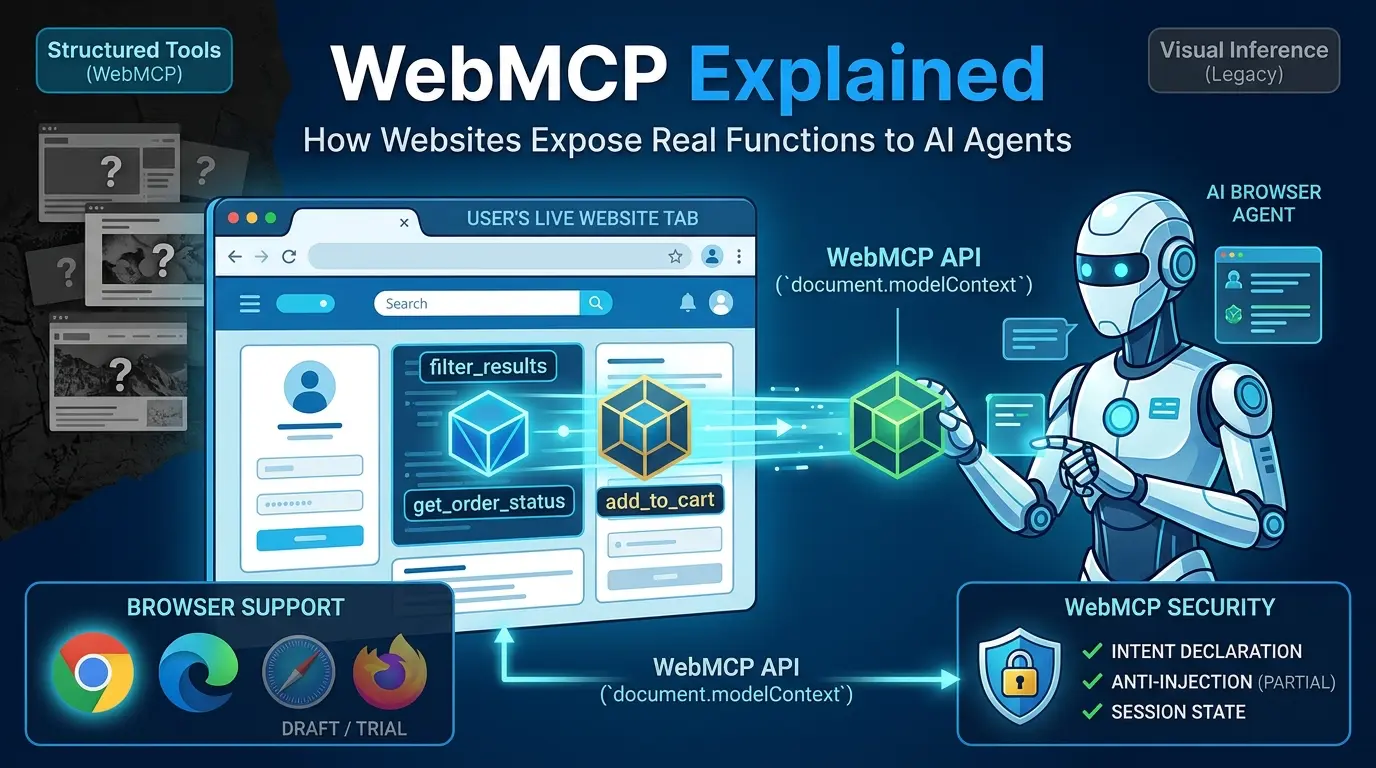

Ask a browser agent to find a hotel room with a separate bedroom and living area. A traditional visual agent may inspect a screenshot, guess which filter to open, click through a menu, wait for the page to update, inspect it again, and repeat the process. The task is not impossible. It is simply being solved through the wrong interface: the agent is inferring application behavior from pixels, markup, and changing layout.
WebMCP is a proposed browser API that gives an agent a more explicit interface. A website can expose selected JavaScript functions or annotated HTML forms as structured tools with names, descriptions, and input schemas. The agent can then discover a capability such as filter_results, get_order_status, or add_to_cart instead of guessing which visual element represents that capability.
That does not make WebMCP a finished standard, a replacement for your API, or a universal fix for prompt injection. The current WebMCP specification is a Draft Community Group Report, not a W3C Standard or a document on the W3C Standards Track. The current specification and Chrome documentation also use document.modelContext; older material may still mention navigator.modelContext, so version boundaries matter.
This guide explains what WebMCP actually does, where it fits beside MCP and direct APIs, how the current JavaScript and HTML approaches work, what the browser can and cannot protect, and how to decide whether your site should experiment with it.
Key Takeaways
Click any topic to expand or collapseWebMCP is not MCP in a browser.
It borrows the idea of structured tools, but it is a separate browser API with different discovery, execution, lifecycle, and security boundaries.
The current API surface is document.modelContext.
If you find examples using navigator.modelContext, check their date and source before using them.
There are two implementation paths:
An imperative JavaScript API for application logic and a declarative API for annotated HTML forms.
WebMCP is tab-bound and contextual.
Tools exist while the relevant document is open and available to the agent; a persistent MCP server is a better fit for always-on backend work.
The strongest case for WebMCP is not “APIs are bad.”
It is that a live page has session context, UI state, permissions, and multi-step behavior that a public API may not expose cleanly.
WebMCP reduces UI guesswork but does not eliminate prompt injection.
Tool output, user-generated content, external data, schemas, and cross-origin exposure still require a threat model.
Do not claim a speed or cost percentage without a matched test.
The calculator in this article is an assumption-based planning aid, not a benchmark.
What is WebMCP?
WebMCP is a proposed web platform API that lets a web application expose functionality as callable tools for browser-based AI agents, browser extensions, embedded agents, and potentially assistive technologies. A tool normally has a name, a natural-language description, a structured input schema, optional safety annotations, and an execution function.
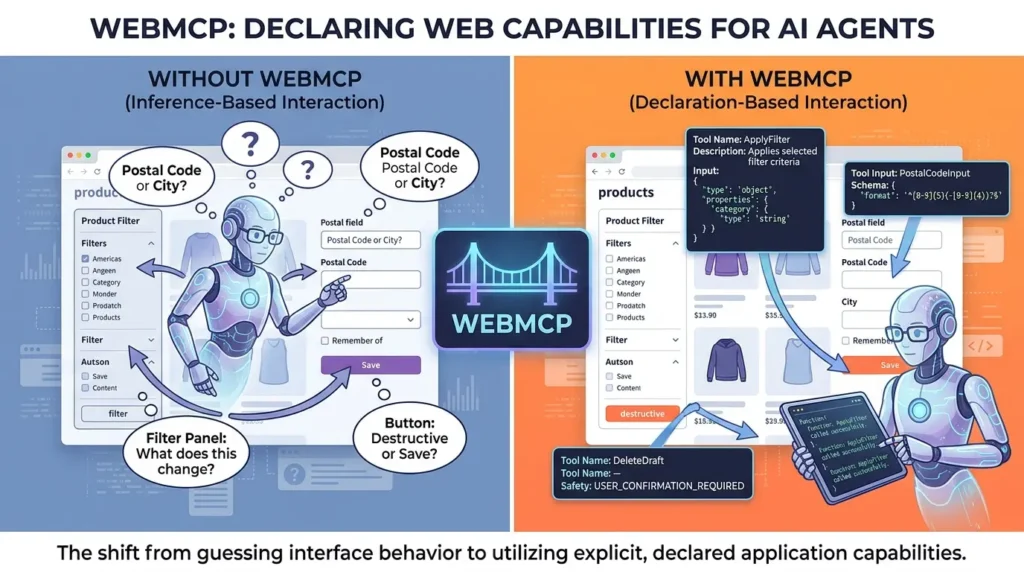
The current WebMCP Draft Community Group Report describes the model as client-side functionality exposed from a page rather than a remote MCP server. The official WebMCP repository describes the goal more concretely: let developers expose JavaScript functions or HTML form elements as tools so agents can operate web applications that were originally designed for human interaction.
The practical change is from inference about interface behavior to declaration of selected application capabilities.
Without a declared tool, an agent may need to infer that:
- a filter panel changes the product query;
- a hidden menu contains playback settings;
- a form field expects a postal code rather than a city;
- a button submits a destructive action rather than saving a draft.
With WebMCP, the site can expose a task-level operation and describe its inputs directly. That does not guarantee that the agent will choose correctly, that the server-side authorization will accept the request, or that the result is safe. It gives the agent a more stable and explicit surface to reason about.
What WebMCP is not
WebMCP is not:
- a finished W3C Recommendation;
- a replacement for REST, GraphQL, OpenAPI, or MCP servers;
- a promise that every browser or agent client can use your tools today;
- a security boundary that makes prompt injection impossible;
- a guarantee that a tool call is faster than a well-designed API or automation workflow;
- a way to run business logic without enforcing authorization at the backend or final resource.
The same distinction applies to MCP itself: exposing a structured tool does not decide whether a principal may invoke it, what arguments are allowed, or whether the downstream resource should execute the request. For the broader server, OAuth, and tool-permission model, see our MCP security and enterprise hardening guide.
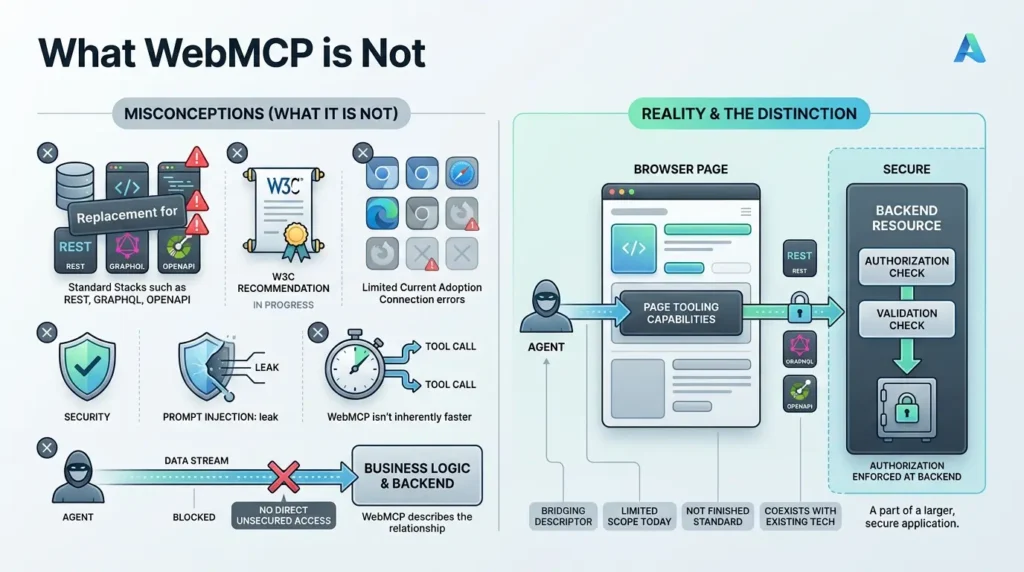
The distinction matters because a tool exposed in the browser is still part of a larger application. The page may call a backend API, read the current session, update the UI, and return a result. WebMCP describes how an agent reaches the page’s capability; it does not replace your application’s authorization and validation model.
WebMCP vs. MCP vs. a direct API
The most useful decision is not “Which standard wins?” It is “Where does the action need to run, and what context does it require?”
The official Chrome comparison of WebMCP and MCP treats them as complementary. MCP is suited to persistent, platform-independent access to backend data and actions. WebMCP is suited to interaction with a live website in the user’s browser.
| Option | Where it runs | Best fit | Main limitation |
|---|---|---|---|
| Direct API | Backend, mobile app, frontend, or service | Stable, documented machine-to-machine operations | May not represent live UI state, session-specific flows, or internal page behavior |
| MCP server | Local or remote server connected to an AI client | Persistent tools, data sources, workflows, and background-capable integrations | Requires a separate integration and may bypass the website’s live UI and session context |
| WebMCP | The live page/document in a browser | Agent interaction with current page state, browser session, forms, and client-side logic | Experimental, client-dependent, ephemeral, and subject to browser/security constraints |
| Browser automation | A browser controlled through clicks, DOM queries, accessibility data, or screenshots | Legacy sites and flows with no structured agent interface | More dependent on layout, labels, timing, and interpretation |
A simple decision rule
Use a direct API or MCP server when the work must run without an open page, needs predictable backend access, or is already represented by a complete and well-governed machine interface.
Consider WebMCP when the agent needs the user’s live browser context, the current page’s state, a UI workflow that is not cleanly exposed through the public API, or a human-visible interaction that should remain inside your website.
Keep browser automation as a fallback for sites that cannot yet expose structured tools. WebMCP is not a reason to remove accessibility semantics, keyboard support, validation, or a usable human interface. The agent-friendly layer should be a progressive enhancement, not a replacement for the website.
How the current WebMCP model works
A typical WebMCP interaction has five stages:
- Registration: the page registers one or more tools with
document.modelContextor exposes an annotated form. - Discovery: an agent or browser client asks the page for available tools and their schemas.
- Selection: the agent chooses a tool and creates arguments that match the declared schema.
- Execution: the browser invokes the page’s execution logic, which may update UI state or call your backend.
- Result: the page returns structured output or an error that the agent can use to continue, ask the user, or stop.
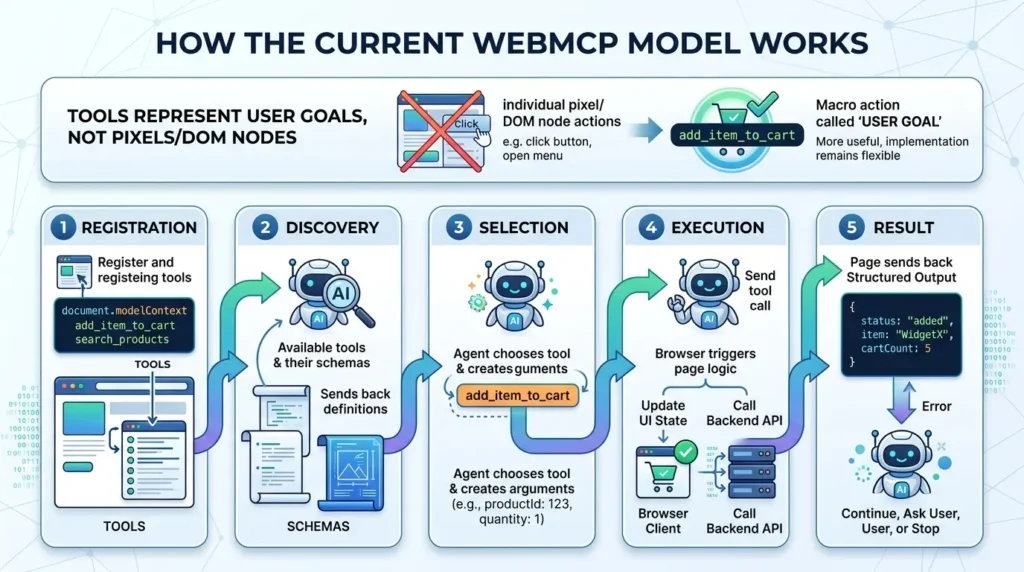
Tools should represent user goals, not individual pixels or every DOM node. A tool called add_item_to_cart is usually more useful than separate tools for “click product card,” “open quantity menu,” and “press plus button.” The former describes a meaningful operation and leaves the implementation free to change the visual layout.
The imperative JavaScript API
The imperative API is the flexible option for application logic, state management, navigation, diagnostics, and actions that cannot be represented by a standard HTML form. The current Chrome Imperative API documentation uses document.modelContext.registerTool().
HTML:
<script>
(async () => {
  if (!('modelContext' in document)) {
    return; // Progressive enhancement: ordinary visitors are unaffected.
  }

  await document.modelContext.registerTool({
    name: 'get_order_status',
    description: 'Look up the signed-in user’s order status for a selected order.',
    inputSchema: {
      type: 'object',
      properties: {
        orderId: {
          type: 'string',
          description: 'The order identifier shown in the user’s account.'
        }
      },
      required: ['orderId'],
      additionalProperties: false
    },
    annotations: {
      readOnlyHint: true,
      untrustedContentHint: false,
      consequentialHint: false
    },
    execute: async ({ orderId }, { signal }) => {
      const response = await fetch('/api/orders/status', {
        method: 'POST',
        headers: { 'Content-Type': 'application/json' },
        body: JSON.stringify({ orderId }),
        signal
      });

      if (!response.ok) {
        return {
          ok: false,
          error: {
            code: 'order_lookup_failed',
            message: 'The order status could not be retrieved.'
          }
        };
      }

      const data = await response.json();
      return {
        ok: true,
        orderId: data.orderId,
        status: data.status,
        lastUpdated: data.lastUpdated
      };
    }
  });
})();
</script>
This is an implementation example, not a universal production recipe. Your server must still authenticate the session, authorize access to the specific order, validate the input, apply rate limits, and avoid returning unnecessary personal data.
After your page has registered at least one WebMCP tool, open DevTools, select the Console tab, and run this snippet. It lists tools available to the current document, selects one by name, and invokes it with a JSON string of arguments.
/* 1. List tools available to this document */
const tools = await document.modelContext.getTools();
console.table(tools.map(({ name, title, description, annotations }) => ({
  name,
  title,
  description,
  readOnly: annotations?.readOnlyHint,
  consequential: annotations?.consequentialHint
})));
/* 2. Select a tool by its registered name */
const tool = tools.find(({ name }) => name === 'get_order_status');
if (!tool) {
throw new Error('Tool not found. Check the registered tool name.');
}
/* 3. Execute it with a JSON string of arguments */
const result = await document.modelContext.executeTool(
tool,
JSON.stringify({ orderId: 'ORDER-123' })
);
console.log('WebMCP result:', result);
Replace get_order_status and ORDER-123 with the name and input expected by your own tool. The current Chrome API expects the tool object returned by getTools(), not only the tool name. If execution triggers a navigation, the returned value can be null; test navigation and cancellation separately.
The current Chrome documentation also covers getTools() for discovery, executeTool() for manual execution, cancellation through AbortSignal, and explicit handling of cross-origin tools. Read the current documentation before treating any example as stable production API syntax.
The declarative HTML API
The declarative API turns a standard HTML form into a tool by adding attributes to the <form> and, where useful, to individual fields. The current Chrome documentation uses these attribute names:
toolnametooldescriptiontoolparamdescription- optional
toolautosubmit
HTML:
<form
  action="/products/filter"
  method="get"
  toolname="filter_products"
  tooldescription="Filter the product list by category and maximum price."
>
  <label for="category">Category</label>
  <select
    id="category"
    name="category"
    toolparamdescription="The product category to display."
  >
    <option value="all">All products</option>
    <option value="shoes">Shoes</option>
    <option value="jackets">Jackets</option>
  </select>

  <label for="max-price">Maximum price in USD</label>
  <input
    id="max-price"
    name="max_price"
    type="number"
    min="0"
    inputmode="decimal"
    toolparamdescription="The highest acceptable price in US dollars."
  >

  <button type="submit">Apply filters</button>
</form>
The browser can synthesize a structured schema from the form controls and labels. When an agent invokes the form, the browser brings it into focus and populates it; it does not silently remove the human interface. If you add toolautosubmit, the form can submit and navigate when the agent invokes it. That is a consequential design decision and should be tested with validation failures, unsaved changes, and user cancellation.
For richer form workflows, the declarative API documents agentInvoked, respondWith(), toolactivated, and toolcancel. These let your application distinguish an agent-triggered submission from a normal user submission and return a structured result to the agent when appropriate.
When should I use the declarative API?
Tool design: the part that determines whether the demo survives
Registering a tool is easy. Designing one that an agent can use reliably is harder.
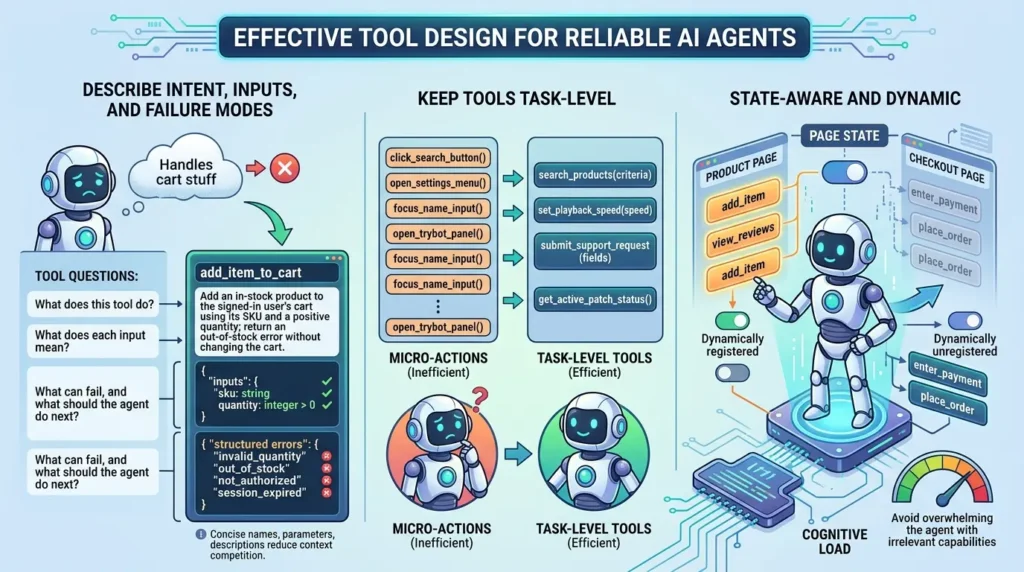
Describe intent, inputs, and failure modes
A tool description should answer three questions:
- What does this tool do?
- What does each input mean?
- What can fail, and what should the agent do next?
“Handles cart stuff” is not enough. “Add an in-stock product to the signed-in user’s cart using its SKU and a positive quantity; return an out-of-stock error without changing the cart” is much more useful because it defines scope, input meaning, and a failure boundary.
Use schemas to constrain inputs. Add enumerations where the domain is small. Reject unknown properties where your implementation supports it. Return structured errors such as invalid_quantity, out_of_stock, not_authorized, or session_expired instead of a generic string that encourages blind retries.
Chrome’s current security guidance recommends keeping tool names, parameter descriptions, and outputs concise. These are implementation recommendations, not a permanent guarantee in the standard, but they reflect a practical constraint: every unnecessary word competes for the agent’s context and can make tool selection less clear.
Keep tools task-level and state-aware
Do not expose every click as a separate tool. A long list of micro-actions increases ambiguity and makes the agent choose between tools that humans would consider part of one task.
A better tool boundary often looks like this:
search_products(criteria)rather thanclick_search_button();set_playback_speed(speed)rather thanopen_settings_menu();submit_support_request(fields)rather thanfocus_name_input();get_active_patch_status()rather thanopen_trybot_panel().
Use the page state to register only relevant tools when possible. The official repository discusses dynamically registering and unregistering tools to avoid overwhelming the agent with capabilities that are not meaningful on the current page.
Security: what WebMCP reduces and what it does not solve
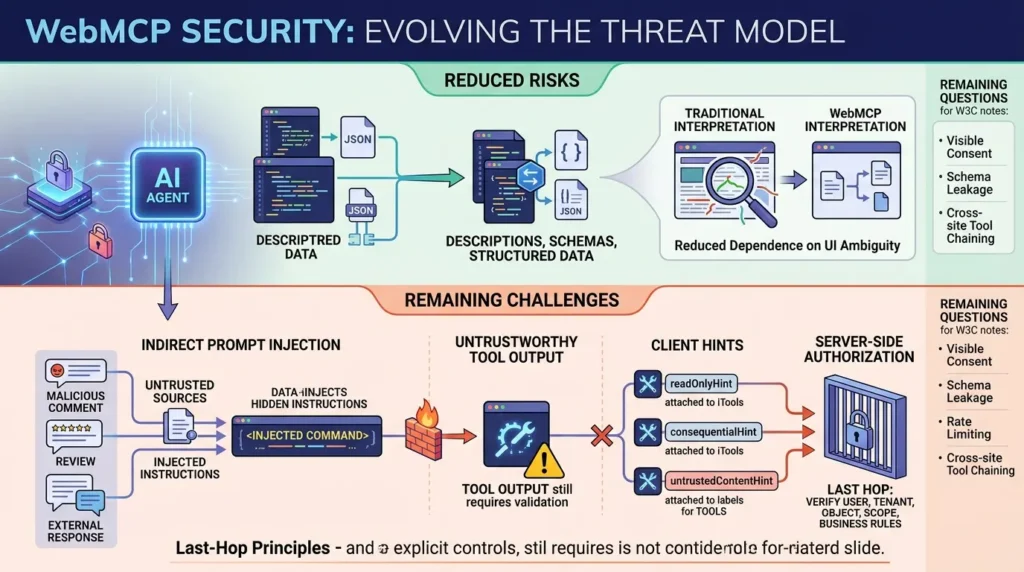
WebMCP changes the threat model because an agent is no longer interpreting only a human-oriented interface. It is consuming descriptions, schemas, results, page content, user data, and potentially cross-origin tools. The browser can mediate some boundaries, but the model is still processing natural-language and structured data together.
The official Chrome WebMCP security guidance warns that indirect prompt injection remains possible. A malicious comment, review, document, or external response can contain instructions that the agent treats as if they were part of the task.
Use the current safety annotations
The current Chrome API documentation describes three important hints:
readOnlyHint: the tool does not modify application or system state.consequentialHint: the tool can cause a significant, real-world, or irreversible action and may require user confirmation.untrustedContentHint: the output can contain user-generated or externally sourced content that should receive heightened scrutiny.
These hints improve the agent and browser’s understanding of the tool. They are not a substitute for authorization, input validation, transaction controls, or a security review.
Control cross-origin exposure explicitly
By default, WebMCP tools are not simply visible to every website. Current Chrome guidance describes explicit mechanisms for cross-origin use, including exposedTo during registration and fromOrigins during discovery. Cross-origin access should be an allow-list decision.
A read-only tool can still expose sensitive account information. A write tool can act on behalf of the user. Treat both as data and privilege boundaries, not merely interoperability features.
Enforce authorization at the last hop
A WebMCP callback may run inside an authenticated page, but that does not mean every requested action is authorized. The backend or final resource must still verify the current user, tenant, object, scope, state, and business rules.
This is the same last-hop principle described in Vertex Frontier’s guide to securing non-human identities for agentic AI: authentication proves that a credential or session exists; it does not by itself prove that a particular action is appropriate at the moment it is attempted.
Remaining security questions
The W3C WebMCP technical notes identify open design questions around visible consent for tool registration, schema leakage, machine-speed abuse and rate limiting, and cross-site tool chaining. These notes also contain older API wording, so use them for threat-model questions rather than as the final authority on the current API name.
A safer rollout plan for a real website
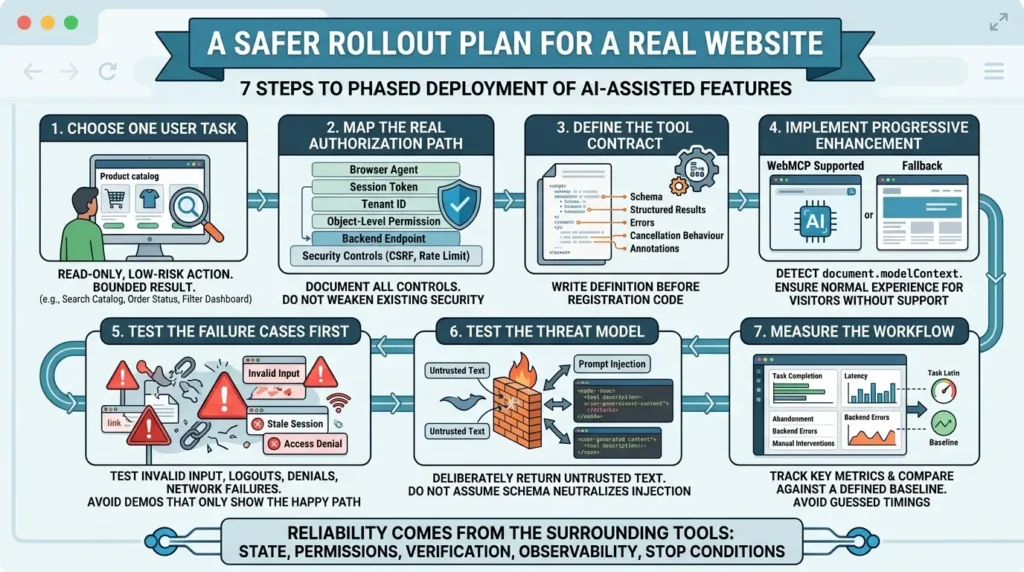
The best first experiment is not checkout, money transfer, account deletion, or a privileged administrative workflow. Start with one read-only, low-risk action that has a clear success condition.
Step 1: Choose one user task
Pick a task users already perform and that has a bounded result: search a catalog, retrieve an order status, filter a dashboard, or run a diagnostic that does not change production state.
Step 2: Map the real authorization path
Document the session, tenant, object-level permission, backend endpoint, CSRF or equivalent controls, rate limit, and expected failure modes. The browser agent is an additional caller of the UI path; it is not a reason to weaken the existing controls.
Step 3: Define the tool contract
Write the name, description, schema, annotations, structured success result, structured errors, cancellation behavior, and user-visible state change before writing the registration code.
Step 4: Implement progressive enhancement
Feature-detect document.modelContext. Visitors without WebMCP support must receive the normal website experience. Do not make the page fail because the experimental API is absent.
Step 5: Test the failure cases first
Test invalid input, stale session, logout in another tab, object access denial, network failure, duplicate calls, cancellation, page navigation, form validation, and partial backend completion. A demo that only tests the happy path tells you very little.
Step 6: Test the threat model
Return deliberately untrusted text from a test fixture and observe how the consuming agent handles it. Test prompt-injection strings in user-generated content, tool descriptions, error messages, and external API responses. Do not assume that a schema alone neutralizes instruction-like content.
Step 7: Measure the workflow
Track task completion, invalid-argument rate, retry rate, cancellation rate, confirmation rate, latency, abandonment, backend errors, and the number of manual interventions. Compare the same task against a defined baseline. Do not publish a percentage improvement from guessed timings.
This measurement mindset matches the broader lesson in Vertex Frontier’s Harness Engineering guide: a model can choose an action, but reliability comes from the surrounding tools, state, permissions, verification, observability, and stop conditions.
Testing matrix
| Test area | What to verify | Failure signal |
|---|---|---|
| Discovery | The right tools appear only in the relevant page state. | Duplicate, stale, or irrelevant tools remain available. |
| Schema | Required fields, types, enumerations, and unknown fields behave as designed. | The agent repeatedly sends invalid or ambiguous arguments. |
| Session | Expired cookies, logout, tenant switching, and permission changes are handled. | A stale page can continue an action it should no longer authorize. |
| Navigation | The application handles page changes and in-flight execution safely. | The agent assumes success after navigation or retries a completed action. |
| Untrusted output | UGC and external data are marked and handled as data, not instructions. | Injected text changes the agent’s plan. |
| Consequential action | Confirmation, cancellation, idempotency, and final authorization work. | A duplicate, irreversible, or unauthorized action occurs. |
| Cross-origin | Only explicitly trusted origins can discover or execute shared tools. | A tool leaks data or action capability to an unintended origin. |
| Accessibility | The human form, focus state, labels, keyboard operation, and agent path agree. | The agent succeeds while the visible UI misleads or excludes the user. |
What WebMCP changes for developers
WebMCP introduces a new interface contract alongside the human UI and the backend API. That contract deserves versioning, tests, review, and observability.
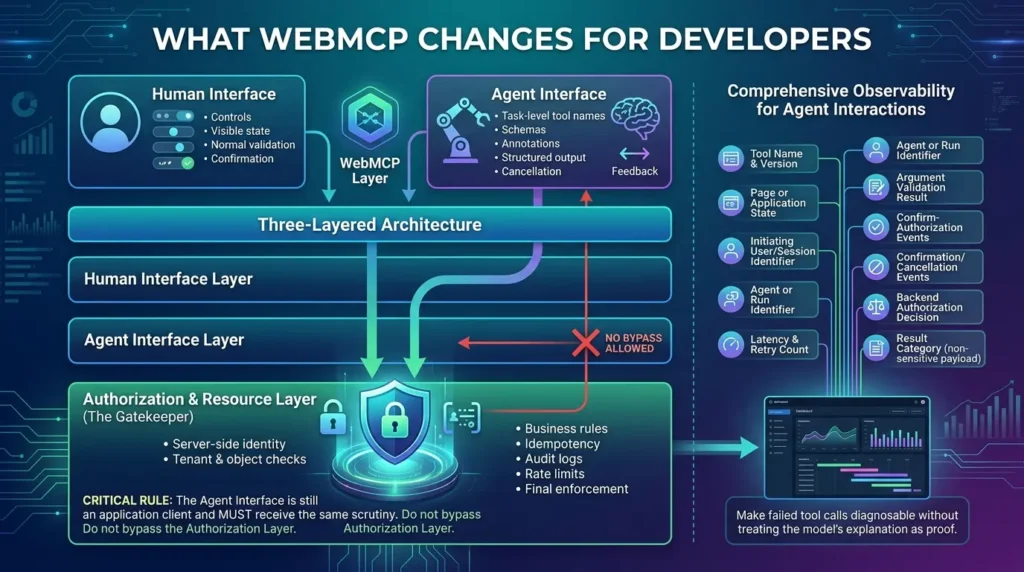
A useful architecture has three layers:
- Human interface: accessible controls, visible state, normal validation, and understandable confirmation.
- Agent interface: task-level tool names, schemas, annotations, structured output, cancellation, and agent-specific feedback.
- Authorization and resource layer: server-side identity, tenant and object checks, business rules, idempotency, audit logs, rate limits, and final enforcement.
Do not let the agent interface become a bypass around the third layer. A tool callback that calls an endpoint is still an application client. It should receive the same scrutiny as any other client.
Observability for agent interactions
A useful event record can include:
- tool name and version;
- page or application state;
- initiating user or session identifier, subject to your privacy policy;
- agent or run identifier when available;
- argument validation result;
- confirmation and cancellation events;
- backend authorization decision;
- latency and retry count;
- result category, without logging unnecessary sensitive payloads.
The exact fields depend on your system and retention requirements. The important point is to make a failed tool call diagnosable without treating the model’s explanation as proof of what happened.
For multi-agent systems where a WebMCP tool call sits inside a larger supervisor-to-worker-to-tool decision graph, multi-agent observability with MLflow turns those event records into structured traces, spans, and tool-call correctness scores tied to versioned prompt, model, and tool-schema lineage.
Browser support and production readiness
Chrome’s current documentation lists WebMCP as an origin-trial feature from Chrome 149 and provides a local development flag. The documentation also describes origin isolation and a tools Permissions Policy. The GitHub implementation-status material should be checked immediately before publication because browser and agent support can change independently of the specification.
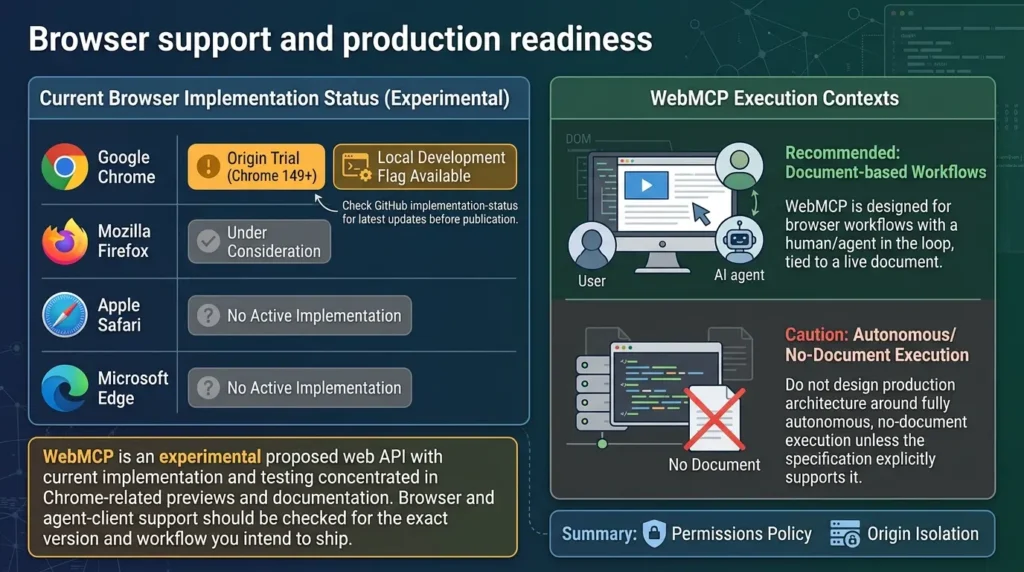
Do not write “WebMCP works in all modern browsers.” A more accurate statement is:
WebMCP is an experimental proposed web API with current implementation and testing concentrated in Chrome-related previews and documentation. Browser and agent-client support should be checked for the exact version and workflow you intend to ship.
Does WebMCP work in headless browsers?
The answer needs precision. WebMCP is designed primarily for browser workflows with a human in the loop, and its tools are tied to a live document. A headless Chrome instance can still contain a real page and document, so “headless” does not automatically mean “no WebMCP.” But that is different from a background execution model with no live page, no document, and no user-facing control.
Do not design a production architecture around fully autonomous, no-document execution unless the current specification and implementation explicitly support the exact behavior you need.
Real-world examples: what can be claimed safely
WebMCP demonstrations and public ecosystem discussion show interest in shopping, support, travel, settings, and developer workflows. However, public interest is not the same as a measured production result.
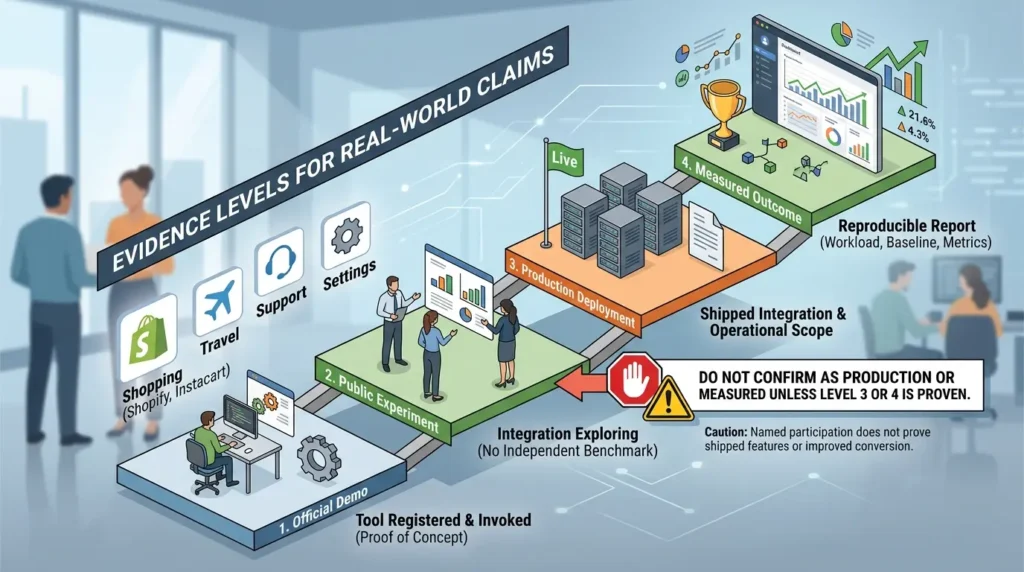
The safest way to write case studies at this stage is to label the evidence:
- Official demo: a project demonstrates that a tool can be registered and invoked under named conditions.
- Public experiment: a team or partner reports exploring an integration, without an independent benchmark.
- Production deployment: the owner documents a shipped integration and its operational scope.
- Measured outcome: a reproducible report states the workload, baseline, versions, metric, and result.
Unless the source provides the last two levels, do not turn a partner mention into a quantified case study. This is especially important for claims involving Shopify, YouTube, Instacart, OpenAI, or other well-known companies. Named participation can be interesting context, but it does not prove a shipped feature, improved conversion, or lower latency.
The agentic task calculator
The following calculator is intentionally illustrative. It uses numbers supplied by the reader rather than a published benchmark.
Common WebMCP mistakes
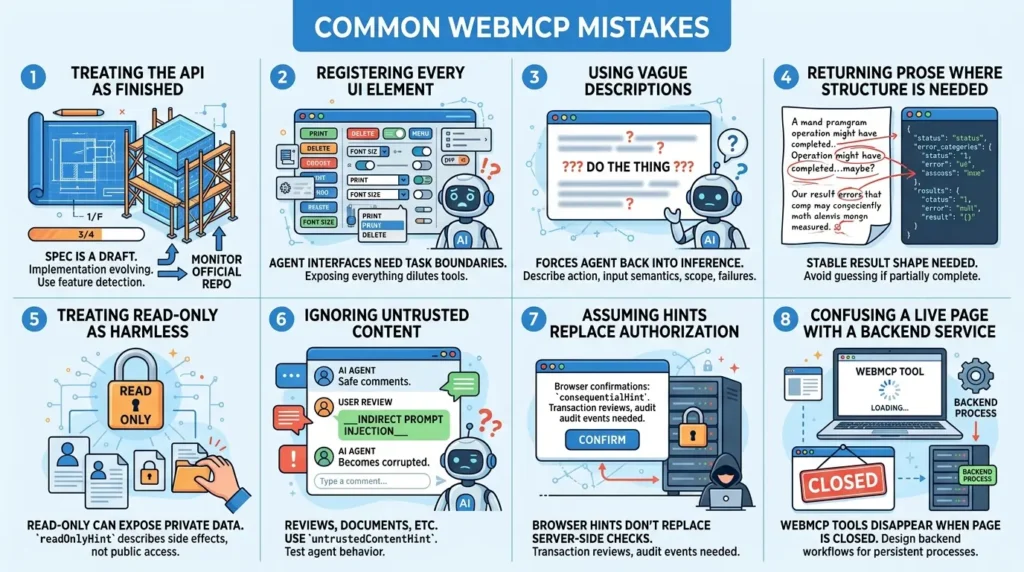
Mistake 1: Treating the API as finished
The specification is still a draft and the implementation is evolving. Keep the integration behind feature detection, isolate the registration code, and monitor the official repository and browser status.
Mistake 2: Registering every UI element
Agent interfaces need meaningful task boundaries. Exposing every button and menu item can create a larger and less useful tool catalog.
Mistake 3: Using vague descriptions
A vague description forces the agent back into inference. Describe the action, input semantics, scope, and important failure modes.
Mistake 4: Returning prose where structure is needed
Return a stable result shape. If the action fails, return an error category that the agent can understand without guessing whether the operation partially completed.
Mistake 5: Treating read-only as harmless
A read-only order lookup can expose private data. readOnlyHint describes side effects; it does not mean the output is public or risk-free.
Mistake 6: Ignoring untrusted content
Reviews, comments, documents, search results, and third-party responses can carry indirect prompt injection. Use untrustedContentHint where appropriate and test the consuming agent’s behavior.
Mistake 7: Assuming a browser hint replaces authorization
consequentialHint can support confirmation behavior. It does not replace a server-side permission check, idempotency key, transaction review, or audit event.
Mistake 8: Confusing a live page with a backend service
A WebMCP tool disappears when its document is gone. If the business process must continue after the user closes the page, design a backend workflow or MCP/API integration instead.
How WebMCP connects to the rest of the agent stack
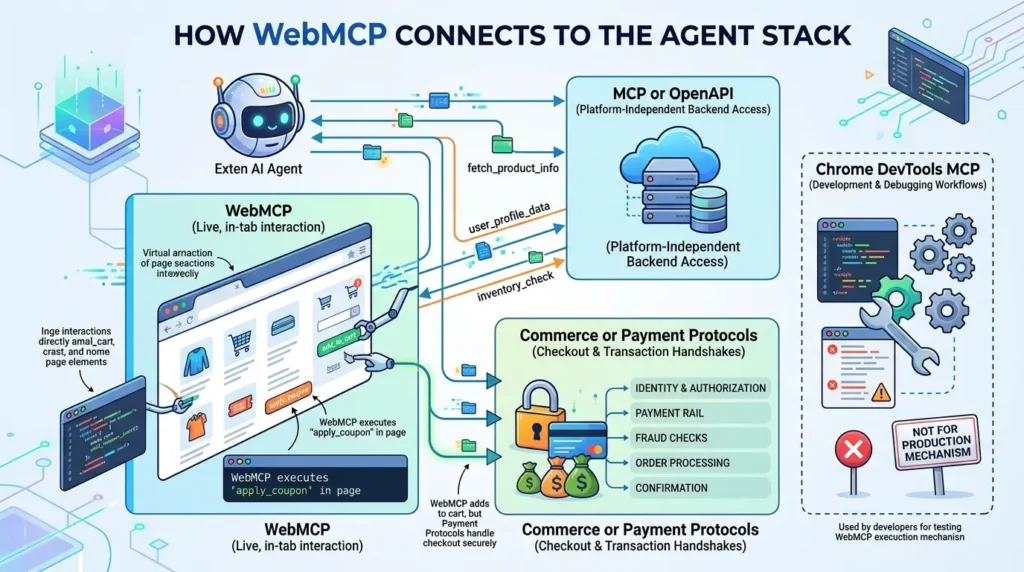
WebMCP is one layer in a larger system. A site may use:
- WebMCP for live, in-tab interaction;
- MCP or OpenAPI for platform-independent backend access;
- Chrome DevTools MCP for development and debugging workflows, not as the production mechanism by which an external agent consumes your WebMCP tools;
- commerce or payment protocols for transaction handshakes and payment rails, where applicable.
For a broader framework-level view of agents, tools, orchestration, memory, and deployment, see Google Agent Development Kit (ADK): What It Actually Takes to Ship an AI Agent That Doesn’t Fall Apart in Production.
For the memory layer specifically, what gets written, who can read it, when it expires, and what stays authoritative when a recalled value conflicts with a current source-of-truth, see our guide to agent memory architecture, which treats that layer as a separate production discipline from both the WebMCP tool contract above and the backend retrieval layer below.
Those layers should not be presented as interchangeable. WebMCP can expose add_to_cart or apply_coupon in the page, but a real checkout still needs its own identity, authorization, payment, fraud, confirmation, and order-processing controls.
Final verdict
WebMCP is best understood as a new interface contract between a live website and a browser agent. It lets developers expose selected application capabilities in a form that an agent can discover and call without reconstructing every intention from the visual UI.
That is useful, but the value is conditional. If your product already has a complete API and your workflow does not need browser context, WebMCP may add little. If your users work inside a complex authenticated web application, and agents need current state or UI-specific actions, WebMCP can provide a more direct and maintainable path than screenshot-driven automation.
The sensible first move is small: choose one low-risk task, expose it progressively with document.modelContext, write a precise schema and structured errors, test session and navigation failures, mark untrusted and consequential behavior honestly, and measure the workflow against a defined baseline. Do not confuse an impressive demo with a finished standard, or with a security model.
The surrounding system still decides whether the agent is reliable: the tool contract, browser permissions, backend authorization, observability, confirmation flow, and recovery behavior. That is the same lesson behind reliable AI agent harness engineering: the model can propose an action, but the system around it determines what the action is allowed to do and how you know it actually worked.
For the 20-concept framework for production agents that organizes that surrounding system, see our flagship overview.
For the code-level implementation of that surrounding system, state.py, memory.py, resilience.py, and observability.py, see our walkthrough on building a production agent harness in Python.
Frequently asked questions
Is WebMCP the same as Model Context Protocol?
Do I need an MCP server to use WebMCP?
Which API name should new code use: document.modelContext or navigator.modelContext?
document.modelContext. Older technical notes and early examples may mention navigator.modelContext. Treat those examples as version-sensitive and follow the current official specification and implementation documentation.Does WebMCP eliminate prompt injection?
Is WebMCP production-ready?
Should I use WebMCP if my site already has a good API?
Can WebMCP run in a headless browser?
📋 Article Timeline & History
Successfully updated on October 8, 2026 with the latest details.
This article was originally published on September 10, 2026.

Was this article helpful?





[…] Instead of asking an agent to infer every action from screenshots or changing DOM structure, WebMCP lets a website expose selected page capabilities as named tools with schemas and structured r…. The result is not a replacement for context management, but a clearer action surface for the […]