
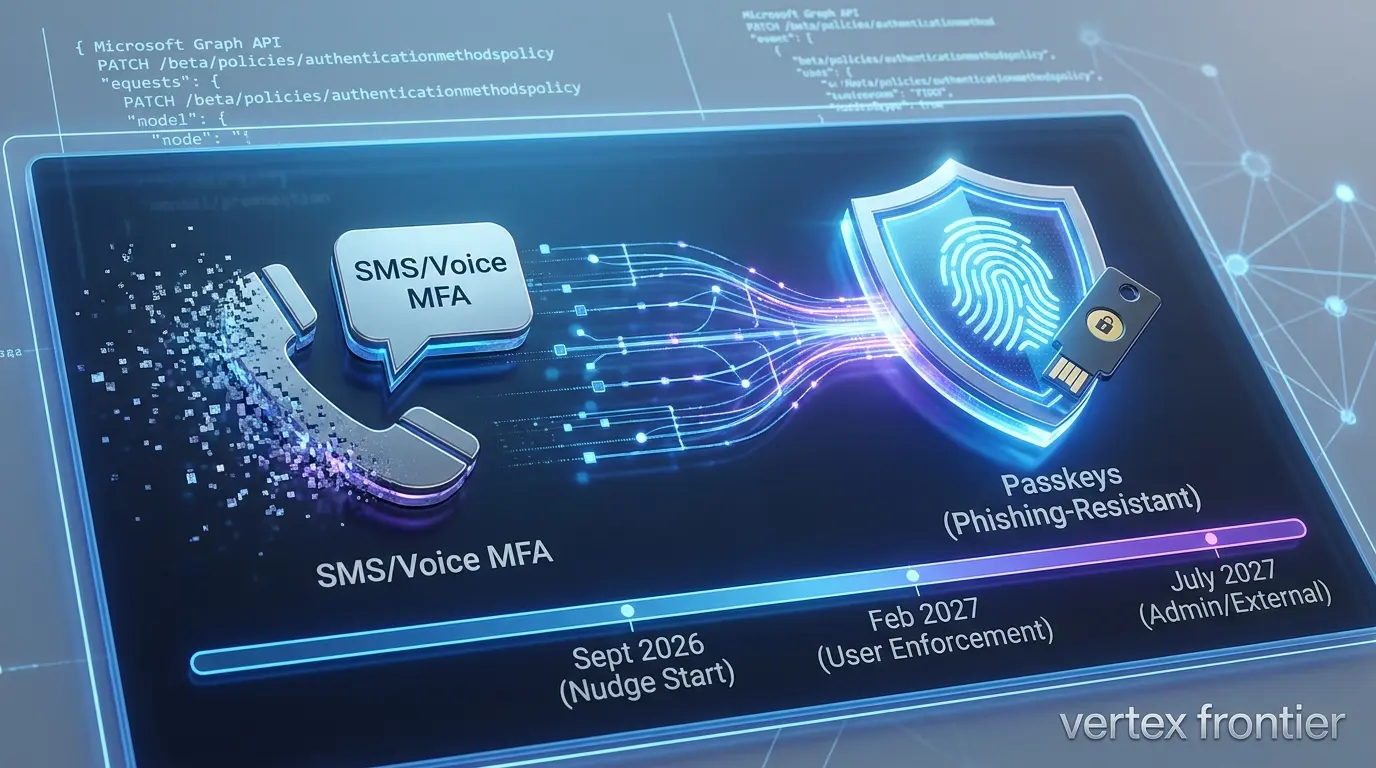

Somewhere in your tenant right now, a user is getting a sign-in prompt that wasn’t there in August. It’s the first visible sign of the Microsoft Entra SMS and voice retirement, nudging them to set up a passkey. Nobody on your team configured it. Microsoft did.
That’s not a glitch. It’s the first stage of a change that Microsoft announced on July 13, 2026: passkeys are now the default authentication experience in Microsoft Entra ID, and Microsoft-provided SMS and voice MFA is being retired on a fixed schedule that runs through mid-2027.
If you manage an Entra tenant, you’ve probably already seen the headlines, and you’ve probably already got five or six half-answered questions sitting in a Teams channel somewhere. Is this optional? Can you keep your current setup a little longer? What happens to the field technician who shares a tablet and has no company phone? What happens if someone loses their only passkey?
This article answers those questions with the actual mechanics involved, the exact API call, the exact dates, the exact pricing, not just “Microsoft is killing passwords” clickbait. It’s late September 2026 as this is written. The first phase already landed. The deadline that actually matters is about four months out.
Quick answers, if you’re skimming
Click any topic to expand or collapseMFA & Passkeys Mandate
Passkeys aren’t mandatory as your only MFA method — but SMS/voice provided by Microsoft is being switched off on a hard schedule.
Key Enforcement Dates
February 1, 2027 is the enforcement date for almost everyone. July 1, 2027 covers Global Administrators and external (guest) users only.
What “Blocked” Means
“Blocked” doesn’t mean locked out. It means a forced passkey registration screen the user can’t skip.
Nudging & Opt-Out
There’s a temporary opt-out from the automatic nudging — not from the deadline itself.
Account Recovery & Budgeting
Account recovery, not registration, is where most tenants will actually struggle. Plan the budget now.
What Is Microsoft Entra SMS and Voice Retirement Exactly?
Microsoft’s SMS and voice retirement is the phased shutdown of Microsoft-provided text-message and phone-call multifactor authentication in Entra ID, replaced by passkeys as the default sign-in method. The shutdown runs from September 2026 through July 2027, and it applies specifically to Microsoft’s own SMS/voice delivery, organizations that still need that channel can keep it by contracting a third-party telecom provider.
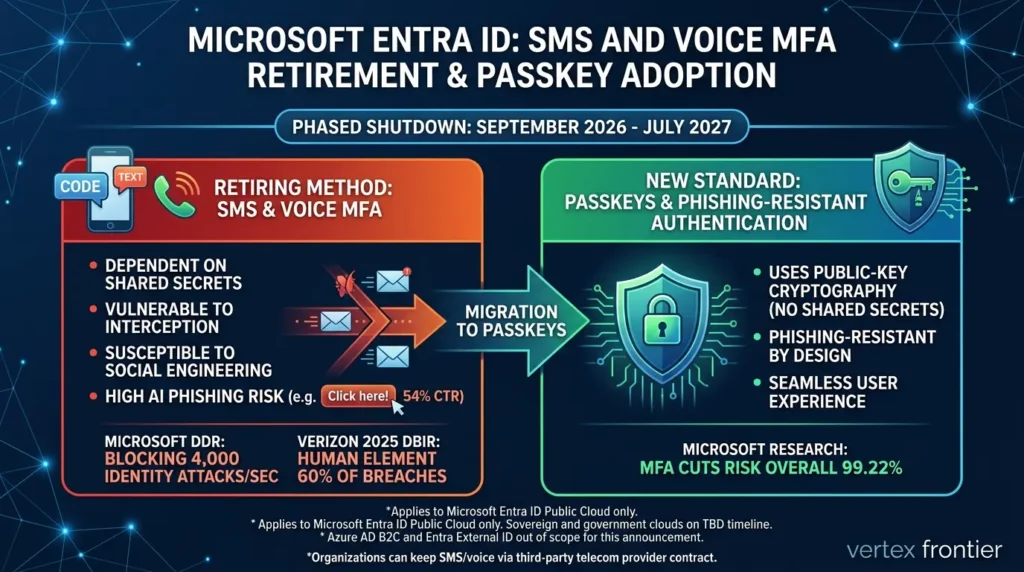
The reasoning, straight from Microsoft’s own announcement, is that SMS and voice depend on shared secrets and phone-network channels that attackers have gotten very good at intercepting, phishing, or socially engineering around. Passkeys use public-key cryptography instead of a shared secret, which is what makes them phishing-resistant by design.
Microsoft lays out the full reasoning in its SMS and voice retirement concept documentation, and in the Message Center notice that formalized the change for admins (MC1426371), published the same day as the blog announcement. There’s real math behind the decision, too.
Microsoft’s own research, published in a peer-reviewed paper on MFA effectiveness, found that enabling any MFA cuts the risk of account compromise by 99.22% overall, and 98.56% even when credentials have already leaked.
And the threat that’s forcing the specific move away from SMS isn’t hypothetical, Microsoft Threat Intelligence has observed AI-generated phishing campaigns getting click-through rates as high as 54%, compared to roughly 12% for older, traditional phishing attempts.
SMS codes are exactly the kind of secret that a convincing AI-written text message can talk a user into forwarding, and the broader numbers back that up: Verizon’s 2025 Data Breach Investigations Report puts the human element behind roughly 60% of breaches, with credential abuse and phishing as two of the leading entry points, against a backdrop where Microsoft’s own Digital Defense Report documents blocking around 4,000 identity attacks and 11,000 password attacks per second across its ecosystem.
This applies to Microsoft Entra ID public cloud only. Sovereign and government clouds are on a separate, not-yet-announced timeline. Azure AD B2C is out of scope entirely, and Entra External ID changes are coming “next year” as a separate announcement, according to Microsoft’s SMS and voice retirement FAQ.
The Timeline Nobody’s Explaining Correctly
Most of the coverage out there compresses this into one date, “SMS dies February 1, 2027.” That’s wrong, or at least incomplete, and the gap matters if you’re planning a migration.
There are actually two enforcement dates, split by population. Regular users and internal guests hit the wall on February 1. Global Administrators and external users, a materially different group, get an extra five months.
| Date | What happens |
|---|---|
| Sept 1, 2026 (already happened) | Passkeys become the default experience. Users enabled for SMS/voice get auto-enrolled in a passkey profile and a Microsoft-managed registration campaign starts nudging them. Unlimited snoozes by default. |
| Sept 18, 2026 (already happened) | Pricing and the list of supported telecom providers publish in the Microsoft Security Store. |
| Oct 30, 2026 | Admins can select and configure a telecom provider if they need to keep SMS/voice past the deadline. |
| Feb 1, 2027 | Microsoft-provided SMS/voice retires for everyone except Global Admins and external users. Internal guests are included in this date. |
| July 1, 2027 | Microsoft-provided SMS/voice retires for Global Admins and external users specifically. |
Notice the asymmetry: internal guests follow the February date, but external users follow the July date. That’s a distinction almost nobody outside the official documentation bothers to spell out, and if your organization runs B2B collaboration at any scale, it changes how you sequence the rollout. Guests you’ve invited into your tenant need to be ready in February. Contractors and partners accessing as external users have until July.
Treat February 1, 2027 as your real deadline for everyone except admins and true external accounts, don’t let the July date create a false sense of slack.
Your Pre–February 2027 Migration Checklist
Five stages cover this cleanly, whether you’re starting today or you’ve already got passkeys partway rolled out:
- Find who’s in scope: Run Microsoft’s PowerShell script to list SMS/voice-enabled users, any non-zero result means that the population needs a plan.
- Decide your opt-out stance and pilot early: Either set passkeyDynamicMigration via Graph API to buy a preparation runway, or switch the campaign to “Enabled” for a pilot group (15–20 non-admin users) to test prompt behavior and ensure break-glass accounts are excluded.
- Match methods to populations: Windows Hello for managed devices, synced passkeys for BYOD, hardware keys or a telecom provider for anyone who can’t do either yet.
- Configure account recovery before you need it: Enable Verified ID and Face Check, and set your TAP issuance process, ahead of the first real lockout, not reactively.
- Communicate before the nudge does: Users who understand why they’re being prompted register faster and call the helpdesk less than users who just see an unexplained new screen.
“Starting this week, you will see a prompt from Microsoft asking you to set up a passkey when signing into your work account. Passkeys replace text message (SMS) codes with fingerprint, face recognition, or your device PIN. This change significantly protects your account against identity phishing.
When you see the prompt at sign-in, click Next and follow the on-screen instructions on your screen. The setup takes under 60 seconds.”
Question 1: Is Microsoft Actually Forcing Passkeys, or Just Changing the Defaults?
Neither answer people usually give is quite right. Microsoft isn’t making passkeys your only allowed MFA method. But it also isn’t leaving your tenant configuration alone.
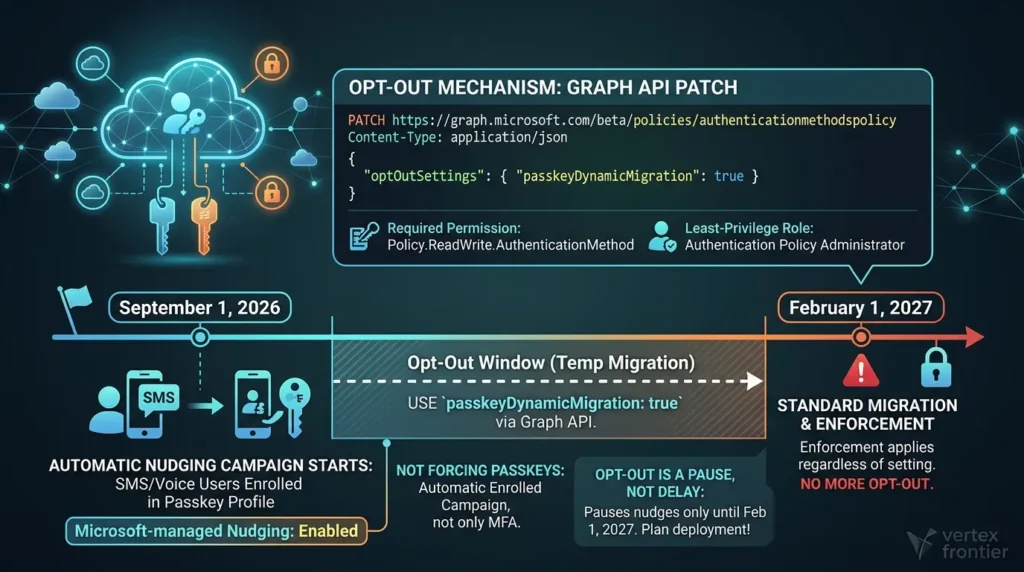
Here’s the actual mechanism. As of September 1, 2026, any user already enabled for SMS or voice MFA got automatically enrolled in a passkey profile in the Authentication Methods Policy, and their Registration Campaign setting got switched to Microsoft-managed, targeting passkeys specifically. The next time that user completes MFA at sign-in, they see a nudge to register a passkey. By default, they can snooze it indefinitely, Microsoft’s own registration campaign documentation lays out the exact mechanics.
So: not forced onto passkeys as the only method. Automatically enrolled into a nudging campaign, yes and that’s the part catching admins off guard.
There is a temporary opt-out, and it’s worth knowing exactly how it works. It only covers the window between September 1, 2026 and February 1, 2027. It pauses the automatic enablement and the registration campaign, it does nothing to the actual retirement date. The property is called passkeyDynamicMigration, and it’s set through the Microsoft Graph API (the video source for this topic garbled the setting’s name badly, it is not “PY dynamic migration” or anything close). Here’s how to set it:
How to opt out (step by step):
- Open Graph Explorer or your preferred Graph client (PowerShell, Postman, etc.).
- Sign in with an account that holds the Policy.ReadWrite.AuthenticationMethod permission, and consent to that scope if prompted.
- Set the method to PATCH and the endpoint to beta/policies/authenticationmethodspolicy.
- Paste the request body below (optOutSettings.passkeyDynamicMigration: true) and run the request.
- Confirm it took effect by running a GET against the same endpoint, the response should now show passkeyDynamicMigration as true.
A quick precision note, because this exact phrase shows up a lot in admin searches: there is no way to fully bypass the passkey registration campaign via the Graph API. This call pauses it. It doesn’t cancel it, and it doesn’t touch the February 1, 2027 enforcement date at all.
This is the verified, exact request:
HTTP / Microsoft Graph (beta):
PATCH https://graph.microsoft.com/beta/policies/authenticationmethodspolicy Content-Type: application/json
{ "optOutSettings": { "passkeyDynamicMigration": true } }
You’ll need the Policy.ReadWrite.AuthenticationMethod Graph permission to run it, through Graph Explorer, PowerShell, or your automation tool of choice. Once it’s set, your tenant is excluded from the automatic enablement and campaign rollout during the opt-out window.
Least-privilege role & rollback: You don’t need Global Admin for this; the Authentication Policy Administrator role holds sufficient privilege alongside the Policy.ReadWrite.AuthenticationMethod permission. If you need to verify the status without write access, or roll back the opt-out to resume the Microsoft-managed campaign, use these PowerShell commands:
# 1. Verify current status (Read-Only)
$policy = Invoke-MgGraphRequest -Method GET -Uri "https://graph.microsoft.com/beta/policies/authenticationMethodsPolicy"
$policy.optOutSettings.passkeyDynamicMigration # Returns True or False

# 2. Rollback: Re-enable the Microsoft-managed campaign if needed
$body = @{ optOutSettings = @{ passkeyDynamicMigration = $false } } | ConvertTo-Json
Invoke-MgGraphRequest -Method PATCH -Uri "https://graph.microsoft.com/beta/policies/authenticationMethodsPolicy" -Body $body -ContentType "application/json"
Here’s the part that turns this from a convenience into a trap if you’re not careful: beginning February 1, 2027, standard migration and enforcement apply regardless of this setting. There’s no opt-out from the actual retirement. If you use passkeyDynamicMigration to buy time and then don’t spend that time migrating users, you haven’t avoided anything, you’ve just delayed your own preparation and compressed it into a shorter runway.
That’s actually the first uncommon insight worth sitting with, and it’s an interpretation, not an official Microsoft statement: the opt-out is a transition tool, not a snooze button, and tenants that treat it like a snooze button are the ones who’ll be scrambling in January 2027. A five-month head start is only valuable if you use it to migrate users, run it as a delay tactic instead, and you’ll compress five months of adoption work into whatever’s left before the enforcement date hits, with a helpdesk that has no idea it’s coming.
If your rollout plan involves passkeys touching production tenants, it’s worth reading up on the five Entra passkey deployment mistakes that quietly undermine a rollout before you flip that opt-out switch, a lot of the pain in this migration comes from configuration gaps that have nothing to do with the retirement timeline itself.
Question 2: Can We Keep Authenticator Push as the Main Method With SMS as Backup?
This is the question that comes up in almost every planning conversation, and the honest answer is “sort of, with a catch that surprises most people.”
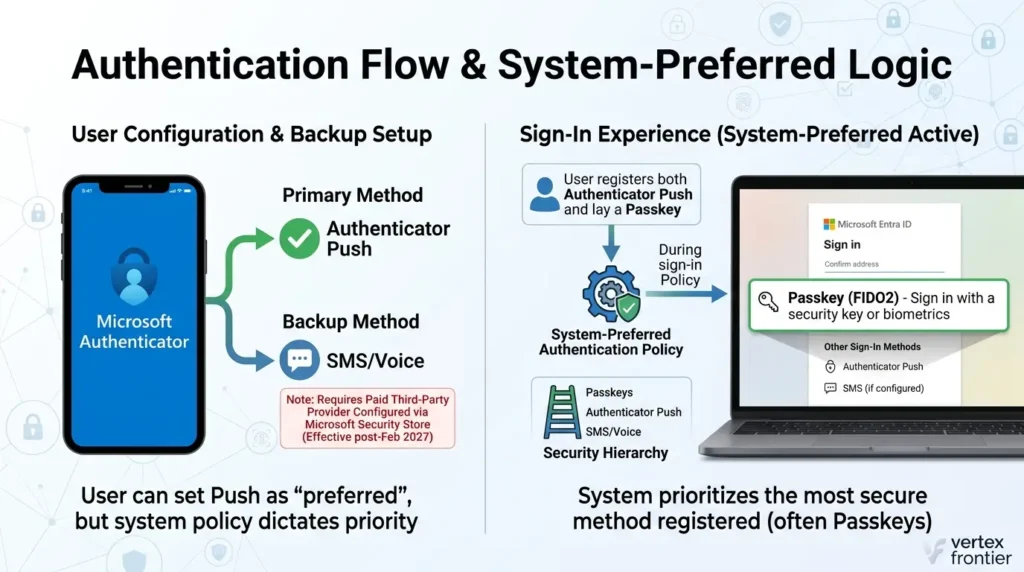
Keeping SMS or voice as a backup past February 2027 is possible, but only through a paid third-party telecom provider configured through the Microsoft Security Store. Microsoft stopped providing that delivery itself; it hasn’t banned the concept of SMS-as-backup, it’s just no longer footing the bill or running the infrastructure. Pricing “varies by telecom provider and region” and is typically billed per message, per Microsoft’s SMS and voice retirement FAQ, configuration opens October 30, 2026. Migrating to passkeys instead, notably, costs nothing extra.
Keeping Microsoft Authenticator push as your primary method is straightforward on its own, you can register it, and even set it as preferred in a user’s profile. But there’s a setting most admins haven’t looked at that overrides individual preference entirely: system-preferred authentication.
What is system-preferred authentication? It’s an Entra policy that prompts users to sign in with the most secure method they’ve registered, regardless of what they personally set as their preferred method. A user with both a password and a passkey registered gets prompted for the passkey first, not because they chose it, but because the system decided it’s stronger. Users can still tap “sign in another way,” but the strongest method leads.
The policy has three states: Disabled (no change to normal behavior), Enabled (applies to second-factor only), and Microsoft-managed (applies to both first-factor and second-factor, gradually rolling out through September 2026, per Microsoft’s system-preferred authentication documentation). It’s scoped to users, not devices, and it doesn’t override Conditional Access authentication-strength requirements.
Here’s the piece that actually answers the original question: Microsoft’s documentation describes the ranking only as “the most secure method the user has registered”, it doesn’t publish an exact numbered hierarchy on that page, so treat any specific ordering you read (including in older practitioner videos) as directional rather than gospel.
What’s confirmed is the practical effect: if a user who normally uses Authenticator push gets swept into the registration campaign and successfully registers a passkey, system-preferred authentication will very likely start presenting the passkey first at their next sign-in, even though nobody changed their “preferred method” setting. Push doesn’t stop working. It just stops being what the user sees first.
So, can you keep push as primary with SMS as backup? Yes, technically, after paying for a telecom provider. But if system-preferred authentication is active in your tenant (and Microsoft is rolling it out to everyone by default through September 2026), “primary” starts meaning something different the moment a user registers a passkey, whether or not that was the plan.
Question 3: Will Microsoft Push the Deadline Back?
Don’t build your migration plan on that bet. Here’s why, with receipts on both sides.
Microsoft has delayed big authentication deprecations before, twice, in fact, in ways directly relevant to this exact team inside Microsoft.
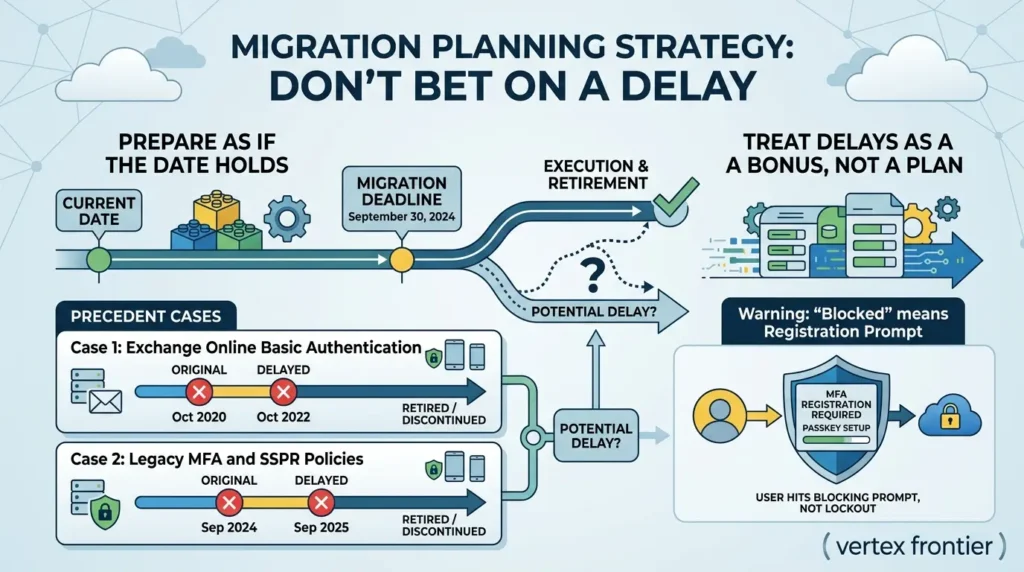
Case 1: Exchange Online Basic Authentication
Originally scheduled to end October 13, 2020, it got postponed (initially for COVID-related reasons) to the second half of 2021, then a September 2021 announcement pushed final disabling to October 2022, and protocol-level retirement communications for SMTP AUTH basic auth were still running as late as 2026. Net effect: roughly a two-year slip from the original date, and arguably longer depending on which specific piece you’re counting.
Case 2: Legacy MFA and SSPR policies
Originally announced for retirement on September 30, 2024, it actually got retired a full year later, on September 30, 2025, a clean one-year slip.
So there’s real precedent for “Microsoft says a date, then moves it.” But look at what both of those slips have in common: the change still happened. Basic Auth is gone. Legacy MFA policies are gone. Nobody at Microsoft walked either change back, they moved the date, then executed.
That’s worth internalizing before you decide how much to bet on a delay here. This change is arguably a bigger deal for both admin experience and end-user experience than either of those two precedents, which cuts both ways: it’s exactly the kind of large-blast-radius change Microsoft has slipped before, but it’s also strategically central to Microsoft’s own security posture in a way that makes an indefinite delay less likely than a temporary one, if a delay happens at all.
The practical stance: prepare on the assumption the date holds, and treat any future delay announcement as a bonus, not a plan. Waiting to find out is the single most expensive mistake available here, because migration work, user communication, method registration, helpdesk readiness, doesn’t compress well under deadline pressure.
Question 4: What About Users Without Corporate Phones?
This is the question with the most “it depends” energy, and it deserves an honest decision framework instead of a one-size answer.
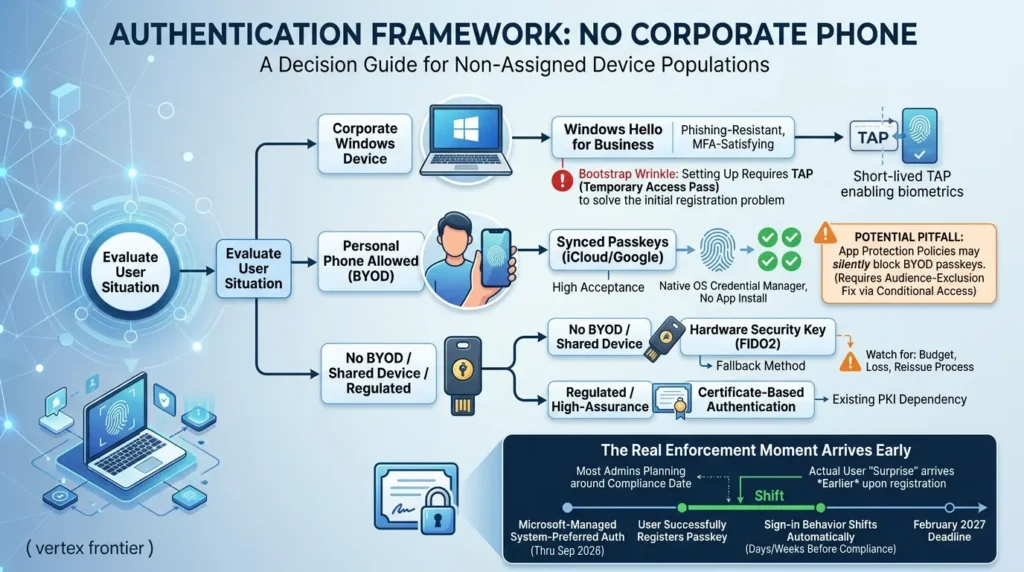
The deciding factor is whether BYOD (bring your own device) is an option at all for that population, and what devices they’re already using day to day.
If users have corporate Windows devices, Windows Hello for Business is usually the obvious first move. It’s phishing-resistant, satisfies MFA on its own, and doesn’t depend on a user registering a personal device. There’s a bootstrapping wrinkle worth knowing about: setting up Windows Hello requires an existing MFA method first, since something has to satisfy that initial registration.
A Temporary Access Pass (TAP) solves that chicken-and-egg problem cleanly, issue a short-lived TAP, use it to register Windows Hello, done. (Under Message Center update MC1450133, Microsoft has begun rolling out the capability for eligible users to register a passkey or passwordless method directly during onboarding without requiring a prior telephony secret, gradually eliminating this bootstrapping friction.)
If users can use synced passkeys, saved to a platform credential manager like iCloud Keychain or Google Password Manager and synced across their own devices, that’s often the path of least resistance for BYOD populations. It’s documented by Microsoft as best for users already comfortable with a platform credential manager, and anecdotally, users who previously refused to install a separate authenticator app are frequently more willing to use synced passkeys, it’s native to the phone’s own operating system, not a third-party install.
If neither is realistic, shared devices, strict no-BYOD policy, regulated environments that won’t allow personal-device registration, hardware security keys (FIDO2 device-bound passkeys) are the fallback, alongside certificate-based authentication where your environment already supports it.
| User situation | Best-fit method | Watch for |
|---|---|---|
| Corporate Windows device | Windows Hello for Business | Bootstrap step needs a TAP |
| Personal phone allowed (BYOD) | Synced passkey (iCloud/Google) | App Protection Policy can silently block registration |
| Shared device / no BYOD allowed | Hardware security key (FIDO2) | Budget per unit; loss/reissue process |
| Regulated / high-assurance environment | Certificate-based authentication | Existing PKI dependency |
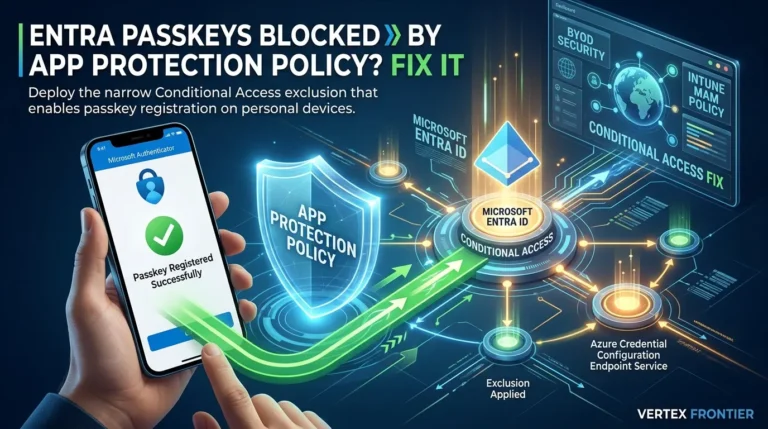
If your BYOD users are on personal phones, there’s a specific failure worth flagging before it bites you: passkeys can silently get blocked by App Protection Policies on BYOD, the audience-exclusion fix that solves it, it’s a Conditional Access interaction that has nothing to do with the retirement timeline and everything to do with a policy most tenants set up for unrelated reasons years ago.
Here’s the second uncommon insight worth carrying into your planning, and again, this is interpretation layered on documented mechanics rather than an official Microsoft statement: the registration nudge isn’t the real enforcement moment, system-preferred authentication is. Even a tenant that manages the February 2027 deadline flawlessly is still going to see sign-in behavior change earlier than that, because Microsoft is rolling out Microsoft-managed system-preferred authentication tenant-wide through September 2026.
The moment a user successfully registers a passkey, their sign-in experience shifts, they start getting prompted for that passkey first, automatically, days or weeks before any deadline forces the issue. Most admins are planning around the compliance date. The actual user-facing “surprise” is behavioral, and it arrives earlier.
Question 5: How Does Account Recovery Actually Work?
This is the question the source video for this topic answered least precisely, and it’s arguably the most important one for planning purposes, because passkey registration is the easy part of this migration. Recovery is the part that actually needs a budget line.
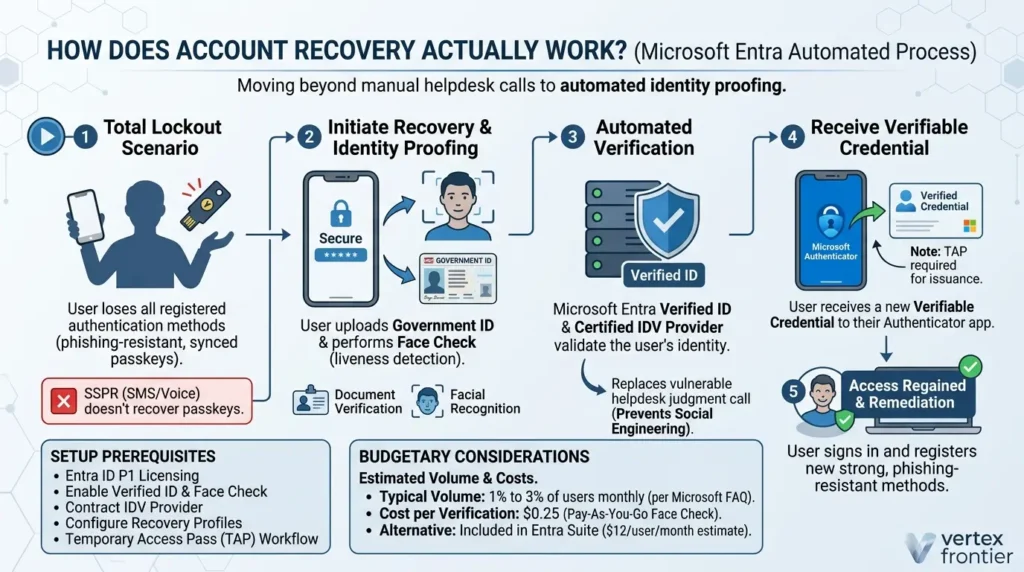
Start with what SSPR can’t do. Self-service password reset resets passwords. It doesn’t touch passkeys, and it never did, the name is literally in the feature. What most summaries miss, though, is that the SMS/voice retirement also reaches into SSPR itself, native Microsoft-provided SMS/voice can no longer be used as an SSPR verification option after retirement either, unless you’ve configured a customer-managed telecom provider.
So what happens when a user loses every phishing-resistant method they had, the YubiKey is gone, the phone with the synced passkey got wiped or stolen, and there’s nothing left to authenticate with? This is where Microsoft Entra account recovery comes in.
What is Microsoft Entra account recovery? It’s a capability for total lockout scenarios, when a user has lost every registered authentication method, that re-establishes identity trust through third-party identity verification instead of a manual helpdesk process. It’s built on Microsoft Entra Verified ID and Face Check: the user proves who they are with a government-issued ID plus a liveness/facial-recognition check through a certified identity verification provider, and receives a new verifiable credential in Microsoft Authenticator to continue signing in.
The motivation is directly connected to the MGM case above: traditional helpdesk recovery is vulnerable to exactly the kind of social engineering that took down MGM’s operations for ten days, a human agent making a judgment call under pressure. Automated identity proofing removes that human judgment call from the highest-risk moment in the whole authentication lifecycle.
How to set up account recovery (step by step):
- Confirm licensing, you need Microsoft Entra ID P1 at minimum.
- Enable Verified ID and configure Face Check for your tenant.
- Contract an identity verification (IDV) provider through the Microsoft Security Store, you’ll need Contributor or Billing Administrator rights on the Azure subscription to set up that provider relationship.
- Assign the Authentication Administrator role to whoever will manage recovery profiles.
- Build identity verification profiles per user population, defining the provider, recovery mode, and account-validation rules.
- Decide your name-matching confidence level (Exact or Relaxed) between the verified government ID and the Entra profile, users who share a name with a colleague can get blocked without a custom validation extension, so this step matters more than it sounds.
- Optionally, wire in a custom authentication extension (an Azure Function, Logic App, or REST API using managed identities) to cross-check verified claims against HRIS or employee-directory data for an extra layer of assurance.
One prerequisite that’s easy to miss: account recovery requires a Temporary Access Pass in the current release, confirmed directly in Microsoft’s account recovery FAQ: “Yes. TAP is required for account recovery in this release.” Plan your TAP issuance workflow alongside the rest of this, not as an afterthought.
And here’s the number that should actually drive your budget conversation: Microsoft’s account recovery FAQ, updated August 14, 2026, states that account recovery requests typically affect about 1% to 3% of users each month. That’s not a rare edge case, for a 5,000-seat tenant, that’s 50 to 150 recovery events every single month, indefinitely, not just during the migration window.
Pricing, verified on Azure’s official pricing page: Face Check costs $0.25 per verification on a pay-as-you-go basis, or you get 8 Face Check verifications per seat per month included if you’re on Microsoft Entra Suite (which runs roughly $12 per user per month and bundles ID Protection, ID Governance, Internet Access, and Private Access, useful context, though treat that specific price point as a secondary-source estimate rather than an official quote). If you’re on Business Premium, E3, or E5 instead of Entra Suite, you’re paying the $0.25 per-verification rate directly.
Here’s a working formula to size your own recovery budget, along with a calculator so you don’t have to do the arithmetic by hand:
Users × Recovery rate × $0.25 = Estimated monthly costRun your own headcount through that before you finalize a licensing decision, it’s a genuinely different conversation at 500 seats versus 50,000.
Real-World Evidence: What Phishing-Resistant MFA Actually Prevents (and What Weak Recovery Actually Costs)
Theory is easy to argue with. These aren’t theory.
Cloudflare stopped a mass SMS phishing campaign cold — because SMS wasn’t in the loop
In July 2022, Cloudflare staff were hit by a coordinated SMS phishing attack impersonating internal IT. Employees were protected because Cloudflare requires FIDO2 hardware security keys for every employee, for every application. The company documented the incident publicly: the phishing campaign reached employees’ phones, but it couldn’t succeed, because there was no shared secret to steal.
Zero accounts compromised from that specific campaign. This is the exact attack class Microsoft’s retirement decision is built around, SMS-based social engineering that phishing-resistant credentials simply can’t be tricked by.
Google has gone years without a single successful employee phishing compromise, at scale
After requiring physical security keys company-wide, the FIDO Alliance’s own case study documents that there has not been a successful phishing attack against Google’s 85,000+ employees since the policy took effect. This isn’t a small pilot group. It’s proof that phishing-resistant MFA holds up at genuine enterprise scale, not just in a lab.
MGM Resorts shows what happens when the weak point isn’t MFA, it’s recovery
In September 2023, the ransomware group behind the attack didn’t break any cryptography. They called MGM’s IT help desk, impersonated an employee, and social-engineered their way past identity verification to reset credentials. MGM later disclosed to the SEC an estimated $100 million negative EBITDA impact for the quarter, plus under $10 million in direct cyber-related costs, and roughly ten days of operational disruption across 29 properties, and that’s just one incident; breach costs generally keep climbing, per what the average cost of a data breach reached in IBM’s latest report.
The technical MFA setup wasn’t the failure point, the recovery and verification process at the helpdesk was. Keep this case in mind heading into the next section, because it’s exactly the failure mode Microsoft’s newer account recovery capability is designed to remove.
Common Mistakes Tenants Are Making Right Now
A few patterns keep showing up across practitioner reporting and Microsoft’s own documented mechanics. None of these are hypothetical, they’re the specific ways real tenants are going to get surprised.
| Configuration Pitfall | Real-World Operational Impact | Preventive Engineering Fix |
|---|---|---|
| Treating “Enabled” as “Enforced” | Users register a passkey but continue signing in via passwords and SMS out of routine. | Configure Conditional Access requiring Phishing-resistant MFA authentication strength. |
| Unlimited-Snooze Default | Registration stalls below 20%; users hit a hard blocking screen all at once on February 1, 2027. | Switch campaign to Enabled and set a snooze cap (e.g., maximum 3 snoozes allowed). |
| MAM App Protection Conflict | Passkey creation inside Microsoft Authenticator silently fails on personal BYOD phones. | Apply the audience-exclusion rule for Authenticator registration in your Intune MAM policy. |
| Assuming SSPR Covers Recovery | Self-Service Password Reset only resets passwords; a user who loses all passkeys remains locked out. | Implement automated account recovery via Verified ID Face Check or establish a strict TAP issuance workflow. |
| Ignoring Recovery Budgeting | Unbudgeted monthly costs or support desk bottlenecks when 1–3% of users inevitably lose their credentials. | Budget ongoing monthly identity verifications ($0.25/check pay-as-you-go or evaluate Entra Suite licensing). |
The Bottom Line
Strip away the headlines and this comes down to three planning decisions: how you’ll migrate users off SMS/voice before February 1, 2027 (or July 1 for admins and external users), which authentication method actually fits each population you manage, and the part most tenants are underinvesting in, how account recovery will work once passkeys are the default and the helpdesk can’t just reset a password anymore.
The registration side of this migration is the easy four-fifths of the work. The recovery side is the part that will actually determine whether this rollout feels smooth or chaotic six months from now, and it’s the part the marketing announcements barely mention. Size that cost now, while you’ve still got the runway to plan it properly, not in January 2027, when everyone else who ignored it is calling their Microsoft rep at the same time.
FAQ: Edge Cases the Sections Above Don’t Cover
Does this retirement apply to Azure AD B2C or sovereign/government clouds (GCC High)?
No, not the same way. Azure AD B2C is out of scope entirely — it isn’t affected by this change at all. Sovereign and government clouds are on a separate timeline that Microsoft hasn’t announced yet, so don’t assume GCC High moves on the same February 2027 / July 2027 dates covered above.
Are internal guests and external (B2B) users on the exact same date?
No — and this is the split most coverage of this topic gets wrong. Internal guests follow the February 1, 2027 date along with your regular users. External users follow July 1, 2027, the same date as Global Administrators. B2B passkey support itself is planned to reach general availability by the end of calendar year 2026, so if your guest population is large, don’t assume day-one parity with internal users.
Do I need to buy extra licensing for passkeys, or for FIDO2 hardware keys?
Passkey support itself is included in every Microsoft Entra plan at no additional cost — migrating to passkeys doesn’t require a licensing upgrade. Physical FIDO2 security keys are a separate, one-time hardware purchase from a vendor, not a Microsoft license. The licensing question that actually costs money is account recovery (Entra ID P1 minimum, plus Face Check verification fees) — covered in the recovery section above.
Is there an admin center toggle for the opt-out, or is the Graph API the only way?
As of this writing, the verified method is the Graph API call above — Microsoft’s documentation doesn’t describe an equivalent point-and-click toggle in the Entra admin center for passkeyDynamicMigration. If you want it scripted for repeatability across tenants, PowerShell wrapping the same Graph call works fine.
Does SSPR stop working entirely, or just lose the SMS/voice option?
SSPR keeps working for what it’s always done — resetting passwords. What changes is that native Microsoft-provided SMS/voice can no longer be used as an SSPR verification method after retirement, unless you’ve configured a customer-managed telecom provider. SSPR never recovered passkeys, before or after this change — that’s what Entra account recovery is for.
Is the $0.25 Face Check cost a one-time migration expense, or ongoing?
Ongoing, indefinitely — not a migration-window cost. Microsoft’s own data puts account recovery requests at roughly 1–3% of users every month, month after month, so budget it as a recurring operational line item, not a one-time rollout expense.

Was this article helpful?
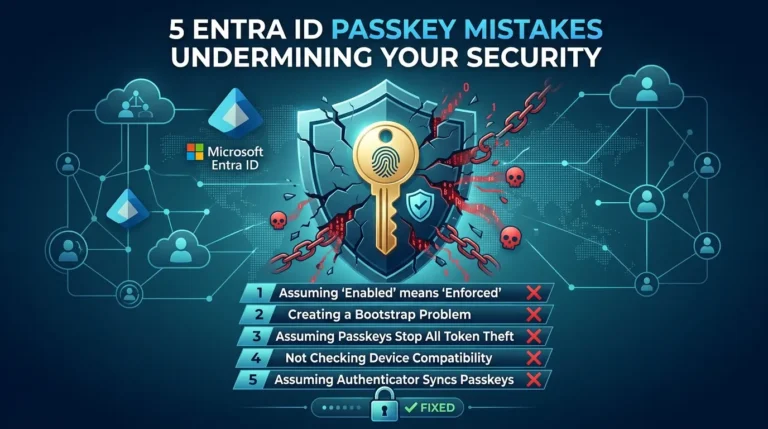




[…] A single toggle in the admin center is not a deployment plan, and right now a lot of IT teams are flipping that toggle under pressure. Microsoft has confirmed that passkeys are becoming the default authentication method in Entra ID, and starting September 1, 2026, any user currently registered for SMS or voice MFA gets auto-enrolled into passkeys whether their admin has planned for it or not. For the full retirement timeline, here’s our admin breakdown. […]
[…] in every remediation plan. Rolling them out across a real workforce is not friction-free, see the 2027 deadline and the most common deployment blocker we walk through next. the app protection policy conflict […]