

A data lake can hold years of history and still give you the wrong answer.
The problem usually isn’t that the files disappeared. It’s that a reader saw one set of files while a writer was replacing another. Or a column was renamed and an old consumer silently interpreted the new layout incorrectly. Or a query had to understand the directory structure before it could find the rows it needed.
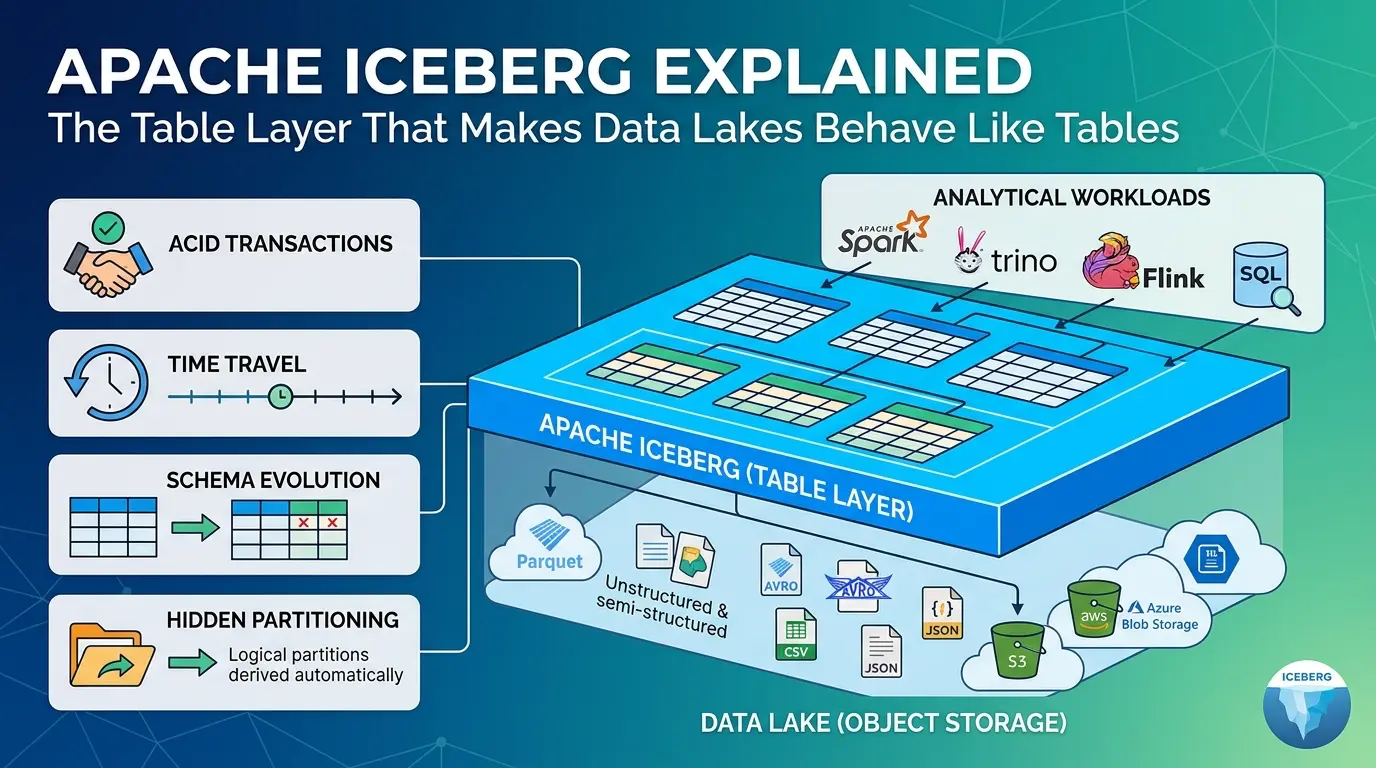
Apache Iceberg was designed for this class of problem. It puts a table layer between analytical workloads and the files in object storage. That layer records what belongs to the table, which version is current, how fields keep their identity, and which files a query can skip.
That sounds like a technical distinction. In practice, it changes who has to coordinate with whom.
This guide explains Apache Iceberg from that angle. You’ll learn what it is, how an Iceberg table is assembled, why snapshots matter, what schema and partition evolution actually change, and where the format fits in a real data platform. The goal is not to present Iceberg as a magic replacement for every data system. It is to give you a mental model you can use when deciding whether a table format is solving a problem you really have.
Quick Takeaways
Click any topic to expand or collapse01. Not a Database
Iceberg is an open table format specification for massive analytic datasets, not a standalone database, query engine, or storage system.
02. Stable Identity & Field IDs
Field IDs preserve a column or nested field’s structural identity through supported schema changes, including renames. They do not validate business meaning or downstream compatibility.
03. Hidden Partitioning & Physical Layout
Queries interface directly with logical columns while Iceberg abstracts and manages the underlying physical partitioning and file prune layouts automatically.
What is Apache Iceberg?
Apache Iceberg is an open table format for large analytical datasets. It defines how table metadata, snapshots, schemas, partition specifications, manifests, and data files relate to one another. Iceberg can be used with engines such as Spark, Trino, Flink, Hive, Impala, and PrestoDB, but feature availability and SQL behavior must be checked for the exact engine, catalog, Iceberg runtime, and table format version you deploy.
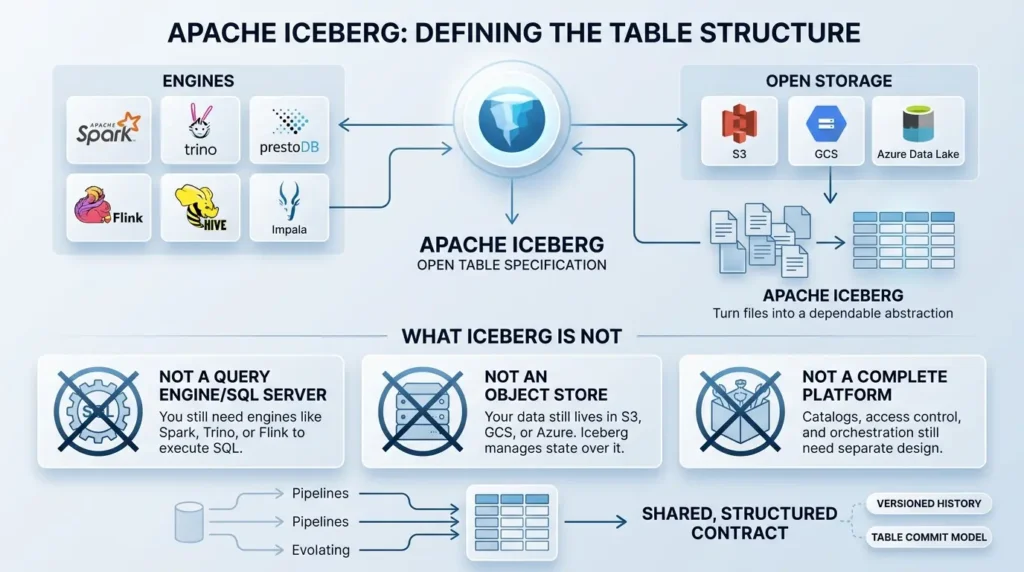
The phrase “table format” matters. Iceberg is not a database server. It is not a SQL engine. It does not run your object storage. Instead, it defines how a table’s data files and metadata fit together so different engines can read and write the same logical table with clearer rules.
A useful comparison is a version-controlled project. The source files are still stored somewhere. What changes is that every published version has a recognizable state, a history, and a way to see what changed. Iceberg applies a similar idea to analytical data, although its metadata structures and commit model are designed for distributed table workloads rather than source code.
The Iceberg table specification defines the format as a way to manage a large, slow-changing collection of files in a distributed file system or key-value store as a table. That definition is more revealing than the usual “data lakehouse format” label. Iceberg is fundamentally about turning files into a dependable table abstraction.
Apache Iceberg with Snowflake: Managed vs External Tables, Catalogs, Performance, and Cost
Version and compatibility boundary
Apache Iceberg is a table specification and ecosystem, not a promise that every engine exposes every feature in the same way. The current table specification describes format versions 1, 2, and 3 as complete and adopted; format version 4 is under active development and has not been formally adopted.
For any production design, record the engine version, Iceberg runtime/library version, catalog implementation, storage system, table format version, required extensions, and maintenance procedures. A feature that is documented for one combination should not be generalized to every Iceberg deployment.
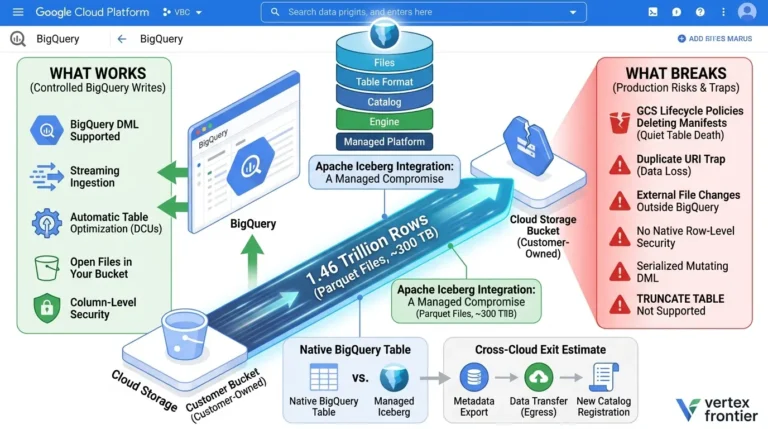
For a concrete example of how one engine changes this picture, see our field guide on Apache Iceberg on BigQuery: what breaks, what works, and what actually matters.
What Iceberg is not
It helps to remove three common misunderstandings before discussing the architecture.
| Iceberg is not… | What that means for you |
|---|---|
| A query engine | You still need Spark, Trino, or Flink to execute SQL and transformations. |
| An object store | Your data still lives in S3, GCS, or Azure. Iceberg manages state over it. |
| A complete platform | Catalogs, access control, and orchestration still need separate design. |
This distinction prevents an expensive category error. If your problem is a slow join, Iceberg may not fix it. If your problem is that several pipelines cannot agree on which files constitute the current table, Iceberg is much closer to the problem.
Iceberg does not replace the rest of the stack. It gives the rest of the stack a shared, structured contract for reading and changing analytical tables.
The problem Iceberg was built to solve
A directory full of Parquet, ORC, or Avro files can look like a table from a distance. It has a name, a location, a schema document, and perhaps a partition convention. But the closer you get to production, the more questions appear.
- Which files belong to the current version?
- What happens if a writer finishes uploading files but fails before publishing them?
- How does a reader avoid seeing half of a change? What does a rename mean if a nested field has been stored across many files?
- Can the table change its partition layout without forcing every consumer to learn a new directory structure?
Older data-lake designs often answered these questions with a mixture of metastore entries, directory listings, naming conventions, and application code. That can work. It also creates hidden agreements. Once several teams and engines depend on those agreements, a small change becomes a coordination event.
The Iceberg reliability documentation explains the contrast with Hive-style tables on object storage: when table state is reconstructed from listings and separate metadata, inconsistent or incomplete views can produce incorrect results. Iceberg instead records the complete file list for each snapshot and stores a reference to the current table metadata.
That design shifts the question from “What files happen to be in this folder?” to “Which committed table state should this reader use?” It is a small sentence with large operational consequences.
A practical mental model: the Table Change Contract
Most introductions list Iceberg features one by one: snapshots, schema evolution, hidden partitioning, time travel, and ACID transactions. The list is accurate, but it does not explain how the pieces relate.
A better way to understand Iceberg is to ask three questions whenever the table changes.
State: what belongs to this table version?
A table needs a precise answer to the question, “What is the current data?” Iceberg handles this through table metadata and snapshots. A snapshot represents a consistent state of the table and points to the data files that belong to that state.
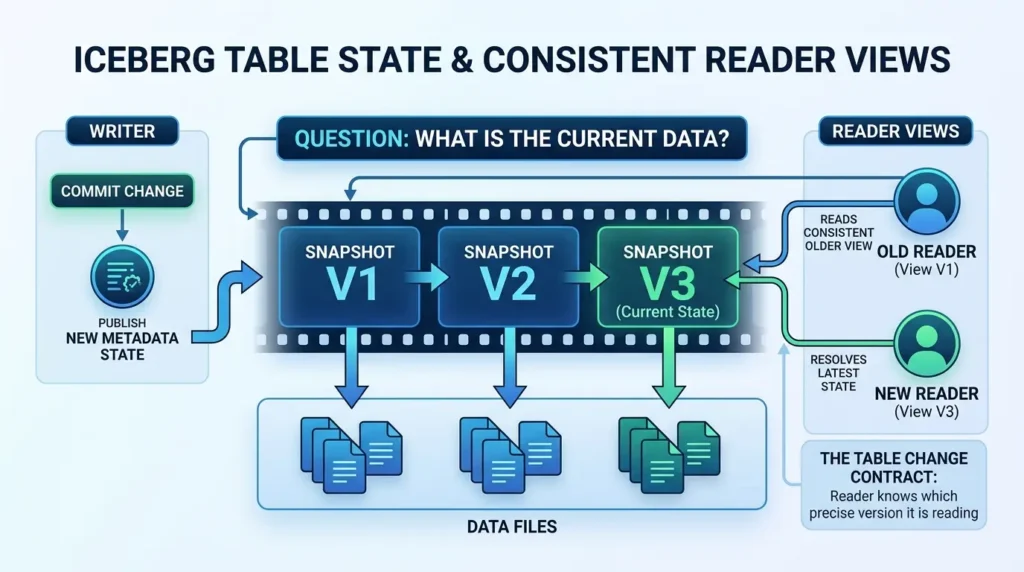
When a writer commits a change, it does not ask every reader to watch a folder while files appear and disappear. It publishes a new metadata state. Readers that have already opened an earlier snapshot can continue reading that view; new readers can resolve the newer one.
This is the first part of the Table Change Contract: a reader should know which version it is reading.
Identity: what does each field mean after the schema changes?
Column names are useful to people, but names alone are a fragile way to track field identity across files. A table may add a column, remove one, reorder fields, widen a type, or rename a field. The stored data should not suddenly change meaning because a name moved.
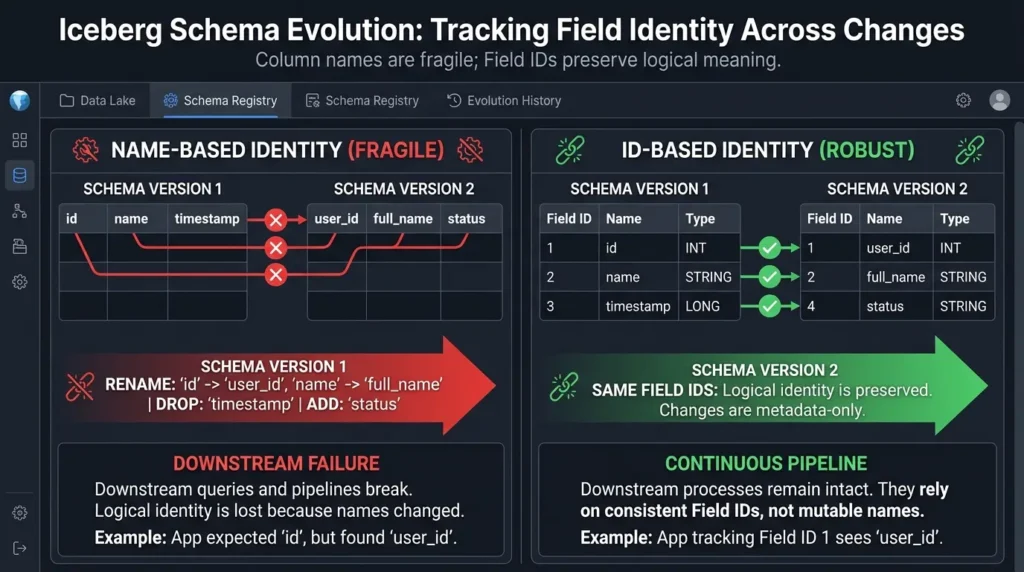
Iceberg’s schema model uses field IDs to preserve identity. Its documentation lists supported schema changes such as adding, dropping, renaming, updating, and reordering fields, including nested structures in the documented cases. Schema updates are metadata changes, so the data files do not need to be rewritten for the schema update itself. See Iceberg’s schema evolution documentation.
This does not mean every schema change is automatically safe in every pipeline. A downstream model can still break if it assumes a field exists, expects a specific type, or applies business logic to a value whose meaning changed. Iceberg protects the table’s structural identity; it cannot validate whether your business definition is still correct.
This is the second part of the contract: a stored value should keep its logical identity even as the schema evolves.
Routing: which files can the query skip?
Analytical tables become expensive when every query has to inspect every file. Partitioning helps by grouping similar rows together, but a partition layout can become a trap when consumers must know its physical details, and the choice of transform, bucket count, and partition column can quietly become a write-bottleneck or a small-file factory at scale.
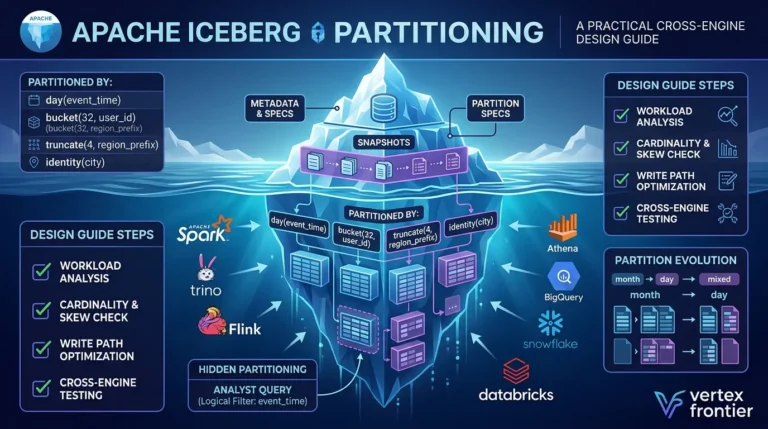
For a practical decision framework on which transform to use, when to use hidden partitioning, and how to validate the layout before going to production, see our companion guide: Apache Iceberg Partitioning: A Practical Design Guide.
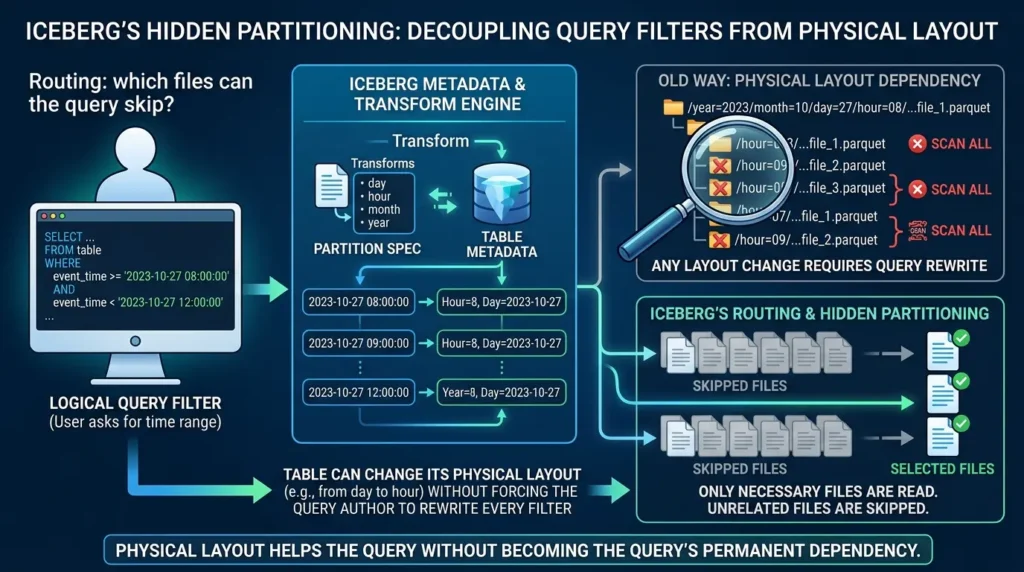
Iceberg’s hidden partitioning separates the logical column used in a query from the physical transform used to organize files. A timestamp column can be transformed into day, hour, month, or year partitions. The query can filter on the timestamp without exposing a separate partition column as part of the table’s logical contract. See Iceberg’s partitioning documentation.
This is more than a convenience. It means the table can change its physical layout without forcing the query author to rewrite every filter around a new directory convention. The query asks for a time range. The table metadata and partition transforms determine which files are relevant.
This is the third part of the contract: the physical layout should help the query without becoming the query’s permanent dependency.
The Coordination Shift
Snapshots answer the state problem. Field IDs answer the identity problem. Partition transforms answer the routing problem. Together, they move decisions from scattered conventions into a table-level contract.
How an Iceberg table is assembled
The architecture becomes easier to understand if you follow a read from the table name to the data file.
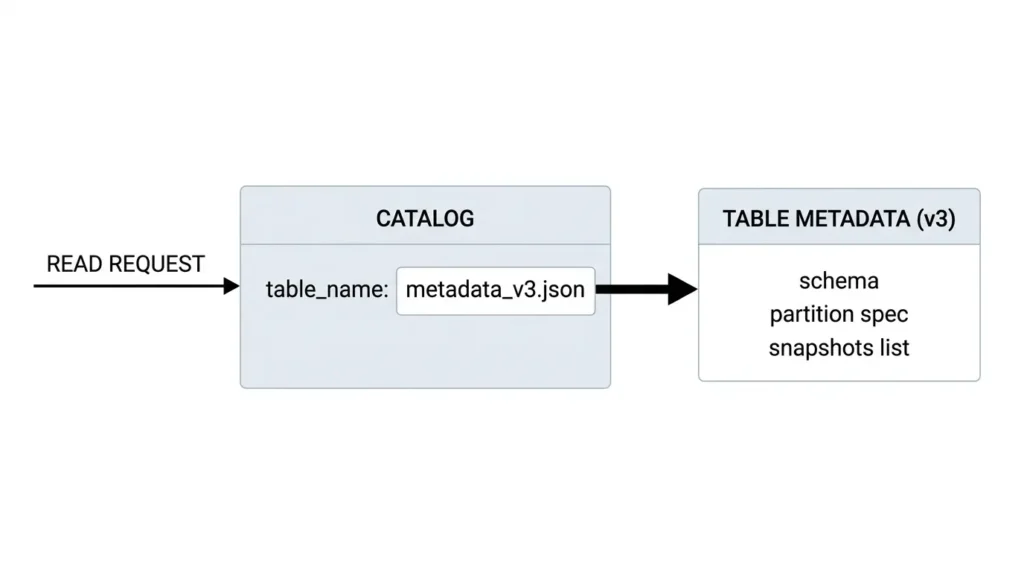
- The catalog points to the current metadata: A catalog gives an engine a way to locate a table and resolve its current metadata. It maintains the table’s identity and the pointer to the current metadata location.
- Table metadata describes the table state: The table metadata records information such as the schema, partition specifications, sort orders, snapshots, and the metadata log. Think of it as the table’s control record.
- A snapshot names one consistent view: Each snapshot represents a table state at a point in the table’s history. The Iceberg table specification describes snapshots, manifest lists, scan planning, and snapshot references as parts of that table state. You can think of a snapshot as a commit boundary.
- Manifest lists and manifests narrow the search: The snapshot points to metadata that describes the data files in that state. Manifest entries can include file paths, partition data, record counts, and field-level metrics.
- Data files hold the rows: The rows remain in data files. Iceberg does not make those files disappear; it gives them a table-level identity and a versioned relationship to one another.
An Iceberg read moves from a table name to a catalog, from the catalog to current metadata, from metadata to a snapshot, from the snapshot to manifests, and only then to the data files that matter.
Iceberg read path at a glance
| Layer | What it answers | What to verify in production |
|---|---|---|
| Catalog | Where is this table and what metadata location is current? | Catalog implementation, authentication, permissions, and commit behavior |
| Table metadata | What schema, partition specs, properties, and snapshots exist? | Metadata retention, format version, and compatible readers |
| Snapshot | Which committed table state should this read use? | Snapshot retention, branches/tags if used, and rollback policy |
| Manifest list and manifests | Which data or delete files belong to that state, and what metrics describe them? | Planning behavior, metadata growth, and maintenance schedule |
| Data and delete files | Where are the rows and row-level delete information stored? | File format, delete semantics, object-store access, and reader support |
This is a conceptual read path. The exact number of remote calls and whether planning occurs on the client or through a catalog service depends on the selected catalog and integration.
The catalog is the control plane
The catalog is more than a directory of table names. It gives engines a way to discover a table, load its current metadata, and commit table changes through the catalog implementation’s coordination mechanism.
The exact behavior for conflict detection, retries, authentication, credential delivery, caching, and multi-table operations depends on the catalog, protocol, client, and deployment configuration. Treat the catalog as a compatibility and governance boundary that must be tested rather than as a universal Iceberg feature.
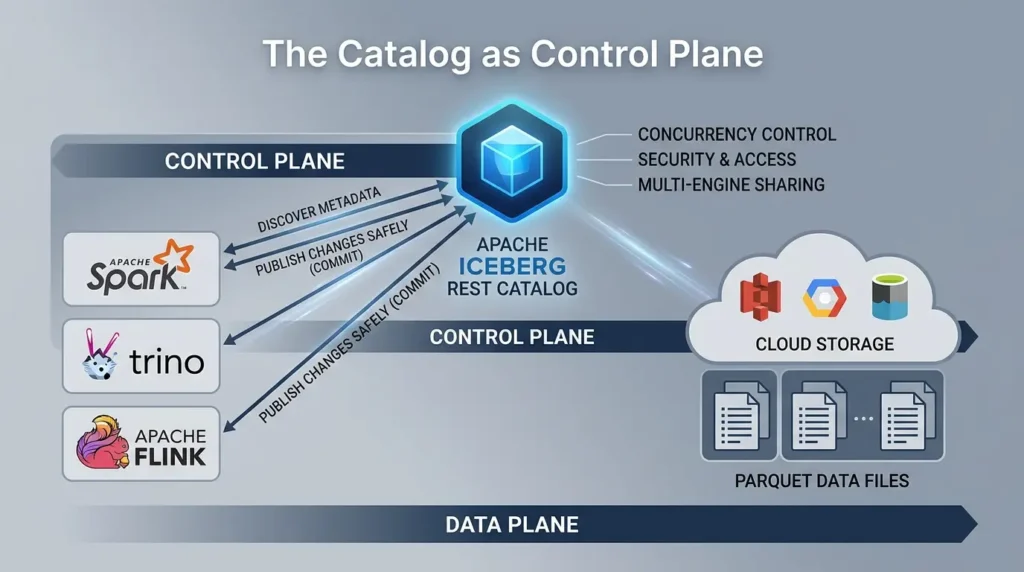
Iceberg’s REST Catalog specification defines a common REST API for managing table metadata and catalog operations. The protocol is designed to improve language and engine compatibility and describes capabilities such as change-based commits, server-side deconfliction and retries, caching, multi-table commits, and credential vending.
These are protocol-level capabilities; a particular catalog server or client may support only a subset, so verify the implementation and version before relying on them in production.
Treat the catalog as part of the table’s control plane. The data files may be in open storage, but the catalog decides how a reader finds the table state and how writers coordinate around it.
A catalog can also be a compatibility boundary
A useful perspective from Datadog’s adoption story is that a REST Catalog does not have to expose the company’s internal metadata system directly. The team described using the REST interface as a stable boundary over an existing backend, which allowed the client contract to remain steady while the implementation evolved, in the Datadog adoption case study.
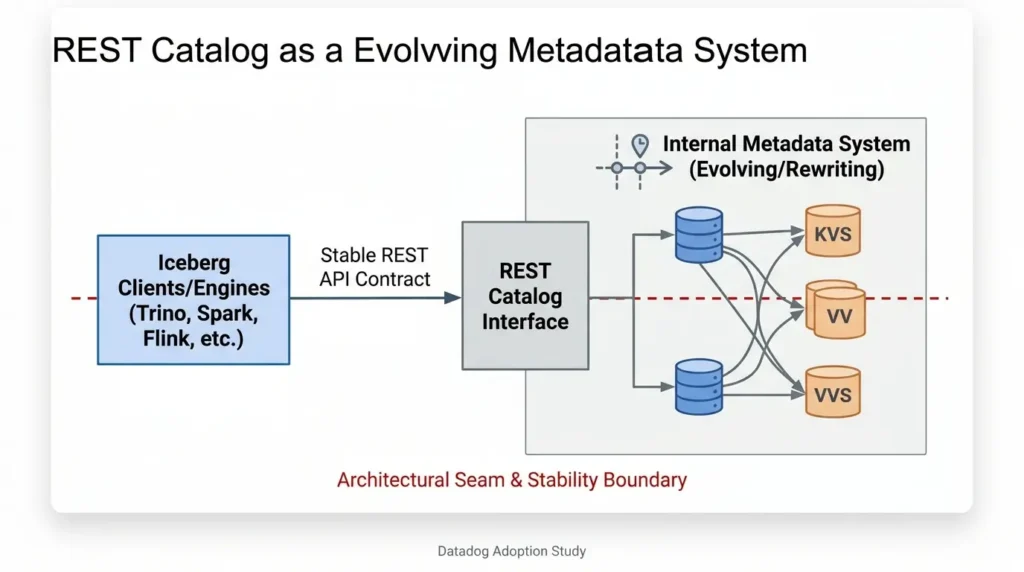
That approach matters for a less obvious reason: the catalog can become an architectural seam. It can shield engines from internal rewrites, but it also creates a responsibility to test the exact behavior that each engine expects. The video’s broader warning is that “Iceberg support” is not a single checkbox. Delete semantics, audit patterns, and write features can differ between engines, so a catalog abstraction does not remove compatibility testing.
A separate Reddit catalog discussion reaches a similar conclusion from the operator’s side: people compare catalogs by deployment effort, moving parts, production maturity, community activity, and upgrade confidence, not by the word “open source” alone.
Deploying Apache Iceberg to Production?
Avoid silent commit conflicts, OOMs during orphan cleanup, and compaction pitfalls. Use our battle-tested Production Readiness Checklist & Runbook.
What happens when a row changes?
Snapshots explain how Iceberg publishes a table state. Row-level operations explain how it gets from one state to the next.
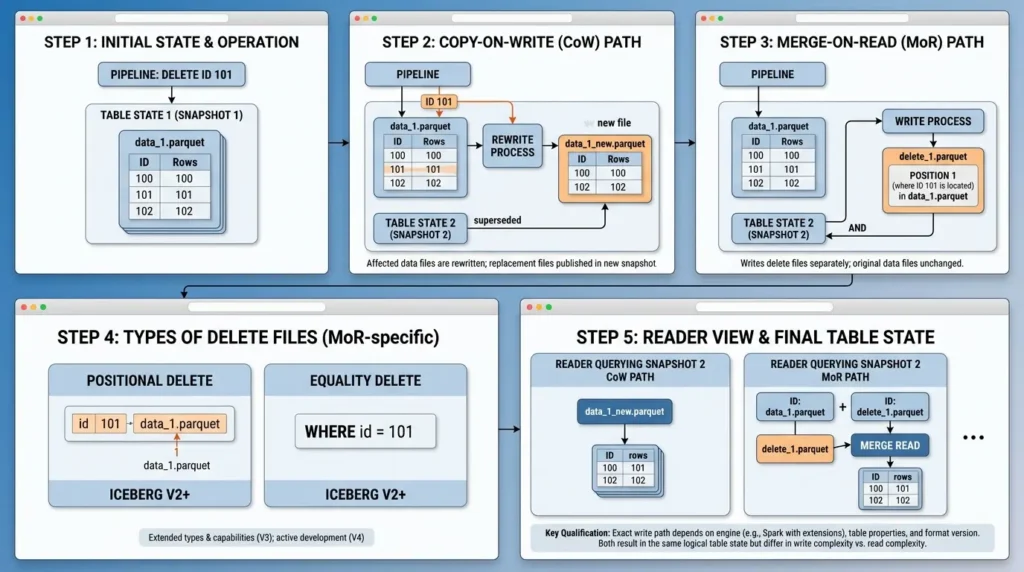
When a pipeline runs UPDATE, DELETE, or MERGE INTO, Iceberg does not edit a row in place inside an object-store file. Depending on the table configuration and engine, it can use Copy-on-Write (CoW) or Merge-on-Read (MoR); the Iceberg configuration reference exposes this choice through delete-mode properties.
| Write Mode | What Happens | When It Can Make Sense |
|---|---|---|
| Copy-on-Write | Rewrites affected data files and publishes replacement files in a new snapshot. | Read-heavy workloads where simpler reads are worth rewriting affected files. |
| Merge-on-Read | Writes delete files separately; readers merge those deletes with the original data files. | Write-heavy or streaming workloads where avoiding immediate rewrites matters. |
Delete files can describe different things. A positional delete identifies a row by its position in a particular data file, while an equality delete identifies rows by one or more column values.
The table specification defines row-level delete behavior by format version: format version 2 adds row-level deletes for immutable data files, while format version 3 adds extended types and capabilities. The current specification states that versions 1, 2, and 3 are complete and adopted; format version 4 is under active development and has not been formally adopted.
The exact write path still depends on the engine, catalog, table properties, and format version. Do not treat “Copy-on-Write” and “Merge-on-Read” as interchangeable guarantees across every Iceberg integration.
The important qualification is that the exact write path depends on the engine, table properties, and format version. The Spark Writes documentation notes that MERGE INTO, DELETE FROM, and UPDATE require Iceberg Spark extensions for the relevant SQL operations, and that Spark can rewrite only affected data files for a merge. Do not treat CoW or MoR as interchangeable labels for every engine.
A row-level change becomes a new table state. The data may be rewritten immediately, or the change may be recorded in delete files for readers to apply later.
Why snapshots matter more than time travel
Time travel is the feature most people remember because it is easy to demonstrate. Query an earlier snapshot, compare results, and roll back if necessary. That is useful, but it is not the deepest reason snapshots exist.
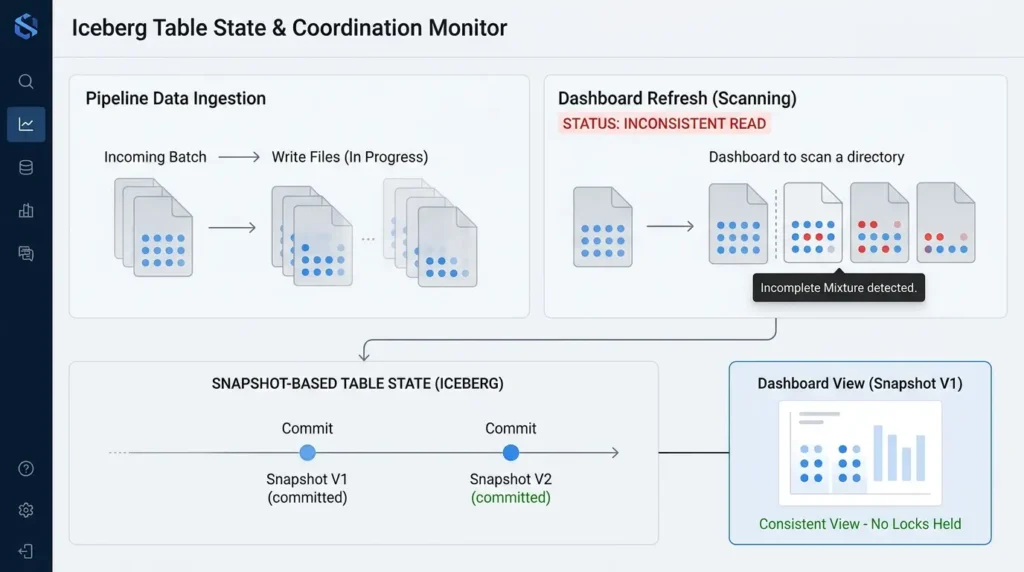
The deeper benefit is coordination.
Imagine a daily pipeline writing a new batch while a dashboard refreshes at the same time. If the dashboard discovers files by scanning a directory, its result depends on exactly when the scan happens. It may see the old set, the new set, or an incomplete mixture. With snapshot-based table state, the dashboard reads one committed view.
The Iceberg reliability documentation describes reliable reads from a consistent snapshot without requiring readers to hold a lock, version history and rollback, and atomic table updates that support serializable isolation. These are the properties that make snapshots operationally useful even when nobody uses a time-travel query.
Time travel is the visible feature. Reduced coordination around table state is the deeper feature.
Time travel is not a historical record
There is a boundary worth making explicit. Iceberg snapshots describe published table states; they are not automatically a durable business-history model. In a Reddit discussion about historical trend reporting, practitioners warned that snapshots may expire, may be expensive to retain for long periods, and can make a business trend depend on hidden table mechanics.
Their practical alternative was to record the history explicitly in an SCD-style or append-only history table when the trend itself is part of the business product.
That distinction makes both designs clearer. Use time travel to reproduce a past state, investigate a bad write, compare versions, or recover from a table-level mistake. Use an explicit history model when a business user needs a stable “what did we believe on each day?” record that survives routine snapshot expiration.
Practitioner Boundary
A snapshot answers: “What did this table contain at that commit?” A history table answers: “What should the business be able to report later, even after maintenance removes old snapshots?”
Schema evolution: changing the table without losing its meaning
Schemas change because the business changes. A product adds a field. An event gains a nested attribute. A metric is renamed. The question is not whether change will happen. It is whether the table can absorb the change without making old data or downstream readers ambiguous.
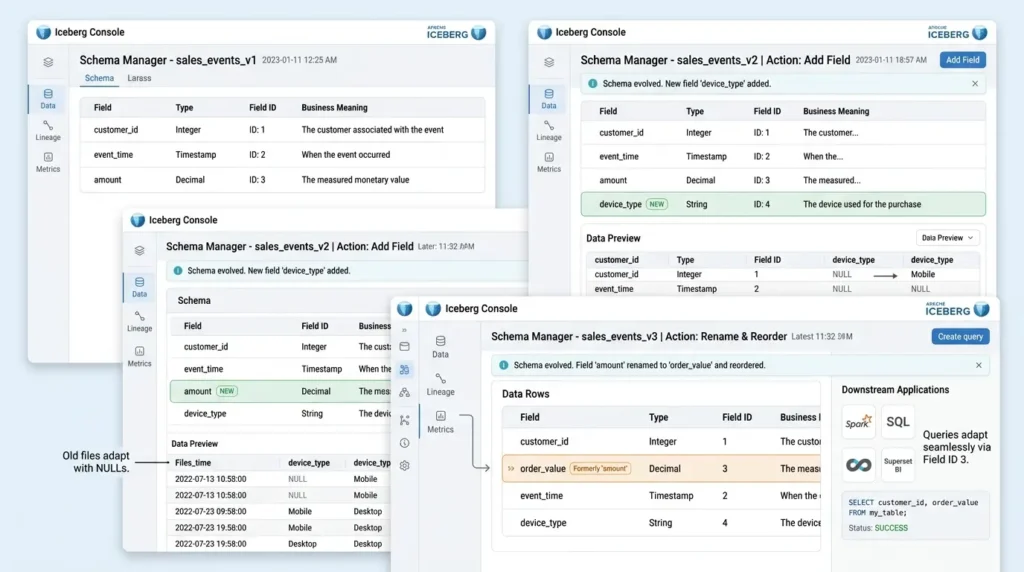
Iceberg documents five common schema operations: add, drop, rename, update, and reorder. It also supports nested structures and uses field IDs to preserve identity. See Iceberg’s schema evolution documentation.
| Field | Business Meaning |
|---|---|
| customer_id | The customer associated with the event |
| event_time | When the event occurred |
| amount | The measured monetary value |
If a new device_type field is added, older files do not contain a value for it. The table can still expose the field with null or default behavior. If amount is renamed to order_value, the table needs to preserve the field’s identity so the rename is not interpreted as “drop one field and create an unrelated field.
Iceberg makes schema change more controlled, not automatic. Stable field identity protects the table’s structure; it does not replace data-quality or consumer-compatibility checks.
Hidden partitioning: physical layout without a public trap
Partitioning is a performance technique. If a query asks for events from one day, a good partition layout helps the engine avoid files for the other days.
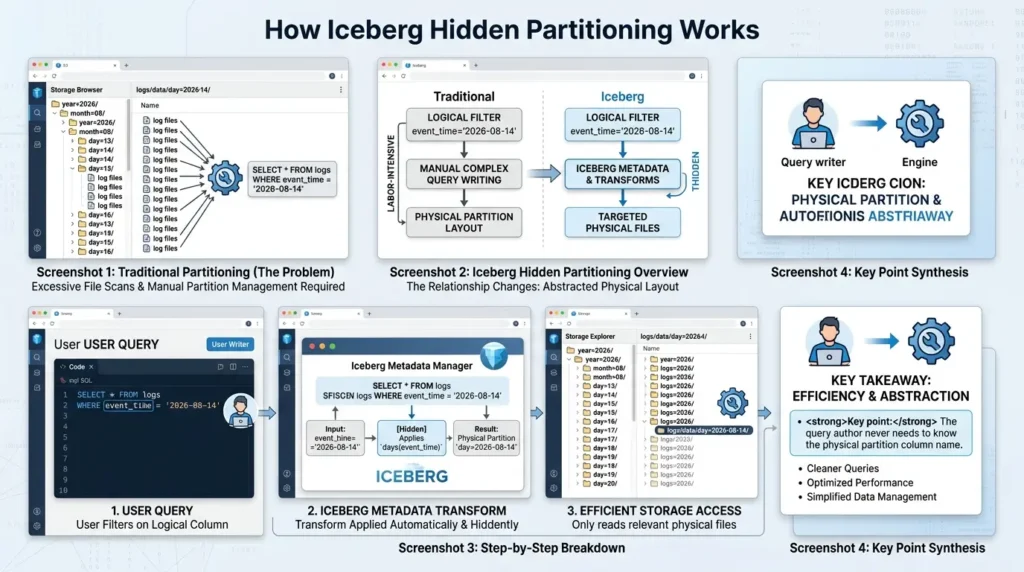
Iceberg’s hidden partitioning changes that relationship. The table can derive partition values from a logical column, and the engine can use those transforms when planning a query. Consumers filter on the logical value rather than manually constructing a filter for the physical partition column. See Iceberg’s partitioning documentation.
How Hidden Partitioning Works
SELECT * FROM logs WHERE event_time >= '2026-08-14 00:00:00' AND event_time < '2026-08-15 00:00:00'Two small Spark SQL examples
The concepts become less abstract when you see how an Iceberg-aware engine exposes them. These examples use Spark SQL. They are intentionally small: the aim is to show the table contract, not turn this guide into a Spark setup manual.
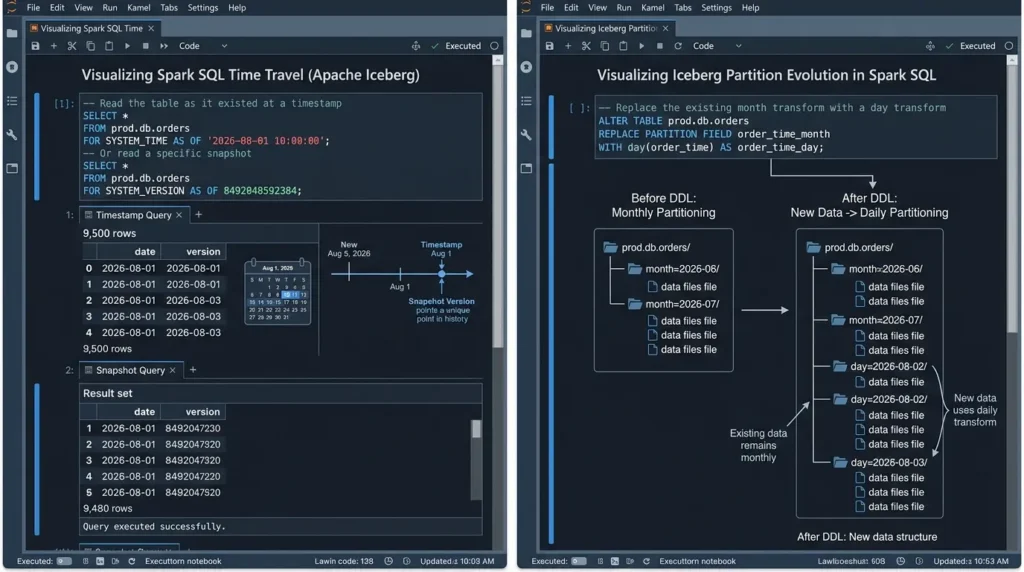
Spark and version boundary
The examples below use Spark SQL with an Iceberg catalog configured in Spark. They are not standalone Spark SQL statements for every catalog. Partition-evolution commands require the relevant Iceberg SQL extensions, and the exact supported syntax depends on the Spark and Iceberg versions in use. Before running an example, verify the catalog configuration, Iceberg runtime package, table identifier, permissions, and table format version against the current documentation.
Read an older table state
Spark supports time travel with either a timestamp or a snapshot/version identifier. See the official Spark Queries documentation.
Spark SQL — Time travel
-- Read the table as it existed at a timestamp
SELECT *
FROM prod.db.orders
FOR SYSTEM_TIME AS OF '2026-08-01 10:00:00';
-- Or read a specific snapshot
SELECT *
FROM prod.db.orders
FOR SYSTEM_VERSION AS OF 8492048592384;
The second query does not ask the storage system to guess which files existed at that moment. It asks the table metadata to resolve a specific version. That distinction is the whole point of the snapshot model.
Evolve the partition layout through metadata
Iceberg’s Spark SQL extensions support adding, dropping, and replacing partition fields. The example below assumes the existing partition field is named order_time_month; the exact field name must match the table’s current partition spec. See the Spark DDL documentation.
Spark SQL — Partition evolution
ALTER TABLE prod.db.orders
REPLACE PARTITION FIELD order_time_month
WITH day(order_time) AS order_time_day;
This is an Iceberg Spark SQL extension and assumes that order_time_month is the actual name of an existing partition field in the current partition spec. Partition evolution is a metadata operation: existing data remains in its earlier layout, while new writes can use the new spec.
Queries continue to express predicates on logical table columns, but planning may handle different partition layouts separately. Validate overwrite behavior after changing a partition spec because dynamic partition overwrites can affect different physical partitions after the change.
Where Iceberg helps in real systems
Iceberg is a good fit when table state, schema change, physical layout, or shared access has become a recurring operational problem.
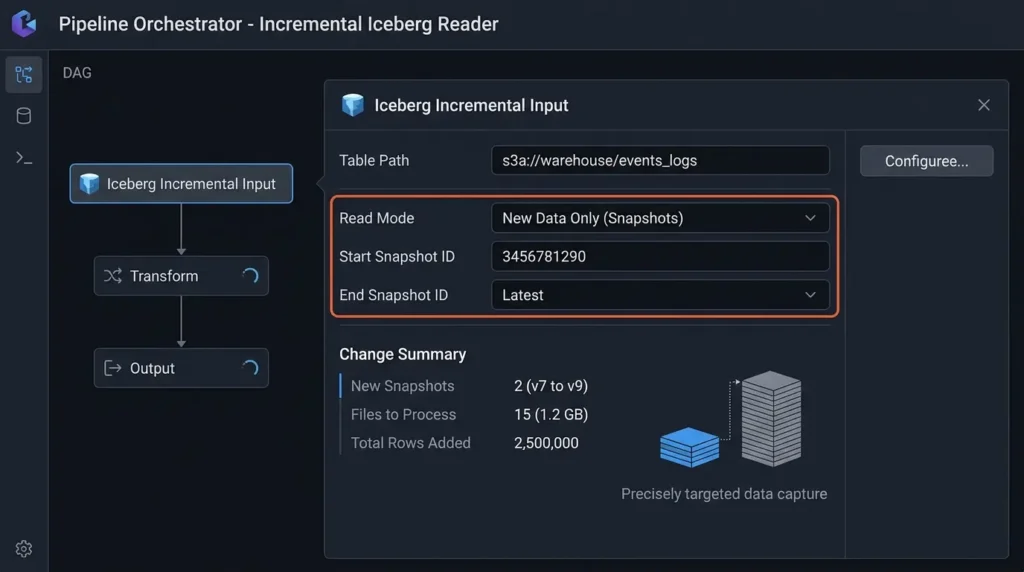
Incremental processing over changing datasets
An incremental pipeline should process new or changed data without repeatedly scanning everything it has already processed. Iceberg snapshots and file-level metadata can give an orchestration system a precise change boundary. Netflix’s published Maestro case study shows what that looks like in practice; the detailed results appear below.
Shared analytical tables across teams
A shared table format can reduce the need to maintain separate copies for every engine or workload. The table still needs access control, ownership, data-quality checks, and a catalog. Iceberg does not remove those responsibilities. It makes the shared table’s state and evolution more explicit.
Long-lived tables whose layout must change
A table that lasts for years will probably outgrow its first partition layout. Iceberg’s schema and partition evolution allow the table’s logical and physical design to change through metadata and versioned specifications. Older data does not have to be rewritten merely because a new partition spec is introduced.
Two real-world examples, and what they actually prove
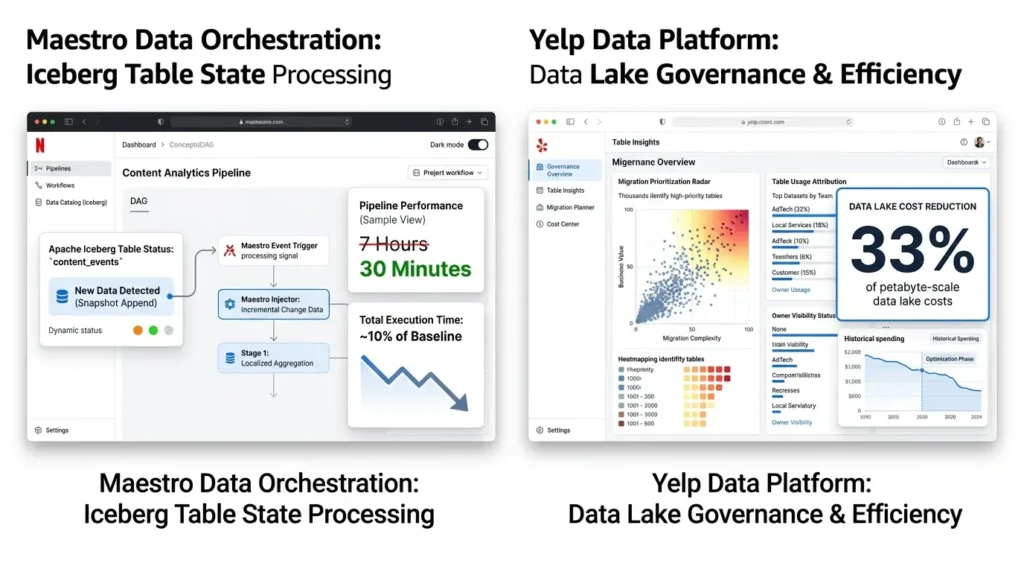
Netflix: the table state became a processing signal
Netflix’s published problem was not “we need a trendy table format.” It was more specific. Large datasets needed fresher processing, late-arriving data made lookback windows expensive, and backfills required manual coordination.
The solution used Maestro and Apache Iceberg together. Netflix created lightweight change-capture tables that referenced new data files without copying the data. Maestro then injected the relevant change data or change ranges into workflows.
Netflix reports a result from a sample pipeline built with Netflix Maestro and an Iceberg-based incremental processing solution: the first stage took about 7 hours in the original lookback-window design and about 30 minutes in the incremental design.
The complete redesigned pipeline used about 10% of the original resources when measured by execution time in that sample. This is a first-party result for a specific Netflix workload, workflow design, configuration, and dataset; it is not a benchmark showing that Iceberg alone will produce the same reduction elsewhere.
Yelp: adoption started with usage visibility
Yelp reports that partition-level usage attribution helped the team prioritize the migration of thousands of tables to Apache Iceberg and identify storage efficiencies that reduced S3 storage cost by 33% across its petabyte-scale data lake.
Yelp attributes the reduction to a broader platform effort that included usage visibility, deletion-based retention, and more cost-effective S3 storage classes, not to Iceberg alone. Treat this as a first-party case study, not as a general Iceberg cost benchmark.
The wording matters. Yelp did not attribute the entire reduction to Iceberg by itself. The result came from usage attribution, migration prioritization, and storage-efficiency work. It shows that a table format succeeds inside an operating model.
Netflix shows how Iceberg metadata can support targeted processing. Yelp shows why platform visibility and governance matter. Neither case supports the idea that Iceberg is a one-click performance upgrade.
Table maintenance is part of the design
The table layer does not end when a write commits. Every write can create a new snapshot, more metadata, and more files. Over time, a healthy production table needs a maintenance rhythm.
| Maintenance Task | Why It Exists | What to Watch |
|---|---|---|
| Expire snapshots | Removes historical snapshots and metadata no longer needed for time travel or rollback. | Retention windows, audit needs, and active readers. |
| Compact data files | Combines many small files into larger files that are easier to plan and read. | File size targets, write frequency, and query patterns. |
| Remove orphan files | Cleans physical files left behind after failed or abandoned writes. | Safety intervals so an in-flight writer is not mistaken for an orphan. |
The official maintenance guide distinguishes recommended maintenance from workload-dependent operations. Snapshot expiration and orphan-file deletion address metadata and unused-file lifecycle, while data-file compaction and manifest rewrites are optional operations that may be useful when file sizes, write patterns, or query-planning costs justify them.
Orphan-file deletion must use a retention interval longer than the maximum expected write duration; an interval that is too short can delete files from an in-progress write and corrupt the table.
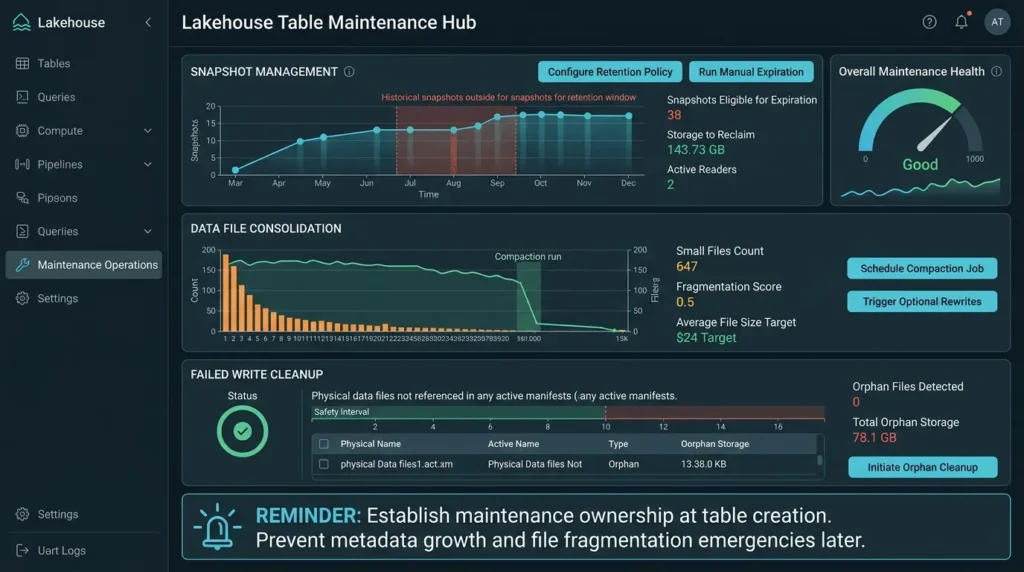
Create maintenance ownership at the same time you create the table. Otherwise, metadata growth and file fragmentation become someone’s emergency later.
The production failure modes are connected
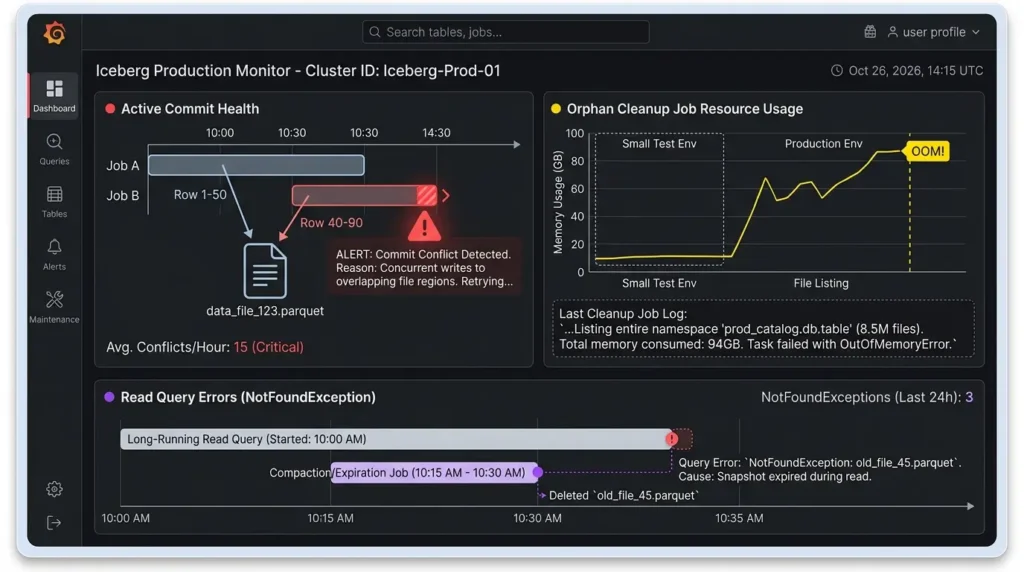
A 2026 Apache Iceberg production talk highlighted three failure modes that are easy to miss in a small test environment. They are not new features; they are consequences of scale and concurrency.
| Failure Mode | Why It Surprises Teams | Design Response |
|---|---|---|
| Commit conflict | Optimistic concurrency validates at the data-file level, so different rows can still conflict when they share a file. | Reduce file overlap, isolate write domains, and coordinate compaction with ingestion. |
| Orphan cleanup OOM | Cleanup cost can follow the total storage listing, not just the number of orphan files. | Scope cleanup, use targeted file lists where supported, and size the job for the namespace. |
| Reader sees NotFoundException | A long-running reader may still need a file that cleanup has deleted after the file stopped being referenced by retained snapshots. | Set retention around the maximum reader lifetime, coordinate compaction and expiration with workload duration, and test the cleanup policy before production use. |
This is an operational retention risk, not a claim that Iceberg can validate every active reader before cleanup. The official maintenance documentation explains when snapshots and their data files become eligible for removal; a production policy must add the maximum reader lifetime, job retry window, and recovery requirements for the deployment.
Maintenance safety checklist
Before scheduling maintenance, define the maximum expected write duration, maximum reader duration, retry window, time-travel or rollback retention, and recovery owner. Expire snapshots only after confirming that the retention window matches audit and rollback requirements.
Run orphan-file deletion only with a retention interval longer than any in-flight write and only after validating path consistency. Compact data files when small-file overhead is material to the workload, and measure the effect rather than assuming compaction always improves performance.
The lessons above come from a practitioner talk on debugging Iceberg in production, not from a universal benchmark, but they sharpen the operating model. In Iceberg, correctness is not only about publishing a coherent snapshot. It is also about keeping the files, metadata, writers, and readers alive long enough for the workload to finish.
A separate Reddit maintenance discussion points to the organizational side of the same problem: teams often move expiration, compaction, and cleanup into scheduled Airflow or Spark jobs, or choose a managed service to reduce the amount of infrastructure they own. The important decision is not whether maintenance is “automatic.” It is who owns the schedule, retention policy, alerts, and recovery path.
Common mistakes when people adopt Iceberg
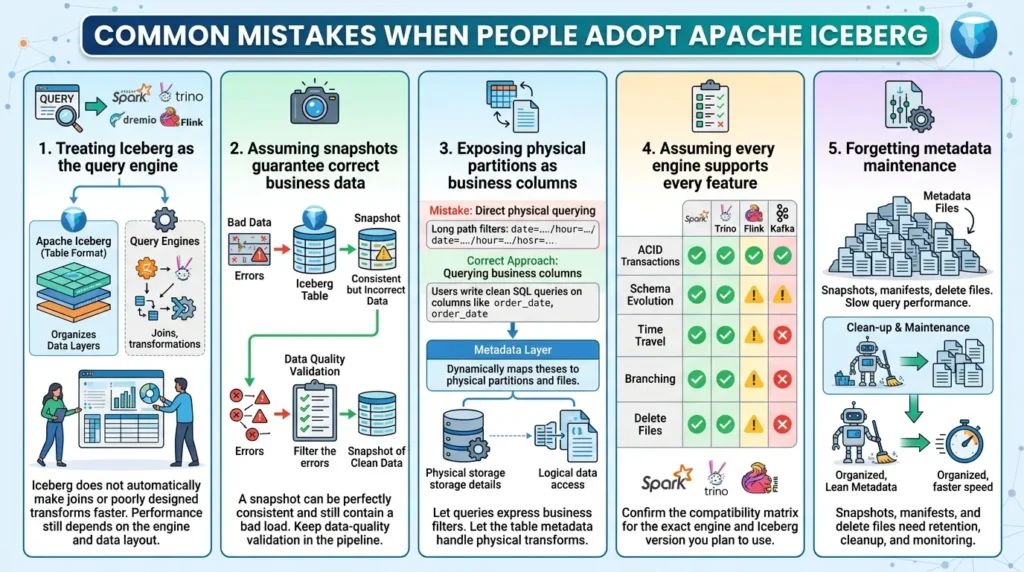
Treating Iceberg as the query engine
Iceberg does not make joins or poorly designed transformations faster by definition. Performance still depends on the engine and data layout.
Assuming snapshots guarantee correct business data
A snapshot can be perfectly consistent and still contain a bad load. Keep data-quality validation in the pipeline.
Exposing physical partitions as business columns
Let queries express business filters. Let the table metadata handle physical transforms.
Assuming every engine supports every feature
Confirm the compatibility matrix for the exact engine and Iceberg version you plan to use.
Forgetting metadata maintenance
Snapshots, manifests, and delete files need retention, cleanup, and monitoring.
A before-and-after workflow
| Situation | Before a Table Format | With an Iceberg Table Layer |
|---|---|---|
| New data published | Readers infer completeness from files. | Writer publishes state through metadata. |
| Reader starts during write | Result depends on timing and listings. | Reader resolves a consistent snapshot. |
| Column is renamed | Relies on name-based conventions. | Field identity survives the change. |
| Late event arrives | Fixed lookback window used. | Workflow targets affected files/ranges. |
Production compatibility checklist
| Question | Why it matters |
|---|---|
| Which engine and exact version will read and write the table? | SQL syntax, row-level operations, branches, and schema behavior vary by integration. |
| Which Iceberg runtime/library and table format version are enabled? | Feature availability and forward-compatibility depend on the version boundary. |
| Which catalog will coordinate table discovery and commits? | Conflict handling, credentials, caching, and multi-table behavior are catalog-specific. |
| Which storage system and file formats are used? | Permissions, path behavior, deletes, and file I/O must be compatible. |
| Who owns snapshot expiration, compaction, orphan cleanup, and alerts? | A table can remain logically correct while operational metadata and file health degrade. |
| What is the maximum reader and writer lifetime? | Retention that is too short can remove files required by active work. |
Do not mark a combination “supported” because a single local test succeeded. Record the tested versions, configuration, permissions, workload, and maintenance policy.
When should you consider Apache Iceberg?
You probably have a table-layer problem when several of these statements are true:
- More than one compute engine needs to read or write the same analytical table.
- Readers and writers sometimes disagree about which files represent the current data.
- Schema changes create repeated downstream breakage or expensive rewrites.
- Queries and jobs depend on physical partition directories.
- Late-arriving data forces broad lookback windows and repeated processing.
- You need an open storage layer without giving every workload its own copy.
Bottom Line
Apache Iceberg is easiest to understand when you stop viewing it as another file format.
It is a table layer for a world where data lives in distributed storage, several engines need access, schemas change, partitions age, and pipelines sometimes have to revisit the past. Its metadata answers which files belong to a table state. Its schema model helps preserve field identity. Its partition model separates the way a query thinks about data from the way files happen to be organized.
The most useful starting point is not a feature checklist. Find one recurring failure in your current platform: a reader that sees partial data, a schema change that forces a rewrite, a partition convention that has leaked into application code, or a pipeline that repeatedly reprocesses unchanged history.
Then ask whether a table-level contract would remove that failure.
If the answer is yes, Iceberg is worth a serious architecture review. If the answer is no, adding it may only give your existing complexity a more sophisticated name.
Ready to take Apache Iceberg from design to production?
Don’t reinvent the wheel. Download our complete Production Readiness Checklist covering catalog hardening, automated compaction crons, commit conflict isolation, and SLA monitoring templates.
Apache Iceberg FAQ
What is Apache Iceberg used for?
Apache Iceberg is used to manage large analytical tables whose data files live in distributed storage. It is useful when a platform needs committed table snapshots, schema evolution, partition evolution, time travel, and access from multiple compatible compute engines. The exact capabilities depend on the engine, catalog, storage system, and Iceberg table format version.
How does Apache Iceberg work?
A catalog resolves a table to its current metadata. The metadata identifies the current snapshot, and the snapshot identifies the data and delete files that make up a committed table state. Manifest lists, manifests, partition information, and file-level metrics help an engine plan which files may need to be read. The exact planning path depends on the catalog and engine integration.
What problem does Apache Iceberg solve?
Apache Iceberg addresses the problem of treating a changing collection of analytical files as a reliable table. It gives readers a committed table state, tracks field identity through supported schema changes, and records partition and file metadata that can help engines plan scans. It does not replace data-quality validation, governance, orchestration, or query-engine tuning.
Is Apache Iceberg a data lakehouse?
Apache Iceberg can be part of a data lakehouse architecture, but it is not the entire lakehouse. A lakehouse typically combines storage, table management, compute engines, governance, and operational processes. Iceberg supplies the table format and metadata layer; the surrounding platform still needs a catalog, access controls, orchestration, monitoring, and data-quality practices.
Does Apache Iceberg provide ACID-style table guarantees?
The Apache Iceberg specification and reliability documentation describe atomic table updates, consistent snapshots, serializable isolation, and reliable reads for supported table operations. These guarantees depend on the relevant engine, catalog, and storage configuration. They do not automatically validate business rules, data quality, permissions, or the correctness of every surrounding pipeline.
What is hidden partitioning in Apache Iceberg?
Hidden partitioning means that Iceberg can derive partition values from logical table columns, such as transforming a timestamp into a day, without requiring users to maintain a separate business-facing partition column. Queries can use the logical column, while the table metadata and engine use partition transforms and file metadata for planning. Physical paths and pruning results still depend on the table, catalog, engine, and storage implementation.
What do you need to deploy Apache Iceberg?
You need a compatible compute engine, an Iceberg catalog, a supported storage system, and a compatible Iceberg runtime or library. You must also define the table schema, partition specification, permissions, retention policy, and maintenance ownership. Before production use, verify the exact engine version, catalog implementation, storage and file formats, table format version, required SQL extensions, and reader and writer lifetime assumptions.
When is Apache Iceberg a better fit than Hive-style table management?
Apache Iceberg can be a better fit when a data platform needs committed snapshots, schema or partition evolution, hidden partitioning, or shared table access across compatible engines. The decision is not simply a speed comparison. It depends on the engine and catalog ecosystem, workload, storage layout, governance requirements, maintenance model, and the operational problems the team is trying to remove.
📋 Article Timeline & History
Successfully updated on September 27, 2026 with the latest details.
This article was originally published on August 14, 2026.

Was this article helpful?



[…] Apache Iceberg Explained: The Table Layer That Makes Data Lakes Behave Like Tables […]
[…] you are comparing Apache Iceberg and Apache Parquet as though they were rival file formats, you have already been handed the wrong […]
[…] distinction does not mean you are replacing Parquet. Iceberg tables commonly continue to use Parquet as their data-file format. The migration adds a table contract […]
[…] you are comparing Apache Iceberg vs Delta Lake vs Hudi, you are probably not looking for another feature checklist. You want to know […]
[…] you need the general mechanics of Iceberg before evaluating the Snowflake boundary, the Apache Iceberg guide from Vertex Frontier covers the format’s broader architecture. This article focuses on the part that creates most […]
[…] does not replace object storage, a query engine, a catalog, or access control. Vertex Frontier’s Apache Iceberg guide explains this distinction through snapshots, metadata, schema evolution, and physical […]
[…] you need the general architecture first, Vertex Frontier’s Apache Iceberg guide explains snapshots, field identity, hidden partitioning, and table state. For the distinction […]
[…] of Iceberg’s table format, snapshots, metadata, and schema evolution, see Vertex Frontier’s Apache Iceberg guide. This article stays focused on the partitioning […]