
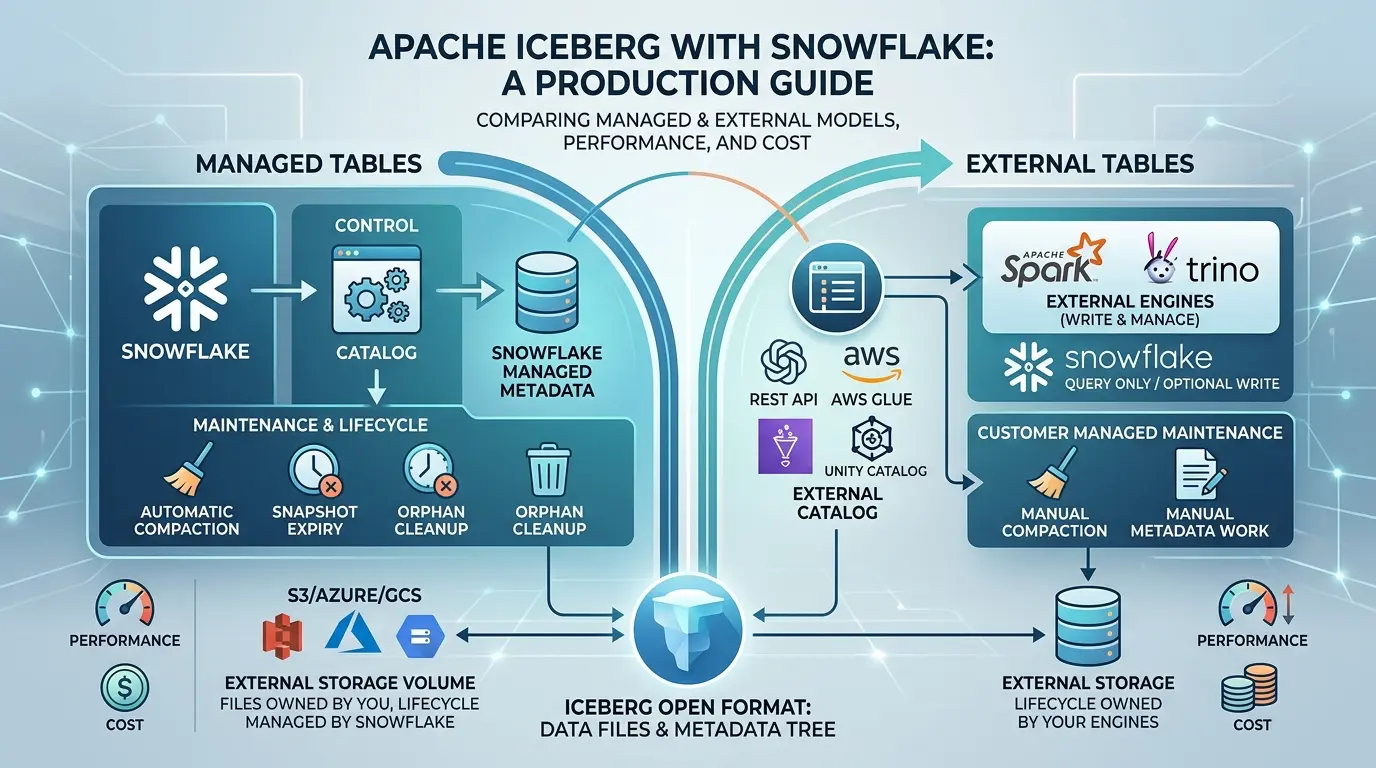

Snowflake does not have one single “Iceberg mode.” It has several ways to work with Apache Iceberg, and each one gives a different system control over the catalog, metadata, storage, writes, maintenance, and external-engine access.
That distinction matters more than the file format itself. A Snowflake-managed Iceberg table can keep its Parquet and Iceberg metadata in storage you control while Snowflake manages the table catalog and lifecycle. An externally managed table can keep the catalog outside Snowflake and still be queried or, under current documented REST-catalog workflows, written from Snowflake. A third path may expose a table to external engines through Snowflake Horizon Catalog.
The right question is therefore not simply “Does Snowflake support Apache Iceberg?” The useful question is:
Which system should own each layer of the table, and what will that ownership cost you operationally?
This guide answers that question with a production-oriented framework. It covers managed and external tables, catalog options, external volumes, metadata, copy-on-write versus merge-on-read, Iceberg v2 and v3, external engines, performance, cost, maintenance, limitations, and the cases where Iceberg is the wrong level of complexity.
Key Takeaways
Click any topic to expand or collapseSnowflake-managed vs. Externally managed Iceberg tables
Snowflake-managed and externally managed Iceberg tables represent fundamentally different operating models, not two naming variations for the same architecture.
Total Cost of Ownership (TCO) implications
Customer-managed external storage reduces Snowflake direct storage ownership, but it does not eliminate compute warehouse usage, cloud service layer charges, table maintenance overhead, catalog fees, or cross-region data transfer costs.
External REST Catalog & lifecycle responsibilities
An external REST catalog preserves open-table ownership and enables multi-engine access, but external compute engines and catalog orchestration remain fully responsible for critical table maintenance, compaction, and lifecycle operations.
Snowflake Horizon REST catalog access
Snowflake documentation supports Horizon REST read/write integration for Snowflake-managed Iceberg v2 and v3 tables, contingent on appropriate RBAC roles, querying engines, storage credentials, and spec compatibility conditions.
Choosing the optimal architecture
The strongest use case for Iceberg is a shared multi-engine data lakehouse ecosystem. If Snowflake is the sole consumer of the dataset, native Snowflake tables, Snowpipe ingestion, or standard external table wrappers offer superior operational simplicity.
Free Vertex Frontier Toolkit
Apache Iceberg with Snowflake Production Readiness Kit
Download the editable Architecture Decision Workbook and the professional Production Readiness Guide. Use them to choose the catalog, assign ownership, test v2/v3 compatibility, plan maintenance, benchmark the real workload, model distributed cost, and make a Go / No-Go decision.
PDF + Excel
What does Apache Iceberg with Snowflake mean?
Apache Iceberg is an open table format for managing large collections of data files as tables. It adds table-level metadata, snapshots, schema evolution, hidden partitioning, and atomic commits around immutable data files. The Apache Iceberg table specification describes the table state, snapshots, manifests, catalogs, concurrency model, and format versions.
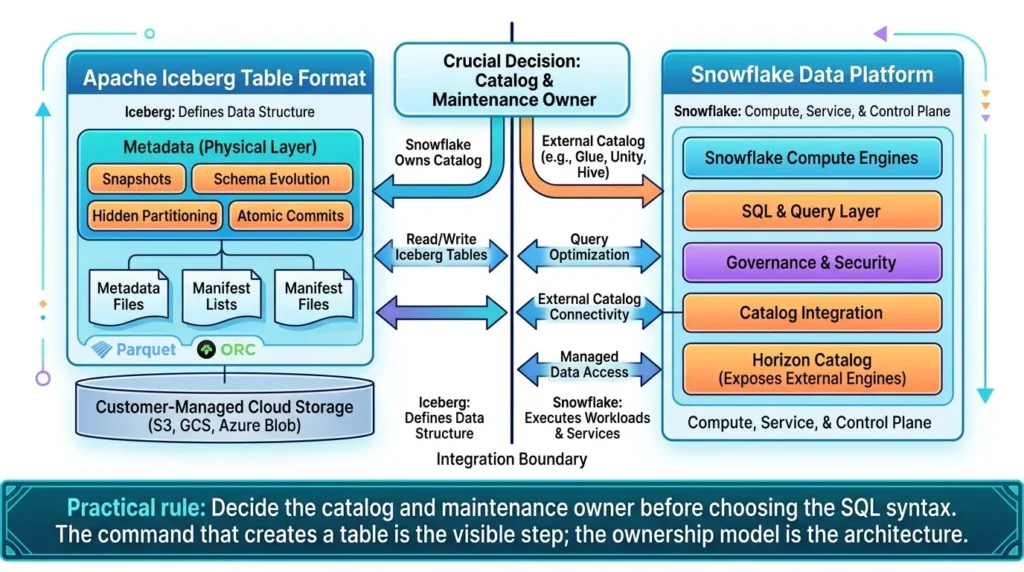
Snowflake provides a compute, SQL, governance, and catalog integration layer around that format. It can read and write Iceberg tables, connect to external catalogs, store files in customer-managed cloud storage, and expose Snowflake-managed tables to external engines through Horizon Catalog. The exact behavior depends on how the table was created and who owns the external catalog.
If you need the general mechanics of Iceberg before evaluating the Snowflake boundary, the Apache Iceberg guide from Vertex Frontier covers the format’s broader architecture. This article focuses on the part that creates most production confusion: the division of responsibility between Snowflake and the rest of the data platform.
The same ownership questions apply on Google’s warehouse: our Apache Iceberg on BigQuery field guide shows how BigQuery splits catalog, storage, and compute responsibilities for Iceberg tables.
The ownership map: who controls what?
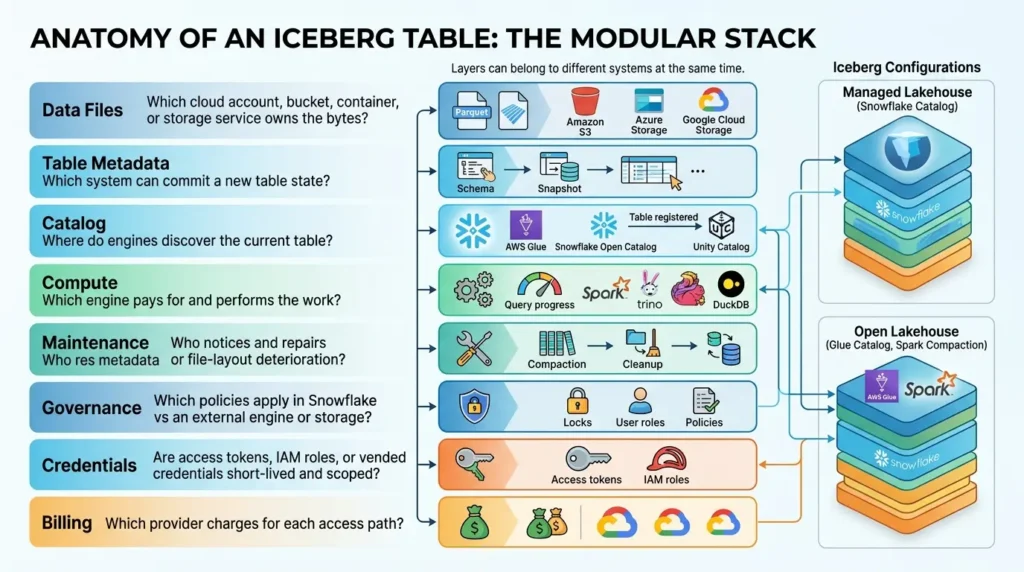
An Iceberg table has several layers that are easy to blur together. The data files may live in Amazon S3, Azure Storage, Google Cloud Storage, or another supported location. The catalog may be Snowflake, a remote REST catalog, AWS Glue, Snowflake Open Catalog, Unity Catalog, or another implementation. The compute may be Snowflake, Spark, Trino, Flink, DuckDB, or several of them.
Those layers can belong to different systems at the same time.
| Layer | What it controls | Question to answer |
|---|---|---|
| Data files | Parquet files containing table rows | Which cloud account, bucket, container, or storage service owns the bytes? |
| Table metadata | Schema, snapshots, partition specs, properties, and metadata pointers | Which system can commit a new table state? |
| Catalog | The current metadata pointer and atomic table registration | Where do engines discover the current table? |
| Compute | Query planning, scans, transformations, and DML execution | Which engine pays for and performs the work? |
| Credentials | Access to Snowflake objects, catalogs, and storage | Are access tokens, IAM roles, or vended credentials short-lived and scoped? |
| Maintenance | Compaction, snapshot expiry, orphan cleanup, manifest work, and refresh | Who notices and repairs metadata or file-layout deterioration? |
| Governance | Roles, masking, row access, policies, tags, and audit boundaries | Which policies apply in Snowflake and which apply in the external engine or storage layer? |
| Billing | Compute, cloud services, storage, optimization, catalog/API calls, and transfer | Which provider charges for each access path? |
This map explains why two teams can both say “we use Iceberg with Snowflake” while operating very different systems. One may use Snowflake as the catalog and Snowflake-managed optimization. Another may use AWS Glue or a REST catalog, Spark for writes, Snowflake for BI, and a separate Spark job for compaction.
The three practical Snowflake operating models
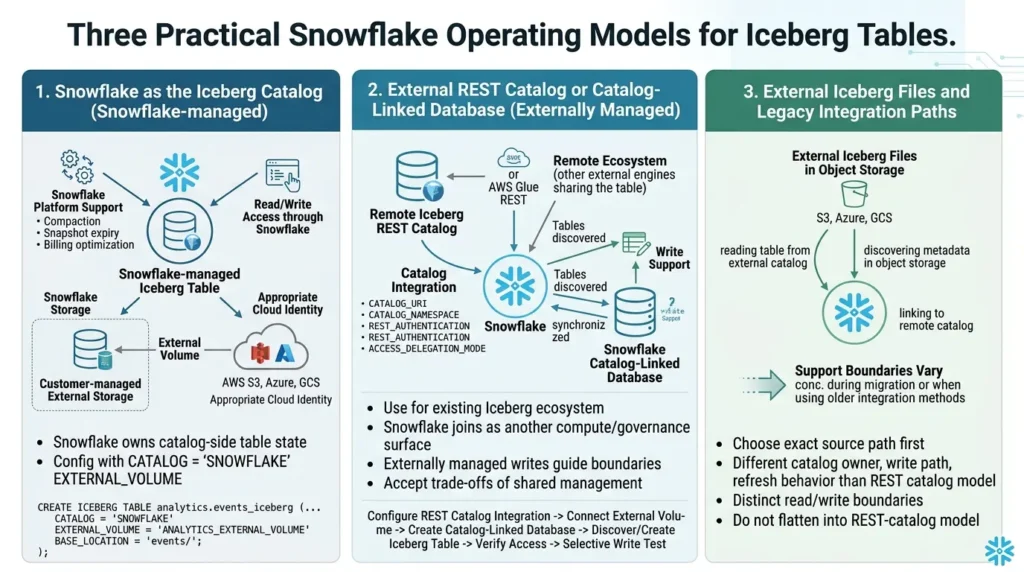
Snowflake as the Iceberg catalog
When Snowflake is the Iceberg catalog, the table is commonly described as a Snowflake-managed Iceberg table. Snowflake owns the catalog-side table state and provides read/write access through Snowflake. The data and metadata can be stored in Snowflake storage or in customer-managed external storage connected through an external volume.
The current Snowflake Iceberg table documentation describes Snowflake-managed tables as receiving fuller Snowflake platform support. It also documents lifecycle features such as compaction, manifest compaction, and snapshot expiry, while noting important differences in storage and optimization billing.
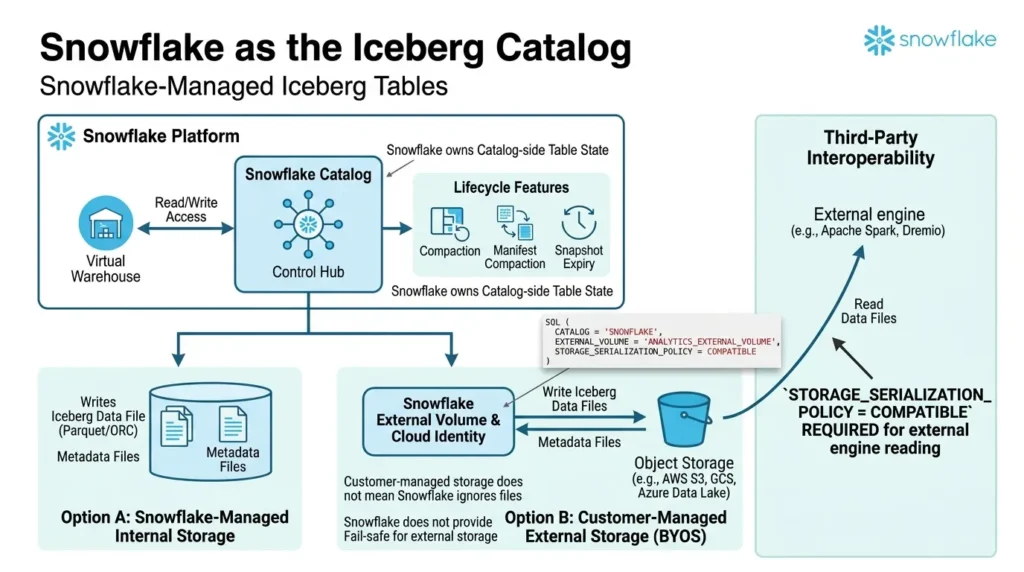
Customer-managed storage does not mean that Snowflake ignores the files. Snowflake still needs an external volume and the appropriate cloud identity to access data files, Iceberg metadata, and manifest files. The storage owner remains responsible for the external location’s protection and recovery model. Snowflake does not provide Fail-safe storage for Iceberg tables stored in external locations.
An illustrative Snowflake SQL shape looks like this:
SQL:
-- Illustrative Snowflake SQL.
-- Validate the current syntax and storage options for your account.
CREATE OR REPLACE ICEBERG TABLE analytics.events_iceberg (
    event_id   STRING,
    event_ts   TIMESTAMP_NTZ,
    payload    VARIANT
)
CATALOG = 'SNOWFLAKE'
EXTERNAL_VOLUME = 'ANALYTICS_EXTERNAL_VOLUME'
-- Use COMPATIBLE when third-party engines must read the files.
STORAGE_SERIALIZATION_POLICY = COMPATIBLE
BASE_LOCATION = 'events/';
The important design decision is not the table name. It is the combination of CATALOG, EXTERNAL_VOLUME, storage location, Iceberg version, write behavior, and external-engine requirements. Snowflake’s CREATE ICEBERG TABLE reference separates the syntax for Snowflake as the catalog from the syntax for REST catalogs, object-storage files, and catalog-linked databases. Do not copy one variant into another.
If Horizon Catalog or another third-party engine will read Snowflake-written files, review STORAGE_SERIALIZATION_POLICY before the first production write. Snowflake’s current SQL reference documents COMPATIBLE for third-party engine interoperability and OPTIMIZED for Snowflake-oriented serialization; the documented default is not a universal interoperability guarantee.
An external REST catalog or catalog-linked database
In an externally managed model, the current Iceberg catalog remains outside Snowflake. Snowflake uses a catalog integration to understand how the table metadata is organized and where to find the external catalog.
The current catalog integration documentation describes integrations for external catalogs, Iceberg REST catalogs, Snowflake Open Catalog, and related workflows.
A catalog-linked database can automatically discover namespaces and tables from a remote REST catalog and keep them synchronized in Snowflake.
This model is especially useful when an existing Iceberg ecosystem already has a catalog and external engines. Snowflake can become another compute and governance surface without becoming the only system that knows the table exists.
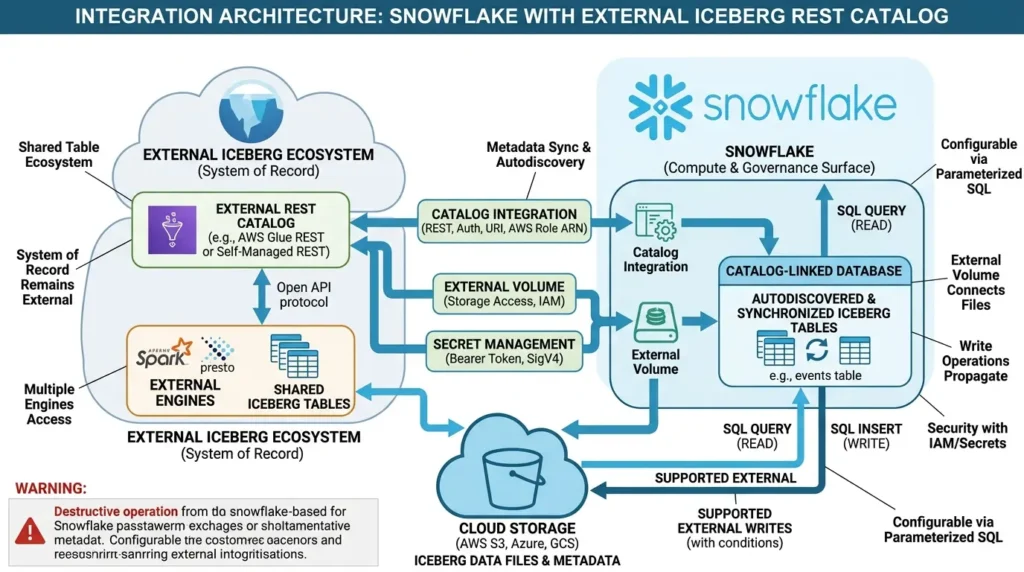
The older mental model, “external Iceberg tables are read-only in Snowflake”, is no longer safe as a general statement. Current Snowflake documentation describes write support for externally managed tables that use a remote Iceberg REST catalog. The workflow has conditions: the catalog must support the documented REST protocol, credentials and storage access must be configured, and the selected database and table-creation path matter. The externally managed writes guide is the primary reference for those boundaries.
Choose the external-catalog path when…
The external catalog is already the system of record, several engines must share the table, or you want Snowflake to join an existing open-table ecosystem. Accept the trade-off: the catalog and external engine remain part of the operating model, and Snowflake does not automatically own every maintenance task.
A complete REST Catalog + External Volume template
The following template shows the sequence an engineer usually needs: configure the remote REST catalog integration, connect the table files through an external volume, create a catalog-linked database, create or discover the Iceberg table, and verify access. It is Snowflake SQL, but it is intentionally parameterized.
Replace every value in angle brackets, complete the provider-side IAM or OAuth trust setup, and keep tokens in Snowflake’s approved secret-management workflow rather than committing them to source control.
The parameter names below follow Snowflake’s current REST catalog integration reference, catalog-linked database reference, and REST Iceberg table reference.
SQL:
-- 0) Prerequisites outside this block:
--    * The remote catalog implements the Iceberg REST OpenAPI specification.
--    * The external volume's storage trust policy is configured.
--    * The bearer token or OAuth/SigV4 credentials are stored securely.
--    * The executing role has CREATE EXTERNAL VOLUME, CREATE INTEGRATION,
--      CREATE DATABASE, USAGE on the external volume, and USAGE on the catalog integration.

-- 1) Create the external volume used by this external-volume workflow.
--    This is an AWS S3 example; Azure, GCS, and S3-compatible syntax differs.
CREATE OR REPLACE EXTERNAL VOLUME ICEBERG_EXTERNAL_VOLUME
  STORAGE_LOCATIONS = (
    (
      NAME = 'primary_s3'
      STORAGE_PROVIDER = 'S3'
      STORAGE_BASE_URL = 's3://<BUCKET>/<PREFIX>/'
      STORAGE_AWS_ROLE_ARN = '<S3_IAM_ROLE_ARN>'
      ENCRYPTION = ( TYPE = 'AWS_SSE_S3' )
    )
  )
  ALLOW_WRITES = TRUE;

-- 2) Connect Snowflake to a generic REST catalog.
--    For OAuth or SigV4, use the corresponding REST_AUTHENTICATION block
--    documented by Snowflake instead of the bearer-token variant below.
CREATE OR REPLACE CATALOG INTEGRATION EXT_REST_ICEBERG_INT
  CATALOG_SOURCE = ICEBERG_REST
  TABLE_FORMAT = ICEBERG
  CATALOG_NAMESPACE = '<REMOTE_NAMESPACE>'
  REST_CONFIG = (
    CATALOG_URI = '<REST_CATALOG_BASE_URL>'
    ACCESS_DELEGATION_MODE = EXTERNAL_VOLUME_CREDENTIALS
  )
  REST_AUTHENTICATION = (
    TYPE = BEARER
    BEARER_TOKEN = '<BEARER_TOKEN_SECRET>'
  )
  ENABLED = TRUE
  REFRESH_INTERVAL_SECONDS = 60;

-- 3) Verify the catalog and the storage path separately.
SELECT SYSTEM$VERIFY_CATALOG_INTEGRATION('EXT_REST_ICEBERG_INT');
SELECT SYSTEM$VERIFY_EXTERNAL_VOLUME('ICEBERG_EXTERNAL_VOLUME');

-- 4) Link the remote catalog to a Snowflake database.
--    ALLOWED_WRITE_OPERATIONS = ALL is consequential: remote drops can
--    propagate to the catalog and underlying data, depending on the path.
CREATE OR REPLACE DATABASE ICEBERG_REST_DB
  CATALOG = EXT_REST_ICEBERG_INT
  EXTERNAL_VOLUME = ICEBERG_EXTERNAL_VOLUME
  ALLOWED_NAMESPACES = ('<REMOTE_NAMESPACE>')
  ALLOWED_WRITE_OPERATIONS = ALL
  CATALOG_CASE_SENSITIVITY = CASE_INSENSITIVE
  SYNC_INTERVAL_SECONDS = 60;

-- 5) In a catalog-linked database, use the documented database/schema context.
--    The linked database supplies the remote catalog integration and volume.
USE DATABASE ICEBERG_REST_DB;
USE SCHEMA '<REMOTE_NAMESPACE>';

CREATE OR REPLACE ICEBERG TABLE events (
    event_id   STRING,
    event_ts   TIMESTAMP_NTZ,
    payload    VARIANT
)
PARTITION BY (DAY(event_ts))
STORAGE_SERIALIZATION_POLICY = COMPATIBLE;

-- 6) Validate the Snowflake read path before enabling external writes.
--    After USE DATABASE/USE SCHEMA, the unqualified name is intentional.
SELECT *
FROM events
LIMIT 10;

-- 7) Only after the write contract is tested, validate a small write.
INSERT INTO events
    (event_id, event_ts, payload)
VALUES
    ('validation-001', CURRENT_TIMESTAMP(), PARSE_JSON('{"source":"snowflake"}'));

SELECT COUNT(*)
FROM events
WHERE event_id = 'validation-001';
For AWS Glue, the integration block changes because Snowflake’s current REST documentation uses SigV4 and requires the AWS account ID as CATALOG_NAME. The remote role trust relationship must include the Snowflake IAM user ARN and external ID returned by DESC CATALOG INTEGRATION.
SQL:
-- AWS Glue REST variant: use provider-specific IAM trust and permissions first.
CREATE OR REPLACE CATALOG INTEGRATION AWS_GLUE_ICEBERG_INT
  CATALOG_SOURCE = ICEBERG_REST
  TABLE_FORMAT = ICEBERG
  REST_CONFIG = (
    CATALOG_URI = '<AWS_GLUE_ICEBERG_REST_ENDPOINT>'
    CATALOG_API_TYPE = AWS_GLUE
    CATALOG_NAME = '<AWS_ACCOUNT_ID>'
    ACCESS_DELEGATION_MODE = EXTERNAL_VOLUME_CREDENTIALS
  )
  REST_AUTHENTICATION = (
    TYPE = SIGV4
    SIGV4_IAM_ROLE = '<GLUE_IAM_ROLE_ARN>'
    SIGV4_SIGNING_REGION = '<AWS_REGION>'
  )
  ENABLED = TRUE;

DESC CATALOG INTEGRATION AWS_GLUE_ICEBERG_INT;
SELECT SYSTEM$VERIFY_CATALOG_INTEGRATION('AWS_GLUE_ICEBERG_INT');
This is copy-paste-ready as a deployment template, not as a promise that placeholders can be left unchanged. A REST endpoint, token, AWS role ARN, namespace, storage base URL, and identifier case are environment-specific. The example assumes a writable path; for a read-only externally managed table, set the external volume to ALLOW_WRITES = FALSE and do not enable catalog-linked writes. For AWS Glue, also follow the current Snowflake Glue REST integration guide and validate Lake Formation permissions when they apply.
If you are using a standard Snowflake database rather than a catalog-linked database, use the documented CATALOG_TABLE_NAME variant of CREATE ICEBERG TABLE (Iceberg REST catalog) instead of the USE DATABASE/USE SCHEMA form shown above.
External Iceberg files and legacy integration paths
Snowflake also documents paths for creating Iceberg tables from files in object storage and for other catalog integration variants. These paths can be useful, but they should not be flattened into the REST-catalog model.
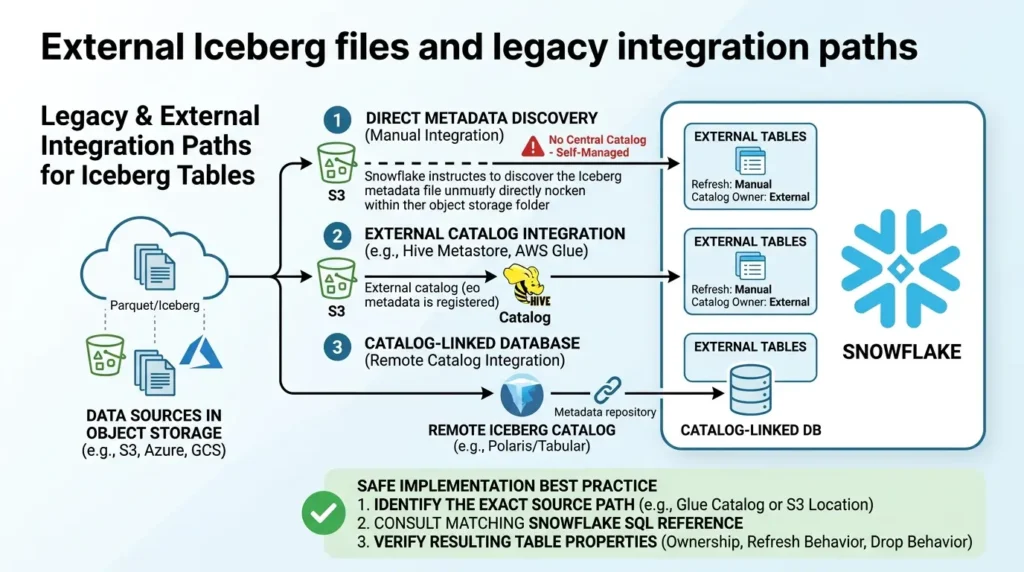
The support boundary can change based on whether Snowflake is reading a table from an external catalog, discovering metadata in object storage, or linking to a remote catalog through a catalog-linked database.
The safest implementation practice is to choose the exact source path first, then follow the matching Snowflake SQL reference and verify the resulting table properties.
This distinction becomes important during migration. A table that looks like “an Iceberg table in S3” may have a different catalog owner, write path, refresh behavior, and drop behavior from another table with the same data location.
Three documented architecture scenarios
The following scenarios are drawn from current product and project documentation. They are documented operating patterns, not customer case studies, and they do not imply a measured performance or cost result.
Scenario 1: An existing data lake that should remain outside Snowflake
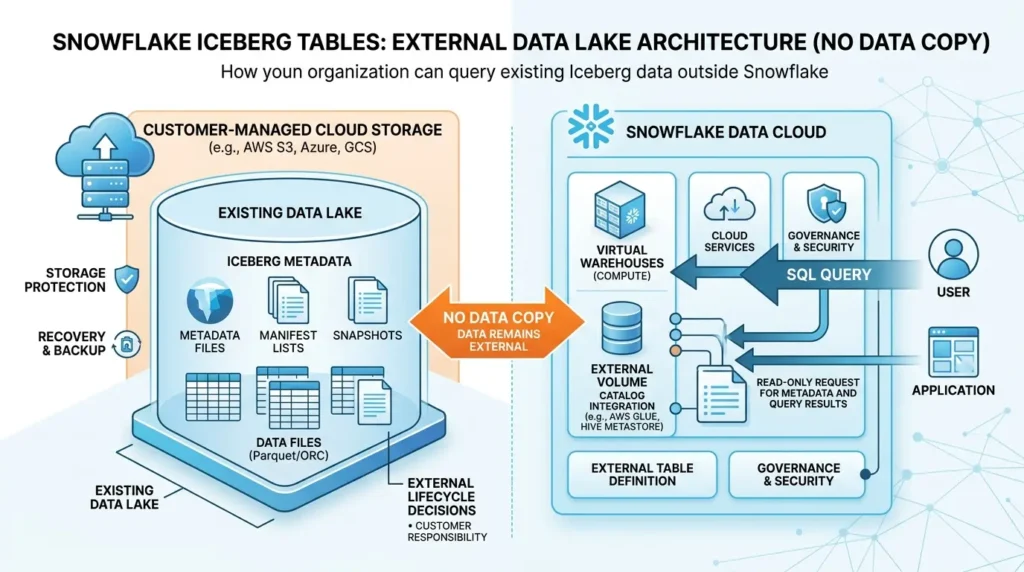
Challenge: The organization already has Iceberg data in customer-managed cloud storage and does not want to copy every table into Snowflake storage.
Architecture: Use Snowflake to query the Iceberg table through an external volume and the appropriate catalog integration. Keep the data files and Iceberg metadata in the external location, and define recovery and storage protection with the cloud provider.
Documented outcome: Snowflake’s Iceberg documentation explicitly positions Iceberg tables for existing data lakes that you cannot, or choose not to, store in Snowflake. The limitation is equally important: storage protection, recovery, and external lifecycle decisions remain part of the customer’s design.
Transferable lesson: “No copy” is a storage and ingestion decision, not an exemption from catalog, identity, network, and maintenance planning.
Scenario 2: Snowflake-managed tables exposed to external engines
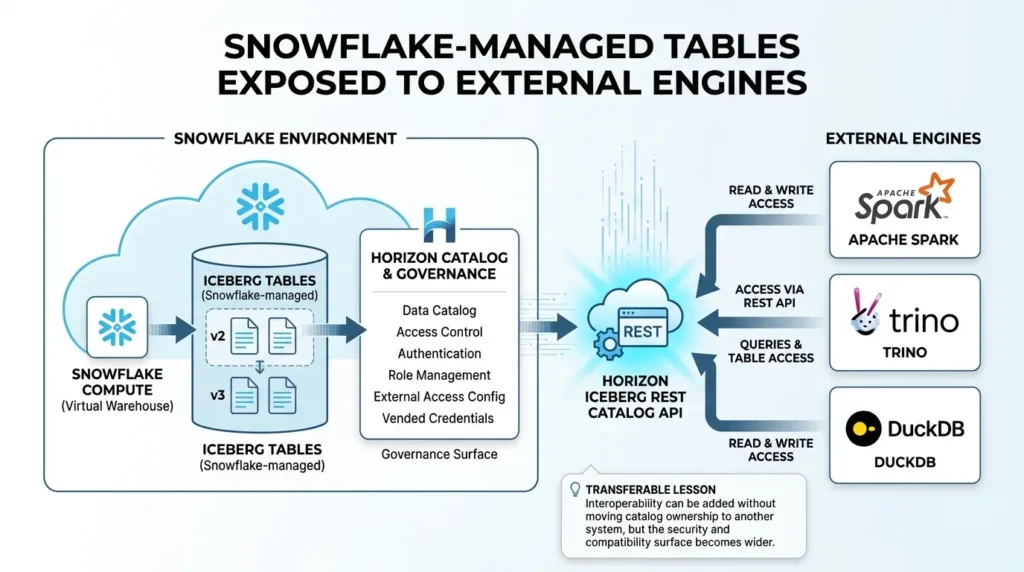
Challenge: Snowflake should remain the catalog and governance surface, but Spark, Trino, DuckDB, or another engine must access the same Iceberg tables.
Architecture: Create Snowflake-managed Iceberg tables and expose them through the Horizon Iceberg REST Catalog API. Configure Snowflake roles, authentication, external-engine access, and where supported vended credentials.
Documented outcome: Current Snowflake Horizon documentation describes external-engine read/write access for Snowflake-managed Iceberg v2 and v3 tables. The conditions remain material: table privileges, authentication, engine compatibility, format version, and delete representation must all align.
Transferable lesson: Interoperability can be added without moving catalog ownership to another system, but the security and compatibility surface becomes wider.
Scenario 3: An external REST catalog that Snowflake joins rather than replaces
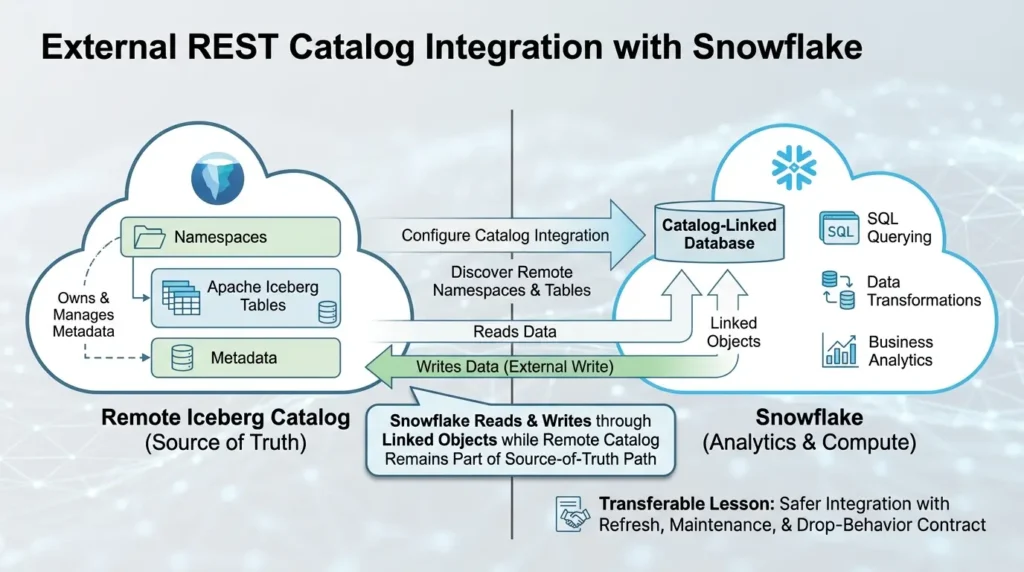
Challenge: A remote Iceberg catalog already owns the namespaces and tables, while Snowflake is needed for SQL, transformations, or analytics.
Architecture: Configure a catalog integration and use a catalog-linked database to discover remote namespaces and tables. For supported REST-catalog workflows, Snowflake can read and write through the linked objects while the remote catalog remains part of the source-of-truth path.
Documented outcome: Snowflake’s current external-write documentation describes catalog-linked databases, writable externally managed tables, and REST-catalog conditions. It also states that external catalog and storage tooling remain responsible for metadata and retention work.
Transferable lesson: Joining an existing catalog is often safer than creating a second table identity, but it requires a written refresh, maintenance, and drop-behavior contract.
Catalog choice: Snowflake, REST, Glue, Open Catalog, Unity Catalog, or Polaris?
A catalog is not a decorative registry. It holds or exposes the current metadata pointer and coordinates atomic table updates. The catalog determines how engines discover the current table state and, in many architectures, where commits are accepted.
| Catalog path | Best fit | Main operational question | Snowflake condition |
|---|---|---|---|
| Snowflake catalog | Snowflake-led DML, governance, and lifecycle management | Will external engines need to write, and do they support the selected format and delete behavior? | Use `CATALOG = 'SNOWFLAKE'` with the appropriate storage choice. |
| Iceberg REST Catalog | Open catalog ownership and multi-engine access | Which engine owns commits, credentials, refresh, and maintenance? | Use a catalog integration; catalog-linked databases can discover remote namespaces and tables. |
| AWS Glue | AWS-centered catalog and lake workflows | Are you using the correct Glue REST endpoint and who expires snapshots when metadata grows? | Writable REST workflows require the documented Glue REST integration path. |
| Snowflake Open Catalog | REST-based interoperability around Snowflake and external engines | Which system remains the source of truth for catalog access and maintenance? | Follow current Snowflake Open Catalog and catalog-integration documentation. |
| Databricks Unity Catalog | A Databricks-centered external catalog that must interoperate with Snowflake | Does the chosen Unity workflow support your writes, engines, credentials, and policies? | Current Snowflake docs describe REST/catalog-linked workflows; do not assume every Horizon external-engine path is identical. |
| Apache Polaris | Open REST catalog patterns, including multi-engine and on-prem designs | Who operates the catalog, tokens, storage credentials, and compatibility upgrades? | Verify the exact Snowflake integration and external-engine path for the deployment. |
Which Iceberg catalog should I choose?
Start with the system that must remain authoritative. If Snowflake is the principal writer and governance surface, Snowflake as the catalog is usually the cleanest starting point. If Spark, Trino, Flink, Databricks, or another engine already owns the table catalog, use the documented external REST integration rather than creating a second, competing table identity. If the organization needs a cloud- or storage-centered open catalog, evaluate Glue, Open Catalog, Unity Catalog, or Polaris against credential, maintenance, and engine compatibility requirements.
Do not select a catalog from the name alone. Run a pilot that creates a snapshot, performs a supported write, refreshes the table, reads it from every intended engine, and verifies who can expire snapshots and remove stale files.
External volumes and security: the setup tutorials under-explain
An external volume is a named, account-level Snowflake object that connects Snowflake to external cloud storage for Iceberg tables. Snowflake’s external-volume documentation describes it as holding the identity and access-management entity used to reach table data, Iceberg metadata, and manifest files.
This means table creation is also an identity workflow. A successful SQL statement does not prove that the external engine, the table owner, or the maintenance job has the permissions it needs.
A production setup should record the following before the first real write:
| Check | What to verify | Why it matters |
|---|---|---|
| Storage location | Bucket/container, base path, cloud, region, encryption, and network route | Defines latency, transfer, recovery, and access boundaries. |
| Cloud identity | Role, service principal, trust relationship, token, or catalog-vended credential | Separates storage authorization from Snowflake object privileges. |
| Snowflake role | `USAGE` on the external volume plus database, schema, and table privileges | A role can have table access and still fail when credentials are vended. |
| Write intent | Read-only or read/write external volume and catalog configuration | Prevents a write workflow from failing after table discovery succeeds. |
| Verification | Run `SYSTEM$VERIFY_EXTERNAL_VOLUME` in Snowflake SQL and test a real read | Checks more than the existence of the object. |
| External-engine path | Token type, role scope, catalog endpoint, and storage credential behavior | External access has its own authentication and authorization path. |
A minimal verification example is:
SQL:
-- Snowflake SQL. Replace the identifier with your verified object name.
SELECT SYSTEM$VERIFY_EXTERNAL_VOLUME('ANALYTICS_EXTERNAL_VOLUME');
Treat this as a connection check, not a complete security review. The Horizon workflow adds Snowflake role privileges, an access token or other authentication method, external-engine configuration, and when applicable, vended storage credentials. Current Horizon Catalog documentation describes these layers separately.
How Iceberg stores data and metadata under Snowflake
Snowflake’s supported Iceberg path uses Parquet for the table’s data files. The metadata tree is a different layer.
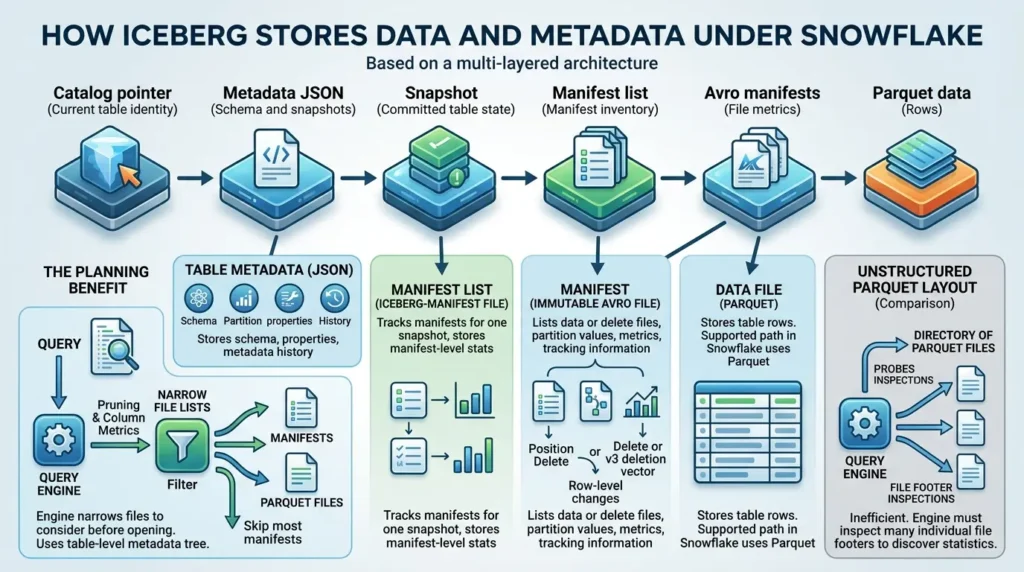
The Iceberg specification defines table metadata files, snapshots, manifest lists, and manifests. A table metadata file describes the table’s current state and snapshots. A manifest list identifies the manifests for a snapshot. A manifest is an immutable Avro file that lists data files or delete files along with partition data, metrics, and tracking information. The data files themselves can be Parquet.
| Layer | Typical representation | Purpose |
|---|---|---|
| Data file | Parquet in Snowflake’s supported Iceberg path | Stores table rows. |
| Table metadata | Iceberg metadata JSON | Stores schema, partition specs, properties, snapshots, and metadata history. |
| Manifest list | Iceberg manifest-list file | Tracks the manifests that make up one snapshot and stores manifest-level statistics. |
| Manifest | Immutable Avro file | Lists data or delete files, partition values, metrics, and tracking information. |
| Delete file | Position delete file or v3 deletion vector, depending on format and engine | Represents row-level changes without necessarily rewriting every data file. |
The planning benefit is important. An engine can use snapshot, manifest-list, manifest, partition, and column-metric information to narrow the files it needs to consider before opening every Parquet file. In a Parquet-only layout, an engine may need to inspect many individual file footers to discover file-level statistics. Iceberg moves much of the file inventory and pruning information into a table-level metadata tree.
That does not mean every query becomes free of object-store requests. The engine still needs catalog and metadata access, and the quality of pruning depends on how files were written, partitioned, and maintained. The correct conclusion is narrower: Iceberg gives the engine a table-level index of file state that a directory full of Parquet files does not provide by itself.
The architecture can be summarized as:
| Catalog pointer Current table identity | → | Metadata JSON Schema and snapshots | → | Snapshot Committed table state | → | Manifest list Manifest inventory | → | Avro manifests File metrics | → | Parquet data Rows |
Writes and maintenance: copy-on-write, merge-on-read, and who cleans up
The phrase “Iceberg supports updates and deletes” hides two different physical strategies.
Copy-on-write (CoW) rewrites the affected Parquet data files. It usually favors read simplicity and predictable reads, but a small row-level change can trigger a large rewrite when the file is large.
Merge-on-read (MoR) writes delete files or deletion vectors alongside existing data files. Writes can touch less data, but readers and maintenance jobs must merge or compact the delete state later.
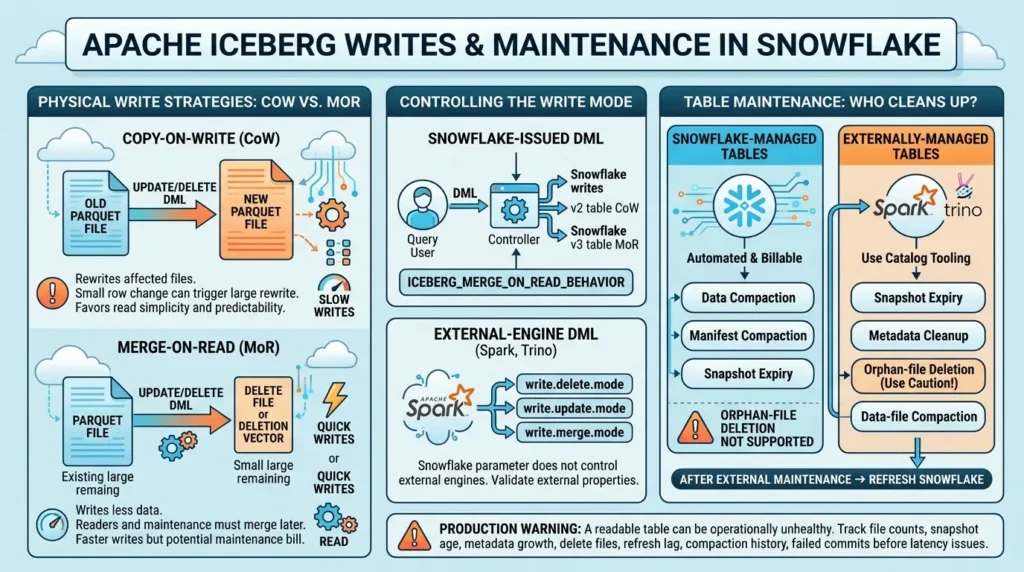
Snowflake’s current management documentation makes an additional distinction: the ICEBERG_MERGE_ON_READ_BEHAVIOR parameter controls row-level DML issued by Snowflake. It does not control write properties used by external engines. If Spark or Trino writes to the same table, configure and validate the external engine’s own Iceberg write-mode properties.
For Snowflake-issued DML, the current documentation describes an AUTO behavior that depends on both format version and management mode.
Snowflake-managed v2 tables remain on copy-on-write under the documented default matrix, while v3 and externally managed tables can use merge-on-read according to the documented conditions. If external readers do not support the chosen delete representation, forcing a different mode may be necessary.
| Situation | What to verify | Operational implication |
|---|---|---|
| Snowflake-issued DML | `ICEBERG_MERGE_ON_READ_BEHAVIOR` at account, database, schema, or table scope | The most specific Snowflake setting wins for Snowflake writes. |
| External-engine DML | The engine’s Iceberg properties such as `write.delete.mode`, `write.update.mode`, and `write.merge.mode` | Snowflake’s parameter does not govern the external engine. |
| MoR with delete files | Delete-file counts, read latency, compaction thresholds, and reader compatibility | Faster writes can create a later read and maintenance bill. |
| CoW with large files | Rewrite size, DML frequency, and write SLA | Simpler reads can come with slower or more expensive writes. |
Managed maintenance versus external maintenance
For Snowflake-managed Iceberg tables, Snowflake documents table optimization features including data compaction, manifest compaction, and snapshot expiry.
Some operations are automatically enabled, some are billable, and Snowflake’s documentation also notes that orphan-file deletion is not supported for Snowflake-managed Iceberg tables. A mismatch between external storage usage and Snowflake metrics therefore needs investigation rather than an improvised deletion job.
For externally managed tables, Snowflake’s documentation states that Snowflake does not perform the external table’s maintenance operations. The external Iceberg engine and catalog tooling must handle tasks such as snapshot expiry, metadata cleanup, and data-file compaction. After external maintenance changes the table, refresh Snowflake so it sees the current snapshot.
The Apache Iceberg maintenance guide recommends treating snapshot expiry, old metadata cleanup, orphan-file deletion, data-file compaction, and manifest rewrites as separate operations. Orphan-file cleanup deserves special caution: removing files with a retention interval shorter than the time required for in-flight writes can corrupt a table.
Iceberg v2 versus v3 in Snowflake: compatibility before ambition
Current Snowflake documentation states that Iceberg versions 1, 2, and 3 are supported with considerations. The system default remains v2 unless you configure a different default or specify ICEBERG_VERSION = 3 when creating a table.
Iceberg v3 adds capabilities such as selected new data types, default values, row lineage, deletion vectors, and other format-level features. Snowflake documents support for some of these features, but not for every combination of table mode, engine, and Snowflake feature.
The most important compatibility rule is simple: every reader and writer that will touch the table must understand the selected format and features. The current Snowflake v3 documentation states that in-place upgrade of an existing Iceberg table through ALTER ICEBERG TABLE is not supported. It also warns that downgrading format versions is not supported by the Iceberg specification.
| Compatibility area | Current documented position | Decision implication |
|---|---|---|
| Default version | Snowflake defaults to v2 unless a different default or table version is configured. | Do not assume a new table is v3. |
| New v3 table | Can be created with the documented v3 configuration and supported syntax. | Check every external reader before using v3-only features. |
| Existing-table upgrade | In-place format upgrade through `ALTER ICEBERG TABLE` is not supported. | Plan a documented replacement, conversion, or external-engine workflow. |
| External-engine upgrade | An external v2→v3 upgrade can require a new snapshot and table replacement/refresh sequence in Snowflake. | Test refresh and recovery before changing a shared table. |
| Deletion vectors | Documented for selected v3 workflows and environments. | Verify that every external reader understands deletion vectors. |
| Streams and other Snowflake features | Support varies between Snowflake-managed and externally managed v3 tables. | Use a feature-by-feature matrix, not a single “v3 supported” label. |
If you are upgrading a shared table, the compatibility gate is more important than the feature list. A v3 table that one engine can write but another cannot read is not an interoperability success.
Horizon Catalog: turning Snowflake-managed tables into an open-engine surface
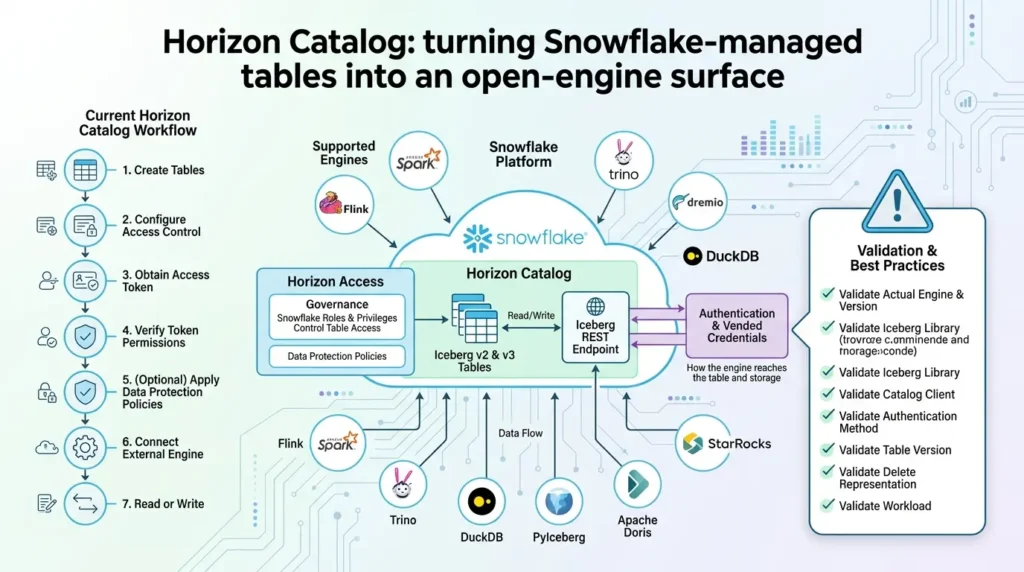
Snowflake Horizon Catalog exposes an Iceberg REST endpoint for external engines. Current Snowflake documentation describes access to Snowflake-managed Iceberg v2 and v3 tables through external engines and documents both read and write workflows. The supported-engine list includes examples such as Spark, Flink, Trino, Dremio, DuckDB, PyIceberg, StarRocks, and Apache Doris.
This creates an important distinction:
- External catalog ownership: Spark or another system owns the remote catalog and Snowflake connects to it.
- Horizon access: Snowflake remains the catalog authority for Snowflake-managed tables while an external engine reaches those tables through the Horizon REST API.
The two paths may look similar from the engine’s perspective, but they produce different responsibilities. In the Horizon path, Snowflake roles and privileges control table access, while external-engine authentication and vended credentials govern how the engine reaches the table and storage.
The current Horizon Catalog workflow includes creating tables, configuring access control, obtaining an access token, verifying token permissions, optionally applying data protection policies, connecting the engine, and reading or writing. That is more than a connection string.
Do not treat the supported-engine list as a promise that every engine/version combination behaves identically. Validate the actual engine, Iceberg library, catalog client, authentication method, table version, delete representation, and workload.
Performance and cost: use a benchmark, not a slogan
It is easy to find a statement that Iceberg is faster, slower, cheaper, or more open than a native Snowflake table. Those claims are incomplete without a workload.
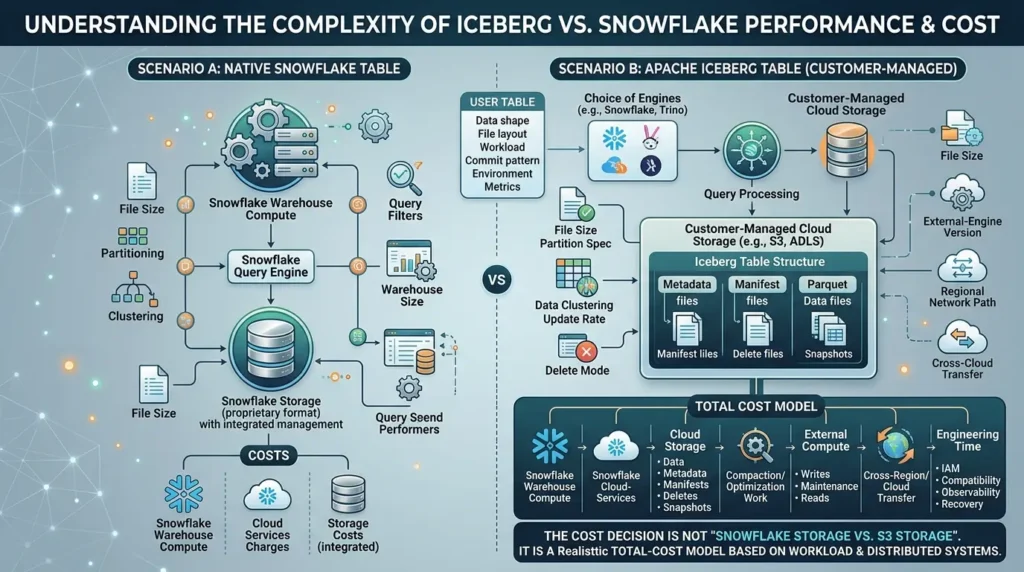
Performance can change with file size, partition spec, data clustering, query filters, update rate, delete mode, metadata size, cache state, warehouse size, external-engine version, storage region, and network path. A Snowflake warehouse reading a nearby customer-managed bucket is not the same test as Trino reading an on-premises S3-compatible endpoint through a cross-network path.
The public discussions that informed this guide contain both successful and negative performance reports. That disagreement is not a reason to pick a side. It is a reason to define a test.
| Benchmark dimension | Record it | Why it changes the result |
|---|---|---|
| Data shape | Rows, column count, row width, null distribution, and data types | Changes compression, scan volume, and metadata statistics. |
| File layout | File count, target size, partition spec, clustering, and delete files | Changes planning work, file-open cost, and pruning quality. |
| Workload | Point lookups, time ranges, joins, aggregates, MERGE, UPDATE, DELETE, and scans | A format can behave differently for reads and writes. |
| Commit pattern | Batch size, commit frequency, concurrent writers, and retry rate | Affects snapshots, manifests, small files, and conflicts. |
| Environment | Warehouse, engine/library version, cloud, region, network, and cache state | Separates compute effects from storage and transfer effects. |
| Metrics | p50/p95 latency, planning time, bytes scanned, files touched, compaction cost, transfer, and failed commits | Prevents one fast query from becoming a universal claim. |
Cost is distributed across several systems
Customer-managed external storage can avoid Snowflake storage charges for the table data, but it does not make the architecture free. Snowflake documents charges for warehouse compute and cloud services. Depending on the path, Snowflake or the cloud provider can also charge for cross-cloud or cross-region transfer. External engines add their own compute, catalog, and storage-access costs.
A realistic total-cost model should separate:
- Snowflake warehouse compute.
- Snowflake cloud-services or catalog/API charges.
- Cloud storage for Parquet, metadata, manifests, delete files, and retained snapshots.
- Compaction, clustering, and optimization work.
- External-engine compute for writes, maintenance, and reads.
- Cross-region and cross-cloud transfer or egress.
- Engineering time for IAM, catalog, compatibility, observability, and recovery.
The cost decision is not “Snowflake storage versus S3 storage.” It is where bytes live, where compute runs, how often files are rewritten, and how many systems must understand the table.
When Iceberg with Snowflake is a strong fit and when it is overkill
Strong fit
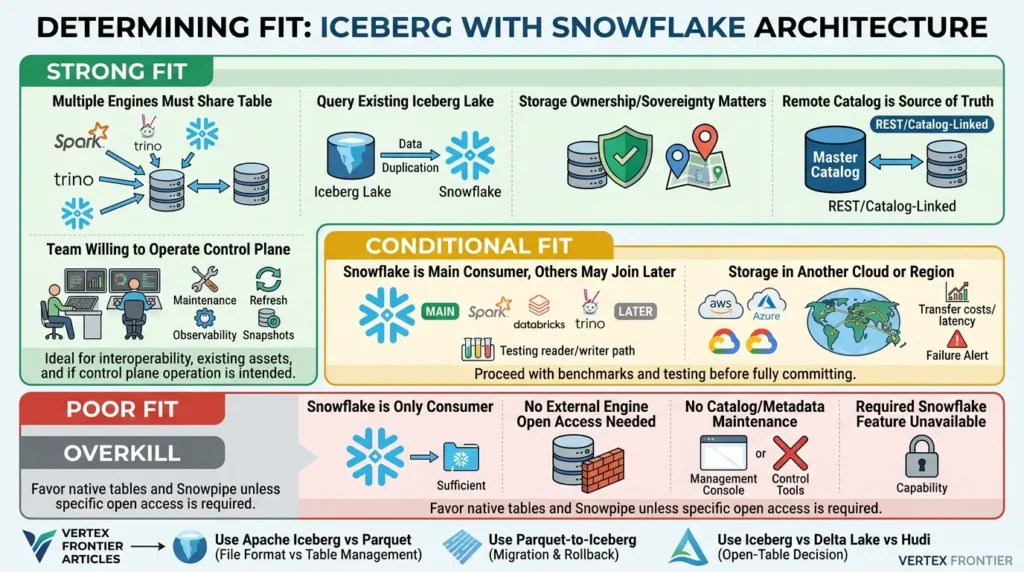
Iceberg with Snowflake is a strong candidate when multiple engines must share the same table, an existing Iceberg lake should be queried without a duplicate ingestion path, storage ownership or sovereignty matters, or a remote catalog is already the organization’s source of truth.
It is also a good fit when the team is willing to operate the control plane: catalog credentials, write compatibility, refresh, maintenance, snapshots, file layout, and observability.
Conditional fit
The fit is conditional when Snowflake is the main consumer but Spark, Trino, Databricks, or another engine may join later. In that case, start with a small table and test the future reader/writer path before committing the production catalog and format version.
It is also conditional when storage is in another cloud or region. Cross-cloud support can be useful, but the benchmark must include transfer, network latency, and failure behavior.
Poor fit
Iceberg may be overkill when Snowflake is the only consumer, the data can be loaded through a simpler Snowpipe or native-table pipeline, and no external engine needs open-table access. It is also a poor fit when nobody owns catalog and metadata maintenance or when the required Snowflake feature is unavailable in the selected table mode.
The adjacent Vertex Frontier articles can help with the next decision without repeating their full coverage: use Apache Iceberg vs Parquet for the distinction between a file format and a table-management layer; use the Parquet-to-Iceberg migration guide for migration execution and rollback planning; and use Iceberg vs Delta Lake vs Hudi for the broader open-table-format decision.
| Question | If the answer is “yes” | Likely direction |
|---|---|---|
| Do multiple engines need the same table? | Open-table interoperability is a requirement. | Evaluate Iceberg seriously. |
| Does an external catalog already own the table? | Creating a second catalog identity would add risk. | Evaluate REST/catalog-linked access. |
| Is Snowflake the only consumer? | Open-table interoperability may not have immediate value. | Compare native tables and Snowpipe first. |
| Can the team own maintenance and compatibility testing? | The open architecture is operable. | Proceed with an explicit control plane. |
A production-readiness workflow
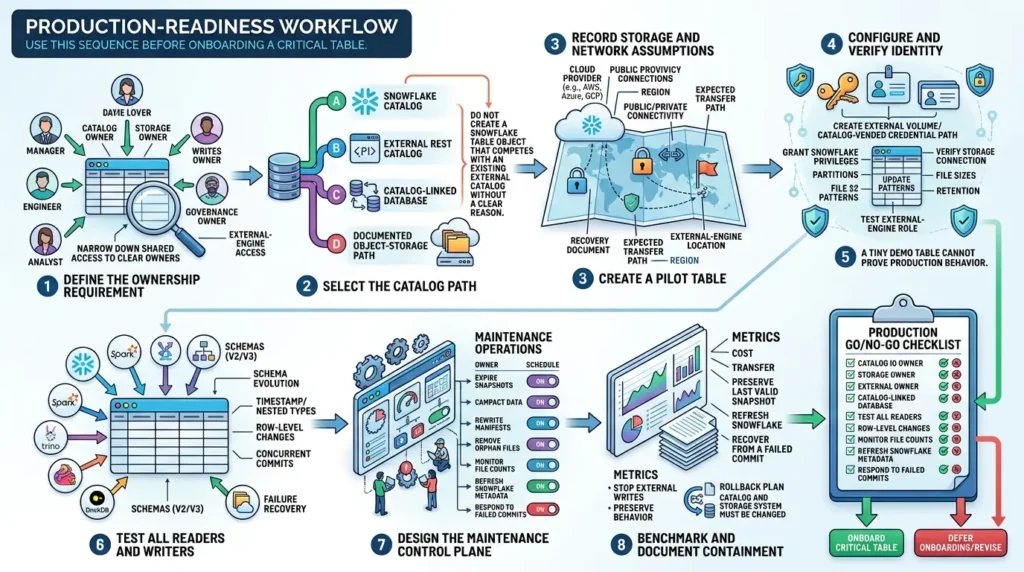
Use this sequence before onboarding a critical table.
Define the ownership requirement
Write down which system should own the catalog, storage, writes, maintenance, governance, and external-engine access. If the answer is “everyone,” narrow it down. Shared access does not require shared ownership of every layer.
Select the catalog path
Choose Snowflake as the catalog, an external REST catalog, a catalog-linked database, or a documented object-storage path. Do not create a Snowflake table object that competes with an existing external catalog without a clear reason.
Record storage and network assumptions
Capture the storage provider, region, private or public connectivity, encryption, recovery policy, expected transfer path, and external-engine location. These assumptions belong in the design document, not only in a cloud console.
Configure and verify identity
Create the external volume or catalog-vended credential path, grant the required Snowflake privileges, verify the storage connection, and test both the table owner role and the external-engine role.
Create a pilot table
Use representative schema, partitions, file sizes, update patterns, and retention. A tiny demo table cannot prove production behavior.
Test all readers and writers
Test Snowflake, Spark, Trino, Flink, DuckDB, or any other engine that will touch the table. Validate v2/v3, schema evolution, timestamp and nested types, row-level changes, concurrent commits, and failure recovery.
Design the maintenance control plane
Define who expires snapshots, compacts data, rewrites manifests, removes orphan files, monitors file counts, refreshes Snowflake metadata, and responds to failed commits. Attach owners and schedules to each operation.
Benchmark and document containment
Measure the workload, cost, transfer, maintenance, and failure behavior. Document how to stop external writes, preserve the last valid snapshot, refresh Snowflake, and recover from a failed commit. A rollback plan is not complete until the operator knows which catalog and storage system must be changed.
Open the production go/no-go checklist
Proceed only when the team can answer “yes” to these questions:
- Do we know which catalog is authoritative?
- Do all intended readers and writers support the selected Iceberg version and delete representation?
- Can we verify external-volume or catalog credentials without sharing long-lived storage secrets?
- Do we have an owner for compaction, snapshot expiry, orphan cleanup, and refresh?
- Have we measured a representative workload across the intended network and regions?
- Do we understand the catalog-specific behavior of DROP, PURGE, replacement, and conversion?
- Can we preserve and recover the last valid table snapshot?
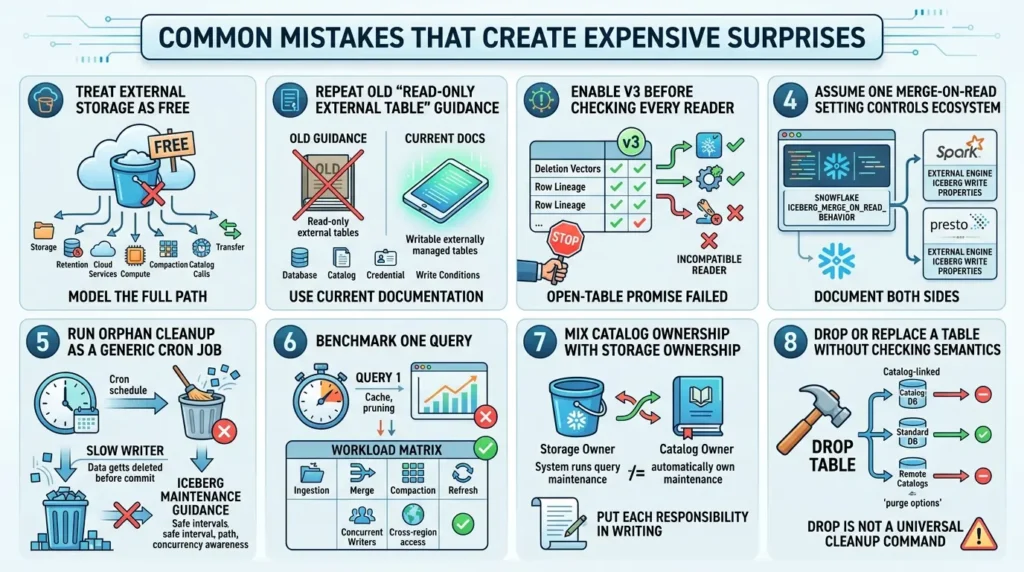
Common mistakes that create expensive surprises
Treating external storage as free
External storage may avoid Snowflake storage charges for customer-managed data, but storage, retention, cloud services, compute, compaction, catalog calls, and transfer still cost money. Model the full path.
Repeating old “read-only external table” guidance
Snowflake’s current documentation describes writable externally managed tables for supported remote REST-catalog workflows. The exact database, catalog, credential, and write conditions matter. Always use the current documentation for the chosen path.
Enabling v3 before checking every reader
Format version is a compatibility contract. If one engine cannot read v3 deletion vectors, row lineage, or another feature used by the table, the open-table promise has already failed for that consumer.
Assuming one merge-on-read setting controls the ecosystem
Snowflake’s ICEBERG_MERGE_ON_READ_BEHAVIOR applies to Snowflake-issued row-level DML. External engines have their own Iceberg write properties. Document both sides.
Running orphan cleanup as a generic cron job
Orphan cleanup can remove files that a slow or still-running writer expects to commit. Follow the Iceberg maintenance guidance, use a safe retention interval, and account for path and concurrency behavior.
Benchmarking one query
One query can measure cache, pruning, or a favorable filter. It cannot measure ingestion, merge, compaction, refresh, concurrent writers, or cross-region access. Use a workload matrix.
Mixing catalog ownership with storage ownership
The system that owns the bucket does not automatically own the catalog. The system that runs the query does not automatically own maintenance. Put each responsibility in writing.
Dropping or replacing a table without checking catalog semantics
Current Snowflake docs describe different behavior for catalog-linked databases, standard databases, remote catalogs, and purge options. A DROP statement is not a universal cleanup command.
Before and after: from feature shopping to an architecture decision
| Before | After |
|---|---|
| “Snowflake supports Iceberg, so we should use Iceberg.” | “Spark and Snowflake must write to customer-managed storage. We selected a REST catalog, documented v2/v3 compatibility, scoped credentials, assigned maintenance ownership, and measured the network path.” |
| “External tables are cheaper because storage is outside Snowflake.” | “Storage, compute, cloud services, catalog calls, compaction, and transfer are modeled separately.” |
| “We can switch to v3 later.” | “Every reader and writer has been tested, and the upgrade or replacement workflow is documented before the version changes.” |
Conclusion: choose the ownership model first
Apache Iceberg with Snowflake is not one feature toggle. It is a set of architectures that divide responsibility differently.
If Snowflake should be the primary catalog, writer, governance surface, and maintenance system, start with a Snowflake-managed table and validate the external storage and external-engine requirements.
If another catalog already owns the table ecosystem, use the documented REST and catalog-linked workflows instead of creating a competing table identity. If external engines must access Snowflake-managed tables, evaluate Horizon Catalog as an access surface and test its credential, policy, version, and write boundaries.
Then design the less glamorous parts: refresh, snapshot expiry, compaction, orphan files, delete representations, cost, and failure recovery. Those details determine whether the open-table architecture remains healthy after the demo ends.
The practical sequence is:
Choose the ownership model, choose the catalog, verify the version and write mode, test every engine, then benchmark the real workload.
That is the difference between adding Iceberg to Snowflake and building a Snowflake Iceberg architecture you can operate.
These architecture, ownership, and cost trade-offs are typical of system-design rounds — our Data Engineering Interview Questions & Answersguide walks through how to frame them under interview conditions.
Ready for the architecture review?
Take the Snowflake Iceberg decision from opinion to evidence.
Use the workbook to document catalog ownership, credentials, maintenance, compatibility, benchmark conditions, and the final deployment gate.
Frequently asked questions
What is Apache Iceberg with Snowflake?
It is the combination of the Apache Iceberg open table format with Snowflake query, SQL, governance, catalog, and integration capabilities. The exact architecture depends on whether Snowflake or an external catalog owns the table and whether data is stored in Snowflake storage or customer-managed external storage.
What is the difference between Snowflake-managed and externally managed Iceberg tables?
Snowflake-managed tables use Snowflake as the Iceberg catalog and receive fuller Snowflake platform support. Externally managed tables use an external catalog and require a catalog integration; their lifecycle and maintenance remain outside Snowflake unless you use a documented conversion or managed path. Current REST-catalog workflows can support writes from Snowflake, so “external” should not automatically be interpreted as “read-only.”
Does Snowflake support Apache Iceberg v3?
Yes, current Snowflake documentation describes v3 support with considerations and limitations. The default remains v2 unless configured otherwise. Before using v3 features, verify that every reader and writer supports v3, because the documented in-place upgrade through ALTER ICEBERG TABLE is not supported and downgrading is not supported by the Iceberg specification.
Can Spark, Trino, or DuckDB read and write Snowflake Iceberg tables?
Current Snowflake Horizon Catalog documentation lists Spark, Trino, DuckDB, and several other external engines for access through the Iceberg REST endpoint, and documents read/write access to Snowflake-managed v2 and v3 tables. The actual result still depends on engine version, authentication, role privileges, table version, delete representation, and workload. Test the exact combination rather than treating the supported-engine list as a universal compatibility promise.
Do Iceberg tables in Snowflake need an external volume?
Many Snowflake Iceberg configurations use an external volume to connect Snowflake to cloud storage, but catalog-vended credential workflows can change which parameters are required. An external volume is a named Snowflake object that stores the identity and access configuration for external storage. Follow the exact table and catalog path for your deployment.
Who handles maintenance for externally managed Iceberg tables?
The external Iceberg engine and catalog tooling handle maintenance for externally managed tables. That usually includes snapshot expiry, metadata cleanup, data-file compaction, and possibly manifest rewrites or orphan-file cleanup. Snowflake’s documentation also recommends refreshing the table after external maintenance so Snowflake sees the new snapshot.
Is Iceberg faster than native Snowflake tables?
There is no honest universal answer. Performance depends on file layout, partitioning, metadata health, query mix, DML pattern, cache state, warehouse, network, external engine, and maintenance. Use a representative benchmark that records planning time, files touched, bytes scanned, latency, compaction, transfer, and failed commits.
Is Iceberg overkill if Snowflake is the only consumer?
It can be. If Snowflake is the only consumer and a native table or Snowpipe pipeline satisfies the storage, governance, and recovery requirements, Iceberg may add catalog and maintenance complexity without an immediate interoperability benefit. Iceberg becomes more compelling when external engines, open storage, existing Iceberg data, sovereignty, or a shared catalog are actual requirements.
📋 Article Timeline & History
Successfully updated on September 19, 2026 with the latest details.
This article was originally published on August 21, 2026.

Was this article helpful?




[…] Apache Iceberg with Snowflake: Managed vs External Tables, Catalogs, Performance, and Cost […]
[…] Apache Iceberg with Snowflake: Managed vs External Tables, Catalogs, Performance, and Cost […]
[…] Apache Iceberg with Snowflake: Managed vs External Tables, Catalogs, Performance, and Cost […]
[…] Apache Iceberg with Snowflake: Managed vs External Tables, Catalogs, Performance, and Cost […]
[…] Apache Iceberg with Snowflake: Managed vs External Tables, Catalogs, Performance, and Cost […]