
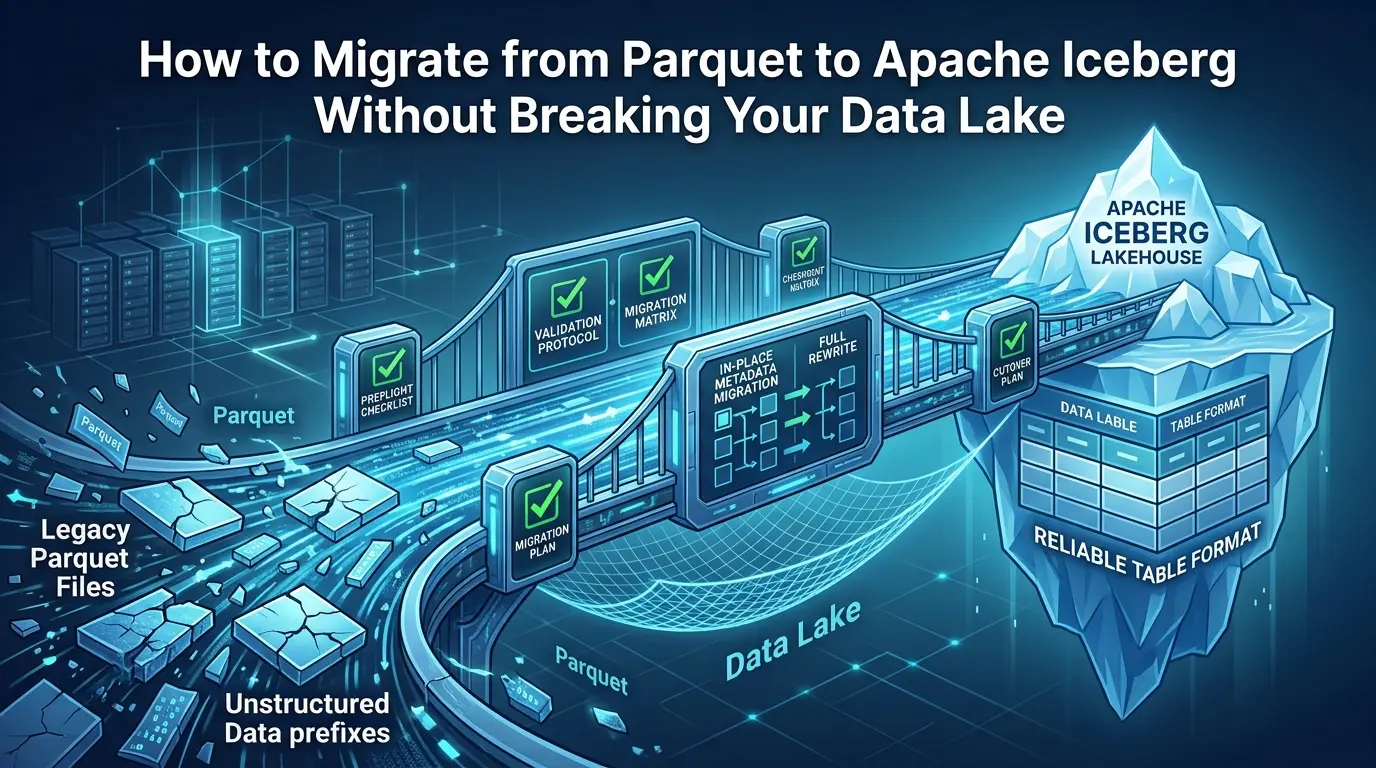

Migrating from Parquet to Apache Iceberg is often described as a conversion. That is why many migration plans begin with the wrong question: “Which command converts these files?”
The more useful question is: what becomes authoritative after the migration? If the file-versus-table boundary is still unclear, read our Apache Iceberg vs. Parquet comparison first; this guide assumes that distinction and focuses on execution.
In one design, existing Parquet files stay in place and Iceberg metadata is added around them. In another, the data is rewritten into a new table with a new layout. In both cases, the table’s identity, catalog entry, writer behavior, cleanup permissions, and rollback path may change. A migration can return the right row count on day one and still be unsafe if a legacy writer adds files on day two.
The Apache Iceberg table-migration documentation makes the central trade-off clear. Full data migration copies the data into a new table and isolates it from the source. In-place metadata migration avoids copying the data, but the source and target remain physically connected: a process that removes source files may also damage the new table’s ability to read them.
This guide is a preflight-first, evidence-driven runbook for data engineers and platform teams. It answers the questions that appear repeatedly around this topic, how to convert Parquet files to Iceberg, whether you can do it without rewriting, when to use migrate, snapshot, or add_files, how AWS Glue and Hive Metastore change the decision, and how to validate the result before cutover.
migrate when you can stop writers and replace the source table identity. Use snapshot when you need a new Iceberg table while keeping the source available for testing or a staged transition. Use add_files for controlled file adoption or for files missed after an initial migration—not as a substitute for schema and partition validation. Choose a full rewrite when the old layout, file sizing, partitioning, or data contract needs to change.Key Takeaways
Click any topic to expand or collapse1. Classify dataset types first
Hive-registered Parquet, raw Hive-style paths, raw non-Hive-partitioned data, and mixed datasets do not carry the same migration assumptions.
2. Treat file ownership as part of migration
In-place registration can make Iceberg responsible for files that other external jobs still believe they own and manage.
3. Do not default to add_files blindly
add_files can rapidly register compatible files, but schema, partition mapping, duplicate behavior, and cleanup authority still require explicit validation.
4. Validate beyond simple row counts
Compare physical files, partitions, numerical aggregates, null rates, duplicate keys, representative queries, and production-engine reads.
5. Plan the post-migration operating phase
Snapshot expiration, orphan-file cleanup, compaction, manifest health, and rollback rehearsal require named owners and explicit retention rules.
Why Parquet-to-Iceberg migration is harder than it looks
Parquet answers a storage question: how should columns and rows be encoded in files? Iceberg answers a table-management question: which files belong to the current table, which snapshot is visible, how are changes committed, and how can several engines resolve the table consistently?
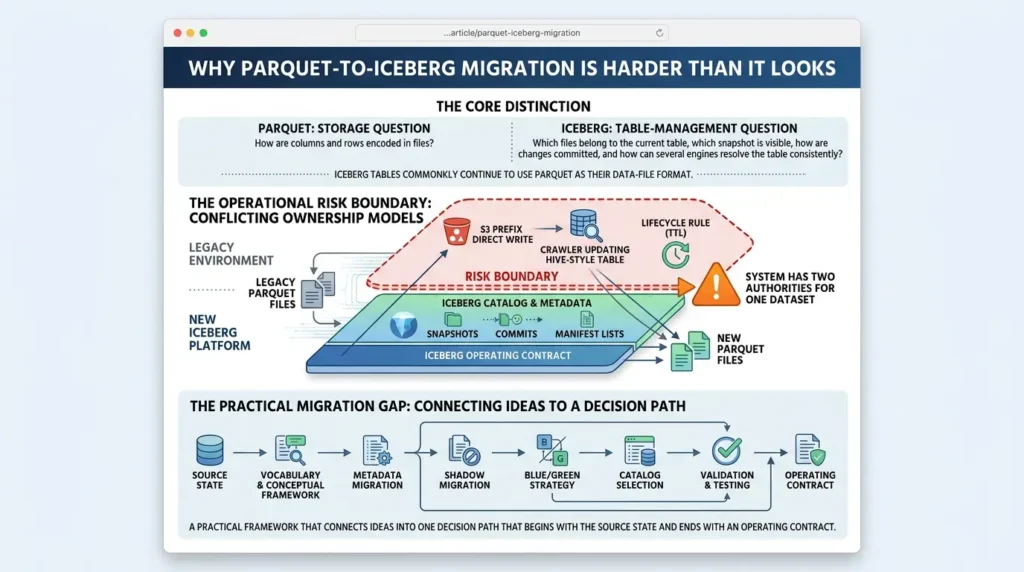
That distinction does not mean you are replacing Parquet. Iceberg tables commonly continue to use Parquet as their data-file format. The migration adds a table contract around those files, and that contract changes how the platform discovers, commits, validates, and cleans up data.
The operational risk appears at the boundary. A legacy job may write directly to an S3 prefix. A crawler may update a Hive-style table. A lifecycle rule may delete files older than a certain age. A new Iceberg table may reference those same objects through its metadata. If the old and new ownership models are not reconciled, the system has two authorities for one dataset.
The strongest public guides cover the vocabulary, metadata migration, shadow migration, blue/green, catalog selection, and validation. The practical gap is connecting those ideas into one decision path that begins with the source state and ends with an operating contract. That is the purpose of the framework below.
Step 1: classify the existing Parquet dataset
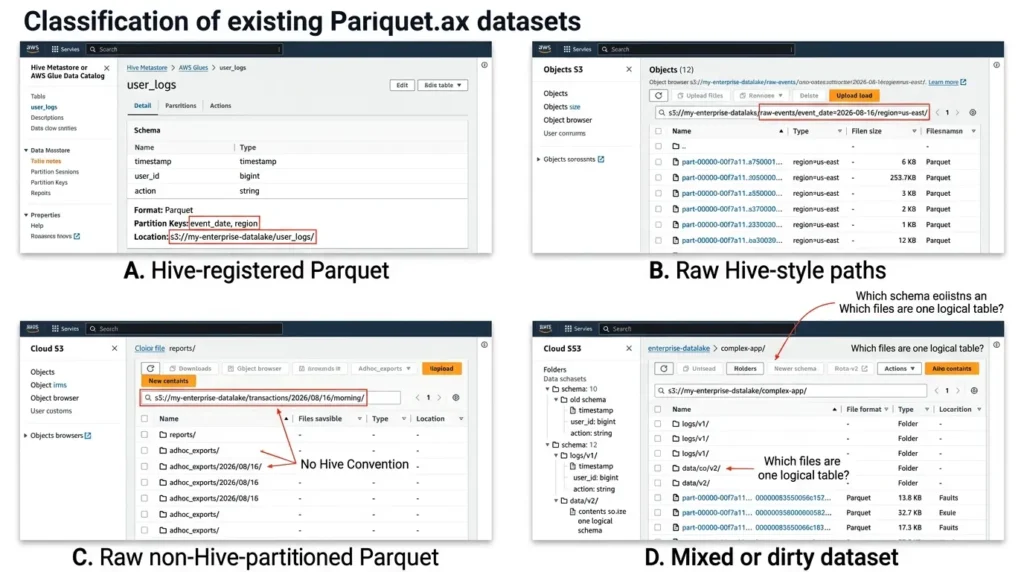
The phrase “existing Parquet data” hides four different situations. Start by placing the dataset in one of these categories.
| Dataset state | What exists today | Likely starting path | Main question |
|---|---|---|---|
| A. Hive-registered Parquet | A catalog contains the table schema, location, and partition information. | `snapshot` for parallel validation or `migrate` for a controlled replacement. | Can all writers stop, and does the catalog support the intended operation? |
| B. Raw Hive-style paths | Directories encode values such as `event_date=2026-08-16/region=us-east/`. | Define a source table, validate path conventions, then adopt or rewrite. | Are the path values complete, consistent, and still meaningful? |
| C. Raw non-Hive-partitioned Parquet | Partition values are not reliably encoded in directory names. | Explicit source mapping or a full rewrite. | How will Iceberg recover the intended partition values? |
| D. Mixed or dirty dataset | Multiple schemas, writers, layouts, or ownership boundaries are present. | Normalize the contract or use a staged rewrite. | Which files are actually one logical table? |
AWS’s enterprise migration guide specifically warns about non-Hive-partitioned layouts because a direct file-registration approach may not map partitions correctly. The result can be null partition values, incomplete reads, or incorrect query behavior. Do not infer a safe partition mapping from a folder name that only looks familiar.
Preflight question: what should I inventory first?
Inventory the catalog definitions, source locations, file formats, partition paths, distinct schemas, writer jobs, direct path readers, lifecycle rules, cleanup jobs, IAM permissions, and retention requirements. Record the inventory version or hash so a retry can tell whether the source changed after preflight.
Step 2: choose in-place migration or a full rewrite
There are two broad migration families. In-place migration creates Iceberg metadata that points to existing files. Full migration reads the source and writes a new Iceberg table, usually through CTAS, INSERT, or a controlled pipeline.
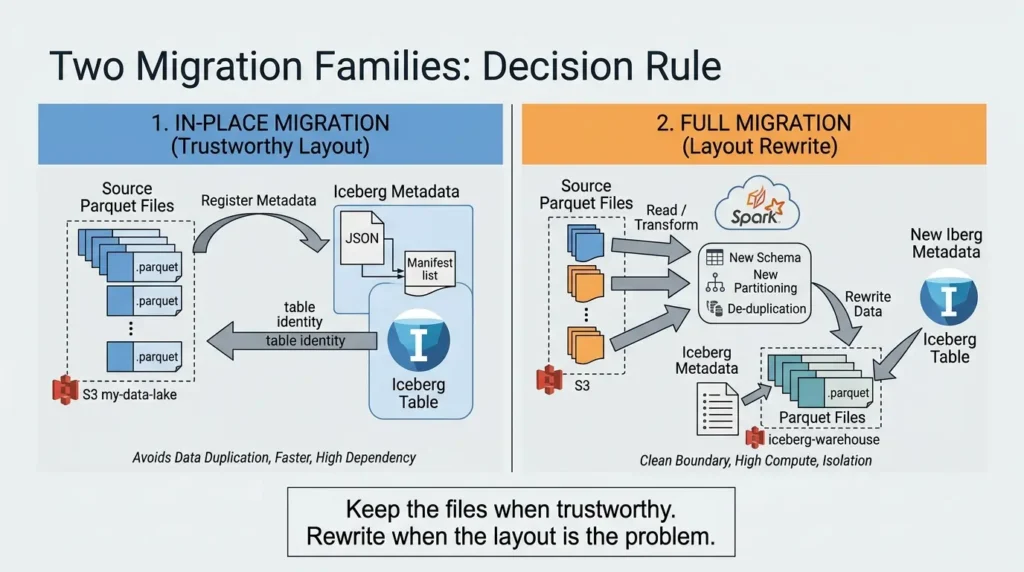
In-place migration is usually faster and avoids duplicating data. It is not fully isolated, however. If a source-side process vacuums, overwrites, or deletes files, the Iceberg table may be affected as well, as the official Iceberg migration guidance explains. Full migration costs more compute and storage, but it gives you a clean boundary and an opportunity to change the schema, partition spec, sorting, compression, or file sizes.
Use this decision rule:
Keep the files when the files are trustworthy. Rewrite the files when the layout itself is part of the problem.
| Migration path | Use it when | Avoid it when | What it does not solve |
|---|---|---|---|
| Snapshot | You need a new Iceberg table while the source remains available for testing or a staged transition. | The source will continue changing without synchronization or a cutover plan. | It does not automatically follow later source-file changes. |
| Migrate | You can stop writers and want the source table identity replaced by Iceberg. | Unknown writers or catalog limitations make replacement unsafe. | It does not repair poor file sizing or inconsistent business data. |
| `add_files` | The target schema and partition contract already exist, and specific compatible files must be registered. | You have not validated schema, partition mapping, duplicate behavior, or ownership. | It is not a complete migration policy. |
| Full rewrite / shadow | You need isolation, deduplication, new partitioning, or better physical layout. | There is no compute, storage, or reconciliation window. | It costs more and requires source-target reconciliation. |
The choice is architectural, not cosmetic. Changing a .parquet suffix or copying a file into a new directory does not create an Iceberg table. The target needs a catalog identity and valid Iceberg metadata. If your search began with Iceberg vs Delta Lake vs Hudi, keep that as a separate table-format decision; this article is about moving existing Parquet data into an Iceberg-managed table.
A useful production distinction is easy to miss: file registration and data ingestion are different jobs. If compatible Parquet files already exist in the right place, a metadata-only operation may be the right tool. If the migration is reading the rows, changing the partition strategy, fixing types, or producing a new physical layout, you are doing a rewrite.
A small Python append loop can be reasonable for a controlled test, but it is a poor default for a large rewrite unless you have measured its throughput, memory behavior, commit pattern, and recovery path. Choose the engine and parallelism for the job you are actually performing, not the job name you started with.
Step 3: understand the three in-place procedures
The procedure terms appear often in Google searches because they represent different operational actions, not interchangeable spellings.
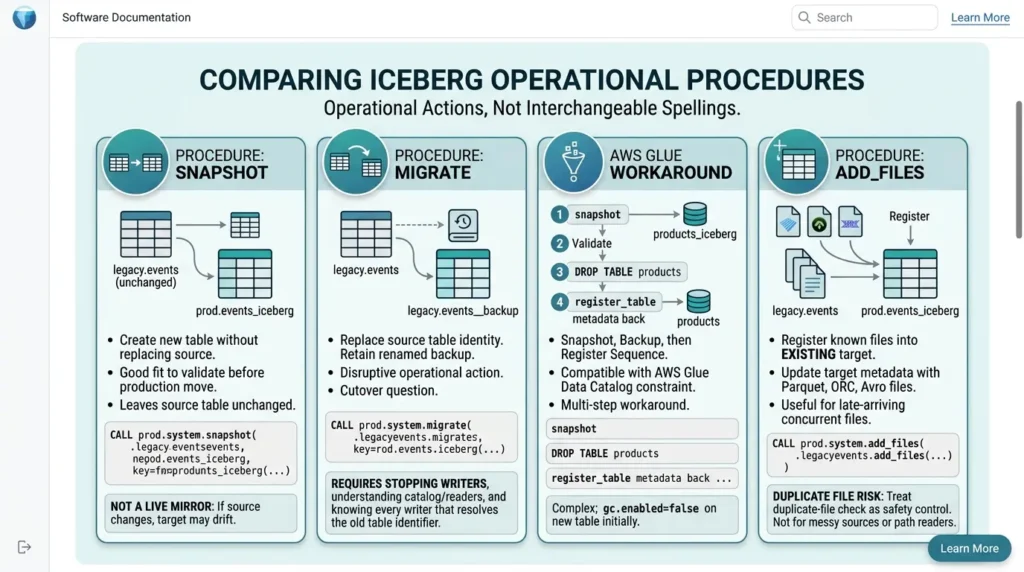
snapshot: create a new table without replacing the source
The official snapshot procedure creates a new Iceberg table with the source schema and partitioning while leaving the source table unchanged during the operation. It is a good fit when you want to validate the new table before moving production readers and writers.
A simplified Spark SQL shape is:
SQL:
CALL prod.system.snapshot(

  source_table => 'legacy.events',

  table        => 'prod.events_iceberg',

location     => 's3://lake/iceberg/events'

);
The important limitation is synchronization. A snapshot is not a live mirror. If the source receives new files or loses files after the snapshot, the target may drift. AWS Prescriptive Guidance recommends stopping source writers and redirecting them to the new table when the snapshot is intended to become the production table.
migrate: replace the source table identity
The migrate procedure is more disruptive. It requires source modifications to stop, locks the source table, and creates the new Iceberg table under the source identity while retaining a renamed backup by default for rollback, as described in the Iceberg migration procedure documentation.
SQL:
CALL prod.system.migrate(

table => 'legacy.events'

);
This is why “how to use the Iceberg migrate procedure” is really a cutover question. Before executing it, you need to know every writer that resolves the old table identifier, whether the reader engines understand Iceberg, whether the catalog supports the operation, and how long the backup will be retained.
Catalog behavior matters. AWS’s Glue migration guidance documents that migrate is compatible with Hive Metastore but not currently with the AWS Glue Data Catalog, and describes a snapshot-plus-registration workaround for the Glue case. Do not assume that a procedure supported in one catalog has identical behavior in another.
Apache Iceberg with Snowflake: Managed vs External Tables, Catalogs, Performance, and Cost
AWS Glue workaround: snapshot, back up, then register
AWS Glue Data Catalog does not support the rename operation required by the native migrate procedure. The documented workaround is to create the new Iceberg table with snapshot, preserve the original Glue table and partition metadata through the Glue APIs, then replace the catalog entry with register_table after validation, following the AWS Glue migration sequence.
The exact API calls are environment-specific, but the sequence is stable:
SQL:
-- 1. Create a separate Iceberg table that points to the existing data files.

CALL glue.system.snapshot(

source_table => 'mydb.products',

table        => 'mydb.products_iceberg',

  location     => 's3://DOC-EXAMPLE-BUCKET/products_iceberg'

);

-- 2. Back up the original Glue table definition and partitions with

--    GetTable, GetPartitions, CreateTable, and CreatePartition/BatchCreatePartition.

-- 3. Validate the new table and stop writers to the original table.

-- 4. After the backup is confirmed, remove the old catalog entry.

DROP TABLE mydb.products;

-- 5. Register the Iceberg metadata file under the production table name.

CALL glue.system.register_table(

table         => 'mydb.products',

  metadata_file => 's3://DOC-EXAMPLE-BUCKET/products_iceberg/metadata/00000-<snapshot-metadata>.metadata.json'

);
The metadata filename is illustrative; obtain the actual file from the snapshot table’s metadata location. AWS also documents that snapshot-created tables set gc.enabled to false, which prevents physical cleanup operations while the original table may still depend on the same files. Enable garbage collection only after the source table is no longer needed and the ownership transition is approved, as AWS’s Glue guidance cautions.
add_files: register known files into an existing target
The add_files procedure adds existing Parquet, ORC, or Avro files to an Iceberg table by updating the target metadata. It can target partitions and can be useful after a snapshot or migrate operation when concurrent writers produced files that were not included in the original operation, as described in the official Add Files migration documentation.
SQL:
CALL prod.system.add_files(

 source_table          => 'legacy.events',

 table                 => 'prod.events_iceberg',

 partition_filter      => map('event_date', '2026-08-16'),

 check_duplicate_files => true

);
Treat the duplicate-file check as a safety control. Registering the same physical files twice can expose duplicate rows. Re-registering a modified partition may also require removing the old target references first, depending on the workflow and engine. Keep the imported file list and resulting snapshot ID in the migration control plane.
The practical test after registration is not merely “can a query read rows?” Ask whether the target behaves like the table you intend to operate. Compare add_files with an INSERT or CTAS path on a representative partition, record whether the operation creates the expected snapshot, and verify how later readers resolve the table through the chosen catalog. A registration shortcut is valuable only when its later read, write, maintenance, and rollback behavior is understood.
When should you not start with `add_files`?
Do not start with add_files when the source schema is inconsistent, partition values cannot be recovered, direct path readers still mutate the data, duplicate-file behavior has not been tested, or the target table does not yet have an approved schema and partition contract. In those cases, use explicit source mapping, a snapshot, or a full rewrite instead.
Step 4: pass the schema and field-identity gate
A Parquet dataset can appear readable while containing incompatible schema histories. One partition may use an integer identifier, another a string. A renamed column may look like a new column to one reader and the same logical field to another. A nullable field may be treated as required by a downstream job.
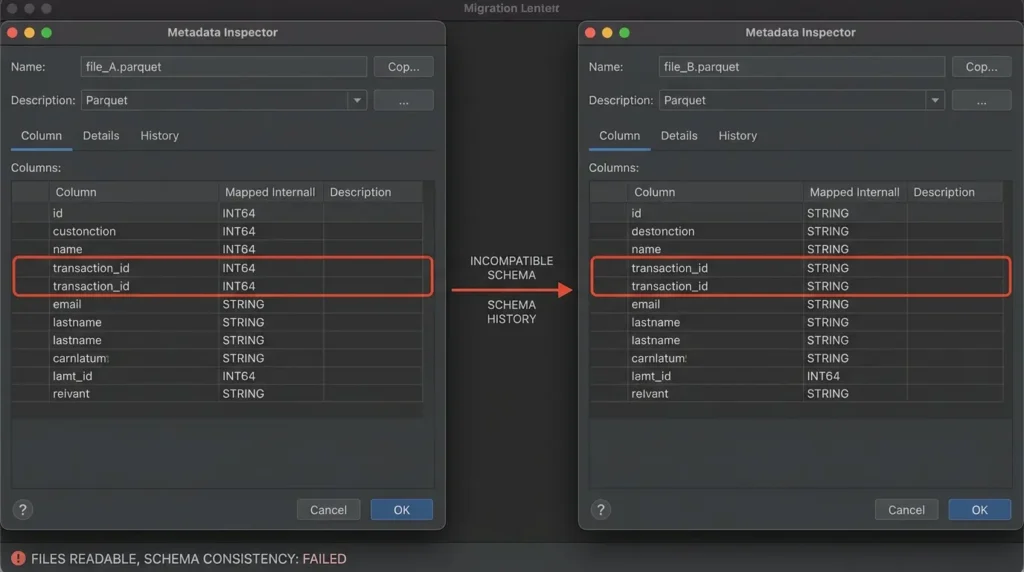
Iceberg’s schema model uses stable field identity so that evolution can be handled safely. Existing Parquet files were not necessarily written with the field IDs expected by Iceberg writers. Some engines can fall back to column names; others may behave differently. The practical rule is not “field IDs always work” or “names always work.” The rule is: test the actual engines and files that production will use.
Schema inventory checklist
- Profile every distinct writer and partition family, not only the newest file.
- List duplicate column names after case normalization.
- Flag integer-to-string, timestamp-to-string, decimal precision, and nested-type changes.
- Separate missing fields from fields that exist but are always null.
- Measure null rates for keys, partition fields, and frequently filtered columns.
- Record whether field IDs exist and how Spark, Trino, Athena, Flink, or other production readers map them.
Partition inventory checklist
- List partition values encoded in paths and those stored only inside the files.
- Check spelling, capitalization, date formats, and unexpected directory levels.
- Find files outside expected partition directories.
- Compare the current partition scheme with real production query predicates.
- Decide whether to preserve the layout or replace it with a rewrite.
Ownership and writer checklist
- List batch jobs, streaming jobs, crawlers, notebooks, repair scripts, and lifecycle rules that can create or delete files.
- Identify catalog readers and direct path readers.
- Confirm who can run snapshot expiration, orphan-file cleanup, compaction, table drop, and restore operations.
- Record source and target locations, catalog identifiers, and retention requirements.
Do not mark the gate as passed because a CREATE TABLE or CALL statement completed. A procedure can create valid Iceberg metadata around a dataset whose business meaning is still inconsistent.
Step 5: build an engine-neutral migration control plane
A one-off notebook can be appropriate for a test table. It is a fragile operating model for an estate containing hundreds of tables. AWS’s enterprise migration guide demonstrates a control-plane pattern with DynamoDB: source paths map to target identifiers, states are tracked, errors are retained, and failed tables can be retried without restarting the entire migration. The same pattern can be built with a relational table, workflow engine, or service.
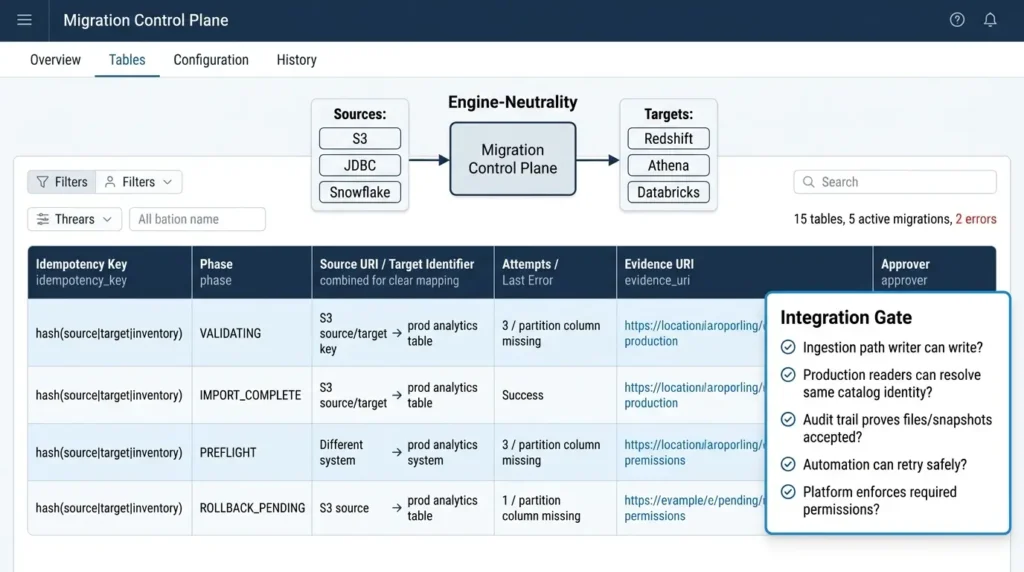
Give every migration a stable idempotency key, such as source-location + target-identifier + inventory-version. Store one record per table and keep the evidence location beside the state.
| Control-plane field | Purpose | Example |
|---|---|---|
idempotency_key | Prevents a retry from creating a second target or re-registering the same files. | hash(source|target|inventory) |
phase | Shows whether the table is in inventory, preflight, import, validation, cutover, or rollback. | VALIDATING |
source_uri / target_identifier | Makes physical and catalog ownership unambiguous. | s3://lake/events → prod.analytics.events |
attempt_count / last_error | Separates transient failures from deterministic schema or permission failures. | 3 / partition column missing |
evidence_uri / approver | Points to inventory, validation results, query diffs, and approval. | s3://audit/migrations/events/ |
A safe retry policy distinguishes inventory and validation retries from destructive cleanup retries. Re-running an inventory is usually safe. Re-running add_files after disabling duplicate checks is not. Re-running orphan cleanup with a shorter retention period should require explicit approval.
Add an integration gate before cutover
A migration can pass its data checks and still fail as a platform rollout. Treat integration as its own gate with five questions: can the ingestion path write the target, can every intended reader resolve the same catalog identity, can the audit trail prove which files and snapshot were accepted, can the automation retry safely, and can the platform enforce the required storage and encryption permissions?
This gate is especially important when one team writes with Spark or a managed ETL service while another reads with Athena, Trino, Redshift, or a warehouse connector. Test the operations that matter in production, DDL, DML, snapshot visibility, timestamp behavior, predicate pushdown, maintenance, and rollback, not only a SELECT * LIMIT 10.
If your destination is BigQuery rather than Spark or Hive, pair this runbook with our Apache Iceberg on BigQuery guide, which adds BigQuery-specific preflight gates, bucket-prefix traps, and a shadow-table cutover checklist
Step 6: validate before changing production ownership
A global count can match while one partition is missing and another contains duplicates. A global sum can match while two errors cancel each other out. A sample query can pass while a renamed field breaks a downstream join.
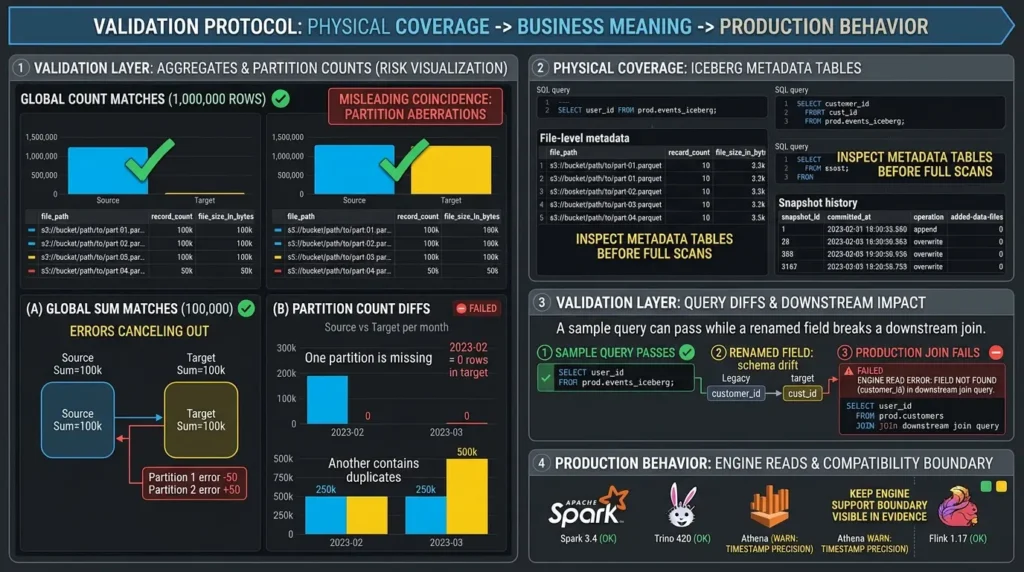
Use a validation protocol that moves from physical coverage to business meaning and then to production behavior.
| Validation layer | Compare | Hold condition | Evidence to keep |
|---|---|---|---|
| File coverage | Expected source files and Iceberg-referenced files. | Missing, duplicate, or out-of-scope files without an explanation. | Inventory hash and files metadata export. |
| Partition counts | Rows grouped by each important partition. | Mismatch outside an approved transformation. | Partition diff table and tolerance. |
| Aggregates | Sums, minima, maxima, and distinct counts. | Unexpected drift, overflow, or type coercion. | Versioned query results. |
| Null rates | Keys, partitions, and filtered columns. | Unexpected increase or newly possible null. | Column profile by partition. |
| Duplicate keys | Business keys or event IDs grouped and counted. | Duplicates introduced by overlap or registration. | Duplicate sample and cause. |
| Query diffs | Representative production SQL and result checksums. | Different results, failed predicates, or unacceptable behavior. | SQL, engine version, checksum, and runtime. |
| Engine reads | Spark, Trino, Athena, Flink, and other production readers. | Field-resolution or catalog errors. | Reader logs and compatibility notes. |
A simple aggregate comparison might look like this:
SQL:
-- Source
SELECT event_date, COUNT(*) AS rows, SUM(amount) AS amount
FROM legacy.events
GROUP BY event_date;

-- Target
SELECT event_date, COUNT(*) AS rows, SUM(amount) AS amount
FROM prod.events_iceberg
GROUP BY event_date;
Inspect Iceberg metadata tables before running full scans
The data query tells you whether business results match. Iceberg’s metadata tables tell you what the table believes it owns. The official Spark Queries documentation exposes metadata tables by adding a metadata-table suffix to the Iceberg table identifier. Use them to inspect files and snapshots quickly, then use the results to target deeper validation.
SQL:
-- File-level metadata: inspect references without scanning every row.
SELECT file_path,
       record_count,
       file_size_in_bytes
FROM prod.events_iceberg.files;

-- Snapshot history: inspect the operations that changed table state.
SELECT snapshot_id,
       committed_at,
       operation,
       summary['added-data-files'] AS added_files
FROM prod.events_iceberg.snapshots
ORDER BY committed_at DESC;
The metadata tables are not a replacement for business-level checks. A file can be present and readable while containing the wrong partition, unexpected duplicate keys, or an incorrect schema interpretation. Use files for coverage and physical evidence, and snapshots or history for the commit timeline.
Keep the engine support boundary visible in the evidence. A table that reads correctly through one connector may still expose a different timestamp precision, predicate-pushdown behavior, maintenance surface, or permission path through another. Record the engine version, catalog configuration, storage role, and query result for each supported reader.
If the migration depends on a feature available only in one engine, state that limitation before calling the table production-ready.
If the migration deliberately deduplicates or transforms records, define the expected difference before running it. A validation result is only meaningful when the acceptance rule is known in advance.
Step 7: choose the cutover pattern
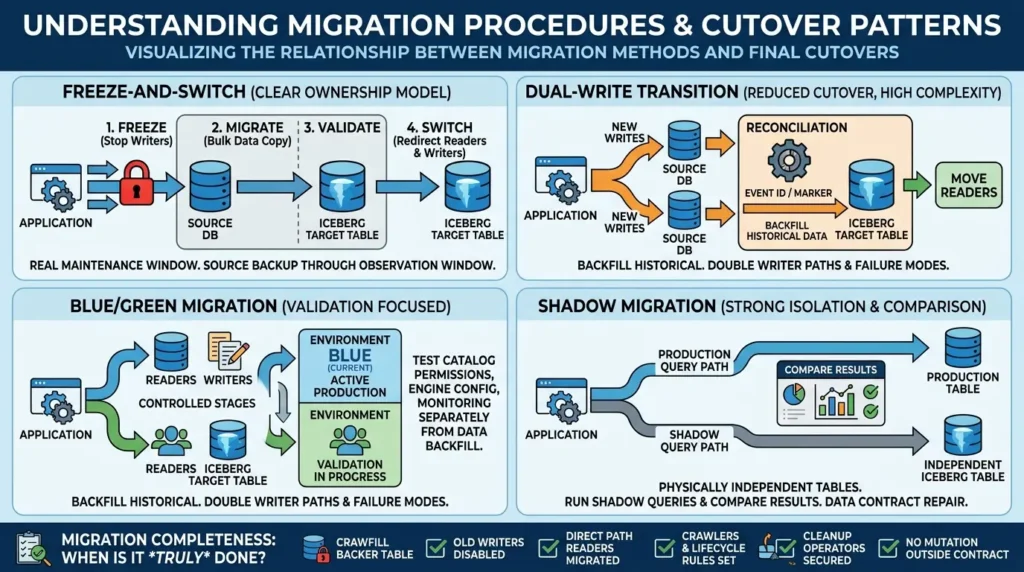
The procedure and the cutover pattern are related, but they are not the same decision. A snapshot can support a blue/green transition. A full rewrite can support a shadow migration. A dual-write design can be used with either a copied target or an in-place target, but it creates a second writer path that must be reconciled.
Freeze-and-switch
Stop writers, execute the migration, validate, redirect readers and writers, and keep the source backup through an observation window. This is the clearest ownership model and fits a controlled migrate operation, but it requires a real maintenance window and a complete writer inventory.
Dual-write transition
Backfill the historical data, write new records to both systems, reconcile by event ID or commit marker, and move readers after the target passes its observation window. This reduces a single cutover event but doubles write paths and failure modes.
Blue/green migration
Keep the current environment as blue, validate the Iceberg environment as green, and move readers and writers in controlled stages. This is useful when catalog permissions, engine configuration, and monitoring must be tested separately from the data backfill.
Shadow migration
Rewrite data into a physically independent Iceberg table, run shadow queries, compare results, and switch after acceptance. It costs more storage and compute but provides the strongest isolation when the source layout is poor or the data contract needs repair.
The migration is not complete when readers move. It is complete when old writers, direct path readers, crawlers, lifecycle rules, and cleanup operators can no longer mutate or delete the new table outside the agreed contract.
Step 8: operate the table after migration
The Google query cluster around “Iceberg snapshot expiration,” “snapshot retention,” “orphan files,” and “compaction after migration” reflects a practical reality: a new Iceberg table creates an ongoing operating responsibility.
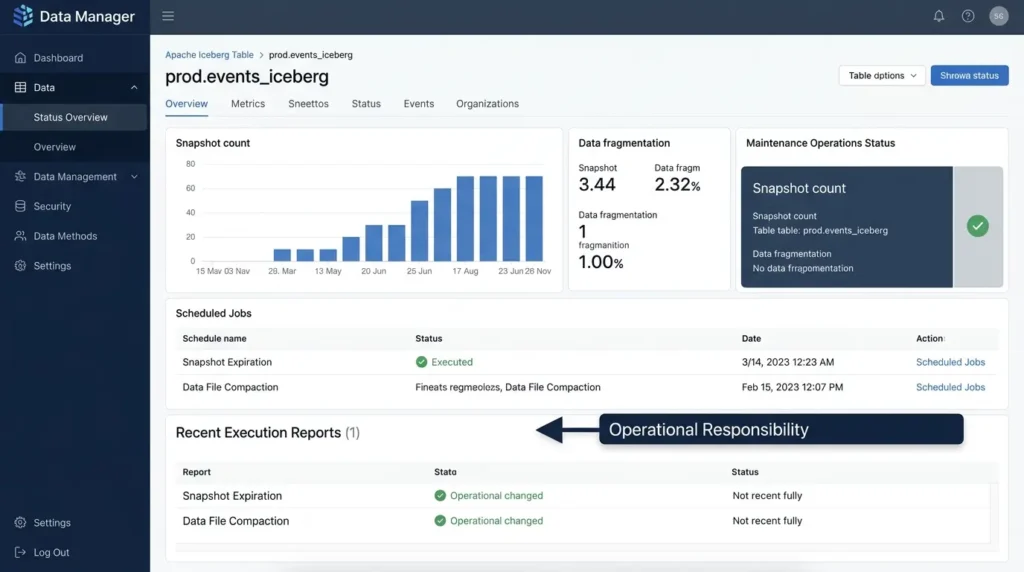
The official Iceberg maintenance guidance recommends expiring old snapshots so that files no longer needed for time travel or rollback can be removed. It also warns that orphan-file deletion is dangerous when the retention interval is shorter than the expected duration of an in-progress write.
Small data files increase metadata and file-open overhead, while rewriteDataFiles can compact them. rewriteManifests can regroup metadata entries when the write pattern does not match common query filters.
| Operation | Purpose | Guardrail | Owner |
|---|---|---|---|
expire_snapshots | Remove snapshots and files no longer needed for time travel or rollback. | Retention covers recovery, late jobs, and the agreed rollback window. | |
remove_orphan_files | Clean files not referenced by table metadata. | Dry-run first; retention exceeds maximum write duration. | |
rewrite_data_files | Compact small files and reduce file-open overhead. | Compaction does not redesign a bad partition strategy. | |
rewrite_manifests | Regroup metadata entries to improve planning. | Measure planning behavior before and after. | |
| Rollback rehearsal | Prove that a known-good table state can be restored. | Rehearse before deleting the source backup or shortening retention. |
Set table properties deliberately after migration
After the first successful validation, make the write contract explicit rather than relying on whichever defaults happen to be active in the deployed engine. The Iceberg table configuration reference lists zstd as the current default Parquet compression codec and 536870912 bytes as the default target file size in the current documentation. Setting them explicitly can make the intended contract visible in code and reproducible across environments.
SQL:
ALTER TABLE prod.events_iceberg SET TBLPROPERTIES (
  'write.parquet.compression-codec' = 'zstd',
  'write.target-file-size-bytes'    = '536870912'
);
-- 536870912 bytes is 512 MiB.
These properties govern future writes and rewrites; they do not recompress existing Parquet files. Validate the values against your deployed Iceberg and engine versions, workload characteristics, and storage policy before applying them broadly. A 512 MiB target is a starting contract, not a universal performance guarantee.
The post-migration handoff should also name the operational levers that are easy to overlook: object-store and KMS permissions, catalog DDL automation, compaction ownership, snapshot-pruning authority, and the response path for a failed commit. Teams often discover these gaps only after the first production write, when the table is technically valid but nobody has permission to maintain it safely.
expire_snapshots and orphan-file cleanup are not interchangeable. Snapshot expiration reasons about snapshots and the files they no longer require. Orphan cleanup reasons about files that are not referenced by the table metadata. Both can remove physical objects when configured to do so, so the operator and retention rule must be explicit.
Need these preflight checklists and matrices as an editable template?
Grab the complete Parquet-to-Iceberg Migration Workbook (includes the schema audit checklist, procedure decision matrix, and Go/Hold/Rollback register).
What migrating to Iceberg does not fix
In-place migration can preserve small files, poor data distribution, skewed partitions, duplicate business keys, stale schemas, and an unsuitable partition strategy. It can make table identity clearer without making scans faster.
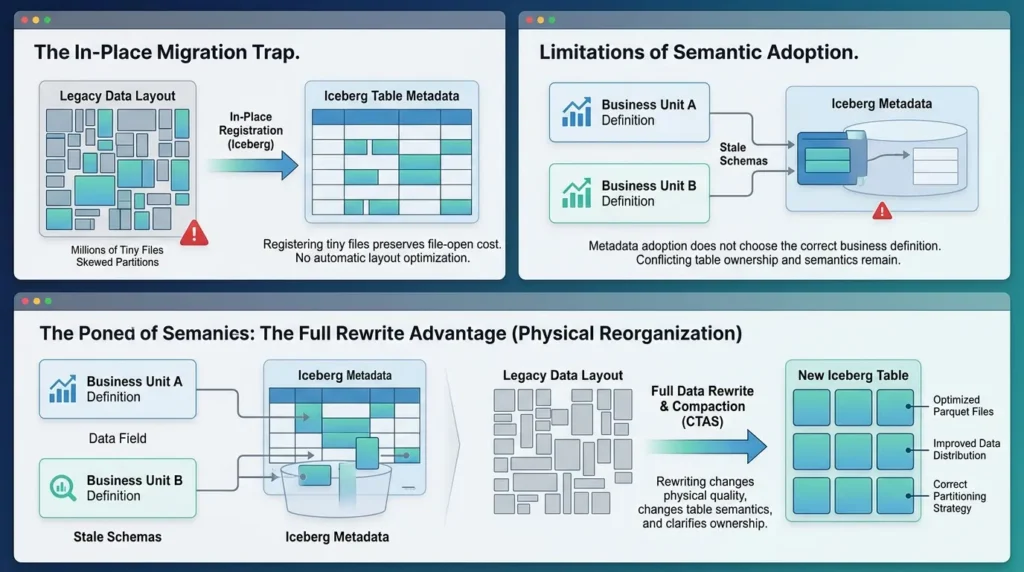
If the performance problem is millions of tiny files, registering them does not remove the file-open cost. If analysts filter on a column ignored by the old partitioning, metadata adoption does not automatically create a better layout. If two writer families disagree about the meaning of a field, Iceberg metadata does not choose the correct business definition.
This is where a full rewrite earns its cost. Use migration to change table semantics and ownership. Use rewriting and maintenance to change physical quality.
A practical Go / Hold / Rollback risk register
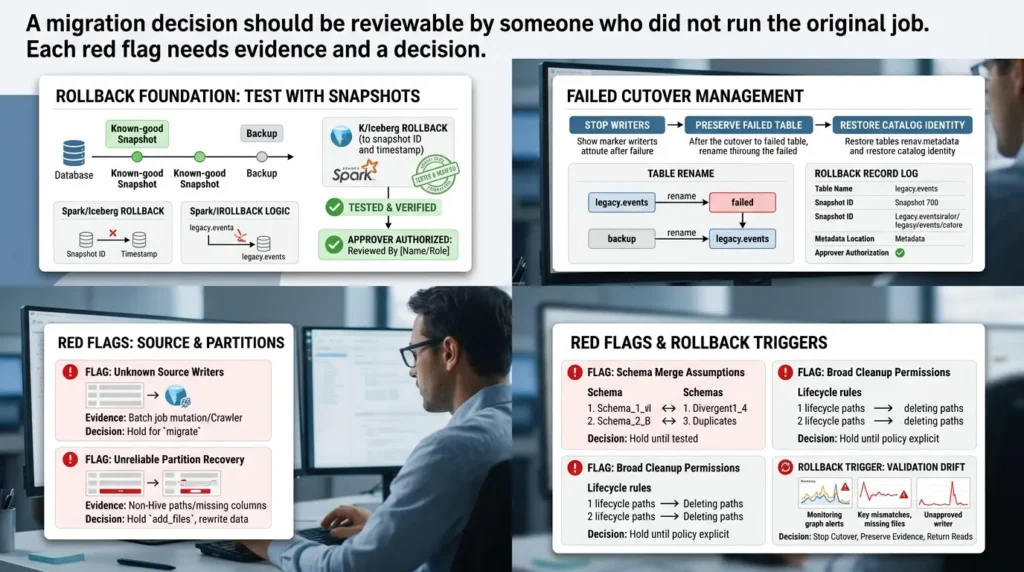
A migration decision should be reviewable by someone who did not run the original job. Each red flag needs evidence and a decision.
Rollback commands you can actually run
Rollback is not a slogan; it is a catalog operation that must be tested while the known-good snapshot or backup still exists. For a Spark-managed Iceberg table, the official Spark procedures reference supports rolling a table back to a specific snapshot or to the snapshot current at a timestamp.
SQL:
-- First, identify the known-good snapshot from the snapshots/history metadata tables.
-- Then roll the table back to that snapshot.
CALL prod.system.rollback_to_snapshot(
  table       => 'prod.events_iceberg',
  snapshot_id => 12345678901234567
);

-- Or roll back to the snapshot that was current at a timestamp.
CALL prod.system.rollback_to_timestamp(
  table     => 'prod.events_iceberg',
  timestamp => TIMESTAMP '2026-08-16 10:30:00'
);
The snapshot ID above is illustrative; use an ID returned by your own table metadata. These procedures update table state and invalidate cached Spark plans that reference the affected table, so readers should be restarted or re-planned according to the deployed engine behavior.
For a failed migrate cutover, stop writers first, preserve the failed Iceberg table for investigation, verify the backup name, and then restore the original catalog identity. A typical Hive Metastore sequence is:
SQL:
-- Names are examples. Confirm the actual backup name before running this.
ALTER TABLE legacy.events RENAME TO legacy.events_iceberg_failed;
ALTER TABLE legacy.events_backup RENAME TO legacy.events;
Do not run the rename blindly if the failed table still owns the production identifier or if the backup has already been modified. The rollback record should include the exact table names, snapshot IDs, metadata locations, and the approver who authorized the change.
Red flag: source writers are not fully known
Evidence: a batch job, crawler, streaming process, or manual repair script can still mutate the source. Decision: Hold for migrate; use a staged path only if synchronization is designed and monitored.
Red flag: partition values cannot be recovered reliably
Evidence: non-Hive paths, missing partition columns, or inconsistent path names. Decision: Hold add_files; define the source mapping explicitly or rewrite the data.
Red flag: schema differences are explained only by “Spark will merge them”
Evidence: type changes, duplicate columns, renames, or unknown field-ID behavior. Decision: Hold until the target schema is tested with representative files and production engines.
Red flag: cleanup permissions are broader than table ownership
Evidence: lifecycle rules or operators can delete paths referenced by Iceberg. Decision: Hold until deletion authority, retention, and source-backup policy are explicit.
Rollback trigger: validation drift or an unsafe writer appears
Evidence: partition-count mismatch, duplicate keys, query-result differences, missing files, or an unapproved writer. Decision: stop cutover, preserve evidence, return reads to the known-good source or snapshot, and do not expire or delete files until the incident is understood.
The practical definition of “migrated”
A Parquet dataset is migrated to Iceberg when the new table has a documented schema and partition contract, a catalog identity, a known writer and cleanup owner, validated file coverage, tested readers, and a rollback path that has not been destroyed by premature cleanup.
The safest migration is not the one with the fewest commands. It is the one where the team can explain what changed, what remained shared, who can delete what, and which evidence would cause the cutover to stop.
That is the difference between placing Iceberg metadata beside Parquet files and moving the table into a managed operating model.
Download the Vertex Frontier Migration Control Pack
A migration is easier to review when the evidence lives in a repeatable control pack instead of one engineer’s notebook. The Vertex Frontier Parquet-to-Iceberg Migration Control Pack includes a printable PDF runbook, an editable workbook, a preflight checklist, a procedure decision matrix, a validation scorecard, a cutover planner, and a Go/Hold/Rollback risk register.
Document the source estate, choose the migration path, retain validation evidence, and make deletion and rollback decisions visible to the entire platform team.
Frequently asked questions
How do I convert Parquet files to Iceberg?
Classify the dataset first. Then choose an in-place path—snapshot, migrate, or controlled add_files—or create a new Iceberg table through a full rewrite. The safe choice depends on schema consistency, partition mapping, writer control, file ownership, and the need for physical isolation.
Can I migrate Parquet to Iceberg without rewriting the data?
Often, yes. Iceberg supports in-place metadata migration for compatible Parquet, ORC, and Avro files. But avoiding a rewrite also means the target may remain dependent on the original files and their ownership rules. Validate the source layout and protect the files from uncoordinated deletion.
What is the difference between Iceberg snapshot and migrate?
Snapshot creates a new Iceberg table while leaving the source available. Migrate replaces the source table identity and requires source modifications to stop during the operation. Snapshot fits staged validation; migrate fits a controlled freeze-and-switch when the catalog and writers support it.
Should I use the Iceberg `add_files` procedure for every migration?
No. Use it when the target schema and partition contract are already defined and the files are known to be compatible, or when adding files missed during a controlled transition. It is a poor first choice when the source state, schema, partition mapping, or duplicate behavior is uncertain.
Does Iceberg use Hive Metastore?
Iceberg can use Hive Metastore, but it can also work with REST catalogs and cloud catalog implementations. Capabilities differ by catalog. For example, [AWS documents a limitation for the migrate procedure with AWS Glue Data Catalog] and describes the snapshot, backup, drop, and register_table workflow explained above.
Will migrating to Iceberg solve the small-files problem?
Not by itself. In-place migration can preserve the existing small files. Use a rewrite or compaction operation when file sizes create planning and file-open overhead, and investigate why the writer is producing small files in the first place.
How should I validate a Parquet-to-Iceberg migration?
Compare file coverage, partition-level counts, business aggregates, null rates, duplicate keys, representative query results, schema resolution in each production engine, snapshot visibility, and rollback behavior. Keep the outputs as evidence rather than relying on one success message.
📋 Article Timeline & History
Successfully updated on September 19, 2026 with the latest details.
This article was originally published on August 17, 2026.

Was this article helpful?




[…] How to Migrate from Parquet to Apache Iceberg Without Breaking Your Data Lake […]
[…] should be treated as a table-ownership change rather than a file-copy exercise. Our guide on migrating Parquet data to Iceberg expands the same validation, backfill, rollback, and ownership questions for the sink side of the […]
[…] discussion of why open table formats still need operational controls, see Vertex Frontier’s Parquet-to-Iceberg migration guide. The migration article covers inventory and ownership; this article adds the partition decision and […]