
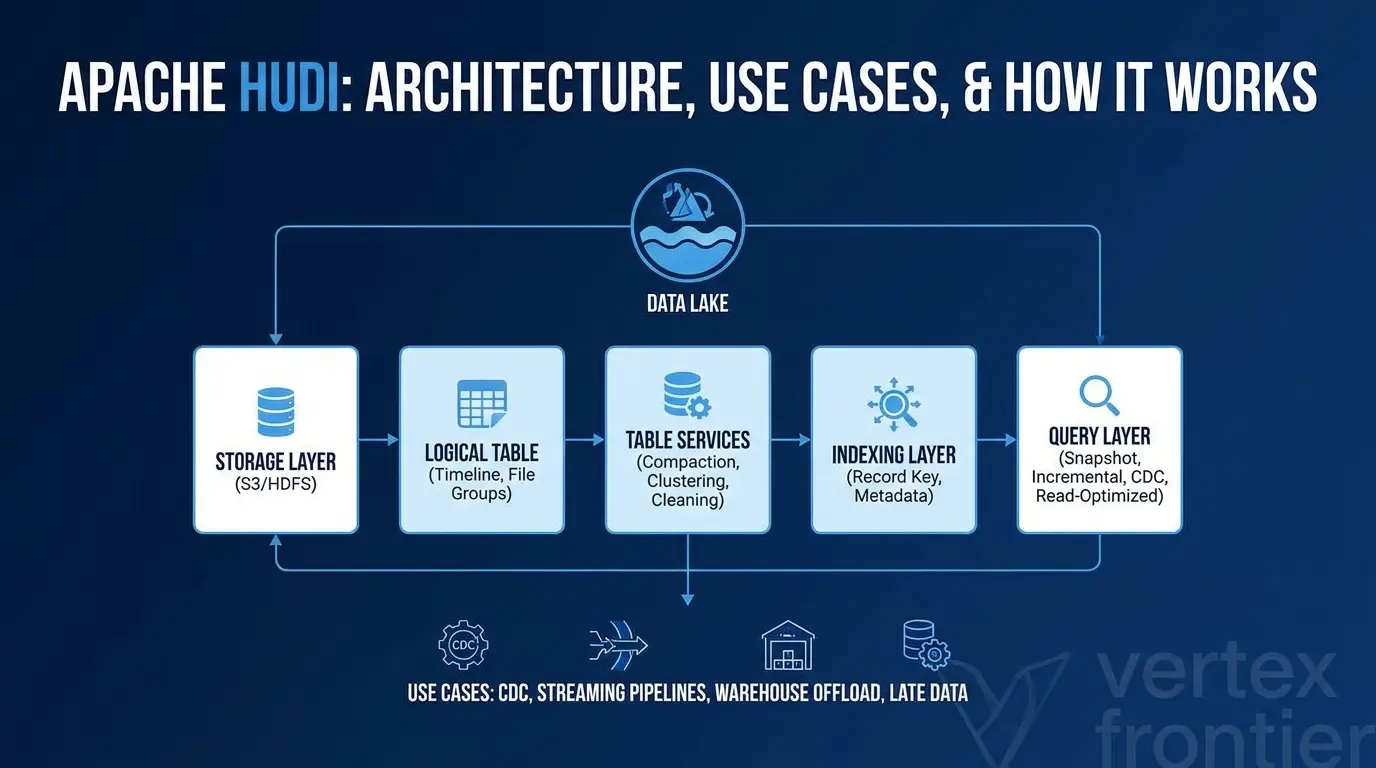

Apache Hudi is often introduced as a table format for data lakes. That description is not wrong, but it is too small to be useful.
Hudi also manages how records are located, how changes become visible, how readers obtain a consistent table view, and how background services keep the storage layout usable. The result is a system designed for data that does not stay still: CDC streams, late-arriving events, frequent updates, deletes, and incremental pipelines.
The important question is not simply “What is Apache Hudi?” It is:
What kind of change-heavy workload do you have, and can your team operate the table services that make Hudi work well?
This guide builds the answer from the inside out. You will see how one record moves through a Hudi table, why Copy-on-Write and Merge-on-Read behave differently, how Hudi’s timeline controls visibility, which use cases fit the project best, and where Iceberg or Delta Lake may be a better choice.
Key takeaways
Click any topic to expand or collapseWhat is Apache Hudi?
Apache Hudi is an open lakehouse table platform that adds record-level upserts, deletes, transactions, indexing, incremental queries, and table services to data stored in open file formats. It is designed for mutable lake data, CDC, late-arriving records, and streaming or batch pipelines, not as a replacement for an OLTP database.
Apache Hudi is an open data lakehouse platform built around an open table format. It stores data in open file formats and adds database-like capabilities such as transactions, upserts, deletes, indexing, incremental processing, concurrency control, and table maintenance.
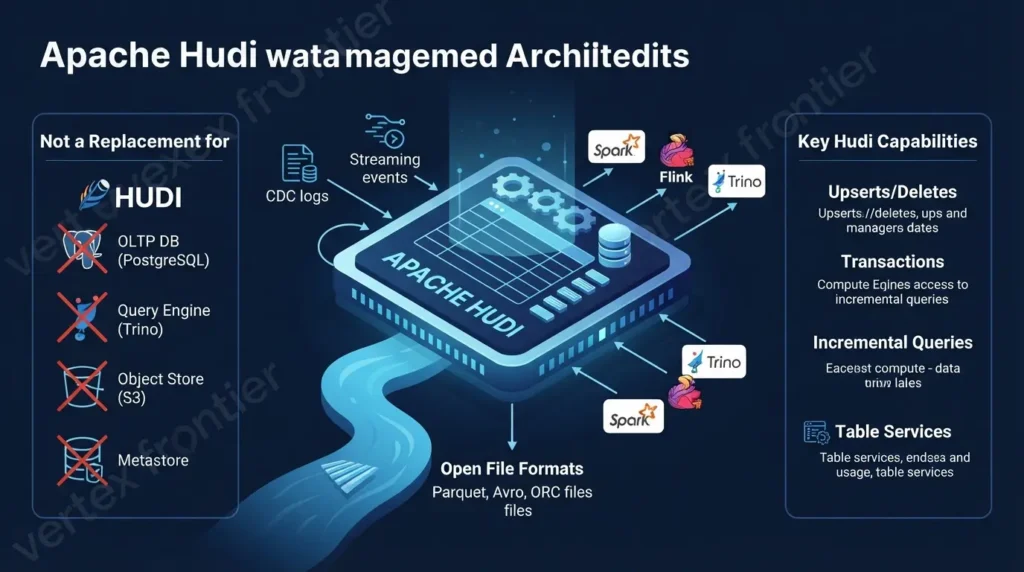
The project’s official overview describes Hudi as a platform for bringing database functionality to data lakes while retaining open storage and integration with engines such as Spark, Flink, Hive, Presto, and Trino.
That wording matters. Hudi is not the same thing as:
- An OLTP database such as PostgreSQL.
- A query engine such as Spark or Trino.
- An object store such as Amazon S3.
- A catalog or metastore.
- A single ingestion connector.
Hudi sits between these pieces. It provides the table and write/read management layer that helps engines work with mutable data stored in a lake.
A useful definition is:
Apache Hudi is a transactional lakehouse table and storage-management system for workloads that need frequent inserts, updates, deletes, incremental reads, and controlled table maintenance over open data files.
The word “transactional” should still be read carefully. Guarantees depend on the Hudi release, table type, writer, lock provider, storage backend, configuration, and deployment model. Hudi is not a universal replacement for a transactional database.
Why was Hudi created?
Object storage and distributed file systems are good at holding large amounts of data. They are not naturally good at answering questions such as:
- Where is the current version of this record?
- How can I update one logical entity without rebuilding an entire table?
- Which changes arrived since the previous pipeline run?
- How can readers avoid seeing half-written output?
- How do I retain enough history for time travel without keeping every old file forever?
A traditional batch lake often handles change by writing another full snapshot. That can work for append-only data. It becomes expensive when a source system sends frequent changes to a large existing dataset.
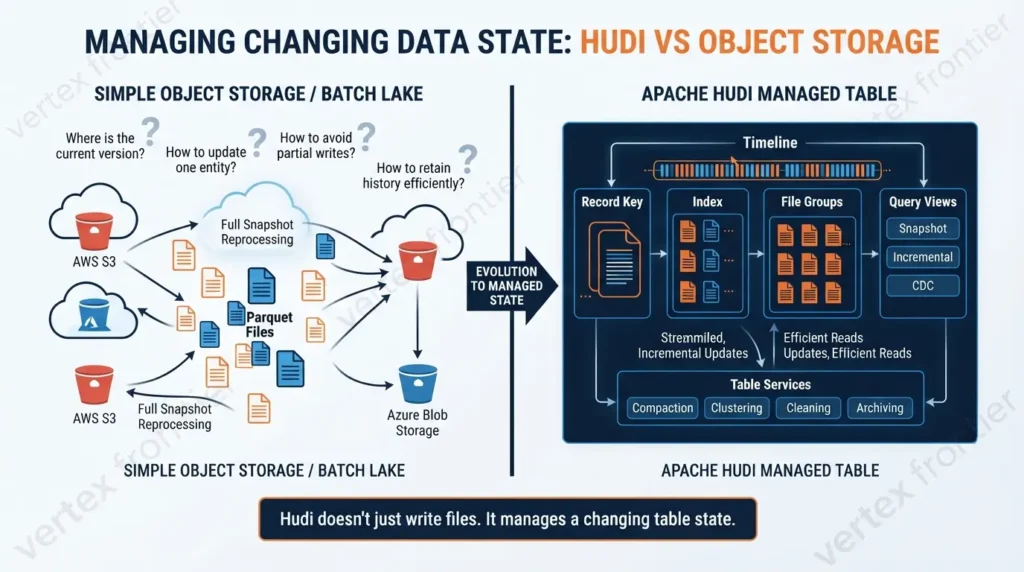
Hudi addresses that problem with a coordinated set of mechanisms:
- A record key identifies a logical record.
- An index helps locate the file group where that record belongs.
- A file group organizes the physical data for a group of records.
- A timeline records what table actions were requested, in progress, or completed.
- A query view determines whether readers see the latest snapshot, incremental changes, CDC records, or only compacted base files.
- Table services such as compaction, clustering, cleaning, and archiving keep the layout manageable.
This is the first major difference between Hudi and a simple folder of Parquet files. Hudi does not merely write files. It manages a changing table state around those files.
Apache Hudi architecture: the layers that work together
Most introductions list Hudi features in isolation. A clearer way to understand the architecture is to separate it into six layers.
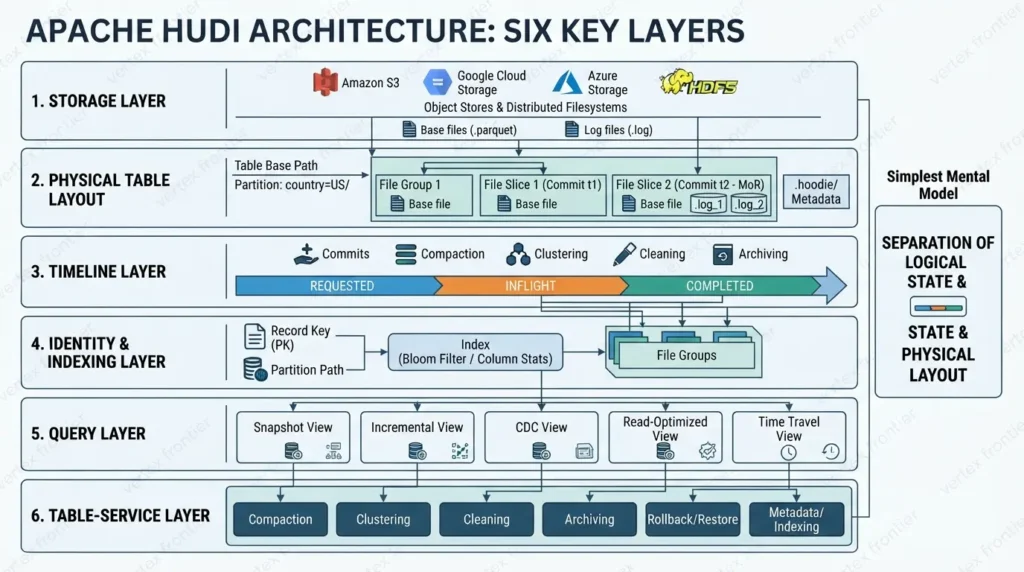
1. Storage layer
The storage layer is usually an object store or distributed file system such as Amazon S3, Google Cloud Storage, Azure storage, or HDFS. The actual records live in base files and, for Merge-on-Read tables, log files.
The base files may use formats such as Parquet or other formats supported by the chosen Hudi release and engine. Hudi’s open-storage approach allows different compute engines to work with the same general lakehouse data, but support is never identical across every engine and version.
2. Physical table layout
Hudi organizes data through a hierarchy:
base path → partitions → file groups → file slices
A file group is associated with a file ID. A file slice represents a version of that group at a particular point in the table’s history. It can contain a base file and, for Merge-on-Read, one or more log files.
The official storage-layout documentation is the best reference for this physical model. The practical implication is simple: Hudi can create a new valid slice instead of editing an existing file in place.
Table Base Path: s3://example-bucket/hudi/customers/
│
├── Partition: country=US/
│   │
│   ├── File Group 1 (file_id: fg_101)
│   │   ├── File Slice 1 (Commit t1)
│   │   │   └── base_file_t1.parquet
│   │   │
│   │   └── File Slice 2 (Commit t2 - MoR)
│   │       ├── base_file_t1.parquet       (base data)
│   │       ├── .fg_101_t2.log_1           (delta updates)
│   │       └── .fg_101_t3.log_2           (late-arriving changes)
│   │
│   └── File Group 2 (file_id: fg_102)
│       └── File Slice 1 (Commit t1)
│           └── base_file_t1.parquet
│
└── .hoodie/ (timeline metadata and table metadata)
This is a teaching diagram, not a literal directory listing. Exact file names, extensions, partition paths, and metadata-table locations vary by Hudi release, table type, key generator, and storage configuration. In particular, Hudi metadata indexes are maintained through the metadata-table subsystem rather than being represented by one universal file name under .hoodie/.
3. Timeline layer
The timeline is Hudi’s record of table state. It contains actions such as commits, delta commits, replace commits, compaction, clustering, cleaning, indexing, rollback, savepoint, and restore.
An action can pass through states such as:
REQUESTED: the action has been planned.INFLIGHT: work is being executed.COMPLETED: the action is published as part of the table’s committed state.
This separation is what allows readers to distinguish completed table state from work that has not finished.
The Apache Hudi timeline documentation also makes an important distinction between requested time and completed ordering. Under concurrency, the order in which work starts is not always the order in which it becomes visible.
4. Identity and indexing layer
A record key tells Hudi which logical record is being written. The partition path adds physical organization. An index helps Hudi find the file group that currently contains the record.
This is not identical to a relational database primary-key constraint. Duplicate behavior depends on the operation, index, writer, table type, partition semantics, and concurrency configuration. That distinction matters when explaining CDC correctness.
Hudi documents several index and metadata-index approaches, including Bloom filters, record-level indexes, column statistics, secondary indexes, expression indexes, and bucket-oriented approaches. Availability and defaults are release- and engine-sensitive, so a production guide should always name its Hudi version.
5. Query layer
Hudi can expose different views of the same table:
- Snapshot: the latest committed table state.
- Incremental/latest-state: records that changed after a specified point in the timeline.
- CDC: change events such as inserts, updates, deletes, and before/after images where supported.
- Read-optimized: base-file data from a Merge-on-Read table, which may not include every un-compacted change.
- Time travel: an earlier valid table state where supported by the selected engine and configuration.
The query type is as important as the table type. Saying “Hudi is fast” without saying which view is being read is too vague to help an engineer make a decision.
6. Table-service layer
Table services perform the maintenance work around the data:
- Compaction merges log files into new base files for
Merge-on-Readtables. - Clustering rewrites file groups to improve layout, sorting, sizing, or data organization.
- Cleaning removes old file slices that are no longer needed under the retention policy.
- Archiving moves older timeline history out of the active timeline.
- Rollback and restore help recover or move the table back to a known state.
- Metadata and indexing services improve file discovery and data skipping.
This is why Hudi should be evaluated as an operating model, not just a storage format.
Hudi separates logical table state from physical file layout. The timeline says which actions are committed. File groups and slices hold the physical versions. Table services rewrite and remove files without changing the reader’s understanding of which table state is valid.
How Apache Hudi works: one record from source to query
Imagine a customer database sends an update through a CDC pipeline. The customer’s address changes, and the event arrives after the original row was written to the lake.
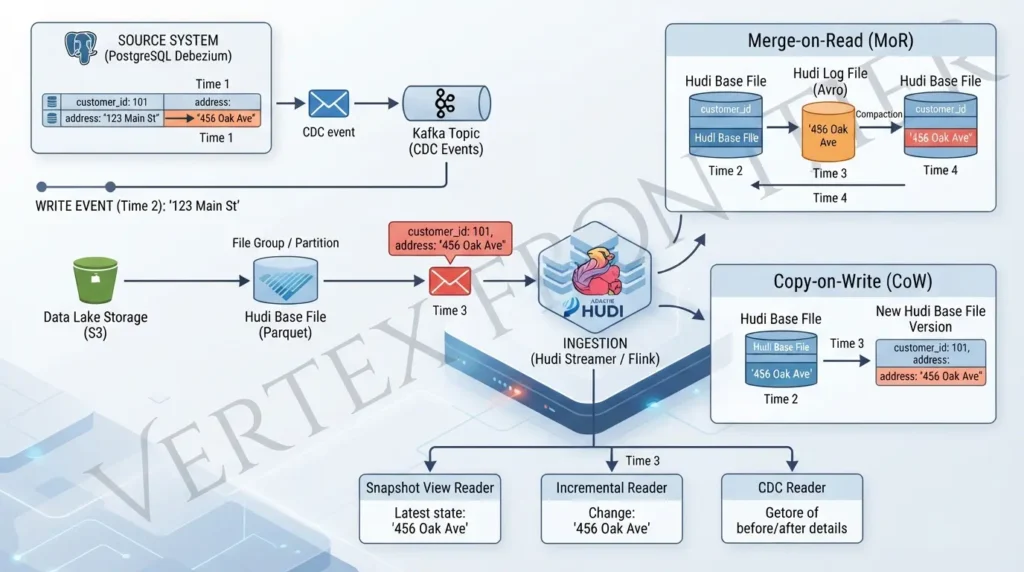
Step 1: The writer receives the event
A Spark job, Flink pipeline, streamer, or another supported writer receives the record. The event may come from a database connector, Kafka, a file landing zone, or another source.
Hudi’s official use-case documentation discusses CDC, Kafka Connect, Debezium-style data, schema registries, checkpoints, late data, and event-time ordering. These integrations are not interchangeable, so the exact connector and engine should be treated as part of the design.
Hudi Streamer: ingestion without writing a custom job for every table
You do not always need to build a bespoke Spark program for each CDC table. Hudi provides Hudi Streamer, the command-line ingestion utility whose main class is org.apache.hudi.utilities.streamer.HoodieStreamer. It can use pluggable sources, schema providers, key generation, transformations, and payloads. The official Hudi Streamer documentation includes Kafka and Debezium examples.
For a PostgreSQL Debezium stream, the documented pattern supplies a Kafka source, a schema registry provider, a PostgreSQL Debezium source and payload, an event-ordering field, a target path, and an operation such as UPSERT. A Merge-on-Read table is one possible choice for frequent CDC writes; the documentation also notes that Copy-on-Write can work.
The important boundary is that Hudi Streamer automates ingestion mechanics, not data modeling decisions. You still need to choose the upstream primary key as the Hudi record key, select an ordering field that reflects source change order, handle deletes, configure checkpoints, and test schema evolution. Never copy the PostgreSQL or MySQL payload class from an example into a different CDC envelope without verifying the source format.
Illustrative Hudi Streamer command — Hudi 1.2.1 documentation pattern:
spark-submit \
  --packages org.apache.hudi:hudi-utilities-slim-bundle_2.12:1.2.1,org.apache.hudi:hudi-spark3.5-bundle_2.12:1.2.1 \
  --class org.apache.hudi.utilities.streamer.HoodieStreamer \
  /path/to/hudi-utilities-slim-bundle.jar \
  --props file:///path/to/debezium-source.properties \
  --schemaprovider-class org.apache.hudi.utilities.schema.SchemaRegistryProvider \
  --source-class org.apache.hudi.utilities.sources.debezium.PostgresDebeziumSource \
  --payload-class org.apache.hudi.common.model.debezium.PostgresDebeziumAvroPayload \
  --source-ordering-field _event_lsn \
  --target-base-path s3://example-bucket/hudi/customers \
  --target-table customers \
  --table-type MERGE_ON_READ \
  --op UPSERT \
  --continuous
Before running: replace the placeholder path and storage location, confirm the Spark/Hudi bundle combination, configure the Kafka and schema-registry properties, and verify that the source is PostgreSQL Debezium. This is a documented pattern, not a universal drop-in command.
Step 2: Hudi identifies the logical record
The writer uses the record key and partition path. The index helps locate the file group associated with the record.
If several events for the same key arrive together, the configured precombine or record-merger behavior can determine which event is retained. The exact semantics depend on the release and writer path. Do not describe precombine as a universal database constraint.
Step 3: Hudi writes a new physical version
The physical behavior now depends on the table type.
With CoW, Hudi writes a new base-file version for the affected data. With MoR, Hudi writes the change to a log file associated with the file group. The existing base file is not edited in place.
Step 4: The action moves through the timeline
Hudi records the action as requested, inflight, and eventually completed. A reader should build its view from the completed table timeline rather than treating every file that exists in storage as immediately valid table data.
Step 5: A query chooses its view
A snapshot reader wants the latest committed state. An incremental reader wants changes after a checkpoint. A CDC reader may want the change itself, including operation type or before/after values. A read-optimized reader may prefer only compacted base files.
The same physical table can therefore serve different downstream jobs, but each job needs a clearly defined query contract.
Step 6: Maintenance reconciles the layout
For MoR, a later compaction job merges log records into a new base file. Cleaning removes older slices only when the retention rules allow it. Clustering may rewrite files into a more useful layout.
That maintenance work is not a sign that Hudi failed. It is part of how a mutable lakehouse table stays queryable without rewriting the entire dataset for every change.
Copy-on-Write versus Merge-on-Read
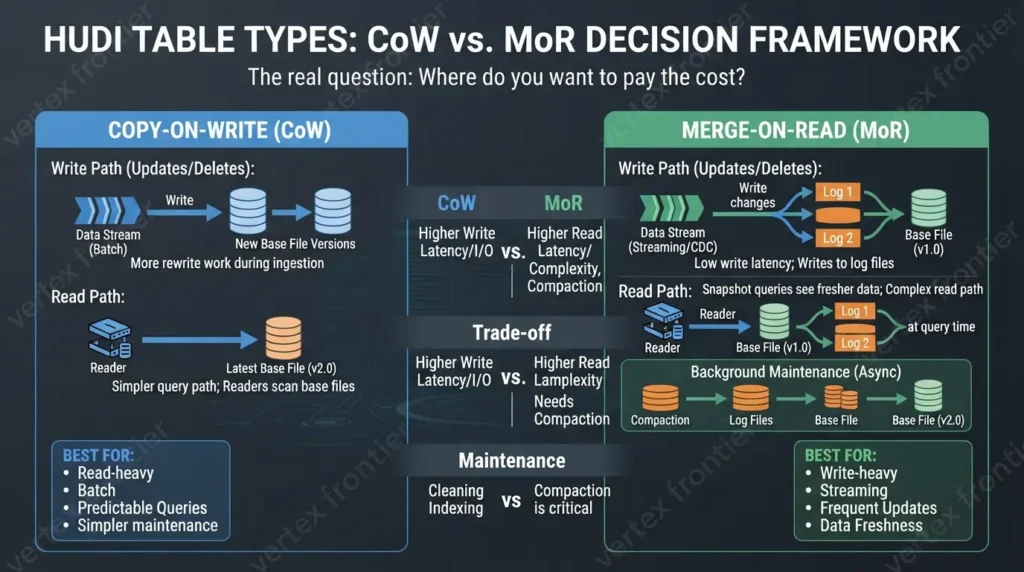
The common shortcut is “CoW is for batch and MoR is for streaming.” That is useful as a first approximation, but it is incomplete. Both table types can support transactional writes and incremental processing. The real question is where you want to pay the cost: during writes, during reads, or during background maintenance.
What is Copy-on-Write (CoW)?
Copy-on-Write(CoW) is a Hudi table type in which updates or deletes create new base-file versions for affected file groups instead of writing log files. Readers can scan base files without merging outstanding logs, but writes may do more rewrite work when existing records change.
CoW is usually the simpler starting point when read performance and a straightforward query path matter more than the lowest possible write latency. It still needs cleaning, indexing, file sizing, and other table services; “copy-on-write” does not mean “maintenance-free.”
What is Merge-on-Read (MoR)?
Merge-on-Read(MoR) is a Hudi table type in which updates and deletes are written to log files associated with base files, then periodically compacted into new base-file versions. Snapshot queries can see fresher changes, while read-optimized queries trade freshness for simpler base-file reads.
MoR can suit frequent CDC or streaming writes, but it adds a compaction and freshness contract. The team must decide how much log data readers may merge and how quickly compaction must complete.
| Decision factor | Copy-on-Write | Merge-on-Read |
|---|---|---|
| Update path | Creates new base-file versions | Writes changes to log files |
| Read behavior | Readers generally scan base files | Snapshot readers may merge base and log data |
| Maintenance | Cleaning and other services still matter | Compaction becomes a central operating concern |
| Typical fit | Read-heavy, batch, static, or slowly changing data | Frequent updates, CDC, streaming, and fresher writes |
| Main trade-off | More rewrite work during ingestion | More read/compaction coordination |
The official Hudi table-type documentation describes these trade-offs without claiming that one mode is always better. That is the right way to evaluate them.
Choose CoW when the read path dominates
CoW can be a sensible starting point when:
- Queries are frequent and predictable.
- Updates are relatively limited or arrive in manageable batches.
- Readers should avoid merging log files at query time.
- The team wants a simpler physical read path.
- Storage rewrite cost is acceptable.
Choose MoR when write freshness dominates
MoR deserves consideration when:
- Records change frequently.
- CDC events arrive throughout the day.
- The pipeline cannot wait for a full base-file rewrite before making changes available.
- Incremental processing is central to the architecture.
- The team can schedule and monitor compaction.
The mistake is choosing MoR because “streaming” sounds modern, then failing to design compaction, cleaning, file sizing, and observability. MoR moves work. It does not remove work.
Hands-on Spark example: write or upsert data into Hudi
The following PySpark example shows the settings an engineer must make explicit: the table name, base path, record key, partition path, ordering field, operation, and table type. It uses the current hoodie.table.ordering.fields option documented for Hudi 1.2.x.
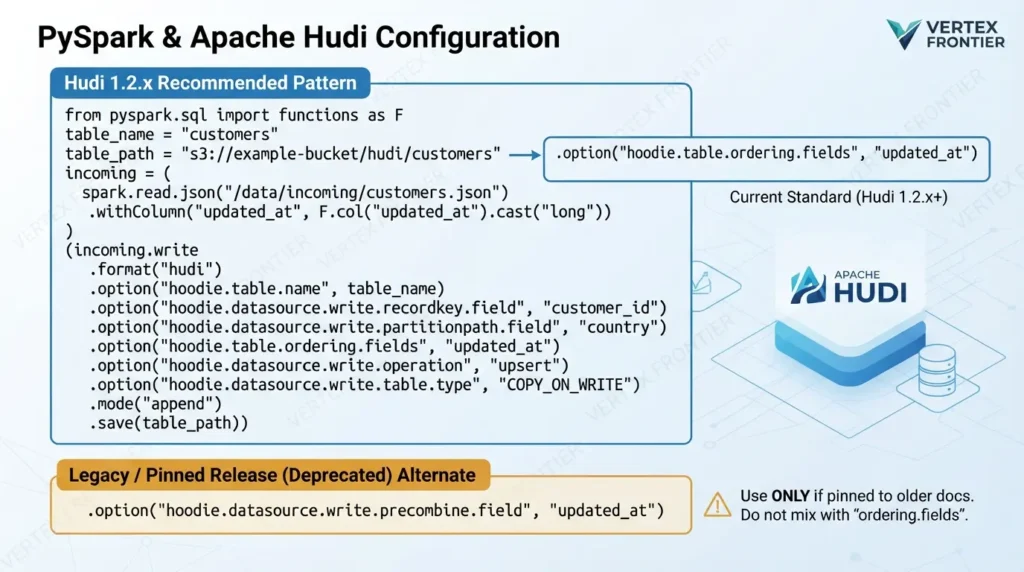
The property named hoodie.datasource.write.precombine.field appears in many older tutorials and is the exact term behind the common “precombine field” search. In the current Hudi writing documentation, that property is deprecated in favor of hoodie.table.ordering.fields. If you are following a pinned older release, use that release’s documentation rather than mixing option names.
PySpark upsert example — Hudi 1.2.x option names:
from pyspark.sql import functions as F
table_name = "customers"
table_path = "s3://example-bucket/hudi/customers"
incoming = (
spark.read.json("/data/incoming/customers.json")
.withColumn("updated_at", F.col("updated_at").cast("long"))
)
(incoming.write
.format("hudi")
.option("hoodie.table.name", table_name)
.option("hoodie.datasource.write.recordkey.field", "customer_id")
.option("hoodie.datasource.write.partitionpath.field", "country")
.option("hoodie.table.ordering.fields", "updated_at")
.option("hoodie.datasource.write.operation", "upsert")
.option("hoodie.datasource.write.table.type", "COPY_ON_WRITE")
.mode("append")
.save(table_path))
For a Merge-on-Read table, change the table-type value to MERGE_ON_READ when creating the table. Keep the table type consistent on later append writes. The record key identifies the logical customer; the ordering field determines which same-key record wins under the documented ordering rules. Validate the key, partition, and ordering semantics against your source before production use.
If a legacy Hudi release specifically requires the older option name, the equivalent setting is:
.option("hoodie.datasource.write.precombine.field", "updated_at")Use this only when the documentation for the exact pinned release calls for it. Do not add both ordering properties casually and assume they have identical precedence.
Hudi query types: the reader’s contract
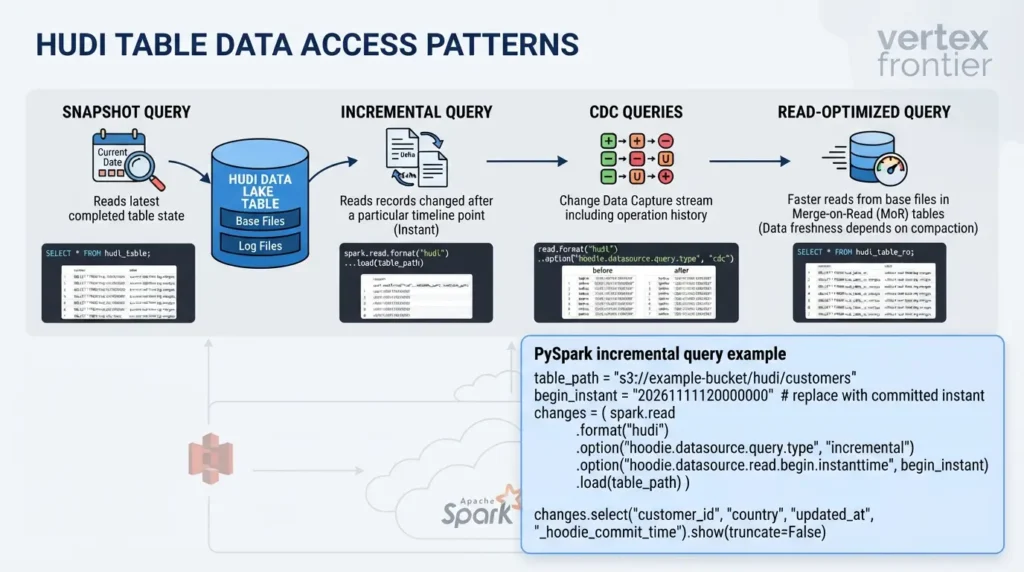
A Hudi table can be used by different readers with different expectations. Make those expectations explicit before building downstream jobs.
Snapshot queries
A snapshot query reads the latest completed table state. This is the view most analysts expect when they ask for the current table.
Incremental queries
An incremental query reads records that changed after a particular timeline point. This can avoid scanning the full table for every downstream job.
Incremental processing is especially useful for materialized views, derived tables, search indexes, and downstream lakehouse jobs that only need the latest changes.
PySpark incremental query after a Hudi instant
An incremental query starts at a Hudi instant and returns the latest-state records written after that point. The instant is a Hudi timeline value, not a wall-clock timestamp typed in an arbitrary format. In a real pipeline, persist the last successfully processed instant only after the downstream write succeeds.
PySpark incremental query:
table_path = "s3://example-bucket/hudi/customers"
begin_instant = "20261111120000000"  # replace with a committed Hudi instant
changes = (
spark.read
.format("hudi")
.option("hoodie.datasource.query.type", "incremental")
.option("hoodie.datasource.read.begin.instanttime", begin_instant)
.load(table_path)
)
changes.select(
"customer_id",
"country",
"updated_at",
"_hoodie_commit_time"
).show(truncate=False)
This example reads the table root path and asks Hudi for incremental latest-state output. It is not automatically a full CDC event log with every before-and-after image. Use Hudi’s CDC query mode and the version-specific documentation when downstream consumers need operation-level change history.
CDC queries
CDC queries focus on the change stream itself. Depending on the writer, engine, table type, and configuration, the output may identify inserts, updates, deletes, and before/after images.
Do not treat “incremental” and “CDC” as identical. An incremental latest-state query may tell you which records are now different. A CDC query may preserve the operation history required to reconstruct what happened.
Read-optimized queries
Read-optimized queries are associated with MoR tables and expose base-file data without requiring the reader to merge every outstanding log change. That can simplify reads, but freshness depends on compaction.
A design that uses read-optimized queries must define how stale the view is allowed to be.
Why indexes and metadata matter
A naive update process could search every file to discover where a record lives. That is not attractive at lake scale, especially when the storage system is object-based and file listings or footer reads have a cost.
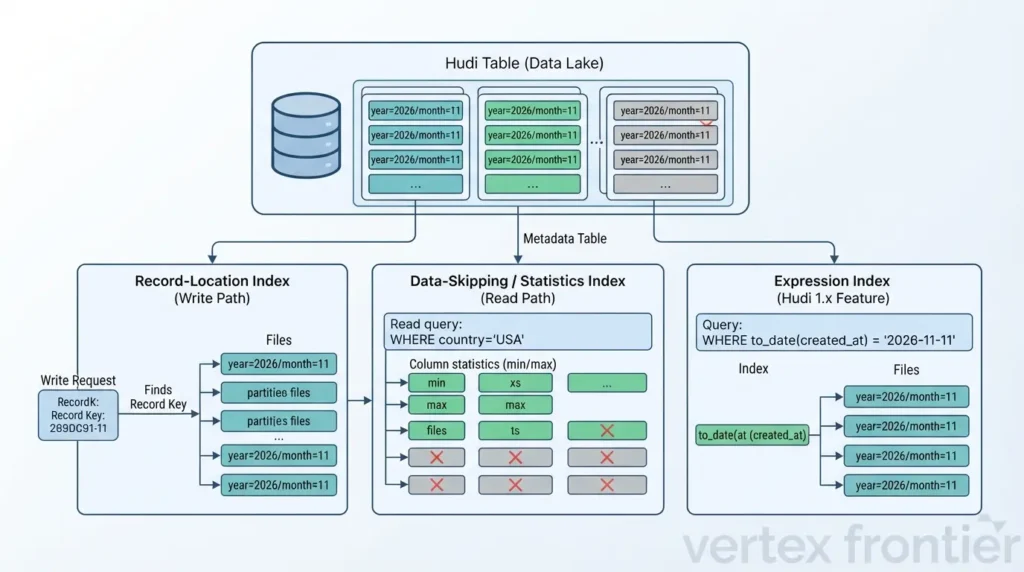
Hudi uses indexes to narrow the search for record locations. Its metadata table can maintain information such as file listings and statistics used for planning and data skipping.
This creates an important distinction:
- A record-location index helps the write path find a record.
- A data-skipping or statistics index helps the read path avoid irrelevant data.
- The metadata table helps Hudi manage and query information about the table itself.
These capabilities are related, but they solve different problems. A premium explanation should not call all of them simply “the Hudi index.”
What Hudi 1.x adds: expression and secondary indexes
Hudi 1.x makes the metadata table more than a file-listing aid. In the Hudi 1.2.1 documentation, expression indexes are documented as a Hudi 1.0.0 feature that indexes a function of a column, while secondary indexes target columns that are not record keys. Both are maintained through the metadata-table indexing system when the relevant feature is enabled and the index has been created.
An expression index is useful when the query predicate is derived from a stored value. For example, a query may filter on a date extracted from a timestamp, or on a normalized form of a string. The index can support data skipping for that expression without requiring the same expression to become an S3 partition directory. This is better described as logical partitioning or predicate pruning, not as a replacement for every physical-partitioning decision.
That distinction matters. Physical partitioning still controls directory layout and can reduce the amount of data a query considers before other pruning mechanisms run. An expression index does not move existing records into new folders. It adds metadata that can help supported Spark SQL predicates avoid irrelevant data files. Availability depends on the Hudi release, Spark SQL path, supported function, index type, and metadata configuration.
Spark SQL example: expression index on a derived date:
-- Enable expression-index maintenance on the Hudi writer
SET hoodie.metadata.index.expression.enable = true;
-- Hudi 1.2.1 SQL DDL pattern
CREATE INDEX IF NOT EXISTS created_date_idx
ON customers
USING column_stats (created_at)
OPTIONS (
expr = 'to_date'
);
-- A supported predicate can use the expression index for pruning
SELECT customer_id, country, created_at
FROM customers
WHERE to_date(created_at) = '2026-11-11';
Important: The current documentation says expression indexes are created through Spark SQL, are not yet supported through the Spark DataSource API, and do not support complex types or arbitrary UDFs. Verify the supported function and exact syntax for the Hudi version you deploy.
Secondary indexes address a different question: “Can the reader find records using a non-primary-key column?” For example, an index on customer_segment may help a predicate on that column, subject to the documented prerequisites and the selected index implementation. Do not confuse this with the record-key index used to locate an upsert target.
The official Hudi indexes documentation and SQL DDL documentation should be checked against the target release before publishing exact index definitions. The metadata-table documentation explains the storage and maintenance boundary behind these indexes.
Apache Hudi use cases
CDC from operational databases
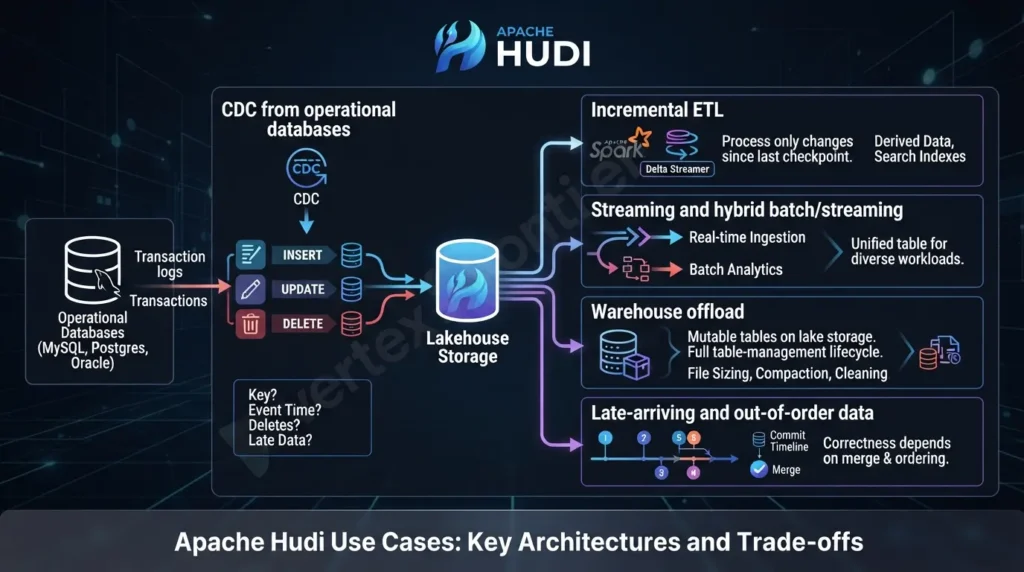
Hudi is a natural candidate when a source database produces continuous inserts, updates, and deletes. A CDC pipeline can land those changes in a lakehouse table rather than repeatedly recreating full snapshots.
The design still needs answers to difficult questions:
- What is the record key?
- Which field determines event ordering?
- How are deletes represented?
- What happens when events arrive late?
- How long must downstream consumers replay changes?
- How are schema changes validated?
- Which query view does each consumer use?
Hudi’s CDC and streaming use-case documentation discusses these concerns, but the correct settings depend on the source connector and engine.
Incremental ETL
If a downstream pipeline only needs records changed since its last successful checkpoint, Hudi’s incremental query model can reduce unnecessary full-table processing.
This is useful for derived facts, aggregates, search indexes, recommendation features, and data products that refresh from changes rather than rereading the entire historical dataset.
Streaming and hybrid batch/streaming
Hudi can support pipelines where streaming ingestion and batch analytics use the same table. That does not mean every query engine has identical support for every Hudi feature. The chosen writer, table type, reader, catalog, and connector still define the real behavior.
Warehouse offload
Some teams use Hudi to keep mutable warehouse-like tables on lake storage. This can be useful when the data volume or sharing model makes a lakehouse more attractive than loading every change into a traditional warehouse.
The trade-off is that the team now owns more of the table-management lifecycle: file sizing, compaction or rewrite strategy, cleaning, monitoring, and compatibility.
Late-arriving and out-of-order data
Event-time systems often receive corrections after an earlier event has already landed. Hudi’s record-key and ordering mechanisms can help model those changes, but correctness depends on the selected merge and ordering behavior.
This is a place where simplistic “upsert support” explanations fail. Upsert is not the whole problem. Identity, ordering, deletes, retention, checkpoints, and downstream interpretation matter just as much.
What real deployments teach us
Uber: why the architecture exists
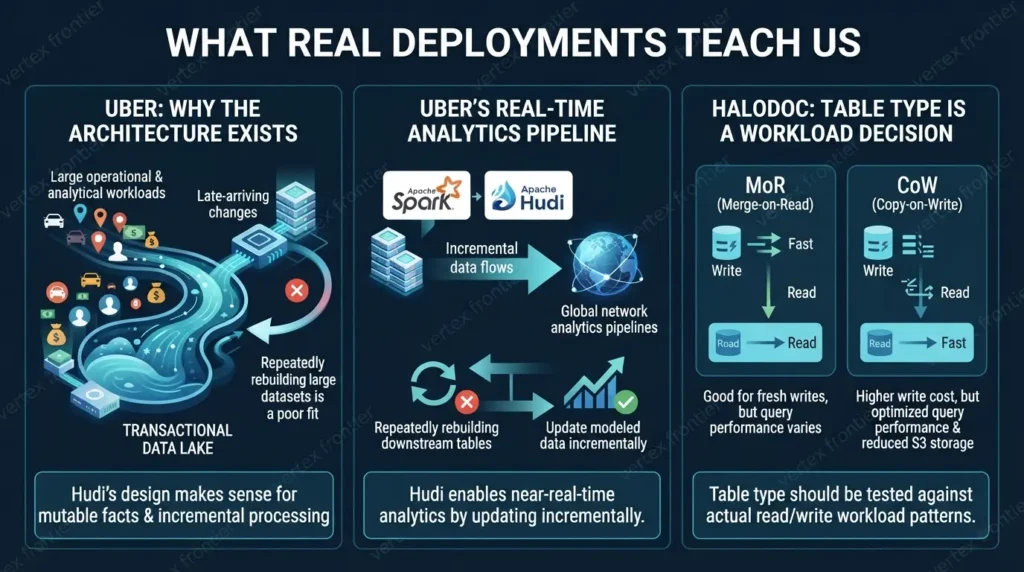
Uber’s historical engineering material describes a transactional data lake built to handle large operational and analytical workloads, including late-arriving changes and incremental processing. The Uber lakehouse architecture case study is valuable because it explains the problem Hudi was designed to address: repeatedly rebuilding large datasets is a poor fit for data that changes continuously.
The lesson is not that every organization should reproduce Uber’s architecture. The lesson is that Hudi’s design makes more sense when the workload has mutable facts, late updates, and downstream consumers that benefit from incremental processing.
Uber’s real-time analytics pipeline
A Data Council presentation about Uber’s global network analytics pipelines shows Hudi used with Spark and incremental data flows for near-real-time analytics. The public description includes a large historical deployment context, but it does not provide a neutral benchmark that can be transferred to another environment.
The transferable lesson is architectural: Hudi becomes useful when the pipeline needs to update modeled data incrementally instead of repeatedly rebuilding every downstream table.
Halodoc: table type is a workload decision
An Apache Hudi community session with Halodoc reports a move from MoR to CoW that improved query performance and reduced S3 storage costs in that organization’s environment. The public material does not provide enough reproducible detail to turn that outcome into a general rule.
The useful lesson is more modest and more important: table type should be tested against the actual read/write pattern. A team that starts with MoR for fresh writes may later find that its query workload and maintenance budget favor CoW.
Apache Hudi versus Iceberg versus Delta Lake
The right comparison is not “Which format is best?” It is “Which table model matches the workload and the surrounding platform?”
| Question | Why it matters | What to verify |
|---|---|---|
| How often do records change? | Frequent mutations increase the value of row-level location and incremental processing | Upsert, delete, index, and merge behavior in the exact release |
| How fresh must reads be? | MoR, compaction, and read-optimized views create different freshness contracts | Snapshot, incremental, CDC, and read-optimized support |
| Which engines are mandatory? | A format’s practical value depends on the compute and catalog ecosystem around it | Spark, Flink, Trino, Hive, catalog, metastore, and cloud compatibility |
| Who operates maintenance? | Compaction, clustering, cleaning, and small-file control affect the real cost | Scheduling, monitoring, retention, failure recovery, and ownership |
| What evidence supports the choice? | Vendor claims and anecdotes are not comparable benchmarks | A workload-matched test with the same data, engine, storage, and query mix |
Hudi’s official FAQ positions Hudi around mutable, streaming, CDC, and incremental workloads. Delta Lake’s official introduction describes its transaction, schema, time-travel, and streaming/batch capabilities. Apache Iceberg’s documentation documents its open table format, catalog integrations, schema and partition evolution, maintenance, and multi-engine ecosystem.
Those sources establish what each project documents. They do not prove that one is always faster or cheaper. The existing Vertex Frontier comparison of Apache Iceberg, Delta Lake, and Hudi is the better destination for a deeper format-selection discussion. This article’s job is to explain Hudi’s internal model first.
Operational costs people underestimate
Hudi’s feature list can look attractive until the operating model is considered.
Small files
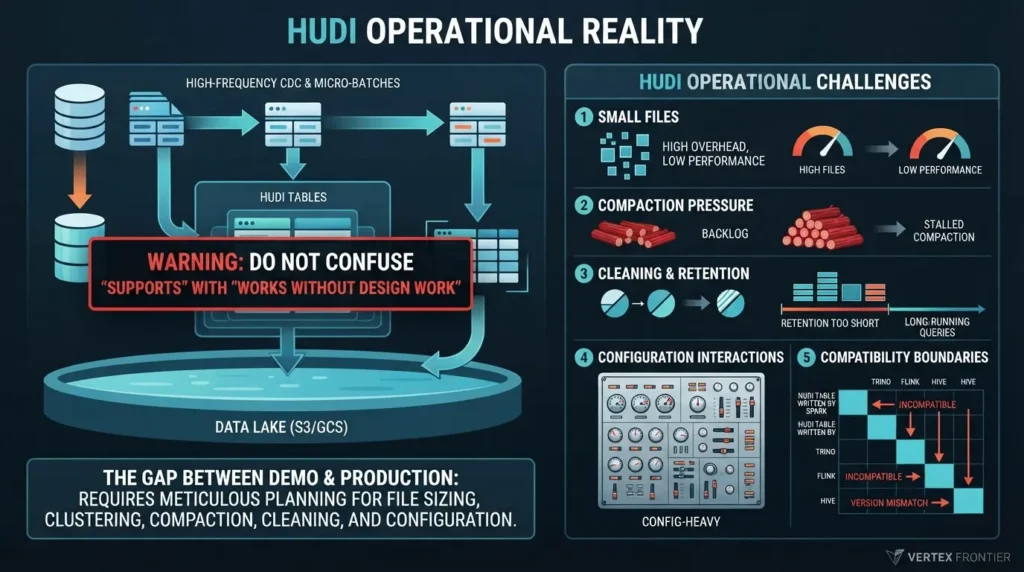
Frequent micro-batches or high-frequency CDC can generate many small files. Small files increase planning work, object-store operations, and query overhead. File sizing and clustering become design concerns rather than optional tuning.
Compaction pressure
MoR reduces the need to rewrite base files on every change, but logs eventually need to be merged. If compaction falls behind, snapshot reads may do more work and read-optimized views may lag.
Cleaning and retention
Cleaning is useful because old slices consume storage. It is dangerous when retention is shorter than the needs of long-running queries, incremental readers, rollback, or time travel.
Configuration interactions
Practitioners on Reddit have repeatedly described Hudi as powerful but configuration-heavy. In one Hudi-to-Iceberg discussion, users described issues around small files, clustering, cleaning, S3 costs, and Spark streaming stabilization. These are community experiences, not universal Hudi behavior, but they reveal a genuine gap between a quick-start demo and production operation.
Compatibility boundaries
A Hudi table written by Spark is not automatically equivalent to a Hudi table queried through every version of Trino, Flink, Hive, or a cloud service. Connector packaging, file format, catalog synchronization, metastore access, credentials, locks, and table type all matter.
The current Trino Hudi connector documentation is a good example of why these boundaries must be checked directly rather than inferred from a general “Hudi supports Trino” statement.
A project may document an integration while your deployment still needs a compatible connector, catalog or metastore, filesystem libraries, IAM permissions, lock provider, table-type check, and version-specific testing.
Common Apache Hudi mistakes
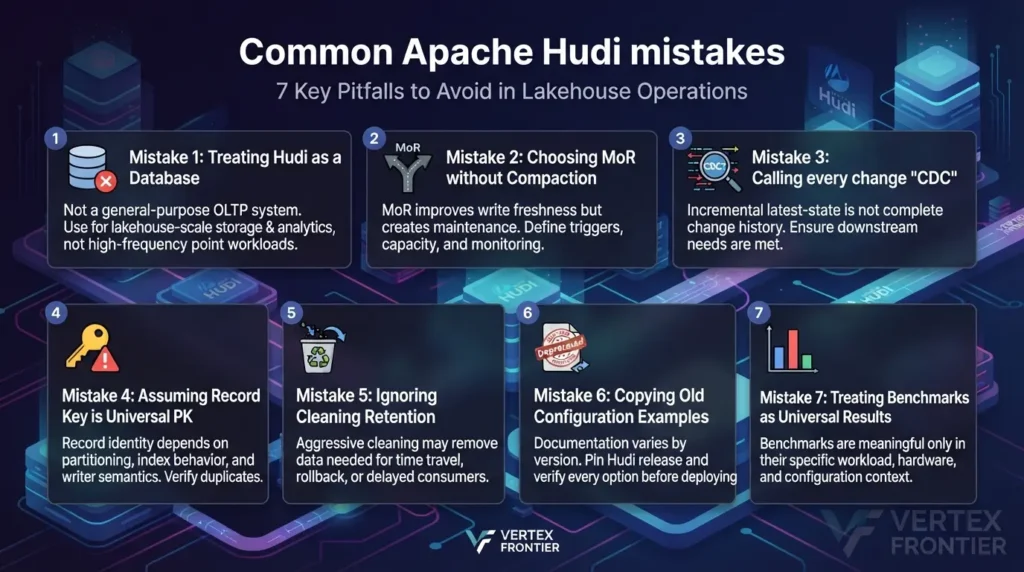
Mistake 1: Treating Hudi as a database
Hudi adds database-like table behavior to lake storage. It is not a general-purpose OLTP system. Keep transaction-heavy point workloads in a system designed for them, then use Hudi where lakehouse-scale storage and incremental analytics are the goal.
Mistake 2: Choosing MoR without a compaction plan
MoR can improve write freshness, but it creates a maintenance obligation. Define compaction triggers, capacity, failure handling, monitoring, and acceptable read freshness before choosing it.
Mistake 3: Calling every change “CDC”
An incremental latest-state query is not automatically a complete change history. Decide whether downstream consumers need current changed records, operation types, before/after images, or replayable event semantics.
Mistake 4: Assuming the record key is a universal primary key
Record identity, partitioning, index behavior, insert semantics, and concurrency determine duplicate behavior. Verify the exact writer and Hudi release.
Mistake 5: Ignoring cleaning retention
Cleaning can reclaim storage, but aggressive retention may remove data needed by time travel, rollback, long-running readers, or delayed incremental consumers.
Mistake 6: Copying old configuration examples
Hudi documentation includes versioned pages, deprecated pages, and release-specific configuration names. Pin the Hudi release and verify every option before publishing or deploying.
Mistake 7: Treating project benchmarks as universal results
The Hudi project, vendors, conference talks, and community users may report impressive results. Those results are meaningful only in their stated workload, hardware, storage, engine, and configuration.
A before-and-after design scenario
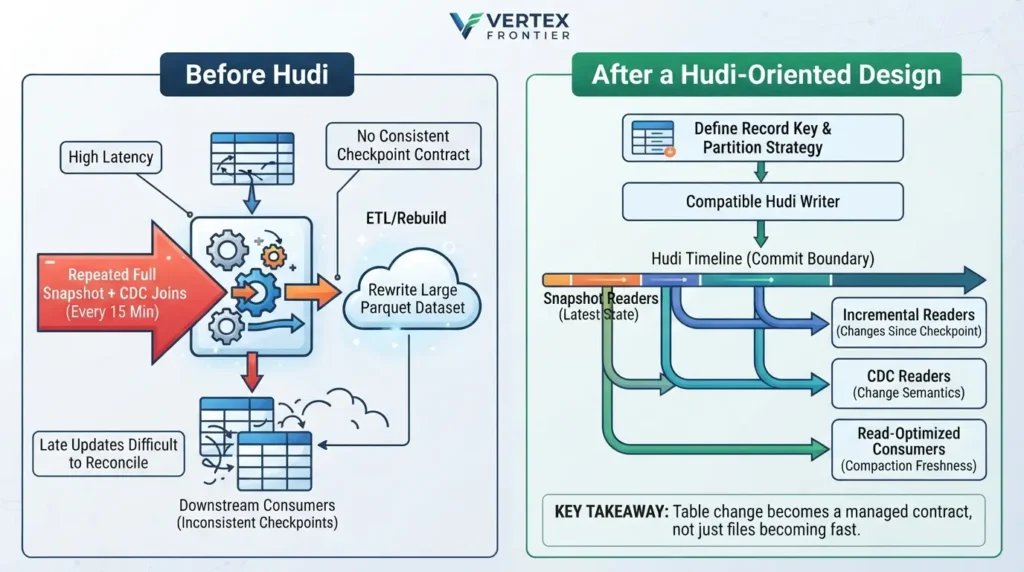
Before Hudi
A team receives database snapshots and CDC files every fifteen minutes. The pipeline repeatedly joins the full snapshot with recent changes, rewrites a large Parquet dataset, and then rebuilds downstream tables. Late updates are difficult to reconcile. The team has no consistent checkpoint contract for downstream consumers.
After a Hudi-oriented design
The team defines a record key and partition strategy, writes changes through a compatible Hudi writer, and uses the timeline as the table’s commit boundary.
Downstream jobs choose their view deliberately:
- Snapshot readers consume the latest committed state.
- Incremental readers consume records changed since a checkpoint.
- CDC readers consume change semantics where supported.
- Read-optimized consumers accept the freshness boundary created by compaction.
The team still has work to do. It must size files, schedule compaction or clustering where needed, set cleaning retention, monitor failed actions, test schema evolution, and verify the engine matrix. Hudi does not make the architecture maintenance-free. It makes the change model explicit and queryable.
That is the real transformation: not “files become fast,” but “table change becomes a managed contract.”
How to evaluate Hudi before adopting it
The most useful evidence available without private production data is not a vendor benchmark. It is a small, repeatable test that uses your own change pattern and query contract.
Run the same representative dataset through the candidate design and record:
- Workload shape: row count, partition distribution, update percentage, delete percentage, event frequency, and late-arrival pattern.
- Write conditions: Hudi release, writer engine and version, storage backend, table type, index, file-sizing settings, and concurrency mode.
- Read contract: snapshot freshness, incremental checkpoint behavior, CDC output requirements, read-optimized tolerance, and the engines that must query the table.
- Maintenance load: compaction or rewrite backlog, clustering work, cleaning retention, small-file count, failed actions, and recovery time.
- Cost signals: compute used by writes, reads, and table services; object-store requests; storage growth; and operational effort.
Do not reduce the result to one “fastest format” number. A useful test reports the conditions, raw measurements, query mix, and trade-offs. This follows the same workload-based logic used in Vertex Frontier’s lakehouse format comparison, while keeping this article focused on Hudi’s mechanics.
| Gate | Pass question | Evidence to keep |
|---|---|---|
| Correctness | Do updates, deletes, late events, and duplicate keys produce the intended state? | Input fixtures, expected output, record-key and ordering rules |
| Freshness | Which query view sees a change, and when? | Timeline checkpoints, compaction lag, and reader results |
| Recovery | Can the team detect and recover failed or incomplete actions? | Failure injection notes, rollback/restore steps, and runbooks |
| Operations | Can maintenance keep pace with ingestion? | Small-file trend, compaction backlog, cleaning retention, and service cost |
| Compatibility | Do all required engines and catalogs read the selected table correctly? | Version matrix, connector artifacts, permissions, and query results |
When should you choose Apache Hudi?
Hudi is worth serious evaluation when most of the following are true:
- The dataset receives frequent updates or deletes.
- CDC or incremental processing is a major requirement.
- Late-arriving data must update existing lakehouse records.
- The team primarily uses a well-supported writer such as Spark or Flink.
- The organization can operate compaction, cleaning, clustering, and monitoring.
- The deployment has a clear catalog, metastore, storage, and compatibility plan.
- The business needs open lake storage rather than an OLTP database.
Consider another table format first when:
- The data is mostly immutable and append-only.
- The team has no capacity for table-service operations.
- A different format has a decisive native integration with the required catalog and engines.
- The workload requires sub-minute transactional behavior or OLTP semantics.
- The proposed choice is based only on a vendor benchmark or a feature checklist.
Final perspective
Apache Hudi’s distinctive idea is not simply “put updates in a data lake.” The more useful idea is that Hudi coordinates four kinds of state:
- Record state: which logical version of a record should win.
- Physical state: which file group and slice hold the data.
- Timeline state: which actions are committed and visible.
- Operational state: which maintenance work is pending or complete.
Once those layers are separated, Hudi becomes easier to reason about. CoW and MoR are storage/write decisions. Snapshot, incremental, CDC, and read-optimized are reader decisions. Compaction, cleaning, clustering, indexing, and concurrency are operational decisions.
That separation is also the safest way to compare Hudi with Iceberg or Delta Lake. Start with the workload, define the freshness and mutation contract, verify the engine and catalog boundaries, and test the maintenance model. The format name comes after those decisions, not before them.
For related lakehouse context, see Vertex Frontier’s Apache Iceberg guide, its data lake architecture questions, and its practical PostgreSQL CDC production guide. Those resources cover adjacent concepts; this article intentionally keeps Hudi’s own architecture and operating model at the center.
Building a modern lakehouse architecture involves trade-offs across multiple technologies. To continue your evaluation:
- Choosing the right format: Compare engine matrices, ACID internals, and catalog integrations in our deep dive on Apache Iceberg vs Delta Lake vs Hudi.
- Table format alternatives: Understand hidden partitioning and catalog architectures in our Complete Apache Iceberg Guide.
- Upstream ingestion: Learn how to capture source changes reliably with our PostgreSQL CDC Production Guide.
Frequently Asked Questions
Is Apache Hudi a database?
No. Hudi is a lakehouse table and storage-management platform that adds database-like capabilities to data stored in open lake storage. The official FAQ says Hudi is not designed to replace an OLTP database.
What is the difference between Hudi CoW and MoR?
Copy-on-Write rewrites base-file versions when records change. Merge-on-Read writes changes to log files and later compacts them into base files. CoW can simplify reads, while MoR can improve write freshness but adds log merging and compaction work.
What is the Hudi timeline?
The timeline records table actions such as commits, compaction, clustering, cleaning, rollback, and restore. Actions can move through requested, inflight, and completed states. Readers use the completed timeline state to build a valid table view.
Is Apache Hudi suitable for CDC?
Yes, CDC is one of Hudi’s strongest documented use cases. However, correctness depends on record keys, ordering or merge semantics, delete handling, checkpoints, schema evolution, retention, and the selected writer and reader engines.
What are Hudi incremental queries?
Incremental queries read records that changed after a specified timeline point. They can help downstream jobs process changes instead of scanning the full table, but an incremental latest-state view is not automatically the same as a complete CDC history with every before-and-after event.
When should I choose Hudi over Iceberg or Delta Lake?
Evaluate Hudi first when frequent mutations, CDC, record-level updates, incremental reads, and write freshness are central requirements and your team can operate the related table services. Compare the exact engine, catalog, cloud, query, maintenance, and governance requirements before choosing a format. No format is universally best.
What is Hudi compaction?
Compaction is a Merge-on-Read table service that merges log-file changes into new base-file versions. It helps control accumulated logs and can improve read behavior, but it must be scheduled, monitored, and sized for the incoming write workload.
Does Hudi work with Spark and Flink?
Hudi documents Spark and Flink integrations, but exact feature support depends on the Hudi release, engine version, bundle, table type, storage, catalog, and configuration. Always verify the version-specific compatibility documentation before deployment.

Was this article helpful?
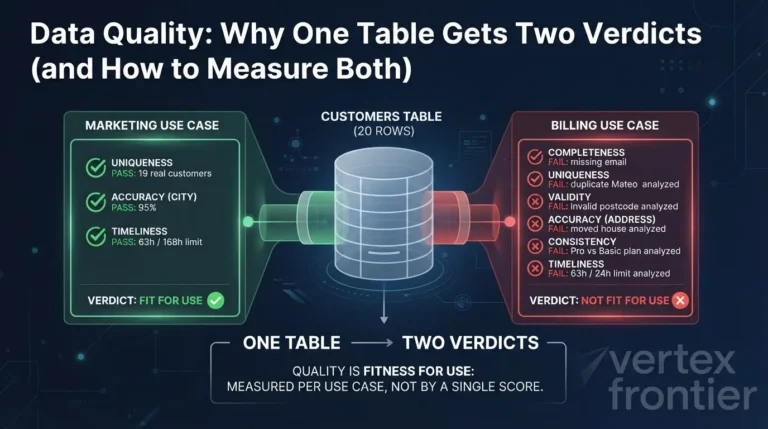





[…] timeline, file groups, indexes, CoW versus MoR, and table services, our dedicated guide to What Is Apache Hudi? walks through one record from source to […]
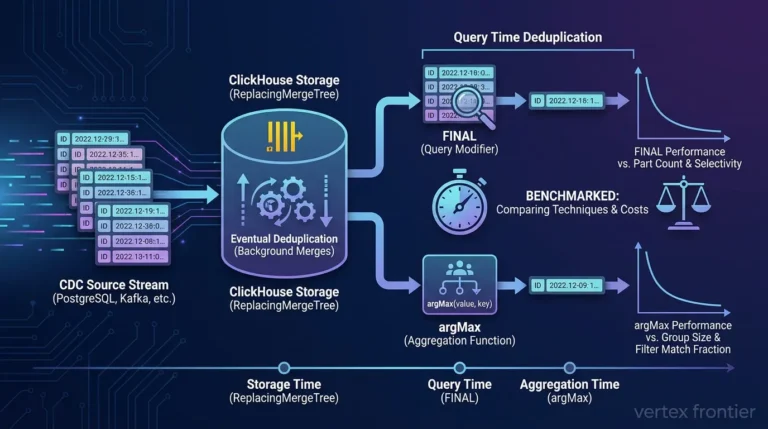
[…] not universal product rankings. Apache Hudi’s official overview and compaction guide explain its table services and Merge-on-Read trade-offs. Our guide Iceberg, Delta Lake, and Hudi comparison goes deeper into workload-based […]
[…] a catalog identity and valid Iceberg metadata. If your search began with Iceberg vs Delta Lake vs Hudi, keep that as a separate table-format decision; this article is about moving existing Parquet data […]