


Looking for the basic syntax? In Python, a nested loop is simply a loop inside another:
for outer in [1, 2]:
    for inner in ["a", "b"]:
        print(outer, inner)  # Prints: 1 a, 1 b, 2 a, 2 b
If you already know the basics and your real problem is that your code has grown into an unreadable, deeply nested mess that your team hates touching, you are in the right place.
A developer on Reddit asked a question that thousands of Python learners have typed in some form. A linter had flagged their code with too-many-nested-blocks, and they wrote that they had no idea how to fix nested loops, or how to learn to fix them. The warning named the symptom. Nothing in the toolchain explained the cure.
That gap is what this guide fills.
Here is the situation. You have a function with a loop inside a loop inside an if. It runs. The numbers come out right. And nobody on your team wants to touch it, including you.
The instinct is to attack the loops: make them smarter, flatter, faster. That instinct is usually wrong. Nested loops are rarely the root of the problem. They are the visible surface of a design problem underneath, and once you find that problem, the loops often fix themselves.
This guide approaches the problem through foundational software design principles rather than surface-level syntax tricks. We build a realistic e-commerce reporting scenario from scratch, back every refactoring step with empirical benchmarks, test it against real-world engineering debates, and outline the exact cases where a nested loop remains the right tool.
Key takeaways
Click any topic to expand or collapseA nested loop is a signal, not the enemy
It tells you to look at the design around it.
Ask three questions in order
Is the data structure right? Is the behavior at the right level? Does this function do too much?
The Manual Join Smell
If the inner loop scans a whole collection to find matches for one outer item, group the data once with a dictionary.
Nesting that mirrors your data is fine
Grids, pairs, and lists of lists are natural. Mixed concerns and unrelated collections are the smell.
O(n²) only hurts at scale
Measure before you rewrite, but fix the structure when the sizes will grow.
After the refactor, loops may remain
What changes is that every function has one reason to change.
What is a nested loop?
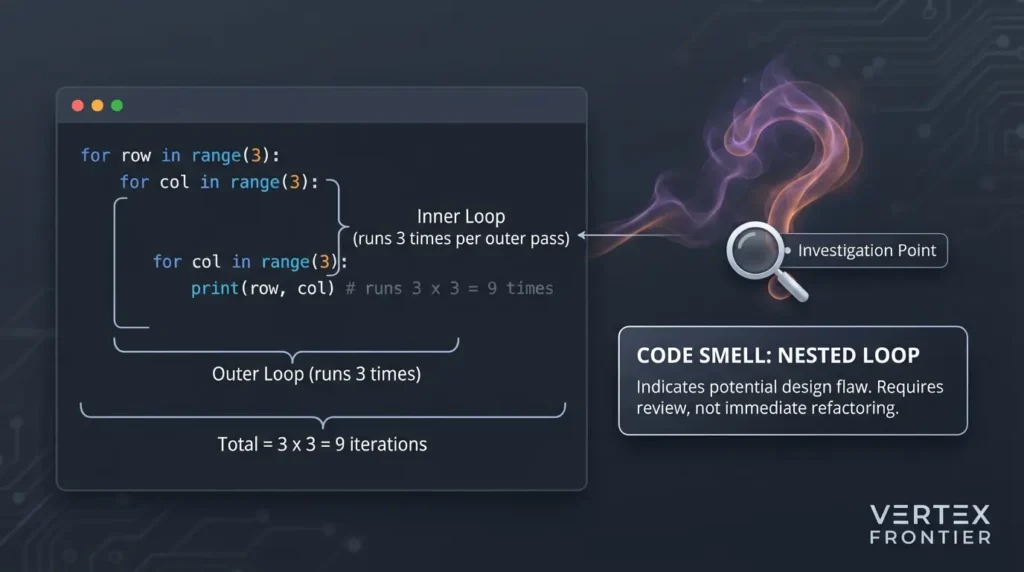
A nested loop is a loop inside another loop. For every single pass of the outer loop, the inner loop runs from start to finish. Ten outer passes over ten inner items therefore produce 100 inner steps, which is why nesting multiplies work instead of adding it.
Python:
for row in range(3): for col in range(3): print(row, col) # runs 3 x 3 = 9 timesThat is the textbook version, and there is nothing wrong with it. The trouble starts when real code grows around the same shape.
What is a code smell?
A code smell is a surface sign in source code that often points to a deeper design problem. It isn’t a bug, and the code may run fine. The term comes from the refactoring tradition and tells you where to look, not what to change.
Martin Fowler’s catalog of refactorings is the classic reference for the idea. Think of a smoke detector. It can go off because of a fire, or because of burnt toast. Either way, you walk to the kitchen and look.
Nested loops belong in that category. They are a prompt to investigate. They are not a verdict.
Are nested loops bad practice?
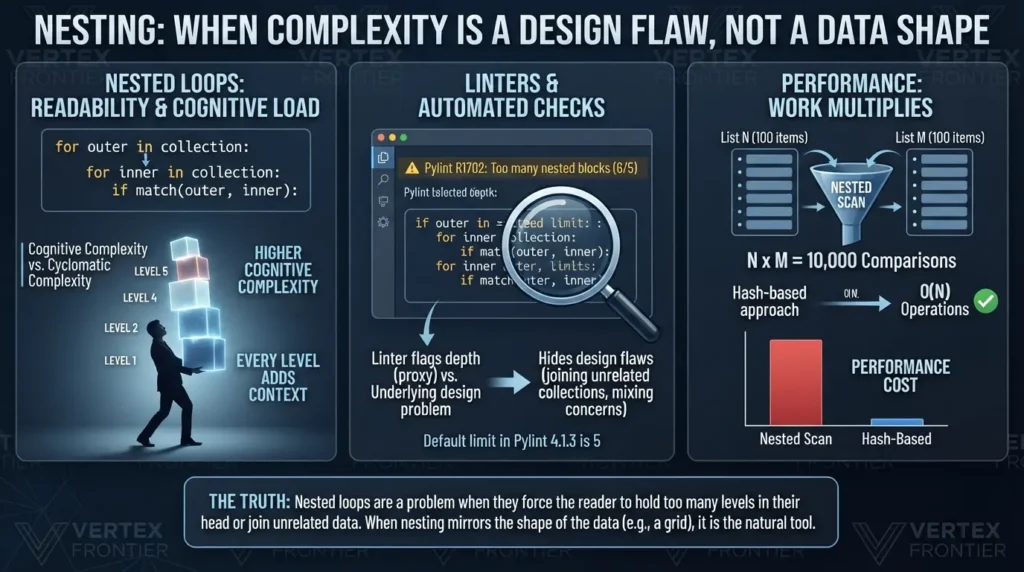
No, not by themselves. Nested loops are a problem when they hide a design flaw: they join unrelated collections, mix several concerns in one block, or force the reader to hold too many levels in their head. When the nesting mirrors the shape of the data, such as a grid, it is the natural tool.
You don’t have to take that on faith. The community has been circling this answer for years.
On the Software Engineering Stack Exchange, the most-upvoted answer to “Why are nested loops considered bad practice?” says nested loops are fine as long as they describe the correct algorithm, and that long ones are usually better split into smaller functions. A second answer in the same thread works through a concrete case. Two lists of 100 items, with one match each, cost about 5,000 comparisons on average with a nested scan, while a hash-based approach does the job far faster.
On r/learnprogramming, one commenter said two loops over 2D data, or three over 3D data, is totally natural. What should be avoided, they added, is nesting loops over unrelated data. Another thread landed in the same place: nested loops get bad when they mix layers of logic or get tangled with each other. Treat these as individual experiences rather than law. But several separate people reaching the same rule is worth noticing.
So why do nested loops have such a bad reputation? Three reasons keep coming up.
Readability: every level adds context
Each level of nesting adds one more thing the reader must remember while reading the line they are on. This is not just a feeling. G. Ann Campbell’s Cognitive Complexity white paper from SonarSource (version 1.7, 2023) describes a metric built to measure how hard code is to understand. Two of its rules matter here. Every loop or conditional adds one point, and each time one sits inside another, it adds an extra point per level of nesting. The paper’s reasoning is that a linear series of five if and for structures is easier to follow than the same five nested.
The metric also gives method structure no penalty at all, because a well-named method condenses several statements into one call. Keep that in mind, because it is exactly what we do in Question 3.
That is different from the older cyclomatic complexity measure McCabe introduced in 1976, which counts independent paths through code. Cyclomatic complexity asks how many paths exist. Cognitive complexity asks how hard those paths are for a person to follow.
Linters: a number on a dashboard
Pylint’s too-many-nested-blocks check (message R1702) fires when a function nests more blocks than its limit. The Pylint documentation describes it, and the default in Pylint 4.1.3, which generated the config file used for this guide, is max-nested-blocks=5. The check counts blocks, not just loops: in the example later in this article, if statements count toward the total alongside for loops.
Here is the uncomfortable part, and it is the first uncommon insight in this guide: your linter is right for the wrong reason. It flags depth, which is a proxy. The real reason to care is that depth compounds mental effort and tends to hide design problems. If you silence the warning, you hide the symptom. If you flatten the code mechanically, you may produce something just as hard to read.
The linter story often starts in interview prep. The Reddit poster above was working through a coding assignment. If you are in that spot, our list of data engineering interview questions worth practicing shows how often this kind of code shows up in screens.
Performance: work multiplies
Two loops over lists of size n and m can do n × m units of work. We will put numbers on that later, because the honest answer is more interesting than “nested loops are slow.”
Five terms people mix up
Search results for this topic blur several different ideas together. This table separates them.
| Term | What it means | Source or status |
|---|---|---|
| Nested loop | A loop inside another loop. The inner loop runs fully for each pass of the outer one. | Basic definition |
| Nested blocks (Pylint) | A count of nested blocks in one function, with a default limit of 5. It includes if blocks, not only loops. | Pylint docs and a local test on Pylint 4.1.3 |
| Cyclomatic complexity | A count of independent paths through code, introduced by McCabe in 1976. | McCabe, IEEE TSE |
| Cognitive Complexity | A score for how hard code is to understand. It adds points for breaks in linear flow and for nesting. | Sonar white paper v1.7 |
| Manual Join Smell | This guide’s name for scanning one collection for every item in another to match keys. | Editorial term, not an industry standard |
Nested loops earn their bad reputation from readability, linter rules, and performance. None of the three is a problem with loops themselves. All three are problems with what the loops contain.
Why readability is a business problem, not a style preference
It is easy to dismiss all of this as taste. The industry data says otherwise.
Stripe’s 2018 Developer Coefficient report, based on a survey run with Harris Poll, asked respondents to estimate how developers spend their time. The average estimate was 17.3 hours of a 41.1-hour week on maintenance work such as debugging, refactoring, and dealing with bad code: 13.5 hours on technical debt plus 3.8 hours on bad code. By simple division, that is about 42% of the week. These are survey estimates, not time-tracking data, and the report is from 2018.
The Stack Overflow 2024 Developer Survey asked professional developers which company challenges frustrate them most (select all that apply). Technical debt came first, chosen by 62.4% of respondents. The same survey section also found that improving the quality of code and developer environments contributed the most to job satisfaction, at a mean of about 21 out of 100 points.
A July 2020 survey by McKinsey of 50 CIOs at financial-services and technology companies with more than $1 billion in revenue found that CIOs reported 10 to 20 percent of the technology budget for new products being diverted to tech debt. The same article is clear that the goal is not zero tech debt, only managed tech debt. That is the same attitude this guide takes toward loops: the goal is not zero, it is understood.
One honest limit. None of these studies measured nested loops. A single nested loop is not a tech-debt crisis. But debt rarely arrives in one piece. It arrives as one more condition, one more loop, one more special case, and readable structure is the cheapest defense against that slow growth.
Hard-to-read code is not an aesthetic problem. Developers and executives both report maintenance burden as a real cost, and developers say better code quality is what satisfies them most.
The code that works and nobody wants to touch
Let’s make this concrete with a realistic example. A shop wants a report for each customer: how many paid orders they placed and how much they spent, with a 5% discount applied for VIP customers.
What you need to follow along
The code in this guide runs on Python 3.9 or newer. The reason is one line: items: list[OrderItem] uses the built-in generic syntax from PEP 585, which targets Python 3.9. The start= keyword argument of sum() needs 3.8 or newer, according to the Python documentation for sum. Nothing outside the standard library is required.
| Item | Requirement or setup | Evidence |
|---|---|---|
| Python | 3.9 or newer | PEP 585 lists Python 3.9 as its target version |
sum(..., start=...) | 3.8 or newer | Python docs: “Changed in version 3.8” |
| Libraries | Standard library only | Checked by inspection of the code |
| Everything in this guide was run on | CPython 3.12.3, Linux | Hands-on observation |
| Measurement tools | Pylint 4.1.3, cognitive_complexity 1.3.0 | Hands-on observation |
Other Python versions and operating systems were not tested here, so treat the results as observations from that one setup.
First, the data models. These stay the same throughout the refactor, apart from one property we will add later.
Python: data models:
from dataclasses import dataclass from decimal import Decimal from enum import Enum
class OrderStatus(Enum): PAID = "paid" PENDING = "pending" CANCELLED = "cancelled"
@dataclass(frozen=True) class OrderItem: price: Decimal quantity: int
@dataclass class Order: order_id: int customer_id: int status: OrderStatus items: list[OrderItem]
@dataclass(frozen=True) class Customer: customer_id: int name: str is_vip: bool = False
@dataclass(frozen=True) class CustomerSummary: customer_id: int name: str number_of_orders: int total_spent: Decimal
Now the report function, written the way code tends to get written when requirements arrive one at a time.
Python: BEFORE (works, but hard to read):
def generate_customer_report(customers, orders): report = {} for customer in customers: total_spent = Decimal("0") number_of_orders = 0 for order in orders: if order.customer_id == customer.customer_id: if order.status == OrderStatus.PAID: order_total = Decimal("0") for item in order.items: order_total += item.price * item.quantity if customer.is_vip: order_total = order_total * Decimal("0.95") total_spent += order_total number_of_orders += 1 report[customer.customer_id] = CustomerSummary( customer_id=customer.customer_id, name=customer.name, number_of_orders=number_of_orders, total_spent=total_spent, ) return reportRun it with a VIP customer named Alice who has one paid order of $50 (two items at $20 and one at $10) plus one pending order, a regular customer named Bob with one paid and one cancelled order, and a customer with no orders. The result is correct: Alice’s total is 47.50 after the discount, Bob’s is 31.00, and the third customer shows zero. One display detail: Python prints Alice’s total as Decimal('47.5000'), because multiplying by Decimal("0.95") keeps the extra digits. The value is right. Format it with f"{total:.2f}" when you show it to a person.
So the code works. It is still painful to read, and it is worth asking why.
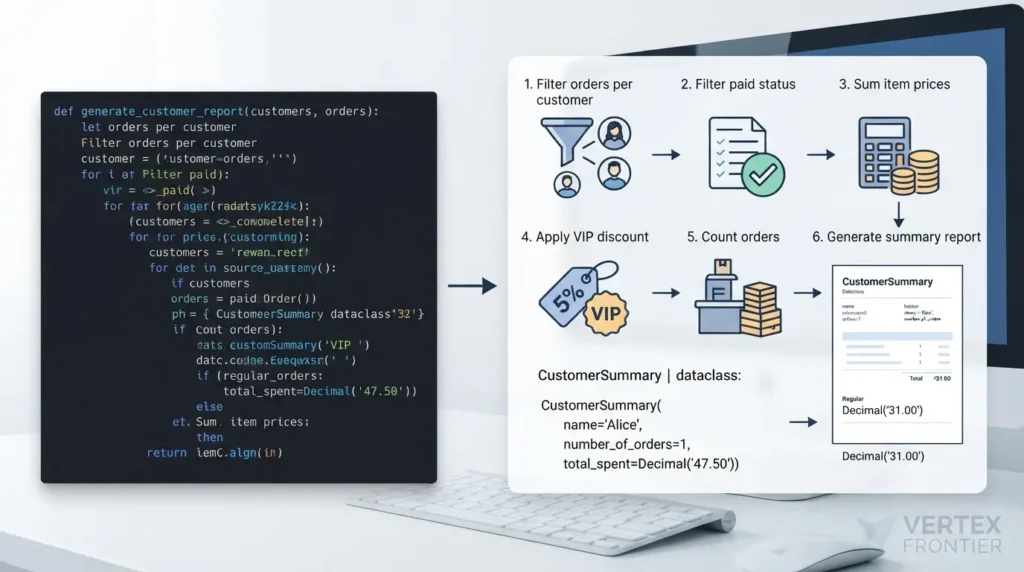
The function is five blocks deep: for, for, if, if, for. Running Pylint’s nested-blocks check on it with the default limit of five produces no warning at all. Lower the limit to four and it fires. In other words, the linter passes this function while a human would struggle with it. That is a good reminder that the metric and the problem are different things.
You can put a number on how hard that function is to follow. Applying the white paper’s rules by hand gives a Cognitive Complexity of 20, and the open-source cognitive_complexity package (version 1.3.0) reports the same 20. Here is where the points come from.
| Line in the function | Structure | Nesting level | Points |
|---|---|---|---|
for customer in customers | for | 0 | +1 |
for order in orders | for | 1 | +2 |
if order.customer_id == customer.customer_id | if | 2 | +3 |
if order.status == OrderStatus.PAID | if | 3 | +4 |
for item in order.items | for | 4 | +5 |
if customer.is_vip | if | 4 | +5 |
| Total | 20 |
Treat this as an illustration of how the metric works. It is not an official SonarQube score, and other analyzers may count Python constructs such as comprehensions differently.
Count what the function actually does in its body:
- Finds the orders belonging to one customer.
- Filters out the ones that aren’t paid.
- Adds up the price of each item.
- Applies the VIP discount.
- Counts the orders.
- Builds the summary object.
Six jobs, one function, five levels of indentation. Now the tempting move is to rewrite the algorithm into something cleverer. Don’t. The algorithm is not the issue.
The 3 Design Questions: a diagnostic you can reuse
When you meet a tangled loop, don’t ask “how do I get rid of this?” Ask three questions, in this order. The order matters. Fixing the data structure removes a whole loop. Fixing the behavior level removes noise. Fixing responsibilities names whatever remains.
Smell: the inner loop scans a whole collection for every outer item.
Fix: group or index the data once (a dictionary), or let the database join.
Smell: low-level work (like an order total) sits inside high-level code (like a report).
Fix: move behavior onto the object whose data it uses.
Smell: a discount change, a status change, and a format change all edit the same function.
Fix: split into named functions with one reason to change each.
We will walk through each one on the report code above.
Question 1: Are you using the right data structure?
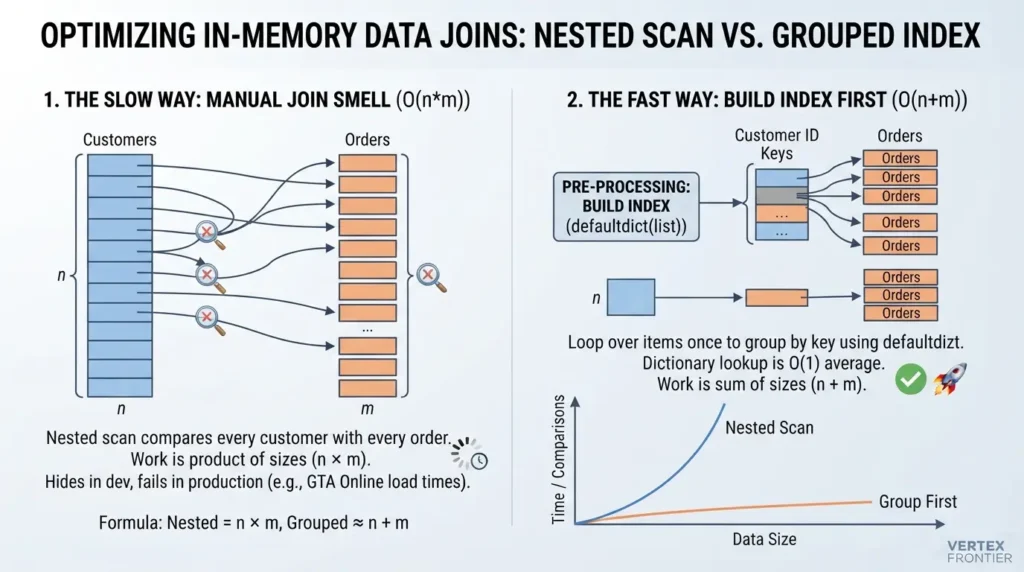
Look at the first two lines of the loop body: for customer in customers and, inside it, for order in orders. For every customer, the code scans every order, then throws away the ones that don’t match.
That has a name. I’ll call it the Manual Join Smell: any for a in As: for b in Bs: if b.key == a.key pattern is an in-memory database join, done the slow way.
If this data lived in a database, you would write a JOIN and the engine would use an index. In memory, you re-implemented the join with no index, so the work is the product of the two sizes. The fix is not a smarter loop. It is better data modeling. If your data really does live in a database, let your database do the join instead. That is where joins belong.
When the data is already in memory, build the index yourself, once.
How to group a list by key in Python
- Create a
defaultdict(list)that maps each key to a list. - Loop over the items once and append each item under its key. Then look up groups with
.get(key, []).
Python: the join, done once:
from collections import defaultdict
def group_orders_by_customer(orders): orders_by_customer = defaultdict(list) for order in orders: orders_by_customer[order.customer_id].append(order) return orders_by_customer
Inside the report function:
orders_by_customer = group_orders_by_customer(orders) customer_orders = orders_by_customer.get(customer.customer_id, [])
While you could build a similar index using a standard dictionary’s .setdefault() method, collections.defaultdict is the more idiomatic tool for the job because it creates the empty list automatically the first time a key appears.
defaultdict inserts that key. Use .get(key, []) when you only want to look something up, so a customer with no orders doesn’t quietly grow your dictionary. A quick check on Python 3.12.3 confirmed both behaviors: indexing a missing key adds it, and `.get()` does not.Why does this help? The Python wiki’s time complexity page lists dictionary lookup as O(1) on average and x in list as O(n). That page describes current CPython, assumes keys with well-behaved hash functions, and is now marked as archived, so treat it as a reference for typical behavior, not a guarantee. A dictionary replaces “search everything” with “go straight to it.” The trade-off is memory: you now hold an index alongside the data.
The two approaches grow very differently, and the formula is short enough to hold in your head.
Try your own numbers. The speed field is a placeholder, so replace it with a rate you have measured on your machine using Python’s timeit module.
Illustrative arithmetic only. Real timings depend on your hardware, data, and what each comparison does.
Notice what happens with small inputs: nothing. With 10 customers and 10 orders, the nested version does 100 comparisons and you will never feel it. That is exactly why this smell survives. It hides in development and shows itself in production.
Case study 1: how a linear scan kept GTA Online loading for six minutes
If your loops are really data pipeline code, the same question applies at a bigger scale. Libraries like pandas, Polars, and DuckDB exist to run joins and group-bys in optimized code. Our guide on picking the right Python data library for the job walks through where each one fits.
The first move is almost never a cleverer loop. It is building an index so the loop doesn’t have to search.
Question 2: Is the behavior at the right level?
With the grouping fix applied, one nested loop is gone and the function is already simpler. But look at this part of the body:
Python: low-level work inside high-level code:
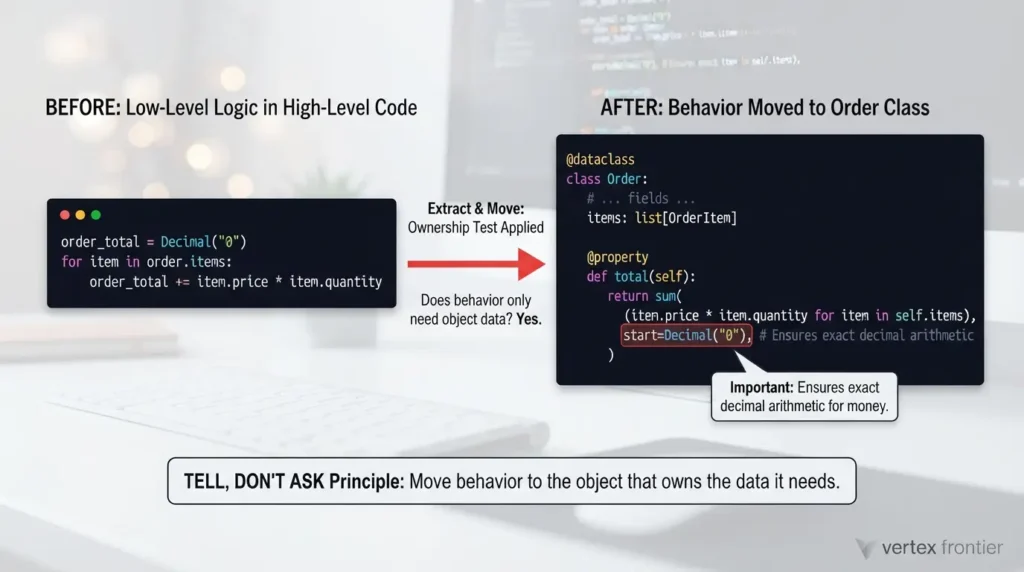
order_total = Decimal("0") for item in order.items: order_total += item.price * item.quantityThis is about the level of the code, not about responsibilities in the abstract. The surrounding function is high-level: it builds a customer report. The three lines above compute what an order costs, which is a low-level fact about an order. It doesn’t belong in report code. It belongs to the Order.
A simple test sorts these cases. If a behavior only needs data from the object itself, it probably belongs on that object. An order total needs only item prices and quantities, and both live on the order. So move it.
Python: behavior moves onto Order:
@dataclass class Order: order_id: int customer_id: int status: OrderStatus items: list[OrderItem]
@property
def total(self):
    return sum(
        (item.price * item.quantity for item in self.items),
        start=Decimal("0"),
    )
The start=Decimal("0") matters. sum() accepts a start value, and passing an explicit Decimal zero keeps the result in exact decimal arithmetic, which is what you want for money. Now the report code just reads order.total, and the inner item loop disappears from it.
The discount is a different case. apply_discount needs the customer and a total, so it doesn’t belong on Order. That is the test working as intended: it tells you what to move, and what to leave.
This idea has an older name in object-oriented design. Tell, Don’t Ask says to tell an object to do work with its own data instead of pulling the data out and doing the work somewhere else.
Move behavior to the object that owns the data it needs. The loop gets simpler because it stops doing someone else’s job.
Question 3: Does this function have too many reasons to change?
Even after two fixes, the function still finds orders, filters paid ones, applies discounts, and builds output. That is a lot for one function, but “too many responsibilities” is a fuzzy phrase. Developers argue about it constantly.
In a Reddit thread titled I’ve Vastly Misunderstood the Single Responsibility Principle, which drew well over a hundred comments, one commenter’s complaint got a lot of agreement: what counts as a responsibility is never defined. Robert C. Martin addressed that confusion himself in a 2014 post on the Clean Code Blog. He ties “reason to change” to people: changes to a module should come from a single person, or a single tightly coupled group representing one narrow business function. Wikipedia’s summary shows how the wording later became “responsible to one actor.”
You can turn that debate into something you can do in five minutes. I’ll call it the Reasons-to-Change Audit.
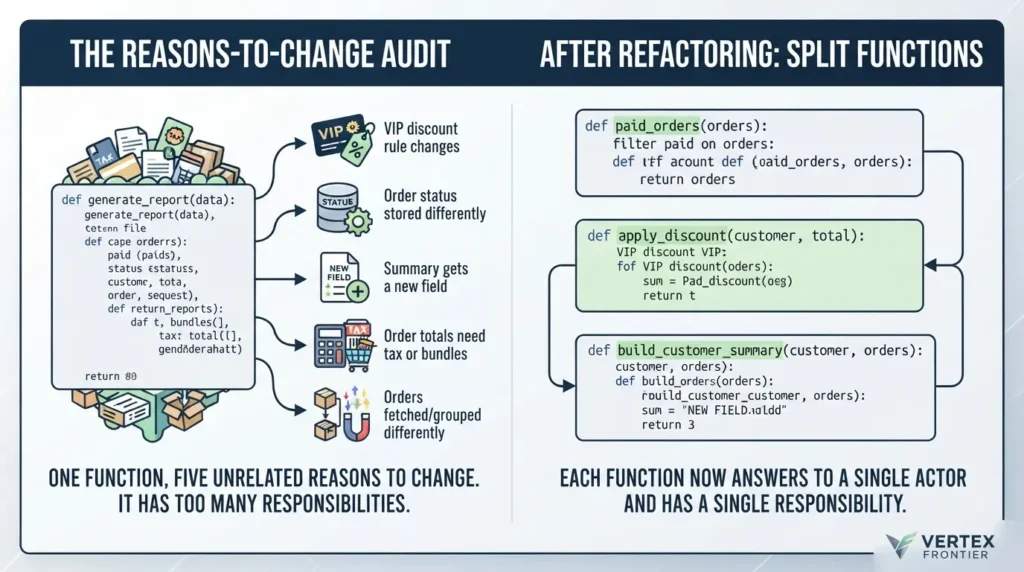
The Reasons-to-Change Audit
List the realistic change requests for the function. For each one, ask whether you would have to edit this function. If three unrelated requests all land on the same function, it has three responsibilities.
| Change request | Before | After |
|---|---|---|
| The VIP discount rule changes | Edit the report function | apply_discount |
| Order status is stored somewhere else | Edit the report function | paid_orders |
| The summary gets a new field | Edit the report function | build_customer_summary |
| Order totals need tax or bundles | Edit the report function | Order.total |
| Orders are fetched or grouped differently | Edit the report function | group_orders_by_customer |
Five unrelated change requests, one function to edit. That is the real definition of “too much,” and it is the problem the nested loops were advertising.
Two other rules of thumb came up in that same Reddit thread, and they are worth keeping as quick checks. One commenter suggested that a class with many private methods can probably be split. Another suggested that a Boolean flag parameter that switches between two behaviors might really be two things. These are opinions from practitioners, not standards, but they are cheap to apply.
Now split the function along those lines.
Python: three extractions:
def paid_orders(orders): return [order for order in orders if order.status == OrderStatus.PAID]
def apply_discount(customer, total): if customer.is_vip: return total * Decimal("0.95") # 5% VIP discount return total
def build_customer_summary(customer, orders): totals = [ apply_discount(customer, order.total) for order in paid_orders(orders) ] return CustomerSummary( customer_id=customer.customer_id, name=customer.name, number_of_orders=len(totals), total_spent=sum(totals, start=Decimal("0")), )paid_orders tells the reader what is happening before they read a single line of its body. Most editors can do this for you, and our explainer on what an IDE does for you covers the refactoring tools behind Extract Function.You don’t always have to go all the way. Splitting out even a little reduces the load.
Count reasons to change. If one function would be edited for several unrelated requests, split it until each piece answers to one.
The before and after: what actually changed
Here is the report function after all three fixes.
Python: AFTER (short orchestration function):
def generate_customer_report(customers, orders): orders_by_customer = group_orders_by_customer(orders) report = {} for customer in customers: customer_orders = orders_by_customer.get(customer.customer_id, []) report[customer.customer_id] = build_customer_summary(customer, customer_orders) return reportIt reads like a sentence: group the orders, then for each customer, build a summary. I ran both versions on the sample data above, and they produce identical output.
| What we measured | Before | After |
|---|---|---|
| Deepest block nesting in one function | 5 blocks | 1 block (a single for) |
| Length of the main function | 22 lines | 7 lines |
| Reasons to change the main function | 5 (see the audit above) | 1 (how the report is assembled) |
| Orders scanned per customer | All of them | Only that customer’s |
| Loops still in the code | Yes | Yes, inside comprehensions, sum(), and small functions |
Cognitive Complexity (cognitive_complexity 1.3.0) | 20 for the one function | 0 or 1 for each of the six functions and methods |
That last row matters. We did not eliminate the loops, and we weren’t trying to. The items still get iterated, and the orders still get iterated. The difference is that each loop now lives in a function with one clear job and a name that says what it is. Fix the design, and the loops mostly fix themselves, even if some of them stay.
How to refactor nested loops in Python in 3 steps
- Fix the data structure. If an inner loop searches a collection for matches, build a dictionary once with
defaultdict(list)and look items up by key. - Move low-level behavior to the object. If code needs only an object’s own data, make it a method or property on that object.
- Split by reasons to change. Extract named functions (filter, calculate, build) until each has one reason to change.
Show the complete refactored file (copy and run)
from collections import defaultdict from dataclasses import dataclass from decimal import Decimal from enum import Enum # ---------- models ---------- class OrderStatus(Enum): PAID = "paid" PENDING = "pending" CANCELLED = "cancelled" @dataclass(frozen=True) class OrderItem: price: Decimal quantity: int @dataclass class Order: order_id: int customer_id: int status: OrderStatus items: list[OrderItem] @property def total(self): return sum( (item.price * item.quantity for item in self.items), start=Decimal("0"), ) @dataclass(frozen=True) class Customer: customer_id: int name: str is_vip: bool = False @dataclass(frozen=True) class CustomerSummary: customer_id: int name: str number_of_orders: int total_spent: Decimal # ---------- behavior ---------- def group_orders_by_customer(orders): orders_by_customer = defaultdict(list) for order in orders: orders_by_customer[order.customer_id].append(order) return orders_by_customer def paid_orders(orders): return [order for order in orders if order.status == OrderStatus.PAID] def apply_discount(customer, total): if customer.is_vip: return total * Decimal("0.95") return total def build_customer_summary(customer, orders): totals = [ apply_discount(customer, order.total) for order in paid_orders(orders) ] return CustomerSummary( customer_id=customer.customer_id, name=customer.name, number_of_orders=len(totals), total_spent=sum(totals, start=Decimal("0")), ) def generate_customer_report(customers, orders): orders_by_customer = group_orders_by_customer(orders) report = {} for customer in customers: customer_orders = orders_by_customer.get(customer.customer_id, []) report[customer.customer_id] = build_customer_summary(customer, customer_orders) return report # ---------- try it ---------- customers = [Customer(1, "Alice", is_vip=True), Customer(2, "Bob"), Customer(3, "Cara")] orders = [ Order(101, 1, OrderStatus.PAID, [OrderItem(Decimal("20.00"), 2), OrderItem(Decimal("10.00"), 1)]), Order(102, 2, OrderStatus.PAID, [OrderItem(Decimal("15.50"), 2)]), Order(103, 2, OrderStatus.CANCELLED, [OrderItem(Decimal("99.00"), 1)]), Order(104, 1, OrderStatus.PENDING, [OrderItem(Decimal("5.00"), 4)]), ] for summary in generate_customer_report(customers, orders).values(): print(summary)Expected output
Running the complete file prints one line per customer. The long Decimal('47.5000') for Alice is expected, as explained earlier.
Output (CPython 3.12.3):
CustomerSummary(customer_id=1, name='Alice', number_of_orders=1, total_spent=Decimal('47.5000')) CustomerSummary(customer_id=2, name='Bob', number_of_orders=1, total_spent=Decimal('31.00')) CustomerSummary(customer_id=3, name='Cara', number_of_orders=0, total_spent=Decimal('0'))How to verify the refactor kept the behavior
A refactor is only safe if you can show nothing changed. Commit the working BEFORE version first, so rolling back is a single git revert. Then run both versions on the same seeded data and compare. Two small checks cover the main risks.
Python: a safety net you can run with pytest:
import random from decimal import Decimal
#Keep the old function next to the new one while you refactor.
#generate_customer_report_before is the BEFORE version from earlier.
def make_data(n_customers=300, orders_per_customer=4, seed=7): rnd = random.Random(seed) customers = [Customer(i, f"c{i}", is_vip=(i % 5 == 0)) for i in range(n_customers)] orders = [] for order_id in range(n_customers * orders_per_customer): items = [OrderItem(Decimal(rnd.randint(100, 5000)) / 100, rnd.randint(1, 3)) for _ in range(rnd.randint(0, 3))] # customer ids go slightly past the real range, so some orders are orphans orders.append(Order(order_id, rnd.randrange(n_customers + 20), rnd.choice(list(OrderStatus)), items)) return customers, orders
def test_refactor_keeps_behavior(): customers, orders = make_data() assert generate_customer_report_before(customers, orders) == generate_customer_report(customers, orders)
def test_grouping_loses_no_orders(): _, orders = make_data() groups = group_orders_by_customer(orders) assert sum(len(v) for v in groups.values()) == len(orders)What can go wrong with the grouped version
The dictionary fixes the scan, and it brings its own failure modes. Most of them are silent, which is why they are worth knowing before they happen.
| Failure mode | How it shows up | How to catch it | Evidence |
|---|---|---|---|
Key type mismatch, such as "1" versus 1 | The lookup returns an empty list, so a customer silently shows zero orders. | Normalize ID types when loading data, and test with real IDs. | Observed locally: .get('1', []) returned an empty list while .get(1, []) found the order |
| Reading a missing key with square brackets | The defaultdict quietly inserts an empty list. | Use .get(key, []) for lookups. | Observed locally on Python 3.12.3 |
| Stale index | If the orders list changes after grouping, the report uses old data. | Build the index inside the report call, or rebuild it after changes. | By design, follows from how an index works |
| Orders for unknown customers | They are never reported, in the old version or the new one. | Compare group sizes to the input length, as in the second check above. | Included as orphan orders in the seeded test data |
| Extra memory | The index holds a reference to every order. | Fine for in-memory sizes. For very large data, let the database do the join. | By construction. Memory use was not measured here |
How many nested loops is too many?
There is no magic number. Two levels over data that is genuinely two-dimensional is normal. Three or more levels, or any level that scans an unrelated collection, deserves a design check. Pylint’s default alarm sits at five nested blocks, but meaning per level matters more than the count.
A useful rule from the community fits this well. In an r/learnjavascript discussion, one developer described not worrying about a nested if, then re-examining their approach when they reach a third level. That is a personal heuristic, not a standard, but it matches how the tools work: Cognitive Complexity adds a growing penalty for each extra level.
Use this table as a quick triage.
| What you see | Verdict | What to do |
|---|---|---|
| Two loops over a grid or matrix | Fine | Name variables row and col. Leave it. |
| All pairs or combinations of items | Fine, watch size | Consider itertools.product or combinations to flatten the nesting. |
| Inner loop searches another collection for a matching key | Manual Join Smell | Group or index first with a dictionary. |
| Each level does different work (filter, compute, format) | Responsibility smell | Extract named functions. |
| Inner loop changes the outer loop’s index or state | Readability trap | Restructure so each loop owns its own variables. |
| You need to exit both loops at once | Extract | Move the loops into a function and return. |
When nested loops are exactly the right tool
This is the contrarian half of the argument, and it is worth stating plainly: the nested loop isn’t the enemy. If you are walking a grid, comparing every pair of items, or reading a list of lists, nesting that mirrors the data is the clearest code you can write.
For flat pairings, the standard library gives you a way to keep the intent while removing the indentation. itertools.product yields every combination of its inputs from a single loop.
Even database engines use nested loops on purpose. The next case study shows how.
Case study 2: why Oracle’s optimizer picks nested loops on purpose
Ask what the nesting mirrors. If it mirrors the data, keep it. If it mirrors a join you forgot to index, fix the structure.
The performance truth: when O(n²) actually hurts
Big O describes how work grows as inputs grow. It doesn’t tell you how many seconds anything takes. Developers on both sides of this argument tend to forget that. Tutorials often ignore performance. Q&A threads sometimes overstate it. The honest answer sits in between, and it depends on size.
The arithmetic is simple. When both collections have the same size n, a nested scan does n × n comparisons, and grouping first does about 2n operations.
| Items in each list (n) | Nested scan (n × n) | Group first (≈ 2n) | Difference |
|---|---|---|---|
| 100 | 10,000 | 200 | 50× |
| 1,000 | 1,000,000 | 2,000 | 500× |
| 10,000 | 100,000,000 | 20,000 | 5,000× |
| 100,000 | 10,000,000,000 | 200,000 | 50,000× |
Read the table as a growth pattern, not a stopwatch. At 100 items the gap is irrelevant. At 10,000 it is the difference between a quick script and a job you start and walk away from. Use the calculator above to try your own sizes.
What it looks like on real code: one measurement
The table above is arithmetic. To see the same pattern on the report function from this guide, the BEFORE and AFTER versions were timed on seeded random data. The results below come from one run on one machine, so read them as an illustration of the growth pattern, not as a benchmark.
| Customers | Orders | BEFORE (seconds) | AFTER (seconds) | Ratio |
|---|---|---|---|---|
| 500 | 2,500 | 0.051 | 0.0032 | 15.8× |
| 1,000 | 5,000 | 0.182 | 0.0081 | 22.5× |
| 2,000 | 10,000 | 0.671 | 0.0165 | 40.6× |
| 4,000 | 20,000 | 2.880 | 0.0392 | 73.4× |
Each row doubles both the customers and the orders, so the nested scan’s work (n × m) quadruples while the grouped version’s work (n + m) doubles. The measured times followed that shape: the BEFORE time grew by roughly 3.6 to 4.3 times per row, and the AFTER time by roughly 2.0 to 2.5 times. The ratio between them widened from about 16 times to about 73 times.
Show the benchmark protocol (copy and run)
import random, timeit from decimal import Decimal
def make(n_customers, orders_per_customer, seed=42): rnd = random.Random(seed) customers = [Customer(i, f"c{i}", is_vip=(i % 5 == 0)) for i in range(n_customers)] orders = [] for order_id in range(n_customers * orders_per_customer): items = [OrderItem(Decimal(rnd.randint(100, 5000)) / 100, rnd.randint(1, 3)) for _ in range(rnd.randint(1, 3))] orders.append(Order(order_id, rnd.randrange(n_customers), rnd.choice(list(OrderStatus)), items)) return customers, orders
for n in (500, 1000, 2000, 4000): customers, orders = make(n, 5) assert generate_customer_report_before(customers, orders) == generate_customer_report(customers, orders) t_before = min(timeit.repeat(lambda: generate_customer_report_before(customers, orders), number=1, repeat=3 if n < 4000 else 1)) t_after = min(timeit.repeat(lambda: generate_customer_report(customers, orders), number=1, repeat=3)) print(n, n * 5, round(t_before, 3), round(t_after, 4))
So when should you act?
- Fix the structure now when the collections will grow, when the code runs on every request, or when it already feels slow.
- Leave it alone when the lists are small and bounded, or the code runs once. The design reasons from earlier may still apply, but the performance reason doesn't.
- Measure first when you are not sure. Guessing which loop is slow is how people optimize the wrong thing, and our piece on how to profile before you optimize shows the habit applied to Python.
Grouping is one of the rare fixes where the performance reason and the readability reason point the same way. That is why it comes first.
Case study 3: Salesforce turns slow loops into hard errors
The pattern is not limited to one language. Oracle shows it as a NESTED LOOPS step in query plans, Salesforce shows it as a CPU limit, and Python shows it as a slow report. Different ecosystems, same question: is the inner side searched or indexed?
Common mistakes (and how to avoid them)
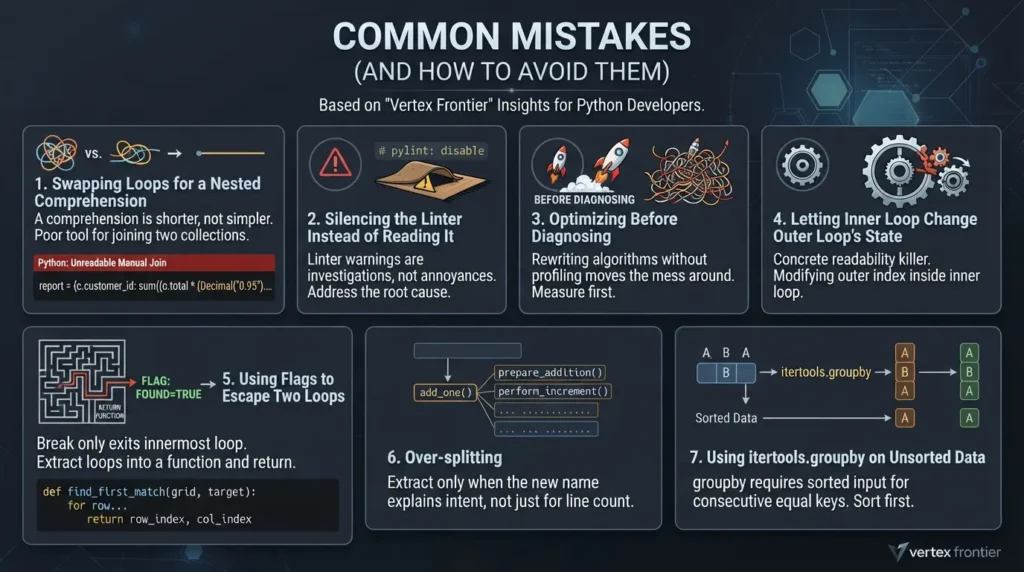
1. Swapping loops for a nested comprehension
This is the second uncommon insight: a comprehension is not a cure. It is shorter, not simpler. Here is the same manual join, compressed into one line.
Python: shorter, but still the Manual Join Smell:
report = {c.customer_id: sum((o.total * (Decimal("0.95") if c.is_vip else 1) for o in orders if o.customer_id == c.customer_id and o.status == OrderStatus.PAID), start=Decimal("0")) for c in customers}It still scans every order for every customer, and now it is also unreadable. Comprehensions are for transforming one collection. They are a poor tool for joining two. The Python tutorial's section on list comprehensions shows what they are designed for.
2. Silencing the linter instead of reading it
A # pylint: disable comment makes the warning go away and leaves the cause in place. Treat the warning as the start of the investigation.
3. Optimizing before diagnosing
Rewriting the algorithm without asking the three questions usually moves the mess around. Diagnose first.
4. Letting the inner loop change the outer loop's state
One Reddit commenter named this as a concrete readability killer: an inner loop that modifies the outer loop's index while it runs. If you need that, the design is asking for a different shape.
5. Using flags to escape two loops
A break only exits the innermost loop, which pushes people toward found = False flags and extra checks. The cleaner Python answer is to extract the loops into a function and return from it.
Python: breaking out of nested loops with return:
def find_first_match(grid, target): for row_index, row in enumerate(grid): for col_index, value in enumerate(row): if value == target: return row_index, col_index return None6. Over-splitting
A function called add_one that adds one is noise, not a name. Extract when the new name explains intent, not just because a line count looks high.
7. Using itertools.groupby on unsorted data
It is tempting as a group-by tool, but itertools.groupby groups consecutive equal keys, so the input must already be sorted by that key. In a quick local test, the keys a, b, a produced three separate groups unsorted, and two groups once sorted. For grouping unsorted records, the dictionary approach above is simpler and safer.
Other design problems nested loops can point to
The three questions cover the most common causes, but real-world code reviews frequently reveal four additional anti-patterns. Each one is a quiet source of tangled loops.
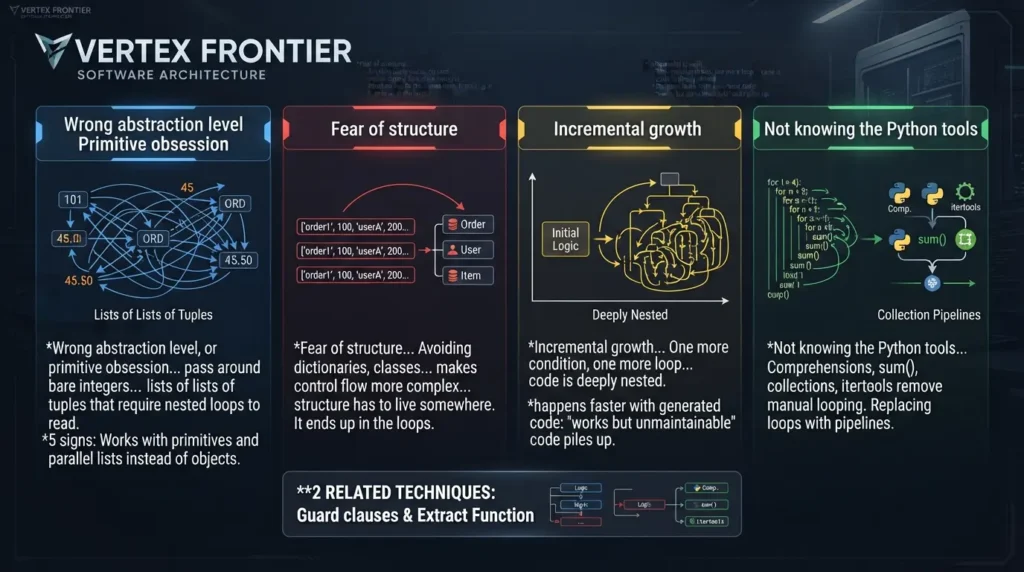
Wrong abstraction level, or primitive obsession
If you pass around bare integers, strings, and floats instead of objects like Order, OrderItem, and Customer, the data has no defined shape, and you can end up with lists of lists of tuples that require nested loops to read. Refactoring Guru's page on primitive obsession describes the smell and its fixes in detail.
Fear of structure
Avoiding dictionaries, classes, and tuples at all costs makes control flow more complex, because the structure has to live somewhere. It ends up in the loops.
Incremental growth
One more condition, one more loop, and suddenly the code is deeply nested. This is not a check you do once at the end. It is something to keep in the back of your mind while coding. It also happens faster with generated code: our look at why AI-generated prototypes fail at production cutover covers how quickly "works but unmaintainable" code piles up when it is generated rather than designed.
Not knowing the Python tools
Comprehensions, sum(), the collections module, and itertools remove a lot of manual looping. For a deeper look at replacing loops with pipelines, Martin Fowler's essay on refactoring loops into collection pipelines is the classic reference, though its examples use Ruby and JavaScript.
Two related techniques deserve a mention. Guard clauses flatten nested if statements by exiting early, for example with continue at the top of a loop body. And Extract Function, which we used above, is available as a one-click refactoring in most editors.
5 signs your nested loops are hiding a design problem
- The inner loop scans a whole collection to find matches for one outer item.
- One block filters, calculates, and formats all at once.
- You can't say in a few words what each level of the loop means.
- Changing one business rule means editing the loop body.
- The loop works with primitives and parallel lists instead of objects.
The checklist, and a decision rule to keep
Next time you meet nested loops and tangled conditions, don't start by trying to optimize or delete them. Ask:
- Am I using the right data structure here?
- Am I doing low-level work that doesn't belong at this level?
- Does this function have too many responsibilities?
- If one business rule changes, do I have to edit this function?
- Can I split this up further?
The decision rule is short. If a nested loop mirrors the shape of your data, keep it and name it well. If it joins collections, mixes concerns, or collects reasons to change, fix the design around it. The loops that remain afterward are loops you chose.
A nested loop is a smoke detector, not a fire. Go and look at what triggered it.
Once the structure feels right, the next step is applying it somewhere larger. Our walkthrough on building and testing a production Python API puts these habits to work in a full project.
What usually causes deeply nested code in your projects? Tell us in the comments, because the patterns people report are often more useful than any rule.
FAQs: nested loops in Python
Are nested loops bad practice?
Not by themselves. They become a problem when they join unrelated collections, mix several concerns in one block, or nest so deeply that readers lose track. When the nesting mirrors the data, such as a grid, it is a natural choice. Treat a nested loop as a prompt to check the design, not as an automatic mistake.
How many nested loops is too many?
There is no fixed number. Two levels over two-dimensional data is normal. Three or more levels, or any level that scans an unrelated collection, deserves a design review. Pylint's default limit is five nested blocks, but what each level means matters more than how many there are.
How do I refactor nested loops in Python?
Ask three questions in order. First, is the data structure right? Group or index data with a dictionary instead of rescanning it. Second, is the behavior at the right level? Move object-specific logic onto the object. Third, does the function have too many reasons to change? Extract named functions until each has one.
Are nested loops always a performance problem (O(n²))?
No. When two collections are scanned against each other, work grows with the product of their sizes, so small inputs are harmless and large ones can be painful. In one local test on CPython 3.12.3, a nested-scan report over 4,000 customers and 20,000 orders took about 2.9 seconds, versus about 0.04 seconds after grouping first. Results depend on your data and hardware, so measure your own case before rewriting.
Why is my linter complaining about too-many-nested-blocks?
Pylint raises too-many-nested-blocks (R1702) when a function nests more blocks than its limit, which defaults to five. The check counts nested blocks in general, and in a local test an if statement counted alongside for loops. Do not just suppress the warning. Use the three design questions to find out why the function got so deep.
Are list comprehensions always better than nested loops?
No. Comprehensions are good for transforming or filtering one collection. A nested comprehension that joins two collections is usually harder to read than the loop it replaced, and it still scans everything. Fix the data structure first, then use a comprehension where it fits.
When are nested loops the right tool?
When the nesting matches the data: walking a grid or matrix, comparing every pair, or reading a list of lists. Database engines also use nested loop joins on purpose when the inner side can be reached efficiently, as Oracle's 12.2 documentation describes. Use itertools.product if you want the same result with less indentation.
What is the difference between SRP and separation of concerns?
Separation of concerns is the broad idea of dividing a program into parts that each deal with one concern. The single responsibility principle applies that idea to a specific unit, such as a function or class, and frames it as having one reason to change. The two overlap heavily and differ mainly in level.
How do I check that my refactor did not change behavior?
Keep the old function next to the new one, run both on the same seeded test data, and assert that the outputs are equal. Also check that grouping loses no records by comparing the total group size with the input length. These checks show agreement on the data you tested, not on every possible input.

Was this article helpful?






[…] deeper question is usually whether the nesting itself is pointing at a design flaw, our guide to nested loops in Python walks through the diagnostic before you reach for a faster […]
[…] Extract Function is the same move that untangles deeply nested loops, and linters like Pylint often point at the code that needs it through their too-many-nested-blocks check. For a concrete walkthrough of when to apply it to nested control flow, see our guide to nested loops in Python. […]
[…] of indexing them. If asked to refactor deeply nested Python code on a whiteboard, our guide to nested loops in Python breaks the diagnostic into three design questions you can apply in five […]
[…] applies: is the structure right, or are you scanning where you should be indexing? Our guide to nested loops in Python covers that case in […]