
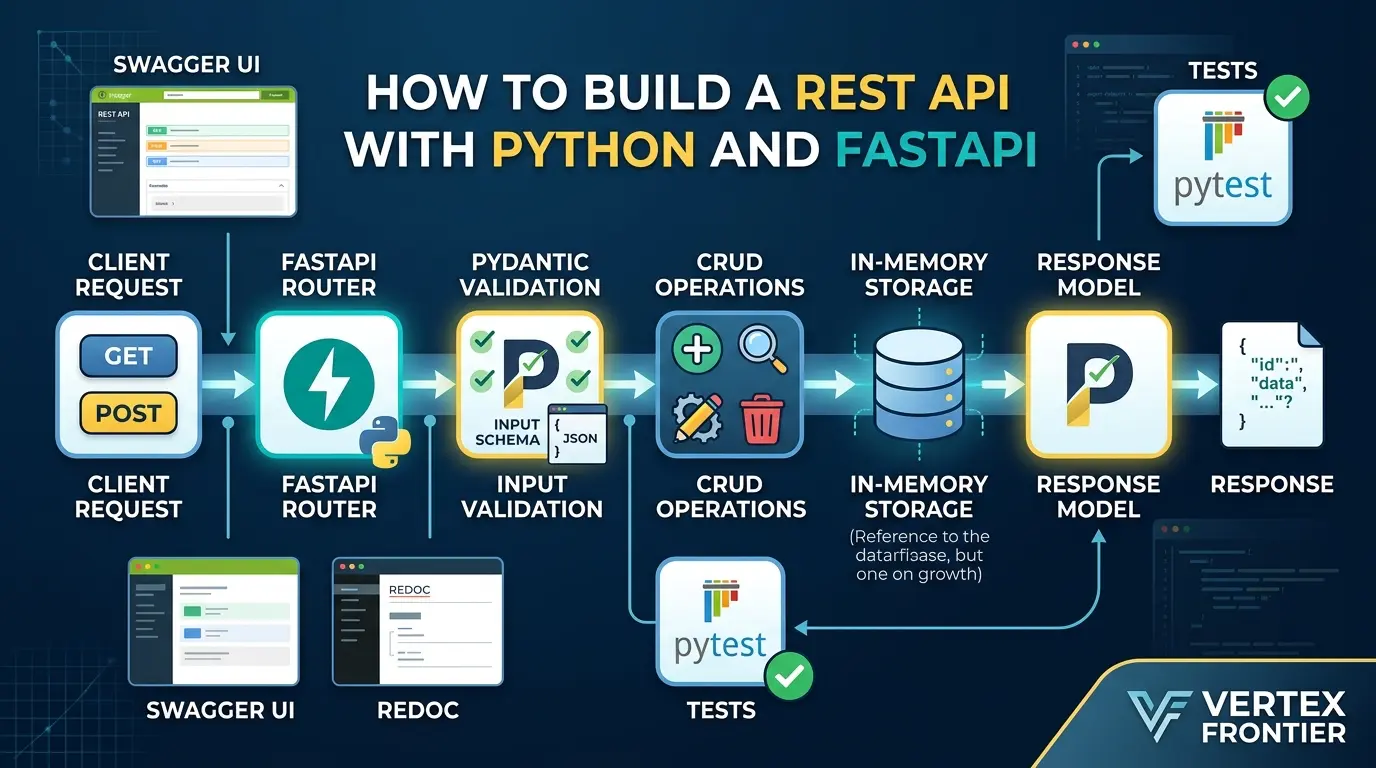

Build REST API with Python And FastAPI is easy to demonstrate and surprisingly easy to get wrong.
A few lines of Python can return JSON from an endpoint. But a useful API needs more than a successful GET request. It needs a clear resource model, validated input, predictable errors, safe response data, testable boundaries, and a deployment plan that does not collapse when the first real dependency becomes slow.
In this tutorial, you will build a small but thoughtfully structured REST API with Python and FastAPI. We will start with a working endpoint, then add typed Pydantic models, CRUD operations, pagination, dependency injection, error handling, OpenAPI documentation, and automated tests. Along the way, we will also examine the parts that many FastAPI tutorials skip: why async def does not automatically make blocking code non-blocking, why an object ID is not authorization, and why an in-memory example must never be confused with a production database.
If you are new to API design, you may want to begin with Vertex Frontier’s guide to what an API is and how APIs work. If you already understand HTTP and JSON, you can start building immediately. By the end, you will have a runnable project and a clear, honest checklist for turning that learning project into a real service.
Key Takeaways
Click any topic to expand or collapseFastAPI vs REST Architectural Constraints
FastAPI is a Python web framework for building HTTP APIs; REST is a set of architectural constraints. They are related, but they are not the same thing.
Building Beyond “Hello World”
The most useful first project is not a single “hello world” route. It is a small, coherent API with a clear contract, typed input and output, predictable errors, and tests.
Pydantic Models Scope & Limits
Pydantic models validate and document data, but they do not replace authentication or object-level authorization.
Understanding async def Execution
async def does not automatically make blocking code non-blocking. The libraries used inside the endpoint matter more than the keyword in the function definition.
In-Memory CRUD Limitations
An in-memory CRUD example is excellent for learning request flow, but it is not durable, multi-process safe, or production-ready.
Production Deployment Checklist
Before deployment, you still need persistent storage, migrations, secrets management, authentication, authorization, rate limits, observability, CI, backups, and a tested rollout plan.
What You Will Build
Click any topic to expand or collapseCore API Features & Architecture
A small task-list REST API built with FastAPI. It exposes a health check endpoint alongside full CRUD operations (Create, Read, Update, Delete) with bounded pagination.
FastAPI Implementation Patterns
Utilizes Pydantic request and response models, FastAPI dependency injection, explicit HTTP error handling, automatic OpenAPI documentation, and automated test coverage via pytest.
Storage & Production Considerations
Uses an in-memory storage layer to keep the learning path concise and runnable, followed by a breakdown of required changes before handling real production users or sensitive data.
What is FastAPI, and how is it different from a REST API?
A REST API is an HTTP interface designed around resources, representations, stateless requests, standard methods, and meaningful status codes. For example, /api/v1/tasks/42 represents one task, while GET reads it, PATCH changes selected fields, and DELETE removes it.
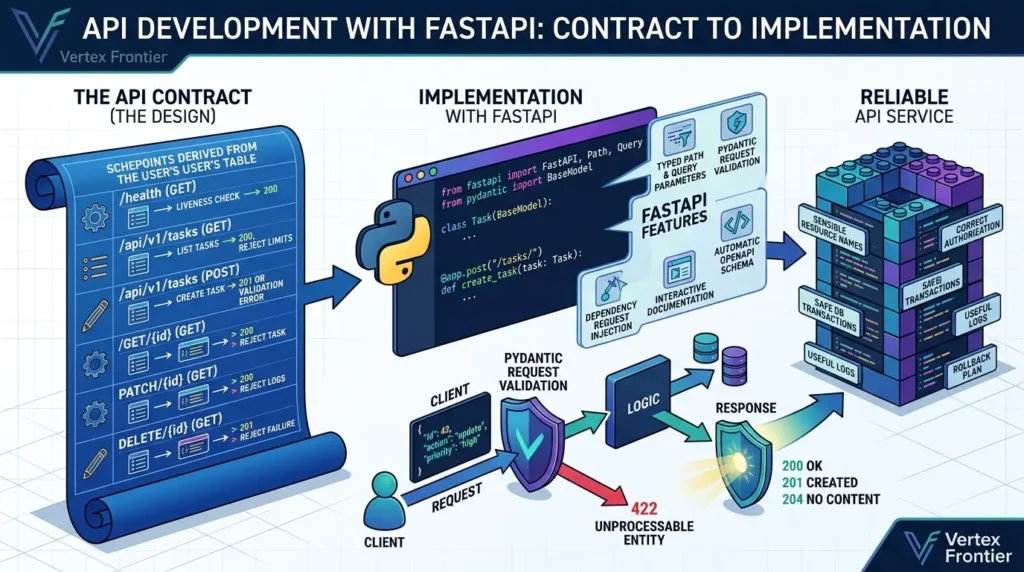
FastAPI is the Python framework used to implement that interface. Its documented features include typed path and query parameters, Pydantic-based request validation, dependency injection, automatic OpenAPI schema generation, and interactive documentation. The official FastAPI first-steps guide demonstrates the smallest version of this flow.
That distinction matters. FastAPI does not decide whether your API has sensible resource names, correct authorization, safe database transactions, useful logs, or a rollback plan. The framework gives you building blocks. Your application design determines whether those blocks form a reliable service.
If the HTTP concepts are new, start with Vertex Frontier’s guide to what an API is and how APIs work before continuing. This article assumes you understand the basic idea of a client sending a request and receiving a response.
The project we will build
We will use a task resource because it demonstrates the important mechanics without requiring an elaborate business domain.
| Method | Path | Purpose | Success / Failure |
|---|---|---|---|
| GET | /health | A narrow local liveness-style check | 200 |
| GET | /api/v1/tasks | List tasks with bounded pagination | 200 (invalid limits rejected) |
| POST | /api/v1/tasks | Create a task | 201 / 422 Validation Error |
| GET | /api/v1/tasks/{task_id} | Retrieve one task | 200 / 404 |
| PATCH | /api/v1/tasks/{task_id} | Update selected fields | 200 / 404 |
| DELETE | /api/v1/tasks/{task_id} | Delete a task | 204 / 404 |
The API contract comes before the code. A route is easier to implement and test when its input, output, and failure behavior are already explicit.
Before and after: the difference between a demo route and an API you can maintain
A common tutorial starts with one file and one dictionary. That is useful for learning the request cycle, but it hides the decisions that become painful later.
| Before | After |
|---|---|
| Routes accept unstructured dictionaries. | Pydantic models define the request and response contract. |
| Every route reaches into storage directly. | A small repository boundary isolates storage decisions. |
| Only happy paths are demonstrated. | Invalid input, missing resources, and deletion are tested. |
| “Async” is treated as a speed switch. | The route style follows the behavior of the libraries it calls. |
| The tutorial says “production-ready.” | The tutorial names the production work that remains. |
The unusual but important insight is this: the most valuable production lesson in a beginner API tutorial may be learning where the tutorial stops. A bounded demo is honest and useful. A toy service described as secure, durable, or scalable is not.
Step 1: Create an isolated Python project
Use a virtual environment or a lock-file-based workflow. Python’s official venv documentation describes virtual environments as disposable environments that should be recreated from project dependencies rather than committed to version control.
This article uses uv as the primary workflow because it can resolve and lock the environment. If your team standardizes on venv and pip, use that consistently instead; do not mix several package managers in one copy-paste path.
Bash — create and run the project:
mkdir fastapi-tasks
cd fastapi-tasks
uv init
uv add "fastapi[standard]==0.141.1" "pytest" "httpx"
uv lock
uv run fastapi dev app/main.py
The exact resolved versions should be recorded in your lock file. FastAPI’s official versioning guidance and release documentation are more important than a vague instruction to install “the latest” package. FastAPI is still in the 0.x series, so a minor release can require compatibility checks.
Version and compatibility matrix
Use this table as a publication gate, not as a promise that every future release will behave identically. The versions below are the reviewed baseline for this article; re-run the clean-install and test commands when you update them.
| Component | Reviewed Baseline | Role | Publication Rule |
|---|---|---|---|
Python | 3.12.3 | Runtime | Confirm the selected Python version supports every syntax feature used. |
FastAPI | 0.141.1 | Web Framework | Pin or lock it; re-test minor-version upgrades. |
Starlette |
1.3.1
| ASGI Toolkit | Do not independently pin it for a normal FastAPI app. |
Pydantic | 2.13.4 | Validation & Schemas | Use v2 APIs consistently; do not mix v1 examples. |
Uvicorn | 0.52.1 | ASGI Server | Keep reload for development and use a separate deployment command. |
HTTPX / pytest | Test Client & Runner | Run the test suite after resolution; do not assume compatibility from package names alone. |
If you do not use uv, the portable fallback is:
Bash — venv and pip fallback:
python3 -m venv .venv
source .venv/bin/activate
python -m pip install --upgrade pip
python -m pip install "fastapi[standard]==0.141.1" pytest httpx
python -m uvicorn app.main:app --relo
On Windows, activate the environment with .venv\Scripts\activate. The important practice is not the shell command itself. It is that the command, dependency file, and tested versions agree.
Step 2: Build the smallest working endpoint
Create the initial package structure:
Project structure:
fastapi-tasks/
├── app/
│   ├── __init__.py
│   └── main.py
├── tests/
│   └── test_tasks.py
├── pyproject.toml
├── uv.lock
└── .gitignore
Start with a route and let FastAPI show you what it adds:
Python — app/main.py:
from fastapi import FastAPI
app = FastAPI(
title="Task API",
version="0.1.0",
description="A small REST API built with Python and FastAPI",
)
@app.get("/health", tags=["system"])
def health() -> dict[str, str]:
return {"status": "ok"}
Open http://127.0.0.1:8000/health in a browser or API client. Then inspect:
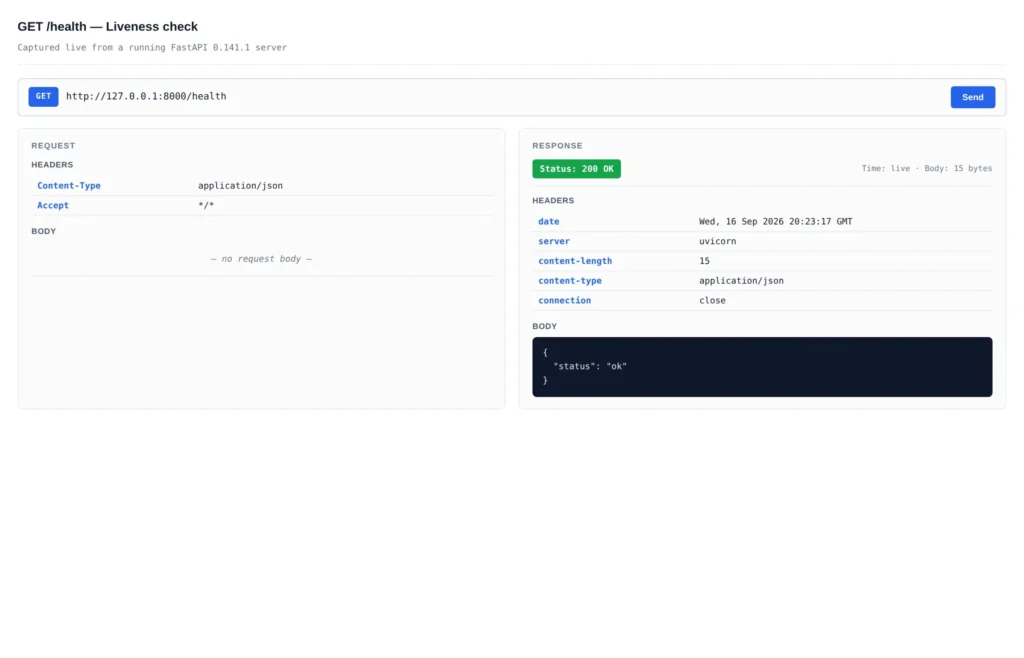
/health endpoint shown as a Postman-style panel: GET request on the left, 200 OK response with {"status":"ok"} on the right./docsfor Swagger UI./redocfor ReDoc./openapi.jsonfor the generated schema.
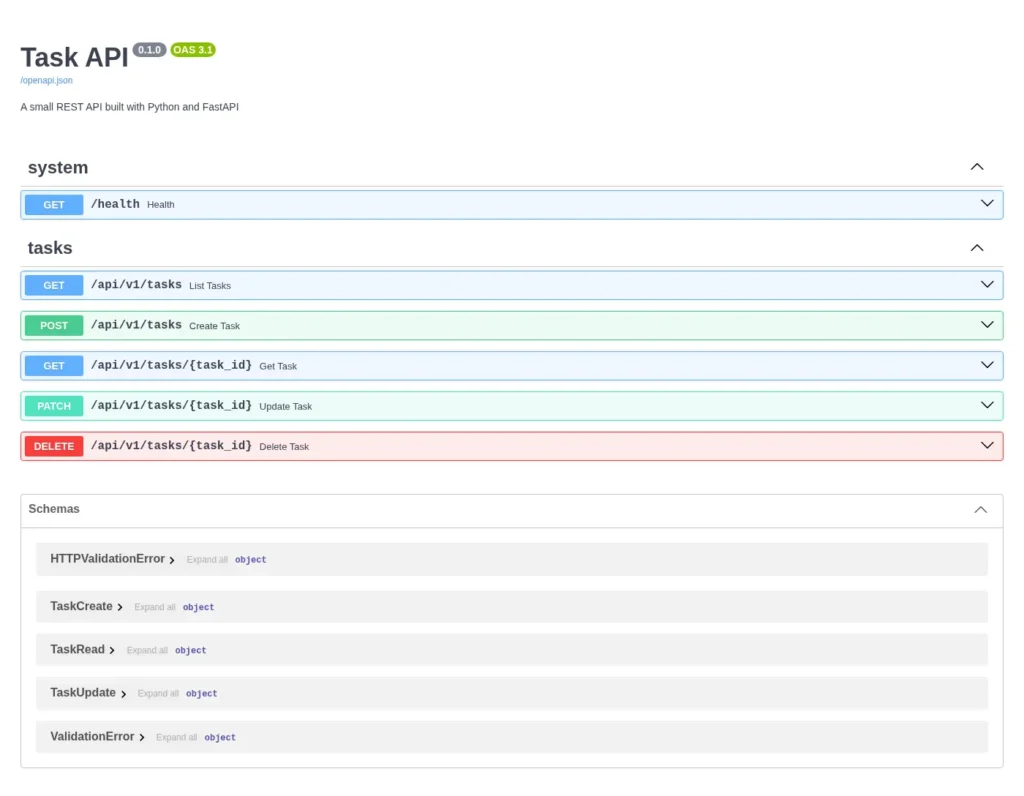
/docs renders the OpenAPI schema as an interactive browser. Each endpoint can be tried in place.The schema is not just decoration. It is a machine-readable description that can feed client generation, contract review, and integration discussions. It is also an inventory of what your service exposes, so review it before deployment.
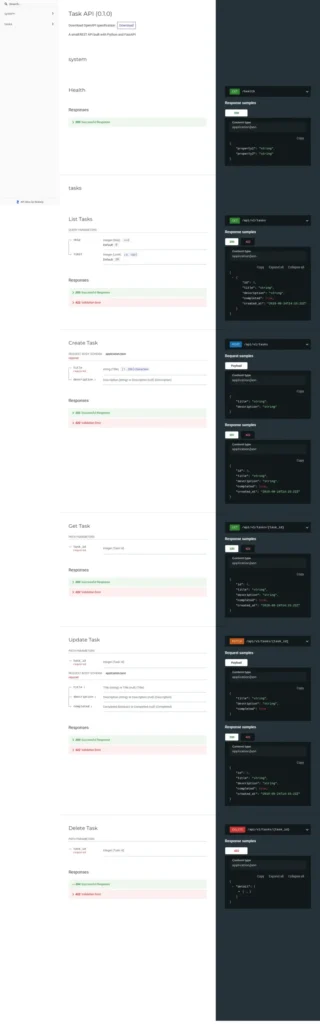
/redoc renders the same OpenAPI schema as a three-column reference layout — best for reading the full contract.A strong FastAPI workflow uses the generated documentation as a feedback loop. If the OpenAPI schema is confusing, the API contract or model design probably needs work.
Step 3: Model input and output with Pydantic
Unstructured dictionaries make it easy to accept accidental fields, return inconsistent shapes, or forget constraints. Pydantic models turn the request and response boundary into explicit Python types and JSON Schema.
The Pydantic models documentation covers validation and serialization. In current Pydantic v2 code, use methods such as model_dump() rather than presenting Pydantic v1 methods as the default.
Create separate models for creation, partial updates, and responses:
Python — app/schemas.py:
from datetime import datetime
from pydantic import BaseModel, Field
class TaskCreate(BaseModel):
title: str = Field(min_length=1, max_length=200)
description: str | None = Field(default=None, max_length=2000)
class TaskUpdate(BaseModel):
title: str | None = Field(default=None, min_length=1, max_length=200)
description: str | None = Field(default=None, max_length=2000)
completed: bool | None = None
class TaskRead(BaseModel):
id: int
title: str
description: str | None
completed: bool
created_at: datetime
Why separate models?
TaskCreatedescribes what a client may send when creating a task.TaskUpdatedescribes a partial change; omitted fields stay unchanged.TaskReaddescribes what the API promises to return.
That last distinction is a security boundary. If an internal object later contains a password hash, billing flag, or private note, a response model can prevent fields outside the public contract from being serialized. FastAPI documents response-model filtering as security-relevant, but it does not replace authorization or careful data handling.
A field declared as str | None is not necessarily optional unless it also has a default. Test the missing-field behavior instead of relying on intuition. Also remember that validation and coercion are not identical: a library may convert compatible input, while strict validation rejects it. Choose and document the behavior your API needs.
Step 4: Move storage behind a small repository
The in-memory repository below is deliberately simple. It exists to isolate HTTP behavior from storage behavior. It does not pretend to be a database.
Python — app/repository.py:
from datetime import UTC, datetime
from .schemas import TaskCreate, TaskRead, TaskUpdate
class TaskRepository:
def init(self) -> None:
self._tasks: dict[int, TaskRead] = {}
self._next_id = 1

def list(self, skip: int = 0, limit: int = 20) -> list[TaskRead]:
    tasks = list(self._tasks.values())
    return tasks[skip : skip + limit]

def get(self, task_id: int) -> TaskRead | None:
    return self._tasks.get(task_id)

def create(self, payload: TaskCreate) -> TaskRead:
    task = TaskRead(
        id=self._next_id,
        title=payload.title,
        description=payload.description,
        completed=False,
        created_at=datetime.now(UTC),
    )
    self._tasks[task.id] = task
    self._next_id += 1
    return task

def update(self, task_id: int, payload: TaskUpdate) -> TaskRead | None:
    current = self._tasks.get(task_id)
    if current is None:
        return None

    changes = payload.model_dump(exclude_unset=True)
    updated = current.model_copy(update=changes)
    self._tasks[task_id] = updated
    return updated

def delete(self, task_id: int) -> bool:
    return self._tasks.pop(task_id, None) is not None
This is a teaching repository, not a concurrency strategy. It resets when the process restarts. Multiple workers would have separate memory. A second process would not see the first process’s tasks. There are no transactions, indexes, backups, migrations, or durability guarantees.
For a persistent service, the next layer is usually a database session and a migration workflow. SQLAlchemy’s APIs are version-sensitive, and Alembic’s autogenerate feature creates candidate migrations that require manual review; it cannot reliably infer every rename or semantic data change. Vertex Frontier’s practical ORM guide is a useful companion when you move from this repository to a relational persistence layer.
Step 5: Add routes, validation, and dependency injection
FastAPI dependencies are reusable callables declared with Depends. They can supply configuration, database sessions, authentication context, or repository objects. The official dependency-injection guide explains the mechanism and its relationship to validation and OpenAPI.
Python — app/dependencies.py:
from typing import Annotated
from fastapi import Depends
from .repository import TaskRepository
_repository = TaskRepository()
def get_repository() -> TaskRepository:
return _repository
Repository = Annotated[TaskRepository, Depends(get_repository)]
Now define the task router. The route layer handles HTTP concerns. The repository handles storage operations.
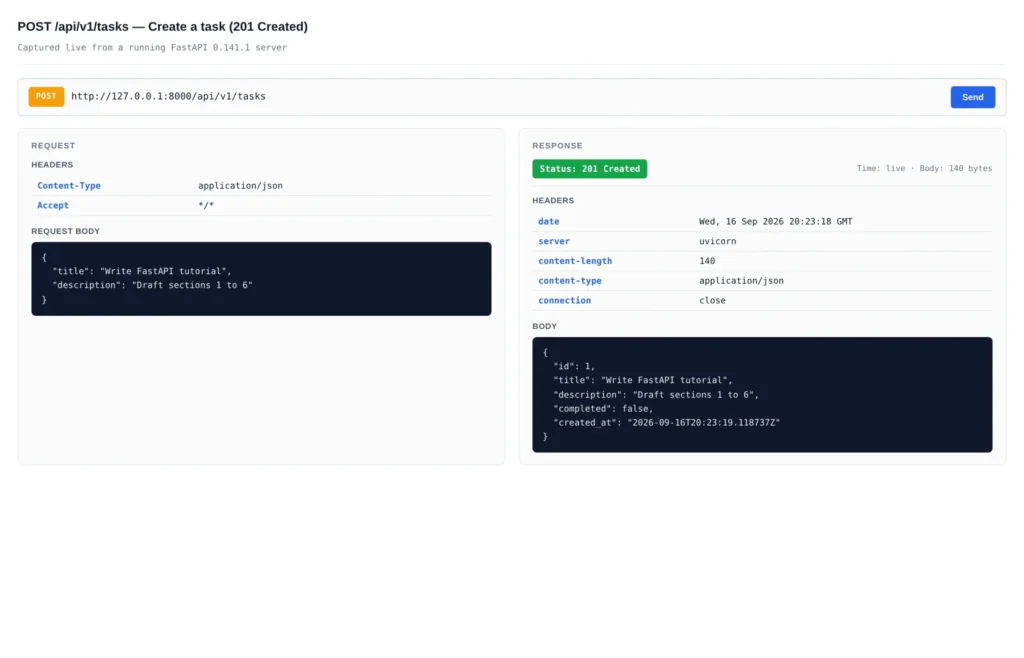
POST /api/v1/tasks shown as a Postman-style panel. The request body on the left is the JSON sent by the client; the 201 Created response on the right echoes the stored representation with a generated id and created_at timestamp.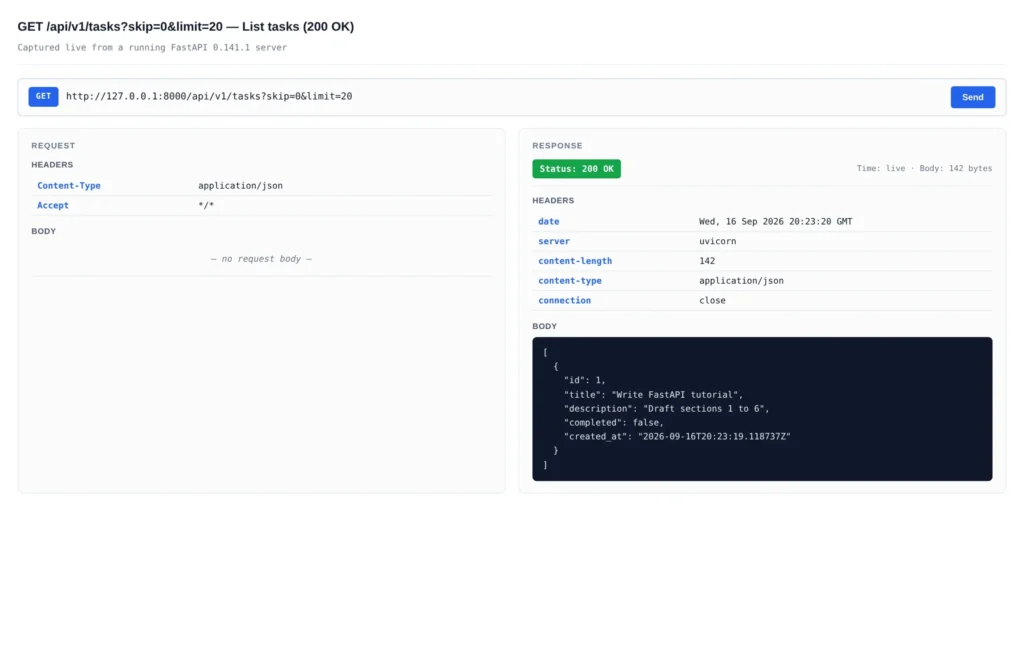
GET /api/v1/tasks?skip=0&limit=20returns the list of stored tasks. The query parameters are visible in the URL bar; the response body on the right is a JSON array of TaskRead objects.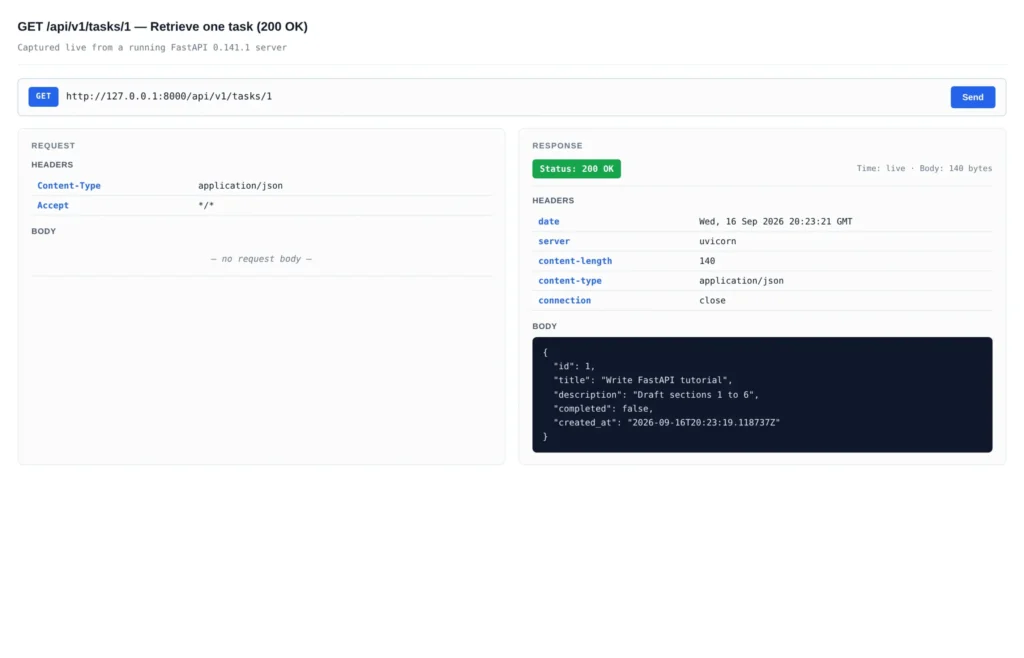
GET /api/v1/tasks/1 returns the single task with the matching id, shown as a Postman-style panel.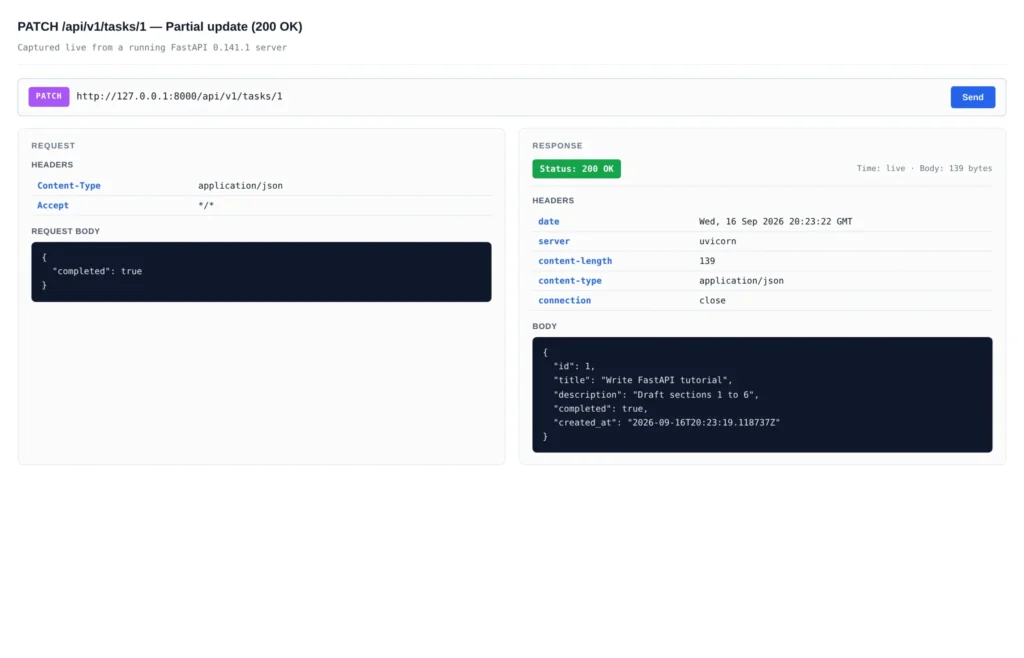
PATCH /api/v1/tasks/1 with {"completed": true} shown as a Postman-style panel. Only the supplied field is updated; the rest of the task representation stays unchanged.Python — app/routes.py:
from typing import Annotated
from fastapi import APIRouter, HTTPException, Query, status
from .dependencies import Repository
from .schemas import TaskCreate, TaskRead, TaskUpdate
router = APIRouter(prefix="/api/v1/tasks", tags=["tasks"])
@router.get("", response_model=list[TaskRead])
def list_tasks(
repository: Repository,
skip: Annotated[int, Query(ge=0)] = 0,
limit: Annotated[int, Query(gt=0, le=100)] = 20,
) -> list[TaskRead]:
return repository.list(skip=skip, limit=limit)
@router.post("", response_model=TaskRead, status_code=status.HTTP_201_CREATED)
def create_task(
payload: TaskCreate,
repository: Repository,
) -> TaskRead:
return repository.create(payload)
@router.get("/{task_id}", response_model=TaskRead)
def get_task(task_id: int, repository: Repository) -> TaskRead:
task = repository.get(task_id)
if task is None:
raise HTTPException(status_code=404, detail="Task not found")
return task
@router.patch("/{task_id}", response_model=TaskRead)
def update_task(
task_id: int,
payload: TaskUpdate,
repository: Repository,
) -> TaskRead:
task = repository.update(task_id, payload)
if task is None:
raise HTTPException(status_code=404, detail="Task not found")
return task
@router.delete("/{task_id}", status_code=status.HTTP_204_NO_CONTENT)
def delete_task(task_id: int, repository: Repository) -> None:
deleted = repository.delete(task_id)
if not deleted:
raise HTTPException(status_code=404, detail="Task not found")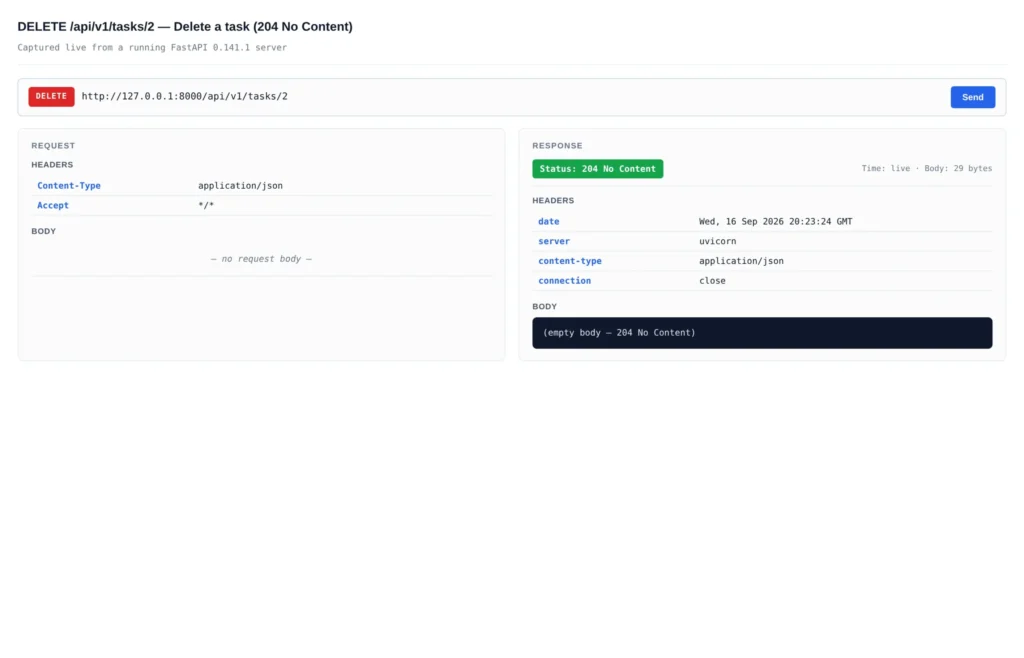
DELETE /api/v1/tasks/{id} shown as a Postman-style panel. The response is 204 No Content with an empty body, indicated in the status pill on the right.Finally, connect the router to the application:
Python — app/main.py:
from fastapi import FastAPI
from .routes import router as task_router
app = FastAPI(
title="Task API",
version="0.1.0",
description="A small REST API built with Python and FastAPI",
)
@app.get("/health", tags=["system"])
def health() -> dict[str, str]:
return {"status": "ok"}
app.include_router(task_router)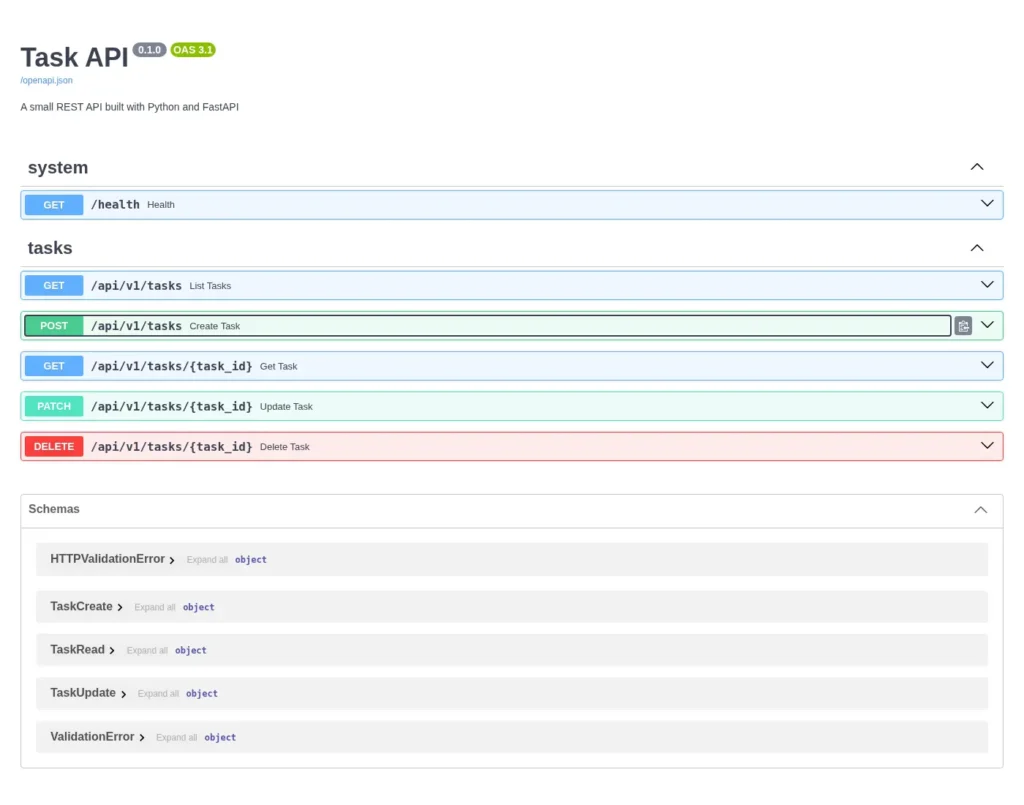
POST /api/v1/tasks operation expanded in Swagger UI. Request body schema, parameters, and example are derived directly from the Pydantic models.Request validation and error matrix
This matrix turns implementation details into a client-facing contract. The exact validation payload can vary with the pinned FastAPI and Pydantic versions, so test status codes and stable fields rather than hard-coding every wording detail.
| Scenario | Example | Expected Status | What the Client Should Do |
|---|---|---|---|
Valid create | A non-empty title within the length limit | 201 Created | Store the returned representation and its ID. |
Invalid body | {"title":""} | 422 Unprocessable | Show a field-level correction; do not retry unchanged input. |
Invalid pagination | ?limit=101 | 422 Unprocessable | Use a value inside the documented range. |
Missing resource | GET /api/v1/tasks/999 | 404 Not Found | Update the client state; do not treat it as a transient server failure. |
Unauthorized access | A protected resource without valid credentials | 401 / 403 | Follow the documented authentication flow; do not guess from status alone. |
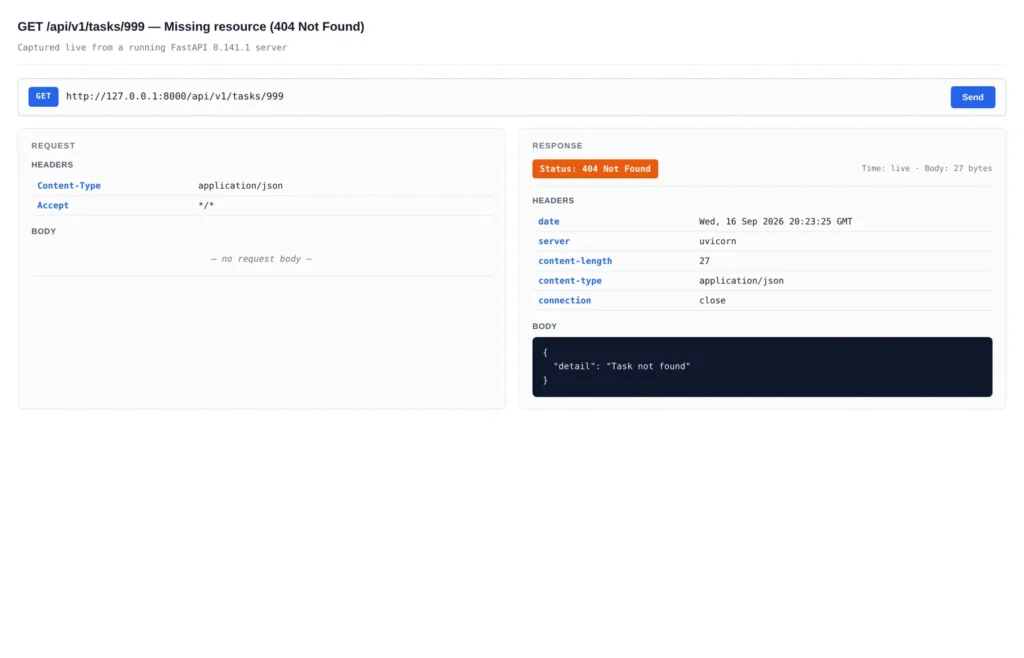
GET /api/v1/tasks/999 shown as a Postman-style panel. The orange status pill on the right signals a 404 Not Found; the response body is the JSON {"detail": "Task not found"} raised by HTTPException.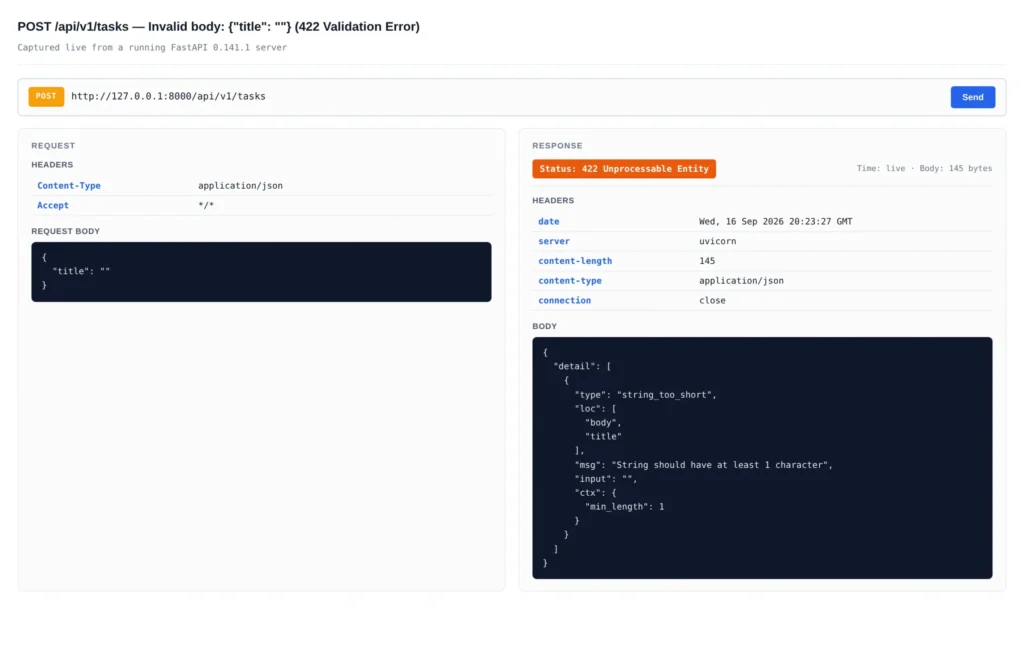
POST /api/v1/tasks with {"title": ""} shown as a Postman-style panel. The orange status pill on the right signals a 422 Unprocessable Entity. FastAPI emits a field-level error report including the failing location (body.title), type (string_too_short), and message.The complete tree is now:
Final learning-project structure:
fastapi-tasks/
├── app/
│   ├── __init__.py
│   ├── dependencies.py
│   ├── main.py
│   ├── repository.py
│   ├── routes.py
│   └── schemas.py
├── tests/
│   └── test_tasks.py
├── pyproject.toml
├── uv.lock
└── .gitignore
This is intentionally smaller than a heavily layered enterprise template. A useful project structure is the smallest structure that makes the next change safer. Adding folders before you have a reason for them creates ceremony, not architecture.
Step 6: Test behavior, not just imports
FastAPI’s testing documentation uses TestClient, which is built on HTTPX and works naturally with pytest for ordinary synchronous test calls. Test the API through its HTTP boundary: status codes, response fields, validation, and failure behavior.
Python — tests/test_tasks.py:
from fastapi.testclient import TestClient
from collections.abc import Iterator
import pytest
from app.main import app
from app.dependencies import get_repository
from app.repository import TaskRepository
@pytest.fixture(autouse=True)
def isolate_repository() -> Iterator[None]:
    """Provide a single fresh repository per test so create-then-read works."""
    repository = TaskRepository()
    app.dependency_overrides[get_repository] = lambda: repository
    yield
    app.dependency_overrides.clear()
@pytest.fixture
def client() -> TestClient:
return TestClient(app)
def test_health_check(client: TestClient) -> None:
response = client.get("/health")
assert response.status_code == 200
assert response.json() == {"status": "ok"}
def test_create_and_read_task(client: TestClient) -> None:
created = client.post(
"/api/v1/tasks",
json={"title": "Write tests", "description": "Cover the happy path"},
)
assert created.status_code == 201
task_id = created.json()["id"]
fetched = client.get(f"/api/v1/tasks/{task_id}")
assert fetched.status_code == 200
assert fetched.json()["title"] == "Write tests"
def test_invalid_task_is_rejected(client: TestClient) -> None:
response = client.post("/api/v1/tasks", json={"title": ""})
assert response.status_code == 422
def test_missing_task_returns_404(client: TestClient) -> None:
response = client.get("/api/v1/tasks/999")
assert response.status_code == 404
assert response.json()["detail"] == "Task not found"
def test_update_and_delete_task(client: TestClient) -> None:
created = client.post("/api/v1/tasks", json={"title": "Temporary"})
task_id = created.json()["id"]
updated = client.patch(
    f"/api/v1/tasks/{task_id}",
    json={"completed": True},
)
assert updated.status_code == 200
assert updated.json()["completed"] is True

deleted = client.delete(f"/api/v1/tasks/{task_id}")
assert deleted.status_code == 204
Run the suite with:
Bash — run tests:
uv run pytest -q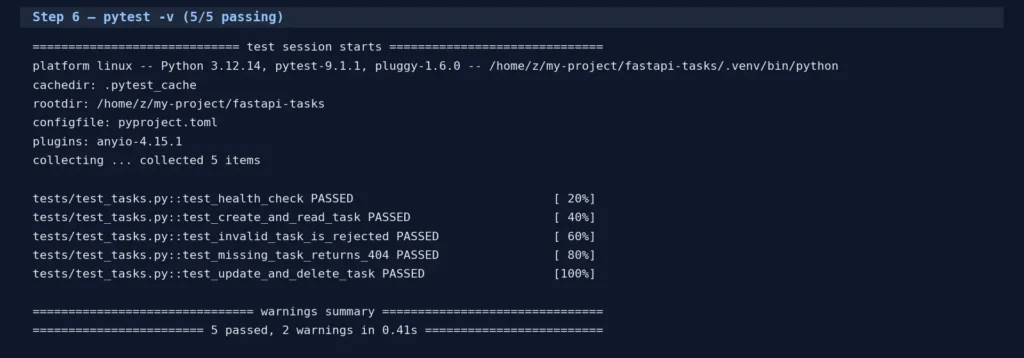
pytest -v against the API: 5 tests, 5 passed, in 0.41s. The tests cover health, create-then-read, invalid input, missing resource, and update/delete.The dependency override gives each test a fresh repository. That is appropriate for this in-memory example. A database-backed test suite needs a more deliberate strategy involving transactions, migrations, fixtures, and cleanup. Do not claim that these tests prove database correctness, multi-worker behavior, or production capacity.
FastAPI troubleshooting matrix
When a small API fails, classify the failure before changing the architecture. This keeps a useful error from turning into a random dependency or worker change.
| Symptom | First Check | Likely Boundary | Safe Next Step |
|---|---|---|---|
Import
The app will not import | Run the command from the project root and verify module:attribute. | Python path / Package layout | Fix the import string or package structure before adding workers. |
Validation
Validation returns unexpected response | Inspect the generated OpenAPI schema and the pinned Pydantic version. | Model declaration / Versioning | Test stable status and fields; avoid depending on exact error wording. |
Perf
Unrelated routes become slow | Look for blocking calls inside async def and measure external/database waits. | I/O behavior / Resource pool | Use the appropriate sync/async library and instrument the wait; do not blindly add workers. |
Testing
Tests leak state | Check dependency overrides, fixtures, and test order. | Test lifecycle | Reset the repository per test or use a transaction/fixture strategy for a database. |
Prod
Production requests time out | Measure client, proxy, app, database, and downstream timeouts separately. | System boundary | Capture request IDs and wait metrics before changing topology. |
The async trap: async def is not a performance button
FastAPI supports both async def and normal def path operations. The correct choice depends on the work performed inside the function and the libraries involved. FastAPI’s concurrency guidance explains when awaiting an async library is useful and why blocking libraries need different treatment.
An async def route that calls a blocking function can still block the event loop. A practitioner report in the FastAPI community described an asynchronous endpoint calling a synchronous operation and making unrelated endpoints, including documentation, appear unresponsive while the operation ran. That is useful experience evidence, not a universal benchmark; the exact library, workload, and deployment matter.
Use this decision rule:
Do not infer throughput from a hello-world benchmark. Database pool saturation, worker count, client concurrency, reverse proxies, background jobs, and OS limits can dominate the result. A Reddit load-test report described long waits despite low CPU and memory; that points to a useful diagnostic question, where are requests waiting?, not to a universal pool-size formula.
Common mistakes that make FastAPI APIs fragile
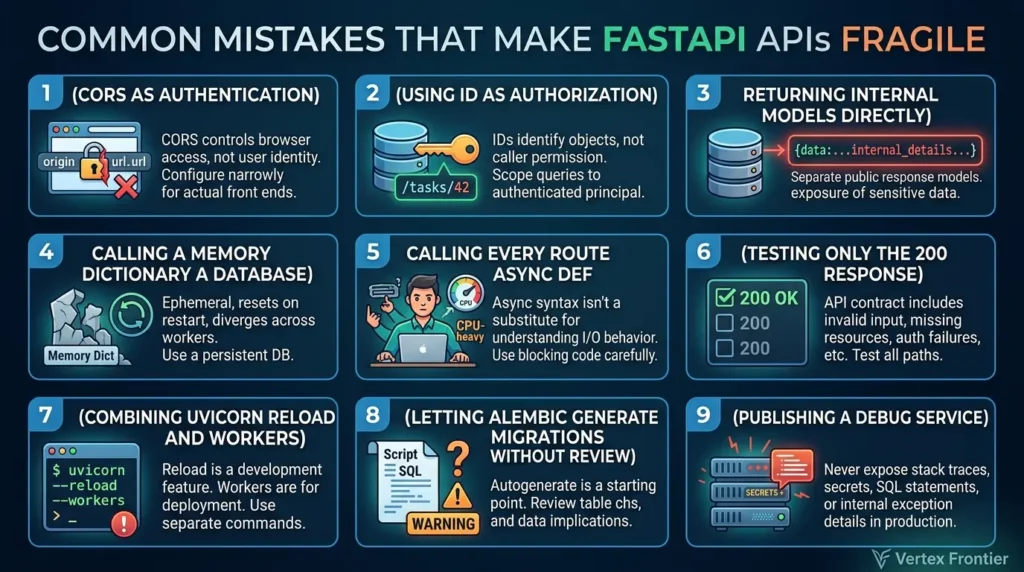
1. Treating CORS as authentication
CORS controls which browser origins may read responses. It does not identify a user, enforce ownership, or protect a server-to-server client. Configure it narrowly for your actual front ends.
2. Using an ID as if it proves authorization
/tasks/42 identifies an object. It does not prove the caller may read or change it. In a real system, the query must be scoped to the authenticated principal or an explicit permission model.
3. Returning internal models directly
Separate public response models from internal objects. Response filtering can reduce accidental exposure, but it cannot repair a data-access rule that fetched the wrong user’s records.
4. Calling a memory dictionary a database
The example resets on restart and diverges across workers. Move to a persistent database and migrations when durability, concurrent access, and recovery matter.
5. Calling every route async def
Async syntax is not a substitute for understanding the I/O behavior of the code inside the route.
6. Testing only the 200 response
An API contract includes invalid input, missing resources, authentication failures, rate limits, and safe error bodies. Test the paths clients actually need to handle.
7. Combining Uvicorn reload and workers
Uvicorn documents --reload as a development feature and makes it mutually exclusive with --workers. Use one development command and a separate deployment command.
8. Letting Alembic generate migrations without review
Autogenerate is a starting point. Review table changes, renames, indexes, constraints, data migrations, and rollback implications before applying a migration.
9. Publishing a debug service
Do not expose stack traces, secrets, SQL statements, tokens, or internal exception details in production responses. Review debug flags, proxy headers, HTTPS termination, and logs as a system.
Authentication, authorization, and the production boundary
A tutorial can demonstrate a protected route, but adding a token parser does not create a complete identity system. FastAPI’s security utilities help extract bearer credentials and integrate security schemes into OpenAPI. Your application still owns token policy, secret management, expiration, rotation, revocation, TLS, and authorization.
JWTs are signed tokens, not encrypted containers. Do not place confidential data in claims merely because the token is signed. Passwords must be hashed with an appropriate password-hashing implementation, never stored in plaintext. A valid token also does not mean the caller can access every object.
Use the OWASP API Security Top 10 as a threat-model checklist. For this small API, the most relevant questions include:
- Can a caller access another user’s task by changing an ID?
- Are authentication failures and authorization failures handled distinctly?
- Are pagination limits, payload sizes, and rate limits appropriate?
- Does the OpenAPI inventory expose endpoints that should not be public?
- Are third-party API responses validated before use?
- Are secrets kept outside source control and logs?
The production boundary is not one final code block. It is a set of operational decisions.
| Area | Learning Demo | Before Real Deployment |
|---|---|---|
Storage | In-memory repository | Persistent database, connection management, backups, and recovery tests |
Schema Changes | No migrations | Reviewed Alembic migrations, data-change plan, rollback strategy |
Identity | No users | Authentication, authorization, rotation, revocation, audit policy |
Operations | Local /health endpoint | Readiness semantics, structured logs, metrics, traces, alerts, and graceful shutdown |
Abuse Controls | Bounded query parameters | Rate limits, quotas, payload limits, timeouts, and abuse monitoring |
Delivery | Development server | Pinned dependencies, CI, HTTPS, trusted proxy configuration, deployment and rollback plan |
For deployment, Uvicorn’s settings documentation should be checked against your process model. --reload belongs to development. Worker count, replicas, memory, database connections, WebSockets, background jobs, and the reverse proxy must be designed together.
Deployment: what changes after localhost?
A Docker image solves packaging. It does not solve authorization, connection pools, graceful shutdown, observability, or database recovery. A Cloud Run or Kubernetes tutorial solves one provider’s deployment path. It does not make the API provider-independent.
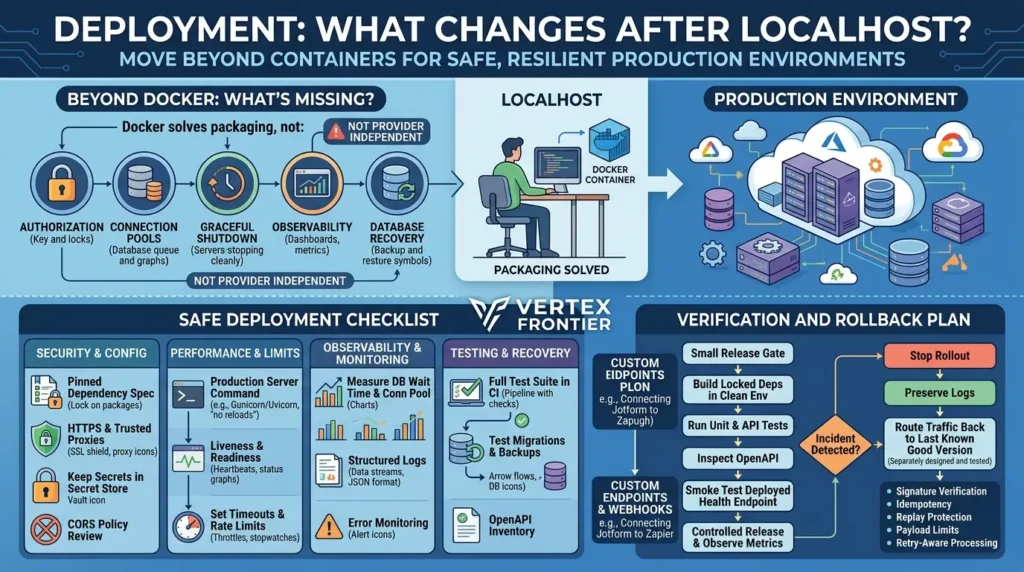
A safe deployment checklist is:
- Build from a pinned dependency specification.
- Run the full test suite in CI.
- Use a production server command without development reload.
- Configure HTTPS and trusted proxy headers only for proxies you control.
- Keep secrets in the deployment secret store, not in the repository or logs.
- Define liveness and readiness separately.
- Set timeouts, request-size limits, pagination bounds, and rate limits.
- Measure database wait time and connection-pool usage.
- Emit structured logs without credentials or sensitive payloads.
- Add error monitoring and a rollback path.
- Test migrations and backup restoration before treating the service as durable.
- Review the generated OpenAPI inventory and public CORS policy.
Verification and rollback plan
Do not treat a green local test run as proof that a deployment is safe. Use a small release gate:
- Build the exact locked dependency set in a clean environment.
- Run unit and API tests, then inspect the generated OpenAPI document for unintended routes or fields.
- Run a smoke test against the deployed health endpoint and one authenticated or representative API operation, where applicable.
- Observe error rate, latency, database wait time, connection usage, and resource consumption during a controlled release.
- If a migration or configuration change causes an incident, stop the rollout, preserve logs and request IDs, route traffic back to the last known-good application version, and follow the tested database recovery procedure.
- Do not “roll back” application code while assuming that a destructive database migration can be reversed automatically. Database rollback must be designed and tested separately.
This is a release protocol, not a benchmark result. The article does not claim that the sample has been deployed or that these steps guarantee zero downtime.
The FastAPI deployment documentation covers process concepts, containers, HTTPS, workers, and deployment environments. Use it as the framework reference, then verify the details for your platform.
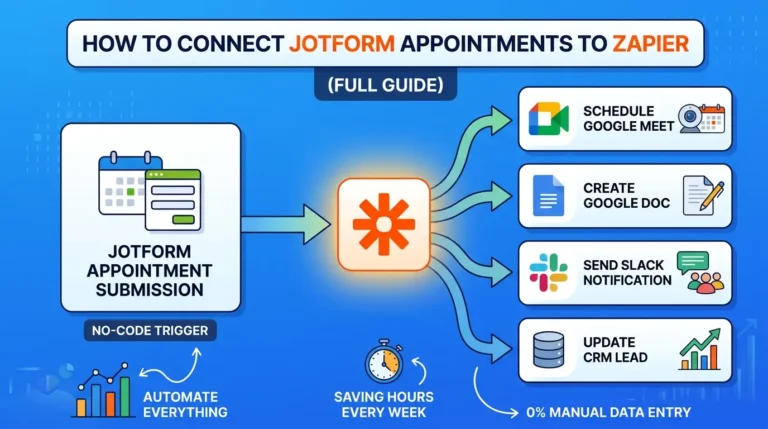
A custom endpoint can also sit behind a webhook integration. For example, Vertex Frontier’s guide to connecting Jotform appointments to Zapier explains when a custom webhook endpoint is actually needed. If you build that endpoint with FastAPI, add signature verification, idempotency, replay protection, payload limits, and retry-aware processing; a bare POST route is not enough.
Final checklist
Before exposing this API to users, verify the following in your own environment:
- The clean-install command succeeds from an empty checkout.
- The exact FastAPI, Pydantic, Uvicorn, HTTPX, and pytest versions are recorded.
/docs,/redoc, and/openapi.jsonmatch the intended contract.- Invalid path, query, and body values return the behavior your clients expect.
- Response models do not expose internal or secret fields.
- Tests do not depend on order or shared in-memory state.
- The chosen async/sync style matches the libraries used by the route.
- A persistent database and reviewed migrations replace the in-memory repository when durability matters.
- Authentication and object-level authorization are designed separately.
- Secrets, HTTPS, CORS, rate limits, timeouts, logs, monitoring, backups, and rollback are addressed.
- The production server command does not combine Uvicorn reload with workers.
- All technical claims and commands are rechecked against the current official documentation.
Conclusion
Building a REST API with Python and FastAPI is straightforward at the syntax level. The harder part is making the boundary between a client and a service explicit: what data enters, what data leaves, what errors mean, which objects a caller may access, and what happens when storage or a dependency is slow.
That is why this tutorial starts with a small in-memory task API but does not end by calling it production-ready. The project gives you a clean path through routing, Pydantic models, CRUD, dependency injection, OpenAPI, and tests. The production checklist tells you where persistence, identity, authorization, observability, and operations begin.
Use the small version to understand the mechanics. Then replace each learning shortcut deliberately—one boundary at a time.
FAQ: FastAPI REST API questions people ask
How can I create a REST API using Python FastAPI?
Install FastAPI in an isolated Python environment, create a FastAPI() application, define path operations, model request and response data with Pydantic, run the development server, and test the endpoints through HTTP and OpenAPI. For a maintainable first project, add a small repository boundary and tests rather than leaving all logic in one route.
How do I create an API using FastAPI?
Create an application object, register a route such as @app.get("/health"), and start it with the FastAPI CLI or Uvicorn. Then open /docs to inspect the generated interactive documentation. Add models, dependencies, errors, and tests as the API grows.
Are REST API and FastAPI different?
Yes. REST describes an architectural style for networked resources. FastAPI is a Python framework that can be used to implement REST-style HTTP APIs, as well as other HTTP interfaces.
Is FastAPI production-ready?
FastAPI is used to build real services, but the framework alone does not make an application production-ready. Readiness depends on storage, authorization, secrets, deployment, resource limits, observability, testing, dependency maintenance, backups, and operational ownership.
Should every FastAPI endpoint use async def?
No. Use async def when the endpoint and its libraries use non-blocking awaitable I/O. A blocking library can still block an asynchronous route. A normal def route may be clearer for synchronous libraries; verify the behavior and workload rather than choosing by slogan.
Can I use FastAPI with PostgreSQL and SQLAlchemy?
Yes, but the database integration adds sessions, connection pools, transactions, migrations, test isolation, and version compatibility. Choose and pin a tested SQLAlchemy version, use a migration tool such as Alembic with manual review, and do not treat an in-memory tutorial repository as a substitute for database design.
Does Pydantic make my API secure?
No. Pydantic validates and serializes data according to declared models. It does not authenticate users, authorize access to objects, protect secrets, enforce rate limits, or prevent every business-logic vulnerability. Treat validation as one boundary in a broader security design.

Was this article helpful?





[…] you’re on the other side, building the API that others will ingest from, our guide to building a tested REST API with Python and FastAPI covers the provider side of this contract: bounded pagination, predictable error shapes, […]