
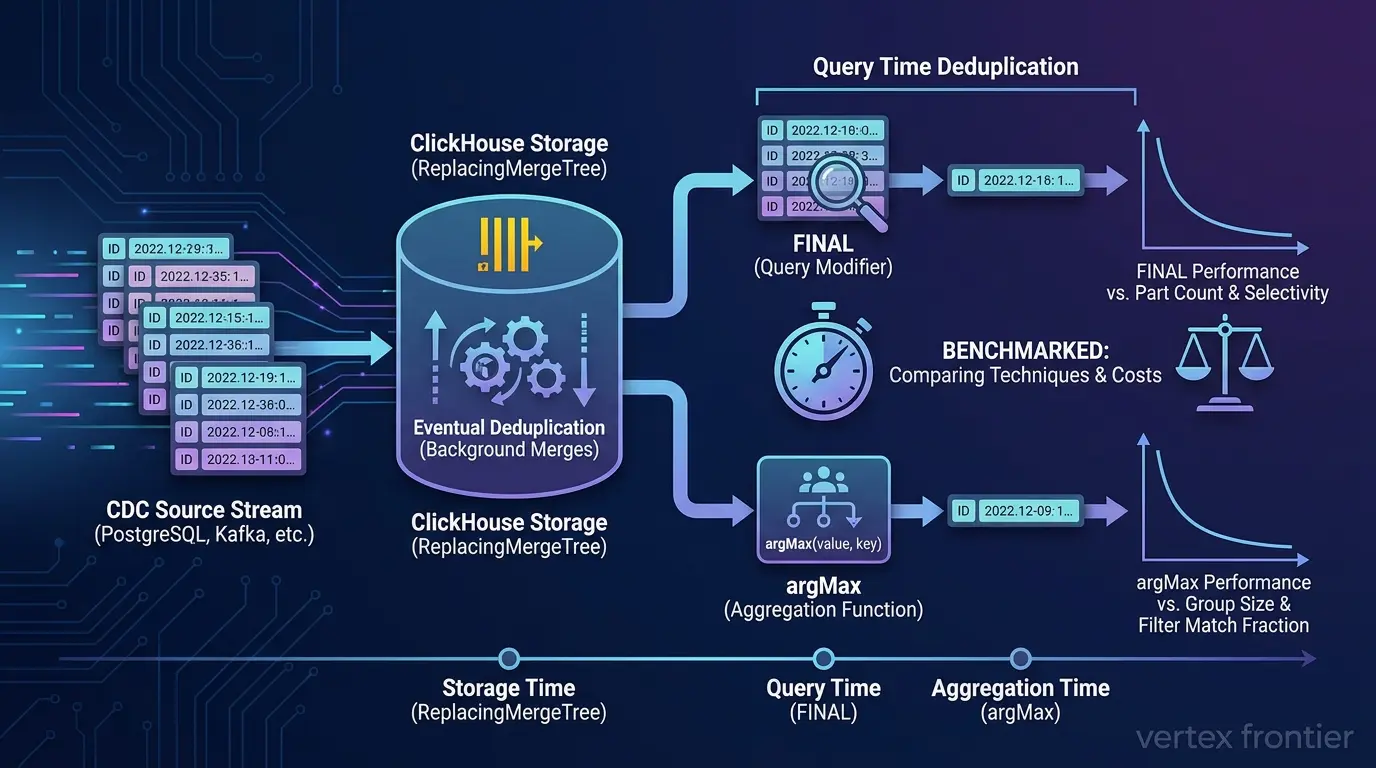

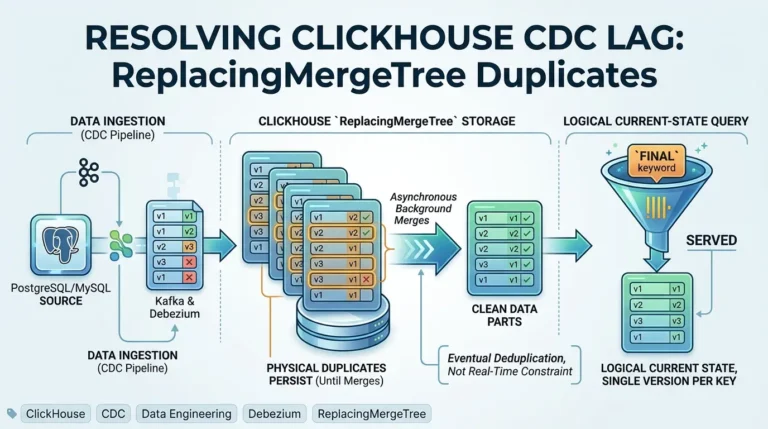
ReplacingMergeTree, FINAL, and argMax do not compete as equals. They pay for the same deduplication work at three different moments: at storage time, at query time, and at aggregation time. Which one is cheapest depends on how many rows your filter keeps, how many unmerged parts your table has, and how fresh a result you need.
If you are debugging a pipeline where duplicates have already reached production, start with our companion guide on why CDC deduplication lag happens. It walks through diagnosis. This article answers a different question: given three techniques, which one should you pick for your workload, and how does each one fail?
One result surprised us. In the Insider Engineering benchmark, the winner flipped depending on how much of the data the filter kept, and the source article describes that variable in confusing terms. We sort that out in the dynamic-selection section, and give you a calculator to measure it on your own data.
Actionable takeaways
Click any point to expand or collapse1. Treat ReplacingMergeTree as a storage optimization
Its deduplication is eventual, so it never replaces a query-time technique when you need current state.
2. Use FINAL for key lookups
Keep part counts low so it stays cheap.
3. Use argMax when your filter keeps very few rows
Or use it when you already run a GROUP BY.
4. Measure the match fraction of your filter
Do this before you choose. Do not copy a threshold from a blog post.
5. Never schedule OPTIMIZE FINAL
Never schedule it as a fix for duplicates.
6. Plan for duplicates on any CDC or Kafka path
Do this unless you have verified exactly-once delivery from end to end.
Scope and version boundary
This article compares three techniques under one scope. We label every claim by evidence class: documented capability, vendor measurement, independent finding, editorial inference, or hands-on observation.
| Scope item | What this article covers | Evidence class |
|---|---|---|
| Product and edition | Open-source ClickHouse MergeTree family, using the current ClickHouse documentation (which also covers ClickHouse Cloud) | Documented capability |
| Techniques compared | ReplacingMergeTree with ver and is_deleted, the FINAL modifier, and the argMax aggregate. CollapsingMergeTree and VersionedCollapsingMergeTree appear only as alternatives | Documented capability |
| Version boundaries with a primary source | 23.12 (no cross-partition merge at query time when the partition key is a prefix of the sorting key), 25.9 and 25.10 (insert-deduplication window defaults) | Documented capability |
| Version boundary from weaker evidence | 23.3 and later (reported FINAL gains, no per-version numbers published) | Independent finding |
| Experimental feature | OPTIMIZE ... FINAL CLEANUP needs allow_experimental_replacing_merge_with_cleanup, labelled experimental in the pages we read on October 10, 2026 | Documented capability |
| Benchmark numbers | Reported by Insider Engineering and by a ClickHouse solutions architect. We did not reproduce them | Independent finding, vendor measurement |
| Syntax checks | SQL examples were run on an embedded ClickHouse engine (server version 26.9.2.1) on October 10, 2026. Not run there: the query-log diagnostic, row policies, refreshable materialized views, and replicated tables | Hands-on observation |
| Date boundary | Sources were opened on October 10, 2026. Re-check dated items before you rely on them | n/a |
The 30-second answer
Each row below covers one technique, so the table works on its own.
| Technique | What it is | When it operates | When to use it | When NOT to use it | Cost model |
|---|---|---|---|---|---|
| ReplacingMergeTree | A table engine that keeps one row per ORDER BY tuple | Storage time (background merges) | CDC tables with stable row identity and a version column | Mutable ORDER BY columns; high-delete tables with no cleanup plan | Duplicates persist on disk until a merge; no query cost by itself |
| FINAL | A query modifier (SELECT ... FINAL) or setting (final = 1) | Query time | Key lookups; queries whose filters match the primary key | Wide scans on tables with many unmerged parts | Merge work per query; grows with unmerged parts |
| argMax | An aggregate: argMax(value, key) | Aggregation time | Very selective filters; queries that already use GROUP BY; append-only ledgers | Wide rows with many columns and a loose filter | Reads all matching rows, then aggregates; memory grows with groups and columns |
Where You Pay: Storage, Query, vs. Aggregation Time
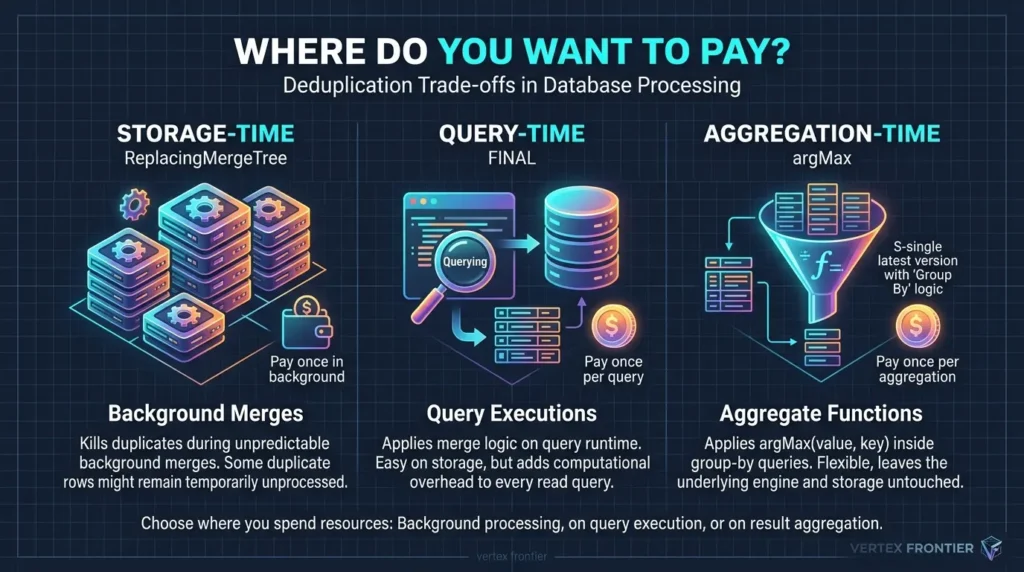
ReplacingMergeTree: storage-time deduplication
ReplacingMergeTree keeps one row per sorting-key tuple, and it does so during background merges. The engine reference says merge timing is not something you can plan around, so some duplicates can remain unprocessed. That one fact drives everything else in this article.
FINAL: query-time deduplication
FINAL applies merge logic to the rows a query touches, and it does not change what is stored. ClickHouse’s knowledge base separates it clearly from the OPTIMIZE … FINAL command, which physically rewrites parts.
argMax: aggregation-time deduplication
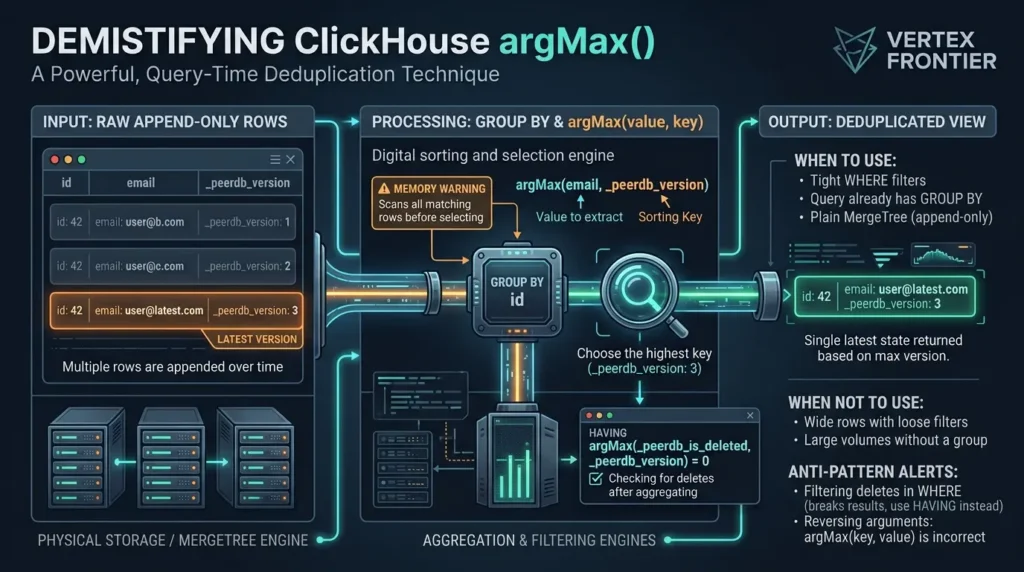
argMax(value, key) returns the value from the row where key is largest, per the function reference. Group by your entity ID, use the version as the key, and you get the latest row without touching the engine. It runs on any MergeTree-family table.
Pick the technique by asking where you want to pay: once in the background, once per query, or once per aggregation.
ReplacingMergeTree: Storage-Time Deduplication & Limits
ReplacingMergeTree reduces stored duplicates over time, but it gives you no point at which a read is guaranteed clean. The official guide and the deduplication strategies page both describe this as eventual deduplication. One Reddit thread on common ClickHouse mistakes appeared in our search results, but we could only read its search snippet, so we treat it as a lead and not as evidence.
How Deduplication Actually Works (ORDER BY vs. PRIMARY KEY)
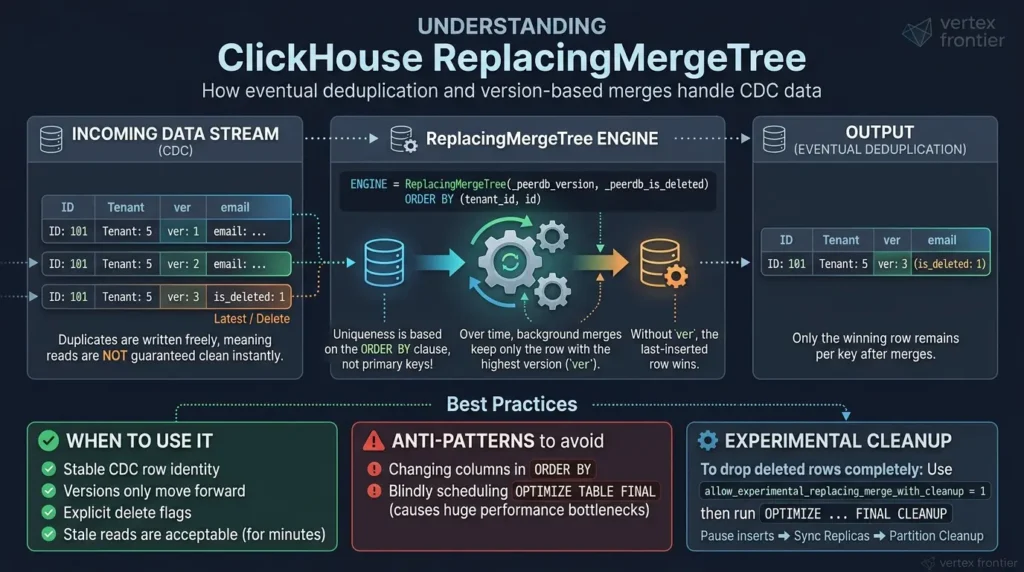
Uniqueness comes from the ORDER BY clause, not the PRIMARY KEY. We cover that trap in depth in our production guide; here we focus on when the engine is the right choice and when it is not. A merge keeps one row per key. Without a ver column, the last-inserted row wins. With ver, the highest version wins, and a tie goes to the most recently inserted row.
Engine Syntax: The ‘ver’ and ‘is_deleted’ Parameters
The ver column can be UInt*, Date, DateTime, or DateTime64. The is_deleted parameter works only when ver is set, and it is a UInt8 where 1 marks a deleted row. By default ClickHouse keeps the last row for a key even when it is a delete row, so a late row with a lower version cannot bring the key back. The engine reference documents all of this.
The Canonical CDC Table Pattern (Postgres & PeerDB Schema)
This table uses the _peerdb_version and _peerdb_is_deleted columns that ClickPipes documents for Postgres CDC. One difference matters. ClickPipes uses the Postgres primary key as the ordering key by default, and its ordering-keys page warns that a different ordering key can cause deduplication problems. Here tenant_id is part of the key, so it must never change for a row, and it should be covered by the source’s replica identity (see the warning box below).
ClickHouse SQL:
CREATE TABLE users ( id UInt64, tenant_id UInt32, email String, plan LowCardinality(String), updated_at DateTime64(3), _peerdb_version UInt64, _peerdb_is_deleted UInt8 ) ENGINE = ReplacingMergeTree(_peerdb_version, _peerdb_is_deleted) ORDER BY (tenant_id, id);Watch the version source. If two events can carry the same version, the later insert wins, and that may not be the later change.
REPLICA IDENTITY must include the ordering key columns. Otherwise logical decoding does not capture the values of non-primary-key columns, and the previous version of a row may not deduplicate with its delete version. The same page notes that deduplicating by id aligns with deduplicating by (tenant_id, id) and avoids problems if tenant_id changes. In our judgment, if tenant_id can change, order by id alone and filter by tenant in a view.When to Choose ReplacingMergeTree
Use it when each CDC row has a stable identity, a version that only moves forward, and an explicit delete flag. It also fits when stale reads are acceptable for a few minutes. Partitioning can help too: ClickHouse’s own guidance names merge-oriented engines as one of two good reasons to partition, because historical partitions can settle into one part and make FINAL cheap.
Dealing with CDC deduplication, ROW_NUMBER() window lag, and idempotency in technical interviews? We cover real-world deduplication and data consistency scenarios in our Data Warehouse Interview Questions handbook.
When to Avoid It: Mutable Keys and High-Delete Tables
Skip it when the sorting key contains columns that change, because an update then creates a different key and the old row never goes away. Skip it for tables with many deletes. The official guide recommends delete handling this way only below roughly 10% deletes unless you can schedule cleanup windows.
Production Anti-Patterns: Mutable Keys & Scheduled OPTIMIZE FINAL
ClickHouse SQL (anti-patterns):
-- ANTI-PATTERN: do not do this -- email can change, so an update becomes a new key ENGINE = ReplacingMergeTree(_peerdb_version) ORDER BY (tenant_id, email);
-- ANTI-PATTERN: do not do this -- scheduled from cron every night OPTIMIZE TABLE users FINAL;
The first creates duplicates by design. The second backfires when it runs on a schedule. ClickHouse’s best-practices page says to avoid OPTIMIZE FINAL in most cases, because it ignores the roughly 150 GB merge safety limit and can build very large parts that later merges struggle to process, which can let ReplacingMergeTree duplicates accumulate.
ClickHouse engineering likewise warns against running it blindly on a schedule. The sources do not forbid every use. The best-practices page names finalizing data before a freeze or export as a specific need, and the ReplacingMergeTree guide lists OPTIMIZE FINAL as a manual remedy once merged parts reach the maximum merge size, with a warning that it can be memory-intensive on large tables and may need repeating as new data arrives.
Hard Deletes & Cleanup: The Experimental FINAL CLEANUP Setting
Dropping delete rows for good needs the experimental setting allow_experimental_replacing_merge_with_cleanup. The setting’s reference page still labels it experimental (last modified August 3, 2026). Before you run it, make sure no older-version rows will arrive later, and run SYSTEM SYNC REPLICA.
ClickHouse SQL (experimental cleanup):
-- table created with: -- SETTINGS allow_experimental_replacing_merge_with_cleanup = 1 SYSTEM SYNC REPLICA users; OPTIMIZE TABLE users PARTITION ID '202609' FINAL CLEANUP;Follow these steps, in this order:
- Confirm that no row with an older version can arrive for the keys you will clean up. The official guide says rows inserted later with older versions would be wrongly kept, because the delete rows will be gone.
- Confirm the table has allow_experimental_replacing_merge_with_cleanup = 1, and accept that the feature is still experimental. In our test engine (version 26.9.2.1), OPTIMIZE … FINAL CLEANUP failed with an error saying CLEANUP merges are not allowed when the setting was off, and removed the deleted key when it was on.
- Pause inserts once step 1 holds. The guide recommends pausing inserts until the sync and the cleanup are complete.
- On a replicated table, run
SYSTEM SYNC REPLICAso all replicas are in sync. On a non-replicated table the command fails (we saw a “not replicated” error), so skip it. - Run OPTIMIZE TABLE … PARTITION ID ‘…’ FINAL CLEANUP on one partition that is no longer subject to changes, check the result, then move to the next partition.
ReplacingMergeTree is a good default storage layer, and a poor promise of clean reads.
FINAL: Query-Time Deduplication & Performance Overhead
FINAL gives correct latest-state reads without changing storage, and its cost tracks how many unmerged parts it has to reconcile. ClickHouse’s solutions architects say so directly in a March 2026 best-practices post: FINAL must reconcile all parts before returning results, and on a table with one part per partition it runs as fast as a query without FINAL.
How FINAL Works: Query-Time Merging and PREWHERE Limits
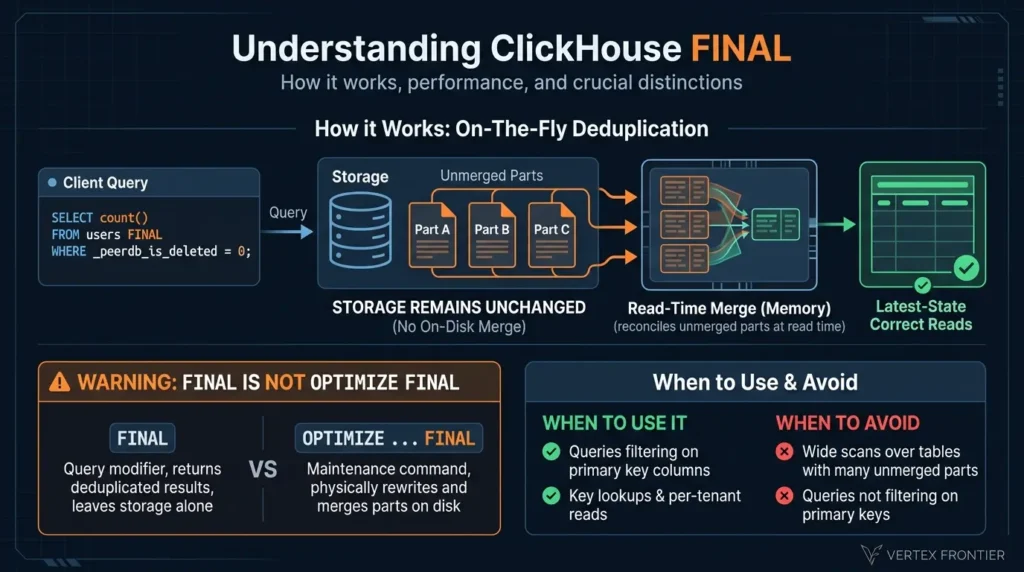
FINAL merges the rows that match the query’s ranges at read time. Insider Engineering reports that it merges only the necessary ranges rather than the whole table. Treat that as a practitioner description, not a documented guarantee.
ClickHouse’s own guide describes FINAL’s overhead as small, and says it is most noticeable when a query does not filter on primary key columns. It also says that when the WHERE condition has no key column, ClickHouse does not currently use the PREWHERE optimization together with FINAL.
Syntax: ‘SELECT … FINAL’ vs. ‘SETTINGS final = 1’
ClickHouse SQL:
-- per table SELECT count() FROM users FINAL WHERE _peerdb_is_deleted = 0;
-- per query: applies to every table in the query SELECT count() FROM users WHERE _peerdb_is_deleted = 0 SETTINGS final = 1;
The first form is the pattern ClickPipes documents for counting live rows. The second form hits every table in the query, which matters for joins.
FINAL is a query modifier that returns deduplicated results and leaves storage alone. OPTIMIZE ... FINAL is a command that rewrites parts on disk. They share a word and nothing else. See our production guide and the official ClickHouse KB for the full distinction.When to Use FINAL: Key Lookups and Selective Queries
Use FINAL when your queries filter on the same columns as the primary key. That is the official guidance for when FINAL is acceptable. Key lookups, per-tenant reads, and “current row by ID” queries fit well.
When to Avoid FINAL: Wide Scans Across Unmerged Parts
Avoid it on wide scans over tables with many unmerged parts, and when your filter hits no key column. The official guide says FINAL’s overhead is most noticeable when queries do not filter on primary key columns, because more data is read and deduplicated.
Is FINAL Still Slow? Modern Performance & Release 23.12+
The old line “FINAL is slow” is now conditional, and the strongest evidence sits in ClickHouse’s own guide. The official ReplacingMergeTree guide calls FINAL’s overhead small and ties its cost to how much data a query must read. It also documents a version boundary: from 23.12 onward, when the partition key is a prefix of the sorting key, merging across partitions is not performed at query time. Two weaker sources point the same way.
PeerDB’s data-modeling guide says recent ClickHouse releases made significant FINAL improvements, and Insider’s post says it tested versions 22.8, 23.3, and 23.8 and saw gains in the newer ones, but it prints no version-by-version numbers.
We also read the GitHub issue Insider cites, #74963. It is a question from Insider’s author about version 23.3, not a maintainer announcement. A community reply in the thread says FINAL has been drastically improved since 23.3, and it adds a cost factor worth knowing: unless FINAL’s optimizations apply, it reads all columns of the sorting key to decide the final row for each key, while an argMax with a GROUP BY reads only the grouping columns.
The commenter describes themselves as an ordinary DBA, so we treat this as a practitioner explanation (an independent finding), not as documentation. We therefore do not name a single release that fixed FINAL. The honest summary is that FINAL has improved across recent versions, and part count, partition alignment, sorting-key width, and filter shape still decide the cost.
Anti-Patterns: Unfiltered Scans and Dangerous Partition Settings
ClickHouse SQL (anti-patterns):
-- ANTI-PATTERN: do not do this -- full scan with FINAL, no filter on tenant_id or id SELECT plan, count() FROM users FINAL GROUP BY plan;
-- ANTI-PATTERN: do not do this -- do_not_merge_across_partitions_select_final without a partition guarantee SELECT * FROM users FINAL WHERE id = 42 SETTINGS do_not_merge_across_partitions_select_final = 1;
The second needs a caveat. The official guide recommends that setting only when the partitioning key does not change for a row, so that updates to the same row always land in the same partition. In our reading, if versions of one row sit in different partitions, FINAL cannot merge them, and it can return rows a full merge would have removed.
Looking Ahead: The ‘Lonely Part’ FINAL Optimization
Issue #54988 tracks a “lonely part” FINAL optimization for ReplacingMergeTree. We cite it so you can follow it, and we do not describe its behavior here.
Keep part counts low and filters aligned with the key, and FINAL is often the simplest correct choice.
argMax: Aggregation-Time Deduplication & Memory Costs
argMax is a real deduplication technique, not just an add-on to ReplacingMergeTree. The official deduplication guide shows an aggregate-after-GROUP-BY alternative to FINAL, and argMax is the same idea generalized to any column. PeerDB’s guide also recommends argMax next to FINAL for deduplicating at query time.
How argMax Works: Post-Aggregation State and Memory Overhead
argMax runs after rows are read and grouped, so ClickHouse must scan every matching row before it can pick the latest one. Insider describes the same limit: the “latest record” check happens after aggregation. That explains why argMax uses a lot of memory when the filter lets many rows through.
Function Syntax & Tombstones: Why Delete Filters Belong in HAVING
The value comes first and the key second: argMax(value, key). argMaxIf adds a condition inside the aggregate. Insider’s introductory snippet writes argMax(writ, age), which reads as reversed against the documented order. Their prose describes the correct intent, and we use the documented order everywhere.
ClickHouse SQL:
SELECT id, argMax(email, _peerdb_version) AS email, argMax(plan, _peerdb_version) AS plan FROM users WHERE tenant_id = 42 GROUP BY id HAVING argMax(_peerdb_is_deleted, _peerdb_version) = 0;The delete check sits in HAVING, after the aggregate. Put it in WHERE and you break the result (see the anti-pattern below).
When to Choose argMax: Tight Filters and Existing GROUP BY Queries
Use it when the filter keeps very few rows, when the query already has a GROUP BY, or when your table is plain MergeTree and append-only. ClickHouse’s own benchmark (covered below) found argMax steadier while a table is still receiving inserts.
When to Avoid argMax: Wide Columns and Memory Explosions
Avoid it on wide rows with a loose filter. Every column needs its own argMax, and memory grows with the number of groups times the number of columns.
Append-Only Pattern: Deduplicating on Plain MergeTree (No RMT)
Here is a ledger table that only ever receives INSERTs. A Reddit thread discusses a similar idea, a ledger column plus argMax instead of FINAL, but we could only read its search snippet, so treat it as a lead.
ClickHouse SQL:
CREATE TABLE account_events ( account_id UInt64, status LowCardinality(String), balance Decimal(18, 2), event_id UInt64, updated_at DateTime64(3) ) ENGINE = MergeTree ORDER BY (account_id, updated_at);
CREATE VIEW account_current AS SELECT account_id, argMax(status, (updated_at, event_id)) AS status, argMax(balance, (updated_at, event_id)) AS balance FROM account_events GROUP BY account_id;
The tuple key breaks timestamp ties with event_id. Run EXPLAIN indexes = 1 on a filtered query against the view, to confirm your account_id filter still reaches the primary index.
Critical Anti-Patterns: Resurrected Deletes and Inverted Arguments
ClickHouse SQL (anti-patterns):
-- ANTI-PATTERN: do not do this -- filtering deletes before argMax brings deleted rows back to life SELECT id, argMax(email, _peerdb_version) AS email FROM users WHERE _peerdb_is_deleted = 0 GROUP BY id;
-- ANTI-PATTERN: do not do this -- arguments reversed: returns the version at the largest email SELECT id, argMax(_peerdb_version, email) FROM users GROUP BY id;
In the first query, the old non-deleted versions pass the filter, and the row returns even though its latest version is a delete. The second runs without an error and returns the wrong data, which is the worst kind of bug.
Version Independence: Engine-Agnostic Aggregation
argMax has no engine dependency, so it behaves the same across the versions in our scope. Its cost is the part that changes with your data.
argMax is a first-class option when your filter is tight or your query already aggregates.
The dynamic-selection pattern: FINAL vs argMax by filter selectivity
The best public evidence says the winner depends on how many rows your filter keeps. Furkan Kahveci of Insider One Engineering measured both techniques on a production contacts table (ReplicatedReplacingMergeTree, ordered by partner and a hash of the user ID). Credit for the idea and the numbers goes to that team.
The Cost Model: Memory Footprint vs. Part Reconciliation
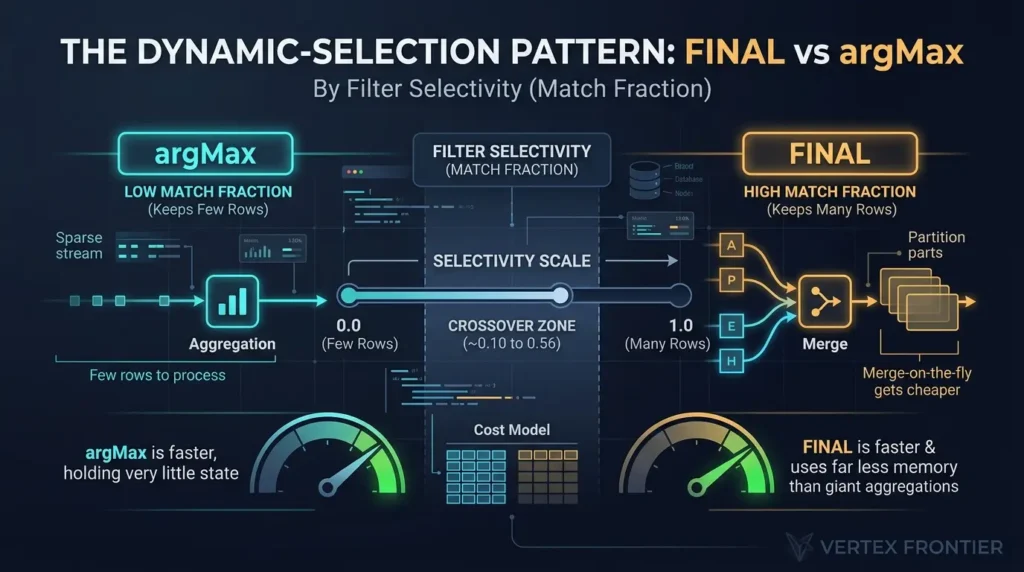
This part is our analysis, built on their numbers and ClickHouse’s description of how each technique works. FINAL pays to reconcile overlapping parts inside the ranges the query reads. argMax pays to read every matching row and hold one aggregate state per group per column. When the filter keeps few rows, argMax has little to hold and FINAL still pays its merge setup. When the filter keeps many rows, argMax holds a lot of state and FINAL’s merge is cheaper.
Measuring Match Fraction: Formula, SQL Sample & Calculator
Insider samples a small slice of the table and divides rows that pass the filter by all rows. That ratio is the match fraction: the share of rows the filter keeps. We use that term because “selectivity” is used both ways in the source. A reader commented on exactly that confusion under the post.
ClickHouse SQL:
SELECT countIf(plan = 'pro') AS matching_rows, count() AS sampled_rows, round(matching_rows / sampled_rows, 2) AS match_fraction FROM users WHERE tenant_id = 42 AND cityHash64(id) % 1000 = 0;Insider uses SAMPLE 1 / 100000, which needs a SAMPLE BY clause in the table definition. The hash filter above works on any table. Both sample raw rows, so the result is approximate. On a small table the hash filter can match no rows and return nan (we saw this on a five-row test table), so use a smaller modulus or a larger table. Feed matching_rows and sampled_rows into the calculator below.
The hints come from one workload (Insider’s results below). Treat them as a first guess and benchmark both techniques.
The Insider Engineering Benchmark: Dissecting the 50% Rule
Challenge: Insider stores each contact update as a new row, so any segmentation query must find the latest row per user. Their older approach grouped rows and filtered after aggregation.
Action: They compared argMax against FINAL across filters with different match fractions, and measured time and memory.
Outcome: The chart shows what they reported (values approximate, from their post; one workload, table version not stated).
Lesson: In this workload FINAL won whenever the filter kept more than about half the rows. argMax won when it kept almost none (match fractions of 0 to 0.10). The crossover sits somewhere between 0.10 and 0.56. We read the table’s “selectivity” column as the match fraction.
Two things support that reading: the post’s own query divides matching rows by all rows, and in the zero row argMax used only 78 MB, which only makes sense if almost no rows matched. But the post’s prose states its 50% rule in terms of rows “eliminated”, which would be the opposite reading, and the author does not reconcile the two.
Treat our reading as an inference, and confirm the direction on your own data with the calculator above. Do not copy 50% as a rule: it comes from one table, one hardware setup, and one data shape. Also note FINAL used far less memory in every row except the last.
Conditions we could not find in the post: the ClickHouse version used for the table, the hardware, row counts, concurrency, and cache state. For that reason we treat these numbers as one reported workload that we did not reproduce, and we use them for direction, not as thresholds. The benchmark protocol below lists what to record when you run your own.
The decision tree
Yes: FINAL is usually cheap. No: check step 2 before you use FINAL.
Near zero: try argMax. Above roughly half: try FINAL. In between: benchmark both.
Many parts raise FINAL’s cost. Fix merges first, or favor argMax on hot partitions.
Step by step: choose a technique for one query
- Write the query with its real filters, and note whether the filter uses a key prefix.
- Run the match-fraction query on a small sample and enter the two counts in the calculator.
- Run system.parts (diagnostic query 2 below) and note the parts per partition on the partitions you read.
- Run the query once with
FINALand once withargMax, on the same data and the same cache state. - Compare duration, memory, and rows read in system.query_log, then keep the cheaper correct one.
Reproducible Benchmark Protocol: How to Test Your Own Data
The published numbers above come from private data, so you cannot reproduce them. Use this protocol on your own data. It records the conditions that make a result worth trusting.
| Condition | What to record |
|---|---|
| ClickHouse version and edition | SELECT version(), and whether you run Cloud or self-managed |
| Hardware | CPU cores, memory, and disk or object storage |
| Table | Row count, number of keys, duplicate share, sorting-key width, parts per partition (diagnostic query 2) |
| Data shape | Row width, key cardinality, update and delete share |
| Query | The exact SQL for each technique, the filter, and its match fraction |
| Concurrency | Number of parallel clients |
| Cache state | Cold or warm, and which caches you cleared |
| Metric | Duration (median and 95th percentile), memory, and rows read, from system.query_log |
| Raw results | Every run, not only the best one |
ClickHouse SQL:
-- 1. Synthetic table: 1M keys, 20% updated, 2% deleted CREATE TABLE bench_users (id UInt64, tenant_id UInt32, email String, plan LowCardinality(String), _peerdb_version UInt64, _peerdb_is_deleted UInt8) ENGINE = ReplacingMergeTree(_peerdb_version, _peerdb_is_deleted) ORDER BY (tenant_id, id);
INSERT INTO bench_users SELECT number, intDiv(number, 100000), concat('u', toString(number), '@x.com'), if(number % 5 = 0, 'pro', 'free'), 1, 0 FROM numbers(1000000);
INSERT INTO bench_users SELECT id, tenant_id, email, if(plan = 'pro', 'free', 'pro'), 2, 0 FROM bench_users WHERE id % 5 = 0;
INSERT INTO bench_users SELECT id, tenant_id, email, plan, 3, 1 FROM bench_users WHERE id % 50 = 1;
-- 2. Equivalence check: must return 0 before you time anything SELECT count() FROM ( SELECT id, email, plan FROM bench_users FINAL WHERE tenant_id = 3 AND _peerdb_is_deleted = 0 ) AS f FULL OUTER JOIN ( SELECT id, argMax(email, _peerdb_version) AS email, argMax(plan, _peerdb_version) AS plan FROM bench_users WHERE tenant_id = 3 GROUP BY id HAVING argMax(_peerdb_is_deleted, _peerdb_version) = 0 ) AS a ON f.id = a.id WHERE f.id != a.id OR f.email != a.email OR f.plan != a.plan;
-- 3. Before each cold run SYSTEM DROP MARK CACHE; SYSTEM DROP UNCOMPRESSED CACHE;
In our test engine the equivalence check returned 0 differences, and FINAL and argMax both returned 98,000 live keys for tenant 3. The cache commands also ran there. That shows the SQL works. It is not a performance result, and we publish no timings from it.
Follow these steps:
- Build the synthetic table above, or copy your own table to a test server.
- Run the equivalence check. If it does not return 0, fix the query before any timing.
- Clear the caches before each cold run. These commands do not clear the operating system page cache.
- Run each technique at least five times cold and five times warm, first with one client and then with your real concurrency.
- Read duration, memory, and rows read from system.query_log, and keep every row.
- Decide only with the conditions table attached to the result.
Measure the match fraction on your own data, then benchmark the two nearest options.
End-to-End CDC Pipelines: Postgres, MySQL, and Kafka Architectures
Most CDC pipelines can deliver the same change more than once, so plan row-level deduplication as part of the design. Insert-level deduplication is a different mechanism. It works on inserted blocks (see ClickHouse’s guide to deduplicating inserts on retries and the settings reference), and the settings reference records that its window defaults changed in 25.9 and 25.10. In our reading, block-level deduplication cannot repair out-of-order change events, because those arrive as different rows, not as repeated blocks.
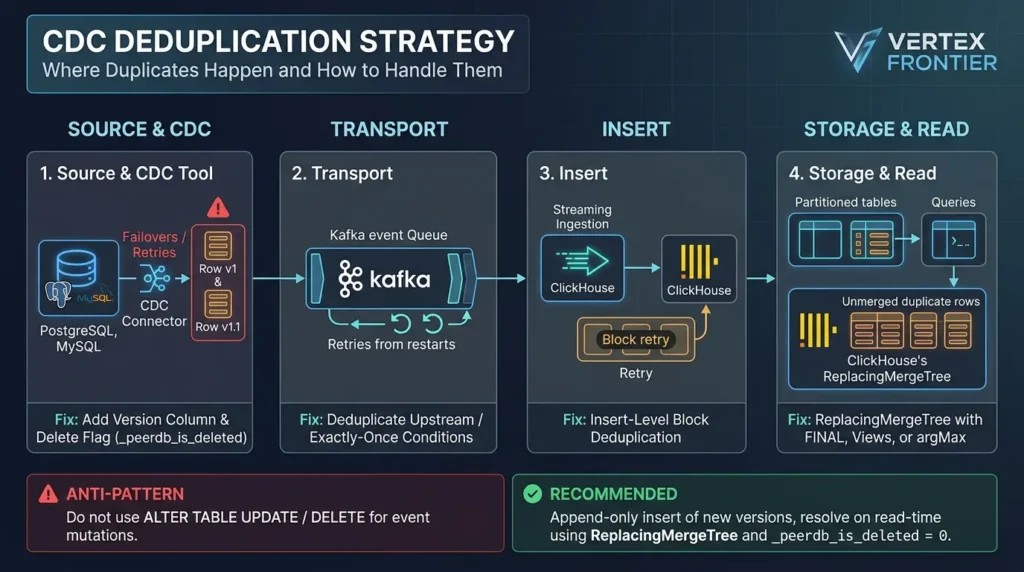
Retries and replays after a failover. Fix: a version column and a delete flag.
Kafka replays after a restart. Fix: check the connector’s exactly-once conditions, or deduplicate upstream.
A retried insert block. Fix: insert deduplication, within its window settings.
Unmerged parts. Fix: FINAL, argMax, a view, or a refreshable view.
This four-point split is our own framework (editorial inference), built from the sources cited in this section.
PostgreSQL CDC: ClickPipes, PeerDB & Replica Identity Rules
The documented pattern is ReplacingMergeTree with _peerdb_version and _peerdb_is_deleted, queried with FINAL plus an _peerdb_is_deleted = 0 filter, per ClickPipes’ deduplication page. The same page shows a row policy that hides the delete filter from applications, and a refreshable materialized view as an alternative for heavy query loads.
ClickHouse SQL:
CREATE ROW POLICY cdc_policy ON users FOR SELECT USING _peerdb_is_deleted = 0 TO ALL;The same ClickPipes page shows two more read-side templates. A view hides the FINAL and the delete filter from analysts, and a refreshable materialized view writes the deduplicated result to a separate table on a schedule.
ClickHouse SQL:
CREATE VIEW users_view AS SELECT * FROM users FINAL WHERE _peerdb_is_deleted = 0;
-- target table with the same columns CREATE TABLE dedup_users AS users ENGINE = MergeTree ORDER BY (tenant_id, id);
CREATE MATERIALIZED VIEW dedup_users_mv REFRESH EVERY 1 HOUR TO dedup_users AS SELECT * FROM users FINAL WHERE _peerdb_is_deleted = 0;
Results from the refreshable view are only as fresh as its last refresh, so pick the interval from your freshness requirement. We ran the view and the target table in our test engine. We could not run the refreshable view there, because that engine rejected it in its default database, so that statement follows the pattern in ClickHouse’s docs and is untested by us.
When you migrate from Postgres, include the source primary key in the ClickHouse ORDER BY, as the official ReplacingMergeTree guide recommends. For tool context, see our Estuary Flow production review and our notes on Postgres CDC failover, retries, and duplicates.
MySQL CDC: Debezium Binlog Positions vs. Wall-Clock Timestamps
The pattern is the same: ReplacingMergeTree, a version column, and a delete flag. The open question is where the version comes from. Wall-clock timestamps can tie or move backward. In our judgment (not a documented ClickHouse rule), a source log position such as the MySQL binlog file and position is a safer ordering signal.
Check your connector’s event schema before you rely on any field. We covered adjacent patterns in MySQL CDC for Apache Doris, and our Debezium vs Estuary Flow vs MaterializedPostgreSQL comparison helps with tool choice.
Kafka-Direct Ingestion: At-Least-Once Replays & Exactly-Once Limits
Plain Kafka consumption is at-least-once, so a restart can replay messages and create duplicates. ClickHouse’s announcement of its Kafka connector explains how that happens and how the connector’s design relies on insert deduplication to aim for exactly-once delivery.
The connector documentation says the sink ships with exactly-once semantics and warns that buffering is incompatible with that mode, because buffering changes batch boundaries and breaks block deduplication. An older Altinity KB note says the Kafka table engine, acting as a Kafka client, could guarantee only at-least-once in some corner cases such as lost connections. It predates current releases, so check your own version.
Even with exactly-once ingestion, replays upstream of Kafka and CDC retries can still produce logical duplicates in different batches. That is our inference, and it is why we keep a version column and a read-time technique in the design. Community reports are mixed. One r/Clickhouse thread and one r/apachekafka thread describe duplicate problems with ReplacingMergeTree and FINAL, but we could only read their search snippets, so we treat them as leads, not evidence. Issue #112143 tracks dedup logic for the Kafka engine.
Tombstone & Delete Handling: How Each Technique Treats Deletes
| Technique | How it handles a delete | Watch for |
|---|---|---|
| ReplacingMergeTree | Delete row stays until cleanup | Cleanup is experimental; run it only after replay windows close |
| FINAL | Filter _peerdb_is_deleted = 0 after dedup | Forgetting the filter shows deleted rows |
| argMax | HAVING argMax(is_deleted, version) = 0 | A WHERE on the delete flag resurrects rows |
Why ALTER Mutations and Lightweight Deletes Fail for CDC
Mutating a row per change event is the wrong tool for CDC, even though it looks like the obvious one. ALTER TABLE … UPDATE and ALTER TABLE … DELETE are mutations. The official ReplacingMergeTree guide says they are handled asynchronously, processed with a single thread, and rewrite data on disk for updates, so they should not be used for high numbers of small changes. The ALTER TABLE … DELETE docs add that it rewrites every data part containing matching rows, and recommend ReplacingMergeTree or CollapsingMergeTree for workloads with frequent deletions or corrections.
Lightweight DELETE FROM is cheaper, and the DELETE docs describe how. It saves a mask (the hidden _row_exists column), later queries skip the masked rows, and the rows are physically removed only at the next merge. The same page warns that deleting large volumes can hurt SELECT performance, that mutations on a table run one after another, and that by default DELETE does not work on tables with projections. It suits rare, targeted deletes. It does not suit one delete per source event.
ClickHouse SQL:
-- ANTI-PATTERN: do not do this -- one mutation per CDC update event ALTER TABLE users UPDATE email = 'new@example.com' WHERE tenant_id = 42 AND id = 7;
-- Reasonable: a rare, targeted delete (for example a legal erasure request) DELETE FROM users WHERE tenant_id = 42 AND id = 7;
Insert the new version as a row and let ReplacingMergeTree, FINAL, or argMax resolve it. That keeps writes append-only, which is what the engine is built for.
Use the version and delete columns from your CDC tool, then pick the read technique per query. Keep mutations for rare corrections.
Matrix: Choosing Your Technique
The thresholds below are judgment calls built on the sources above, and not ClickHouse rules. Use them to pick what to test first.
1. Choosing by Table Size and Part Volume
| Table size | Start with | Why |
|---|---|---|
| Small | FINAL | Simplest query; cost is low either way |
| Medium | FINAL or argMax by match fraction | Use the dynamic-selection steps |
| Large | ReplacingMergeTree, partitioned, with selective FINAL | Merges shrink part counts; ClickHouse suggests forced merges on old partitions |
2. Choosing by Match Fraction and Selectivity
| Match fraction | Start with | Why |
|---|---|---|
| Near zero | argMax | Little state to hold (Insider, one workload) |
| Above about half | FINAL | Lower memory in Insider’s rows |
| No filter | Pre-compute a refreshable view | Both techniques scan everything |
3. Choosing by Query Pattern (Point Lookups vs. Analytics)
| Pattern | Start with | Why |
|---|---|---|
| Key lookup | FINAL | Filter matches the primary key |
| GROUP BY analytics | argMax | Folds into the aggregation |
| Join | FINAL on each side | The setting applies to every table in the query |
| Live row count | FINAL plus delete filter | Documented CDC pattern |
4. Choosing by Ingestion Source (Postgres, Debezium, Kafka)
| Source | Start with | Why |
|---|---|---|
| Postgres via ClickPipes/PeerDB | ReplacingMergeTree plus FINAL | Documented default |
| Debezium (Postgres or MySQL) | ReplacingMergeTree plus FINAL or argMax | Pick by match fraction |
| Kafka-direct | ReplacingMergeTree plus FINAL, with upstream dedup | At-least-once delivery |
5. Choosing by Freshness SLA: Strict vs. Eventual Consistency
| Requirement | Start with | Why |
|---|---|---|
| Latest state on every read | FINAL or argMax | Merges are eventual |
| Stale for minutes is fine | ReplacingMergeTree alone | Cheapest reads |
| Batch freshness | Refreshable materialized view | Pre-deduplicated on a schedule |
Summary: The Role-Based Decision Guide
| Reader situation | Start with | Why | Evidence class |
|---|---|---|---|
| Team replicating Postgres with ClickPipes or PeerDB | ReplacingMergeTree, read through a view with FINAL and the delete filter | It is the documented pattern | Documented capability |
| API serving key lookups per tenant | FINAL with a key-prefix filter | The docs say FINAL is acceptable when queries filter on key columns | Documented capability |
| Dashboards that scan large ranges | A refreshable materialized view into a deduplicated table | You avoid paying for FINAL on every load; staleness equals the refresh interval | Editorial inference |
| Ad hoc lookups where the filter keeps very few rows | argMax, then benchmark against FINAL | One reported workload favored argMax at near-zero match fractions | Independent finding |
| Append-only ledger on plain MergeTree | An argMax view with a tuple key | No engine dependency; the tie-break worked in our test engine | Hands-on observation |
| Kafka-direct pipeline | ReplacingMergeTree with a version column, and the connector’s exactly-once conditions checked | Exactly-once has documented conditions | Documented capability, editorial inference |
Start with the row that matches your workload, then verify with a benchmark.
Case study: ClickHouse’s own benchmark on 152 million rows
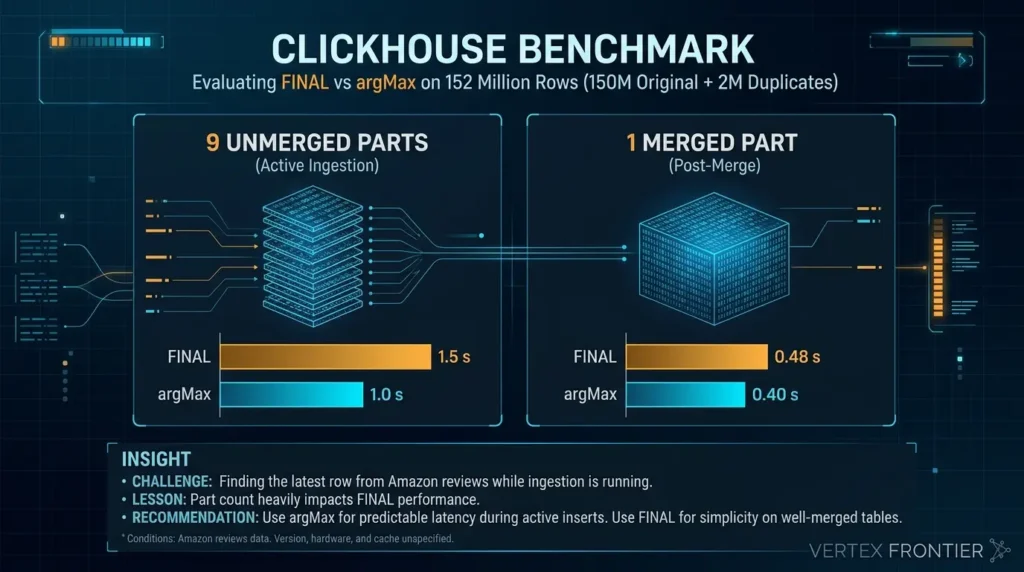
Challenge: A ReplacingMergeTree table of Amazon reviews (150M originals plus 2M duplicates) needed a correct latest-row lookup while ingestion was running.
Action: A ClickHouse solutions architect compared FINAL and argMax on the same lookup at two table states.
Outcome: With 9 unmerged parts, FINAL took 1.5 s and argMax 1.0 s. After merging down to one part, they measured 0.48 s and 0.40 s.
Lesson: Part count moved FINAL far more than it moved argMax. The post’s advice: FINAL for simplicity on well-merged tables, argMax for predictable latency during active inserts. This is a single lookup on one dataset.
Conditions the post gives: a ReplacingMergeTree table with about 150 million original rows plus 2 million duplicates, measured with 9 unmerged parts and again after merging to one part. Conditions it does not give: the version, the hardware, and the cache state.
We found no public, named-company postmortem that reports measured results for ReplacingMergeTree-based CDC deduplication. These two cases are the best-documented measurements we could verify, and the Kafka reports earlier are practitioner signals, not case studies.
Production Anti-Patterns: How Each Deduplication Technique Fails
| Anti-pattern | Technique | Why it fails |
|---|---|---|
Mutable column in ORDER BY | ReplacingMergeTree | Updates create new keys |
Scheduled OPTIMIZE FINAL | ReplacingMergeTree | Oversized parts; duplicates return |
| Unfiltered FINAL scan | FINAL | Full merge cost on every query |
| Partition setting without a key guarantee | FINAL | Stale versions can survive |
Delete filter in WHERE | argMax | Old versions pass the filter |
| Reversed arguments | argMax | Silent wrong results |
Retry and failover mistakes live upstream of all three, so read our Postgres CDC production guide alongside this table.
Diagnostic Toolkit: Pinpointing Which Technique Bottlenecks Your Query
When duplicate rows or query latency spikes appear in production, guessing whether the bottleneck stems from unmerged parts, FINALoverhead, or argMax memory allocation wastes critical triage time. ClickHouse exposes its entire internal execution state through system tables, meaning you never have to guess. Use the symptom-to-cause matrix below to identify your specific failure mode, then run the five diagnostic queries that follow to inspect part health, active merges, and real execution metrics from system.query_log.
Symptom-to-Root-Cause Matrix: Common Deduplication Failures
| Symptom | Likely cause | First check | Evidence class |
|---|---|---|---|
| Updated rows appear twice | A mutable column in ORDER BY turned the update into a new key | Compare ORDER BY with the columns that change | Documented capability |
| Deleted rows come back | The delete flag filtered in WHERE before argMax, a missing delete filter, or an older row inserted after a cleanup | Review the query, then the cleanup conditions | Hands-on observation, documented capability |
| The previous version survives a delete in Postgres CDC | A custom ordering key without a matching REPLICA IDENTITY | Check that the replica identity includes the ordering key columns | Documented capability |
| FINAL is slow | Many parts per partition, no filter on key columns, or a wide sorting key (a community reply reports that FINAL reads all sorting-key columns when its optimizations do not apply) | Diagnostic queries 2 and 4 | Documented capability, vendor measurement |
| Duplicates keep growing in a large partition | Merged parts reached the maximum merge size | Compare part sizes with max_bytes_to_merge_at_max_space_in_pool | Documented capability |
FINAL CLEANUP fails with an experimental-merge error | The table setting is off | Check the table settings | Hands-on observation |
Run these in order. The first two show whether duplicates exist and why, and the last three show where the time goes.
ClickHouse SQL:
-- 1. Unmerged duplicate surplus for one tenant SELECT count() AS raw_rows, uniqExact(id) AS live_keys, count() - uniqExact(id) AS surplus FROM users WHERE tenant_id = 42;
-- 2. Parts per partition (many parts raise FINAL cost) SELECT partition, count() AS parts, sum(rows) AS total_rows FROM system.parts WHERE active AND table = 'users' GROUP BY partition ORDER BY parts DESC;
-- 3. Are merges running right now? SELECT table, elapsed, progress, num_parts FROM system.merges;
-- 4. Does the filter reach the primary index? EXPLAIN indexes = 1 SELECT count() FROM users FINAL WHERE tenant_id = 42;
ClickHouse SQL:
-- 5. FINAL vs argMax in your real query log, last 24 hours SELECT if(positionCaseInsensitive(query, ' final') > 0, 'FINAL', if(position(query, 'argMax') > 0, 'argMax', 'other')) AS technique, count() AS queries, round(quantile(0.95)(query_duration_ms)) AS p95_ms, formatReadableSize(quantile(0.95)(memory_usage)) AS p95_memory, round(avg(read_rows)) AS avg_read_rows FROM system.query_log WHERE type = 'QueryFinish' AND event_time > now() - INTERVAL 1 DAY AND query ILIKE '%users%' GROUP BY technique;Watch for high read_rows with low result counts in query 5: that points to a filter that misses the index. On multi-replica services, wrap system.* tables in clusterAllReplicas as ClickHouse recommends.
Query 5 needs system.query_log, which our embedded test engine does not have, so we did not run it. Test it on a non-production server first. Queries 1 to 4 ran in our test engine.
Read parts per partition and rows read before you blame any technique.
Query 1 gives you two numbers. The calculator below turns them into the error a reader would see if they queried the table with no FINAL and no argMax.
The result applies to a plain count() on the same filter. Deleted keys are not excluded here.
ClickHouse Deduplication Timeline: Key Version Changes & Defaults
ClickHouse moves fast, and deduplication behavior that was true in version 22.x or 23.x may no longer apply today. Before following advice from older blog posts, verify your deployed engine version against the architectural boundaries and default settings below.
| Version | Change | Source |
|---|---|---|
| 23.3+ | FINAL performance reported as improved (community and practitioner evidence, not a single release note) | Insider, PeerDB docs |
| 23.12 | If the partition key is a prefix of the sorting key, merging across partitions is not performed at query time | Official ReplacingMergeTree guide |
| 25.9 | replicated_deduplication_window default changed to 10,000 | Settings reference |
| 25.10 | replicated_deduplication_window_seconds default changed to 3,600 | Settings reference |
| Undated | “Lonely part” FINAL optimization tracked | Issue #54988 |
| Undated | Kafka engine dedup logic tracked | Issue #112143 |
Check the version column and the defaults in this table before you trust a blog post from an older release.
Beyond the Big Three: Alternative Engines and Upstream Deduplication
If one of the three techniques keeps failing, the engine or the pipeline may be the wrong choice.VersionedCollapsingMergeTree uses a sign column and a version, which suits data that changes often. A refreshable materialized view pre-deduplicates on a schedule, but ClickHouse’s own guidance warns that these need careful handling of late data, backfills, and idempotency. Incremental materialized views do not propagate updates or deletes from their source, so they fit append-only data.
Upstream deduplication in a stream processor such as Flink or ksqlDB removes duplicates before they reach ClickHouse, at the cost of running another system. For more reading, see Altinity’s row-level deduplication KB and Altinity’s ReplacingMergeTree explainer. We did not re-verify their contents for this update.
Switch engines or move deduplication upstream when a technique keeps failing for structural reasons.
| Before | After |
|---|---|
ReplacingMergeTree alone; dashboards double-count; nightly OPTIMIZE FINAL as a patch | Same engine with partitions and forced merges on old data; FINAL on key lookups; argMax on tight-filter analytics; refreshable view for dashboards |
The decision rule to keep
Store with ReplacingMergeTree, because it keeps the table small over time. Never trust it for a clean read. For a key lookup, read with FINAL and keep parts per partition low. For an aggregation whose filter keeps almost nothing, read with argMax. For everything in between, measure the match fraction, benchmark both, and write down the result with your ClickHouse version beside it. The evidence we could verify is one production workload and one ClickHouse benchmark, so your own numbers outrank both.
The deduplication, version-ordering, and delete-tombstone decisions in this article also appear as interview questions about CDC, incremental loading, and exactly-once semantics, see our 50-question ETL Interview Questions guide for the underlying patterns.
FAQs: ClickHouse CDC Duplicates
Does ReplacingMergeTree guarantee deduplication?
No. ClickHouse documentation says deduplication happens only during background merges that run at an unknown time, so the engine can remove duplicates in the background to save space but does not guarantee their absence. Use FINAL or argMax when a query must see the latest state.
What is the difference between FINAL and OPTIMIZE FINAL?
FINAL is a query-time modifier that returns deduplicated results without changing stored data. OPTIMIZE FINAL is a command that physically merges parts on disk and ignores the usual merge size limit of about 150 GB. ClickHouse advises avoiding OPTIMIZE FINAL in most cases.
Is FINAL safe to use in production?
ClickHouse’s guide describes FINAL as having a small overhead that is most noticeable when a query does not filter on primary key columns. The cost still depends on how many parts and rows the query must read, so test your own queries. PeerDB’s guide and Insider Engineering report improvements in recent releases, but we found no single release note that explains them.
Does argMax require ReplacingMergeTree?
No. argMax is an aggregate function, so it works on any table where you can group by the entity key and pick the row with the highest version. A plain MergeTree ledger that only receives INSERTs, read through an argMax view, is a valid pattern. ReplacingMergeTree only reduces stored duplicates over time.
Which technique should I use for CDC from PostgreSQL or MySQL?
For Postgres through ClickPipes or PeerDB, the documented pattern is ReplacingMergeTree with a version column and a delete flag, read with FINAL and a filter on the delete flag. For other sources, the same engine pattern applies, but choosing the version value is your design decision. In our judgment, a source log position can be a safer ordering signal than a wall-clock timestamp.
How do I handle deletes in a CDC pipeline?
Send an explicit delete flag with a higher version than the row it deletes. With FINAL, filter the flag to zero after deduplication. With argMax, check the flag inside HAVING and not WHERE, because a WHERE filter lets older versions bring deleted rows back. Permanent removal with OPTIMIZE FINAL CLEANUP is experimental and has documented conditions.
Why do I get duplicates when loading from Kafka into ClickHouse?
Plain Kafka consumption is at-least-once, so a replay after a failure can create duplicates. ClickHouse’s Kafka Connect sink documents exactly-once semantics built on insert deduplication, with conditions such as not using buffering. Duplicates created upstream can still reach the table in different batches, so keep a version column and a read-time technique.
Should I schedule OPTIMIZE FINAL, and when should I avoid ReplacingMergeTree?
ClickHouse’s best-practices page says to avoid OPTIMIZE FINAL in most cases, and its engineering guide warns against running it blindly on a schedule. The ReplacingMergeTree guide does describe targeted use on partitions that no longer change. Avoid ReplacingMergeTree when sorting-key columns change, or when you have many deletes and cannot schedule cleanup.
📋 Article Timeline & History
Successfully updated on October 16, 2026 with the latest details.
This article was originally published on October 10, 2026.

Was this article helpful?





[…] For a head-to-head comparison of FINAL against argMax and ReplacingMergeTree on real CDC data, see our companion guide that benchmarks all three techniques. […]
[…] The same lesson applies across engines, for ClickHouse specifically, our benchmarked CDC deduplication comparison shows how merge timing, partition boundaries, and read-time…. […]
[…] By contrast, ClickHouse handles CDC deduplication with a different trade-off, our benchmark of ReplacingMergeTree, FINAL, and argMax shows where each approach pays its cost on CDC wo…. […]