

No bookmarked articles yet.
A production MySQL database has a new kind of heavy reader. It is not a person, and it does not wait between questions.
A human analyst may run one query, read the result, think, and then try another. An AI agent can inspect a schema, test several hypotheses, compare time windows, join related records, and validate an answer through multiple SQL queries launched within the same short burst. If those queries run against the MySQL instance that handles checkout, payments, orders, or inventory, analytical work is competing with the application that keeps the business running.
A read replica reduces pressure on the primary, but it does not automatically create an analytical serving layer. A nightly export isolates the workloads, but the result may already be stale. MySQL Change Data Capture (CDC) provides a third path: read committed changes from the MySQL binary log and apply them to a separate analytical system.
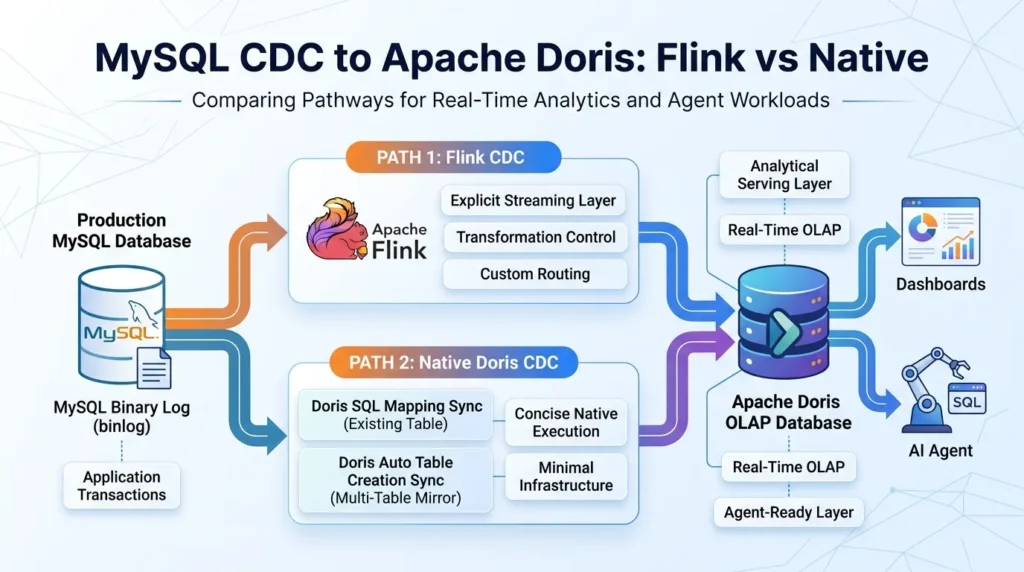
This article shows how to build that path with Apache Doris. It compares three practical routes:
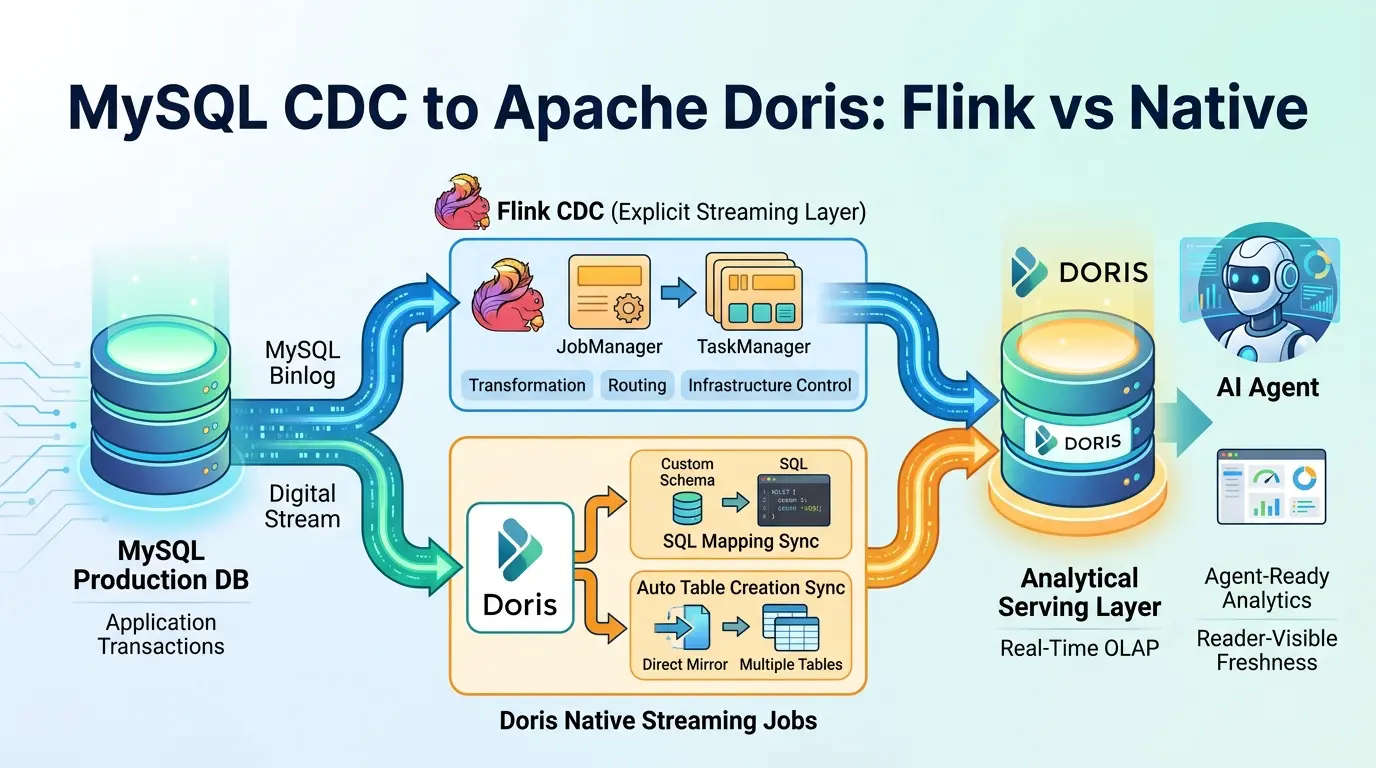
- Flink CDC, when you need an explicitly operated streaming layer with transformations, routing, or multiple sinks.
- Doris SQL Mapping Sync, when the target table already exists and the synchronization needs SQL mapping or filtering.
- Doris Auto Table Creation Sync, when the goal is a direct mirror of several primary-key tables or a database with minimal intermediate logic.
The important correction is that “native CDC” is not one universal mode. The Doris routes have different table-management behavior and delivery semantics, and those differences affect how you test the system.
The Short Answer
Click any topic to expand or collapseDecouple OLTP Writes from Analytical Reads via CDC
Use CDC to separate transactional writes from analytical reads. Keep production MySQL focused on application transactions and give dashboards or AI agents a dedicated serving layer.
Flink CDC: Advanced Stream Transformations & Routing
Use Flink CDC for fine-grained processing control. It is the ideal architectural choice when you require inline transformations, custom routing, multi-destination sinks, or an existing Flink deployment.
Doris SQL Mapping Sync: Schema-designed Target Tables
Use Doris SQL Mapping Sync for pre-designed target schema structures. It natively supports SQL-shaped projections, transformations, and field mappings directly into existing Doris tables.
Doris Auto Table Creation Sync: Database Mirroring
Use Doris Auto Table Creation Sync for thin database replication. It automatically provisions primary-key target tables across multi-table sync jobs, with a documented at-least-once delivery guarantee.
Mutation Verification: Testing Updates & Deletes
Thoroughly validate update and delete event behaviors before celebrating successful insert streams. The destination table data model dictates whether current-state mutations maintain downstream consistency.
Query-Visible Freshness Metrics
Measure end-to-end reader-visible freshness rather than connector checkpoints alone. A successful streaming commit doesn’t ensure that the analytics layer or querying agent can immediately read the record.
Get the MySQL CDC to Apache Doris Production Starter Kit
Skip the scattered snippets. Download the practical files for a MySQL-to-Doris CDC proof of concept: target-table DDL, SQL Mapping job, monitoring queries, correctness tests, freshness logging, and incident recovery.
What is MySQL CDC?
MySQL CDC is a way to capture database changes and deliver them to another system. In the common binlog-based design, a CDC reader consumes MySQL’s binary log rather than repeatedly scanning the whole source table. MySQL’s binary logging documentation describes the available logging options and row-image behavior.
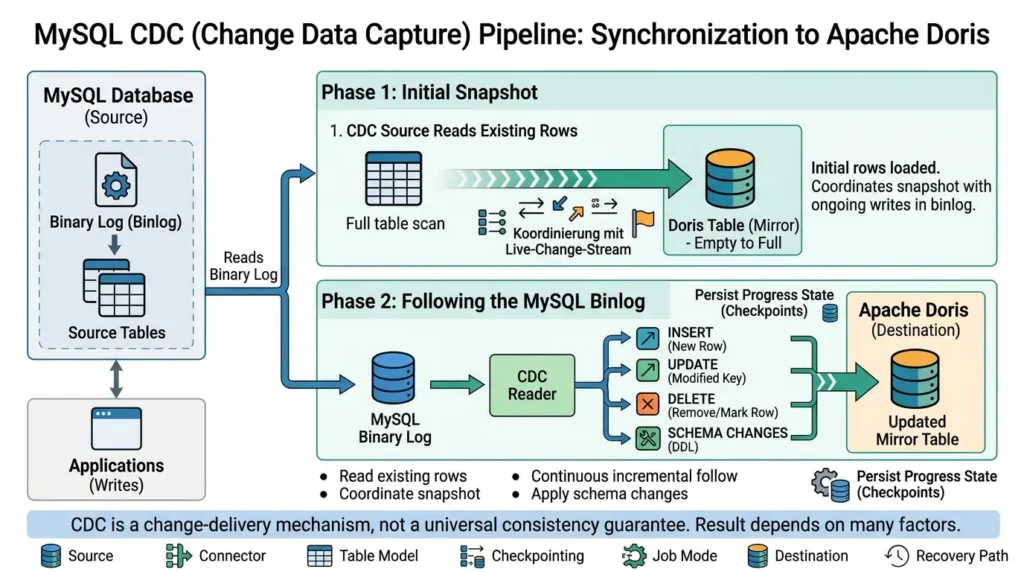
A new destination normally needs two phases.
Phase 1: Read the initial snapshot
An empty Doris table cannot become a useful mirror by reading only changes that happen after the job starts. The CDC source first reads the rows that already exist. During that snapshot, the application may continue writing, so the source must coordinate the existing rows with the live change stream before continuing incrementally.
The initial snapshot still consumes source, network, and destination capacity. CDC avoids repeating a full-table export after the snapshot; it does not make the first copy free.
Phase 2: Follow the MySQL binlog
Once the snapshot is complete, the CDC reader follows incremental changes. Each event must become a correct downstream operation:
- Insert a new row.
- Update the correct key.
- Remove or mark a deleted row according to the destination model.
- Apply schema changes according to the supported policy.
- Persist enough progress state to recover after a restart.
Inserts are the easiest event to demonstrate. The useful tests are repeated updates, hard deletes, restart recovery, out-of-order events, schema changes, destination outages, and visibility through the actual reader path.
CDC is a change-delivery mechanism, not a universal consistency guarantee. The result depends on the source, connector, table model, checkpointing, job mode, destination, and recovery path.
The Flink CDC MySQL connector documentation covers snapshot and incremental reading, startup modes, server IDs, and the relationship between the snapshot and binlog phases.
Why use Apache Doris as the analytical serving layer?
Apache Doris is an analytical database designed for workloads that combine ingestion and querying. Its column-oriented storage and distributed execution model are aimed at scans, joins, aggregations, dashboards, and ad hoc analysis rather than application transactions.
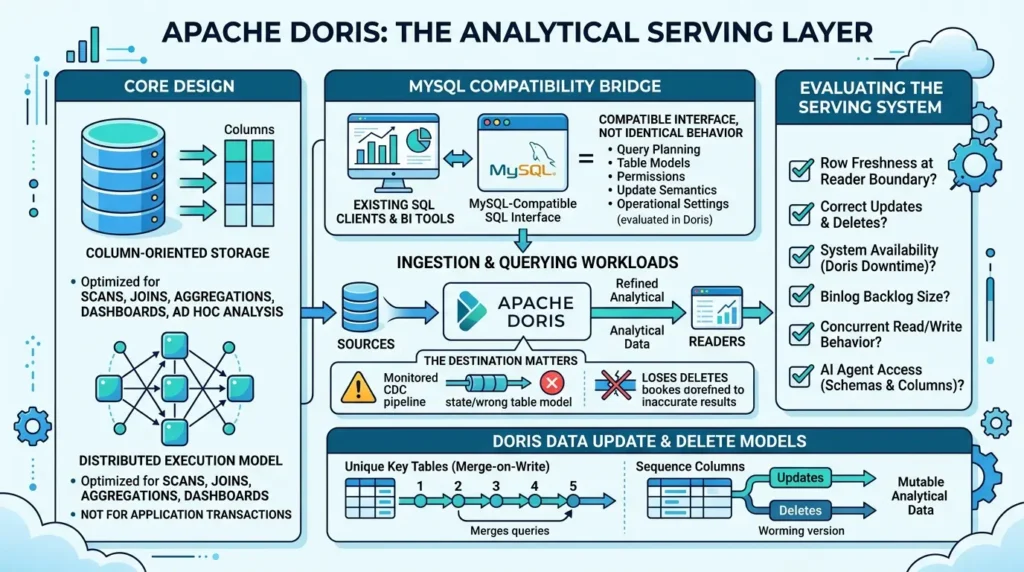
Doris also exposes a MySQL-compatible SQL interface, which can make it easier to connect existing SQL clients and BI tools. Compatibility is not identical behavior: query planning, table models, permissions, update semantics, and operational settings still need to be evaluated in Doris.
The destination matters as much as the pipeline. A well-monitored CDC job feeding the wrong table model can still serve stale or duplicated states. A fast analytical engine cannot repair a pipeline that loses deletes.
Evaluate the serving layer as a system:
- How fresh are the rows at the reader boundary?
- Are updates and deletes represented correctly?
- What happens when Doris is unavailable?
- How large can the binlog backlog become?
- How does the engine behave under concurrent reads and writes?
- Which schemas and columns may an AI agent access?
The Doris data update and delete documentation explains Unique Key tables, Merge-on-Write behavior, updates, deletes, sequence columns, and mutable analytical data.
Flink CDC or native Doris CDC?
The right choice depends less on which command is shorter and more on where you want the synchronization logic to live.
Flink CDC: more control, more infrastructure
Flink CDC fits teams that need transformations before the data reaches Doris, routing to multiple tables or destinations, joins with other streams, or an existing Flink operating model.
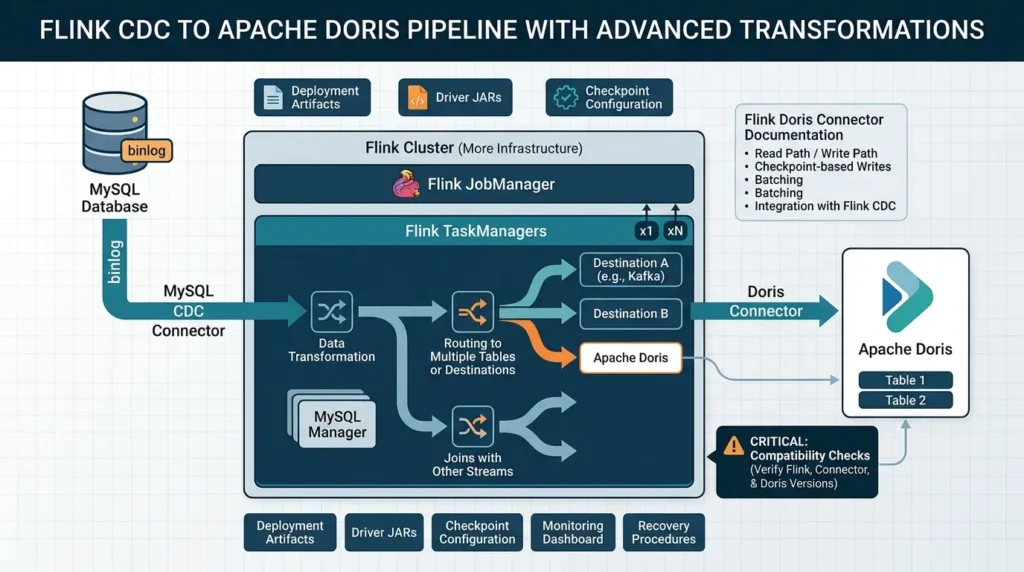
A typical deployment includes MySQL, a Flink JobManager, one or more TaskManagers, a MySQL CDC connector, a Doris connector, driver JARs, checkpoint configuration, deployment artifacts, monitoring, and recovery procedures. That is more infrastructure than a direct native job, but it exposes more control points.
The Flink Doris Connector documentation describes read and write paths, checkpoint-based writes, batching, compatibility considerations, and integration with Flink CDC. Treat its compatibility information as part of the implementation. Do not assume that arbitrary Flink, connector, and Doris versions are interchangeable.
Doris SQL Mapping Sync: an existing target plus SQL
Doris SQL Mapping Sync uses a streaming job with cdc_stream(...) and inserts into an existing Doris table. It is designed for cases where the target schema is already planned and the pipeline needs column mapping, filtering, or SQL transformation.
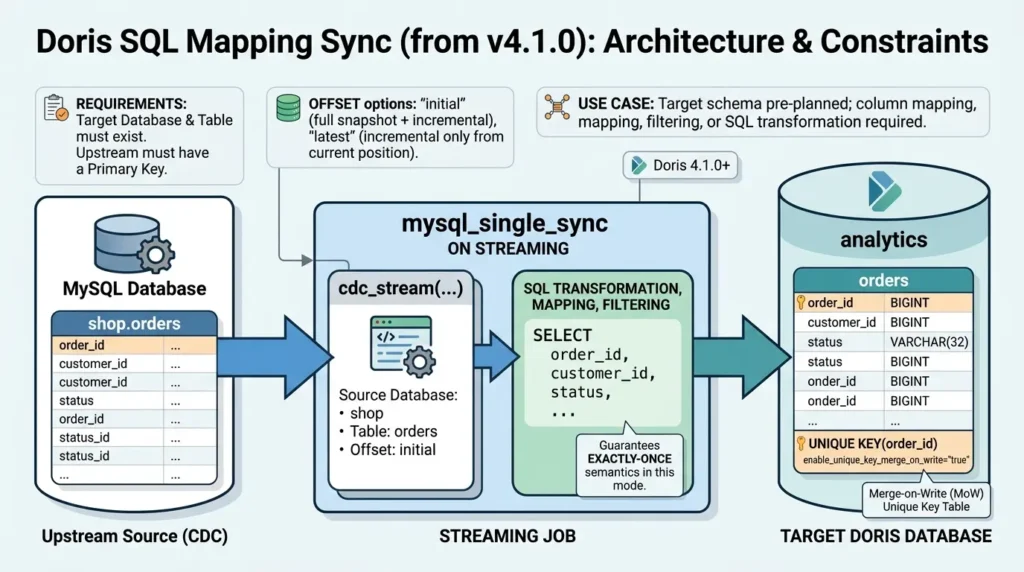
The current Doris SQL Mapping documentation states that this mode is supported from Doris 4.1.0, requires a primary key upstream, and uses a Unique Key target table. It also documents exactly-once semantics for this supported mode. Those conditions belong to the claim; “native CDC is exactly-once” is too broad.
Before submitting the streaming job, create the target database and table. The following DDL is an illustrative Merge-on-Write Unique Key table for the orders example:
SQL:
CREATE DATABASE IF NOT EXISTS analytics;

CREATE TABLE IF NOT EXISTS analytics.orders (
    order_id BIGINT NOT NULL,
    customer_id BIGINT NOT NULL,
    status VARCHAR(32),
    total_amount DECIMAL(12, 2),
    updated_at DATETIME
)
UNIQUE KEY(order_id)
DISTRIBUTED BY HASH(order_id) BUCKETS 10
PROPERTIES (
    "enable_unique_key_merge_on_write" = "true"
);
Current Doris 4.x documentation describes Merge-on-Write as the default implementation for new Unique Key tables, so the explicit property makes the intended table model visible but may be redundant in an environment where that default applies. Verify the exact behavior for the Doris version you deploy.
Also match nullability, types, key columns, distribution, and replica settings to the source and cluster rather than copying this schema unchanged.
An illustrative single-table job looks like this:
SQL:
CREATE JOB mysql_single_sync
ON STREAMING
DO INSERT INTO analytics.orders
SELECT
    order_id,
    customer_id,
    status,
    total_amount,
    updated_at
FROM cdc_stream(
    "type" = "mysql",
    "jdbc_url" = "jdbc:mysql://127.0.0.1:3306",
    "driver_url" = "mysql-connector-java-8.0.25.jar",
    "driver_class" = "com.mysql.cj.jdbc.Driver",
    "user" = "cdc_reader",
    "password" = "REPLACE_WITH_SECRET",
    "database" = "shop",
    "table" = "orders",
    "offset" = "initial"
);
Treat the example as version-specific documentation syntax, not a universal production template. Create and validate the target table before submitting the job. The offset changes the meaning of the load: initial performs a full snapshot and then continues incrementally, while latest starts from the latest available position and does not create a complete historical mirror in an empty destination.
Doris Auto Table Creation Sync: a thin multi-table mirror
Auto Table Creation Sync uses a different syntax and is intended for mirroring one or more MySQL tables into a Doris database. Doris can create downstream primary-key tables when needed and keep their primary keys aligned with the source.
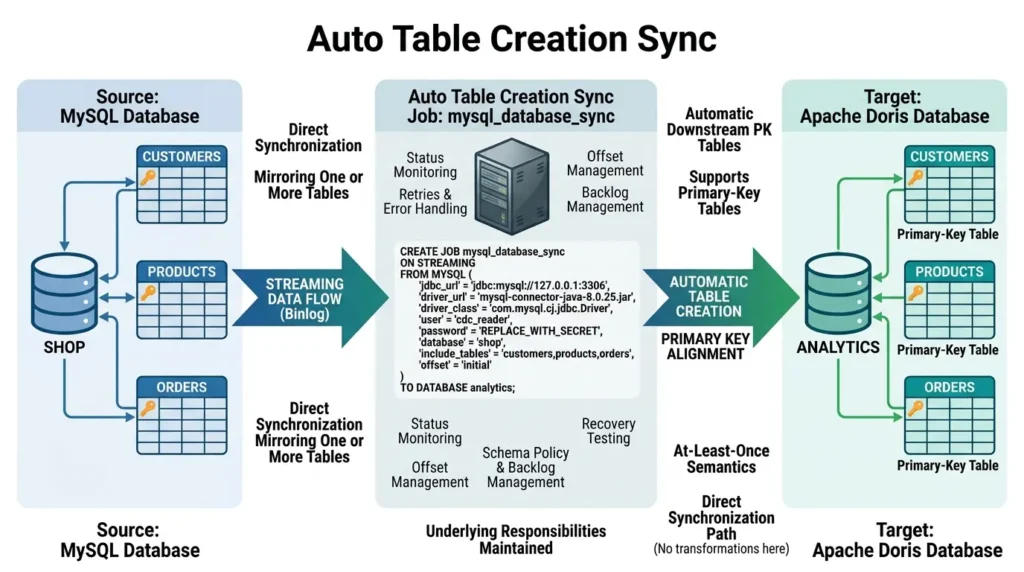
The Doris Auto Table Creation documentation currently describes this path as supporting primary-key tables and providing at-least-once semantics. It is intended for direct synchronization; column mapping, filtering, and transformation belong in SQL Mapping Sync or an external processing layer.
SQL:
CREATE JOB mysql_database_sync
ON STREAMING
FROM MYSQL (
    "jdbc_url" = "jdbc:mysql://127.0.0.1:3306",
    "driver_url" = "mysql-connector-java-8.0.25.jar",
    "driver_class" = "com.mysql.cj.jdbc.Driver",
    "user" = "cdc_reader",
    "password" = "REPLACE_WITH_SECRET",
    "database" = "shop",
    "include_tables" = "customers,products,orders",
    "offset" = "initial"
)
TO DATABASE analytics;
The shorter statement does not remove the underlying responsibilities. The job still needs binlog access, credentials, offsets, status monitoring, retries, schema policy, backlog management, and recovery testing.
| Decision area | Flink CDC | Doris SQL Mapping | Doris Auto Table Creation |
|---|---|---|---|
| Best fit | Transformations, routing, joins, multiple sinks, or an existing Flink platform | One existing target table with SQL mapping or filtering | Thin mirror of several primary-key tables or a database |
| Target table | Depends on the sink and configuration | Created and modeled in advance | Created automatically when the supported conditions are met |
| Transformations | Broadest processing flexibility | Supported through SQL mapping | Limited in the direct mirror path |
| Documented delivery semantics | Depends on the complete source, checkpoint, sink, and recovery configuration | Exactly-once is documented for the supported SQL Mapping mode | At-least-once is currently documented for this mode |
| Main trade-off | More components and more operational control | Less external plumbing, more target-table responsibility | Fast direct mirror, fewer transformation options |
When not to use each route
Do not add Flink just because it is familiar if the requirement is a thin mirror and the team has no need for transformation, routing, or multiple sinks. Conversely, do not choose Auto Table Creation only because its SQL is shorter if the workload needs filtering, column renaming, strict delivery semantics, or a custom analytical model.

A hybrid design can be reasonable: use native synchronization for simple current-state tables and Flink for transformation-heavy or multi-sink flows. The decision should be made table by table, not by forcing every source table through one mode.
MySQL prerequisites: binlog, grants, drivers, and retention
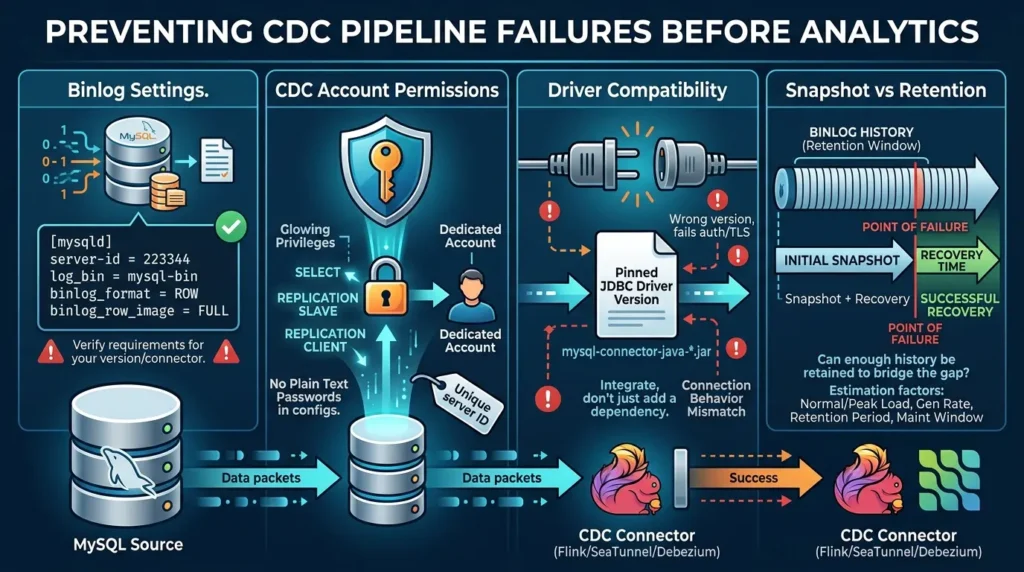
Most CDC failures happen before the analytics query runs. The source account, binlog settings, driver, server ID, network, snapshot duration, and retention window all shape whether the pipeline can start and recover.
Binlog settings
A common row-based starting point is:
[mysqld]
server-id = 223344
log_bin = mysql-bin
binlog_format = ROW
binlog_row_image = FULL
This is an illustrative configuration, not a universal production template. The required settings depend on the connector and version. Verify the exact requirements for the path you deploy. The current Doris CDC documentation and related Flink/SeaTunnel examples use row-based binlog settings for their demonstrated MySQL routes.
CDC account permissions
The required grants depend on the connector, snapshot strategy, and mode. Common privileges in MySQL CDC examples include SELECT, REPLICATION SLAVE, and REPLICATION CLIENT. Some snapshot approaches also use RELOAD; the Flink CDC documentation distinguishes cases where incremental snapshot changes that requirement.
Use a dedicated account, keep the capture scope as narrow as practical, and assign a unique server ID to each independently managed binlog reader. Never place a real password in a public article, repository, Docker Compose file, or SQL history.
Driver compatibility
The JDBC driver is part of the integration, not a cosmetic dependency. A tutorial that works with one driver may fail with another because of authentication, TLS, or connection behavior. Pin the driver version used by the tested example and place it in the documented directory or file-upload mechanism for that connector.
Snapshot duration versus binlog retention
The initial snapshot and the binlog retention window are coupled. If the snapshot or recovery process takes longer than the period for which the required binlog history remains available, the job may be unable to continue from its saved position.
The exact failure and recovery sequence depends on the connector, but the capacity question is universal: Can the source retain enough change history to bridge the snapshot and the worst expected interruption?
Estimate this before production:
- Snapshot duration under normal source load.
- Snapshot duration under peak source load.
- Expected binlog generation rate.
- Configured retention period.
- Longest planned maintenance window.
- Time required to detect and recover a failed job.
Do not turn a single local snapshot time into a universal retention recommendation.
A complete correctness test plan
The fastest way to make a CDC article useful is to define what “correct” means before discussing throughput.
| Test | Source action | Destination assertion | What it exposes |
|---|---|---|---|
| Snapshot completeness | Start with a known dataset and primary-key count | Keys and row-state expectations reconcile after the snapshot | Missing rows or incomplete initial load |
| Insert | Add a new order | The row appears once and is queryable through the real reader | Basic delivery |
| Update | Change status, price, or customer attribute | The current-state row reflects the expected latest value | Upsert and table-model behavior |
| Delete | Delete or cancel a known row | The downstream view no longer presents the row as active | Delete sign, soft-delete, or reconciliation semantics |
| Repeated update | Change the same key several times | The final visible state is correct and duplicates are understood | Replay and at-least-once effects |
| Restart | Stop and restart the job | The job resumes from its supported progress state | Offsets, checkpoints, and replay behavior |
| Destination outage | Make Doris unavailable briefly | Backlog and recovery remain within the freshness target | Retry, backlog, and visibility behavior |
| Schema change | Add or drop a supported column | Behavior matches the documented policy for the selected route | DDL propagation and compatibility boundaries |
A fast wrong answer is a reliability failure with better marketing.
Schema evolution: do not promise more than the route supports
Schema evolution is a recurring search and operations question because a CDC pipeline does not only move rows. It also has to decide what happens when the source table changes.
Test and document at least these operations:
- Add a nullable column.
- Add a column with a default.
- Drop a column.
- Change a data type.
- Rename a column.
- Add or change a primary key.
- Create a new table after the job starts.
Do not collapse these into the phrase “automatic DDL synchronization.” The supported operations differ by connector, table model, version, and target path. Flink CDC’s quickstart demonstrates schema changes in its documented example, while Doris and vendor integration pages describe their own DDL behavior. Those examples should be treated as route-specific evidence, not a universal promise across all configurations.
| Change type | What to verify | Why it matters |
|---|---|---|
| Add column | Does the connector propagate it, and does the target accept the type? | Often the easiest DDL change, but still version-sensitive. |
| Drop column | Does the job pause, alter the target, ignore the change, or fail? | Dropping a field can break transforms and downstream queries. |
| Type change | Is the conversion safe, lossy, rejected, or manual? | A successful DDL event does not prove value preservation. |
| Rename | Is it treated as a rename or as drop-plus-add? | The distinction affects historical data and query compatibility. |
| Primary-key change | Is the table model still valid after the change? | CDC correctness depends on stable row identity. |
Monitor the job from the operator’s point of view
A pipeline is not production-ready because the job submitted successfully. The operator needs to know whether the job is running, where the source position is, whether the destination is accepting data, and whether the reader can see the result.
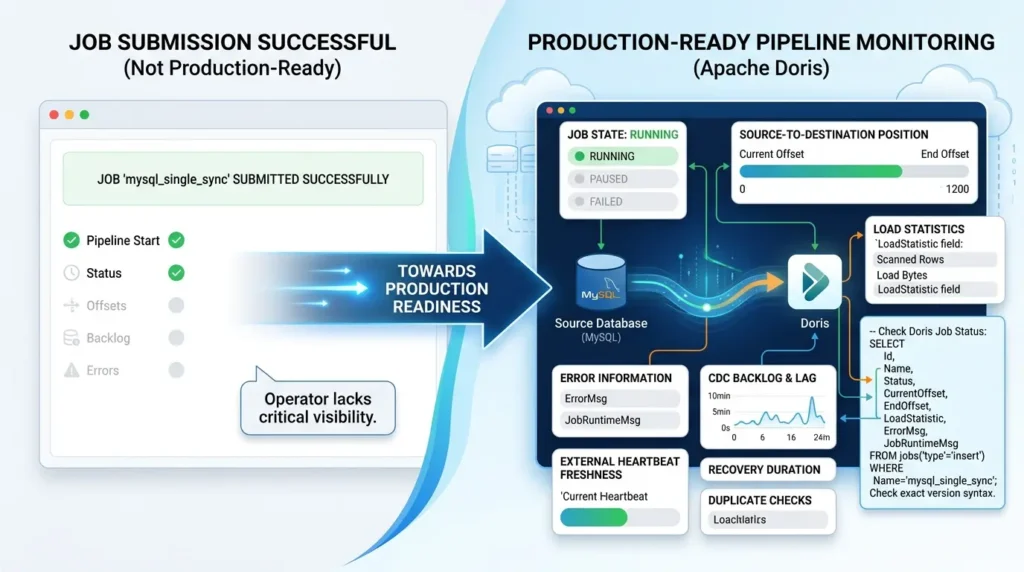
For Doris Streaming Jobs, the current documentation shows status inspection through the jobs("type"="insert") table function and exposes fields such as job status, current offset, end offset, load statistics, error information, and runtime messages. Use the syntax documented for the exact Doris version rather than copying a query from an older article.
For the SQL Mapping job above, a focused status query is:
SQL:
-- Check CDC streaming job status, offsets, and error details
SELECT
    Id,
    Name,
    Status,
    CurrentOffset,
    EndOffset,
    LoadStatistic,
    ErrorMsg,
    JobRuntimeMsg
FROM jobs("type" = "insert")
WHERE ExecuteType = "STREAMING"
  AND Name = "mysql_single_sync";
CurrentOffset, EndOffset, ErrorMsg, and JobRuntimeMsg are documented job fields for Streaming Jobs. Row and byte counters such as scanned rows or load bytes are exposed inside LoadStatistic rather than as guaranteed top-level columns, so inspect that field or use SELECT * when diagnosing a version-specific output shape.
A practical monitoring set includes:
- Job state: running, paused, failed, or canceled.
- Current source offset and end offset where available.
- Snapshot progress and scanned rows.
- Destination load errors.
- CDC backlog or source-to-destination lag.
- External heartbeat freshness.
- Duplicate or stale-row checks.
- Recovery duration after a source or destination interruption.
The important distinction is between connector progress and user-visible freshness. A checkpoint can succeed while a dashboard query still cannot see the row. Measure through the same path used by the dashboard or agent.
For how this same 'caught up but wrong' pattern manifests in ClickHouse with ReplacingMergeTree, see our deep dive.
Measure freshness from the reader’s point of view
Create a dedicated heartbeat row in MySQL with a current UTC timestamp. Read that row from Doris through the real dashboard or agent connection. Subtract the source timestamp from the destination observation time. Repeat under idle, normal, burst, and recovery conditions.
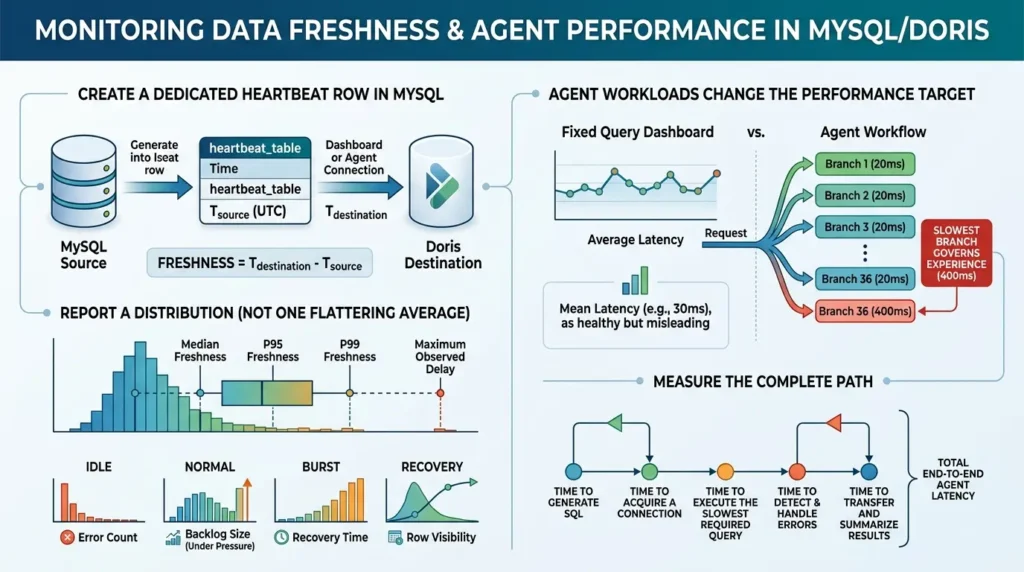
Report a distribution instead of one flattering average:
- Median freshness.
- p95 and p99 freshness.
- Maximum observed delay.
- Error count.
- Backlog size during pressure.
- Recovery time after source or destination interruption.
- Whether the actual reader saw the row.
Agent workloads change the performance target
For a dashboard with a fixed query set, average latency can be a useful starting metric. For an agent, the response path may contain several branches launched close together. The agent often cannot continue until the slowest required branch completes.
If 35 queries finish in 20 milliseconds and one takes 400 milliseconds, the user experience may still be governed by the slow branch. Mean latency looks healthy; the answer is not ready.
End-to-end agent latency can also include SQL generation, connection acquisition, queueing, retries, cancellation, result transfer, and answer synthesis.
Measure the complete path:
- Time to generate SQL.
- Time to acquire a connection.
- Time to execute the slowest required query.
- Time to detect and handle errors.
- Time to transfer and summarize results.
This is an educational probability calculation, not a capacity model. It assumes independent query outcomes. Replace the inputs with measured latency samples and a real concurrency test before using the result operationally.
What does a complete MySQL CDC Quick Start need?
The public competitor set is strongest when it places the entire first-run path on one page. The Apache Flink CDC quickstart combines Linux or macOS preparation, a Flink standalone cluster, Docker Compose for MySQL and Doris, sample tables, connector JARs, a YAML pipeline, submission, and schema/data-change tests. The Apache SeaTunnel tutorial adds concrete grants, binlog settings, driver placement, and sink properties.
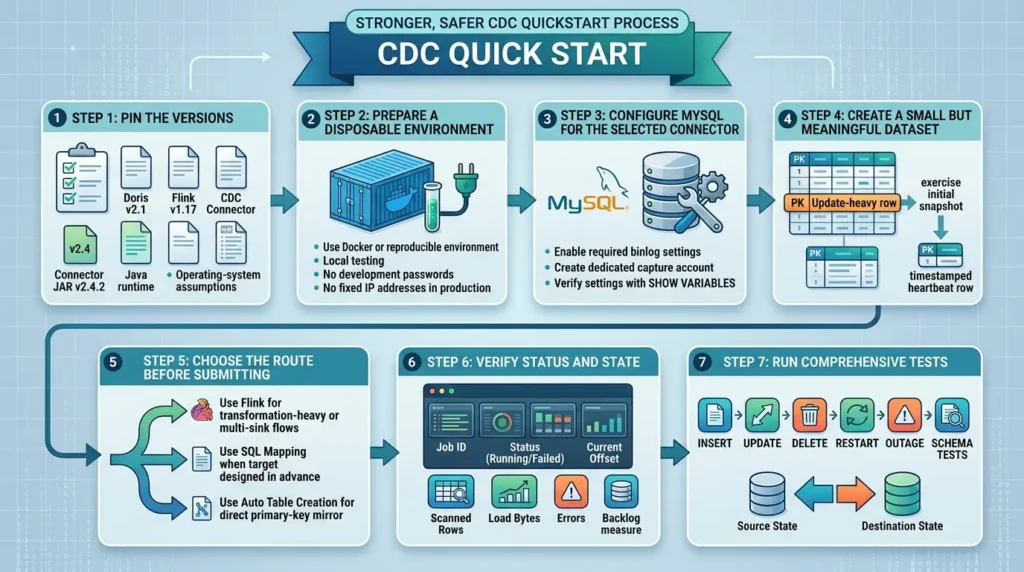
A stronger, safer Quick Start should include the following sequence:
Step 1: Pin the versions
Record the MySQL version, Doris version, Flink version, CDC connector version, connector JAR version, Java runtime, and operating-system assumptions. A tutorial without version boundaries becomes ambiguous as soon as a connector changes its defaults or syntax.
Step 2: Prepare a disposable environment
Use Docker or another reproducible environment for local testing. Do not carry development passwords, single-node replication settings, fixed IP addresses, or local volumes into production without an explicit decision.
Step 3: Configure MySQL for the selected connector
Enable the required binlog settings and create a dedicated capture account. Verify the settings with SHOW VARIABLES and record the result in the test notes.
Step 4: Create a small but meaningful dataset
Use at least one current-state table with a primary key, one table with an update-heavy row, and enough records to exercise the initial snapshot. Include a timestamped heartbeat row.
Step 5: Choose the route before submitting the job
Use Flink for transformation-heavy or multi-sink flows. Use SQL Mapping when the target is designed in advance and the logic is expressible in SQL. Use Auto Table Creation for a direct primary-key mirror when its documented at-least-once semantics fit the workload.
Step 6: Verify status and state
Record the job ID, status, current offset, scanned rows, load bytes, errors, and any available backlog measure. A screenshot of a “running” job is not a correctness test.
Step 7: Run insert, update, delete, restart, outage, and schema tests
Compare source state and destination state after every action. Keep the test results with the version matrix and configuration.
Authentication errors: fix the connection boundary carefully
A MySQL JDBC connection may fail with an error such as Public Key Retrieval is not allowed when the authentication exchange requires a public key and the connection is not configured for secure or permitted key retrieval.
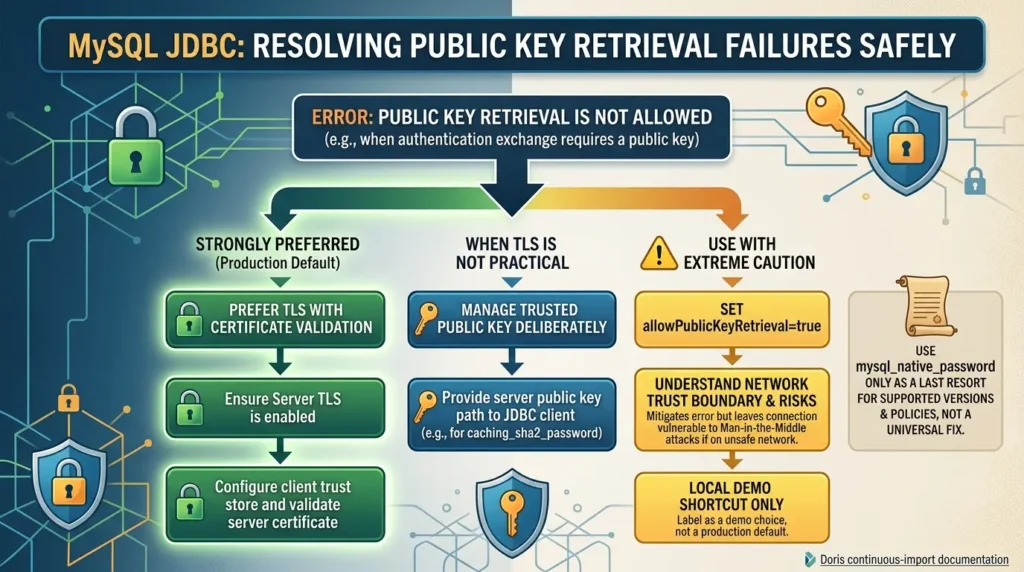
The relevant Doris continuous-import documentation lists more than one remedy, including JDBC connection configuration and account authentication choices. The MySQL connection options documentation and caching SHA-2 authentication documentation explain the security and compatibility context.
A safer decision sequence is:
- Prefer TLS with certificate validation where practical.
- If using RSA key exchange, manage the trusted public key deliberately.
- If using allowPublicKeyRetrieval=true, understand the network trust boundary and client behavior.
- Treat mysql_native_password as a legacy compatibility option for supported versions and policies, not as a universal fix.
The local demo may need a shortcut. Label that shortcut as a demo choice rather than presenting it as the production default.
Case studies and external evidence: keep the scope visible
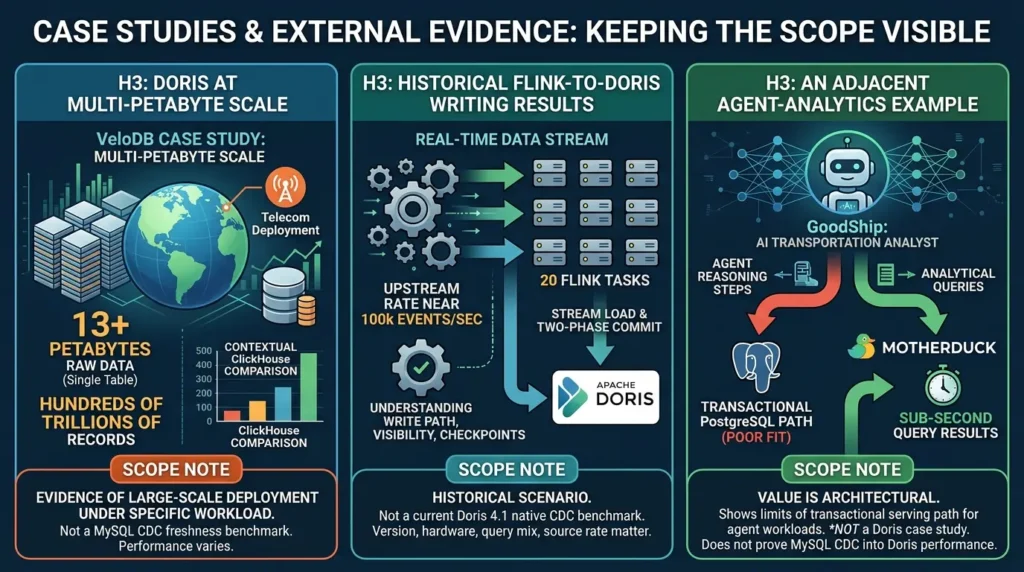
Doris at multi-petabyte scale
A VeloDB case study describes a telecom deployment with more than 13 petabytes of raw data in a single table and hundreds of trillions of records. It reports the organization’s cluster and workload results in the context of a ClickHouse comparison the VeloDB telecom case study.
That is evidence of a Doris deployment at multi-petabyte scale under a specific workload. It is not a MySQL CDC freshness benchmark, and it does not predict the performance of every Doris cluster.
Historical Flink-to-Doris writing results
An Apache Doris engineering article describes Flink real-time writes through Stream Load and two-phase commit. It discusses a historical scenario with 20 Flink tasks and an upstream rate near 100,000 events per second the Apache Doris Flink real-time write article.
The article is useful for understanding the write path and the relationship between checkpoints and visibility. It should not be presented as a current Doris 4.1 native CDC benchmark. Version, hardware, query mix, source rate, and implementation mode matter.
An adjacent agent-analytics example
GoodShip’s published case study describes an AI transportation analyst built on MotherDuck. It explains why analytical queries and agent reasoning steps created a poor fit for a transactional PostgreSQL path and reports sub-second query results in that specific environment GoodShip’s AI Transportation Analyst case study.
This is not a Doris case study. Its value is architectural: agent workloads can expose the limits of a transactional serving path. It does not prove the performance of MySQL CDC into Doris.
The claim ledger
Before publishing a performance or scale number, record four things: the source, the version, the workload, and the measurement method.
| Evidence type | What it can support | What it cannot support |
|---|---|---|
| Official documentation | Syntax, prerequisites, documented limitations, and mode-specific behavior | Universal throughput or your production capacity |
| Vendor case study | A reported workload and the organization’s result | A general benchmark or neutral comparison |
| Historical engineering post | How a path worked in its stated version and conditions | Current behavior without version revalidation |
| Local demo | A reproducible test design and baseline under stated conditions | Production capacity, market-wide performance, or a universal SLO |
Let agents inspect the warehouse without unchecked mutation rights
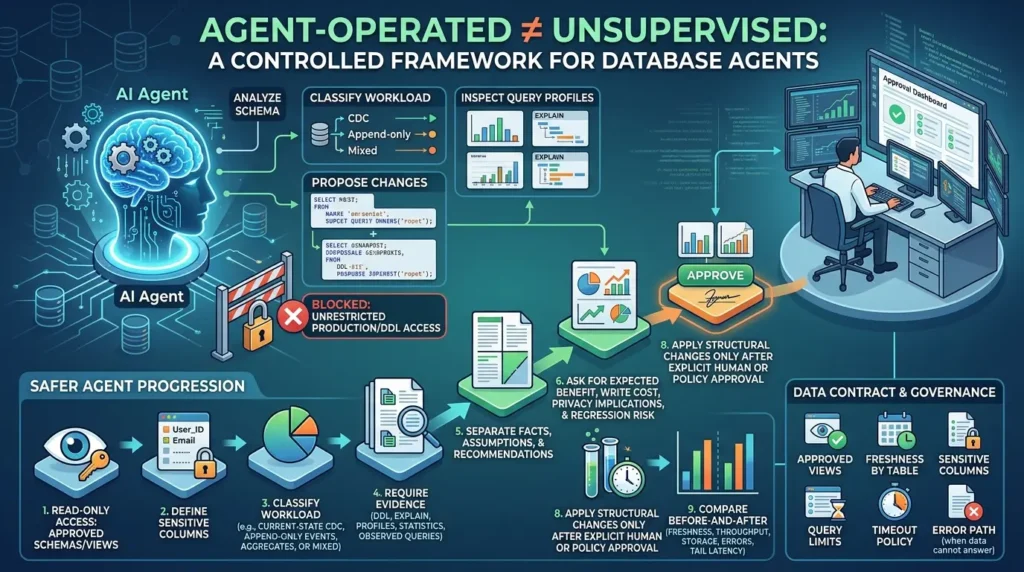
An agent can help review schemas, classify workloads, inspect query profiles, and propose changes. That does not mean it should have unrestricted access to production tables or DDL.
The open-source VeloDB Agent Skills repository describes skills related to workload classification, Doris data-model selection, DDL review, query investigation, and operational workflows. The existence of such skills does not remove the need for permissions, evidence, approval, and rollback.
A safer progression is:
- Give the agent read-only access to approved schemas or views.
- Define which columns contain sensitive data.
- Ask the agent to classify the workload: current-state CDC, append-only events, aggregates, or mixed.
- Require evidence from DDL, EXPLAIN, profiles, statistics, and observed queries.
- Make the agent separate facts, assumptions, and recommendations.
- Ask for expected benefit, write cost, privacy implications, and regression risk.
- Test proposals on representative data and concurrency.
- Apply structural changes only after explicit human or policy approval.
- Compare before-and-after freshness, write throughput, storage, errors, and query tail latency.
“Agent-operated” should not mean “unsupervised.” The data contract should define approved views, freshness by table, sensitive columns, query limits, timeout policy, and the error path when the data cannot answer a question.
Common mistakes
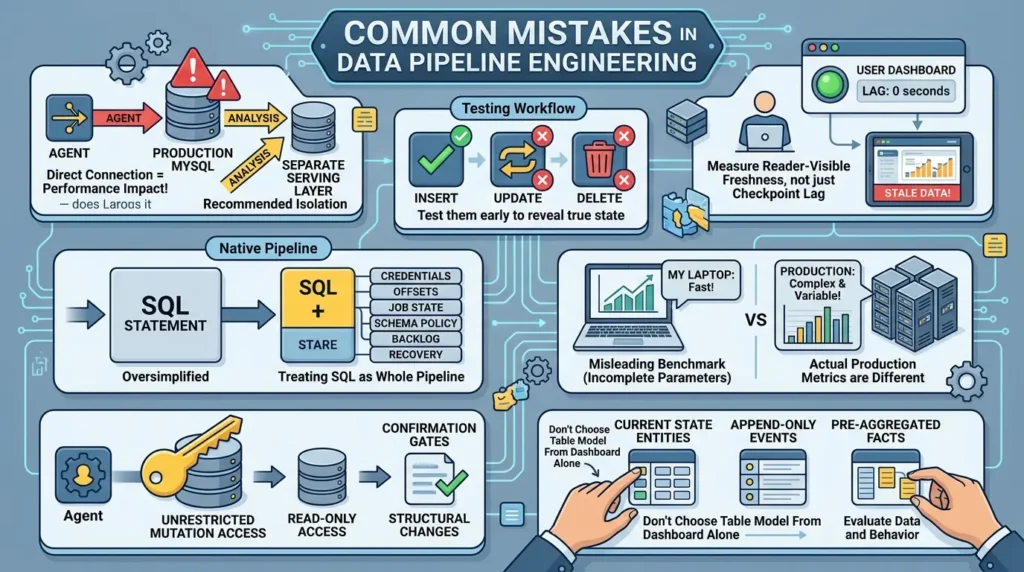
Pointing an agent directly at production MySQL
The data is already there, but scan-heavy and unpredictable queries now compete with application traffic. A separate analytical serving layer creates a clearer resource, freshness, and permission boundary.
Testing only inserts
Inserts are easy to generate. Updates and deletes reveal whether the destination model represents current state correctly. Test them early.
Measuring connector lag instead of reader-visible freshness
A checkpoint can succeed while the dashboard still cannot see the row. Use an external heartbeat and read it through the actual path.
Treating one SQL statement as the whole native pipeline
The SQL declaration is shorter, but credentials, offsets, job state, retries, schema policy, backlog, and recovery still exist.
Presenting local measurements as production benchmarks
A laptop result can be a useful baseline. It becomes misleading when the hardware, dataset, query mix, concurrency, duration, error policy, percentiles, and recovery behavior are omitted.
Giving the agent unrestricted mutation access
An unsafe DDL change can affect availability, cost, privacy, or correctness. Start with read-only access and confirmation gates for structural changes.
Choosing a Doris table model from the dashboard alone
Current-state entities, append-only events, and pre-aggregated facts have different semantics. The table model must match the data and the way updates and deletes should behave.
A practical production workflow
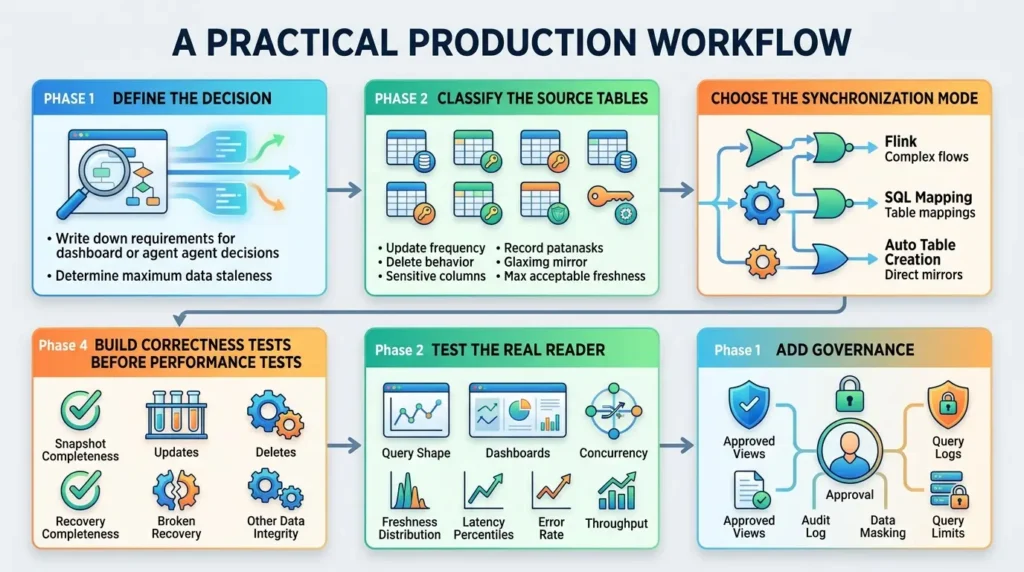
Phase 1: Define the decision
Write down what the dashboard or agent needs to decide and how stale the data may be before the decision becomes unsafe. “Real time” is not a requirement until it has a business meaning.
Phase 2: Classify the source tables
For each table, record its primary key, update frequency, delete behavior, current-state or historical meaning, sensitive columns, query patterns, and maximum acceptable freshness. This inventory often shows that not every table belongs in the same job or destination model.
Phase 3: Choose the synchronization mode
Use Flink for transformation-heavy or multi-sink flows. Use SQL Mapping when one existing target table needs SQL-shaped mapping or filtering. Use Auto Table Creation when a direct multi-table mirror is the main requirement and its documented at-least-once semantics are acceptable for the use case.
Phase 4: Build correctness tests before performance tests
Test snapshot completeness, update propagation, delete propagation, restart recovery, duplicate behavior, schema changes, source downtime, destination downtime, and binlog-retention pressure. Only after correctness is clear should you tune query latency.
Phase 5: Test the real reader
Replay dashboard queries, realistic agent-generated query shapes, and sustained concurrency. Include cold starts, connection-pool exhaustion, slow branches, cancellation, timeouts, and retries. Record freshness distribution, latency percentiles, unblocking time, error rate, source CPU and I/O, destination write throughput, query saturation, and recovery time.
When source CPU and I/O saturate before the connector does, the bottleneck is usually the host's memory and writeback path, our Linux vm.swappiness and dirty ratios guide covers how to read vmstat, PSI, and Dirty/Writeback before changing sysctls.
Phase 6: Add governance
Expose approved views where possible. Separate raw mirrors from business-friendly semantic models. Add audit logs, data classification, masking, query limits, and human approval for structural changes.
This checklist is local to the page. It does not save state after a refresh unless the WordPress site adds its own storage.
Before and after CDC
| Before CDC | After a controlled CDC serving layer |
|---|---|
| Dashboards and agents query production MySQL. | Analytical readers query Doris instead. |
| Large scans compete with application traffic. | Transactional and analytical workloads have separate serving boundaries. |
| Batch jobs create a freshness gap. | Freshness is measured through an external heartbeat. |
| Updates and deletes may be mishandled downstream. | Correctness tests define how current state changes. |
| Performance testing focuses on one query. | Burst tests measure tail latency and agent-unblocking time. |
| Agents infer too much from raw tables. | Approved views, metadata, limits, and freshness contracts guide them. |
Conclusion: build for the reader you actually have
The move from dashboards to AI agents changes the database conversation. The question is no longer only whether a warehouse can refresh a report every few minutes. It is whether the serving layer can remain correct, fresh, and predictable while an automated client explores the data through many concurrent queries.
MySQL CDC provides the bridge. Flink CDC keeps the streaming layer visible and gives teams broad processing control. Doris SQL Mapping Sync provides a concise native path when a target table and SQL transformation are already defined. Doris Auto Table Creation Sync simplifies a direct multi-table mirror when its table and delivery constraints fit the workload.
The most transferable lesson is the test plan:
- Use a heartbeat for freshness.
- Test updates and deletes before celebrating inserts.
- Compare source and destination state after restarts and outages.
- Fire concurrent queries to expose tail latency.
- Publish local measurements as local measurements.
- Give agents a data contract and read-only access before considering mutations.
Faster SQL is useful. Faster SQL that returns the wrong rows, violates the freshness boundary, or competes with checkout traffic is not.
The correctness, freshness, and exactly-once questions raised here are exactly what interviewers probe under CDC and pipeline-reliability questions — see our Data Engineering Interview Questions & Answers guide for the underlying patterns.
For ETL-specific preparation that drills into incremental loading, CDC, retries, and pipeline reliability, see our 50-question ETL Interview Questions guide.
Take the implementation files with you
The starter kit gives you a clean path from MySQL prerequisites to Doris target DDL, CDC correctness checks, reader-visible freshness, and recovery decisions.
Download the ZIP — free, no emailFAQS : MySQL CDC to Apache Doris
What is MySQL CDC in simple terms?
It is a way to read committed changes from MySQL’s binary log and deliver inserts, updates, and deletes to another system. A new destination usually begins with an initial snapshot, then follows incremental log events.
How do I sync MySQL to Apache Doris?
Choose a route first. Use Flink CDC for an explicitly operated streaming layer, Doris SQL Mapping Sync for an existing target table with SQL mapping, or Doris Auto Table Creation Sync for a direct mirror of supported primary-key tables. Then verify binlog settings, permissions, driver compatibility, offsets, updates, deletes, and recovery.
Do I still need Flink if I use Apache Doris Streaming Jobs?
Not always. Doris can manage direct synchronization through Streaming Jobs. Flink remains useful when you need complex transformations, custom routing, several downstream systems, or a stream-processing platform your team already operates.
What is the difference between SQL Mapping and Auto Table Creation?
SQL Mapping uses cdc_stream to insert into an existing Doris target table and supports SQL-shaped mapping and transformation. Auto Table Creation uses FROM MYSQL ... TO DATABASE to mirror one or more tables and create downstream primary-key tables when needed. They have different capabilities and delivery semantics.
How should I handle MySQL CDC updates and deletes?
Test them against the selected Doris table model. Current-state tables need a stable key and a documented update/delete behavior. Depending on the route, deletes may be represented through the connector’s delete handling, Doris delete-sign mapping, soft-delete logic, or a reconciliation process. Do not assume that an insert-only test proves current-state correctness.
Does native CDC always provide exactly-once delivery?
No. The guarantee depends on the specific Doris mode and configuration. Current Doris documentation describes exactly-once for the supported SQL Mapping mode and at-least-once for the current Auto Table Creation mode. Verify the mode and version before making a production claim.
How do I measure MySQL CDC freshness?
Write a timestamped heartbeat row in MySQL, read that same row from Doris through the dashboard or agent path, and measure the delay externally. Repeat under normal load, bursts, and recovery. Report a distribution rather than one average.
Why should agents avoid production MySQL?
Agents can issue many concurrent and unpredictable analytical queries. Those queries compete with application transactions and can create noisy-neighbor behavior. A separate analytical serving layer provides a clearer freshness, permission, and resource boundary.
📋 Article Timeline & History
Successfully updated on October 14, 2026 with the latest details.
This article was originally published on September 5, 2026.

Was this article helpful?




[…] Building an Agent-Ready Analytics Layer with MySQL CDC and Apache Doris […]