


How this was checked: Traefik’s documentation and source (v3.7 line), mailcow’s documentation and source (master branch), and the public threads cited inline. Every command was checked for syntax, and the regex behavior was tested with an RE2 engine, which shares Go’s regexp syntax. Nothing here was run against a live Mailcow server.
You followed the guide. The Traefik dashboard shows your router. The certificate is valid.
Then the browser prints four words: 404 page not found.
A 404 invites label-shuffling. That wastes hours, because a 404 isn’t vague. It’s an answer, and it comes from one specific place in the request path.
This guide teaches you to read that answer. In about a minute you can tell whether Traefik refused the request, whether nginx-mailcow did, or whether you’re looking at a different problem wearing a 404 costume. Then you jump to the fix that matches.
Here’s what you’ll get:
- A status-code map and a byte-count trick that identify who answered.
- A six-step triage and an interactive layer finder.
- Fixes for every Traefik-side cause, including the v3 rule-syntax change and the Docker 29 trap.
- Four documented cases from public threads, with their limits stated.
- Corrections to three explanations that don’t survive a look at the source code.
If you haven’t stood up Mailcow with Traefik yet, start with our Production Mailcow Setup guide. This article assumes you already have a deployment returning 404s, and it won’t repeat the setup.
Key takeaways
Click any topic to expand or collapseWhat a Traefik 404 actually means
Before you fix anything, settle one question: who is talking?
What is a Traefik 404?
A Traefik 404 is the response Traefik gives when a request reaches one of its entrypoints but doesn’t match any router. Traefik’s FAQ lists four situations:
- The entrypoint has no routers at all.
- An HTTP request reaches an entrypoint that has no HTTP router.
- An HTTPS request reaches an entrypoint that has no HTTPS router.
- Routers exist, but none of them matches the request.
The FAQ adds why it’s a 404 and not a 503: Traefik can’t tell whether a missing router is temporary.
What is the 19-byte 404?
The 19-byte 404 is how that answer looks on the wire. It’s the plain text 404 page not found plus a newline, with no HTML and no styling. In the Traefik community case we’ll meet shortly, the access log shows a 404 with exactly 19 bytes.
nginx-mailcow has its own 404, and it looks different. nginx’s stock error page is a small HTML document. Without a version string it’s 146 bytes, and a Mailcow forum thread shows an nginx-mailcow access log line with a 404 of exactly that size. If your nginx prints its version, or you’ve customized error pages, the number shifts by a few bytes. The reliable signal is plain text versus a small HTML page.

Now put the two side by side with the other statuses people confuse with them.
| What you see | Who says it | What it means | Typical Mailcow cause |
|---|---|---|---|
| 404, 19 bytes of plain text | Traefik | No router matched the request | Rule never matches, router never created, wrong entrypoint or TLS setup, wrong Host |
| 404, small HTML page ending in "nginx" | nginx-mailcow | The request arrived. nginx has nothing for that Host or path | A proxy rewrote the path or Host, or the name isn’t one nginx-mailcow serves |
| 502 Bad Gateway | Traefik | A router matched, but contacting the backend failed | Wrong port, wrong hostname, wrong Docker network |
| 504 Gateway Timeout | Traefik | A router matched, but the backend didn’t answer in time | Packets dropped on the way, or Traefik chose a network it can’t use |
| 503 Service Unavailable | Traefik | A router matched, but no server was ready | A service defined with no servers, or failing health checks |
| 301 or 302 to HTTPS, often looping | nginx-mailcow | Not a 404. The plain-HTTP port is only redirecting | HTTP_REDIRECT=y with plain HTTP sent to that port (our reading of the template) |
This table is the heart of the article. Network and port fixes belong to the 502 and 504 rows, not to the 404 rows.
Traefik’s FAQ says a 502 means an error while contacting the upstream service, and a 503 means a router matched but no server was ready. Our reading of Traefik’s proxy error handler agrees: a failed connection becomes a 502, and a timeout becomes a 504. A 404 means “not routed” or “the backend said so.”
There’s one honest exception. With the Docker provider, a container that isn’t running gets no router at all, so a stopped or restarting nginx-mailcow can look like a routing 404. We’ll cover it in the router section.
The four checkpoints

Every request passes four checkpoints in order. Each one can refuse it, and each refusal has a different voice.
Checkpoints 1 and 2 speak in Traefik’s voice. Checkpoint 3 speaks in 5xx. Checkpoint 4 speaks in nginx’s voice.
A 404 comes from checkpoint 1, 2, or 4, never from 3. Work out which voice you’re hearing before you edit anything.
Triage in one minute: read the response before you touch a label
Here’s a habit that saves hours. Change nothing until you’ve captured three facts: the status, the size, and the certificate.
Assumptions and placeholders
The commands assume Traefik runs as a container, in its own Compose project, on a Docker network that nginx-mailcow also joins. Replace these placeholders with your own values:
| Placeholder | What it means | How to find it |
|---|---|---|
mail.example.com | Your MAILCOW_HOSTNAME, as users type it | The MAILCOW_HOSTNAME line in mailcow.conf |
SERVER_IP | The public IP of the host running Traefik | The A record of your hostname, or your provider’s panel |
traefik | The name of your Traefik container | The name column of docker ps |
nginx-mailcow | mailcow’s web service, which Docker also uses as a network alias | The service key in mailcow’s docker-compose.yml |
8080 | The port nginx-mailcow listens on | The HTTP_PORT line in mailcow.conf |
How to diagnose a Mailcow 404 behind Traefik, step by step
- Capture the status and size with the real hostname. Use the
curlcommand below. The--resolveoption makes curl send the right TLS server name and Host header together, which a bare-H "Host: ..."doesn’t. - Classify the responder. Match the pair to the status table above:
404 19is Traefik,404with roughly 146 bytes of HTML is nginx-mailcow, a 5xx is the service checkpoint, and a 3xx is a redirect. - Check the certificate name. Run the
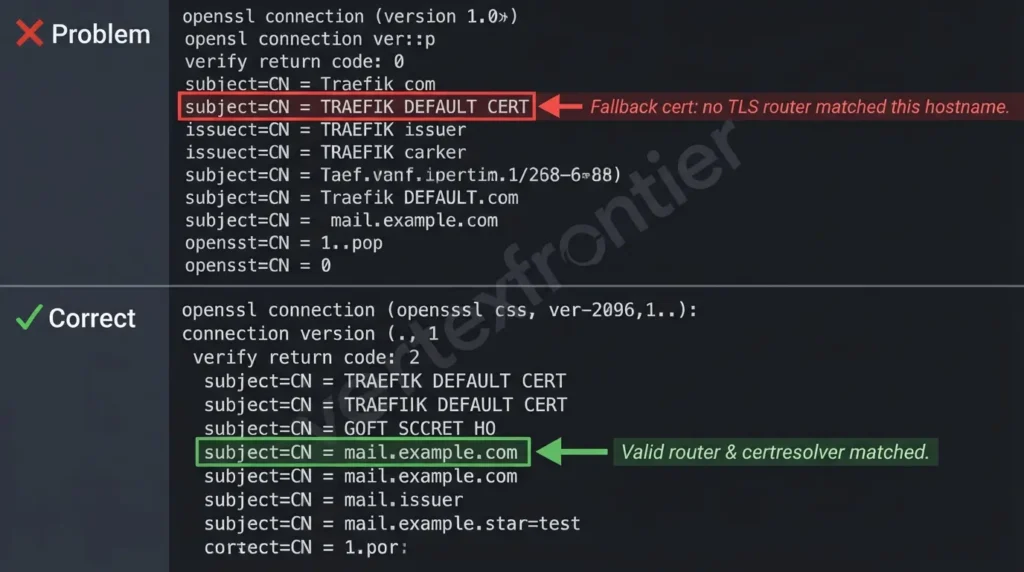
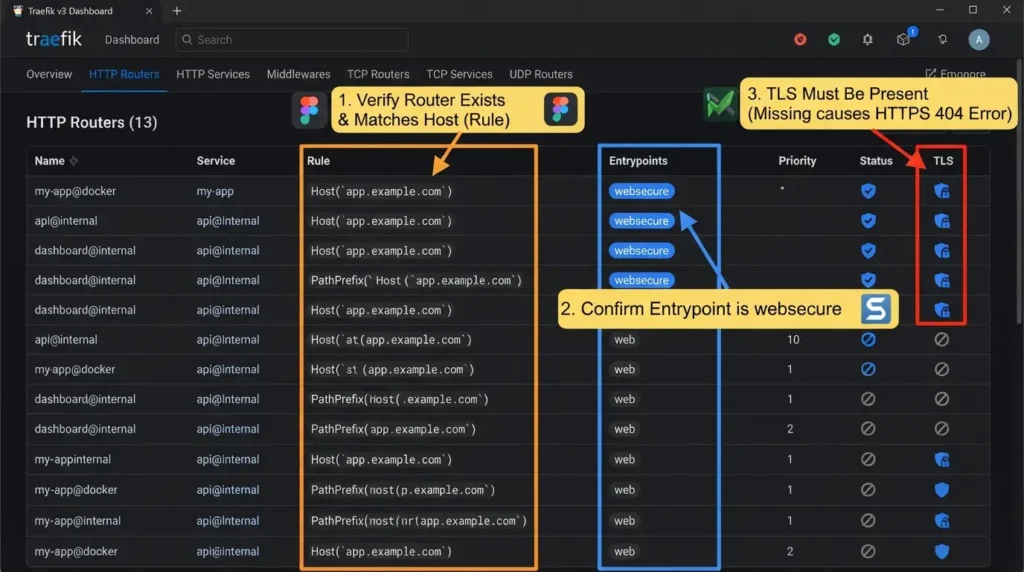
opensslcommand below. If the subject readsTRAEFIK DEFAULT CERT, Traefik had no certificate matching that server name and fell back to its default. That’s a hint that no TLS router covers the name, not proof. - Look at what Traefik knows. Open the dashboard’s HTTP routers page and find your router. Check that it exists, that its rule is what you meant, and that its entrypoint is right. No dashboard? Read Traefik’s startup and provider logs instead.
- Ask nginx-mailcow directly from inside the Traefik container. Use the wget command below. It bypasses every router and tests the network path and the port in one shot.
- Change one thing, then repeat step 1. The status and size pair tells you whether your change moved the failure to a different checkpoint.
Bash:
# Step 1: status code and body size, using the real hostname.
# --resolve keeps the TLS server name and the Host header aligned.
curl -sk -o /dev/null -w '%{http_code} %{size_download}\n' \
  --resolve mail.example.com:443:SERVER_IP https://mail.example.com/
Expect a line like 404 19. The first number is the status, and the second is the body size in bytes. The -k flag skips certificate checks, which is fine for diagnosis but not for scripts you keep. Traefik writes access logs only when you enable them (--accesslog=true, or an accessLog section), per its logging reference, so turn them on while you debug.
Bash:
# Step 3: which certificate does the server present for your hostname?
echo | openssl s_client -connect SERVER_IP:443 -servername mail.example.com 2>/dev/null | openssl x509 -noout -subject
You want a subject that names your hostname. CN=TRAEFIK DEFAULT CERT is the fallback certificate. Traefik’s TLS documentation says it falls back to the default certificate when none matches the requested server name, and the source names that generated certificate TRAEFIK DEFAULT CERT.
Bash:
# Step 5: ask nginx-mailcow directly, from inside the Traefik container.
# Replace "traefik" with your Traefik container's name, and 8080 with your HTTP_PORT.
docker exec traefik wget -S -O /dev/null --header 'Host: mail.example.com' http://nginx-mailcow:8080/ 2>&1 | head -5
Read the first line of the output:
HTTP/1.1 200 OK, or a 3xx: the network path and port work. Look at what Traefik dials, not at the backend.- A “bad address” style error: the name doesn’t resolve on Traefik’s network.
- “Connection refused”: the name resolves, but nothing listens on that port.
- A hang: packets are being dropped, or the two containers don’t share a network.
Those four outcomes feed the finder below.
The layer finder
Answer three questions from the triage. The tool names the likely checkpoint and the next two or three checks.
404 layer finder
The finder encodes the decision tree used through the rest of this article. It deliberately shows no percentages, because no public data supports ranking these causes by how often they occur.
If you route with the file provider, temporarily point the service at a URL you know works. If the 404 doesn't change, the request never reached the service, so the fault sits at the entrypoint or the router. A Traefik forum user ran exactly this experiment, and it is the first case in the next section.
Status, size, certificate, router list, direct test. Five facts, one minute, and you know which checkpoint to open.
When Traefik says no: the router and entrypoint causes
If step 1 gave you a 19-byte 404, you're in this section. There are four causes. I've ordered them the way the triage leads you: first "does the router exist?", then "does it match?"
Cause 1: The router was never created
Open the dashboard. If your router isn't listed, nothing about its rule matters yet. With the Docker provider, a router comes from container labels, and several things stop that from happening.
- A missing
traefik.enable=true. According to Traefik's Docker provider reference, whenexposedByDefaultis false, containers without that label are ignored. Setting it to false is good practice, and it's also a silent way to lose a router. - A container that isn't running. In Traefik's provider source, containers that aren't in the running state are filtered out before any router is built. A restarting nginx-mailcow therefore looks like a routing problem, not a crash.
- Labels on the wrong service. In mailcow's own
docker-compose.ymlthe service is callednginx-mailcow. The sample on the community-supported Traefik v3 page labels a service callednginx, and usesnginxas a network alias. Put the labels on the real service key.
Check what the provider says before you guess:
Bash:
docker logs --tail=200 traefik 2>&1 | grep -i -E 'docker|api|too old|error|provider'
docker ps --format '{{.Names}}\t{{.Status}}' | grep nginx-mailcow
The second command shows whether nginx-mailcow is actually Up.
The Docker 29 trap
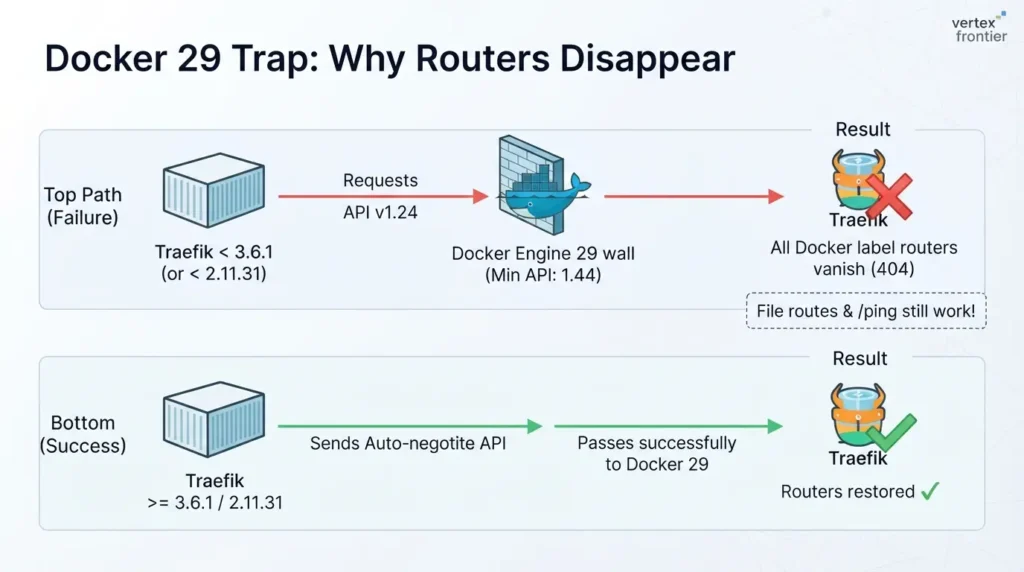
If every Docker-label router disappeared at the same moment, don't debug your labels. Debug the connection between Traefik and Docker.
Docker Engine 29 raised the minimum API version it accepts to 1.44, according to Docker's release post. Traefik releases before 3.6.1 asked for an older version, so the Docker provider couldn't talk to the daemon and the label-based routers never appeared. Traefik's changelog lists the fix in v3.6.1, released November, 2025, and in v2.11.31 for the v2 line. Both negotiate the API version automatically. Upgrade Traefik. Don't downgrade it.
Case study: every container returned 404 after an upgrade
- Challenge. In November 2025, Traefik issue 12248, titled "Traefik 3.6 404s all containers," reported that every container answered 404 after the upgrade, including Traefik's own dashboard. The reporter ran Traefik under Podman, and a maintainer closed the issue as a likely duplicate of issue 12253.
- Action. Issue 12253, titled "client version 1.24 is too old," held the cause. Docker 29.0.0 refuses API versions below 1.44, and Traefik's Docker client asked for 1.24. Traefik v3.6.1 shipped automatic negotiation on November 13, 2025, and the v2 line got it in v2.11.31.
- Outcome. Upgrading fixed it for reporters in 12253. One commenter saw v3.1.7 fail with Docker 29 and v3.6.6 work. On 12248, a commenter reported that rolling back to v3.5.4 didn't help, and that file-based routes kept working while label-based routes failed. Another said 404s persisted on 3.6.2 and suspected a different cause, so not every report in 12248 is the Docker 29 case.
- Lesson. When all Docker-label routers vanish together while file-based routes survive, check the Docker connection first. One commenter in 12253 also reported that Traefik's /ping endpoint stayed healthy while the provider failed, so a
/pingcheck won't catch this. Read the provider errors in the logs.
How to recover from the Docker 29 trap
- Confirm the cause. Run the log command from the start of this section. Look for
clientversion 1.24 is too old, or a similar line that mentions a minimum API version. - Upgrade Traefik. Move to v3.6.1 or later, or v2.11.31 or later on the v2 line. v3.7 was the newest line when I reviewed the changelog. Run the commands below in the directory of your Traefik Compose project.
- Verify. Repeat step 1 of the triage, then check that your routers are back in the dashboard.
- Only if you can't upgrade yet, use Docker's temporary override below, restart Docker, and remove the override once Traefik is updated.
Bash:
# In your Traefik project directory, after raising the image tag to v3.6.1 or newer
docker compose pull traefik
docker compose up -d traefik
The override is documented in Docker's release post. It sets the daemon's minimum API version back, through daemon.json or the DOCKER_MIN_API_VERSION environment variable. Treat it as a bridge, not a fix.
JSON (/etc/docker/daemon.json, temporary workaround):
{
  "min-api-version": "1.24"
}
Cause 2: The router exists, but its rule never matches
Now the router is listed, and the 404 persists. Time to read the rule like a regular-expression engine would.
The Traefik v3 syntax change
Traefik's migration guide says the HostRegexp, HeaderRegexp, PathRegexp, QueryRegexp, and HostSNIRegexp matchers now use Go's regexp syntax. In v2, a pattern like {subdomain:[a-z]+}.mymail.com used a named placeholder. In Go, those braces are ordinary characters. The pattern still compiles, but it never matches a real hostname. Nothing logs an error, which is why it hurts.
Case study: valid rule, no error, 404:
- Challenge. In February 2025, a Traefik user reported that routes to a Mailcow host, defined in the file provider, stopped working after Traefik and Mailcow were updated. The dashboard still showed the routers, the certificate, and the service. The browser got a 404, and the access log read
404with19bytes. Pointing the service at google.com changed nothing. - Action. Another member recognized the Traefik v3 regex change and rewrote the rule in Go regexp form:
[a-z]+\.mymail\.com. The author also had to remove the YAML double quotes, so the backslashes weren't consumed. - Outcome. The routes worked again, according to the author.
- Lesson. A rule can be valid and still never match. The 19 bytes said "no router matched," and the unchanged 404 after swapping the service proved the request never reached it.
Here's the same fix in both common places:
YAML (dynamic file, v3 syntax):
# v2 style: compiles in v3, but never matches a real hostname
rule: 'HostRegexp(`{subdomain:[a-z]+}.mymail.com`)'
# v3 style: Go regular expression, dots escaped, anchored
rule: 'HostRegexp(`^[a-z]+\.mymail\.com$`)'
YAML (Docker labels in docker-compose.yml):
labels:
- "traefik.http.routers.mailcow.rule=HostRegexp(`^[a-z]+\\.example\\.com$$`)"Single-quoted YAML keeps a backslash as written. Double-quoted YAML needs \\. to produce \., as in the label above. Compose also reads $ as variable interpolation, so a literal anchor in a label must be written $$. Run docker compose config and read the label you actually ended up with.
Go regular expressions match anywhere inside the string unless you anchor them with ^ and $. For routing, anchor them. We tested the unanchored pattern [a-z]+\.example\.com, the form Traefik's own rule examples use, with an RE2 engine. It also matches evil.example.com.attacker.org. Traefik compiles the pattern and checks it with a substring match.

The migration guide has more changes that hit copied v2 rules. Path and PathPrefix no longer accept placeholders. A matcher such as Host that took several values in v2 now takes one, so combine them with ||. If you can't migrate rules yet, Traefik offers a bridge. It's deprecated, and the guide says it goes away in the next major version.
YAML (static configuration, temporary bridge):
core:
  defaultRuleSyntax: v2
# Or per router, as a label:
# - "traefik.http.routers.mailcow.ruleSyntax=v2"
Finally, the plainest rule failure is the visitor's. Browsing to the server's IP address sends the IP as the Host, which matches no rule. That's correct behavior, and it falls under the FAQ's fourth situation. Test with the hostname, as in step 1.
Cause 3: The entrypoint and TLS don't line up
A router counts as an HTTPS router only when it has TLS settings. Without them, HTTPS requests fall into the FAQ's third situation: an HTTPS request on an entrypoint with no HTTPS router. The answer is a 404.
The official label sample is a good illustration. Its main router sets tls=true and a certificate resolver. Its autodiscover and autoconfig routers set only tls.certresolver, which is enough on its own. Copy one pattern or the other, but make sure a TLS setting exists.
The plain-HTTP side has its own trap. With no router on the web entrypoint and no redirect, an HTTP request gets a 404. Redirect at the entrypoint instead of hand-writing a router:
YAML (static configuration):
entryPoints:
  web:
    address: ":80"
    http:
      redirections:
        entryPoint:
          to: websecure
          scheme: https
  websecure:
    address: ":443"
Both options come from Traefik's entrypoint reference.
Cause 4: Names you never routed
Mailcow's web server answers to more names than the one in your browser tab. In mailcow's nginx template, the server names are MAILCOW_HOSTNAME, plus autodiscover.*, autoconfig.*, and mta-sts.*. Anything in ADDITIONAL_SERVER_NAMES is added to that list.
Traefik doesn't know that. In the official sample, the main router matches only mail.domain.com. Two more routers each match an exact host and an exact path: /mail/config-v1.1.xml on the autoconfig name, and /autodiscover/autodiscover.xml on the autodiscover name. Any other host or path hits Traefik's 404, by design.

That's why one Mailcow forum user, following the Traefik v2 page in September 2023, could report that the web UI worked while autodiscover and autoconfig returned Traefik's 404 pages. The only reply asked for the Traefik logs, and the thread records no resolution, so the evidence here is limited to the symptom. The mechanism, though, follows from the routers.
Check each name the same way you checked the main one:
Bash:
curl -sk -o /dev/null -w '%{http_code} %{size_download}\n' \
  --resolve autoconfig.example.com:443:SERVER_IP https://autoconfig.example.com/mail/config-v1.1.xml
curl -sk -o /dev/null -w '%{http_code} %{size_download}\n' \
  --resolve autodiscover.example.com:443:SERVER_IP https://autodiscover.example.com/autodiscover/autodiscover.xml
Anything except 404 19 means a router matched. The DNS records these names need are covered in our mailcow DNS setup guide. If you publish an MTA-STS policy, its mta-sts host needs a route as well. Mailcow's MTA-STS guide describes the host it expects, and a reply in the Traefik thread below adds that host to the frontend router.
Router missing? Check discovery: the label, the container state, the Docker connection. Router present? Check the rule, the entrypoint, the TLS setting, and every name Mailcow serves.
When nginx-mailcow says 404
A 404 with a small HTML page isn't Traefik's. It means your proxy did its job, and nginx-mailcow is the one saying no.
By default Traefik forwards the original Host header to the backend (service reference), so nginx-mailcow sees the same name the browser used. That shifts your question. It's no longer "did Traefik route this?" It becomes "what did Traefik deliver, and does nginx-mailcow have anything for it?"
The fastest bisect is to compare a request that goes through Traefik with one that doesn't. Reuse the step 5 command, and ask for the path that fails:
Bash:
docker exec traefik wget -S -O /dev/null --header 'Host: mail.example.com' http://nginx-mailcow:8080/admin/ 2>&1 | head -5A Mailcow maintainer used the same idea from the other side: ask nginx-mailcow itself, from inside its own container.
Bash:
cd /opt/mailcow-dockerized
# Use your HTTPS_PORT here. 8443 is the value in mailcow's reverse-proxy overview.
docker compose exec nginx-mailcow curl -sk -o /dev/null -w '%{http_code}\n' https://127.0.0.1:8443/admin
If the direct request returns what you expect, such as a 302 redirect, the backend is fine. The difference lives in what the proxy path changes: the Host header, a path-altering middleware (such as StripPrefix or a custom headers rule), or another proxy in front.
Case study: a 404 that came from nginx itself:
- Challenge. In March 2024, a Mailcow user reported that the web UI loaded, but the admin page returned a 404. The nginx-mailcow access log showed the request with a 404 and 146 bytes. Nginx Proxy Manager forwarded traffic to nginx-mailcow. That isn't Traefik, but the layers are the same.
- Action. A Mailcow maintainer asked the user to request the admin path from inside the container, where his own test returned a 302 redirect. The user also connected straight to mailcow's nginx over a VPN, and it worked.
- Outcome. Direct access worked, so the user suspected the reverse-proxy path. The posts we retrieved record no final fix, so the cause stays unproven.
- Lesson. A 404 of 146 bytes in nginx-mailcow's log tells you the proxy delivered the request. Compare direct against proxied, and the difference points at what the proxy changed.
A small HTML 404 means Traefik routed the request. Bisect direct versus proxied, then check the Host header, the path, and any middleware.
Beyond 404: Fixing Mailcow 502, 504, and 301 Redirects Behind Traefik
Fix a 404 and its neighbors may be next. That's good news. Traefik is now routing the request, and the failure has moved to the service checkpoint.
One boundary rule keeps this whole article short: Traefik owns the HTTP plane, and mailcow owns SMTP, IMAP, and POP3. We cover that design in Step 3 of the Production Mailcow Setup guide. A 404 is almost always an HTTP-plane failure.
Four mechanics cause most of what you'll see next.
The port: nginx-mailcow listens on HTTP_PORT, inside the container too
In mailcow's docker-compose.yml, the published port uses the same number on both sides:
YAML (mailcow docker-compose.yml, excerpt):
ports:
  - "${HTTPS_BIND:-}:${HTTPS_PORT:-443}:${HTTPS_PORT:-443}"
  - "${HTTP_BIND:-}:${HTTP_PORT:-80}:${HTTP_PORT:-80}"
And in the nginx template, the listen lines use HTTP_PORT and HTTPS_PORT only. So when a Traefik service says port 8080, nginx-mailcow must actually listen on 8080, which means HTTP_PORT=8080 in mailcow.conf. The community-supported Traefik page tells you to read mailcow's reverse-proxy overview first, and that overview is where HTTP_PORT=8080 comes from. Skip it, and port 8080 doesn't exist. Traefik gets "connection refused" and returns a 502.
The bind address: what it actually does
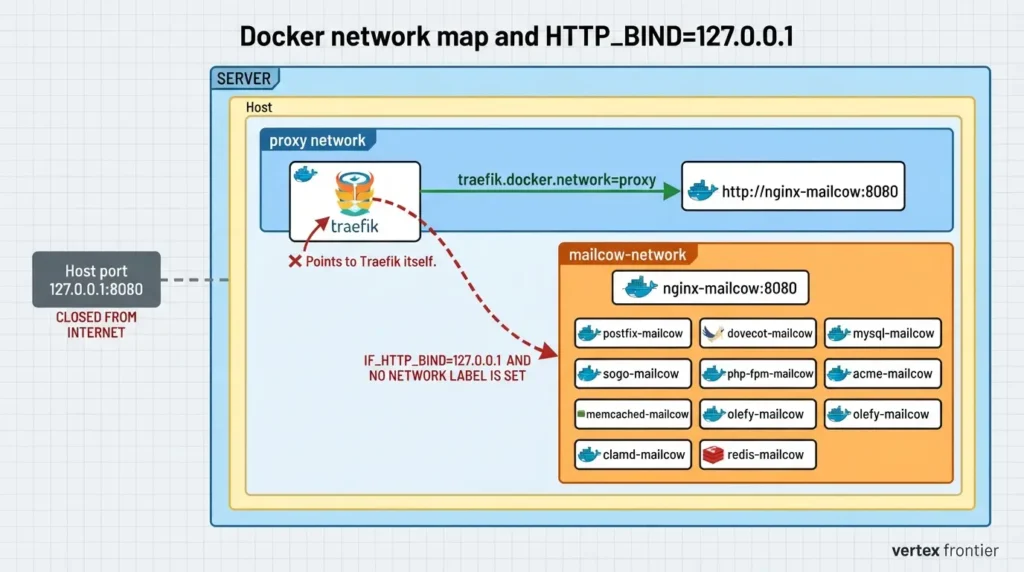
One explanation says HTTP_BIND=127.0.0.1 breaks Traefik, because nginx supposedly binds to the container's loopback. The source doesn't support it. Search the compose file and the nginx templates, and HTTP_BIND and HTTPS_BIND appear only in the ports: mapping above. That mapping decides which host address the port is published on. The nginx listen lines contain no address at all.
mailcow's overview says these settings also change the bindings inside the nginx container. What changes inside is the port number.
So when Traefik runs as a container on the same Docker network, it connects straight to nginx-mailcow:8080, and the host-side bind never comes into play. The bind matters only when Traefik reaches mailcow through a published port.
Which address should Traefik dial?
The right service URL depends on where Traefik runs and how it reaches mailcow:
| How Traefik reaches mailcow | Service URL | What the bind must allow | Basis |
|---|---|---|---|
| Traefik in a container, on a Docker network shared with nginx-mailcow | http://nginx-mailcow:8080 | Nothing. The host binding isn't used, so keep loopback | Traefik v3 page and the compose file |
| Traefik with host networking | http://127.0.0.1:8080 | Loopback. HTTP_BIND=127.0.0.1 works | Docker host networking |
| Traefik in a container, through the host's published port | http://HOST_IP:8080 | The bind must be reachable from the container, so not loopback. Firewall that port | A Mailcow forum reply |
Docker provider with useBindPortIP | The container's published binding | The same limits as the row above | Docker provider reference |
Setting HTTP_BIND= and HTTPS_BIND= to nothing publishes the HTTP and HTTPS ports on every host interface. It doesn't make Traefik's container-to-container route work any better, because that route never used the host binding. mailcow's overview recommends a loopback address, which keeps those ports off public interfaces. The IP bindings page explains the variables.
For every address in your config, ask who dials it, and from where. Traefik dials the service URL from inside its own container, so it needs a name that container can resolve and a port the backend listens on. The host dials a published port, so the bind address matters there. Mixing the two views is behind several wrong explanations in this area.
The hostname: container name versus service name
The dynamic-file sample points at http://mailcow-nginx-mailcow-1:8080. That container name only exists if your Compose project is called mailcow. A freshly generated mailcow.conf sets COMPOSE_PROJECT_NAME=mailcowdockerized, so the real name is mailcowdockerized-nginx-mailcow-1. Copy the sample, and the name doesn't resolve, which also ends in a 502.
Compose gives every service its service name as a network alias, so nginx-mailcow resolves on any network the service joins. You can also read the real name with docker ps.
Case study: 127.0.0.1 inside a container:
- Challenge. In May 2025, a Mailcow user ran Traefik v2.11 in its own Compose project on the same VM as Mailcow, following the Traefik v2 page. With
HTTP_PORT=8080andHTTP_BIND=127.0.0.1, the service URLhttp://127.0.0.1:8080gave 404 errors. - Action. The replies split. One advised leaving Docker's networks alone, using the host's IP, and changing only the port. Others showed a shared Docker network with
traefik.docker.network, and one noted that a 404 without any styling is most likely Traefik's, so check its logs. The user first removed the bind and tried the VM's IP, which still returned 404, and then switched the URL tonginx-mailcow:8080. - Outcome. The container name on the shared network worked, according to the user.
- Lesson. A service URL is resolved from inside Traefik's container, where
127.0.0.1means Traefik itself. One detail stays open: by Traefik's own code a refused connection should be a 502, so the 404 errors the user saw may have come from another layer. The thread has no access-log byte counts, which is exactly what step 1 captures.
The networks: Traefik may dial the wrong one
If nginx-mailcow sits on more than one network, Traefik has to choose which address to dial. The Docker provider reference describes traefik.docker.network as the per-container override. If the label names a network the container isn't on, the provider's source logs a warning and falls back to the container's first network. The result is a 5xx, not a 404.

Check that Traefik and nginx-mailcow actually share a network:
Bash:
cd /opt/mailcow-dockerized
docker inspect "$(docker compose ps -q nginx-mailcow)" --format '{{range $n, $net := .NetworkSettings.Networks}}{{$n}} {{$net.IPAddress}}{{"\n"}}{{end}}'
docker inspect traefik --format '{{range $n, $net := .NetworkSettings.Networks}}{{$n}}{{"\n"}}{{end}}'
At least one network name must appear in both outputs. That's the one traefik.docker.network should name.
The redirect: when the port only redirects
Not every near miss is a 5xx. In mailcow's nginx template, when HTTP_REDIRECT is on, the server listening on HTTP_PORT returns a 301 to HTTPS for every request, apart from certificate validation and the MTA-STS policy file. A freshly generated mailcow.conf sets HTTP_REDIRECT=y. If Traefik ends TLS and forwards plain HTTP to that port, the browser receives redirects instead of the interface, and often loops.
That's our reading of the template, so verify it on your own system. Run the step 5 command. A 301 with an https Location header confirms it. In that template, turning HTTP_REDIRECT off makes the main web server listen on HTTP_PORT instead. Test the change before you rely on it.
Version traps at a glance
Here's how those traps line up. The newest Traefik line was v3.7 when I reviewed the changelog, so none of these rows is a reason to stay on an old release.
| What changed | Applies to | Symptom | Fix | Source |
|---|---|---|---|---|
| Regex matchers use Go syntax. Placeholders are gone, and matchers take one value | Traefik v3.0 and later | 19-byte 404, no error | Rewrite rules. The v2 bridge is deprecated | Migration guide |
| Docker 29 raised the minimum API version to 1.44 | Docker 29+ with Traefik before 3.6.1 (before 2.11.31 on v2) | Every Docker-label router missing, including the dashboard | Traefik 3.6.1 or later (2.11.31 on v2). A temporary min-api-version override works too | Docker release post and Traefik changelog |
nginx listens on HTTP_PORT inside the container | Every mailcow release with this compose layout | 502 when the service port differs | Make the service port equal HTTP_PORT | docker-compose.yml and nginx template |
Default Compose project name is mailcowdockerized | A newly generated mailcow.conf | 502 "no such host" with the sample's container name | Use the service name nginx-mailcow | Setup script and Traefik v3 page |
HTTP_REDIRECT=y turns the HTTP port into a redirector | A newly generated mailcow.conf | 301 or a redirect loop instead of the UI | Test the direct request, then forward to HTTPS or change the setting | nginx template |
A 502 or 504 after a 404 is progress. Check the port, then the hostname, then the shared network, then the redirect. Leave the bind address alone unless you route through a published port.
Before and after: four defects, one repair ladder
Let's string the mechanics together. The scenario below is constructed from the documented behavior in this article. It isn't a recorded incident, and your exact statuses may differ. It shows how one broken override hides its faults behind each other.
Here is the config as found:
YAML (docker-compose.override.yml, before):
services:
  nginx-mailcow:
    labels:
      - "traefik.http.routers.mailcow.rule=HostRegexp(`{sub:mail}.example.com`)"
      - "traefik.http.routers.mailcow.entrypoints=websecure"
      - "traefik.http.routers.mailcow.tls.certresolver=myresolver"
      - "traefik.http.services.mailcow.loadbalancer.server.port=8080"
    networks:
      mailcow-network:
        aliases:
          - nginx
      proxy:
networks:
  proxy:
    external: true
# mailcow.conf still has the default HTTP_PORT=80
And the same file, repaired:
YAML (docker-compose.override.yml, after):
services:
  nginx-mailcow:
    labels:
      - "traefik.enable=true"
      - "traefik.docker.network=proxy"
      - "traefik.http.routers.mailcow.rule=Host(`mail.example.com`)"
      - "traefik.http.routers.mailcow.entrypoints=websecure"
      - "traefik.http.routers.mailcow.tls=true"
      - "traefik.http.routers.mailcow.tls.certresolver=myresolver"
      - "traefik.http.services.mailcow.loadbalancer.server.port=8080"
    networks:
      mailcow-network:
        aliases:
          - nginx
      proxy:
networks:
  proxy:
    external: true
# mailcow.conf now has HTTP_PORT=8080, HTTP_BIND=127.0.0.1, and HTTP_REDIRECT=n
Now the ladder. Each row is one change, followed by what step 1 would return:
| Step | Change | Step 1 returns | Why |
|---|---|---|---|
| 0 | As found | 404 19 | exposedByDefault is false and traefik.enable=true is missing, so Traefik never created the router |
| 1 | Add traefik.enable=true | 404 19 | The router exists now, but the v2 placeholder rule matches no real hostname |
| 2 | Rewrite the rule as Host(...) | 502 | The router matches. The service port is 8080, but nginx-mailcow listens on 80, so the connection is refused |
| 3 | Set HTTP_PORT=8080, recreate the container | 502 or 504 | Port fixed. With two networks and no network label, Traefik may dial an address it can't reach |
| 4 | Add traefik.docker.network=proxy | 200 | Traefik dials the shared network, and HTTP_REDIRECT=n lets nginx serve the UI on HTTP_PORT instead of redirecting. |
Notice the shape. The 404 hid three more faults, and each fix moved the failure one checkpoint to the right. That's why the triage ends with "change one thing, then repeat step 1."
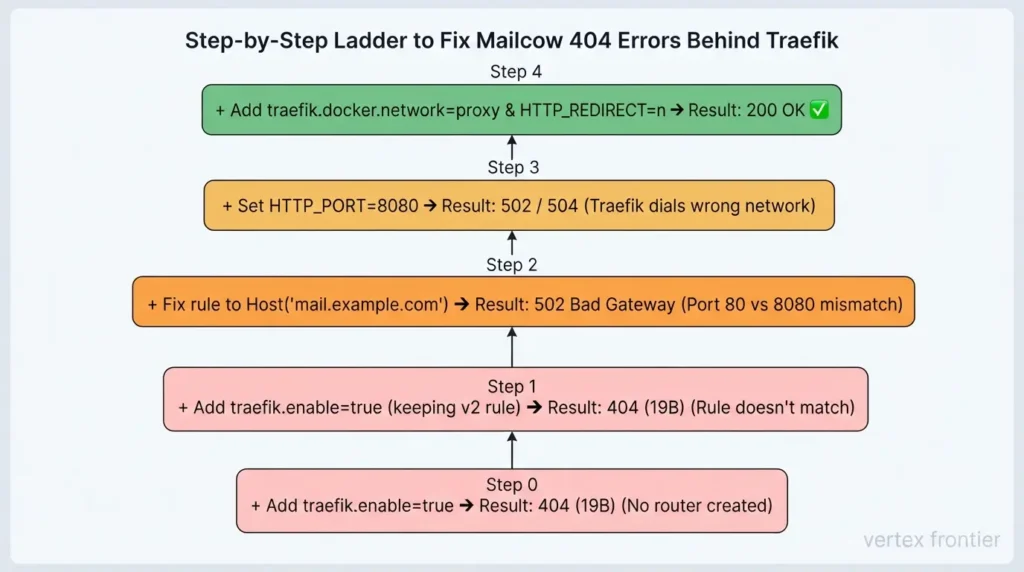
Four defects produced two different statuses. Fix in status order: 404 first, then 5xx, then redirects.
How to know it's really fixed
Passing step 1 on the main hostname isn't the finish line. mailcow serves more names than that, and an upgrade can break all of them at once.
Edit safely first. Copy docker-compose.override.yml before you change it, run docker compose config to read the final result, and apply the change with docker compose up -d in the project you edited. If the result is worse, restore the copy and run docker compose up -d again.
Then check every row of this table:
| Check | Pass looks like |
|---|---|
| Main hostname (triage step 1) | Not 404 19, and no 5xx. A 200 or a redirect |
| Plain HTTP (first command below) | A redirect whose Location header starts with https:// |
| Autoconfig and autodiscover (the names check in cause 4) | Anything except 404 19 |
| Certificate (triage step 3) | A subject that names your hostname, not TRAEFIK DEFAULT CERT |
| MTA-STS policy, if you publish one (second command below) | Policy text that begins with version: STSv1 |
| After every Traefik, Docker, or mailcow upgrade | Re-run every row. The Docker 29 case shows that one upgrade can remove every router at once |
Two of those checks need commands you haven't seen yet:
Bash:
# Plain HTTP side: read the status line and the Location header
curl -sI --resolve mail.example.com:80:SERVER_IP http://mail.example.com/
# MTA-STS policy, only if you publish one (mailcow generates it dynamically)
curl -sk --resolve mta-sts.example.com:443:SERVER_IP https://mta-sts.example.com/.well-known/mta-sts.txt
When not to use Traefik in front of Mailcow
Here's the uncomfortable question. How many of these 404s exist only because a layer was added?
mailcow's own docs label the Traefik v3 page as community-supported. On a host where mailcow owns ports 80 and 443, nginx-mailcow already answers to MAILCOW_HOSTNAME, autodiscover.*, autoconfig.*, and mta-sts.*. Its built-in ACME container handles certificates. Put Traefik in front, and you recreate that work by hand: one router per name, a certificate hand-off to Postfix and Dovecot, rule syntax that changes between major versions, and a shared Docker network.
Each hand-off is a place to get a 404.
Traefik earns that cost in some setups:
- Other HTTP applications need ports 80 and 443 on the same host.
- You want one place to manage certificates for many apps.
- You already run Traefik, and you accept the hand-offs.
Without one of those reasons, direct ingress is a legitimate production choice. It also doesn't make verification harder. Our Mailcow production-readiness verification guide doesn't assume a proxy, and its seven layers apply to both topologies.
This isn't an argument against Traefik. It's an argument for knowing what you're paying for.
What a web 404 doesn't touch
TLS ends at Traefik for the web interface. Mail protocols are separate. The Traefik v3 page sets SKIP_LETS_ENCRYPT=y, then uses a certs-dumper container that copies Traefik's certificates into mailcow's SSL directory and restarts Postfix and Dovecot. A 404 on the web UI says nothing about SMTP delivery. The exception is an unrouted mta-sts host, which breaks the policy fetch. For SMTP encryption itself, read our MTA-STS vs DANE comparison.
Common mistakes and how to avoid them
These are ordered by where they strike in the request path, not by frequency. We found no public data that ranks them.

Testing with the server's IP address
The IP becomes the Host, which matches no rule.
Fix: use curl --resolve with the real hostname.
Copying v2 rules into v3
Placeholders and multi-value matchers stop working quietly.
Fix: rewrite them, then read the final labels with docker compose config.
Forgetting traefik.enable=true
With exposedByDefault false, the router never exists.
Fix: add the label, and check the dashboard.
Labeling the wrong service
mailcow's service is nginx-mailcow, not nginx.
Fix: put the labels on the real service key.
Pointing at the wrong port
Traefik's service port must equal HTTP_PORT.
Fix: run the direct test from the Traefik container.
Trusting the sample's container name.
The default project name is mailcowdockerized.
Fix: use the service name nginx-mailcow.
Leaving two networks without a network label
Traefik may dial the wrong one.
Fix: set traefik.docker.network to the shared network.
Blanking HTTP_BIND to fix routing
It doesn't help, and it exposes a plain-HTTP port.
Fix: keep the loopback bind unless you route through a published port.
Pairing Docker 29 with a Traefik release before 3.6.1, or downgrading Traefik
Fix: upgrade Traefik to 3.6.1 or later (2.11.31 on the v2 line).
Routing only the main hostname
Autodiscover, autoconfig, and MTA-STS names get Traefik's 404.
Fix: route each name the way mailcow's nginx expects.
Next Steps After Fixing Your Mailcow 404
A Mailcow 404 behind Traefik is never "just a 404." It's an answer with a voice. Plain text and 19 bytes means Traefik found no router. A small HTML page means nginx-mailcow got the request. A 5xx means Traefik routed it and couldn't finish the trip.
So read the status, the size, and the certificate first. Then open one checkpoint, change one thing, and run the first command again.
Once the 404 is gone, confirm the rest of the stack. Our walkthrough of how to verify Mailcow is production-ready covers the seven layers. If you're starting fresh and want to avoid these failure modes from the beginning, the guide to setting up Mailcow with Traefik covers the boundary design that prevents most of them.
One more setting belongs on your checklist. mailcow's overview says it trusts the default gateway IP as a proxy, and the compose file exposes a TRUSTED_PROXIES variable for nginx-mailcow. A reply in the Traefik thread reminds Traefik users to add Traefik to it, so mailcow sees real client addresses. And remember that a working web interface says nothing about delivery. Our guide to building a self-hosted email server without landing in spam covers that side.
FAQs: Fix mailcow 404 errors behind traefik
Why does Traefik return a 404 for Mailcow when the dashboard shows the router?
The dashboard lists routers that exist. A 404 says this particular request matched none of them. Common reasons are a Host that isn't in the rule (such as the server's IP), a v2-style HostRegexp placeholder, a router on the wrong entrypoint, or a router without TLS settings answering an HTTPS request. Test with curl --resolve and compare the real Host with the rule.
What changed in Traefik v3 that breaks HostRegexp rules?
Traefik v3 reads HostRegexp and its sibling matchers as Go regular expressions. The v2 placeholder form, {sub:[a-z]+}.example.com, no longer works as a placeholder. It compiles but never matches a real hostname, and nothing logs an error. Rewrite it as ^[a-z]+\.example\.com$. A deprecated v2 bridge exists while you migrate.
How can I tell whether Traefik or Mailcow returned the 404?
Check the body size. Traefik's own 404 is the 19-byte plain-text line 404 page not found. nginx-mailcow's 404 is a small HTML page that ends with "nginx", which measured 146 bytes in a Mailcow forum thread. Confirm it by looking at which service's access log recorded the request. Traefik writes access logs only when you enable them.
Should the Traefik service URL use 127.0.0.1 or the container name?
When Traefik runs in a container, use the service name nginx-mailcow on a Docker network both containers share, with the port set to HTTP_PORT. Inside the Traefik container, 127.0.0.1 means Traefik itself. Loopback only works when Traefik uses host networking or routes through a published port.
Why does Traefik return 404 on HTTPS while HTTP works?
A router without TLS settings doesn't count as an HTTPS router. Traefik's FAQ lists this as a 404 case: an HTTPS request arrives on an entrypoint that has no HTTPS router. Add tls=true or a tls.certresolver to the router, and confirm the router uses the websecure entrypoint.
Why do autodiscover and autoconfig return 404 when the Mailcow web UI works?
The official sample routes them with separate rules that match an exact host and an exact path. Any other host or path gets Traefik's 404. Check the exact URLs, the names in your rules, and the DNS records for those names. If you publish MTA-STS, the mta-sts host needs a route too.
Why does curling the server IP return a 404 when the browser works?
Traefik chooses routers by the Host header. Requesting the IP sends the IP as the Host, which matches no rule, so Traefik returns its 404. That's expected. Use curl --resolve mail.example.com:443:SERVER_IP https://mail.example.com/ to send the real hostname.
Does Docker 29 break Traefik with Mailcow?
It broke Traefik releases before 3.6.1. Docker 29 raised its minimum API version to 1.44, and those Traefik releases asked for an older one, so Docker-label routers never appeared and everything returned 404. Traefik 3.6.1 negotiates the version automatically, and so does 2.11.31 on the v2 line. Upgrade Traefik. A commenter on the GitHub issue reported that downgrading to 3.5.x didn't help.

Was this article helpful?








[…] web route still answers with a 404, do not stack more labels on the problem. Our dedicated guide to fixing Mailcow 404 errors behind Traefik shows how to read the response itself, its size, body, and certificate, and name the exact layer […]
[…] ports 80 and 443 correctly but the web UI still hands back a 404, the fault is one layer up: the Traefik 404 diagnosis guide for Mailcow shows how to tell a proxy-level 404 from an nginx-mailcow 404 in under a […]
[…] the proxy can answer the request itself with a bare 404 before Mailcow ever sees it. Our guide to fixing Mailcow 404 errors behind Traefik explains how the size and body of the response reveal whether Traefik or nginx-mailcow produced […]