


A Mailcow installation can be online in an afternoon. That is not the same thing as having a production mail system.
The difference appears after the first successful login: a certificate renews while another service owns port 80, a provider blocks outbound SMTP, a Docker network is missing from the proxy, a backup exists but has never been restored, or an update collides with a local change. These are not exotic failures. They are boundary failures, places where Mailcow, Docker, Traefik, DNS, the host, and the mail ecosystem meet.

This guide treats production as a set of verifiable boundaries, not a single Compose command. It focuses on a single-server Mailcow deployment on Linux, with Docker Compose and Traefik at the web edge. Exact commands and settings remain version- and environment-sensitive, so check the current Mailcow documentation and the Traefik documentation before applying changes.
Scope and version boundary
This is an architecture and operations guide, not a universal copy-paste recipe. It assumes a current Mailcow Dockerized release, Traefik v3.x, Linux, public DNS, and a single host. Before production use, pin the exact Mailcow revision, Traefik version, Docker/Compose implementation, operating system, provider, and certificate method in your change record. If your topology differs, keep the principles but re-verify every listener, label, network, and certificate hand-off.
Key Takeaways
Click any topic to expand or collapseTraefik Traffic Ownership & Routing Boundaries
Traefik should own only the traffic you deliberately give it. Webmail and autodiscover/autoconfig are HTTP concerns; SMTP, submission, IMAP, and POP3 are mail-service concerns with different routing and TLS assumptions.
Explicit Certificate Management Ownership
Certificate ownership must be explicit. Decide which component obtains, stores, renews, and distributes certificates before you write container labels or mount volume files.
Layered Security Infrastructure
Security is layered. Host access control, Docker port exposure, Mailcow administration, DNS authentication records (SPF, DKIM, DMARC), and sender IP reputation are distinct, complementary controls.
Disaster Recovery Testing Beyond Backups
A backup file is not a complete recovery plan. Mailcow’s restore process requires an initialized, running Mailcow environment on a new node; test and document that recovery path prior to an outage.
Production Readiness Verification
Production deployment requires repeatable verification. A setup is operational only when mail delivery flow, automatic certificate renewal, storage capacity, ISP constraints, updates, and restore rehearsals are routinely validated.
Audit your DNS, Traefik edge, TLS, storage, and recovery boundaries before going live. Instant offline file — no email or sign-up required.
The production model: one system, several control planes
Mailcow is not one container. It is a composed platform that brings together mail transport, mailbox access, webmail/groupware, web services, anti-spam, antivirus, DNS support, storage, databases, and caches. The official Mailcow installation documentation explains the supported installation path; the operational challenge is deciding how those components interact with the rest of the host.

A useful mental model is to separate the deployment into five control planes:
- Identity and DNS: the hostname, A/AAAA records, MX, reverse DNS/PTR, SPF, DKIM, DMARC, and optional TLSA/DANE records.
- Mail transport: inbound SMTP, submission, outbound delivery, queue behavior, and recipient-side reputation.
- Mailbox access: IMAP/IMAPS, POP3/POP3S where needed, and client authentication.
- Web edge: the Mailcow UI, webmail, autodiscover/autoconfig, ACME challenges, and any other HTTP service on the host.
- Operations: updates, backups, restores, logs, disk capacity, alerts, and the ability to explain what changed.
Traefik mainly belongs to the fourth plane. It may also participate in selected TCP routing, but placing every Mailcow protocol behind the same HTTP mental model is where many “works in the demo” configurations become difficult to operate.
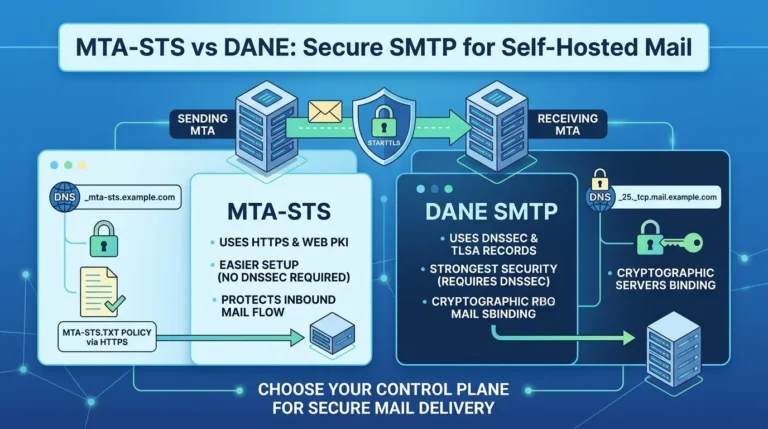
The transport-security choice deserves its own review because MTA-STS and DANE protect the SMTP delivery path, not the Traefik web edge. For the trust-model, DNSSEC, certificate, rollover, and enforcement differences, see MTA-STS vs DANE for self-hosted mail.
| Boundary | What it owns | What to verify | Typical failure signal |
|---|---|---|---|
| DNS | Names and mail discovery | A/AAAA, MX, PTR, SPF, DKIM, DMARC, optional TLSA | Clients cannot discover the service or recipients distrust mail |
| Traefik | Selected HTTP/TCP entry points and certificates | Entrypoint, router rule, service port, Docker network, resolver | 404, wrong certificate, router not created, connection timeout |
| Mailcow | Mail services and persistent application state | Supported listeners, generated configuration, volumes, update path | Mail flow failure, missing mail, broken UI, inconsistent service state |
| Host firewall | Host-level exposure | Published ports, Docker interaction, SSH policy, IPv6 policy | A service is reachable when it should not be, or unreachable when it should |
| Recovery | Reconstruction of data and service state | Off-host copies, restore order, secrets, DNS cutover, acceptance tests | A “successful” backup cannot produce a usable server |
The deployment becomes easier to debug when every port, certificate, secret, and persistent volume has one named owner.
Step 1: Preflight the host and provider before installing Mailcow
The cheapest production incident is the one you prevent before cloning the repository.
Choose a dedicated shape

Mailcow’s resource needs depend on enabled services, message volume, mailbox count, antivirus and anti-spam workload, storage, and operational headroom. Community reports show both multi-year use on a 4 GB VM and concerns about Mailcow being more memory-intensive than lighter alternatives. Neither is a universal sizing rule. Treat these reports as context, not a benchmark.
For a serious deployment, prefer a dedicated VPS or host with SSD-backed storage, a stable public IPv4 address, and enough memory that normal activity does not consume the entire system. Confirm whether the provider supports outbound SMTP on port 25 and whether it will set a meaningful PTR record. An immaculate Docker configuration cannot fix a blocked port or a poor sending reputation.
And if that host is your own Proxmox node rather than a rented VPS, the storage type matters just as much as the SSD, our Proxmox storage guide (ZFS, Ceph, LVM, NFS) explains why putting VM disks on shared NFS is a classic mistake.
Verify DNS before containers

Create the hostname you will actually use and ensure it resolves correctly before you troubleshoot Mailcow. The Mailcow DNS prerequisites cover the records the project expects. At minimum, verify:
- The Mailcow hostname resolves to the intended public address.
- The MX record points to the correct mail hostname.
- Reverse DNS/PTR is set by the provider and corresponds to the sending identity.
- IPv6 is either correctly configured end to end or deliberately disabled according to the supported Mailcow procedure.
- SPF, DKIM, and DMARC are planned before the first production message.
- Autodiscover/autoconfig names are included if your clients require them.
A practical preflight is to test from outside the server’s network. Check both A and AAAA records, inspect the MX chain, verify PTR, and confirm that port 25 is reachable from a permitted external test point. Do not confuse “the web UI loads” with “the mail system can deliver.”
Establish SSH and host boundaries

Use SSH keys, disable password authentication after confirming key access, and restrict administrative access to the smallest practical source set. Keep the host and Docker packages on a supported update path. Do not paste secrets into shell history, screenshots, public tickets, or Compose labels.
The firewall deserves special care. Docker-published ports and host firewall rules do not always behave like a simple process listening directly on the host. The Docker packet-filtering documentation explains why Docker can affect firewall behavior and why administrators should understand the forwarding path instead of assuming that a familiar UFW rule is the complete policy. Test the externally visible ports after applying your firewall policy.
Preflight gate
Do not proceed to proxy debugging until DNS, PTR, port 25 policy, public reachability, storage capacity, and your SSH recovery path are known. This prevents an edge configuration from receiving blame for a provider or identity problem.
Step 2: Install Mailcow without turning the repository into a local fork
Use the supported Mailcow installation flow and keep local customization small, documented, and reversible. The current Mailcow documentation presents Docker Compose Plugin and standalone Compose syntax; choose the command variant that matches the installed tooling and keep it consistent .

A typical setup sequence is conceptually:
Bash:
# Illustrative sequence — confirm paths and prerequisites in the current Mailcow docs.
git clone https://github.com/mailcow/mailcow-dockerized /opt/mailcow-dockerized
cd /opt/mailcow-dockerized
./generate_config.sh
# Edit mailcow.conf only after reviewing the generated values.
docker compose pull
docker compose up -d
The sequence is deliberately conservative. Do not copy a third-party docker-compose.override.yml into production without checking which Mailcow services, networks, ports, and generated files it assumes. A configuration that worked with an older Compose schema or Traefik release may fail silently or create the wrong routing behavior today.
After the initial start, validate the Mailcow UI, service health, DNS checks, container logs, and disk use. Then record the exact Mailcow revision, Docker version, Compose implementation, Traefik version, operating system, and public hostname. This small inventory turns a future incident from “what changed?” into a question you can answer.
Do not treat generated configuration as disposable. Mailcow’s persistent data includes more than mailbox files. Configuration, secrets, databases, queues, certificates, and service state all belong in the operational model.
Step 3: Design the Traefik boundary before writing labels
Traefik’s Docker provider discovers containers and configures routers and services from Docker metadata. The Traefik Docker provider reference documents the provider’s configuration and the broader routing model. In a Mailcow deployment, the important decision is not “which label do I paste?” It is “which traffic is this router allowed to own?”
HTTP and mail TCP are different problems

Webmail, the Mailcow UI, and autodiscover/autoconfig are HTTP workloads. SMTP, submission, IMAP, and POP3 are mail protocols. Traefik has separate HTTP and TCP routing concepts; the Traefik routing documentation should be checked for the exact version and syntax you deploy.
A reverse proxy can make web ingress cleaner, but it does not remove the need to understand mail protocol behavior. Decide whether the mail services remain directly published by Mailcow, are passed through a TCP edge, or are handled by a different supported topology. Do not route them through an HTTP router simply because the web UI is already working.
| Choose direct Mailcow ingress when… | Choose Traefik at the web edge when… |
|---|---|
| The host is dedicated to Mailcow, you want the smallest number of moving parts, and Mailcow’s supported web exposure fits your needs. | The host already has shared HTTP ingress, you need central certificate management, or you can operate an explicit proxy-to-Mailcow boundary. |
| You cannot yet document who owns each port and how renewal is tested. | You can name the Docker network, backend port, router rules, certificate resolver, and rollback path before deployment. |
Use a port-ownership matrix
The matrix below is a design tool, not a universal port prescription. Mailcow’s current configuration and your chosen topology determine the final values.
| Traffic | Protocol class | Possible owner | Production question |
|---|---|---|---|
| Web UI / webmail | HTTP/HTTPS | Traefik → Mailcow web service | Is TLS terminated once, and is the backend port explicitly known? |
| Autodiscover / autoconfig | HTTP/HTTPS | Traefik → the correct Mailcow web route | Are host rules and paths tested with a real client? |
| Inbound SMTP | TCP | Mailcow/Postfix directly or a deliberate TCP edge | Can external senders connect, negotiate TLS, and deliver? |
| Submission | TCP with authentication/TLS | Mailcow/Postfix directly or deliberate TCP edge | Does a client authenticate without exposing an unintended service? |
| IMAP/IMAPS | TCP with TLS options | Mailcow/Dovecot directly or deliberate TCP edge | Are certificate names, TLS policy, and client settings aligned? |
Certificate ownership is a lifecycle, not a label

The current Mailcow Traefik v3 guide describes a community-supported approach in which Traefik handles web traffic, domain routing, and certificate management. It also shows disabling Mailcow’s built-in Let’s Encrypt handling, configuring Traefik, restarting services, and testing the web and autodiscover paths . Follow that guide’s current configuration rather than treating an old blog post as a drop-in template.
Before you deploy, answer five questions:
- Which component requests the certificate?
- Where is the ACME state stored, and who can read it?
- Which web entry point answers the ACME challenge?
- Which Mailcow services need certificate material, if any, after TLS termination?
- How will renewal trigger reloads or certificate distribution, and how will you know it succeeded?
A common failure pattern is a green certificate on one service and an insecure certificate on Mailcow. The root cause can be a missing Docker network, a service port mismatch, a router that never matched, or a certificate that Traefik obtained but Mailcow’s mail services never received. Inspect the proxy logs, router state, container networks, certificate storage, and the externally served certificate separately.
A safe Traefik implementation sequence
- Create or confirm the shared Docker network used by Traefik and the Mailcow web service.
- Confirm the backend web listener and whether Mailcow exposes it directly or through an internal port.
- Add one HTTP router for the primary Mailcow hostname.
- Add and test autodiscover/autoconfig routes only after the primary UI route works.
- Add TLS resolution and renewal handling.
- Restart the affected services using the current Mailcow documentation.
- Test from outside the host: browser, curl, a mail client, and a certificate inspection tool.
- Only then decide whether selected mail protocols need a TCP router.
This ordering gives each failure a smaller search space. If the primary web route is broken, adding six more labels will make the incident harder to read, not easier to solve.
Step 4: Add the proxy configuration without creating a hidden port conflict
The examples below are illustrative patterns, not a drop-in replacement for the current Mailcow Traefik v3 guide. Keep the generated Mailcow Compose files intact, use docker-compose.override.yml rather than editing docker-compose.yml, and substitute your real hostname, certificate resolver, and external Docker network. The current Mailcow guide uses an internal web-service port of 8080 in its Traefik example .
Mailcow settings: certificate ownership and bindings

If Traefik is the component terminating HTTPS, Mailcow’s current Traefik v3 guidance documents skipping Mailcow’s built-in ACME handling for that topology. The exact binding values depend on where Traefik runs. A containerized Traefik cannot reach a Mailcow service bound only to the host loopback address, so do not copy HTTP_BIND=127.0.0.1 blindly into a container-to-container design.
For a topology in which the Mailcow web service is exposed to the Docker network and Traefik reaches it internally, use the current Mailcow reverse-proxy example as the source of truth and record the chosen internal port. A simplified, version-sensitive settings block may look like this:
# mailcow.conf — illustrative; verify against the current reverse-proxy guide
SKIP_LETS_ENCRYPT=y
AUTODISCOVER_SAN=n

# Use the internal web port expected by your chosen proxy topology.
# Do not bind the service to 127.0.0.1 when Traefik runs in another container.
HTTP_PORT=8080
HTTPS_PORT=8443
HTTP_BIND=
HTTPS_BIND=
The blank bind values above are intentional placeholders for a Docker-network topology, not a universal security recommendation. If you use a host-level proxy instead, a loopback bind may be appropriate, but the host proxy and Mailcow port mappings must then agree. The Mailcow IP bindings documentation explains the binding format; verify the generated Compose mapping before restarting services.
A conservative docker-compose.override.yml pattern

The following pattern shows the ownership relationship: Traefik discovers nginx-mailcow on one named external network, routes HTTPS web traffic to the internal web port, and obtains certificates through its configured resolver. It intentionally does not pretend that SMTP, IMAP, or POP3 should use the same HTTP router.
YAML:
# docker-compose.override.yml — illustrative Traefik v3 pattern
# Replace proxy, mail.example.com, and myresolver with your values.
services:
  nginx-mailcow:
    expose:
      - "8080"
    networks:
      - proxy
    labels:
      - "traefik.enable=true"
      - "traefik.docker.network=proxy"
      - "traefik.http.routers.mailcow.rule=Host(`mail.example.com` )"
      - "traefik.http.routers.mailcow.entrypoints=websecure"
      - "traefik.http.routers.mailcow.tls=true"
      - "traefik.http.routers.mailcow.tls.certresolver=myresolver"
      - "traefik.http.routers.mailcow.service=mailcow-web"
      - "traefik.http.services.mailcow-web.loadbalancer.server.port=8080"

networks:
  proxy:
    external: true
Before applying it, confirm that the network is created and that the Traefik container joins the same network. Then inspect the merged configuration rather than guessing what Compose will do:
Bash:
docker network inspect proxy
docker compose config > /tmp/mailcow-effective-compose.yml
grep -A30 -n 'nginx-mailcow:' /tmp/mailcow-effective-compose.yml
The current community-supported Mailcow Traefik page also demonstrates explicit routes for autodiscover/autoconfig and certificate distribution to mail services. If clients or SMTP/IMAP listeners need certificates from Traefik, follow that guide’s cert-dumper and downstream-reload pattern instead of assuming the web certificate automatically covers every listener .
Do not copy this blindly
A label can be syntactically valid and still route to the wrong port, network, or certificate owner. Treat the snippet as a map of responsibilities. Validate the generated Compose model, Traefik dashboard or API, TLS handshake, web route, autodiscover path, and mail-client connections after every topology change.
Step 5: Choose an outbound SMTP relay when port 25 is unavailable
A provider may block outbound TCP/25 or restrict new accounts from direct delivery. In that case, the practical alternative is a sender-dependent transport: Mailcow hands selected outbound mail to a third-party relay, also called a smarthost. The current Mailcow relayhost documentation describes using the admin UI’s Configuration and Details → Routing → Add sender-dependent transport, entering the relay host and credentials, testing the relay, and assigning the transport to a domain .

This is not a way to hide poor sender identity. The relay provider will usually require domain verification, authenticated submission, and its own SPF/DKIM/DMARC or alignment steps. Keep the provider’s credentials out of public snippets and note that Mailcow’s documentation warns that relayhost credentials are stored in plain text in the relevant configuration path . Review the provider’s current security model before choosing a service such as Amazon SES, SendGrid, Mailgun, or Postmark.
A safe relay workflow is:
- Confirm whether direct outbound port 25 is actually blocked from the server.
- Create and verify the sending domain in the relay provider’s console.
- Add the relayhost in Mailcow’s Routing UI and test it with a controlled sender.
- Assign the sender-dependent transport to the intended domain rather than changing every domain by accident.
- Send a test message, inspect the Mailcow/Postfix logs, and verify the provider’s delivery event.
- Document the fallback plan if the relay provider is unavailable.
The relay changes the outbound path; it does not remove the need for correct PTR, SPF, DKIM, DMARC, TLS, abuse controls, queue monitoring, and a tested recovery plan.
Step 6: Harden the host, Docker edge, and Mailcow admin surface
Security hardening is most useful when each control has a threat and an observable test.
Host and Docker controls

Keep SSH access key-based and restricted. Patch the operating system and Docker components through a known maintenance path. Avoid exposing the Docker socket to more services than necessary; Traefik’s Docker provider needs access to Docker metadata, but that does not make the socket harmless. Use read-only mounts where they are supported by the chosen architecture, keep secrets out of labels and public repositories, and document every exception.
Review published ports from the outside. A service that is “not linked in Traefik” may still be reachable because of a host-published port. Conversely, a firewall policy may appear correct while Docker forwarding creates a different exposure path. The test is not the rule file; the test is the observed network surface.
Mailcow administration

Use strong, unique administrator credentials and enable the Mailcow account protections that your current release supports, including two-factor authentication where appropriate. Separate administrator access from routine mailbox administration. Keep the admin interface off broad public exposure when your topology allows it, but do not hide it behind an untested proxy rule that breaks emergency access.
Do not describe a deployment as “fully secure.” Security depends on configuration, patching, credentials, exposure, logs, and operator behavior. Mailcow’s documentation includes dedicated guidance for two-factor authentication, WebAuthn/FIDO2, firewall-related tasks, TLS, and service-specific hardening; use the current project pages for exact capabilities rather than relying on a generalized checklist.
Deliverability controls are not the same as host controls

SPF helps receiving systems evaluate authorized senders for a domain. DKIM provides a cryptographic signature that receivers can verify. DMARC connects domain alignment and receiver policy to those signals. Reverse DNS and IP reputation affect how receiving systems interpret a sending host. These controls improve the trust story for mail, but they do not replace patching, access control, or network segmentation.
Use Mailcow’s DNS checks and external validation tools after publishing records. Send test messages to multiple recipient providers and inspect authentication results. A message reaching one inbox does not prove consistent deliverability everywhere.
| Control lane | Protects or improves | Example verification | Do not confuse it with |
|---|---|---|---|
| Host access | Administrative entry points | Key-only SSH, restricted sources, tested recovery key | Mail authentication |
| Docker exposure | Reachability of containers and published ports | External port scan and container publish review | Traefik router visibility |
| Mailcow admin | Account and control-plane access | 2FA/WebAuthn policy and admin login review | Spam filtering |
| DNS authentication | Domain authentication and alignment signals | SPF/DKIM/DMARC checks in received headers | Host patching |
| Reputation | Recipient trust in the sending IP/domain | Provider checks and real delivery tests | A valid TLS certificate |
Step 7: Treat updates as a controlled change
Do not use generic image automation as a substitute for Mailcow’s supported update process. The current Mailcow update documentation documents ./update.sh, a check mode, stable/nightly/legacy variants, hooks, and rollback guidance. It also states that stable updates are intended for productive use while nightly updates are for testing and are not suitable for production.

A disciplined update runbook looks like this:
- Record the current revision, configuration changes, disk space, certificate expiry, queue state, and backup location.
- Run the supported update check and review changes before applying them.
- Confirm that your off-host backup is current and that the restore path is known.
- Apply the update during a maintenance window appropriate for your traffic.
- Verify container health, web access, SMTP submission, inbound delivery, IMAP, spam processing, and certificate status.
- Compare logs and queue behavior with the pre-update baseline.
- Record the result and any manual intervention.
Be careful with local changes. The Mailcow update process is repository-aware; a local override or hand-edited generated file can create conflicts or be overwritten. Keep customizations in the supported extension points, track them in version control outside of secrets, and review the diff before a production update.
Step 8: Make backups recoverable
The official Mailcow backup documentation and restore documentation should be your source of truth for the current script and component behavior. The restore page documents backup-path handling, optional multithreading, component selection, and an important prerequisite: on a new system, Mailcow must be initialized and running before restoration.

That prerequisite changes how you think about disaster recovery. You do not restore into an imaginary empty directory and assume the application will reconstruct itself. You prepare a compatible host, initialize Mailcow, then restore the selected data through the supported mechanism.
The restore documentation lists components such as crypt data, Rspamd data, the mail directory, Redis, Postfix data, and the SQL database. It also warns about architecture differences and the MAILDIR_SUB value for older installations. These details are exactly why a backup should be tested on a separate recovery environment rather than trusted because a scheduled job completed.
A useful recovery drill includes:
- A copy stored outside the production host.
- A record of the Mailcow hostname, revision, Docker/Compose versions, DNS provider, and secret-handling process.
- A clean recovery host or VM with the required architecture and storage.
- A test initialization before restoration.
- A restore of the components your recovery objective requires.
- Verification of mailbox visibility, authentication, inbound/outbound mail, aliases, DKIM, TLS, and web access.
- A documented DNS or provider cutover plan.
Do not publish a fixed RPO/RTO number unless you have measured it on your own workload. The community evidence supports the importance of backup and restore questions; it does not establish a universal recovery time.
Rollback and failure containment
A production runbook needs a stop condition. If a proxy change breaks web access, restore the last known-good edge configuration and keep mail transport changes separate. If an update produces a service regression, use the rollback procedure documented by Mailcow for the relevant revision; do not improvise a database or volume deletion. If a restore test fails, preserve the backup and logs, record the missing prerequisite, and do not overwrite the only production copy while experimenting.

For every change, capture the before-state, the exact file or repository revision changed, the expected observable result, and the reversal command or documented procedure. This is especially important when certificate distribution, generated Mailcow configuration, Docker networks, or repository-local changes are involved.
CLI verification commands you can run after each change
Use these commands from a trusted administrative shell and replace every placeholder. They test different boundaries; one successful command does not prove that the whole mail system is healthy.
Inspect DNS and reverse DNS
Bash:
# Forward records for the service hostname and mail discovery
dig +short A mail.example.com
dig +short AAAA mail.example.com
dig +short MX example.com

# Reverse DNS / PTR for the public sending address
dig -x <YOUR_SERVER_IP> +short
The PTR result should be compared with the hostname used in your mail identity and provider configuration. DNS consistency is a prerequisite, not a deliverability guarantee.
Inspect SMTP STARTTLS
Bash:
openssl s_client -starttls smtp -connect mail.example.com:25 -servername mail.example.com -crlfLook for a completed TLS handshake, a certificate whose names match the service you are testing, and an SMTP banner appropriate to the listener. For submission, test the port and TLS mode that your client actually uses; do not infer submission health from port 25.
Send a controlled submission test with swaks
Bash:
swaks \\
  --to controlled-recipient@example.net \\
  --from test@example.com \\
  --server mail.example.com \\
  --port 587 \\
  --tls \\
  --auth LOGIN \\
  --auth-user 'test@example.com' \\
  --auth-password 'USE-A-SECRET-MANAGER-OR-INTERACTIVE-INPUT'
Use a mailbox you control, obtain permission before sending, and avoid putting a real password in shell history. If the command reports success, verify the message in the destination mailbox and inspect the Postfix logs; a 250 response confirms acceptance by the next hop, not inbox placement everywhere.
Inspect queue and service logs
Bash:
cd /opt/mailcow-dockerized
docker compose ps
docker compose logs --tail=200 postfix-mailcow
docker compose exec postfix-mailcow postqueue -p
The exact container name and available commands can differ with the deployed Mailcow revision. Use docker compose ps first, and consult the current Mailcow troubleshooting documentation if a service name or command is absent.
A practical production verification loop
A production setup should have a short, repeatable loop that an operator can run after installation and after every meaningful change.
Verification loop
If a check fails, isolate the boundary. A certificate problem is not automatically a Traefik problem; it may be DNS, ACME challenge reachability, a router rule, a Docker network, certificate storage, or a downstream service that still expects the certificate.
Monitoring and alerting: Watchdog plus an independent view
Mailcow includes Watchdog checks for container and service conditions. The current threshold documentation lists checks for services such as Nginx, Unbound, Redis, MySQL, Postfix, Dovecot, Rspamd, ACME, Fail2ban, and the Postfix queue; it also documents MAILQ_THRESHOLD and MAILQ_CRIT as configurable queue thresholds. Watchdog can restart affected containers after a threshold is reached, but that recovery action is not a substitute for incident notification or root-cause analysis.

Configure WATCHDOG_NOTIFY_EMAIL to an external recipient managed by another mail system. Mailcow’s authorization guidance explains that Watchdog notifications may need to work when Postfix, Rspamd, or Redis inside the instance is unavailable, and therefore recommends external recipients plus SPF/DMARC for MAILCOW_HOSTNAME . Test that notification path deliberately.
For a second view, the current Mailcow Prometheus exporter documentation describes enabling its compose override, exposing /metrics with a hostname and read-only API key, and restricting the exporter to localhost or a trusted network rather than binding it broadly . This is useful for metrics such as container state, API response health, and mail-queue observations, but it introduces another secret and endpoint that must be protected.
A practical monitoring stack can therefore have three layers:
| Layer | What it sees | What to alert on | Residual risk |
|---|---|---|---|
| Mailcow Watchdog | Service checks and selected queue thresholds | Repeated failed checks, container restarts, critical queue growth | It runs with the instance; an instance-wide failure may prevent local visibility |
| Prometheus exporter | Read-only API-backed service and container metrics | Scrape failure, API failure, queue trend, service-down signal | The API key and metrics endpoint need network controls |
| External uptime / host monitoring | Public reachability, TLS expiry, disk, CPU, memory, and host liveness | HTTP/TLS failure, disk pressure, host down, certificate nearing expiry | An HTTP check cannot prove mail acceptance or inbox placement |
Tools such as Netdata or Uptime Kuma can fill the external host and reachability layer, while Prometheus/Grafana can visualize exporter metrics. Treat them as deployment choices, not Mailcow guarantees, and keep at least one notification route independent of the server being monitored.
Common production mistakes—and the better replacement

Mistake 1: Treating Traefik as a universal Mailcow proxy
Why it fails: HTTP routing and mail TCP services have different semantics.
Better replacement: Start with the web edge, document every mail protocol separately, and add TCP routing only when the selected topology requires it.
Mistake 2: Copying a community override without a version check
Why it fails: Community examples are valuable but may depend on an older Mailcow, Compose, or Traefik layout.
Better replacement: Use the current official page for supported behavior, then use community threads for failure modes and test ideas.
Mistake 3: Calling a green padlock “secure”
Why it fails: TLS protects one connection path; it does not harden SSH, Docker, admin accounts, DNS authentication, or recipient trust.
Better replacement: Maintain a control matrix with a threat, owner, and verification method for each control.
Mistake 4: Automating updates like generic stateless containers
Why it fails: Mailcow is a stateful composed platform with repository-aware update behavior and persistent data.
Better replacement: Use the supported update script, review changes, back up first, and verify the mail system afterward.
Mistake 5: Measuring backup success by file creation
Why it fails: A backup can exist while the restore prerequisites, secrets, architecture, or DNS cutover are unknown.
Better replacement: Perform a recovery drill and record the result.
Before and after: from tutorial install to production system
| Tutorial state | Production state | Proof |
|---|---|---|
| The UI loads over HTTPS | Certificate owner and renewal path are documented | Renewal test and expiry monitoring |
| Containers are running | Persistent state, published ports, and Docker networks are intentional | External port review and service health checks |
| A test email arrived | Inbound, outbound, submission, authentication, and client discovery work | Multi-provider mail-flow test and received headers |
| A backup job completed | An off-host backup can produce a usable, tested service | Recovery drill with acceptance checks |
| An update command ran | The supported update path was reviewed and the system was revalidated | Change record, logs, queue, and mail-flow comparison |
Final checklist
Before calling the deployment production-ready, confirm that you can answer these questions without opening a random forum tab:
- Which component owns every public port?
- Which component requests and renews each certificate?
- Which Docker network connects Traefik to the Mailcow web service?
- Which records establish mail identity and authentication?
- What happens if outbound port 25 is blocked or the IP reputation is poor?
- Which update path is supported, and what local changes must be reviewed?
- Where is the off-host backup, and when was the last restore drill?
- How will you detect certificate expiry, queue growth, disk pressure, and failed services?
A successful Mailcow deployment is not the one with the most labels. It is the one whose boundaries are visible, whose state is recoverable, and whose operator can explain what will happen when the happy path ends.
Take the Production Audit Checklist with You
Don’t rely on memory during cutover. Download the standalone offline checklist covering all 5 boundaries (DNS, Traefik edge, TLS, storage recovery, and watchdog limits) — 100% free, no tracking, and no email required.
FAQ: Production Mailcow Setup
Do I need Traefik in front of Mailcow?
Can Traefik handle SMTP and IMAP the same way it handles the Mailcow web UI?
Should I disable Mailcow’s built-in Let’s Encrypt handling when Traefik manages certificates?
How much RAM does a production Mailcow server need?
Is a Mailcow backup enough to recover from a server failure?
Should I use an automatic Docker image updater for Mailcow?
Does SPF, DKIM, and DMARC make a Mailcow server secure?
📋 Article Timeline & History
Successfully updated on October 7, 2026 with the latest details.
This article was originally published on August 29, 2026.

Was this article helpful?





[…] Production Mailcow Setup: Docker, Traefik Reverse Proxy, and Security Hardening […]
[…] If this multi-domain, single-server shape is your actual production topology, the DNS layer covered here is only half the picture, certificate ownership, Traefik routing, and host hardening for exactly this setup are covered in our production Mailcow setup guide with Docker and Traefik. […]
[…] your base Mailcow deployment is not stable yet, complete the production Mailcow setup with Docker and Traefik first. Transport policy is not a substitute for a correct host boundary, certificate owner, DNS […]