

Most Mailcow DNS guides give you a record list and a green checkmark from an online tester, then leave you alone with the actual failure modes: Autodiscover that works on your main domain but not the second one, a DMARC record that was copy-pasted straight to enforcement, or mail that clears every authentication check and still lands in spam.
The record list is rarely the hardest part. The difficult failures usually occur at the boundaries between DNS, TLS certificates, Mailcow hostnames, email authentication, and client behavior.
This guide assumes you already have (or are about to have) a running Mailcow instance, if you haven’t installed it yet, our self-hosted email server setup guide walks through provisioning the VPS and getting the stack online before you get here. What follows treats DNS as its own subject, not a side note in an install walkthrough.

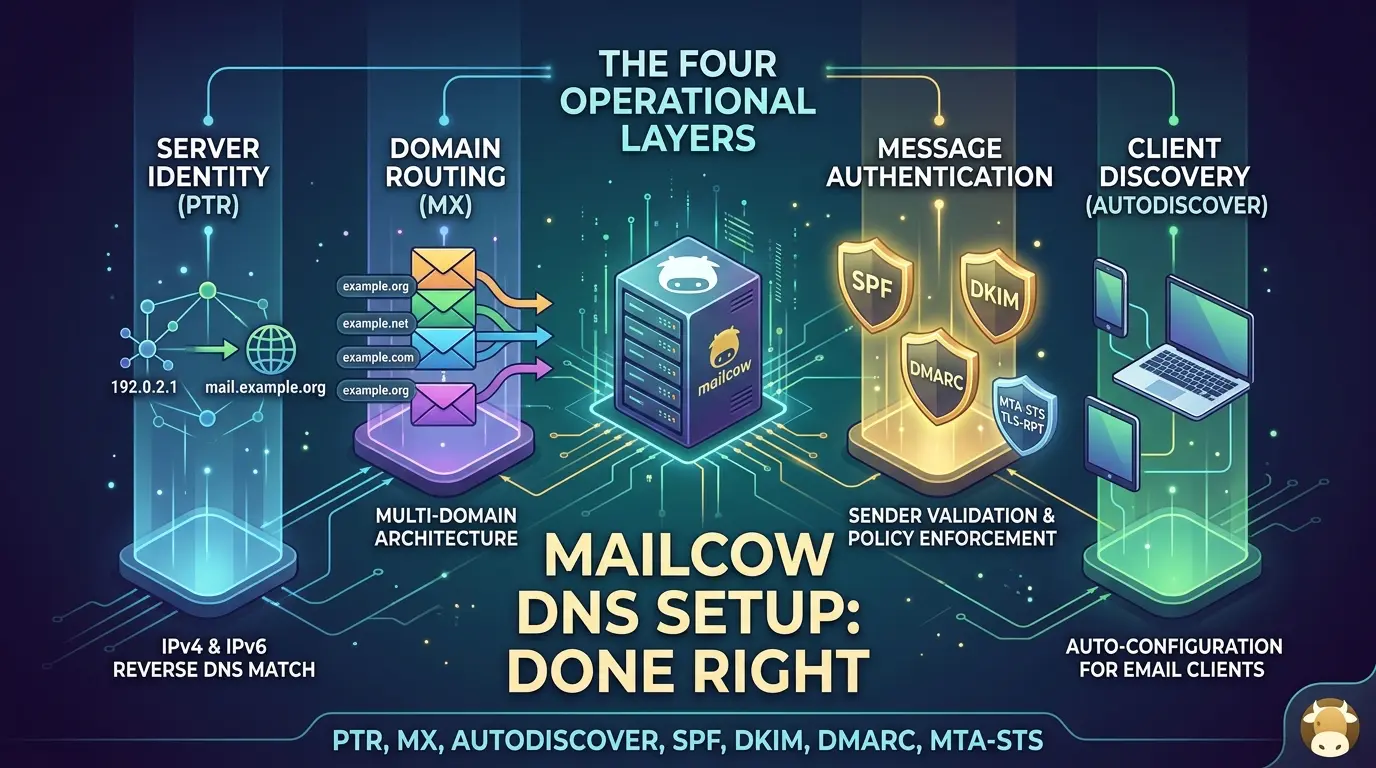
This guide treats those four layers as the actual subject: the reverse-DNS identity of your server, the forward routing that gets mail to the right domain, the authentication records that vouch for your messages, and the client-discovery records that let Thunderbird or Outlook configure themselves.
It also goes past the classic three (SPF, DKIM, DMARC) into the optional transport-security layer, MTA-STS, TLS-RPT, and the IPv6 identity checks. Every DNS value below is checked against the current Mailcow DNS setup documentation, the Autodiscover/Autoconfig guide, the Advanced SSL documentation, the MTA-STS setup guide, and the Microsoft Outlook client page, so you’re working from what the project currently documents rather than a 2021 blog post.
Key Takeaways
Click any topic to expand or collapseSingle Public IP & PTR Record Identity
A single public IP address has exactly one effective PTR identity. Hosting multiple mail domains on one server routes outbound traffic through MX configurations rather than separate PTR records.
Mailcow Domain Model & Primary Host Name
Mailcow’s internal model reflects this architecture: the primary mail A record belongs solely to the domain hosting the management UI, while secondary managed domains reach the server via their respective MX records.
Autodiscover / Autoconfig CNAME & TLS Validation
Autodiscover and Autoconfig CNAME records require active DNS resolution before certificate issuance. Mailcow includes secondary autodiscover hostnames in TLS certificates only if those records already resolve externally.
Modern Outlook Compatibility Constraints
Autodiscover support stops after Outlook 2019. Modern desktop clients including Outlook 2021, Microsoft 365, and the new Outlook interface require explicit manual IMAP/SMTP configuration.
Email Authentication vs. Inbox Placement Promises
SPF, DKIM, and DMARC verify sender authenticity and message integrity, but do not guarantee inbox placement. Provider sender guidelines treat them as baseline authentication requirements rather than delivery guarantees.
Progressive DMARC Policy Enforcement
Avoid deploying DMARC directly with p=reject. Begin in monitoring mode (p=none), analyze aggregate and forensic reports, and progressively enforce strict policies.
IPv6 PTR Matching & Rejection Risks
Major receivers like Gmail enforce identical PTR-to-hostname matching rules for IPv6 as for IPv4. A missing or mismatched IPv6 PTR record causes hard message rejections even with valid IPv4 records.
Native MTA-STS UI Feature Integration
MTA-STS is available directly within the Mailcow Admin UI (version 2025-09+). Enabling it requires two DNS TXT records and a UI toggle without deploying a dedicated web server.
Mailcow DNS Launch & Troubleshooting Assistant
Get the complete offline verification checklist, multi-domain routing rules, and dig commands in a single ready-to-use file.
The four DNS layers behind a working Mailcow deployment
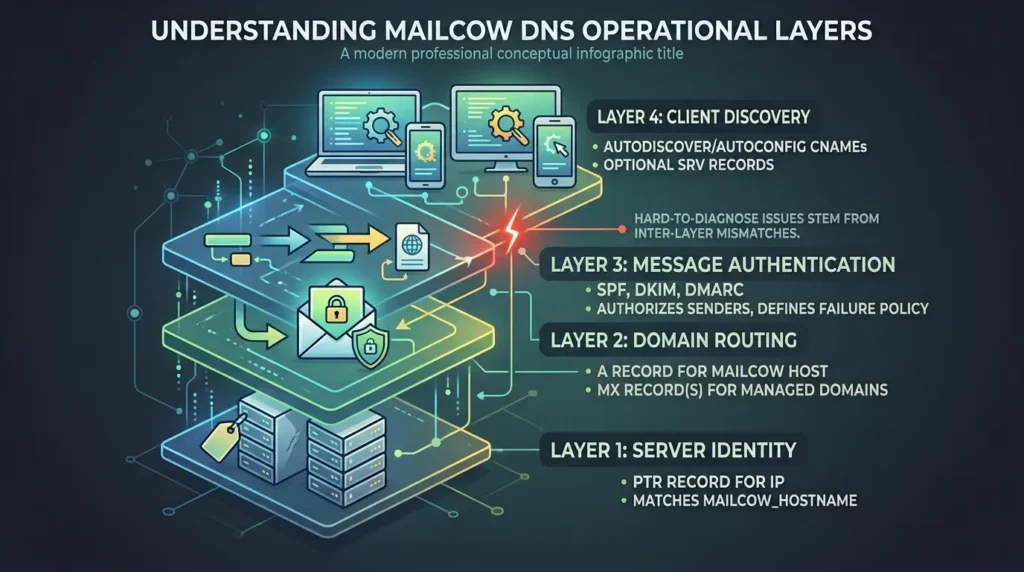
Beginner tutorials compress Mailcow's DNS requirements into one task: "add these records." Production troubleshooting looks different because it separates four operational layers that a record list hides:
- Server identity — the PTR record for your IP, which should match your Mailcow hostname (MAILCOW_HOSTNAME).
- Domain routing — the A record for your Mailcow host, plus the MX record every managed domain uses to reach it.
- Message authentication — SPF, DKIM, and DMARC, which tell receiving servers who is allowed to send and what to do when that check fails.
- Client discovery — the autodiscover/autoconfig CNAMEs and optional SRV records that let mail clients configure themselves.
Many hard-to-diagnose Mailcow DNS problems are caused by a mismatch between these layers rather than by one isolated record.
For example, a secondary domain can have a resolving Autoconfig CNAME but still fail client setup if the HTTPS certificate does not cover that hostname, the certificate sits at layer 4 but depends on layer 1 and 2 timing to pick up the name in the first place. Keep this framework in mind; the rest of the guide is organized around it.
Who controls each record: the ownership map most guides skip
Before touching a zone file, know where each value actually lives. This is the single most common source of "I set my DNS correctly" confusion, because PTR records are configured somewhere most people never open.
| Record | Where you configure it | What it actually proves |
|---|---|---|
| PTR (reverse DNS) | Your hosting/VPS provider's control panel — not your DNS zone editor | That the IP sending your mail resolves back to your Mailcow hostname |
| A / AAAA (mail host) | Your authoritative DNS zone | Maps the mail hostname to an IP address used by the web UI and mail services; it does not by itself prove those services are reachable or correctly configured |
| MX | Your DNS zone, one per managed domain | Which server should receive mail for that domain |
| CNAME autodiscover/autoconfig | Your DNS zone, one pair per domain | Where mail clients should look for auto-configuration |
| TXT SPF | Your DNS zone, one per sending domain | Which servers are authorized to send for that domain |
TXT DKIM (dkim._domainkey) | Your DNS zone, value generated inside the Mailcow UI | Allows receivers to verify a DKIM signature and the integrity of the signed message data, provided the message was signed and the selector/key are correct |
TXT DMARC (_dmarc) | Your DNS zone, one per domain | What a receiver should do when DMARC alignment fails, and where aggregate or forensic reports may be sent |
| SRV (advanced) | Your DNS zone, optional | Explicit service discovery for CalDAV, CardDAV, IMAP, and submission ports |
The distinction that trips people up most: PTR lives with the IP, everything else lives with the domain. If your provider only exposes PTR through a support ticket, that is normal, it is not a Mailcow limitation, and no DNS-zone change will fix a wrong PTR.
Set the PTR record and align it with your Mailcow FQDN
Mailcow's documentation is direct about this requirement: the PTR record for your IP address needs to match the FQDN of your Mailcow host, and that record is normally set at the provider you leased the IP from, not in your own DNS zone. If you use IPv6 as well, you need a matching PTR for that address too, the official guidance calls this out explicitly rather than treating IPv4 as sufficient on its own.

Two practical points that don't show up in most record lists:
- The PTR is a property of the IP, not of any single domain. If your Mailcow server sends mail on behalf of three domains, there is still only one effective PTR value for that IP.
- Keep the outbound SMTP server identity, especially the hostname presented during the SMTP session, consistent with the PTR/FQDN relationship. This is separate from the visible From domain, which may belong to any domain hosted on the Mailcow instance. An operator on the r/mailcow community described a multi-domain deployment where mail delivery improved once the server kept announcing the PTR-matching hostname instead of the sending domain's own name. Treat this as a useful operational pattern from a self-reported deployment, not a guaranteed fix, receiving-provider behavior on this point isn't uniformly documented, and you should verify your own setup with a test rather than assume the pattern transfers exactly.
The minimal DNS record set for one Mailcow domain
This is the baseline Mailcow's own documentation defines for a single managed domain, the floor every deployment needs before anything else works.
| Name | Type | Value |
|---|---|---|
mail | A | your server's public IPv4 (add AAAA for IPv6) |
autodiscover | CNAME | mail.example.org. (your MAILCOW_HOSTNAME) |
autoconfig | CNAME | mail.example.org. (your MAILCOW_HOSTNAME) |
@ | MX (priority 10) | mail.example.org. (your MAILCOW_HOSTNAME) |
One line in Mailcow's documentation is easy to miss and explains a lot of confusion later: the mail A record should only be created for the domain that hosts the Mailcow web interface. Every other managed domain reaches the server through its own MX record instead of getting its own mail A record. That single rule is the seed of the entire multi-domain architecture in the next section.
One server, many domains: the multi-domain architecture most tutorials skip
This is the scenario where generic "copy these four records" advice breaks down, because it implicitly assumes one domain per server. Mailcow is routinely used to host several unrelated domains behind a single IP and a single web UI, and the record shape for the primary domain is different from every domain added afterward.
| Domain role | Record | Value |
|---|---|---|
| Primary domain (hosts the web UI — example.org) | mail.example.org | A → server IP |
autodiscover.example.org / autoconfig.example.org | CNAME → mail.example.org. | |
example.org | MX → mail.example.org | |
| Reverse DNS of the server IP | PTR → mail.example.org | |
| Every added domain ( example.net) | example.net | MX → mail.example.org (no separate A record) |
example.net | TXT → its own SPF policy | |
dkim._domainkey.example.net | TXT → its own DKIM key, generated per-domain in the Mailcow UI | |
autodiscover.example.net / autoconfig.example.net | CNAME → mail.example.org. (if you want client autoconfig for this domain — see the SAN caveat below) |
Three things to hold onto from this table:
- You do not need, and should not create, a second PTR record for the second domain. One IP has one reverse-DNS identity, no matter how many domains it serves.
- SPF, DKIM, and DMARC are per-domain even when the server is shared. Each hosted domain gets its own SPF policy and its own DKIM key generated inside the Mailcow UI, because these records authenticate the sending domain, not the server.
- Sharing one outbound IP creates shared reputation exposure. This is a real architectural trade-off, not just a technical footnote: a problem associated with one hosted domain can affect how receivers evaluate traffic from that IP, although final delivery decisions also depend on the domain, authentication, content, complaints, volume, and recipient behavior.
If this multi-domain, single-server shape is your actual production topology, the DNS layer covered here is only half the picture, certificate ownership, Traefik routing, and host hardening for exactly this setup are covered in our production Mailcow setup guide with Docker and Traefik.
Configure SPF, DKIM, and DMARC without breaking legitimate mail
Mailcow's documentation gives you working example syntax for all three records. The examples are correct as illustrations, but each one needs to be adapted rather than copied verbatim into a production zone. These three mechanisms answer related but different questions. SPF checks whether the sending IP is authorized for the domain used by the SMTP envelope sender.
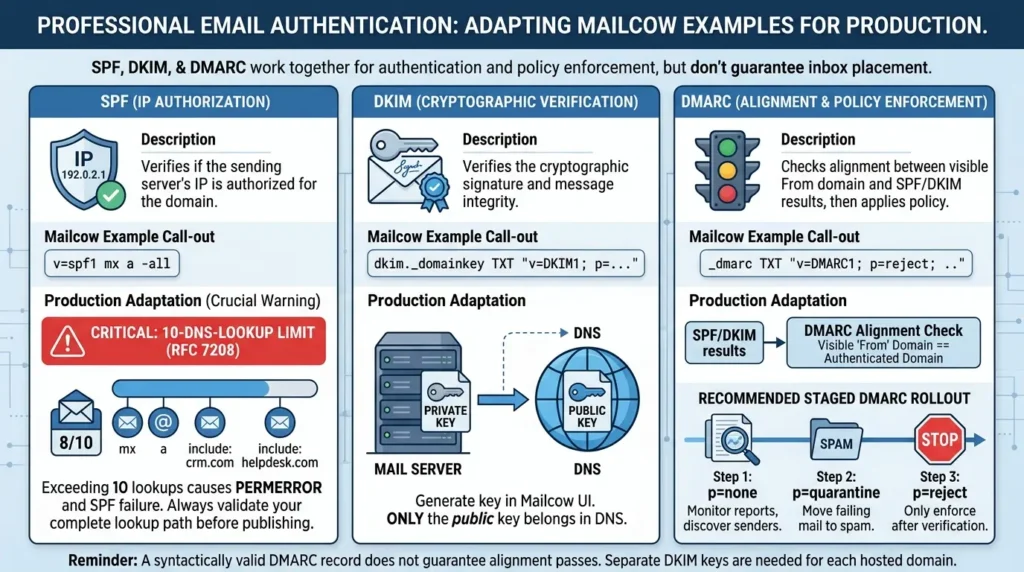
DKIM lets a receiver verify a cryptographic signature and the integrity of the signed message data. DMARC checks alignment between the visible From domain and a passing SPF or DKIM result, then applies the policy published by the domain owner. Together they provide authentication signals and policy enforcement; they do not guarantee inbox placement.
| Record | Mailcow's documented example | What to check before you publish it |
|---|---|---|
| SPF | v=spf1 mx a -all | This authorizes only your Mailcow server. If you also send through a CRM, helpdesk, marketing tool, or a relayhost, add their SPF include mechanisms — otherwise those senders will fail authentication for your domain. |
| DKIM | dkim._domainkey TXT "v=DKIM1; k=rsa; ...; p=..." | Generate the key in the Mailcow UI first, then copy the exact TXT value it shows you. The DNS record must hold the public key; nothing that looks like a private key ever belongs in DNS. |
| DMARC | _dmarc TXT "v=DMARC1; p=reject; rua=mailto:..." | Mailcow's example jumps straight to p=reject. Don't copy that policy value on day one — see the staged rollout below. Also verify that the visible From domain aligns with either the authenticated SPF domain or the DKIM signing domain; a syntactically valid DMARC record does not guarantee that alignment passes. |
On the SPF row specifically: SPF evaluation has a limit of 10 DNS-query-causing mechanisms and modifiers for a single evaluation, per RFC 7208 §4.6.4, including nested include lookups. Mechanisms such as a, mx, ptr, exists, and redirect can consume this budget, the exact cost depends on the record and its nested policies.
Go over the limit and the record doesn't just get less effective, it returns a hard PermError, which most receivers treat as an outright SPF failure. This is easy to hit by accident: mx a plus one include for a CRM, one for a helpdesk, and one for a marketing tool can already sit close to the ceiling once nested includes are counted. If you authorize several external senders, calculate the complete lookup path with an SPF validator before publishing the record, not after mail starts failing.
On the DMARC policy specifically: publishing p=reject before you've confirmed every legitimate sender is properly authenticated is one of the most common self-inflicted deliverability incidents. The safer sequence, consistent with dmarcian's staged-enforcement guidance, is:
- Start at p=none with a rua reporting address, and let reports accumulate for a couple of weeks. p=none is a monitoring policy, it does not ask receivers to quarantine or reject failing messages. It's useful for discovering legitimate senders and alignment failures before you enforce a stricter policy.
- Review the aggregate reports for any sending source that fails alignment, a forwarding service, a ticketing system, or a marketing tool you forgot about.
- Fix or authorize those sources, then move to p=quarantine.
- Only move to p=reject once quarantine data shows failures are limited to mail you genuinely don't want delivered.
DKIM is worth one more caution: the Mailcow UI generates a key per domain, so if you host example.org and example.net on one server, each domain needs its own DKIM record generated and published separately, there's no single shared key across hosted domains.
Route Autodiscover and Autoconfig correctly
The CNAME pair from the minimal record set, autodiscover and autoconfig, is what most email clients use to find their configuration automatically.
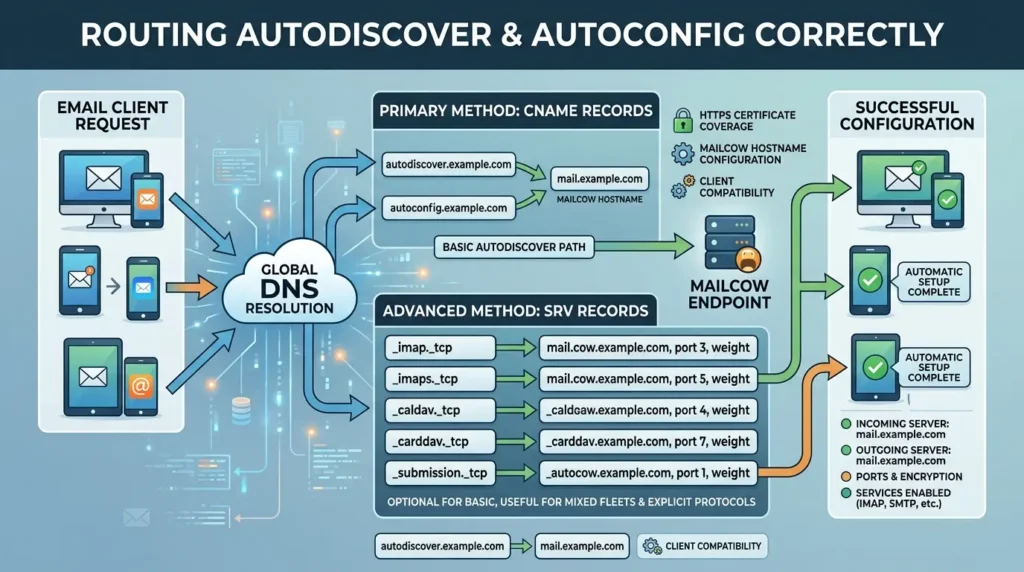
According to Mailcow's guide, the default Autodiscover/Autoconfig endpoints are provided out of the box, but successful automatic setup still depends on DNS resolution, HTTPS certificate coverage, the Mailcow hostname configuration, and whether the client supports the relevant discovery method.
You only need to touch the underlying configuration file if you want to change the default behavior (for example, switching between ActiveSync and plain IMAP for Outlook desktop clients).
For deployments that want the more explicit protocol, the advanced DNS configuration also documents a full set of SRV records covering CalDAV, CardDAV, IMAP, IMAPS, POP3, POP3S, Sieve, SMTPS, and submission ports.
SRV records aren't required for basic Autodiscover/Autoconfig to work, but they give clients that support them a more explicit, less ambiguous discovery path, useful if you're supporting a mixed fleet of desktop and mobile clients rather than one browser-based webmail user base.
Why Autoconfig can fail on a second domain even when DNS looks correct
This is the failure pattern that separates a tutorial deployment from a production one, and it's the clearest example of the four-layer framework in action. A Mailcow operator on the community forum reported exactly this: Autoconfig worked fine on the domain hosting the Mailcow UI, but failed for a second, added domain, even though the autoconfig and autodiscover CNAMEs for that domain resolved correctly.
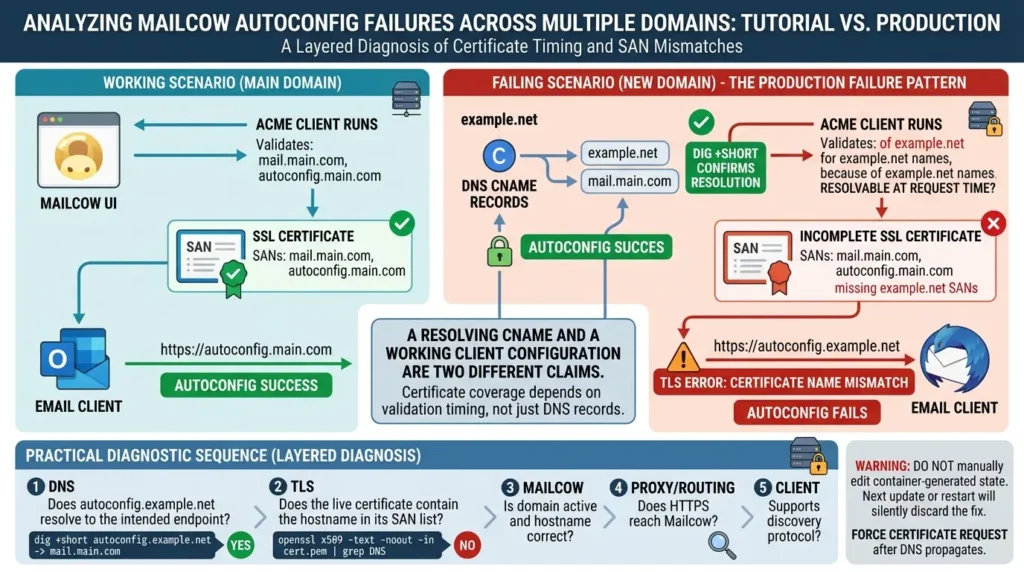
The explanation lives in how Mailcow's certificate automation actually works, and it's documented rather than speculative. Per the Advanced SSL documentation, the Mailcow ACME client requests coverage for MAILCOW_HOSTNAME and, for added domains, attempts to validate autodiscover.<domain> and autoconfig.<domain>, only names that can be validated are added as SANs (Subject Alternative Names).
If the names were not resolvable at certificate-request time, they may be absent until the ACME process runs again, and any client that tries to reach autoconfig.example.net over HTTPS in the meantime will hit a certificate name mismatch, which looks like a broken Autoconfig even though the DNS itself is fine.
A practical diagnostic sequence for this exact symptom. Treat this as a layered diagnosis rather than assuming that a missing SAN is the cause:
- DNS: Does autoconfig.example.net and autodiscover.example.net resolve to the intended endpoint?
- TLS: Does the live certificate contain the hostname in its SAN list?
- Mailcow: Is the domain active and is the hostname configuration correct?
- Proxy/routing: Does HTTPS reach the Mailcow endpoint rather than another service?
- Client: Does the installed client support the discovery protocol and profile type being offered?
Working through it in practice:
- Confirm the DNS actually resolves for the new domain: dig +short autoconfig.example.net and dig +short autodiscover.example.net.
- Inspect what your current certificate actually covers. The following is an illustrative diagnostic pattern, the certificate path can differ by installation and should be confirmed against the current Mailcow SSL documentation before running it. A community-reported version for Mailcow's default certificate path is:
openssl x509 -text -noout -in /path/to/live/certificate.pem | grep DNSThe important check is whether the live certificate's SAN list contains every hostname a client will actually contact, such as autoconfig.example.net and autodiscover.example.net. Do not assume that a specific path like data/assets/ssl/cert.pem is correct for every deployment, confirm the live certificate location for your own installation first.
- If the new domain's autoconfig/autodiscover names are missing from that list, force a new certificate request after confirming DNS has propagated, rather than editing generated files by hand. Manually editing container-generated state is a common way to make the next update or restart silently discard the fix.
- Check the ADDITIONAL_SAN variable in mailcow.conf if you're using wildcard or non-standard hostnames, this is the documented mechanism for extending certificate coverage, and current Mailcow documentation notes that Let's Encrypt caps a single certificate at 100 domain names, which matters if you're hosting a large number of domains on one instance.
The takeaway isn't "missing SANs always cause this." It's that a resolving CNAME and a working client configuration are two different claims, connected by certificate timing you can actually inspect instead of guess at.
Optional transport security: MTA-STS, TLS-RPT, and TLSA/DANE
These features are adjacent to the core Mailcow DNS setup rather than prerequisites. Keep them disabled or in monitoring/testing mode until you understand the certificate, DNSSEC, reporting, and receiver requirements.
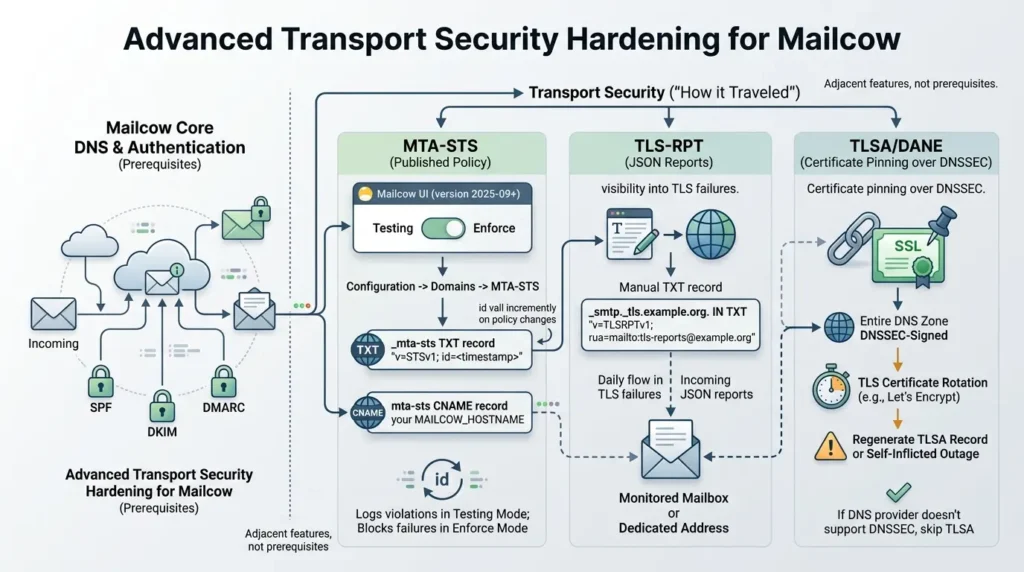
SPF, DKIM, and DMARC authenticate who sent a message. They say nothing about how it traveled between servers, a gap that MTA-STS, TLS-RPT, and DANE each address differently. MTA-STS, TLS-RPT, and DANE address transport-security concerns, but they are separate from SPF, DKIM, and DMARC and are not prerequisites for basic Mailcow mail flow. Treat them as optional hardening and monitoring features, and verify their support and operational requirements before enabling enforcement.
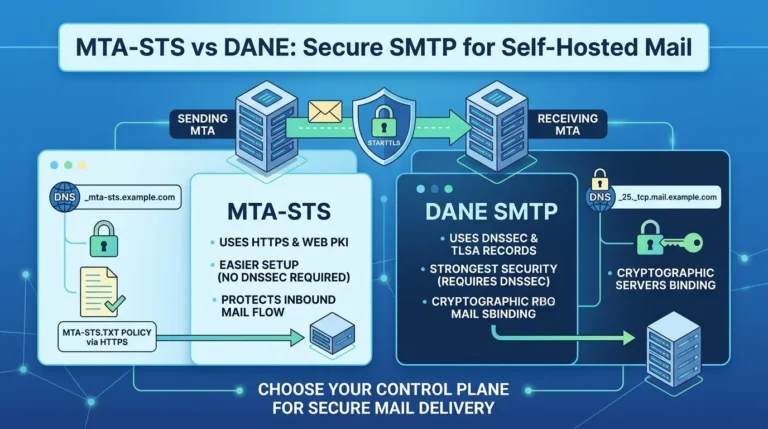
If you are deciding between the two transport-security models rather than configuring Mailcow alone, see our practical comparison of MTA-STS vs DANE for self-hosted mail, including DNSSEC requirements, policy caching, certificate validation, TLSA rollover, and inbound versus outbound enforcement.
The current Mailcow documentation confirms that MTA-STS management requires Mailcow 2025-09 or newer, uses a UI policy, and requires the _mta-sts TXT and mta-sts CNAME records, see the official MTA-STS guide.
MTA-STS (a published policy for TLS-protected delivery). Mailcow added native MTA-STS support directly in the UI, but only from version 2025-09 onward, check your installed version before following this section, since the feature simply isn't present in older releases.
Once enabled per domain (Configuration → Domains → edit the domain → MTA-STS tab), Mailcow generates and serves the policy file itself; you don't need to run a separate web server for it. The setup needs two DNS records, per the official MTA-STS guide:
| Name | Type | Value |
|---|---|---|
_mta-sts | TXT | v=STSv1; id=<unique-id, e.g. a timestamp> |
mta-sts | CNAME | your MAILCOW_HOSTNAME — required so a valid certificate can be issued and the policy file can be served |
Start in testing mode, not enforce, that's a toggle in the same UI tab, and it logs policy violations without blocking mail while you confirm nothing legitimate is being dropped. Every time you change the mode or MX list, Mailcow bumps the id value automatically; if you ever set the TXT record by hand, you have to increment id yourself or receivers will keep using a cached, stale policy.
TLS-RPT (visibility into TLS failures). Mailcow's own MTA-STS documentation doesn't provision a TLS-RPT record for you, so this is a separate, manual addition, not a native Mailcow feature.
TLS-RPT (RFC 8460) gives you daily JSON reports on TLS negotiation problems other servers experience sending to you. It provides an additional reporting channel for TLS negotiation and delivery failures and can help reveal MTA-STS or TLS problems, but it should be used alongside mail logs, test messages, and external validation rather than treated as the only diagnostic method. It's one more TXT record:
_smtp._tls.example.org. IN TXT "v=TLSRPTv1; rua=mailto:tls-reports@example.org"Use a mailbox you actually monitor, or a dedicated address, the reports arrive daily and are only useful if someone reads them.
TLSA/DANE (certificate pinning over DNSSEC). Mailcow's DNS Check has surfaced TLSA suggestions for years, multiple independent reports in Mailcow's own GitHub issue tracker describe the UI recommending records in the _25._tcp.<domain> / _443._tcp.<domain> format, consistent with RFC 6698.
Treat the feature as genuinely optional, though: a TLSA record only provides real protection when your entire DNS zone is DNSSEC-signed, and it needs to be regenerated every time your TLS certificate rotates which, with Let's Encrypt's ~90-day renewal cycle, means an unmaintained TLSA record becomes a self-inflicted outage rather than a security improvement. If your DNS provider doesn't support DNSSEC, skip TLSA rather than publishing a value you can't keep in sync.
Client compatibility: what actually configures itself
DNS being correct is necessary for automatic client setup, but it isn't sufficient, the client itself has to support the protocol Mailcow is offering.
| Client | Autodiscover/Autoconfig status |
|---|---|
| Thunderbird and other Mozilla-based clients | Can use the Autoconfig endpoint via the autoconfig CNAME when the relevant DNS, HTTPS, and Mailcow hostname conditions are satisfied; verify the actual client version and configuration. |
| Microsoft Outlook, up to and including Outlook 2019 | Autodiscover works, per current Mailcow documentation. |
| Outlook 2021, Microsoft 365, and the new Outlook | Autodiscover no longer works with Mailcow — this is a Microsoft-side change, and manual IMAP/SMTP setup is required. |
| Apple Mail (iOS/macOS) | Uses a mobile-configuration profile endpoint rather than the Autodiscover/Autoconfig protocols above. |
| Any client, manual fallback | Use the Mailcow FQDN as the server address and select the ports and TLS modes shown by the current Mailcow client documentation. A common setup uses IMAPS on 993 and SMTP submission on 587 with STARTTLS; port 465 may be available for implicit TLS depending on the deployment. |
The Outlook boundary is worth calling out on its own, because it's a genuine, documented version cliff rather than a vague compatibility warning.
Mailcow's documentation states plainly that the Autodiscover feature stops working once you move past Outlook 2019, Outlook 2021, Microsoft 365, and the new Outlook all require the manual configuration path. If a user on modern Outlook reports that "Autodiscover isn't working," the honest first question is which Outlook build they're running, not whether your DNS is wrong.
Validate everything before you call DNS "done"
A DNS checker showing green does not mean mail flow, client setup, and authentication are all actually working. Run through this sequence instead of trusting a single tool.
| Step | How to check it | What it confirms |
|---|---|---|
| 1. Core resolution | dig +short A mail.example.orgdig -x YOUR_IPV4 +short | The mail hostname resolves to the expected address, and the IP's PTR resolves to the expected Mailcow hostname. Compare both results — a successful command alone does not prove forward-confirmed reverse DNS. |
| 2. Per-domain routing | dig MX example.net for every hosted domain | Secondary domains route to the correct mail host, not to themselves |
| 3. Certificate coverage | openssl x509 -noout -text -in cert.pem and inspect the SAN list | Every hostname clients will actually connect to is covered by the live certificate |
| 4. Authentication mechanics | Send a test message and read the report from Mailcow's documented port25.com authentication checker, or use Mail-tester | SPF, DKIM, and DMARC actually pass on a real outbound message |
| 5. Header-level confirmation | Open the raw headers of a delivered message and read the Authentication-Results field | What the *receiving* server actually decided, not just what an external tool predicts |
| 6. Real client behavior | Add the account in the actual client your users run (Thunderbird, the correct Outlook build, mobile Mail) | Autoconfig/Autodiscover completes end to end, not just at the DNS level |
| 7. IPv6 identity (if enabled) | dig -x <your-IPv6> and dig AAAA mail.example.org | The IPv6 PTR resolves and matches an AAAA record, exactly like the IPv4 pair. The hostname returned by PTR should resolve back to the same address through A or AAAA, as applicable. |
Why authenticated mail still lands in spam
This is the gap that catches operators who did everything "right." A recent r/mailcow thread describes exactly this: an operator with what they believed was a clean IP and consistent Gmail test sends still saw messages land in spam, despite apparently correct authentication.
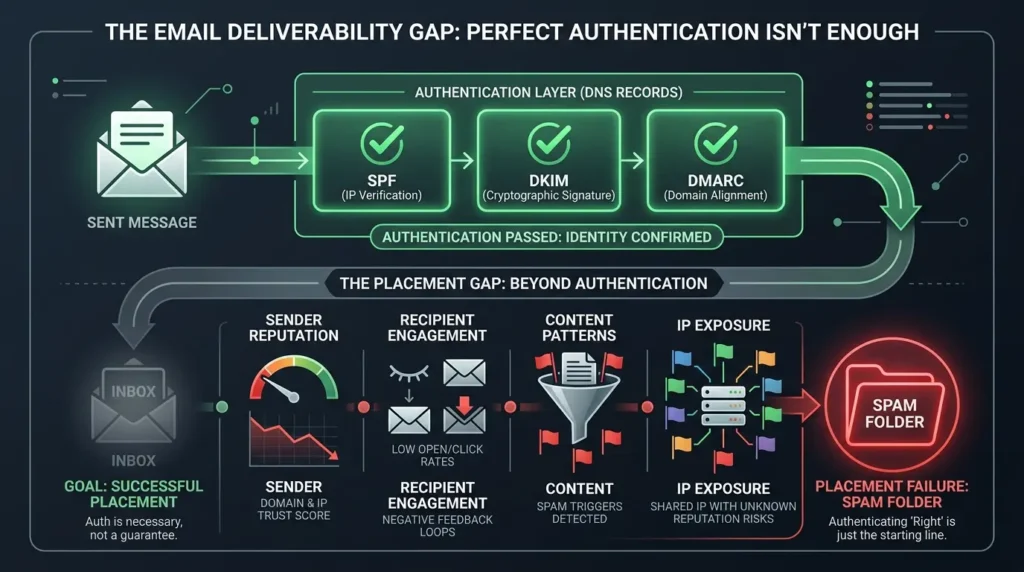
A reply in that same thread pushed back on the instinct to re-check SPF/DKIM/DMARC yet again, pointing out that generic authentication advice doesn't address every possible cause. That thread doesn't establish the exact cause in that specific case, no full headers or reputation data were shared, but it illustrates a distinction worth building into your mental model permanently.
SPF, DKIM, and DMARC provide different authentication and alignment signals: SPF evaluates the envelope sender and sending IP, DKIM verifies a cryptographic signature, and DMARC evaluates alignment with the visible From domain.
Google's own email sender guidelines frame all three as recommended minimums that reduce the chance of a message being marked as spam or rejected, not as a placement guarantee. Inbox placement also depends on sender reputation, spam complaint rate, recipient engagement, content patterns, and sending volume history, none of which a DNS record controls.
Practically, that means:
- Passing authentication is table stakes, not a finish line. Treat a clean SPF/DKIM/DMARC result as "the message wasn't rejected for identity reasons," not as "the message will reach the inbox."
- If mail authenticates cleanly but still lands in spam, the next places to look are Google Postmaster Tools (for Gmail specifically), your spam complaint rate, sending volume ramp-up on a new IP, and message content, not another pass through your DNS records.
- A shared IP across multiple hosted domains means shared reputation exposure. One domain's spam complaints or blocklist listing can affect deliverability for every domain on that server.
Common mistakes to avoid
- Creating a second PTR record for a second domain. A single IP has one reverse-DNS identity; additional domains route through MX, not through their own PTR.
- Publishing p=reject on day one. Start DMARC in monitoring mode and read the aggregate reports before enforcing anything.
- Assuming a resolving CNAME means Autoconfig will work. Certificate SAN coverage depends on DNS resolving at the time Mailcow requests the certificate, which can lag behind a DNS change you just made.
- Editing Mailcow's generated files by hand instead of using the documented configuration variables (like ADDITIONAL_SAN), hand edits tend to get silently overwritten on the next update.
- Copying the SPF example literally when you also send through a third-party tool, forwarder, or relayhost that isn't covered by mx a.
- Treating a passing DNS checker as proof of deliverability, rather than as one input among several.
- Promising Autodiscover will work on any Outlook version. Current Mailcow documentation draws a hard line at Outlook 2019; anything newer needs manual setup.
Where this leaves your setup
Treat the record list as the easy 20% of the job. The remaining 80% is keeping four layers, reverse DNS, forward routing, authentication, and client discovery, consistent with each other as you add domains, renew certificates, and onboard new clients. Verify each layer independently rather than trusting a single green checkmark, and re-check the Outlook and DMARC guidance periodically: client support and provider sender requirements are the two parts of this setup most likely to change after you publish.
Every Mailcow-specific claim in this guide was checked against the project's current documentation as of August 2026, and the MTA-STS section specifically requires Mailcow 2025-09 or newer. Version-gated features and vendor policies (Outlook Autodiscover support, Gmail's error codes, DMARC enforcement stages) can change after this date, re-verify against the linked sources below before treating any single value as permanent.
Ready to launch or troubleshoot your Mailcow DNS?
Don’t rely on trial-and-error. Take our complete offline verification playbook to run through PTR validation, SAN certificate inspection, SPF lookup limits, and MTA-STS checks directly on your terminal.
FAQs : Mailcow DNS Setup
Does every domain hosted on Mailcow need its own PTR record?
No. A single IP address has one effective reverse-DNS identity. If one Mailcow server hosts several domains, the PTR record points to the server's canonical FQDN (your MAILCOW_HOSTNAME), and every other hosted domain reaches that same server through its own MX record — not through a separate PTR.
What is the minimum set of DNS records Mailcow needs to function?
For an additional domain to receive mail, its MX record must point to the Mailcow mail host. For outbound authentication, publish an SPF record and the DKIM record generated for that domain; DMARC is strongly recommended but is a policy layer rather than a prerequisite for basic mail reception. If users of that domain need automatic client setup, also publish the relevant autodiscover and/or autoconfig records and ensure the required TLS names are covered by the certificate.
Why does Autodiscover work on my main domain but not on a second domain I added?
Mailcow's certificate automation only adds a domain's autodiscover/autoconfig hostnames to the TLS certificate if those DNS names already resolve when the certificate is requested. If you added the second domain's CNAMEs after the last certificate issuance, the certificate may not cover them yet, which produces a name-mismatch error that looks like a broken Autoconfig even though DNS itself is correct. Inspect the certificate's SAN list directly to confirm.
Should my DMARC record start at p=reject?
No. Start at p=none with a reporting address, review the aggregate reports for a couple of weeks to catch senders you forgot about, move to p=quarantine once those are fixed, and only move to p=reject after quarantine data confirms remaining failures are traffic you actually want blocked.
Does passing SPF, DKIM, and DMARC guarantee my mail won't land in spam?
No. These records prove the message is authenticated — that it really came from your domain and wasn't altered — but inbox placement also depends on sender reputation, spam complaint rate, content, and recipient engagement. Major providers describe authentication as a minimum requirement, not a delivery guarantee.
Does Autodiscover work with Microsoft 365 or the new Outlook?
According to the current Mailcow Outlook documentation, Mailcow Autodiscover is supported up to and including Outlook 2019. Outlook 2021, Microsoft 365, and the new Outlook require manual IMAP/SMTP configuration for this integration. ActiveSync has separate compatibility limitations and should not be treated as a universal workaround.
What does the ADDITIONAL_SAN variable do, and when do I need it?
ADDITIONAL_SAN in mailcow.conf lets you add extra names to the certificate request. The exact behavior depends on the ACME challenge method: HTTP-01 can expand patterns such as smtp.* across added domains, while DNS-01 supports true wildcard certificates. Use the current Mailcow SSL documentation for the challenge-specific syntax and validation requirements. A certificate request is also subject to the documented 100-name limit.
Do I need SRV records if I already added the autodiscover/autoconfig CNAMEs?
Not strictly. The CNAME pair is the standard starting point for supported clients, provided DNS, TLS, and hostname requirements are satisfied. SRV records are part of Mailcow's advanced/optional DNS configuration and give clients that support them a more explicit discovery path for IMAP, SMTP, and CalDAV/CardDAV — worth adding if you support a mixed fleet of clients, not required for basic functionality.
Why does mail sent over IPv6 get rejected by Gmail even though my IPv4 setup is fine?
Gmail applies the same PTR-matches-hostname requirement to IPv6 that it does to IPv4. If your server has IPv6 enabled but no matching IPv6 PTR record — or the PTR hostname lacks a matching AAAA record — mail sent over IPv6 can be rejected outright, independent of how correct your IPv4 DNS is. Either configure the IPv6 PTR with your provider or disable outbound IPv6 for mail if your provider can't support it.
Do I need MTA-STS and TLS-RPT for Mailcow?
MTA-STS and TLS-RPT are optional transport-security features, not prerequisites for basic Mailcow sending and receiving. In Mailcow 2025-09 and newer, MTA-STS can be managed through the UI. The setup uses an _mta-sts TXT record and an mta-sts CNAME, while TLS-RPT is published separately as a TXT record if you want TLS failure reports. Follow the current Mailcow guide and start with testing before enforcing a policy.
📋 Article Timeline & History
Successfully updated on September 10, 2026 with the latest details.
This article was originally published on September 1, 2026.

Was this article helpful?






[…] SPF, DKIM, and DMARC remain separate layers. For a broader foundation checklist covering PTR, MX, SPF, DKIM, DMARC, IPv6, and Mailcow-specific DNS dependencies, see Mailcow DNS Setup, Done Right. […]