
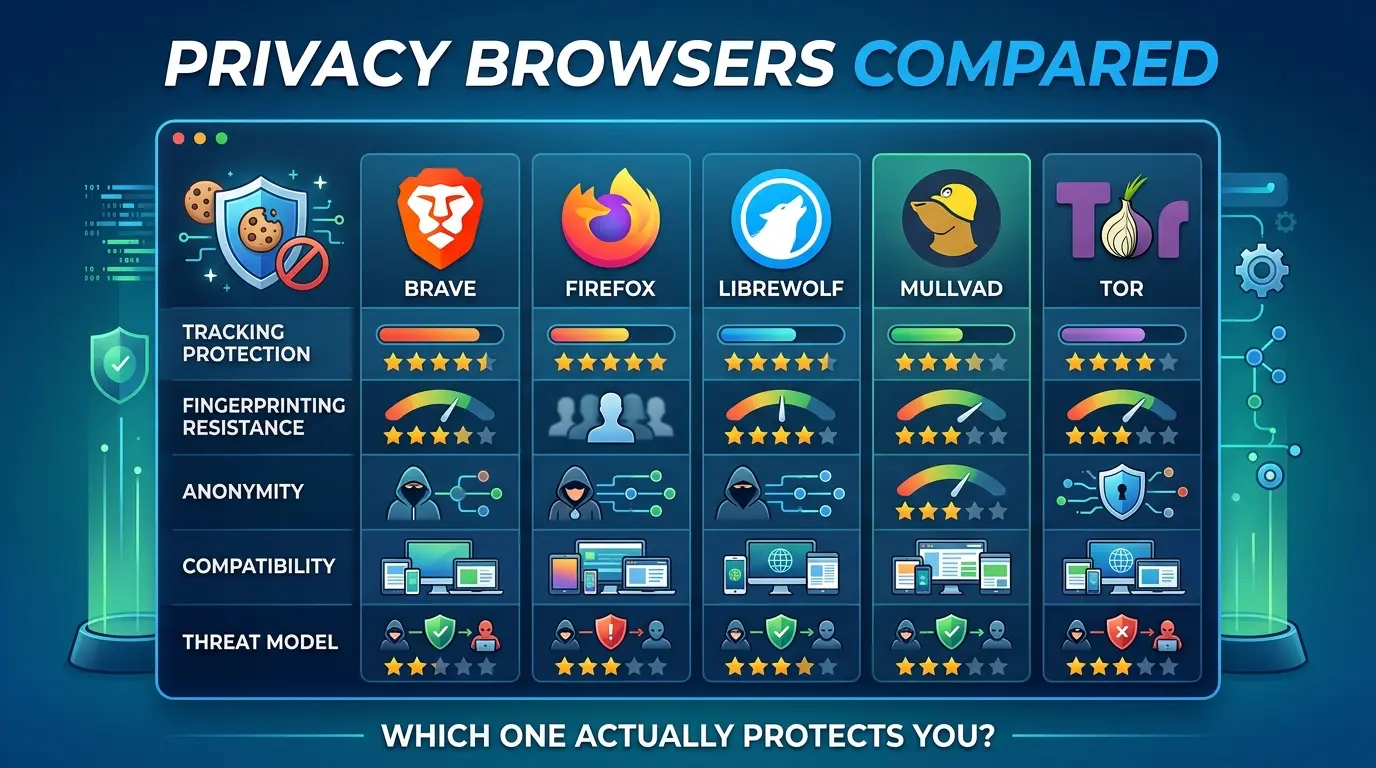

Your VPN can hide your IP address from the sites you visit. A private search engine can reduce what your search provider learns. Incognito mode can keep some local history off your device.
None of those things answers the browser question: what does the browser reveal to every page you open, and what can a website connect back to you?

The right privacy browser depends on the job. Brave is the easiest everyday switch from Chrome. Firefox is the most flexible independent browser engine. LibreWolf ships stronger Firefox privacy defaults. Mullvad Browser applies Tor-derived anti-fingerprinting protections without using the Tor network. Tor Browser is the specialized choice when network-level anonymity, onion services, or censorship resistance matter.
That is not a universal ranking. It is a set of trade-offs.
Key Takeaways
Click any topic to expand or collapseWebMCP is not MCP in a browser.
It borrows the idea of structured tools, but it is a separate browser API with different discovery, execution, lifecycle, and security boundaries.
The current API surface is document.modelContext.
If you find examples using navigator.modelContext, check their date and source before using them.
There are two implementation paths:
An imperative JavaScript API for application logic and a declarative API for annotated HTML forms.
WebMCP is tab-bound and contextual.
Tools exist while the relevant document is open and available to the agent; a persistent MCP server is a better fit for always-on backend work.
The strongest case for WebMCP is not “APIs are bad.”
It is that a live page has session context, UI state, permissions, and multi-step behavior that a public API may not expose cleanly.
WebMCP reduces UI guesswork but does not eliminate prompt injection.
Tool output, user-generated content, external data, schemas, and cross-origin exposure still require a threat model.
Do not claim a speed or cost percentage without a matched test.
The calculator in this article is an assumption-based planning aid, not a benchmark.
This guide uses the same layered model as Vertex Frontier’s private search engines comparison: each tool protects a boundary, not your entire digital life. The browser layer, network layer, account layer, device layer, and behavior layer can still interact.
Privacy, anonymity, security, and fingerprinting are different
A privacy browser can reduce tracking without making you anonymous. It can make cross-site profiling harder without hiding your IP address. It can block known fingerprinters without stopping every script on every site.
Use these definitions before comparing products:
| Term | What it means | What it does not guarantee |
|---|---|---|
| Tracking protection | Blocks or isolates known ads, trackers, cookies, and storage mechanisms | That a logged-in service cannot associate activity with your account |
| Fingerprinting resistance | Reduces the usefulness or uniqueness of browser and device signals | That every site sees no identifying signals |
| Network anonymity | Hides or changes the source IP and network path | That accounts, timing, behavior, or browser signals cannot link sessions |
| Security | Reduces exposure to malicious content through patching, sandboxing, isolation, and safe defaults | That a browser can protect a compromised device or stolen account |
| Operational privacy | Keeps identities, accounts, devices, networks, and behaviors separated when required | That separate browser profiles automatically create separate identities |
A VPN is mainly a network-layer tool. It can change what websites and your ISP see about the network path, but it does not automatically remove cookies, account identifiers, browser fingerprints, or behavioral signals.
The EFF Cover Your Tracks test is useful for exploring fingerprinting, but EFF describes it as a simulated test rather than a complete inventory of every tracking method.
Key takeaway: a browser is not a complete anonymity system
A browser can reduce tracking and fingerprint exposure. It cannot erase the identity attached to an account, reverse a compromised device, or make a network operator unable to see that traffic exists. Choose the browser after defining the threat you are trying to reduce.
What browser fingerprinting actually reveals
Cookies identify a browser by storing data. Fingerprinting attempts to identify or classify a browser from the characteristics it exposes while a page is loading.
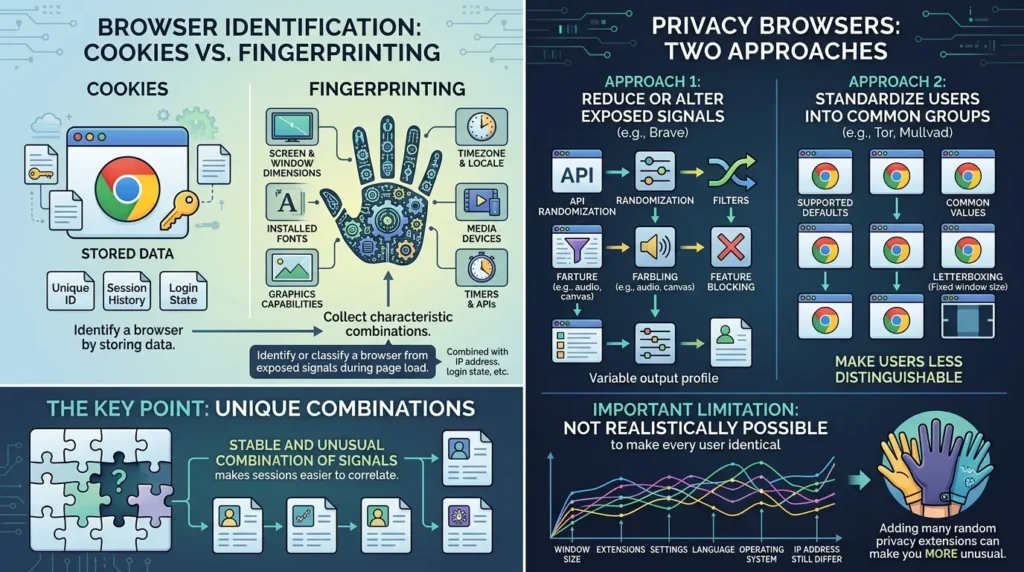
Depending on the browser, operating system, permissions, and site, those characteristics can include screen and window dimensions, timezone and locale, fonts, graphics capabilities, canvas and WebGL behavior, media devices, timers, and other APIs. A site may combine these signals with IP address, login state, first-party storage, and behavior.
The important point is not that every fingerprint is permanently unique. The important point is that a stable and unusual combination of signals can make sessions easier to correlate.
Privacy browsers usually take one or both of two approaches:
- Reduce or alter exposed signals. Brave documents API randomization, “farbling,” and feature blocking for some fingerprintable APIs.
- Standardize users into common groups. Tor Browser and Mullvad Browser aim to make users less distinguishable by using supported defaults, common values, letterboxing, and other anti-fingerprinting measures.
Neither approach is magic. Tor’s own documentation explains that it is not realistically possible to make every user identical. Window size, extensions, settings, language, operating system, accounts, IP address, and behavior can still change the picture. This is why adding random privacy extensions to a standardized browser can sometimes make you more unusual rather than less.
The Chrome Incognito lesson: local privacy is not anonymity
Chrome’s official Incognito documentation describes a narrower protection than many people assume. After all Incognito windows close, Chrome removes session history and site data from the device, but visited websites, organizations controlling the network, and internet service providers may still observe activity.
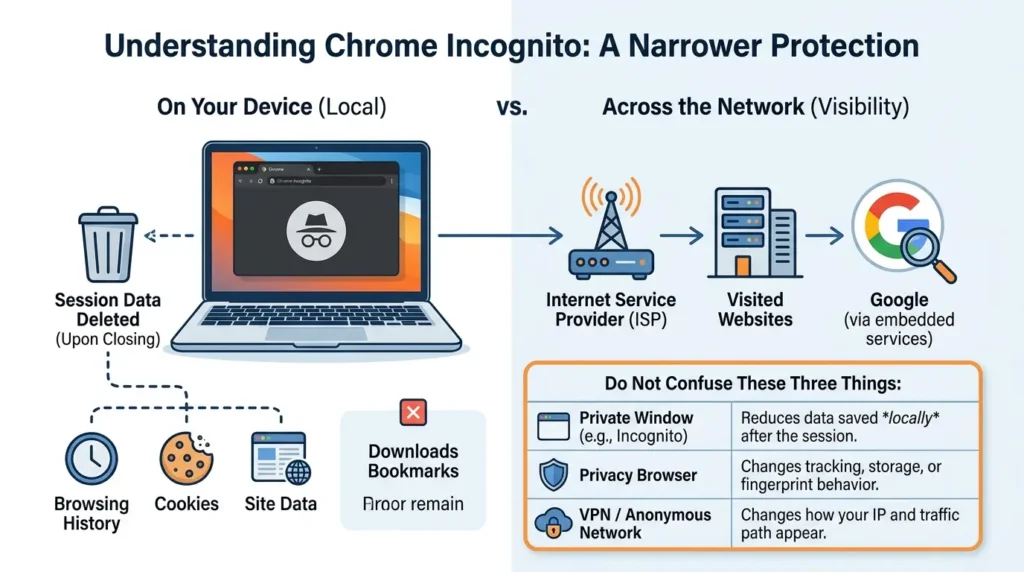
Downloads and bookmarks also remain on the device.
The Brown v. Google litigation made this distinction more visible. The lawsuit alleged that Google collected browsing-related information through Incognito use and embedded services. The parties later settled.
The Ninth Circuit’s April 2026 opinion confirms the settlement and policy changes, but it should not be simplified into “Google admitted illegal tracking” or “everyone received a $5 billion payout.” The frequently reported $5 billion figure described the estimated value of proposed relief and data at issue, not a universal cash payment to users.
For precise legal wording, cite the final operative settlement documents as well as reporting such as The Verge’s account of the proposed terms.
The practical lesson is straightforward: Incognito is useful for limiting local session history. It is not a privacy browser, an anti-fingerprinting mode, or a VPN.
- Private window: reduces data saved locally after the session.
- Privacy browser: changes tracking, storage, script, or fingerprint behavior.
- Anonymous network path: changes how your IP and traffic path appear to websites and network observers.
The five-browser comparison
The matrix below avoids a single “privacy score.” Product defaults can change, so treat it as a decision framework and verify current settings before publication or deployment.
| Dimension | Brave | Firefox | LibreWolf | Mullvad Browser | Tor Browser |
|---|---|---|---|---|---|
| Best fit | Everyday privacy with Chromium compatibility | Flexible independent engine and ecosystem | Hardened Firefox defaults | Anti-fingerprinting without Tor routing | Anonymity, onion services, and censorship resistance |
| Engine | Chromium | Gecko | Firefox-based | Tor/Firefox-derived | Hardened Firefox base |
| Fingerprinting approach | API randomization and feature blocking documented by Brave | ETP defenses by default; advanced RFP is separate | RFP and hardening documented by the project | Crowd-blending, RFP, letterboxing, standardized values | Crowd-blending, letterboxing, isolation, security levels |
| Hides IP by itself? | No | No | No | No; add a network layer if needed | Yes, through the Tor network |
| Compatibility cost | Usually lower for mainstream Chromium sites | Generally broad; hardening can add friction | Workflow-dependent; strict defaults can break sites | Some CAPTCHA and web-app friction is possible | Highest routine speed and compatibility trade-offs |
| Setup effort | Low for baseline use | Low to medium, depending on the goal | Low baseline setup, with possible exceptions | Low baseline setup; customization rules matter | Low installation effort, higher operational discipline |
Brave: the practical Chrome replacement
Brave is the most approachable recommendation for a Chrome user who wants stronger defaults without relearning the web. It is Chromium-based, so many Chrome extensions and websites work in familiar ways. Its built-in Shields documentation describes blocking for third-party ads and trackers, cross-site cookies, phishing, and fingerprinting-related techniques.
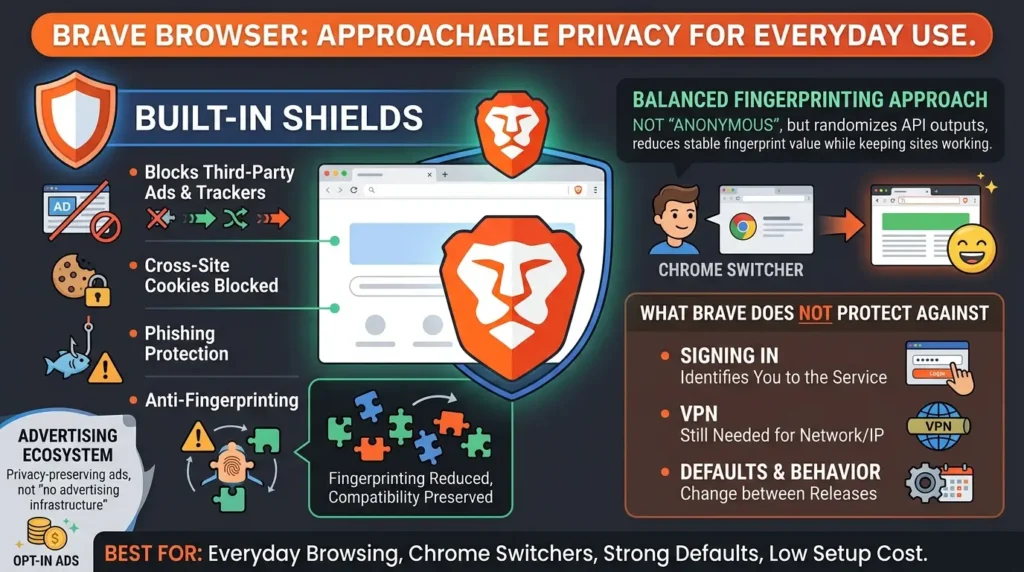
Brave’s fingerprinting approach is not “make me anonymous.” Brave documents randomizing or removing some fingerprintable API outputs and applying protections per site or browser session. That can reduce the value of a stable fingerprint while preserving more compatibility than an aggressively hardened configuration.
What Brave does not protect against: signing into a service still identifies you to that service; a VPN is still needed for a different network/IP exposure; and browser defaults, feature behavior, and privacy modes can change between releases.
Brave also operates its own advertising ecosystem, so readers who want a browser project with a different incentive structure should examine the alternatives rather than treating “privacy-preserving ads” as “no advertising infrastructure.”
Best for: everyday browsing, Chrome switchers, and readers who value strong defaults with low setup cost.
Firefox: the independent engine and flexible baseline
Firefox matters for more than its settings. It is the major independent browser engine in this comparison, which gives the web a non-Chromium implementation with its own standards and governance path.
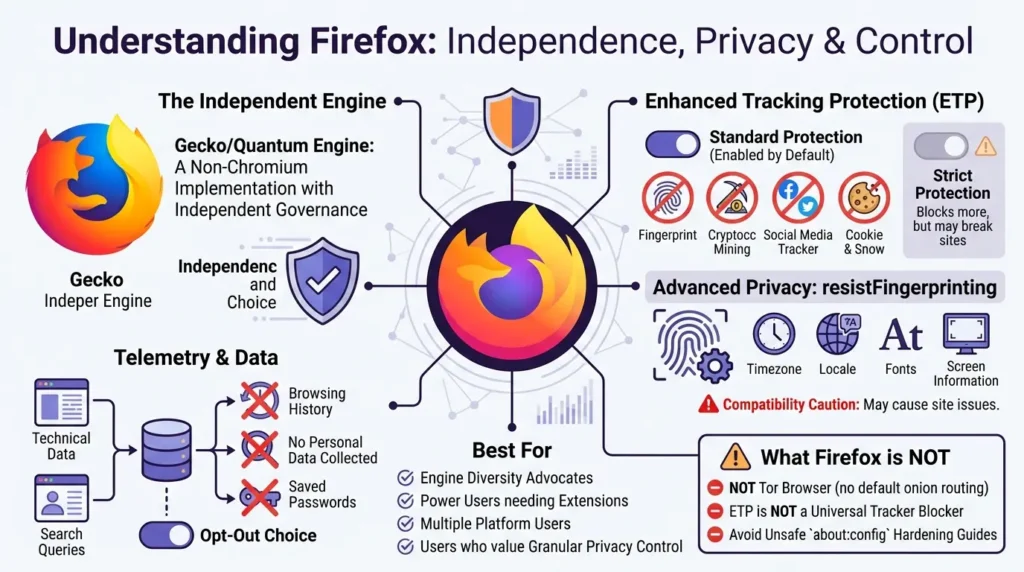
Mozilla’s Enhanced Tracking Protection documentation says Standard protection is enabled by default and blocks categories such as known fingerprinters, cryptominers, social-media trackers, and cross-site tracking cookies. Strict protection blocks more content but can break sites.
Do not confuse ETP with advanced privacy.resistFingerprinting settings. Mozilla’s Resist Fingerprinting documentation describes changes to timezone, locale, fonts, navigator values, timers, screen information, sensors, and other signals. Those changes can create compatibility problems.
Firefox also collects technical and interaction telemetry by default unless the user opts out; Mozilla says that data is not browsing history, search queries, or saved passwords, and documents a separate DAU-ping caveat in its telemetry material.
What Firefox does not protect against: stock Firefox is not Tor Browser; ETP is not a universal tracker blocker; and enabling advanced hardening without understanding compatibility can damage your daily workflow. Avoid treating every about:config guide as a current or safe baseline.
Best for: readers who value engine diversity, extensions, platform support, and control over how much hardening they accept.
LibreWolf: hardened Firefox with a smaller project surface
LibreWolf is an independent, community-maintained Firefox-based project. Its documented features include strict tracking protection, uBlock Origin, dFPI/Total Cookie Protection, Resist Fingerprinting, disabled WebGL, URL tracking protection, and disabled telemetry features.
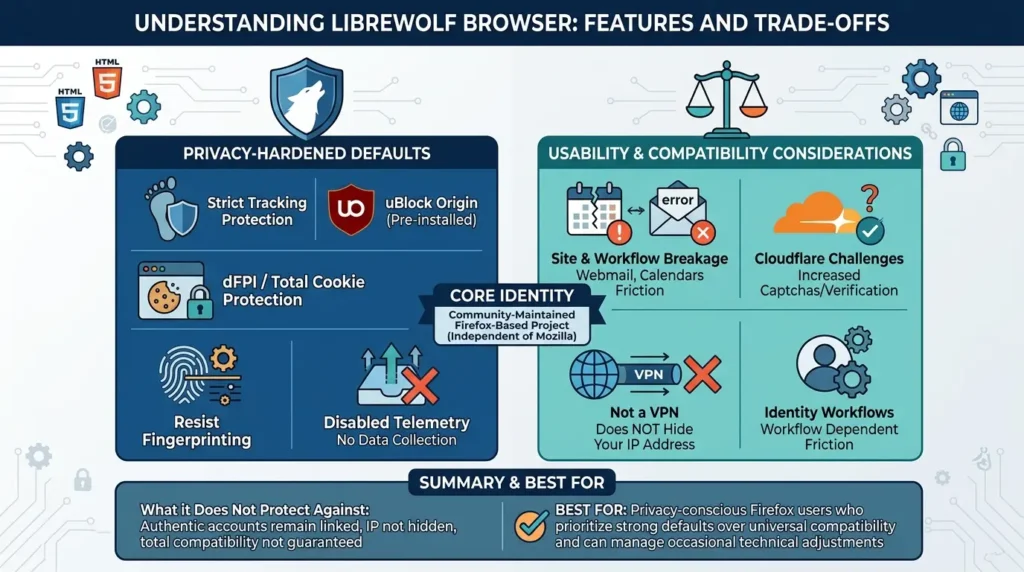
That makes LibreWolf attractive to readers who would otherwise spend time applying a privacy-oriented Firefox configuration. But a hardened default is not the same as universal compatibility. Community reports collected for this research describe workflow-dependent friction around webmail, calendars, timezones, extensions, and Cloudflare challenges.
Other users report using LibreWolf successfully, especially when their work relies less on browser-only productivity tools. The disagreement is the point: compatibility depends on the sites, extensions, and identity workflows you actually use.
LibreWolf’s own privacy policy also matters. It describes the project’s no-collection goal but qualifies absolute claims about data sent to Mozilla or third parties. LibreWolf is not an official Mozilla product.
What LibreWolf does not protect against: it does not hide your IP, make an authenticated account anonymous, or guarantee that every hardened setting will work with every web application. Its update and maintenance process should be checked as part of your security model.
Best for: Firefox users who want stronger defaults and can tolerate a smaller project/support surface and occasional breakage.
Mullvad Browser: Tor-derived anti-fingerprinting without Tor routing
Mullvad Browser exists because many people want stronger fingerprinting resistance than a conventional browser provides but do not want every session to travel through the Tor network. It was created through a collaboration between Mullvad and the Tor Project.
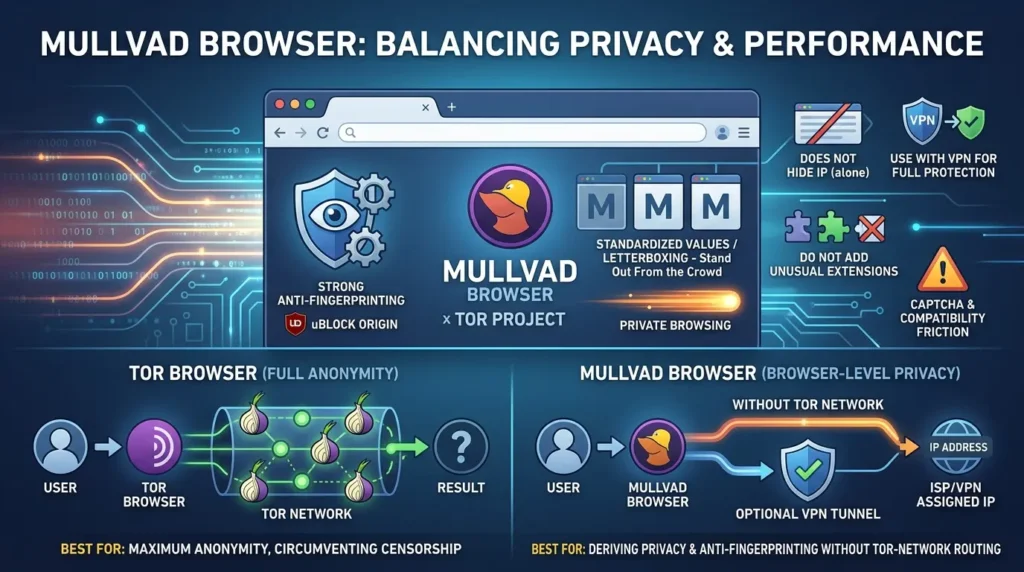
The Tor Project’s launch explanation describes it as Tor Browser without the Tor Network. Mullvad’s browser overview and hard-facts page describe private browsing, uBlock Origin, anti-fingerprinting, letterboxing, and standardized values. The browser can be used with or without a VPN. Without a separate network layer, it does not hide your IP.
This is the most important distinction in the entire comparison. Mullvad Browser can reduce browser-level distinguishability, but it is not a substitute for Tor Browser when your threat model requires Tor-network routing. It is also not a license to install unusual extensions or customize the browser until you stand out from the crowd it was designed to join.
What Mullvad Browser does not protect against: it does not provide Tor-network anonymity by itself, and it cannot stop an account you log into from recognizing you. It may also create CAPTCHA or compatibility friction on some sites. Treat those as testable workflow risks, not guaranteed defects.
Best for: readers who want Tor-derived browser privacy and anti-fingerprinting without Tor routing, especially when a separate VPN or trusted network layer fits the threat model.
Tor Browser: when network-level anonymity matters
Tor Browser is different from the other four because it combines browser-level protections with the Tor network. The Tor network routes traffic through relays, which changes the network path and helps hide the user’s source IP from the destination site. Tor Browser also uses standardization, first-party isolation, letterboxing, font restrictions, and security levels to reduce fingerprint-based distinction.
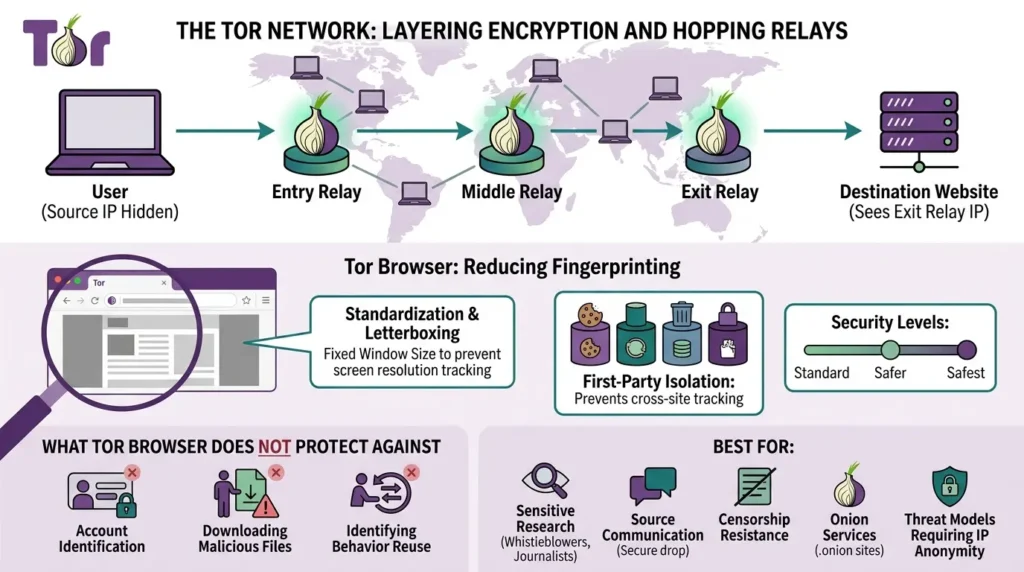
The Tor Project’s fingerprinting documentation is careful about the limits: the objective is to reduce the number of distinguishable groups, not to make every user identical. That is why supported defaults matter. Fullscreen behavior, unusual settings, extra extensions, account reuse, and other changes can affect the anonymity set.
Tor is a specialized tool, not necessarily the best everyday browser. Websites may block Tor exits, login and payment flows can be difficult, and interactive media can be inconvenient. The right question is not “Is Tor annoying?” It is “Does this session require the protection Tor is designed to provide?”
What Tor Browser does not protect against: it cannot make a user safe if they reveal their identity through an account, download and open a malicious file, reuse identifying behavior, or ignore the Tor Project’s operational guidance.
Best for: sensitive research, source communication, censorship resistance, onion services, and threat models where IP/network anonymity matters.
Which privacy browser should you choose?
Use this decision guide instead of looking for a single winner:
I want to leave Chrome with minimal friction
Choose Brave as the starting point. It provides built-in Shields and a Chromium-based workflow. Keep expectations precise: it improves tracking resistance; it does not make logged-in browsing anonymous.
I want a mainstream independent browser engine
Choose Firefox. Use Standard ETP first, review telemetry settings, and only consider advanced hardening when you understand its compatibility cost.
I want stronger fingerprinting resistance but not Tor routing
Evaluate Mullvad Browser. It uses Tor-derived anti-fingerprinting technology, but add a separate network layer if hiding your IP is part of your threat model.
I want hardened Firefox defaults and accept workflow friction
Evaluate LibreWolf. Test the webmail, calendar, authentication, extensions, and work apps you actually rely on.
I need network-level anonymity or onion services
Choose Tor Browser. Follow the Tor Project’s supported defaults, avoid unnecessary customization, and reserve it for workflows that need its stronger anonymity properties.
A practical compartmentalization model
Separate browsers can be useful, but they are only one part of compartmentalization. A simple, low-risk model is:
- Everyday browser: normal work, shopping, general reading, and accounts where your identity is already known.
- Privacy-focused browser: less account-heavy research, tracker reduction, and browsing that benefits from stronger defaults.
- Tor Browser: sessions where the network path, destination anonymity, or onion access is central to the threat model.
Do not assume that a new profile creates a new person. Reusing the same email address, account, device, IP, timing pattern, writing style, or behavior can reconnect sessions. For sensitive communication, read the broader boundaries explained in Vertex Frontier’s articles on private messaging and what end-to-end encryption protects.
Five browser-privacy mistakes that undo the setup
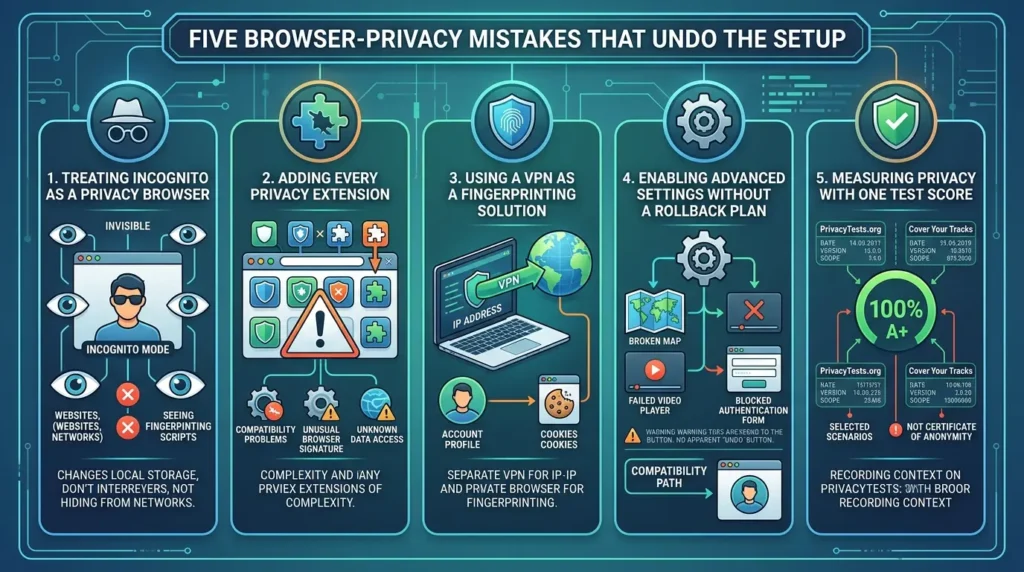
1. Treating Incognito as a privacy browser
It mostly changes local storage behavior. It does not hide you from websites, networks, or fingerprinting scripts.
2. Adding every privacy extension
Extensions can change your browser’s behavior, create compatibility problems, or make a standardized browser more unusual. Add a tool only when you understand the threat it addresses and the data it can access.
3. Using a VPN as a fingerprinting solution
A VPN and a privacy browser address different layers. Combining them can be useful, but neither one erases account-level tracking.
4. Enabling advanced settings without a rollback plan
Firefox RFP, aggressive content blocking, and hardened forks can break localization, maps, media, authentication, or work applications. Keep a compatibility path instead of weakening your only browser when a site fails.
5. Measuring privacy with one test score
PrivacyTests.org is a useful independent, open-source test suite, but it measures selected scenarios on specific browser versions and settings. EFF’s Cover Your Tracks is also a test, not a certificate of anonymity. Record the date, version, settings, and test scope before drawing conclusions.
How to test a browser without misleading yourself
If you want to compare browsers, use a small reproducible protocol rather than a vague “I tested it” claim:
- Record the browser version, operating system, extensions, privacy settings, window size, and network configuration.
- Test the same sites in fresh profiles or supported default configurations.
- Check tracker blocking, storage isolation, fingerprint signals, login behavior, CAPTCHA frequency, and ordinary site compatibility separately.
- Repeat tests after updates because browser defaults and site defenses change.
- Do not turn one test result into a universal privacy or anonymity ranking.
A useful results table should contain test date, browser version, setting, site, observed behavior, and limitation. Without those fields, a percentage or score is difficult for a reader to reproduce.
Mobile and iOS caveats
Do not transfer desktop conclusions directly to mobile. Feature parity, extension support, private browsing behavior, and engine restrictions can differ by operating system. iOS browsers are also subject to Apple platform rules that affect how browser engines and features are delivered. Treat “best private browser for iPhone” as a separate research question from “best privacy browser for Windows or Linux.”
Before recommending a mobile browser, verify the current official app, supported extensions, sync behavior, engine constraints, and whether the privacy feature being discussed exists on that platform.
On Android, the OS layer itself is replaceable in a way iOS does not allow, and that choice shapes what your browser and apps can actually protect. For that layer specifically, see our privacy-focused operating systems comparison covering Linux, Tails, and GrapheneOS.
Frequently Asked Questions
What is the best privacy browser in 2026?
There is no single best browser for every threat model. Brave is the easiest everyday switch from Chrome, Firefox offers an independent engine and flexibility, LibreWolf offers hardened Firefox defaults, Mullvad Browser focuses on anti-fingerprinting without Tor routing, and Tor Browser is designed for anonymity and onion services.
Is Brave more private than Firefox?
Brave generally requires less configuration for strong everyday tracker blocking because Shields are built in. Firefox offers more control and preserves an independent engine, but its privacy outcome depends more on settings, extensions, and the user’s tolerance for compatibility trade-offs. Neither browser makes an authenticated session anonymous.
Is LibreWolf safer than Brave?
They optimize for different trade-offs. LibreWolf ships stronger Firefox privacy hardening, while Brave prioritizes built-in protection with Chromium compatibility. LibreWolf can create more workflow friction, and Brave’s documented protections should not be interpreted as perfect unlinkability. Choose according to your sites, accounts, and threat model.
What is the difference between Mullvad Browser and Tor Browser?
Mullvad Browser uses Tor-derived anti-fingerprinting technology but does not route traffic through the Tor network and does not hide your IP by itself. Tor Browser combines browser protections with Tor-network routing, which is why it is the specialized choice for network-level anonymity and onion services.
Does a VPN stop browser fingerprinting?
No. A VPN changes the network/IP layer, while fingerprinting uses browser and device signals. A VPN can be part of a layered setup, but it does not automatically remove cookies, account identifiers, fingerprints, or behavioral tracking.
Does Incognito stop websites from tracking me?
No. Incognito mainly limits the history and site data saved locally after the session. Visited sites, network operators, ISPs, and services embedded in websites may still observe activity. Incognito is not a substitute for a privacy browser or anonymous network.
Should I use Tor Browser every day?
Only if your daily workflow genuinely requires its anonymity properties and can tolerate the compatibility and usability cost. Many readers will use Brave, Firefox, LibreWolf, or Mullvad Browser for ordinary work and reserve Tor Browser for sensitive sessions.
Can browser profiles create separate identities?
Not by themselves. Profiles can separate cookies and local state, but accounts, email addresses, IP addresses, devices, timing, writing style, and behavior can still link activity. High-risk compartmentalization requires an operational process, not just a second profile.
📋 Article Timeline & History
Successfully updated on October 5, 2026 with the latest details.
This article was originally published on September 7, 2026.

Was this article helpful?






[…] Privacy Browsers Compared: Brave vs Firefox vs LibreWolf vs Mullvad vs Tor (2026) […]
[…] Privacy Browsers Compared: Brave vs Firefox vs LibreWolf vs Mullvad vs Tor (2026) […]
[…] Privacy Browsers Compared: Brave vs Firefox vs LibreWolf vs Mullvad vs Tor (2026) […]