
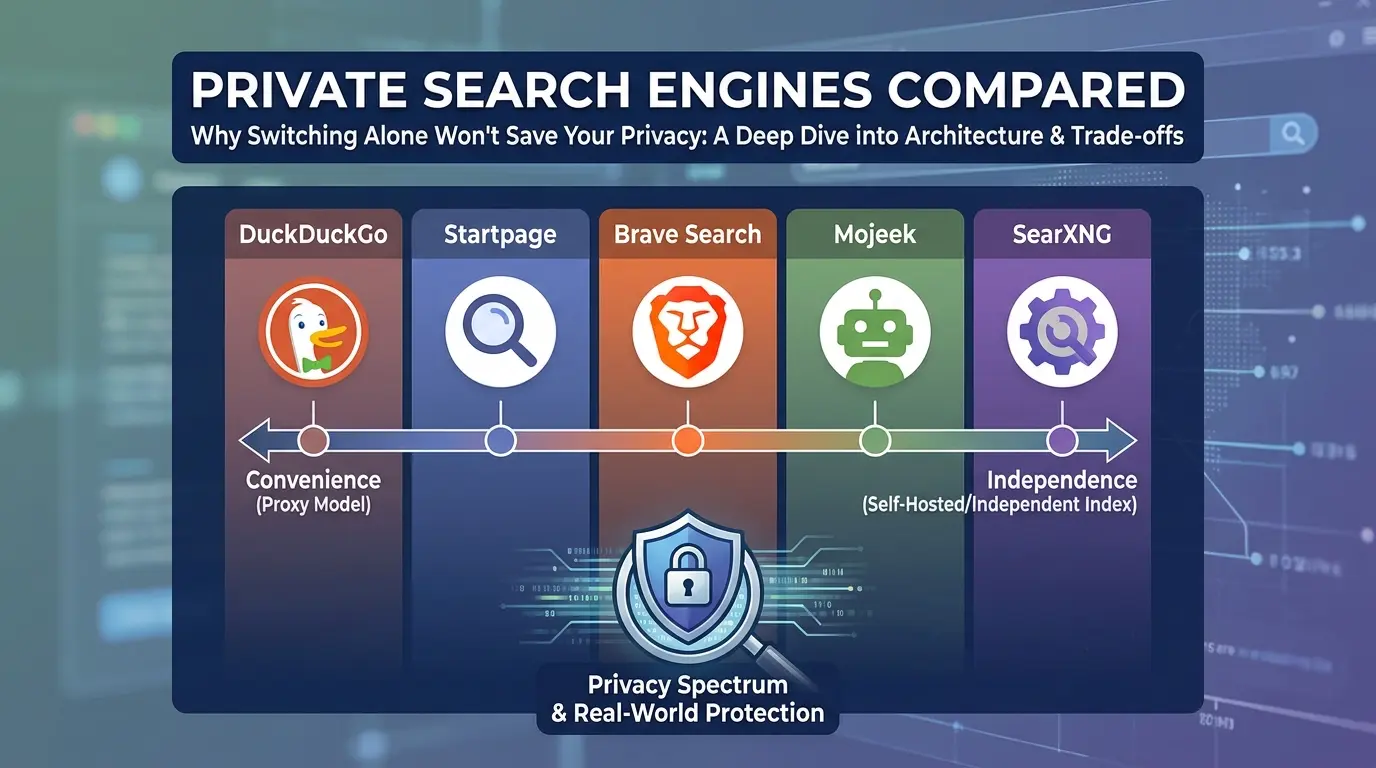

You switched from Google to DuckDuckGo. You feel safer now. You’re wrong, or at least, you’re only half right.
Here’s the uncomfortable truth nobody tells you when they recommend “just use a private search engine”: A private search engine is one privacy layer, not an anonymity switch. Your internet provider and intermediate network operators still need IP information to route traffic, while the search provider may apply its own policy about search queries, IP addresses, cookies, and abuse prevention. The result you get depends on the entire path: the search engine, your browser, DNS resolver, accounts, and the websites you visit after clicking a result.
That is why this guide separates three questions that are often collapsed into one: who can see the query, who can connect it to you, and who can track what happens after you leave the search page. Your browser still leaks data through fingerprinting. And some of the “private” engines you’ve heard recommended a hundred times have business relationships that complicate the privacy promise on the label.
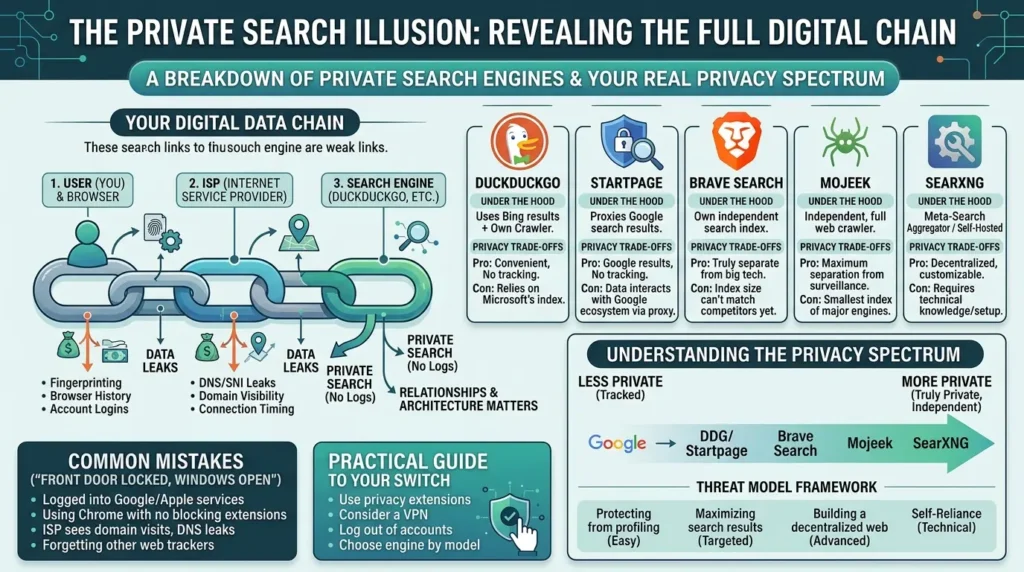
This isn’t another listicle of five search engines with one-line descriptions. This is a breakdown of how each major private search engine actually works under the hood, what each one trades away to give you privacy, and which one fits your specific threat model, because “private” isn’t one thing. It’s a spectrum, and where you land on it depends on what you’re actually trying to protect yourself from.
By the end of this guide, you’ll understand the real architecture behind DuckDuckGo, Startpage, Brave Search, Mojeek, and SearXNG, not just what their marketing pages say, but what independent researchers and long-term users have found after putting them through real-world use. You’ll also get a practical framework for choosing the right one, plus the mistakes most people make when they “switch to private search” and think the job is done.
I’ll be honest with you, I made this exact mistake myself. Three years ago, I switched to DuckDuckGo, changed my default search engine, and genuinely believed I’d ‘gone private.’ I hadn’t. I was still logged into Gmail in the same browser, still using Chrome with zero extensions, and still letting my ISP see every domain I visited. The search engine switch was real, but it was like locking the front door while leaving every window wide open. This guide exists because I spent two years after that actually learning what works, and I don’t want you to waste the same time I did.
What you’ll walk away with
Click any topic to expand or collapseMechanics of “private search” engines
How “private search” actually works — analyzing the proxy model vs. independent index vs. metasearch architectures.
DuckDuckGo & Microsoft tracker controversy
The real story behind DuckDuckGo’s Microsoft tracker controversy, the syndication agreement context, and what changed since.
Startpage & corporate trust models
Why Startpage’s privacy model depends entirely on trusting its parent company and underlying Google result proxy pipeline.
Mojeek’s independent web index
The real index-size gap behind Mojeek’s non-tracking independent crawler, trade-offs, and why it’s still valuable.
AI search tools & privacy pitfalls
Why emerging AI search tools and LLM interfaces are repeating the same privacy and data logging mistakes traditional engines made.
Threat-model decision framework
A practical decision framework to evaluate providers based on your actual threat model rather than generic marketing claims.
6 critical mistakes after switching engines
The 6 common browser and configuration mistakes that quietly undo your privacy gains immediately after switching search engines.
What a Private Search Engine Actually Means (Most People Get This Wrong)
Here's the contrarian point most privacy guides skip: a private search engine doesn't mean an anonymous one. Every search engine on this list still sees your IP address the moment you send a query, unless you're routing through Tor or a VPN. What changes is what happens after that moment: whether your query gets stored, linked to a profile, sold to advertisers, or used to build a behavioral fingerprint over time.
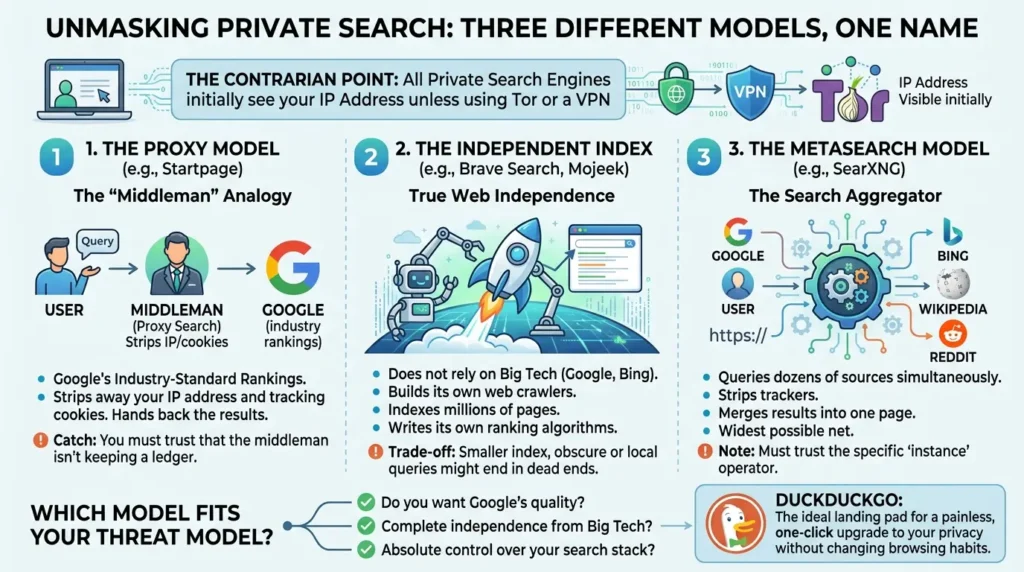
To understand why private search is such a mess of conflicting opinions, you first need to realize that "private search" is actually three completely different technologies wearing the exact same trench coat. Confusing them is the single biggest reason people end up picking the wrong tool for their needs.
Here are the three main models, with the privacy boundary made explicit:
- Metasearch — SearXNG: SearXNG aggregates results from other search services and removes or limits private data in outgoing requests. The privacy boundary depends on the specific instance. SearXNG’s documentation says public-instance users must trust the administrator not to log or redistribute requests, while a private or self-hosted instance gives the operator control over source code, logging settings, and private data.
- Proxy or anonymizing intermediary — Startpage: The service says it removes identifying information from the query before sending it to its search and content providers. You still have to trust the intermediary to apply its stated policy, operate its infrastructure correctly, and handle abuse prevention without creating a personal search history. When you click a normal result, you leave Startpage’s protection unless you use its Anonymous View feature.
- Independent index — Brave Search or Mojeek: These services build and rank a web index that is not simply a proxy for Google’s results. Independence changes who controls the index and ranking layer; it does not mean that the browser, ISP, destination website, or every optional feature is automatically private. Brave currently describes its search index as fully independent, while Mojeek’s own privacy policy should be read carefully because it describes standard traffic logs even though it does not record IP addresses.
The first step isn't choosing a brand; it's deciding which of these three models fits your personal threat model. Do you want Google’s quality, complete independence from Big Tech, or absolute control over your search stack?
The practical starting point depends on what you value most. DuckDuckGo is a low-friction switch for reducing query-linked profiling. Startpage is useful when you value Google-like result coverage and accept a proxy model. Brave and Mojeek are relevant when index independence matters. SearXNG is relevant when you want control over the metasearch configuration. None of these choices removes the need to secure your browser, DNS path, accounts, and destination websites.
How We Compared the Engines
This comparison separates documented provider claims from hands-on observations. The goal is not to produce a universal “best” ranking, but to measure visible result behavior and the practical trade-offs that matter when choosing a default search engine.
Test protocol
| Test dimension | Method used in this comparison |
|---|---|
| Query privacy | We did not infer server-side logging from the appearance of a result page. Provider collection and retention claims were checked against current public documentation, while the hands-on test recorded only visible browser behavior. |
| Result coverage | We ran the same two English queries—one general and one technical—through the engines where the result page loaded: best private search engine and PostgreSQL logical replication tutorial. |
| Personalization | All searches were performed without signing into a provider account. This reduces account-based personalization, but it does not prove that an engine has no other ranking or session signals. |
| External-link boundary | We recorded whether the result page exposed an Anonymous View or comparable privacy action. We did not treat a normal click as protected after leaving the search engine. |
| Index independence | We used each provider’s current public documentation for architecture claims. Similar result pages were not treated as proof of a shared or independent index. |
| Public versus private infrastructure | We attempted a public SearXNG instance and recorded the exact instance, searx.be. The instance returned an automated browser-verification page before results could be compared. |
Test conditions
Test date: August 18, 2026
Country and language: United States / English query set; no search-region or geolocation override
Browser and device: Chromium Stable on Ubuntu 24.04, desktop viewport
Query set: Two fixed queries: best private search engine and PostgreSQL logical replication tutorial
Account state: Logged out; no provider account was used; fresh public search sessions
Network conditions: Sandbox network; no user VPN or Tor configured
Engines attempted: DuckDuckGo, Startpage, Brave Search, Mojeek, and the public SearXNG instance searx.be
What we observed
| Engine | General query | Technical query | Observable result |
|---|---|---|---|
| DuckDuckGo | Results loaded. The visible set included PrivacySavvy, SafetyDetectives, RestorePrivacy, Guru99, Norton, PrivateProxyGuide, PrivacyTools.io, NordVPN, PrivacyOn, and Ghostery. | Results loaded. After a sponsored Udemy result, the visible set included a DEV Community tutorial and official PostgreSQL documentation, followed by additional technical guides. | Both tested result pages loaded in Chromium. |
| Startpage | The first load showed a verification screen, then results loaded. The visible set included Reddit, Brave Search, Startpage, Ghostery, DuckDuckGo, PCMag, BlockSurvey, YouTube, EthicalAds, and NordVPN. | Results loaded. The visible set began with a Medium tutorial, followed by official PostgreSQL documentation, Crunchy Data, EnterpriseDB, YouTube, Severalnines, Microsoft Learn, Learnomate, and DigitalOcean. | Verification appeared on the general query; both result pages exposed “Visit in Anonymous View” actions. |
| Brave Search | Results loaded with Reddit discussion modules, a Brave Search result, related questions, YouTube results, and web results from SafetyDetectives, Startpage, PCMag, Ghostery, Intego, Surfshark, PrivacyTools.io, Privacy Guides, Quora, and NordVPN. | Results loaded. The first visible result was official PostgreSQL documentation, followed by Crunchy Data, with additional results from Percona, Microsoft Learn, EnterpriseDB, Npgsql, DigitalOcean, and others. | Both tested result pages loaded and exposed Ask, Goggles, filters, and external search links. |
| Mojeek | The page returned an ALTCHA “I’m not a robot” challenge before results appeared. | Not run after the general-query verification block. | No result-quality conclusion was drawn. |
| SearXNG (searx.be) | The instance returned browser verification, then reported that automated verification failed and offered an image challenge. | Not run after the general-query verification block. | No result-quality conclusion was drawn; this records the limitation of the selected public instance only. |
The visible pages suggest that DuckDuckGo, Startpage, and Brave Search all returned usable coverage for the two tested queries, with official PostgreSQL documentation appearing in the technical results on all three accessible engines. That is a two-query observation, not a universal quality ranking.
The test also showed that anti-bot verification can become part of the practical user experience: Startpage required an initial verification step, while Mojeek and the selected SearXNG instance did not expose results in this sandbox session.
Automated HTTP requests were not used to calculate latency or result counts because several endpoints returned anti-bot responses, including HTTP 202 or 429 statuses, instead of ordinary result pages. The comparison therefore reports visible result behavior and access friction, not fabricated response-time scores.
What this test can and cannot show
The test can compare visible result behavior, broad source coverage for a small fixed query set, interface features, verification friction, and documented workflows. It cannot prove what a provider could disclose under every legal or technical circumstance. It cannot establish server-side logging or retention, prove that one engine is universally more private, or turn the behavior of one public SearXNG instance into a statement about every SearXNG instance.
Because Mojeek and searx.be were blocked by verification before results appeared, their result quality should not be compared with the other engines from this run. A stronger follow-up study would repeat the same query set on another date, add local and recent queries, test a second public SearXNG instance, and record exact timestamps and regional settings.
Sources for provider-specific claims
DuckDuckGo’s current privacy policy explains its treatment of search history, IP addresses, external websites, and private search ads. Startpage’s privacy policy explains anonymized queries, search logging, Anonymous View, and the boundary after clicking ordinary results. Brave’s independence page describes the current independent-index claim and optional private usage metrics. SearXNG’s documentation explains the difference between public and private instances and the role of instance configuration.
Jurisdiction, Company Location, and the Limits of “Eyes” Labels
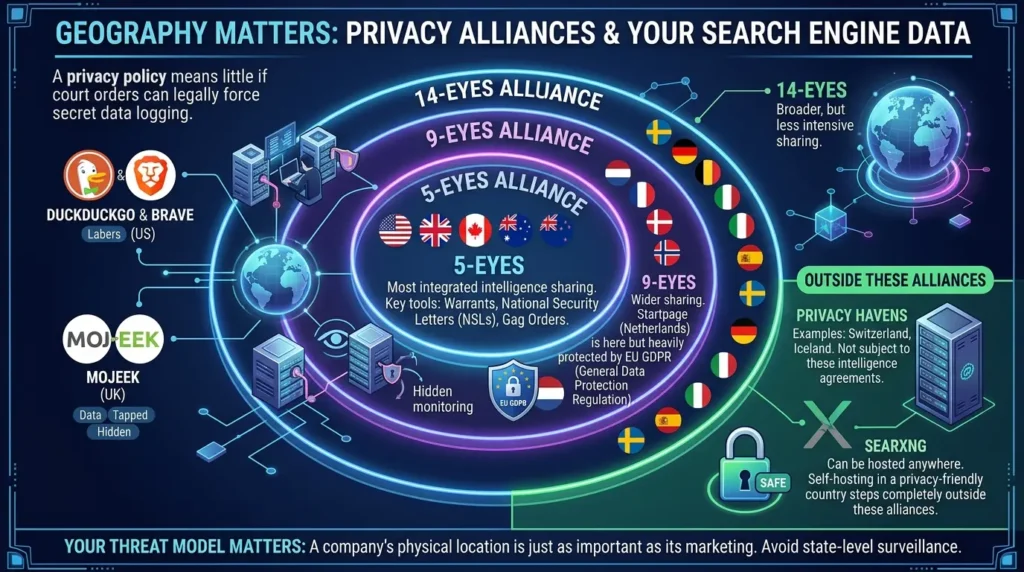
Where a search provider is incorporated and operates can affect the legal process for government requests, but Five Eyes, Nine Eyes, and Fourteen Eyes labels are not a complete threat model.
They do not by themselves prove what a company logs, whether a request is valid, what data exists, or how a court would handle a specific order. Evaluate four separate questions instead:
| Question | Why it matters |
|---|---|
| Where is the legal entity based? | It indicates which laws and courts may apply to the provider. |
| What does the current privacy policy say is collected or retained? | It defines the provider’s stated data practices, subject to exceptions and changes. |
| What does the technical architecture make available? | It can limit or expand what the provider can retrieve from systems and logs. |
| What happens after you click a result? | The destination website, browser, cookies, and accounts may create a new tracking relationship. |
For example, Startpage says it operates from the Netherlands and does not record search queries, while its policy also explains that some abuse-prevention processing exists and that ordinary external links leave Startpage’s privacy protection. SearXNG is different because the jurisdiction and logging behavior depend on the operator of the particular instance. The correct conclusion is not that one country is automatically safe; it is that jurisdiction is one input in a larger evidence-based comparison.
DuckDuckGo Search Engine Privacy: The Default Recommendation, and Why That's Both Right and Incomplete
DuckDuckGo is the name everyone throws out first, and there's a real reason for that. It's the most accessible privacy search engine that exists, mobile apps, desktop browser extensions, a Tor onion service, and a default that "just works" without configuration. For most people moving away from Google for the first time, it's still the most sensible starting point.
Does DuckDuckGo Use Google?
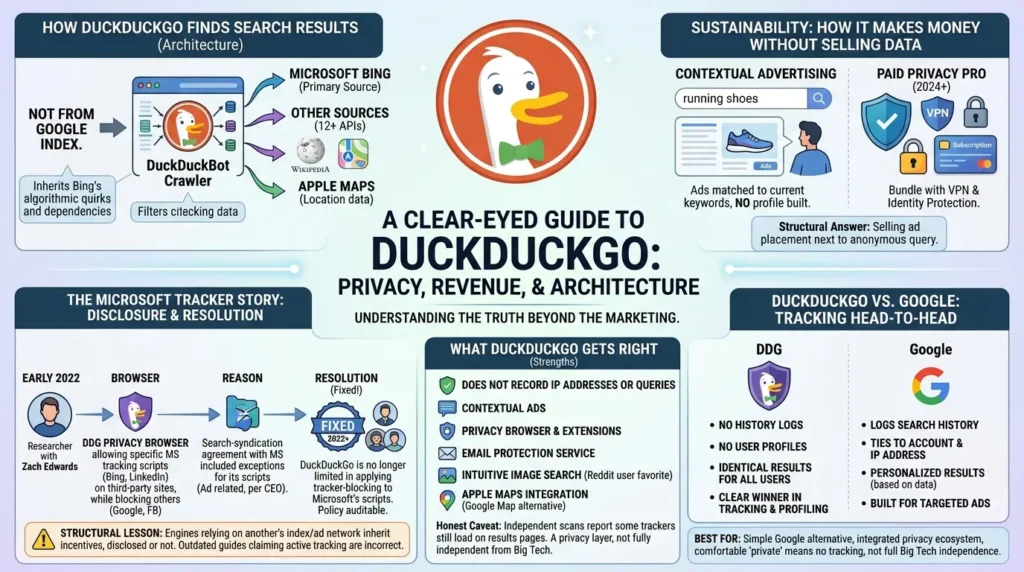
No. This is one of the most common misunderstandings about DuckDuckGo, and it's worth clearing up directly: DuckDuckGo has no relationship with Google's search index at all. Its results come primarily from its own crawler (DuckDuckBot) combined with Microsoft's Bing and more than a dozen other sources, including Wikipedia and Apple Maps for location data. If you want results sourced from Google specifically while still avoiding personalized tracking, that's the use case Startpage solves instead, covered in the next section.
However, the tech community on Reddit frequently points out the downside of this architecture: The "Bing Wrapper" dependency. Because DDG relies so heavily on Bing’s index, it inevitably inherits Bing's algorithmic quirks, filtering choices, and occasional technical glitches. If Bing experiences an issue, DuckDuckGo users often feel the impact immediately.
Private Email Services Compared: What Happens When Your "Zero-Access" Provider Gets a Court Order
How Does DuckDuckGo Make Money If It's Free?
DuckDuckGo runs entirely on contextual advertising and, since 2024, a paid Privacy Pro subscription that bundles a VPN and identity protection tools. The contextual model means an ad is matched to the keyword in your current search, search "running shoes" and you'll see a shoe ad, without DuckDuckGo building a profile of who you are or what you've searched before. This is the structural answer to "how can a free privacy tool be sustainable": it's not selling your data, it's selling ad placement next to a single, anonymous query.
But there's a chapter in DuckDuckGo's history that most "best privacy tools" listicles either skip entirely or bury in a footnote, and it's exactly the kind of thing that separates a surface-level recommendation from one that actually informs you.
The Microsoft Tracker Story Nobody Tells You
In May 2022, a security researcher named Zach Edwards discovered something that didn't match DuckDuckGo's marketing. The DuckDuckGo Privacy Browser, the mobile app, not the search website, was actively allowingMicrosoft tracking scripts from Bing and LinkedIn to load on third-party websites, while it was blocking equivalent scripts from Google and Facebook. BleepingComputer's original investigation documented the DuckDuckGo Privacy Browser allowing Microsoft tracking scripts from Bing and LinkedIn to run on third-party websites while it blocked equivalent trackers from Google and Facebook.
DuckDuckGo's CEO didn't deny it. He confirmed the search-syndication agreement with Microsoft limited how the browser could apply its tracker-blocking protections to Microsoft-owned scripts, framing the partnership as related to ad placements and search results rather than tracking by design. In plain terms: DuckDuckGo's contract with Microsoft, the company supplying part of its search results through Bing, came with strings attached, and one of those strings meant Microsoft got a tracking exception that Google and Facebook didn't.
This matters for one specific reason that almost never gets mentioned: it's proof that "we don't track you" and "we have zero business entanglements with Big Tech" are two completely different promises. DuckDuckGo kept the first one. The second one had an asterisk nobody disclosed until an outside researcher found it.
The good news, and this is the part that's important to get right, because plenty of outdated articles still treat this as an active problem, is that DuckDuckGo fixed it. In DuckDuckGo's own follow-up announcement, founder Gabriel Weinberg confirmed the company was no longer limited in applying third-party tracker loading protection to Microsoft's scripts, stating they had not had, and did not have, any similar limitation with any other company. The change rolled out to DuckDuckGo's mobile apps and browser extensions, and the company now documents its full approach on its web tracking protections help page, making the policy auditable going forward.
What DuckDuckGo Actually Gets Right
DuckDuckGo’s current privacy policy says it does not save or share search history, does not save IP addresses alongside searches, and does not log IP addresses to disk in a way that can be tied back to a user or search history. It also explains that anonymous search trends may be used to improve results, that network providers still see the IP information needed to route traffic, and that the privacy boundary changes when you visit an external website.
The important distinction is therefore between “DuckDuckGo does not build a user-linked search history” and “nothing in the surrounding browsing session can identify me.” The first is a provider policy claim. The second depends on your network, browser, accounts, destination websites, and the data you voluntarily submit after clicking a result.
The honest caveat, separate from the Microsoft episode: independent scans have reported that some trackers still load on DuckDuckGo's result pages, and the engine draws on Bing and other APIs for part of its results, meaning it isn't a fully independent search engine. That doesn't make it untrustworthy, it makes it a privacy layer, not a from-scratch alternative.
Here’s my honest take after using DuckDuckGo daily for over two years: it’s genuinely good enough for 80% of what I search. The remaining 20%, obscure technical queries, very recent news, hyper-local results, I bounce to Startpage without guilt. The people who hate DDG the loudest are usually the ones who expected it to be Google-minus-tracking. It’s not. It’s its own thing, and once you stop comparing every result to what Google would have shown you, it clicks.
Despite these criticisms, real-world users on r/browsers point out two major advantages of DDG over its competitors:
- Intuitive Image Search: Multiple Reddit threads highlight that DDG’s image search is actually superior and more intuitive than both Brave’s and Startpage's.
- The Apple Maps Integration: For location-based searches, DDG utilizes Apple Maps. While total "de-googlers" might still be skeptical of Apple, the community widely considers it a much safer, less intrusive alternative to Google Maps.
DuckDuckGo vs. Google: Which Is Actually Safer?
DuckDuckGo is a strong candidate when the comparison is specifically about reducing search-history profiling. Its current policy says that search queries are not stored with IP addresses or other unique identifiers, while Google’s personalization and account behavior can vary by the user’s settings, signed-in state, and products used.
The fair comparison is not “DuckDuckGo never sees anything and Google sees everything”; it is whether you prefer a search service that says it does not build a user-linked search history, or a more personalized ecosystem that uses more account and activity context.
Best for: Anyone who wants the simplest possible switch away from Google with the broadest tooling, search, browser, and email protection in one ecosystem, and is comfortable with the fact that "private" here means "doesn't track you," not "fully independent from Big Tech."
Startpage Private Search: Google's Search Quality, Minus Google Knowing It's You
If DuckDuckGo is the “easy switch,” Startpage is the “I want a Google-like result experience without sending my personal query context directly to Google” option.
Startpage says it strips unnecessary metadata, including the user’s IP address, before sending an anonymized query to its search and content providers, and says it does not log search queries. The result is a proxy model: you are changing which intermediary handles the request, not eliminating the need to trust an intermediary.
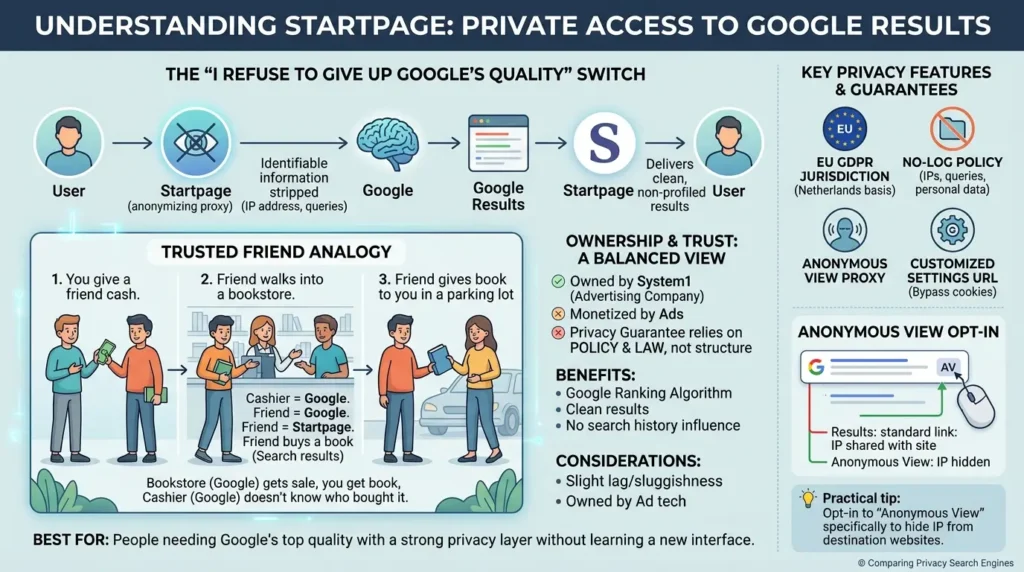
The mechanism that makes this work is called Anonymous View, a built-in proxy that lets you open a result link without revealing your IP address or identity to the destination website. Startpage says it operates from the Netherlands and complies with applicable EU privacy law.
That legal framework is relevant, but it does not mean the service is immune from lawful requests or that jurisdiction replaces an examination of the provider’s current technical and retention practices.
Here's the part most comparison articles gloss over because it doesn't fit neatly into a checklist: using Startpage doesn't eliminate the need to trust a company with your search data, it just changes which company you're trusting.
Think of Startpage like this: Imagine you want to buy a highly sensitive book from a local bookstore, but you don't want the cashier to recognize you or log your credit card. So, you pay a trusted friend in cash to walk inside, buy the book, and hand it to you in the parking lot. The bookstore gets its sale, you get your book, and the cashier has absolutely no idea who actually went home to read it. Startpage is that friend; Google is the bookstore.
I tested this myself last month: I searched for the same obscure academic paper on Startpage and directly on Google, side by side. The results were identical, same order, same snippets, same everything. The only difference? Google’s version had my search history influencing the sidebar suggestions, and Startpage’s was clean. That’s the product in a nutshell: Google’s brain, without Google’s memory.
Is Startpage Owned by an Advertising Company? Can You Trust It?
This is the question that comes up in nearly every Startpage thread, and the honest answer is yes, and it's worth understanding what that does and doesn't mean. Startpage is partially owned by System1, an advertising technology company, and the service's business model still depends on serving ads alongside the anonymized results.
The privacy proposition is real and verifiable through its no-log policy and jurisdiction, but it's worth being honest about the structural reality: an ad-funded proxy is monetized by advertising, the same economic engine that makes profiling profitable everywhere else online. The privacy guarantee here rests on policy and legal jurisdiction, not on the kind of architectural independence Mojeek or Brave Search offer.
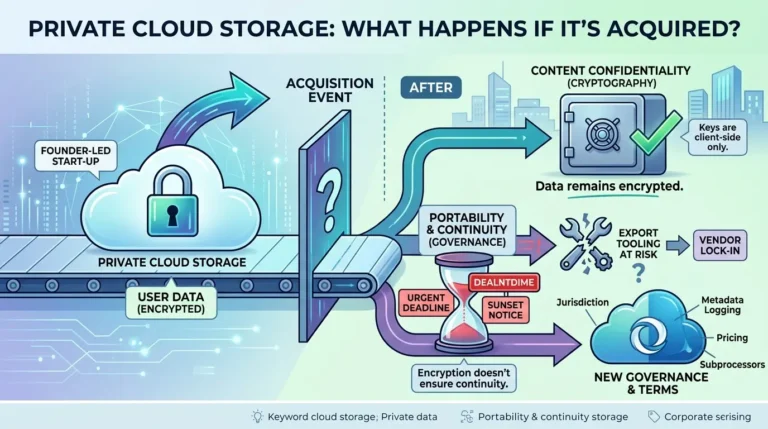
For many privacy purists on Reddit, the acquisition of Startpage by System1 remains an immediate deal-breaker. The common phrase in the community is: “The product is great, but the owner is a red flag. This isn't a Startpage-specific concern. The same pattern, a privacy provider getting acquired and the new owner's incentives overriding the original promise, is what ended Skiff after Notion's acquisition. We broke down the full acquisition-risk framework, including what changes and what doesn't, in our guide to private cloud storage acquisition risk.
From a technical usability standpoint, threads on r/privacy frequently complain about the slight lag or sluggishness compared to Brave Search or Google. Because Startpage has to act as a real-time proxy (fetching, sanitizing, and returning Google results), it often feels noticeably slower.
That's not a reason to avoid Startpage. GDPR enforcement carries real legal weight, and a no-log policy backed by EU jurisdiction is meaningfully different from a U.S. company under a far looser regulatory regime. It's simply a different kind of privacy guarantee, a legal and contractual one, not a structural one where the company physically cannot link your query to you because it never had your identity to begin with.
A popular Reddit power-user tip to bypass cookie tracking on Startpage is using a customized settings URL. Instead of relying on browser cookies to remember your preferences (like dark mode or region filters), Startpage allows you to generate a unique settings URL with your preferences pre-baked into the link itself, completely eliminating the need for tracking cookies.
Best for: People who find Google's actual result quality hard to give up and want the closest thing to "Google, privately" without learning a new search interface.
Brave Search: An Independent Search Engine Alternative to Google and Bing
Brave Search takes a different approach from a proxy service. Its current documentation describes Brave Search as fully independent, meaning the search product is presented as using its own independent index rather than simply forwarding every query to Google or Bing. Brave also says it uses private usage metrics to estimate overall activity and performance, and that users can turn this option off in Settings.
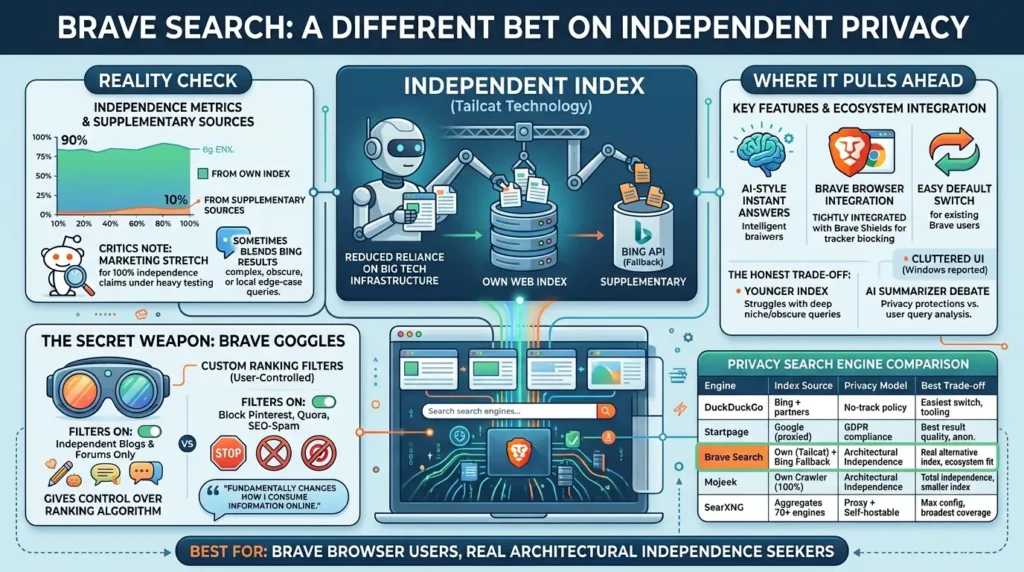
That independence should be evaluated separately from privacy. An independent index can reduce dependence on another company’s ranking and crawling infrastructure, but it does not automatically make your browser, network, destination websites, or optional AI features private. The most useful question is not whether Brave is “100% private”; it is which layer of the search experience you want to keep independent and which data practices you accept.
Older comparisons often describe Brave Search as silently falling back to Bing for difficult queries. That claim should not be repeated as a current universal rule without a dated source or a reproducible test. Brave’s current independence page describes the search product as fully independent, so this article should distinguish current documented behavior from historical community criticism.
Where Brave Search Pulls Ahead
Brave Search ships with AI-style instant answers and a feature set that goes beyond bare result links, and it integrates tightly with the Brave browser for users who already use Brave Shields for tracker blocking. If you're already inside that ecosystem, switching your default search engine costs you nothing, it's already the default.
The honest trade-off: because Brave's index is younger than Google's by decades, it can struggle with deeply niche or obscure queries, and some reviewers describe its interface as more cluttered than the minimalist alternatives on this list.
Some Windows users on Reddit have reported that the web interface can occasionally feel a bit heavy and clunky. Additionally, there is an ongoing debate regarding Brave's built-in AI summarizer. Although Brave claims their AI processes queries with strict privacy protections, some advocates remain skeptical about whether user queries are silently analyzed to improve their internal language models.
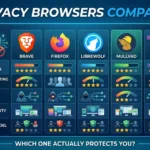
| Engine | Search model | What the provider or project claims | Main privacy boundary | Best fit |
|---|---|---|---|---|
| DuckDuckGo | Mixed sources and partner data | It says it does not save search history or link searches to IP addresses or unique identifiers. | Your ISP, browser, accounts, and destination websites remain separate tracking surfaces. | Easiest first step away from search-history profiling. |
| Startpage | Anonymized intermediary to search/content providers | It says it strips identifying metadata and does not log searches. | You still trust the intermediary; ordinary result clicks leave its protection. | Users who prioritize a Google-like result experience. |
| Brave Search | Independent index | It describes Brave Search as fully independent and uses optional private usage metrics. | Independence of the index is not the same as complete privacy across browser, network, and AI features. | Users who value index independence and ecosystem integration. |
| Mojeek | Independent crawler and index | It describes a no-tracking policy and does not record IP addresses. | Its policy also describes standard logs and is dated; coverage may be smaller. | Researchers who value an independent, less personalized index. |
| SearXNG | Metasearch aggregation | The project describes no tracking/profiling and removal of private data from requests. | Public-instance operator, configuration, upstream engines, and logging settings. | Users who want configurability or self-hosting. |
| Kagi | Paid search with privacy-focused policies | It aligns the service with subscriptions and documents limited, purpose-specific server retention. | An account and payment relationship still exist; optional AI and third-party services have their own boundaries. | Users willing to pay for an ad-free, customizable experience. |
The Secret Weapon: Brave Goggles
Brave Search has one highly underrated feature that completely changes how you interact with a search index: Goggles.
Normally, a search engine's secret algorithm decides what is "relevant" for you, often prioritizing high-authority media sites. With Goggles, Brave allows users and community developers to apply custom ranking filters to search results.
Want to search the web but only see results from independent blogs and forums, entirely bypassing major media publishers? Or perhaps you want a filter that completely blocks Pinterest, Quora, and copycat SEO-spam sites from your results? You can apply a community-created Goggle in one click.
It’s a massive step forward for informational freedom, giving you back control over the ranking algorithm itself,something Google or Bing would never dream of allowing.
I’ll say something that might be unpopular in privacy circles: Brave Search is the one I actually enjoy using the most day-to-day. Not because it’s the most private (Mojeek wins that), and not because its results are the best (Startpage wins that). It’s because the Goggles feature fundamentally changed how I consume information online. I have a Goggle that filters out every major news publisher and only shows me independent blogs and forums. The internet feels completely different through that lens, like discovering a quieter, more thoughtful version of the web that the algorithm usually buries.
Best for: Brave browser users, and anyone who wants real architectural independence from Google/Bing without sacrificing too much in result coverage.
Mojeek: The No-Tracking Search Engine With Zero Dependency on Big Tech
If Brave Search is "mostly independent," Mojeek is the engine that takes independence to its logical extreme. Founded in the UK in 2004, Mojeek positions itself as an independent search engine with its own crawler and ranking system. Its privacy policy describes a no-tracking approach and says that IP addresses are not recorded; however, the same policy also says that standard logs are retained and may include visit time, requested page, referral data, and separate browser information.
The defensible description is “no user-tracking policy with limited identifying fields in standard logs,” not “no logs at all.” The policy page is dated, so verify it again before publishing a time-sensitive claim. As Mojeek explains on its own site, its web search results are 100% independent, coming entirely from its own crawler and index rather than from any other engine.
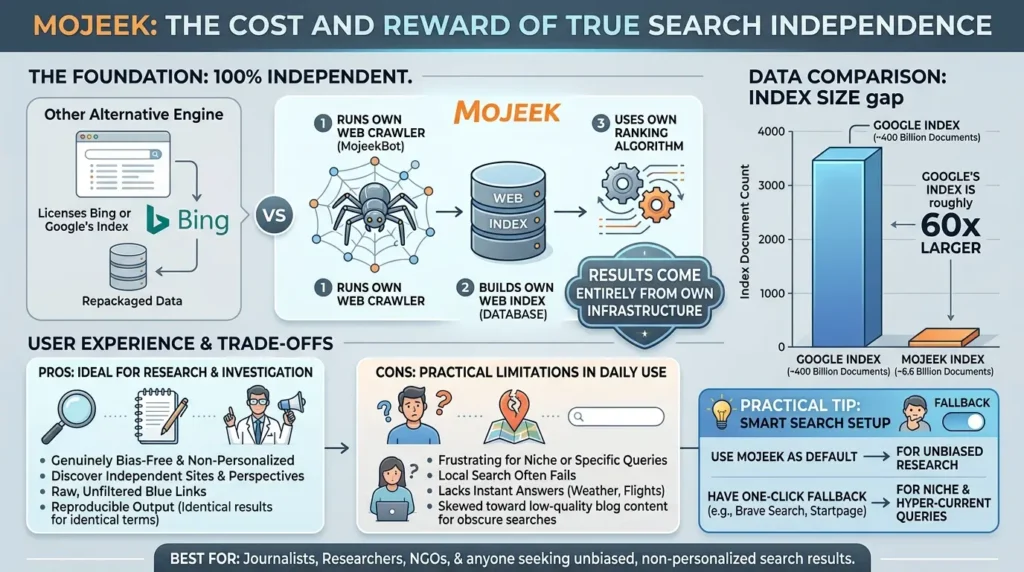
This isn't a small technical detail, it's the entire point. Building a web-scale crawler from the ground up is one of the most resource-intensive undertakings in software, which is exactly why almost every other "alternative" search engine on the market quietly licenses Bing or Google's index instead of building their own. Mojeek's persistence in doing it the hard way is the reason privacy researchers consistently rank it as a genuinely separate option rather than a repackaged one.
The Real Cost of True Independence
Index-size comparisons are useful only when the date, definition, and source are clear. A reported document count for Google and a reported page count for Mojeek may not measure the same thing, and neither number directly predicts the quality of a particular query. Rather than presenting a fixed “60 times larger” ratio as a permanent fact, treat index size as one explanation for coverage differences and show a dated query sample when making a practical recommendation.
I experienced this exact frustration during my first week of trying Mojeek as my primary engine. I searched for a specific Python error message and got a page of vaguely related blog posts instead of the Stack Overflow thread I needed, and searching for a nearby restaurant yielded nothing helpful.
This shows up clearly in real user feedback. On Mojeek's own app store reviews, one long-term user wrote that the engine performs well for most searches, but when searching something more obscure or in question form, results sometimes skew toward low-quality blog content that recycles the same information. That's the honest trade-off: Mojeek's purity is also its limitation.
Because there's no personalization and no tracking-based ranking, two people searching the same term get identical results, which is great for researchers and journalists who need reproducible, bias-free output, and frustrating for anyone chasing a very specific, very recent, or very niche result.
It's worth noting Mojeek isn't trying to be a Google replacement for every use case. The company's own messaging is explicit that the goal is providing a genuine alternative, not optimizing rankings to imitate another engine, and that philosophy shows results that can feel unfamiliar if you're used to Google's heavily personalized output.
Let’s be completely honest for a second: searching on Mojeek feels a bit like stepping into a time machine back to 2005. You won't get Google's hyper-polished, mind-reading autofill, and you won't get instant local weather or flight trackers at the top of your screen. Instead, you get raw, unfiltered blue links. For some, this is an incredibly refreshing break from SEO-optimized junk. For others, it's a frustrating reminder of how dependent we’ve become on Big Tech’s hand-holding.
I’m going to be brutally honest: the first week I tried Mojeek as my only search engine, I almost gave up three times. I searched for a specific Python error message and got a page of vaguely related blog posts instead of the Stack Overflow thread I needed.
I searched for a restaurant near me and got nothing useful. But here’s what happened after I stopped treating it like a Google replacement and started treating it like a research tool: I discovered articles, independent sites, and perspectives that Google’s algorithm had never once surfaced for me in fifteen years of daily use. Mojeek doesn’t show you what’s popular. It shows you what exists. That distinction matters more than I expected.
Best for: Journalists, researchers, NGOs, and anyone who needs genuinely unbiased, non-personalized, reproducible search results, and is willing to occasionally supplement with a second engine for hard-to-find content.
The Economics of Independence: How Do Free Search Engines Pay Their Server Bills?
Running a web crawler and keeping billions of pages indexed requires massive server warehouses, cooling systems, and immense network bandwidth. If these companies aren't building advertising profiles on you, how do they stay in business?
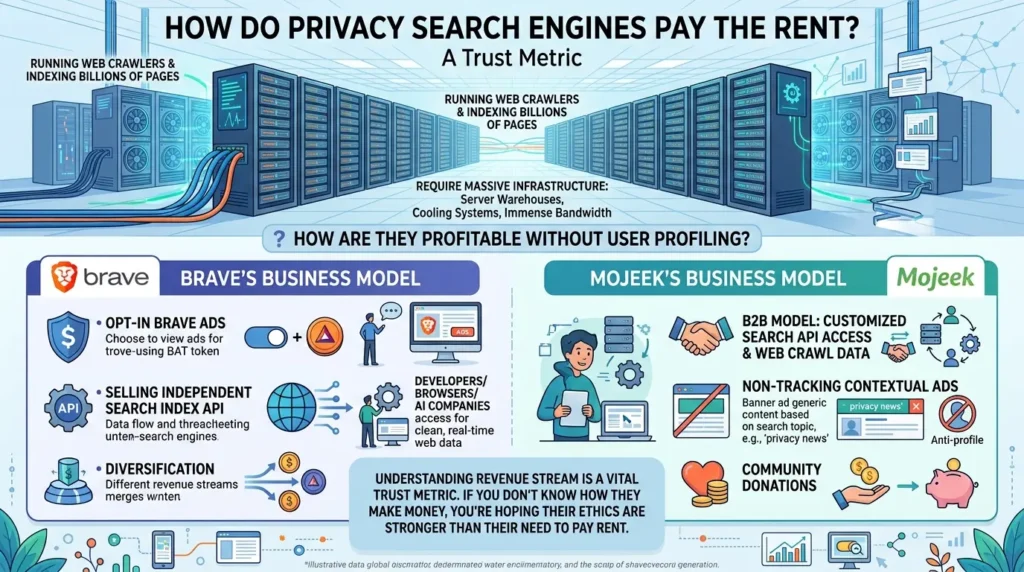
Understanding a search engine’s revenue stream isn't just about curiosity; it’s a vital trust metric. If you don't know how a privacy service makes money, you're hoping their ethics are stronger than their need to pay rent. Here is how they manage:
- Brave’s Business Model: Brave doesn’t just rely on opt-in Brave Ads. They have diversified by selling their independent search index API to third-party developers, browsers, and AI companies that need clean, real-time web data.
- Mojeek’s Business Model: Mojeek operates a B2B model, selling customized search API access and web crawl data to enterprise clients, alongside running non-tracking contextual ads and accepting community donations.
SearXNG: The Self-Hosted Metasearch Engine Power Users Run That Nobody Talks About
Every privacy roundup mentions DuckDuckGo. Almost none of them mention SearXNG in any real depth, which is a gap, because it solves a problem none of the four engines above can: what happens when you don't want to trust any single company with your search habits, including the privacy-focused ones?
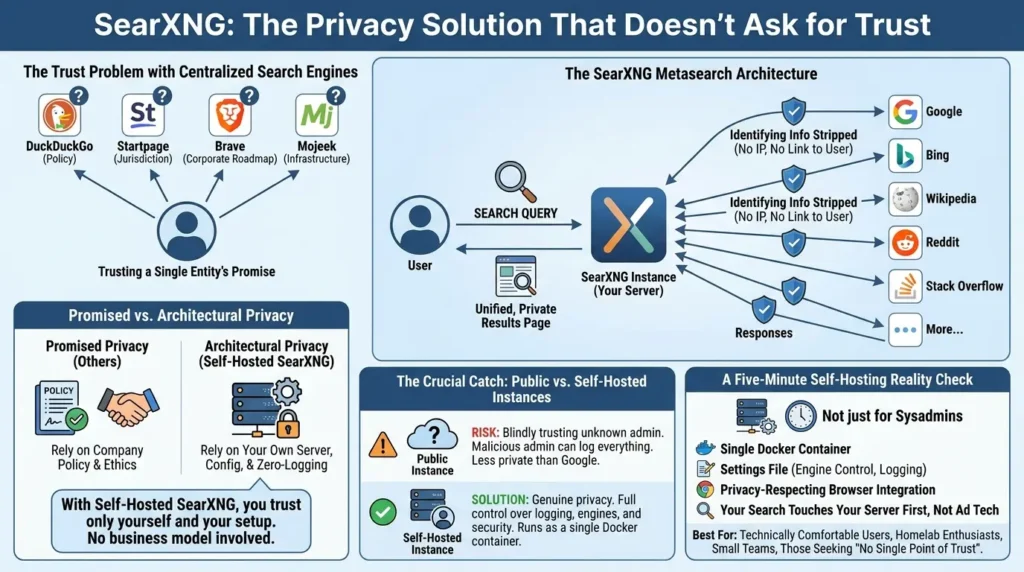
SearXNG is a free, open-source metasearch engine that aggregates results from multiple search services rather than maintaining one general-purpose index of its own. The project says users are not tracked or profiled by SearXNG itself, but the privacy boundary still depends on the particular instance, its configuration, its enabled engines, and its administrator.
SearXNG’s documentation explains that it removes private data from outgoing requests and that the instance’s IP may be visible to external services. It also explains that public-instance users must trust the operator not to log, aggregate, forward, or sell requests. A private or self-hosted instance gives the operator control over source code, logging settings, and private data; it does not make the operator’s server, upstream engines, or the user’s network magically invisible.
Why This Architecture Solves a Problem the Others Don't
Think about what you're trusting with every engine covered so far: DuckDuckGo's policy, Startpage's jurisdiction, Brave's corporate roadmap, Mojeek's infrastructure. With SearXNG, if you self-host it, the answer changes completely, you're trusting your own server, configuration, and logging settings. Nobody else's business model is involved at all.
That's not a small distinction. It's the difference between promised privacy and architectural privacy. A self-hosted SearXNG instance can be configured with zero logging, behind your own reverse proxy, with full control over which of the 70-plus supported engines are even queried. You can disable Google entirely from your stack and never send it a single character, while still pulling results from a dozen other sources.
But there is a major catch that tech experts on r/privacy constantly warn beginners about: using a public SearXNG instance can actually be less private than using Google. When you use a public instance run by an unknown volunteer, you are blindly trusting that random administrator not to log your queries. If that admin is malicious, they can easily capture every search term and IP address you send.
For genuine privacy, self-hosting is the only real answer. It runs cleanly as a single Docker container, but as r/selfhosted users often point out, it comes with "maintenance fatigue."
Full disclosure: I self-hosted my own SearXNG instance, and I love it, but setting it up took me about 45 minutes, and I’ve had to update the Docker container twice in six months just because Google changed something that broke the scraper scripts.
Self-hosting your own SearXNG instance is the digital equivalent of baking your own bread from scratch. Sure, buying a pre-sliced loaf from the supermarket (using a public instance) is infinitely easier and faster. But when you bake it yourself, you know exactly what ingredients went into the dough, no hidden preservatives, no artificial tracking scripts, and complete control over the oven settings.
A Five-Minute Self-Hosting Reality Check
You don't need to be a sysadmin to try this. A minimal SearXNG deployment runs as a single Docker container, with a settings file controlling which engines are active, what gets logged (ideally nothing), and how rate limiting works. Pair it with a privacy-respecting browser as your default search provider, and every search you make for the rest of your browsing life never touches a company's ad infrastructure directly, it touches your own server first.
Best for: Technically comfortable users, homelab enthusiasts, small teams, or anyone whose threat model includes "I don't want to trust any single company" rather than just "I want a nicer privacy policy."
Kagi: The Premium, Paid-Only Search Engine That Has Zero Incentives to Track You
There’s an old, uncomfortable rule in tech: If you aren't paying for the product, you are the product. Every search engine on this list, even the most private ones, has to navigate the awkward dance of running some form of advertising to keep the lights on.
Except for Kagi.
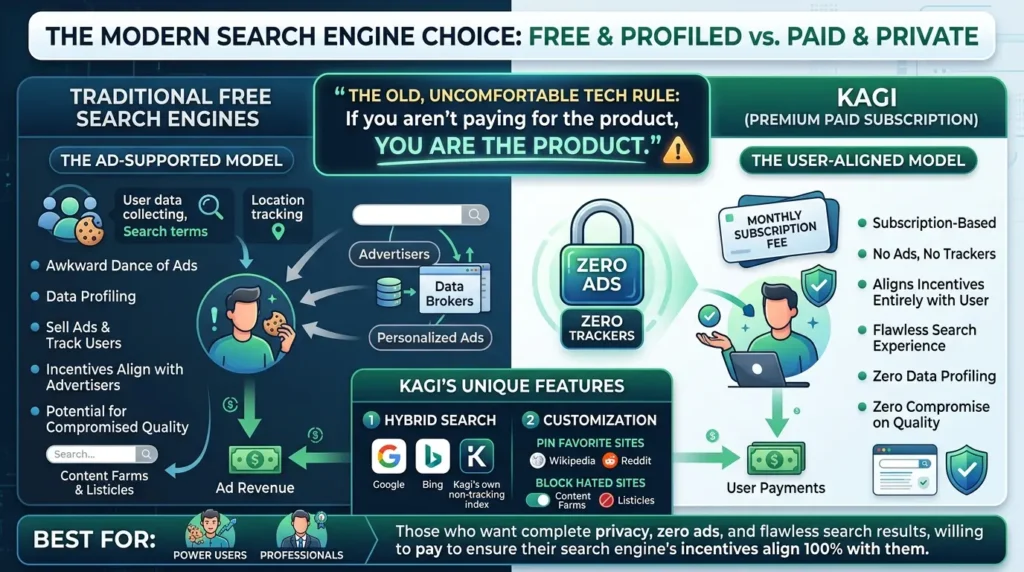
Kagi is a premium, paid-subscription search engine. It has no free tier (beyond a limited trial), zero ads, and zero trackers. By aligning its business model entirely with user subscriptions, Kagi has zero incentive to ever profile you, sell ads, or compromise result quality.
It uses a hybrid model, pulling high-quality results from Google, Bing, and its own non-tracking web index. It also lets you completely customize your search experience, you can permanently "pin" sites you love (like Wikipedia, Reddit, or specific blogs) to the top of your results, and entirely block sites you hate (like content farms and generic listicles).
Best for: Power users and professionals who want a flawless search experience, have zero tolerance for ads, and are willing to pay a monthly fee to ensure their search engine's incentives align 100% with their privacy.
AI Search Privacy: A Separate Data-Handling Problem
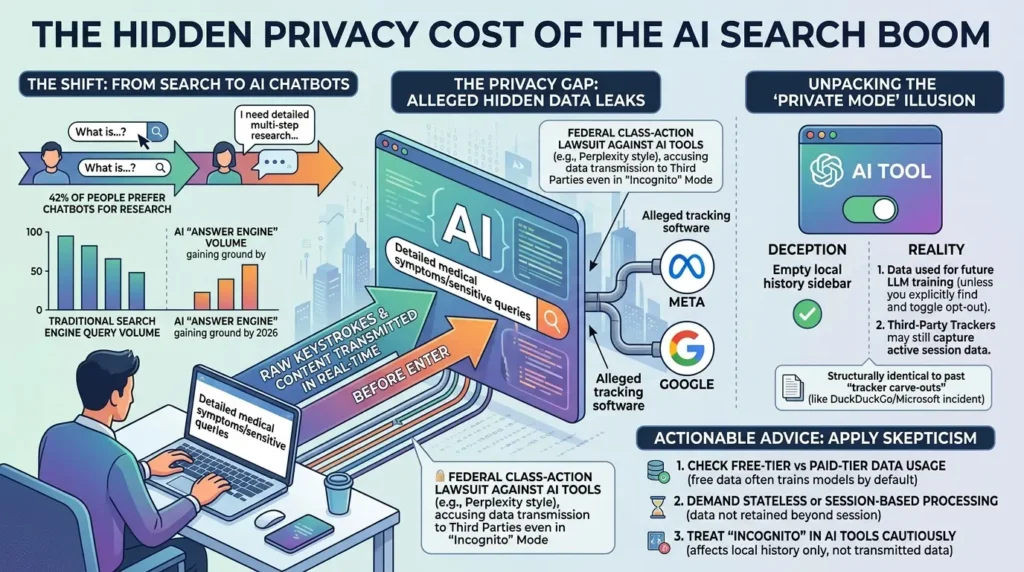
Conversational search changes the privacy question because users often submit longer prompts, personal context, documents, and follow-up messages instead of short search terms. The right comparison is not “AI search is always worse” or “traditional search is always safer.”
It is: what does the service say it collects, which providers receive the request, whether the request is used for model improvement, how long it is retained, and what a private or incognito mode actually changes?
A Practical AI Search Privacy Checklist
| Question | What to verify |
|---|---|
| Is the service using a first- party model or sending requests to third-party providers? | Read the current AI privacy and subprocessors documentation. |
| Are free-tier prompts used for training or product improvement? | Check the current account and plan settings; do not infer this from the word “private.” |
| What does Incognito or Temporary mode change? | Determine whether it only hides local history or also changes retention and training. |
| Are web pages, images, or documents fetched through a proxy? | Check whether the service discloses what the destination or model provider can see. |
| Can the user delete conversations and files? | Verify deletion scope, retention periods, backups, and legal exceptions. |
| What happens when you click an external result? | The destination website may apply its own cookies, accounts, and tracking systems. |
Do not present an allegation in a lawsuit or a single personal experience as proof that an entire AI search category secretly transmits every user prompt. If you mention a complaint, investigation, or security report, identify it as an allegation, link to the primary document, state whether it has been proven, and give the date and scope.
The strongest recommendation is simple: do not enter medical, legal, financial, confidential business, or identifying information into an AI search service until you understand its current data controls. The privacy lesson is the same as with traditional search, but the sensitive surface is larger: a conversational prompt can contain the question, the background, the user’s assumptions, and several follow-up details in one record.
🎁 Free Bonus: The Complete Privacy Stack Blueprint
Switching your search engine is just step one. Want to fully secure your browser, DNS, and devices without breaking your daily workflow?
📥 Download Free PDF Guide (Privacy Stack Blueprint)Six Mistakes That Quietly Undo Your Privacy Gain (And How to Fix Them)
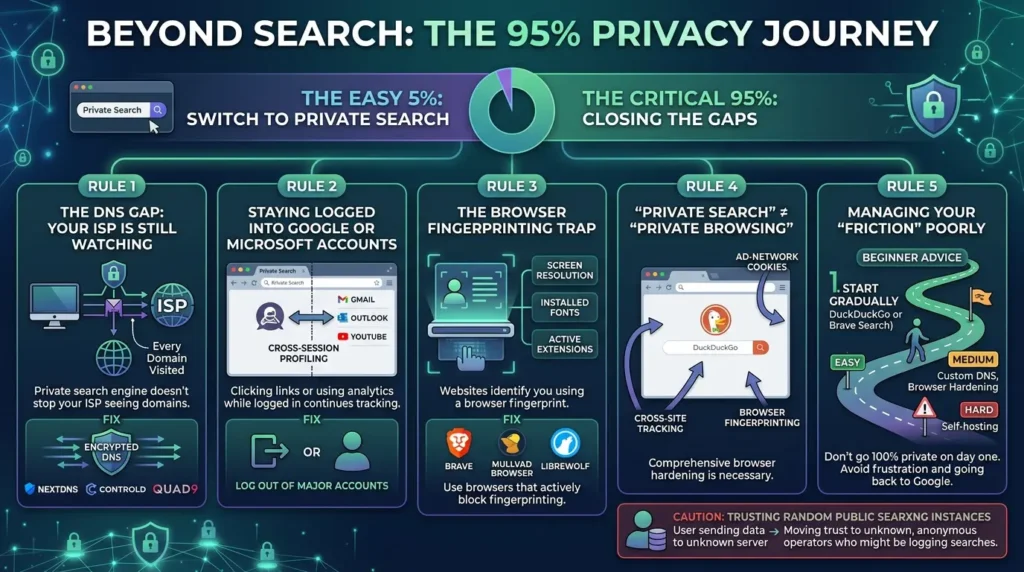
Switching search engines is the easy 5% of the work. Here is where most people lose the other 95% without realizing it, along with the "Golden Rules" of privacy recommended by r/privacy:
The DNS Gap: Your ISP is Still Watching
A private search engine is completely useless if your Internet Service Provider (ISP) is still resolving your DNS. Even if the search engine doesn't log your query, your ISP can see every single domain you visit anyway.
- The Fix: Always pair your private search engine with a secure, encrypted DNS provider like NextDNS, ControlD, or Quad9.
Staying Logged into Google or Microsoft Accounts
Your private search engine doesn't matter if you're still signed into Gmail or Outlook in the same browser session. The moment you click a Google-owned link or load a page with embedded Google Analytics while logged in, the profiling continues elsewhere.
The Browser Fingerprinting Trap
Even if your search engine has a zero-logs policy, websites can still recognize you using a "browser fingerprint", a unique combination of your screen resolution, installed fonts, and active extensions.
- The Fix: Use browsers that actively block fingerprinting (like Brave, Mullvad Browser, or LibreWolf).
Treating "Private Search" and "Private Browsing" as the Same Thing
Switching DuckDuckGo into your Chrome address bar solves one tiny problem and leaves a dozen others untouched. Browser fingerprinting, ad-network cookies, and cross-site tracking don't care what search engine sent you to the page.
Managing Your "Friction" Poorly
The ultimate community advice for beginners is: don't go 100% private on day one. You will hate the loss of convenience (like losing instant local maps or autocomplete) and go back to Google.
- The Fix: Start with DuckDuckGo or Brave Search. Once you get used to the slight shift in results, slowly introduce harder tools like custom DNS, browser hardening, or self-hosting.
Trusting Random Public SearXNG Instances
Treating any random public SearXNG URL as automatically secure skips the fact that you've simply moved your trust to an unknown, anonymous operator who may or may not be logging your searches.
Which One Should You Actually Use? An Interactive Decision Guide
Instead of a generic "it depends," here's a structured way to match your situation to the right engine based on what actually matters to you.
The Reality: What Actually Happens to Your Data After You Switch?
Let’s look at how this transition actually plays out in the real world, because too many privacy guides promise a digital utopia that doesn't exist.
The Old Way (The Default Google Experience)
You search for "how to fix a leaky pipe" on Google. For the next three weeks, your Instagram feed, YouTube sidebar, and random news sites are plastered with ads for local plumbers and plumbing tools. Google has noted that you are likely a homeowner with an active maintenance issue, packaged that data, linked it to your account, and sold it to advertisers.
The Halfway Switch (Private Search Engine Alone)
You switch to DuckDuckGo, but keep using Google Chrome while logged into your Google account. You search for "how to fix a leaky pipe." DuckDuckGo doesn't track you. However, you click a YouTube video to solve the problem, and since you're logged into Chrome, Google still logs that interaction. The plumbing ads still show up, just a little later, and through a different vector.
The Complete Switch (The Privacy Stack)
You search with a privacy-oriented engine, use a browser with appropriate tracker and fingerprinting protections, keep unnecessary accounts logged out, and use encrypted DNS or a trusted network configuration where appropriate.
This can reduce several common tracking paths, but it is not a guarantee that “no advertiser knows anything.” The result depends on the sites you visit, the accounts you use, the information you submit, and the configuration of every layer.
The Bottom Line
There's no single "best" private search engine, and anyone telling you otherwise is selling you something. DuckDuckGo wins on convenience. Startpage wins on result quality. Brave Search and Mojeek win on genuine independence, at different points on the coverage-versus-purity spectrum. SearXNG wins on control, if you're willing to do the setup.
The contrarian insight worth carrying forward: picking any one of these and stopping there gives you a meaningful but partial privacy improvement, closing one tap while four others stay open. The people who actually reduce their exposure significantly are the ones who treat search engine choice as the first decision in a stack, not the only one.
Start with the engine that matches your priority from the guide above. Then come back to close the other gaps, your browser, your DNS, and your account logins are next.
If I had to give you my personal setup, the one I actually use every day, not a theoretical ideal, it’s this: Brave Search as my default (with a custom Goggle that kills SEO spam), a !sp bang shortcut to Startpage when I need Google-quality results, and my self-hosted SearXNG instance for anything I consider genuinely sensitive. Is it perfect? No. Is it dramatically better than where I was three years ago, blindly typing everything into Google while logged into Gmail? Absolutely. Start where you are. Pick one engine from this guide. Use it for a week. You’ll never go back to giving Google every thought in your head for free.
Frequently Asked Questions
Is DuckDuckGo actually private in 2026?
DuckDuckGo is a reasonable option for reducing search-history profiling. Its current privacy policy says it does not save or share search history, does not save IP addresses alongside searches, and does not log IP addresses to disk in a way that can be tied back to a user or search history. This does not make your entire browsing session anonymous: your ISP, browser, accounts, and the websites you visit after clicking a result remain separate privacy layers. DuckDuckGo also relies on multiple sources for results, so it is not the same as using a fully independent search index.
Which private search engine has the best results, closest to Google?
Startpage is the most direct option to evaluate if you want results from external search and content providers through an anonymized intermediary. Startpage says it strips unnecessary identifying metadata before sending a query and does not log searches. Result quality can vary by query type, country, language, freshness, and personalization, so “closest to Google” should be tested rather than treated as a permanent guarantee.
Can I trust Startpage if an advertising technology company owns it?
Ownership is a legitimate factor, but it is not a substitute for evaluating the service's current technical and privacy practices. Startpage says it does not record search queries or IP addresses, uses non-personalized sponsored links, and operates from the Netherlands under applicable EU privacy law. The practical trade-off is that Startpage uses a policy- and intermediary-based model: you still trust the service to apply its stated controls and to handle the query correctly.
Why does Mojeek sometimes give worse results than Google?
Mojeek uses its own crawler and index, so it does not have the same coverage, ranking history, or infrastructure as the largest search engines. That independence can produce weaker results for some niche, local, or very recent queries. It can also provide a less personalized alternative for researchers who want a separate index. The most practical approach is to use Mojeek for the searches where independence matters and keep a second engine for coverage gaps.
What is the actual difference between Brave Search and Mojeek?
Both are presented as alternatives with independent search infrastructure, but their products and documentation differ. Brave Search currently describes its search product as fully independent and also offers optional private usage metrics. Mojeek describes its own crawler and a no-tracking policy, while its privacy policy also describes standard traffic logs and is dated. Compare their current documentation, coverage, ranking behavior, and privacy settings rather than assuming that one label proves complete independence or complete anonymity.
Do I need to self-host SearXNG, or are public instances safe?
Public SearXNG instances can be useful for trying the service, but you must trust the operator of the specific instance not to log, aggregate, forward, or sell requests. SearXNG's documentation says that private or self-hosted instances give the operator control over source code, logging settings, and private data. Self-hosting reduces dependence on an unknown instance operator, but the resulting privacy still depends on your server, configuration, upstream engines, network, and maintenance.
Will switching search engines alone stop companies from tracking me?
No. Switching search engines can reduce one tracking path: the way a search provider stores or profiles your query. It does not automatically prevent browser fingerprinting, cookies, account-based tracking, DNS or network visibility, or tracking by the websites you visit after clicking a result. Treat a private search engine as one layer in a broader privacy setup, not as a complete anonymity solution.
Are AI search tools like ChatGPT or Perplexity more or less private than traditional search engines?
Neither is automatically safer. AI search tools can receive longer prompts, personal context, documents, and follow-up messages, so you should check which providers receive the request, how long prompts are retained, whether free-tier data is used for training or improvement, and what temporary or private modes actually change. Do not treat a lawsuit allegation or a product label as proof of universal behavior. Avoid entering sensitive personal, medical, legal, financial, or confidential business information until you understand the service's current controls.
📋 Article Timeline & History
Successfully updated on September 14, 2026 with the latest details.
This article was originally published on July 24, 2026.

Was this article helpful?
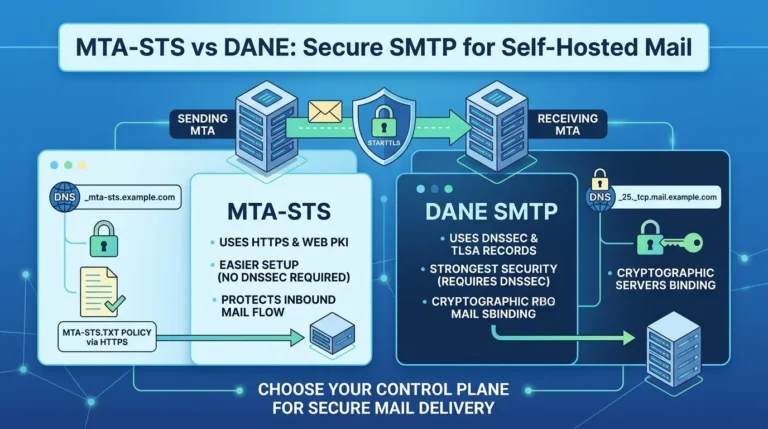
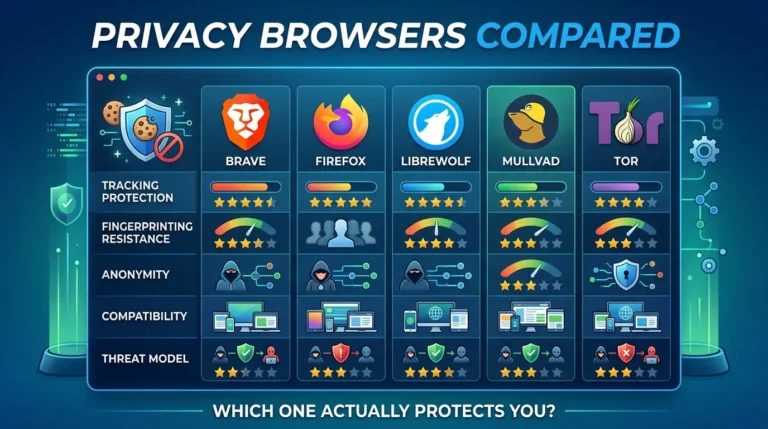



[…] guide uses the same layered model as Vertex Frontier’s private search engines comparison: each tool protects a boundary, not your entire digital life. The browser layer, network layer, […]