

I’ve been using encrypted email for over six years. I’ve migrated between providers three times. I’ve sat in coffee shops reading privacy policies the way normal people read restaurant menus, scanning for the thing that’s going to ruin the experience. And the single most important thing I’ve learned in all that time isn’t about encryption algorithms or jurisdiction maps. It’s this: the moment you actually need your privacy to hold up, the marketing language on a provider’s homepage becomes completely irrelevant. What matters is what they architecturally can’t hand over, not what they promise they won’t.
That lesson didn’t come from a textbook. It came from watching a documented pattern unfold, involving the most recommended encrypted email provider on the internet, where three activists, in three different countries, using three encrypted accounts, all got identified anyway. If you’ve read any “best private email” article, you’ve seen Proton Mail listed first, usually with language like “not even Proton can read your emails.” That claim is technically true. It’s also not the whole story, and the gap between those two things is exactly what this guide is about.
This isn’t another feature checklist comparing storage limits and pricing tiers. It’s a breakdown of what “private email” actually protects, and what it doesn’t, based on those documented legal cases, not marketing pages. By the end, you’ll understand why encryption alone was never enough to protect three real people, what Tuta does structurally differently that would have changed those outcomes, and how to pick the provider that actually matches what you’re trying to protect.
What you’ll learn in this guide Click any topic to expand or collapse
Proton Mail’s metadata logging vs. zero-access encryption.
The documented pattern of Proton Mail identifying users despite “zero-access” encryption.
Content encryption vs. metadata exposure.
Why encrypting your message content does nothing to protect metadata — and why that’s the whole story.
Tuta’s architectural differences.
How Tuta’s architecture makes the exact scenario that happened to Proton users structurally harder.
Jurisdictional impact on email privacy.
The real difference between Swiss, German, and Belgian jurisdiction for email privacy.
Where Mailfence & Posteo fit in.
Where Mailfence and Posteo fit for different threat models.
Practical framework for selecting a provider.
A practical framework for matching your provider to what you’re actually protecting.
Why These Four Providers?
A fair question before we go further: why Proton, Tuta, Mailfence, and Posteo specifically, and not the dozens of other services that show up in “best private email” lists?
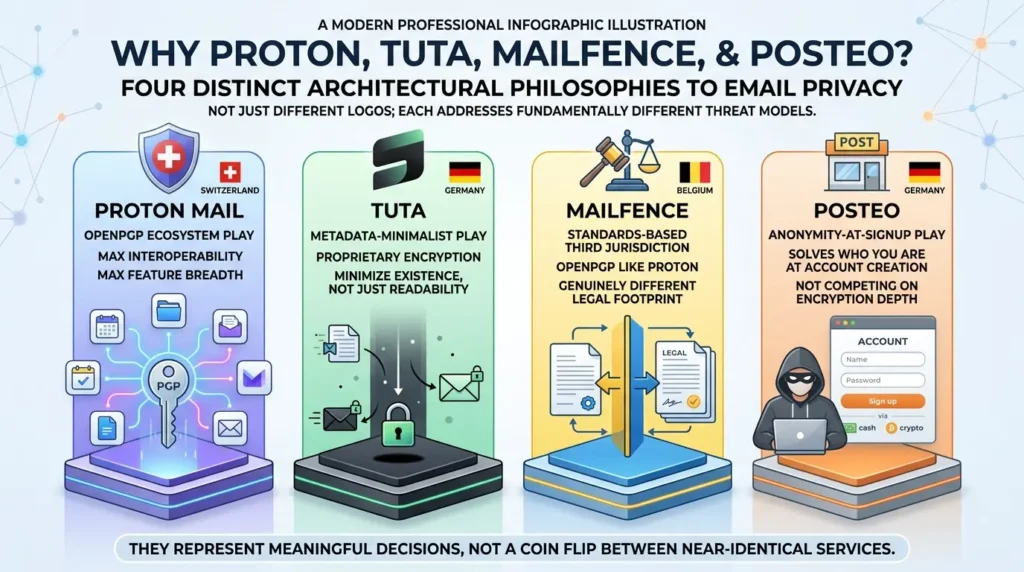
The selection wasn’t arbitrary. These four were chosen because each represents a fundamentally different architectural philosophy toward the same problem, not just different branding of the same approach:
- Proton Mail (the OpenPGP ecosystem play): maximum interoperability, maximum feature breadth, Swiss jurisdiction.
- Tuta (the metadata-minimalist play): proprietary encryption designed to minimize what exists, not just what’s readable.
- Mailfence (the standards-based third-jurisdiction play): OpenPGP like Proton, but from Belgium, offering a genuinely different legal footprint.
- Posteo (the anonymity-at-signup play): solving a different problem entirely (who you are at account creation) rather than competing on encryption depth.
Together, they cover the four distinct threat models most people actually have. Other providers (StartMail, Disroot, and the now-defunct Skiff — whose shutdown after Notion’s acquisition is the case study we dissect in our private cloud storage acquisition risk guide) are mentioned briefly later, but these four form the comparison because they’re architecturally different enough that choosing between them is a meaningful decision, not a coin flip between near-identical services wearing different logos.
How to Read This Comparison
This is not a ranking of “the most private email provider” in the abstract. Each service solves a different part of the privacy problem:
| Privacy question | What you are actually evaluating |
|---|---|
| Can the provider read stored message content? | The provider’s encryption model and whether the message arrived end-to-end encrypted. |
| Can the provider see or retain useful metadata? | The service’s handling of IP addresses, email addresses, timestamps, subjects, payment data, and recovery information. |
| Can you exchange encrypted mail with other providers? | OpenPGP/S/MIME support, external-recipient workflows, and interoperability. |
| Can you use normal email clients? | IMAP/SMTP support, desktop clients, bridges, and proprietary-client requirements. |
| Can you keep using the service if the provider changes direction? | Custom-domain support, export options, portability, and the provider’s long-term operating model. |
The right choice depends on which of these questions matters most to you. A service can be excellent at protecting stored message content and still be a poor fit for someone whose primary concern is identity unlinkability. Conversely, a service with anonymous signup may not provide the same message-content protections as an end-to-end encrypted mailbox.
What “Zero-Access Encryption” Actually Promises (and Doesn’t)
The providers in this guide do not protect exactly the same things, so “encrypted email” should not be treated as one universal guarantee. Proton describes zero-access encryption for stored mailbox data, while Tuta describes end-to-end encryption across a broader set of mailbox fields. Mailfence relies on OpenPGP-based workflows, and Posteo offers several separate layers, including encrypted transport and optional mailbox encryption. The practical details differ by provider, message path, and configuration.
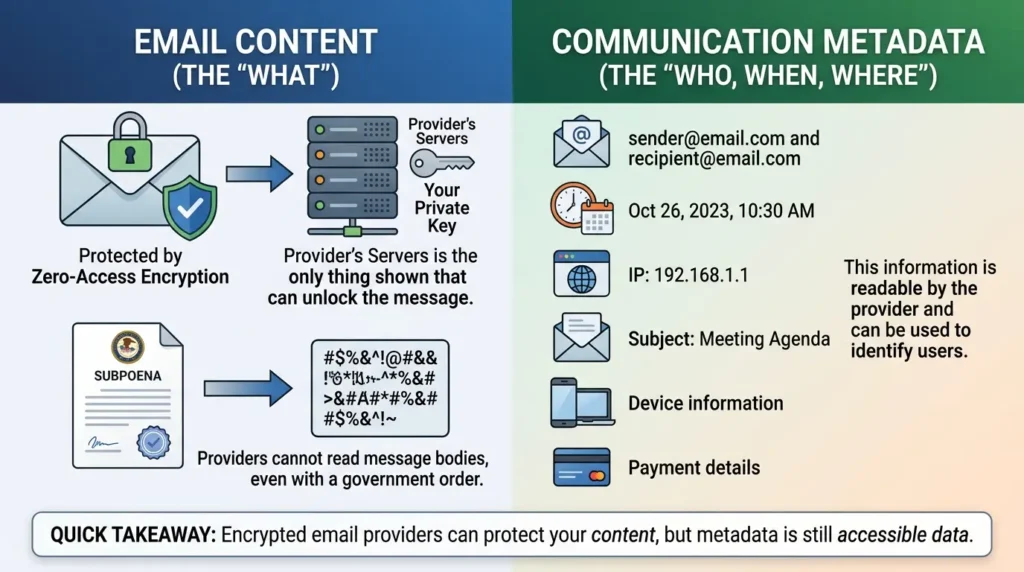
The most useful distinction is between message content and metadata. Message content includes the body and attachments. Metadata can include sender and recipient addresses, timestamps, IP-related information, subject lines, device or session information, recovery details, and payment records. Encryption may protect some of these fields, but not necessarily all of them, and the exact answer depends on the provider and the way the message was sent.
Proton’s own explanation of zero-access encryption says that stored data is encrypted so the provider cannot read it once it has been encrypted. It also distinguishes this from end-to-end encryption, where data is encrypted before it reaches the service. That distinction matters when a message comes from a provider that does not use end-to-end encryption with Proton: the message may be encrypted after Proton receives it, rather than before it reaches Proton.
Quick takeaway: “The provider cannot read this stored message” and “the provider cannot help identify the account” are different claims. This guide evaluates them separately instead of treating “private email” as a single protection level.
The Pattern: Three Activists, Three Countries, One Encrypted Provider
This is the part most comparison articles either skip or bury in a single line. It deserves the full context, because it’s the clearest evidence available of what “private email” means in practice when a government actually asks.
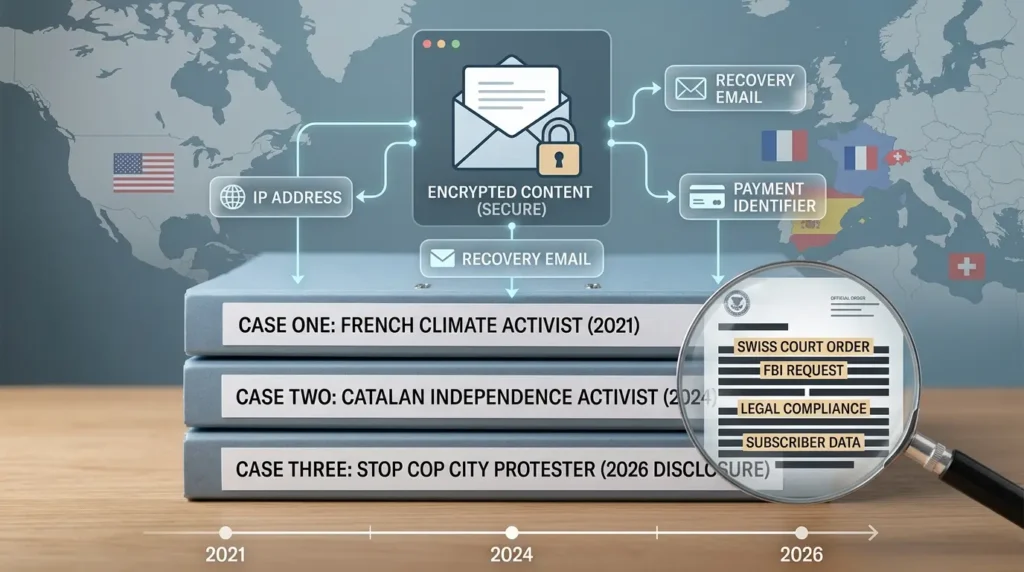
Case One: The French Climate Activist (2021)
In the summer of 2021, French police were investigating an anti-gentrification group occupying buildings near Place Sainte Marthe in Paris. They wanted to identify the person behind a Proton Mail account linked to the group. France doesn’t have direct jurisdiction over a Swiss company, so French authorities routed the request through Europol to Swiss authorities, who approved it under Swiss law. As TechSpot reported, Proton was then legally compelled to begin logging the IP address of that specific account going forward, something it doesn’t do by default. The logged IP, combined with a recovery email address Proton also provided, led investigators to an Apple ID, which led to the activist’s identification and arrest.
The detail worth sitting with: this wasn’t a hack, a leak, or a security failure. It was the system working exactly as designed under Swiss law. Proton’s own website had claimed “we do not keep any IP logs”, a claim that quietly disappeared from the site shortly after the case became public.
Case Two: The Catalan Independence Activist (2024)
Three years later, the pattern repeated with a different jurisdiction and a different account. Spanish authorities requested data connected to a Catalan independence activist’s account through the same kind of international legal assistance channel. Proton provided a recovery email address that authorities used to complete the identification.
Case Three: The Stop Cop City Protester (Disclosed 2024, Reported 2026)
The most detailed case became public more recently, though the underlying events happened earlier. 404 Media’s March 2026 investigation revealed a court record showing that on January 25, 2024, Swiss authorities, acting on an FBI request submitted through the US-Switzerland Mutual Legal Assistance Treaty (MLAT), compelled Proton Mail to disclose subscriber payment data for the account defendtheatlantaforest@protonmail.com, tied to the “Defend the Atlanta Forest” and Stop Cop City protest movement, which the FBI’s Domestic Terrorism squad was investigating over alleged arson, vandalism, and doxing connected to the protests. Proton provided a credit card payment identifier, which the FBI traced through the issuing bank to a named individual.
Proton’s public response to the reporting is worth including because it illustrates the exact distinction this guide keeps returning to. Proton’s head of communications told 404 Media that “Proton did not provide any information to the FBI, the information was obtained from the Swiss justice department via MLAT”, a technically accurate description of the legal chain. 404 Media’s reporting noted that, functionally, the data still reached the FBI regardless of which agency handed it over last. As of the March 2026 report, the identified individual did not appear to have been charged with a crime connected to the account.
What Connects All Three Cases
None of these cases involved Proton’s encryption being broken. Message content stayed unreadable in every single one. What got each person identified was metadata the encryption was never designed to protect: an IP address, a recovery email, a payment identifier. Proton’s own transparency report shows the company received over 9,000 legal requests in 2023 alone and complied with approximately 89% of them, according to its published transparency report for that year, a figure that shifts annually as legal landscapes evolve.
Which the company frames as compliance with Swiss law, and which is, factually, exactly that. Swiss law requires it. Proton is not lying when it says it complies with valid Swiss court orders. The gap is between that fact and the marketing language that leads users to assume “Swiss privacy laws” means immunity from all government requests.
Behind these dry court files and technical timelines are real human beings. They didn’t get caught because they were foolish; they got caught because they had a very human, very reasonable belief that a ‘zero-access’ shield would protect the causes they cared about. It is a sobering reminder that digital privacy is never just an abstract debate for tech enthusiasts, it has real, life-altering consequences for ordinary people trying to make a difference.
Why This Happened: The Technical Reason Metadata Survived Encryption
This is the part almost no comparison article connects back to the actual cryptography, and it’s the single most useful technical fact in this entire guide.
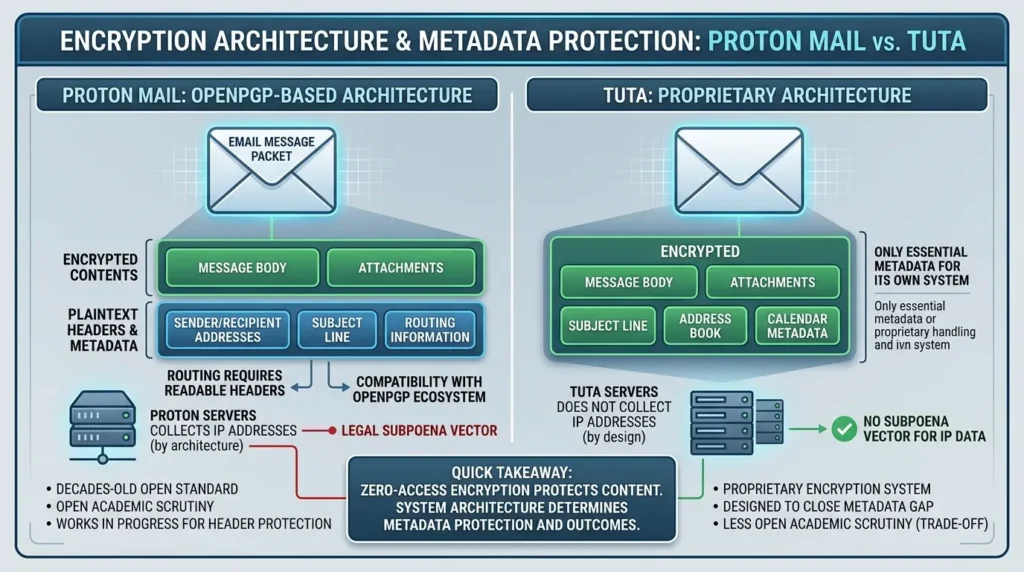
Proton Mail is built on OpenPGP, the decades-old open encryption standard. OpenPGP encrypts message bodies and attachments. It does not encrypt email headers, because headers, sender, recipient, subject line, routing information, need to remain readable for the email system itself to function and for compatibility with the broader PGP ecosystem. This isn’t a flaw Proton introduced; it’s a structural property of the standard Proton chose to build on, as Proton’s own comparison documentation acknowledges.
To be fair, this isn’t a frozen situation. The OpenPGP community has been working on header protection proposals (sometimes called “Memory Hole” or the more recent IETF drafts), and Proton has begun implementing some of these protections incrementally. But as of mid-2026, subject-line encryption remains incomplete in the OpenPGP ecosystem at large, it’s a work in progress, not a solved problem, and certainly not yet equivalent to what Tuta offers natively today.
Tuta makes a different architectural choice from OpenPGP-based providers. According to Tuta’s current security documentation, it does not use PGP and encrypts a broader set of mailbox data, including subject lines, contacts, calendars, filters, and the search index. Tuta also says that email addresses and the date associated with an email remain unencrypted because email delivery requires addressing information to remain available.
Tuta also states that it does not log IP addresses by default when users log in or send an email, and that it strips IP addresses from outgoing mail headers. Its documentation separately describes encrypted session information that is automatically deleted after one week. The precise claim is therefore “Tuta minimizes and protects IP-related information according to its documented design and settings,” not “Tuta can never possess any IP-related information under any circumstance.”
This architectural difference may reduce some metadata exposure, but it should not be presented as a guarantee against identification. Account recovery choices, recipient information, payment records, device security, login activity, and the behavior of the other party can still matter. The defensible conclusion is narrower: a provider cannot disclose a category of data that its documented architecture does not create or retain in the relevant workflow, but that conclusion must be evaluated field by field rather than applied to the entire identity of a user.
This doesn’t mean Tuta is unconditionally safer, its subject-line encryption uses proprietary cryptography that hasn’t received the same decades of open academic scrutiny that OpenPGP has, which is its own trade-off, discussed further below. But the connection between architecture and outcome is real and specific: what a provider chooses not to collect can’t be subpoenaed, no matter how strong the legal order.
Quick takeaway: Zero-access encryption protects content. It says nothing about metadata unless the provider specifically architected the system to minimize what metadata exists in the first place. That architectural choice, not the strength of the encryption, is what determined the outcome in all three documented cases.
Decision Matrix: Which Provider Fits Which Threat Model?
Use this matrix as a starting point, not as a substitute for reading each provider’s current documentation. The “best” option changes depending on whether you are protecting message content, reducing profiling, minimizing account-linkage data, or preserving interoperability.
| Your primary concern | Strong starting point | Why it may fit | Important limitation |
|---|---|---|---|
| Protection from advertising-based profiling and casual provider access | Proton Mail or Tuta | Both offer strong protections for stored mailbox data, with different architectures and trade-offs. | Neither choice automatically makes the user anonymous. |
| Reducing exposure of more mailbox fields, including subject lines | Tuta | Tuta says it encrypts subject lines, contacts, calendars, and other mailbox data end-to-end. | Its proprietary client model reduces interoperability with traditional email clients. |
| OpenPGP interoperability with other PGP users | Proton Mail or Mailfence | OpenPGP-based workflows are more compatible with the wider PGP ecosystem. | OpenPGP does not provide the same metadata model as Tuta’s mailbox architecture. |
| Anonymous signup or payment as the primary concern | Posteo, subject to its current account and payment options | Posteo focuses on minimizing identity information at signup and offers optional encryption layers. | Anonymous signup is not the same as sender-side end-to-end encryption. |
| A full productivity ecosystem | Proton Mail | Mail, calendar, storage, password management, and related services are designed to work together. | More ecosystem features also mean more account and configuration decisions to manage. |
| Standard desktop-client compatibility | Proton Mail with Bridge, Mailfence, or Posteo | These options are more suitable when external-client workflows matter. | Verify current plan requirements and protocol support before migrating. |
The most important row is the one that matches your actual threat model. If you cannot state what you are protecting, from whom, and under what circumstances, choosing a provider based only on an encryption label is premature.
Provider Workflow Comparison: What We Verified
This section reports a documentation-led comparison of the current consumer workflows described by Proton, Tuta, Mailfence, and Posteo. It is not a claim that the author independently audited any provider’s servers, cryptographic implementation, or legal response process. No live test accounts were used, and no real messages, recovery requests, or desktop-client sessions were created for this comparison.
The purpose is to separate what a provider’s current documentation says from what would require a controlled account-based test. That distinction matters because a visible webmail interface cannot prove what a provider can see on its servers or what information could be disclosed under a legal order.
Test scope
| Test area | What we verified | Verification status |
|---|---|---|
| Stored message content | Proton describes zero-access protection for stored Proton Mail content and attachments once encrypted. Tuta describes end-to-end encryption for its mailbox data. Posteo describes optional crypto mail storage. Mailfence describes OpenPGP-based encryption workflows. | Verified against current provider documentation; not independently audited. |
| Subject-line handling | Tuta says subject lines are encrypted. Posteo explains that user-configured OpenPGP/S/MIME leaves metadata such as subject, sender, recipient, and timestamp unencrypted. Proton and Mailfence require a message-path and encryption-workflow distinction rather than a single universal answer. | Partly verified from documentation; no independent message inspection was performed. |
| External recipients | Tuta documents password-protected end-to-end encrypted messages to external recipients. Mailfence documents OpenPGP and password-encrypted message workflows for non-Mailfence recipients. Proton and Posteo support different external-recipient workflows depending on the message path and user configuration. | Verified as documented workflows; no test messages were sent. |
| Search | Tuta says its encrypted search index is stored locally on the user’s device or in the browser and searched locally. No equivalent hands-on search test was performed for the other providers in this comparison. | Tuta workflow documented; comparative testing not performed. |
| Account recovery | Mailfence documents an alternate email address for password-reset links. The recovery choices and consequences should be checked separately for each provider and plan. | Public documentation checked for Mailfence; no recovery request was submitted. |
| Client compatibility | Tuta says it does not offer IMAP and instead provides its own open-source desktop clients. Mailfence documents IMAPS, POPS, and SMTPS access for paid accounts. Exact Proton Bridge and Posteo client support should be verified for the plan being compared. | Partly verified from documentation; no external-client login was performed. |
| Metadata and legal exposure | Provider documentation and transparency material were treated as separate from message-content encryption. Encryption claims do not by themselves establish anonymity or immunity from legal requests. | Analytical conclusion; not a server-side test result. |
Provider-specific observations
Proton Mail
Proton’s current zero-access documentation distinguishes protection after data reaches the service from end-to-end encryption before the data reaches the service. It gives the example that a message arriving from Gmail may be readable by Proton briefly before Proton encrypts it for stored access. The defensible conclusion is therefore narrower than “Proton can never see any email”: stored content may be protected after encryption, while the exact protection depends on the sender, recipient, and message path.
Tuta
Tuta’s current documentation says that its mailbox, subject lines, contacts, calendars, filters, and search index are encrypted, while email addresses and dates remain available for delivery and protocol purposes. It also says that Tuta does not offer IMAP and instead provides its own open-source clients. For external recipients, Tuta documents a password-protected workflow in which the recipient uses the shared password to decrypt the message. These are documented product workflows, not results from an independent cryptographic audit.
Mailfence
Mailfence documents OpenPGP key management, password-encrypted messages, TLS-protected web and mail-client connections, and encrypted communication with non-Mailfence recipients. Its FAQ also states that paid accounts support IMAPS, POPS, and SMTPS, and that users can export keys and messages for migration. OpenPGP workflows require careful separation of message content from metadata, and the provider’s own threat model should be read before making a broad privacy claim.
Posteo
Posteo documents encrypted access, TLS transport when supported by the other server, encrypted server disks, and optional crypto mail storage for saved email data. It separately describes user-configured OpenPGP or S/MIME for end-to-end encryption, noting that message metadata can remain unencrypted. Posteo also states that crypto mail storage is applied after messages reach its servers and is not a substitute for sender-side end-to-end encryption.
What we observed
No live account-based observations are claimed in this version. The table above records documented workflows and explicitly marks the areas that require a controlled test. Publishing invented screenshots, message results, recovery behavior, or client-compatibility outcomes would make the comparison look more authoritative while making it less reliable.
A true hands-on test would require dedicated test accounts, non-sensitive messages, a fixed date, the exact plan and client versions, and a written record of every setting. It would still show the user-visible workflow, not everything a provider could technically access or disclose.
What this comparison does not prove
This comparison does not prove that one provider is universally more secure, that a provider can never receive a particular category of data, or that a documented encryption feature protects every message path. It does not prove that a provider can or cannot comply with a future legal request. It also does not establish that an interface observation describes every plan, region, client, or future release.
Provider documentation, pricing, legal requirements, and product behavior can change. Recheck the relevant documentation before making a high-risk decision, and do not use a consumer email comparison as a substitute for professional digital-security advice in a high-risk situation.
Proton Mail: The Full Ecosystem, With an Honest Anonymity Caveat
Proton Mail remains the most complete option in this category, and dismissing it because of the cases above would be an overcorrection. With over 100 million accounts across its full ecosystem, Mail, VPN, Drive, Calendar, and Pass combined, Proton is the closest thing to a genuine, privacy-respecting replacement for the entire Google suite.
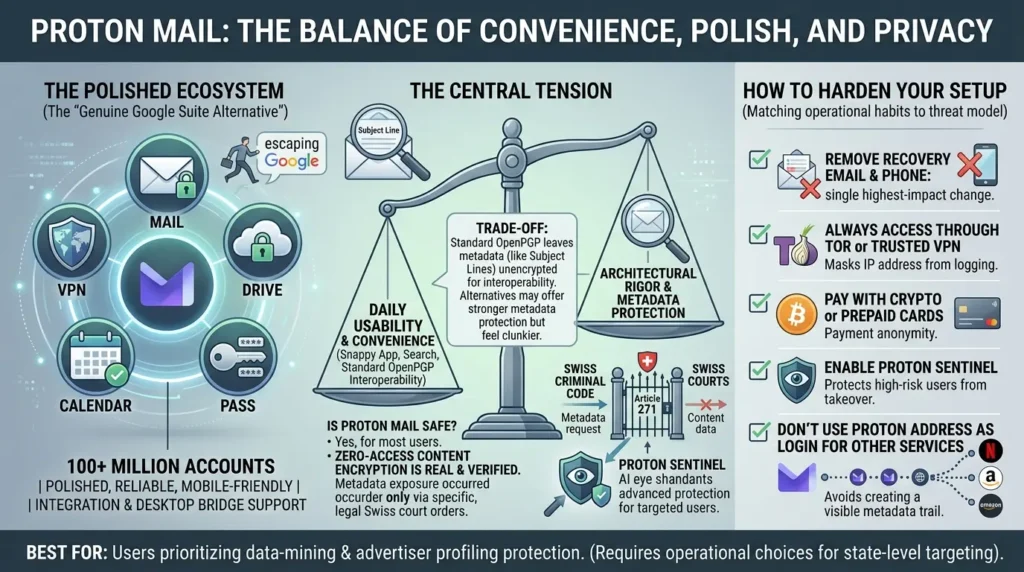
I used Proton Mail as my primary email for nearly three years. The experience was, honestly, good, polished, reliable, and the ecosystem integration (Calendar, Drive, VPN bundled together) made it feel like I’d actually escaped Google without losing functionality. The mobile app is snappy. Search works well enough. The Bridge app let me keep using Thunderbird on desktop, which mattered to me more than I’d like to admit.
What eventually made me reconsider wasn’t a bad experience with the product, it was reading the French activist case in detail and realizing that my own setup had the same vulnerabilities: a recovery email tied to my real identity, payments through a card with my name on it, and no consistent VPN use. I wasn’t an activist or a journalist. But the exercise of asking “what would happen if someone specifically wanted to identify me through this account?” produced an uncomfortable answer. That discomfort is what led me to dig deeper into the alternatives, not because Proton failed me, but because I’d been trusting marketing language instead of understanding architecture.
This mirrors what I’ve seen echoed across privacy forums, users consistently describe Proton as “more pleasant to use,” even when they acknowledge that alternatives offer stronger metadata protection. The trade-off between daily polish and architectural rigor is the central tension in this entire comparison.One user noted, “Proton is more pleasant to use. Tuta is more secure but feels ‘clunkier’ to some” .
However, this ease of use comes with a known trade-off. Advanced privacy advocates frequently point out that Proton Mail’s reliance on standard OpenPGP, while excellent for interoperability, inherently means that metadata like subject lines remain unencrypted. This highlights a common user dilemma: balancing daily convenience with absolute metadata privacy.
Is Proton Mail Actually Safe to Use?
For most users, Proton Mail can provide a substantial privacy improvement over ordinary mail services, especially against advertising-based profiling, casual provider access, and the consequences of a server-side breach. That does not mean it provides anonymity, and it does not mean every message path has the same protection.
The relevant question is not whether Proton is “safe” in the abstract. It is whether its documented protections match your threat model. If your concern is keeping stored mailbox content away from the provider, Proton’s zero-access model is relevant. If your concern is preventing an investigator from linking a specific account to a real-world identity, you must separately consider IP-related information, recovery details, payment information, account reuse, device security, and the legal process that applies to the account.
The documented cases discussed in this article involved metadata and account-related information rather than a demonstrated break of message encryption. That distinction is important, but it should not be turned into a universal guarantee: the exact information available to a provider depends on the product, configuration, message path, account history, and applicable law.
Proton’s Swiss legal structure can change the process through which foreign requests are handled, but jurisdiction should not be presented as immunity. A legal request may still be reviewed and processed under the applicable Swiss procedure, and the information that can be disclosed depends on what exists, what the service is legally required to retain or provide, and what the relevant order covers. Use the current Proton transparency documentation and the primary legal record for each case rather than treating one case as a universal description of every future request.
In response to exactly the kind of targeted attacks documented in this guide, Proton introduced Proton Sentinel, an advanced account protection program that combines AI-driven monitoring with human security analysts to detect and block suspicious login attempts and account takeover attempts in real time. It’s designed specifically for high-risk users: journalists, activists, executives, and anyone who suspects they might be individually targeted.
Sentinel doesn’t change the metadata equation discussed above, it won’t prevent a Swiss court order from compelling IP logging, but it does meaningfully raise the bar against unauthorized access to your account itself. It’s the kind of feature that shows Proton is listening to the criticism and building for the users who need more than default protections, even if the fundamental architectural choices around metadata remain unchanged.
Already on Proton? Here’s How to Harden Your Setup
If you’ve read the cases above and feel a knot in your stomach, but you’re already invested in Proton’s ecosystem and don’t want to migrate, here’s the good news: the activists in those cases weren’t undone by Proton’s encryption failing. They were undone by metadata they could have minimized with different operational choices. Here’s what you can do today:
- Remove your recovery email and phone number: This is the single highest-impact change. Case two depended entirely on a recovery email address. Yes, this means if you lose your password, you lose your account. That’s the trade-off. Write your password down and store it somewhere physical and secure.
- Always access Proton through Tor or a trusted VPN: Case one depended on an IP address logged after a court order. If your IP was already masked by Tor before the logging began, the logged address leads to an exit node, not to you. Proton explicitly supports Tor access and even maintains an .onion address for this purpose.
- Pay with cryptocurrency or cash-topped prepaid cards: Case three was resolved through a credit card identifier. Proton accepts Bitcoin and cash, use them if payment anonymity matters to your situation.
- Enable Proton Sentinel if you believe you might be individually targeted: It won’t solve the metadata question, but it protects against someone else getting into your account.
- Don’t use your Proton address as a login for other services: Every site where you use your encrypted email as a username creates a metadata trail connecting that address to your activity on that platform, visible to that platform, not to Proton.
None of this is paranoia. It’s just matching your operational habits to the actual threat model the documented cases reveal. Most Proton users don’t need any of this, but if you’re reading this section, you probably already know whether you do.
Best for: Users who want a complete, polished privacy ecosystem and whose threat model is data-mining and advertiser profiling rather than state-level targeting of a specific identity.
Tuta: The Metadata-Minimalist Choice
Tuta has implemented post-quantum cryptography (Kyber/ML-KEM) alongside traditional algorithms for newly sent messages, protecting future communications against “harvest now, decrypt later” attacks. It’s an important caveat: this protection applies going forward, not retroactively to messages already stored, meaning anything sent before the upgrade remains protected only by classical encryption. Still, it puts Tuta ahead of every other provider in this guide in preparing for a post-quantum world.
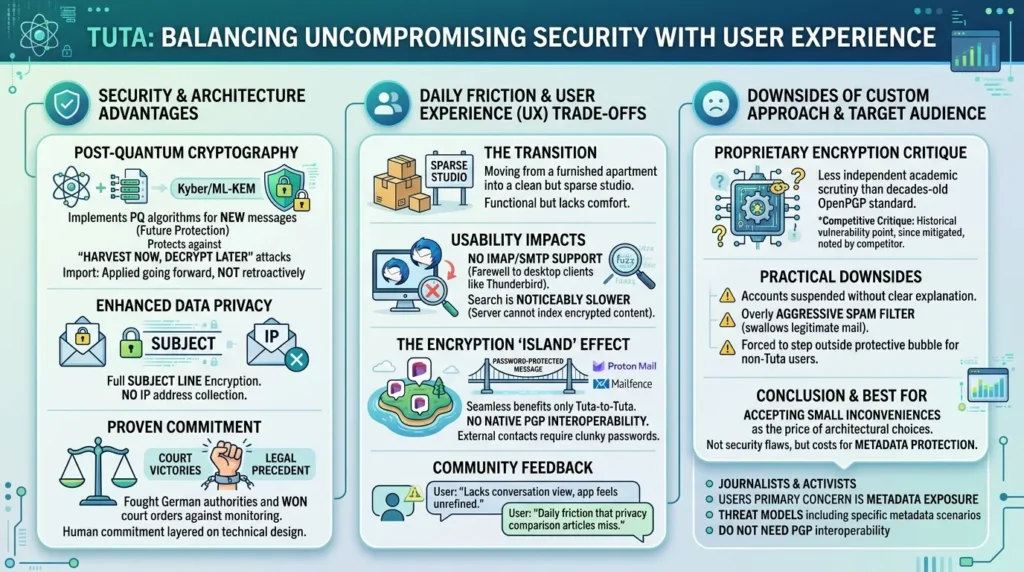
Switching to Tuta felt like moving from a furnished apartment into a clean but sparse studio. Everything I needed was there, the encryption was stronger in ways that mattered to me specifically, the subject-line encryption gave me genuine peace of mind, and knowing that no IP address was ever collected felt like a weight I didn’t know I was carrying had been lifted.
But I won’t pretend the transition was frictionless. The lack of IMAP support meant saying goodbye to Thunderbird, a client I’d used for a decade. Search is noticeably slower because the server genuinely can’t index your encrypted content. And the first time I tried to send an encrypted message to a colleague on Proton Mail, I discovered the hard way that “encrypted email provider to encrypted email provider” doesn’t automatically mean end-to-end encryption between them, I had to use a password-protected message instead, which felt clunky and required explaining to my confused colleague why they needed a separate password.
These aren’t dealbreakers. But they’re the kind of daily friction that privacy comparison articles never mention because they’re not dramatic enough for a headline. Living with Tuta means accepting small inconveniences as the price of architectural choices you believe in. Some days that feel noble. Some days you just want your email to work like Gmail used to.
It’s worth noting that this architectural stance hasn’t gone unchallenged. German authorities have, on more than one occasion, attempted to compel Tuta to install monitoring capabilities on its servers, essentially asking the company to start collecting what it was designed never to touch. Tuta fought these orders in court and won, establishing a legal precedent that its architecture makes certain forms of compliance technically impossible. But the pressure is real and ongoing. Choosing Tuta means trusting not just its code, but its willingness to keep fighting these battles, a human commitment layered on top of a technical one.
This sentiment echoes across privacy forums — as one user put it, ‘Tuta won me over because it encrypts subject lines, which Proton still doesn’t do.
However, this enhanced security often comes with user experience trade-offs. Users frequently discuss the lack of a “conversation view” or a mobile app that feels less refined than Proton’s. For many, choosing Tuta is a conscious decision to prioritize architectural security over mainstream polish.
Does Tuta’s Custom Encryption Have Downsides?
Yes, and it’s worth being direct about the trade-off rather than presenting Tuta as strictly superior. Because Tuta doesn’t use OpenPGP, it can’t natively exchange end-to-end encrypted mail with users on other PGP-compatible services, Proton, Mailfence, or a standalone PGP client, without falling back to password-protected messages.
This is what privacy communities often refer to as the encryption “island” effect: you only get the full, seamless benefits of zero-access privacy if the person on the other end is also using Tuta. Otherwise, you are forced to step outside that protective bubble or rely on manual workarounds.
Proton has also publicly disputed some of Tuta’s security claims, pointing out that Tuta’s encryption has not always required authenticated encryption, a cryptographic detail that in theory could allow message tampering by a compromised server, though Tuta has since added mitigations. This is a legitimate technical criticism from a competitor, not proof of a practical exploit, but it’s a real trade-off: Tuta’s proprietary approach means less independent academic scrutiny than the decades-old, IETF-standardized OpenPGP protocol Proton uses.
There are also practical friction points that privacy forums discuss candidly. As I mentioned, the lack of IMAP/SMTP support means you cannot use any third-party email clients. Users have reported accounts being suspended without clear explanation, sometimes requiring days of back-and-forth with support to resolve. The spam filter has drawn criticism for being overly aggressive, occasionally swallowing legitimate messages.
None of these are security flaws, they’re the cost of Tuta’s uncompromising architecture, and whether that cost is acceptable depends entirely on how much metadata protection matters to your specific situation.
Best for: Users whose primary concern is metadata exposure specifically, journalists, activists, or anyone whose threat model includes exactly the scenario that unmasked the three activists above, and who don’t need PGP interoperability with non-Tuta contacts.
Mailfence: OpenPGP Interoperability from a Third Jurisdiction
Mailfence, based in Brussels, occupies a specific niche: standards-based OpenPGP encryption (like Proton) combined with Belgian jurisdiction (unlike either Proton or Tuta). Belgium sits outside the Five Eyes, Nine Eyes, and Fourteen Eyes intelligence-sharing alliances, and Mailfence’s own documentation notes that Belgian law requires a local judge’s court order for any data request, a legal bar the company describes as rarely triggered in practice.
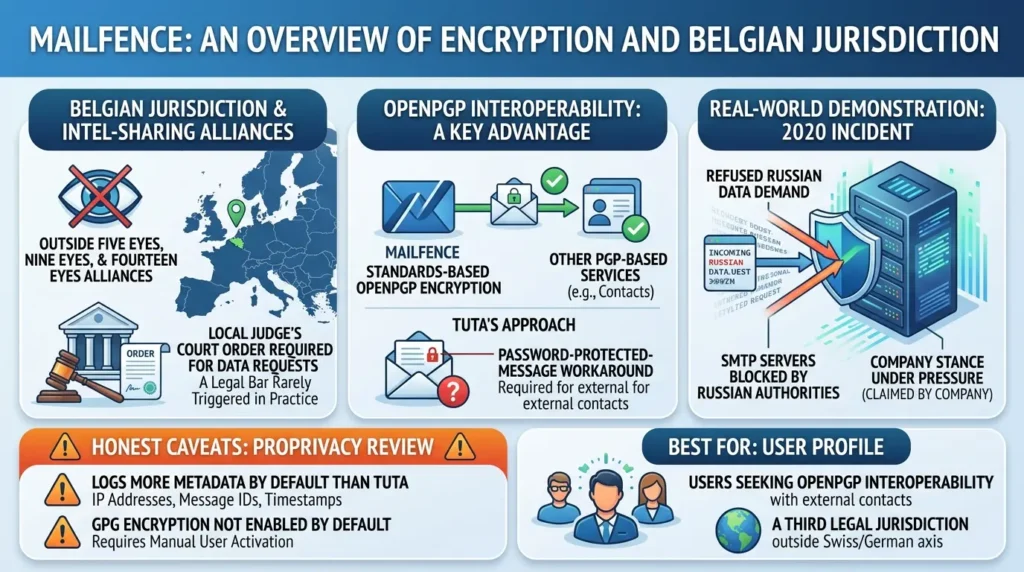
Mailfence’s interoperability is a genuine advantage for users who need to exchange encrypted mail with contacts on other PGP-based services without the password-protected-message workaround Tuta requires.
In 2020, Mailfence reported that Russian authorities blocked its SMTP servers after the company refused to comply with a data demand, a claim the company has referenced in its own communications, though independent third-party reporting on the specific incident remains limited. If accurate, it’s a real-world demonstration of the company’s stated position under pressure, not just a policy page promise.
The honest caveat: independent review from ProPrivacy notes that Mailfence logs more metadata by default than Tuta, including IP addresses, message IDs, and timestamps, and GPG encryption isn’t enabled by default, requiring users to activate it manually.
Best for: Users who specifically want OpenPGP interoperability with contacts on other encrypted providers, combined with a third legal jurisdiction outside the Swiss/German axis.
Posteo: Maximum Anonymity at Signup, Minimum Encryption by Default
Posteo occupies a different position in this comparison. Its privacy model combines encrypted access and transport with optional mailbox, calendar, address-book, and user-configured end-to-end encryption features. Posteo’s current encryption documentation distinguishes between transport encryption, server-side disk encryption, optional crypto mail storage, and user-configured OpenPGP or S/MIME. Those layers should not be collapsed into a single statement that Posteo either is or is not “end-to-end encrypted.”
Posteo’s optional crypto mail storage encrypts saved email data, including content, attachments, and metadata, after the messages reach Posteo’s servers. Posteo explicitly notes that this feature is not a substitute for sender-side end-to-end encryption and does not protect against lawful interception. That distinction is central to understanding what Posteo solves and what it does not.
The Appeal of Posteo’s Radical Simplicity
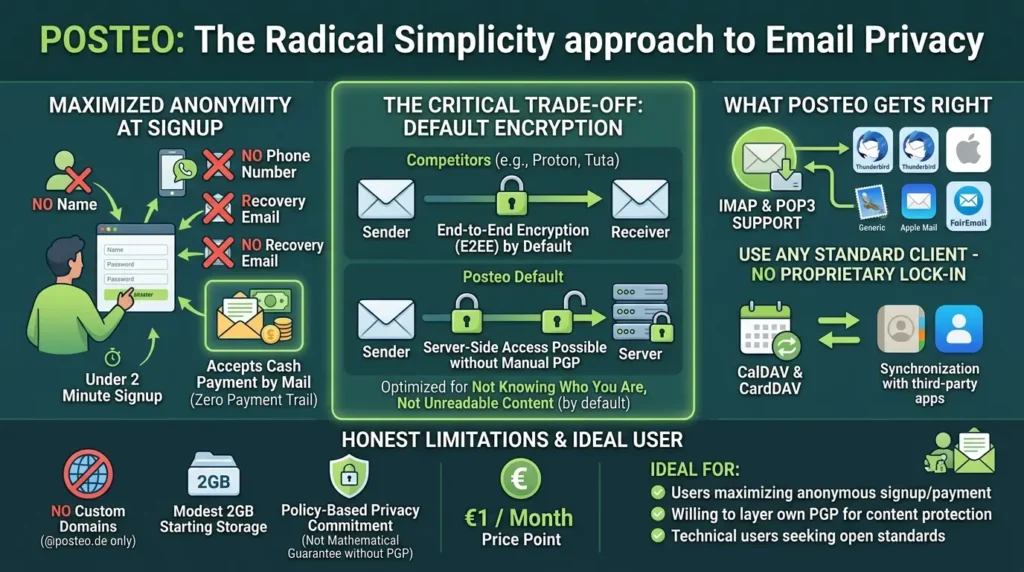
Posteo maintains a dedicated following among users who despise “bloated” ecosystems. Many praise its 1 Euro/month price point and the ability to pay with literal cash sent via mail, which is a favorite feature for those seeking total anonymity at signup. One user remarked, “I personally prefer Posteo. It has nearly all essential features and starts at only 1 euro per month… but no custom domain support is the greatest drawback” . This highlights that for some, the lack of features is actually a feature, a minimalist tool that does one thing well, even if it lacks the polish of larger competitors.
I kept a Posteo account for about eight months as a secondary address, the one I used for mailing lists, forum signups, and anything I wanted completely disconnected from my real identity. The signup experience was almost unsettling in its simplicity: no name, no phone number, no verification email. I paid with a prepaid card bought with cash. The whole process took under two minutes, and at the end of it, I had a functioning email address that was connected to absolutely nothing about me.
That feeling, of having a digital space that truly belongs to no one’s profile of you, is surprisingly rare in 2026. It’s also surprisingly limited in practice. Without end-to-end encryption by default, I was always aware that Posteo could read what I was sending if they chose to (or were compelled to). I eventually layered my own PGP on top, which worked but added friction to every single message. Posteo is a beautiful tool for a very specific use case. It just wasn’t my primary use case.
The Trade-Off Nobody Highlights
Posteo is best understood as a layered privacy service rather than a direct replacement for a provider whose default mailbox architecture encrypts more fields end-to-end. Its transport encryption protects email while it is being delivered when the other server supports the relevant standards. Its optional crypto mail storage protects saved mailbox data after it reaches Posteo. User-configured OpenPGP or S/MIME can add end-to-end protection for individual messages, but the sender and recipient must use a compatible workflow, and metadata can remain exposed depending on the protocol and message path.
The practical lesson is simple: anonymous or low-information signup, encrypted transport, encrypted storage, and sender-side end-to-end encryption are four different protections. Posteo may be attractive when account identity, standard clients, and user control matter most, but the buyer should choose the specific layer they need rather than treating the service label as the whole threat model.
What Posteo Gets Right That Others Don’t
Where Posteo quietly excels, and why it maintains a devoted following among technical users, is in what it doesn’t lock down. Unlike Tuta, Posteo fully supports IMAP and POP3, meaning you can use it with any standard email client: Thunderbird, Apple Mail, FairEmail on Android, or whatever you prefer. You’re not trapped in a proprietary interface. For users who’ve spent years customizing their email workflow around a specific client, this isn’t a minor detail, it’s the difference between a tool that fits your life and one that asks you to reshape your life around it.
Posteo also supports CalDAV and CardDAV for calendar and contact syncing with third-party apps, again, open standards rather than proprietary lock-in. Combined with the €1/month price point and zero-identity signup, this creates a specific profile: the user who wants to be invisible at the door, use whatever tools they prefer inside, and handle their own encryption layer on top.
The Honest Limitations
But Posteo’s minimalism cuts both ways. There’s no custom domain support, your address will always end in @posteo.de (or .net, .eu, etc.), which means you can’t bring your own domain and maintain portability the way you can with Proton or Mailfence. Server-side search works, but because Posteo doesn’t have the resources of a 100-million-user company, it can feel slower than what you’re used to. Storage starts at 2 GB (expandable to 20 GB for additional cost), which is modest by 2026 standards.
And the elephant in the room: The encryption limitation discussed above means Posteo could technically access your messages if compelled. They’ve stated they don’t, and their track record supports that claim, but it’s a policy commitment rather than a mathematical guarantee. If you want both anonymity and zero-access encryption, you’ll need to layer your own PGP on top of Posteo’s infrastructure, which is entirely possible, but requires technical comfort that not every user has.
Best for: Users whose primary concern is anonymous signup and payment, leaving no identity trail at account creation, who are willing to configure their own PGP encryption on top for message content protection.
| Provider | Main architecture or workflow | Subject-line position | IP-related statement in current documentation | Main trade-off |
|---|---|---|---|---|
| Proton Mail | Zero-access protection for stored mailbox data, with end-to-end workflows depending on the sender and recipient | Depends on the message and encryption workflow; do not treat all mail paths as identical | Check Proton’s current documentation and the specific legal record; do not reduce this to “never” or “always” | Broad ecosystem and interoperability versus a more complex metadata and legal analysis |
| Tuta | Proprietary, open-source client architecture with broader mailbox encryption | Tuta says subject lines are encrypted | Tuta says IP addresses are not logged by default at login or send, while session information is handled separately | Stronger metadata minimization in documented workflows versus limited traditional-client interoperability |
| Mailfence | OpenPGP-based email and productivity workflow | Depends on the OpenPGP/message workflow | Verify current Mailfence documentation for current logging and retention details | Open-standard interoperability versus a different metadata model from Tuta |
| Posteo | Encrypted transport and access, optional crypto mail storage, and optional user-configured E2EE | Depends on the selected encryption layer and message path | Verify current Posteo privacy and encryption documentation | Strong standard-client support and layered options versus more user configuration |
What About Other Encrypted Providers?
This guide focuses on four providers because they represent genuinely different architectural philosophies, not because they’re the only options worth knowing about. A few others deserve brief mention:
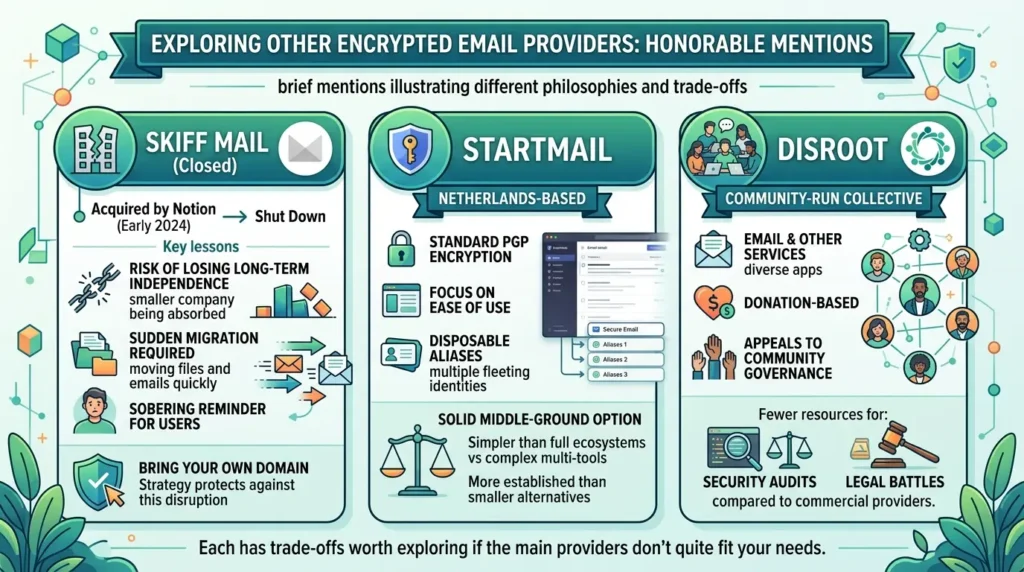
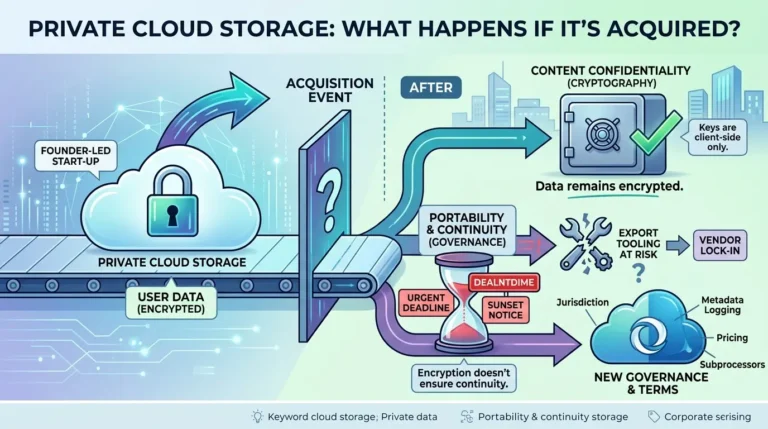
Skiff Mail offered a promising encrypted workspace before being acquired by Notion in early 2024 and subsequently shut down, a sobering reminder that choosing a privacy provider also means betting on its long-term independence. Users who’d built their digital lives around Skiff had to migrate everything on short notice, which is exactly the kind of disruption a “bring your own domain” strategy protects against.
StartMail, based in the Netherlands, offers standard PGP encryption with a focus on ease of use and disposable aliases, a solid middle-ground option for users who want something simpler than Proton’s full ecosystem but more established than smaller alternatives.
Disroot, a community-run collective, provides email alongside other services on a donation basis, appealing to users who prefer community governance over corporate structure, though with fewer resources for security audits and legal battles than commercially-funded providers.
Each has trade-offs worth exploring if the four main providers in this guide don’t quite fit your needs.
What Will This Actually Cost You?
This guide deliberately isn’t a feature checklist, but let’s be honest: price matters, and pretending otherwise doesn’t serve you. Here’s what you’re looking at as of mid-2026:
| Provider | Free Tier | Paid Starting At | What Paid Adds |
|---|---|---|---|
| Proton Mail | Yes (500 MB, 1 address) | ~$4/month (Mail Plus) | 15 GB, custom domain, 10 addresses, Proton Calendar |
| Tuta | Yes (1 GB, 1 address) | ~€3/month (Revolutionary) | 20 GB, custom domains, unlimited search, multiple calendars |
| Mailfence | Yes (500 MB, limited PGP) | ~€3.50/month (Entry) | 5 GB, custom domain, full PGP, documents & calendar |
| Posteo | No free tier | €1/month | 2 GB (expandable), IMAP/POP3, calendar, address book |
Note: Prices reflect publicly listed rates as of July 2026 and may vary by billing cycle (monthly vs. annual).
A few things worth noting: Posteo’s €1/month with no free tier is actually a feature, not a limitation, it means the service isn’t subsidized by converting free users into paying ones, and there’s no incentive to harvest data from non-paying accounts. Proton’s ecosystem pricing (Proton Unlimited at ~$10/month) bundles VPN, Drive, and Pass together, which is genuinely good value if you’d use all of them. Tuta’s free tier is the most generous for storage among the encrypted providers.
Which Provider Matches Your Actual Threat Model?
Let’s be completely honest: keeping up with modern digital privacy is exhausting. Nobody wants to live in a state of perpetual digital paranoia, acting like a field agent just to send a routine email to a family member or colleague. It is entirely normal to feel overwhelmed and just want things to ‘just work.’ The goal of securing your email shouldn’t be to make you hyper-vigilant or miserable; it is simply to help you build a sensible, quiet boundary that fits your actual life without draining your energy.
A Practical Threat-Model Decision Guide
| If you mainly want to protect against… | Start by evaluating… | Do not assume that this automatically protects you from… |
|---|---|---|
| Advertising profiles and routine provider scanning | A provider with strong stored-data encryption and no advertising model based on mailbox content | Account takeover, metadata exposure, or legal disclosure |
| Message-content exposure to the mailbox provider | The exact sender-to-recipient encryption workflow | Identity linkage, payment records, or the recipient’s provider |
| Subject-line and mailbox-field exposure | Tuta’s documented mailbox encryption model and its workflow limitations | Every form of metadata or every external email path |
| Dependence on a proprietary client | Proton Bridge, Mailfence, Posteo, or another documented standards-based workflow | The security properties of the external client itself |
| Identity linkage at account creation | Current signup, recovery, and payment options, plus your own operational practices | Message-content confidentiality unless you configure it separately |
| Long-term portability | Custom-domain support, export options, and a migration plan | Future price, policy, or product changes |
No table can decide your threat model for you. The purpose of this guide is to make the trade-offs visible so that you can choose deliberately.
Five Mistakes That Undo Your Email Privacy Setup
I’ve made three of these five mistakes personally. Not because I’m careless, because I’m human, and humans optimize for convenience under pressure. The recovery email I added “just in case” during a stressful week. The credit card payment because cryptocurrency felt like too much hassle at 11 PM on a Tuesday. The time I emailed a sensitive document to someone’s Gmail address and only realized afterward that my end-to-end encryption meant nothing once it landed in Google’s servers.
I’m listing these not as abstract warnings but as things I actually did, recognized, and fixed, some of them embarrassingly late. If you see yourself in any of these, you’re in good company. The point isn’t perfection; it’s awareness.
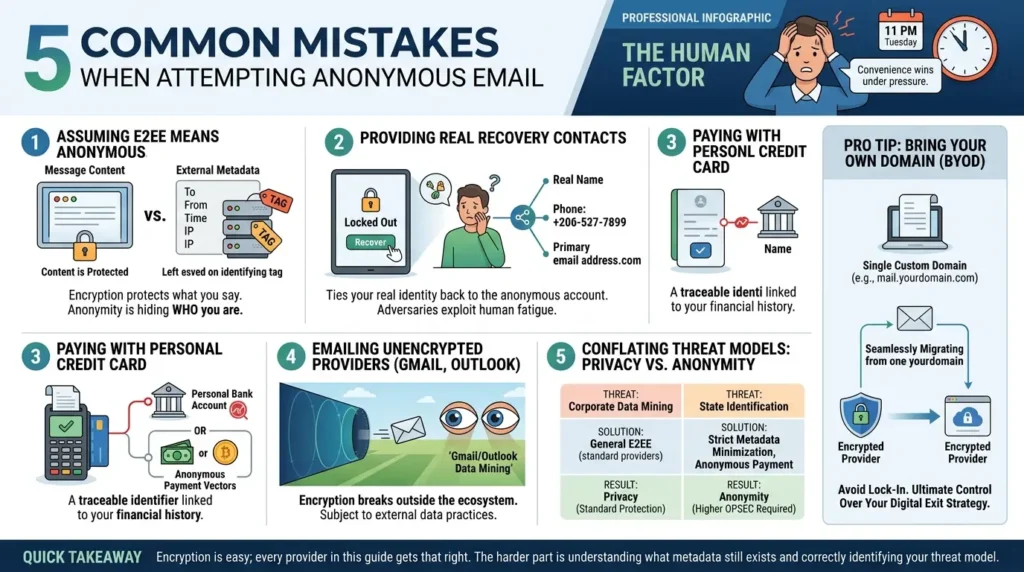
Assuming “end-to-end encrypted” means “anonymous.”
As shown across all three documented cases, encryption protects content. It says nothing about your identity unless the provider specifically minimizes metadata by architecture. Conflating these two guarantees is the single most common, and most consequential, misunderstanding in this space.
Providing a real recovery email or phone number when anonymity matters.
Case two above depended entirely on a recovery email address. If your threat model requires anonymity, any recovery method that ties back to your real identity defeats the purpose before a single email is sent.
Why do we make this mistake? Because we are human. We get locked out of our accounts on a chaotic Tuesday afternoon, we are stressed, we are in a hurry, and we just want to get back to work.
Adversaries rarely need to break sophisticated encryption; they simply wait for that inevitable moment of human fatigue when daily convenience wins over strict security protocols. True email security means acknowledging your own human limits and setting up recovery methods that protect you even when you are tired.
Paying with a personal credit card when payment anonymity matters
Case three above was resolved through a payment identifier traced through a bank. If account-identity minimization is part of your threat model, review the provider’s current signup and payment options before creating the account.
A payment method that is less directly connected to your identity may reduce one linkage vector, but it does not make the account anonymous by itself, and availability, legality, retention, and verification requirements can vary by provider and region.
Emailing an unencrypted provider and assuming the conversation is protected
End-to-end encryption between two encrypted-provider users breaks down the moment either party emails someone on Gmail or Outlook. The message may be encrypted in transit, but it arrives readable on the other end, fully visible to that provider and subject to that provider’s own data practices.
Not checking whether your specific threat model needs anonymity or just privacy
Most users conflate these. Corporate data mining and advertiser profiling are privacy problems every provider in this guide solves well. State-level identification of a specific person is an anonymity problem, and as the cases above show, only a subset of these tools, used correctly, with careful operational choices, meaningfully address it.
Note: A common piece of “pro-level” advice shared across privacy forums is: “Whatever provider you go with, bring your own domain” . Users emphasize that relying on an address ending in @protonmail.com or @tuta.com means you are effectively “locked in.” If you own your domain, you can migrate your entire digital identity from Proton to Tuta (or vice versa) in minutes if a provider changes their terms or suffers a major legal setback. This operational choice is often seen as more important than the choice of the provider itself, as it grants the user ultimate control over their digital exit strategy.
Quick takeaway: The encryption is the easy part; every provider in this guide gets that right. The harder part is understanding exactly what metadata still exists around that encryption, and whether your specific situation depends on that metadata staying hidden.
Before and After: What Actually Changes
Before switching from Gmail or Outlook
Before switching from a conventional mailbox provider: the provider’s ability to process message content, metadata, attachments, and account activity depends on its service design, encryption workflow, terms, and the message path. Do not assume that every provider uses the same advertising or scanning model; check the current privacy documentation for the service you are comparing.
Content, attachments, and metadata are all visible to the provider, and in Gmail’s case, used to build an advertising profile spanning years of communication. Government requests for content require no encryption to bypass, the provider can simply hand over what it already reads.
After switching to an encrypted provider (any of the four above)
Message content becomes unreadable to the provider itself, meaningfully raising the bar for casual access, data breaches, and routine corporate data mining. This is a real, substantial privacy gain for the vast majority of use cases.
What doesn’t automatically change
Metadata, who you email, when, how often, from what device or IP, and depending on the provider, even the subject line, may remain visible unless you’ve specifically chosen a provider and configuration that minimizes it. Legal jurisdiction determines who can compel that metadata to be disclosed, and under what process, but every jurisdiction in this guide has some process by which disclosure is legally possible.
Many users transitioning from Gmail share the “shock” of losing features they took for granted, such as instant server-side search (The search limitations I described above apply here too) and seamless third-party app integrations . The “human touch” here is acknowledging that privacy comes with a “convenience tax.” Users often find themselves adapting to a different workflow, realizing that the trade-off for not being the product is a slightly less frictionless experience.
The Bottom Line
Three activists, three countries, one encrypted provider, zero broken encryption, and three identities unmasked anyway. That pattern isn’t an argument against encrypted email. It’s an argument for understanding precisely what encryption protects, and choosing your provider and your operational habits based on that precision rather than marketing language.
Proton Mail remains an excellent, full-featured choice for the privacy problem most people actually have. Tuta’s architecture is the more deliberate choice if metadata minimization is specifically what you need. Mailfence offers a genuine third path with OpenPGP interoperability. Posteo solves a different problem entirely, anonymous signup, that none of the encryption-first providers address as directly.
The question isn’t “which provider is most private” in the abstract. It’s “private from what, and from whom”, and the three cases in this guide are the clearest real-world answer available to that question.
If I’m being fully honest about where I landed after all this research and all these migrations: I use Tuta as my primary email for anything sensitive, Proton for the ecosystem convenience of Drive and Calendar for non-sensitive daily life, and I keep a Posteo address for the handful of situations where I want an identity that connects to nothing. Is that overkill for someone who isn’t a journalist or an activist? Probably. But the hour I spent setting it up buys me something I can’t easily quantify: the quiet confidence that I understand exactly what each tool protects and what it doesn’t, and that I’ve made a deliberate choice rather than a default one.
Your setup will look different from mine, because your life looks different from mine. That’s the whole point. The best private email provider isn’t the one with the strongest encryption or the most impressive jurisdiction, it’s the one whose specific protections match the specific thing you’re trying to keep safe. I hope this guide gave you enough clarity to make that match with confidence.
Ultimately, digital privacy is not about having ‘something to hide.’ It is about having something to protect, your personal boundaries, your quiet spaces, your unfinished thoughts, and your digital dignity. It is the fundamental right to exist online without being packaged, profiled, and auctioned off by a silent algorithm. Choosing a secure provider, and understanding its limits, is not just a technical checklist. It is a quiet, daily reclamation of your personal space in a world that tries to make everything public.
Frequently Asked Questions
Can Proton Mail read my emails?
Proton says that stored Proton Mail content and attachments are protected with zero-access encryption once encrypted, so Proton cannot read them in that stored form. This does not mean that every message path is end-to-end encrypted before the message reaches Proton. For example, a message arriving from a provider that does not use end-to-end encryption may be encrypted after Proton receives it. It also does not mean that all metadata is unavailable. Stored message content, transport encryption, end-to-end encryption, and account-related metadata are different things.
Is Proton Mail safe for activists or journalists?
Proton Mail can provide strong protection for stored message content, but it should not be treated as an anonymity tool. If a person's safety depends on preventing an account from being linked to a real-world identity, they must evaluate IP-related information, recovery details, payment records, account reuse, device security, and the applicable legal process separately. The documented cases discussed in this guide involved account-related information and metadata rather than a demonstrated break of message encryption. High-risk users should consult a qualified digital-security organization before choosing a workflow.
What's the real difference between Proton Mail and Tuta?
Proton and Tuta make different architectural trade-offs. Proton emphasizes a broad ecosystem and OpenPGP-related interoperability, while Tuta says it encrypts a broader set of mailbox fields, including subject lines, contacts, calendars, filters, and the search index. Tuta also says it does not log IP addresses by default when users log in or send an email, while its documentation describes session information separately. The practical difference is not simply that one service is secure and the other is not; it is a choice between different metadata protections, client models, and interoperability requirements.
Does Swiss jurisdiction actually protect my privacy?
Swiss jurisdiction can affect the process through which foreign requests are handled, but it does not create absolute immunity from legal requests. The information that can be disclosed depends on what exists, what the provider is legally required to retain or provide, and what the relevant order covers. Read the provider's current transparency documentation and the primary legal record for a specific case rather than treating jurisdiction alone as a guarantee.
Which private email service doesn't log IP addresses?
There is no reliable one-line answer because logging behavior depends on the provider, product, settings, account event, and current policy. Tuta says it does not log IP addresses by default when users log in or send an email, and that it strips IP addresses from outgoing mail headers. Its documentation also describes encrypted session information that is automatically deleted after one week. For Proton, Mailfence, and Posteo, check the current product-specific privacy and technical documentation. Compare specific data fields and workflows instead of labeling an entire service “no IP” without a defined scope.
Is Posteo end-to-end encrypted?
Posteo offers several different encryption layers, so the answer depends on the feature and message path. Its documentation describes encrypted transport, encrypted access, optional crypto mail storage for saved mailbox data, and user-configured OpenPGP or S/MIME for end-to-end encryption. Posteo also says that crypto mail storage is not a substitute for sender-side end-to-end encryption and does not protect against lawful interception. Treat Posteo as a layered privacy service rather than as a single encryption label.
Can encrypted email providers be forced to spy on a specific user?
A provider may be legally compelled to provide data it holds or, where legally permitted, to perform future collection for a specific account. Whether it can be compelled to decrypt stored content depends on the provider's architecture, the location of the keys, the message path, and the applicable law. A provider cannot produce a category of data that was never created or retained in the relevant workflow, but that principle must be evaluated field by field. No provider should be described as universally immune from legal compulsion.
Which is better for businesses, Proton Mail or Mailfence?
Proton Mail may fit a business that values an integrated ecosystem and a documented desktop-client workflow such as Bridge, subject to the current plan and configuration. Mailfence may fit a business that values a Belgian provider, productivity features, or standards-based OpenPGP interoperability. The better choice depends on administration, compliance requirements, client compatibility, migration options, pricing, and the organization's threat model. Verify current business plans and technical support before migrating company mail.
📋 Article Timeline & History
Successfully updated on September 14, 2026 with the latest details.
This article was originally published on July 21, 2026.

Was this article helpful?




[…] Private Email Services Compared: What Happens When Your “Zero-Access” Provider Gets a Co… […]
[…] Private Email Services Compared: What Happens When Your “Zero-Access” Provider Gets a Co… […]