
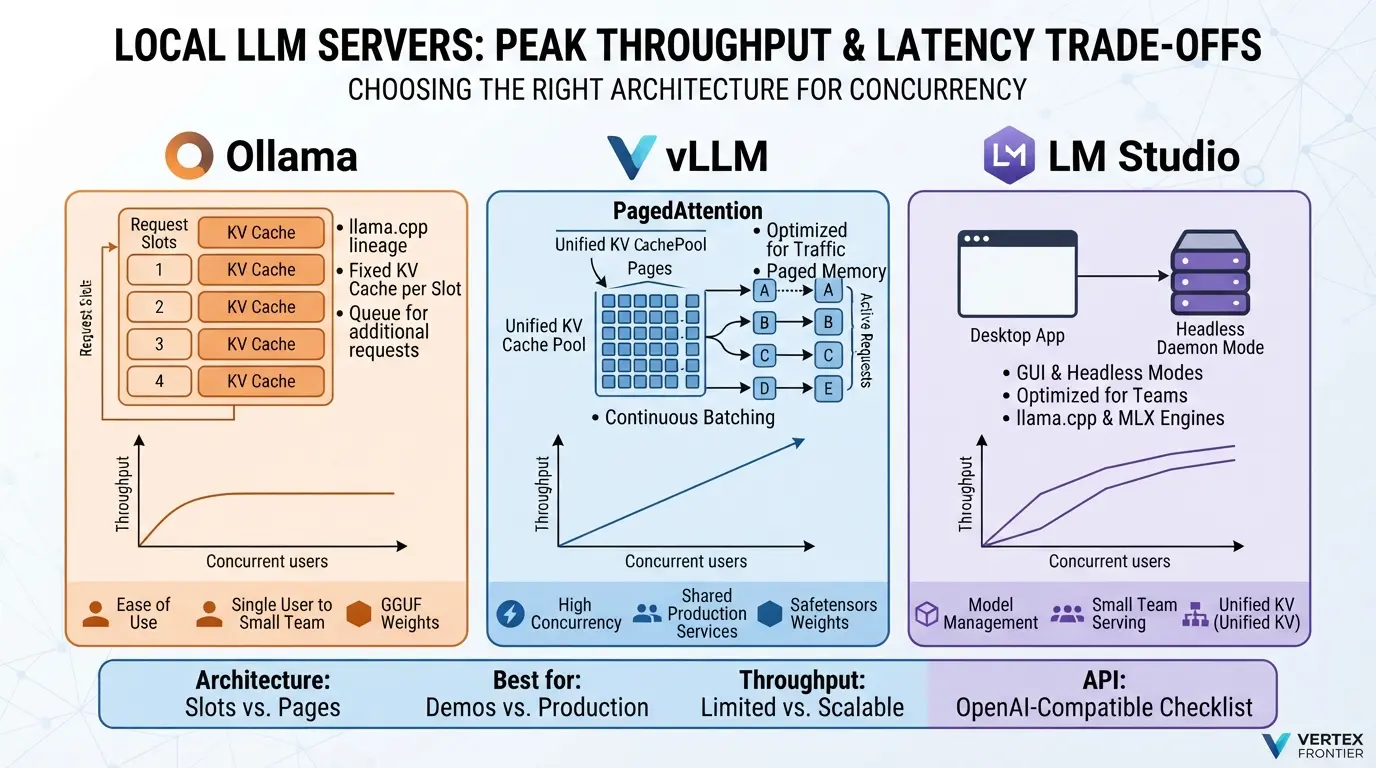

A team ships an Ollama box to 40 colleagues. Day one feels great. A few weeks later, answers that took three seconds take over a minute and requests start timing out. That is the story an engineer told in an April 2026 post-mortem on Towards AI, and the pattern is easy to reproduce.
The usual advice is “Ollama for demos, vLLM for production.” It is true enough to be useless. It doesn’t tell you why the gap exists, where exactly it opens, or what to change when you hit it.
The reason is architectural. Once you see it, cold starts, concurrency, tool calling, quantization and GPU cost stop being five separate topics. They are one decision viewed from five angles.
This guide walks through that decision and the consequences. You will leave able to diagnose why a local server melts under load, calculate your own migration trigger, and pick from the real 2026 shortlist instead of the old big three.
Three things here contradict most comparison posts still ranking on Google:
- Hugging Face’s TGI, a fixture of older shortlists, is now in maintenance mode.
- LM Studio runs headless and has been free for work use since July 2025.
- Ollama does stream tool calls. The problem is subtler, and more annoying, than “it can’t.”
Key takeaways
Click any topic to expand or collapseThe Architecture Decision That Decides Everything
Ask which server is faster and you start the wrong argument. Ask how each one spends GPU memory on a request and most of the answer falls out.
What is the difference between Ollama and vLLM?
Short answer: Ollama runs models through llama.cpp using a small number of fixed request slots, each reserving its own KV cache, and keeps models loaded for five minutes by default. vLLM is a serving engine that stores the KV cache in small pages and schedules all active requests at every decode step. Ollama is built for a person. vLLM is built for traffic.
The KV cache: the memory nobody budgets for
Every token a model has read leaves behind keys and values that the attention layers need again on the next step. That stored state is the KV cache. It grows with every token, for every active request. On a 24 GB card running an 8B model, it is often the first thing to run out, not the weights.
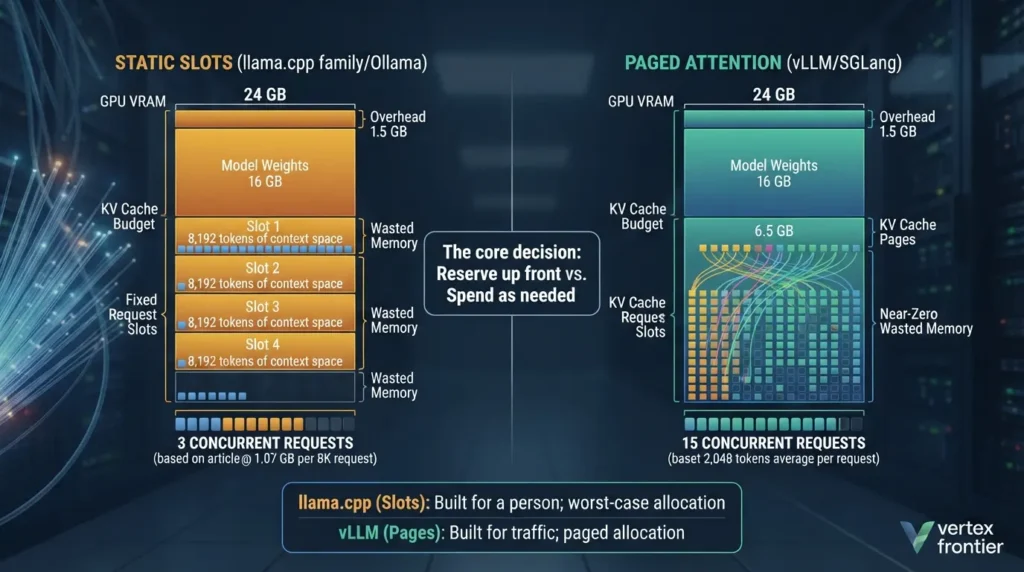
Ollama and the rest of the llama.cpp family (LM Studio’s engine, llama.cpp’s own server) think in slots. You decide how many requests may run at once, and each slot gets a context-sized region of KV memory. Ollama’s FAQ says required memory scales by the parallel-request setting times the context length, and gives an example: a 2K context with four parallel requests becomes an 8K allocation. In practice, memory is sized for the worst case rather than for the average request.
vLLM treats the same memory the way an operating system treats RAM. The PagedAttention paper splits the KV cache into small blocks, hands them out as tokens arrive, and takes them back when a request ends. The authors report near-zero wasted KV memory and 2 to 4 times higher throughput than FasterTransformer and Orca at the same latency. That is a 2023 comparison against those systems, not against llama.cpp-based servers. vLLM’s design documentation covers the mechanism in detail.
What is continuous batching?
Short answer: Continuous batching, also called iteration-level scheduling, lets an engine add new requests to the running batch at any decode step and remove finished ones immediately, instead of waiting for the slowest request in a batch to complete.
That one change removes the dead time that static batching creates. A short answer no longer sits idle behind a long one.
This is not a story of “batching versus no batching.” LM Studio’s 0.4.0 notes say its parallel requests use llama.cpp’s open-source continuous batching, and the vllm-metal team’s comparison describes llama.cpp as batching decode across slots. The real difference is how memory is reserved: fixed regions per slot versus pages on demand.
The KV cache behaves like RAM, not storage. It is volatile, it degrades under load, and every access costs compute. Teams that treat it as durable memory get burned in production, and we unpack the analogy and the fix in our agent memory architecture guide.
| Dimension | llama.cpp lineage Ollama, LM Studio, llama.cpp server | Paged scheduler vLLM, SGLang |
|---|---|---|
| KV memory | Per slot, sized to a context length. LM Studio can pool it with a “unified KV” setting. | Small blocks allocated as tokens arrive. SGLang keeps prefixes in a radix tree. |
| Concurrency control | A set number of parallel slots. Extra requests wait in a queue. | Requests join and leave the batch at every decode step, limited by KV memory and max sequences. |
| Prefix reuse | Engine-specific. Check your server’s cache settings. | Documented: vLLM automatic prefix caching, SGLang RadixAttention. |
| Model residency | Loaded on demand, unloaded after an idle timer. Ollama’s default is 5 minutes. | One model per process, loaded at startup, resident until you stop it. |
| Startup work | Read the weights. | Read the weights, compile kernels, capture CUDA graphs, profile memory for the KV cache. |
| Native format | GGUF | Hugging Face safetensors (GPTQ, AWQ, FP8 and others) |
| Hardware reach | Very wide: NVIDIA, AMD, Apple Silicon, CPU. | NVIDIA first. AMD Instinct through ROCm. Apple Silicon through vllm-metal since September 2026. |
| Sweet spot | One user to a small team on a workstation. | Shared services with latency targets. |
Here is the arithmetic behind the table. It is worth doing once for your own model, because it turns “how many users can this card hold?” from a guess into a number.
With the defaults, an 8B model in 16-bit leaves about 4.1 GB for KV cache. At 8,192 tokens, one request needs roughly 1.07 GB. Slot-style reservation fits three. If real requests average 2,048 tokens and memory is paged, the same card holds about fifteen.
Notice the pattern. The card did not change, the model did not change, and the capacity is five times higher. The difference is accounting. It also fits how Ollama’s defaults have behaved: an older copy of its FAQ describes auto-selecting four slots or one based on available memory, while the current docs list a default of one.
One caveat before moving on. LM Studio’s 0.4.0 release added parallel requests with continuous batching and a unified KV option, so the llama.cpp family is no longer one design. We cover that in the LM Studio section.
Your concurrency ceiling is a memory budget. Slot engines reserve it up front. Paged engines spend it as needed.
Cold Start Physics: Why vLLM Takes Minutes and Ollama Loads in Seconds
Both halves of that sentence are true, and both mislead. Ollama isn’t magic at loading, and vLLM isn’t doomed to a five-minute wait. They differ in what work they repeat on every start and what they keep around.
Why Ollama feels instant
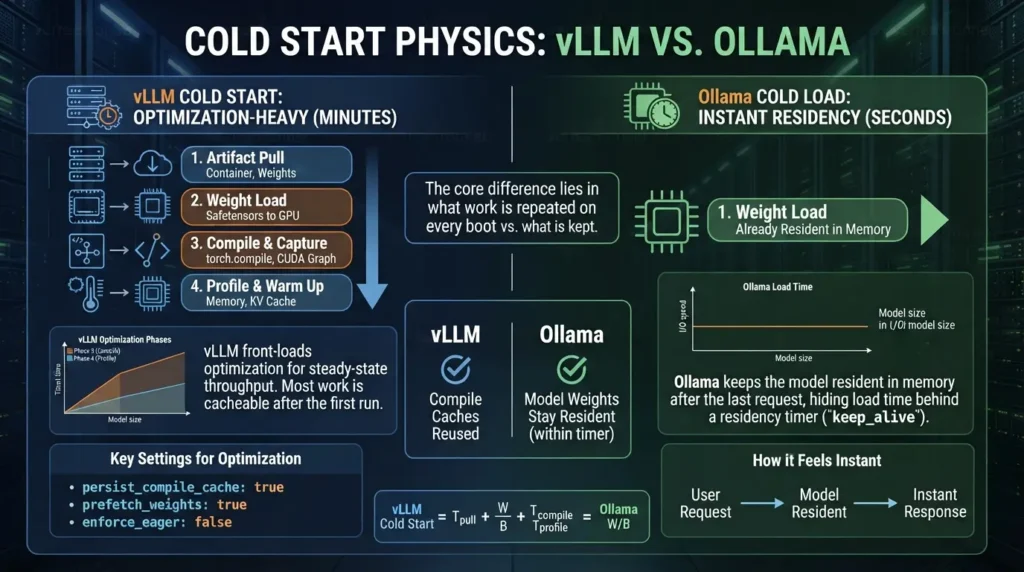
Ollama keeps a model in memory after the last request. By default, models stay loaded for five minutes, and the keep_alive setting lets you change that: a negative value keeps the model loaded indefinitely, and zero unloads it immediately. ollama ps shows what is loaded and when it will go.
So the “instant” experience is residency. Send a request within the window and the weights are already in memory. Come back after lunch and you pay the full load again. The timer hides the cost. It doesn’t remove it.
Bash Code:
# Load the model now and keep it resident (-1 = never unload) curl http://localhost:11434/api/generate -d '{"model": "llama3.1", "keep_alive": -1}' # See what is loaded and when it will unload ollama ps # Make the default survive reboots on a systemd host sudo systemctl edit ollama # In the editor, add these two lines and save: # [Service] # Environment="OLLAMA_KEEP_ALIVE=-1"The four phases of a vLLM cold start
A vLLM start does more work because it is optimizing for steady-state throughput. Here is the model we use to reason about it. RunPod’s breakdown uses the same four steps, and its tests found that weight loading plus compile and graph capture dominate the wait.
- Artifact pull. The container image, and the weights too if they are not already local.
- Weight load. Reading safetensors shards into GPU memory.
- Compile and capture.
torch.compileand CUDA graph capture for the batch sizes the server expects. - Profile and warm up. Measuring free memory, sizing the KV cache, running dummy passes.
Ollama skips phases 3 and 4. That is the trade: faster starts, less optimization of the steady state.
Phase 2 is mostly an I/O problem, and which phase dominates depends on model size. In an AWS-authored, sponsored post on cutting GPU inference cold starts, configuration-only changes reduced weight loading for a 203 GB model from 423 seconds to 25 seconds by tuning how weights stream from S3.
The same post reports that compile time stays roughly constant while load time grows with model size, so small models are compile-bound and large ones are I/O-bound. RunPod measured a compile and capture step of two to four minutes on its setup, so expect wide variation.
Case study: RunPod cuts a 32B model’s cold start from 324 s to 91 s
- Challenge: A serverless vLLM worker serving Qwen3-32B-FP8 on two H200 GPUs, with weights on a network volume and vLLM 0.27.0, took a median of 324 seconds to become ready.
- Decision: The team changed four settings: persist the compile cache on the volume, prefetch the safetensors weights, limit CUDA graph capture to realistic batch sizes, and turn on Hugging Face offline mode when every asset is local.
- Outcome: Median cold start fell to about 91 seconds, a 3.5x improvement, with no custom code and unchanged request-time execution. The sample is small: three baseline runs and two optimized runs, and RunPod calls the ratio directional. The very first optimized boot, which had to build the caches, still took about 284 seconds.
- Lesson: Most of the wait was avoidable work, not model physics, but only after the caches exist. RunPod’s own numbers are noisy: on a separate setup, four cold starts with an unchanged configuration took 273, 355, 387 and 834 seconds. Caches go stale when you change the model or serving flags, a network volume ties the worker to one datacenter, and lowering the maximum sequence count can cap throughput.
“vLLM is slow to start” is a deployment habit more than a law of nature. Teams that persist compile caches and prefetch weights pay the tax once. Teams that rebuild everything on every boot pay it forever.
Estimate your own cold start
The arithmetic is simple enough to do before you provision anything.
With the defaults, vLLM needs about two minutes on its first start and just over one minute with persisted caches. Ollama’s cold load is the same weight read, about 32 seconds. The gap is the compile and profile work, plus whether anyone is waiting while it happens.
Ollama hides load time behind a residency timer. vLLM front-loads optimization work, and most of that work is cacheable if you let it be.
Concurrency Benchmarks: Where Ollama Collapses and vLLM Shines
At one user, the two servers feel similar. At forty, they don’t.

How Ollama queues work
Ollama’s FAQ documents three settings that shape concurrency: OLLAMA_NUM_PARALLEL (parallel requests each model processes, default 1 in the current docs), OLLAMA_MAX_QUEUE (512 by default) and OLLAMA_MAX_LOADED_MODELS. If too many requests arrive, the server answers with a 503 saying it is overloaded. The same page states that required memory scales by OLLAMA_NUM_PARALLEL times OLLAMA_CONTEXT_LENGTH, and gives an example: a 2K context with four parallel requests becomes an 8K allocation.
Defaults have moved. An older copy of that FAQ on GitHub says the default auto-selects four slots or one based on available memory, and Red Hat’s 2025 test, run on Ollama 0.9.2, describes a default cap of four parallel requests. Read the startup configuration of your own build instead of trusting any blog post, including this one.
Raising parallelism helps up to a point. Each extra slot adds KV memory, so you trade headroom for concurrency.
Case study: a 40-user rollout that stalled
- Challenge: After six months of single-user use, an engineer shipped Ollama to 40 internal users. Response times went from about three seconds to over a minute, and requests began timing out.
- Decision: The author then tested Ollama, vLLM and llama.cpp side by side.
- Outcome: The detailed benchmark figures sit behind Medium’s member paywall, which we could not open, so we don’t repeat them here. The incident description is the only part we could read.
- Lesson: Treat this as a third-party anecdote, not measured evidence. It matches the pattern in the controlled test below, which is why that test matters.
Case study: Red Hat’s A100 sweep
- Challenge: Red Hat engineers wanted numbers instead of folklore about when each tool fits.
- Decision: They ran GuideLLM 0.2.1 against a single A100-PCIE-40GB with Llama 3.1 8B (fp16 on Ollama 0.9.2, vLLM 0.9.1), using a fixed prompt dataset, 300-second runs and 1 to 256 virtual users. One comparison used defaults. The other raised
OLLAMA_NUM_PARALLELto 32, the highest stable value they found. - Outcome: Red Hat’s write-up reports a vLLM peak of 793 tokens per second against 41 for Ollama, and a P99 latency of 80 ms versus 673 ms at peak throughput. It says vLLM led at every tested concurrency level, even with Ollama tuned. With defaults, Ollama’s throughput stayed flat and its time to first token rose sharply as requests queued. In the tuned run, Ollama’s inter-token latency became erratic.
- Lesson: Tuning added complexity without closing the gap. Scope matters, though: this is one GPU, one 8B model and mid-2025 versions, published by a company that sells a vLLM-based product. Rerun it on your own stack.
The plateau test
Red Hat’s description of the default run is the cleanest way to recognize saturation: Ollama’s throughput stayed flat while concurrency grew. When aggregate throughput stops rising as users rise, the server is saturated, and the only thing left to grow is the queue.
The two engines also fail in different places. In Red Hat’s default run, Ollama kept inter-token latency low by throttling its active work, so the pain showed up as waiting before the first token. vLLM served a larger batch, and its inter-token latency began to rise above 16 concurrent users. That is why you should record time to first token, inter-token latency and end-to-end latency, not only tokens per second.
When prefixes repeat, SGLang changes the math
Agents with long system prompts, RAG over the same documents and multi-turn chats send requests that start the same way. SGLang’s RadixAttention keeps those prefixes in a radix tree so a new request can reuse KV cache from an earlier one. The LMSYS launch post reports up to 5 times higher throughput than Guidance and vLLM, as they existed in January 2024. vLLM now documents its own automatic prefix caching, so the gap on a current release may differ. If every request has a unique prompt, there is nothing to reuse, and any advantage should shrink. Test both on your prompts.
How do I find my own collapse point?
Short answer: Run a burst test that ramps concurrency while holding prompt and output length constant, record P95 latency, time to first token and aggregate tokens per second at each step, and find the step where throughput stops rising or P95 crosses your target.
- Collect 20 to 50 realistic prompts, including your real system prompt.
- Cap output length (for example 200 tokens) so runs are comparable.
- Ramp concurrency through 1, 2, 4, 8, 16 and 32 against the same server and model.
- Record P95 end-to-end latency, time to first token and aggregate tokens per second.
- Find the knee: the step where throughput flattens or P95 passes your SLA.
- Compare the knee to your expected peak concurrency, with at least 1.5x headroom.
Red Hat used GuideLLM for this. The script below is a bare-minimum version you can run in a minute.
Python Code (illustrative, not validated against every server version):
import asyncio, time from openai import AsyncOpenAI # Point this at Ollama (11434), vLLM (8000) or LM Studio (1234) client = AsyncOpenAI(base_url="http://localhost:8000/v1", api_key="x") MODEL = "meta-llama/Llama-3.1-8B-Instruct" PROMPT = "Explain paged KV caches in about 120 words." async def one(): t0 = time.perf_counter() r = await client.chat.completions.create( model=MODEL, max_tokens=200, messages=[{"role": "user", "content": PROMPT}]) tokens = r.usage.completion_tokens if r.usage else 0 return time.perf_counter() - t0, tokens async def run(users): t0 = time.perf_counter() results = await asyncio.gather(*[one() for _ in range(users)]) wall = time.perf_counter() - t0 lat = sorted(x[0] for x in results) p95 = lat[max(0, int(0.95 * len(lat)) - 1)] tps = sum(x[1] for x in results) / wall print(f"users={users:3d} p95={p95:6.1f}s aggregate={tps:7.1f} tok/s") for n in (1, 2, 4, 8, 16, 32): asyncio.run(run(n))This is a closed-loop burst: every user fires at once. Real traffic arrives staggered, so your live P95 will usually look better. If the burst already fails, take it seriously.
A number without its conditions is hard to trust, including yours. Record these with every run, and publish them next to any conclusion you share.
| Item | What to write down | Why it matters |
|---|---|---|
| Hardware | GPU model, VRAM, driver and CUDA or ROCm version | Throughput and memory limits change with the card and stack. |
| Software versions | Server version, client version, model revision | Defaults and features move between releases, as the Ollama and vLLM docs show. |
| Model and precision | Exact tag or checkpoint, quantization, context length, KV cache type | Different quantizations are different workloads. |
| Workload | Prompt source, input and output length distribution, system prompt | Prefix sharing and length change the result more than most settings. |
| Load shape | Closed or open loop, concurrency steps, seconds per step, warm-up | A burst and a steady stream stress different parts of the server. |
| Cache state | Cold or warm model, prefix cache on or off, number of repeats | Hugging Face’s TGI benchmark reports second runs with prefix caching on, which shows how much this changes results. |
| Metrics | Time to first token, inter-token latency, end-to-end P50, P95 and P99, aggregate tok/s, errors and timeouts | Engines fail in different metrics, as Red Hat’s runs show. |
| Raw results | Per-request logs and server logs for every run | Without them, nobody can check your conclusion, including you next quarter. |
Collapse is a P95 problem that starts when aggregate throughput flattens. Measure your own knee, and write down the conditions.
The Real API Differences That Break Agent Frameworks
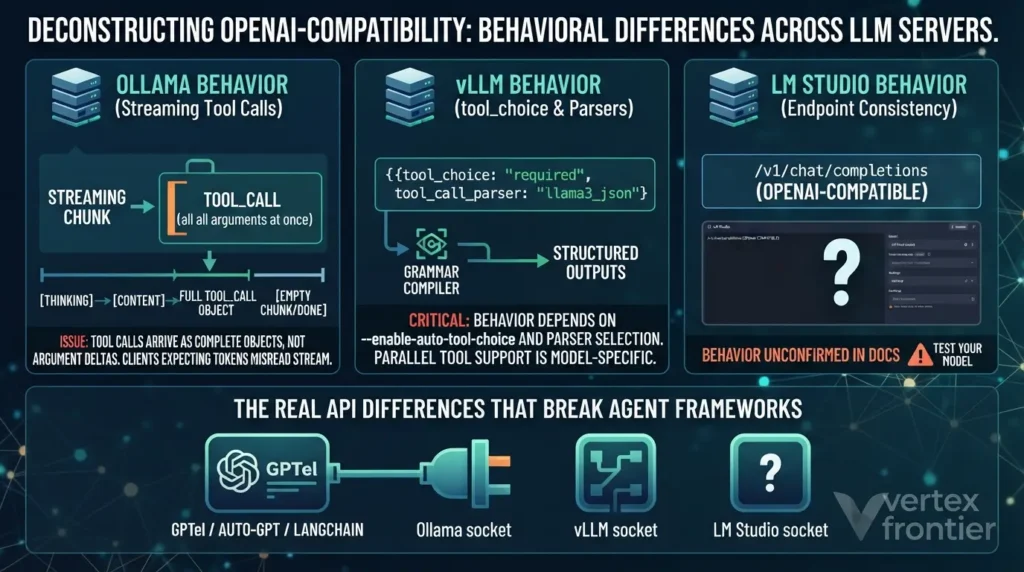
Every server in this guide calls itself “OpenAI-compatible.” That phrase covers three different promises, and agent frameworks depend on the third one.
- Layer 1, endpoint shape:
/v1/chat/completionsexists and accepts a messages array. - Layer 2, response schema: the JSON matches OpenAI’s chat completion object.
- Layer 3, behavior:
tool_choiceis honored, tool calls stream the way the client expects, structured output holds, parallel calls work.
The servers can all look compatible on layers 1 and 2. They differ on layer 3, and layer 3 is what an agent loop leans on. That is why a swap that works in a five-line demo can fail inside a framework.
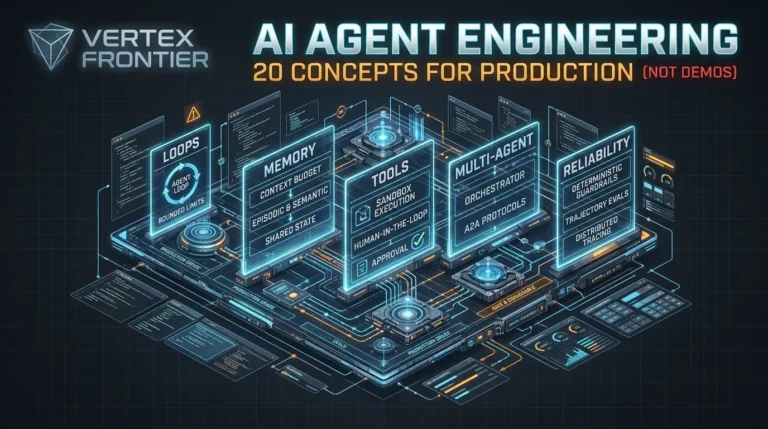
Agent frameworks break in production for reasons unrelated to the model. The harness around the model decides whether your agent ships or stalls, and we cover the 20 concepts that separate demos from production systems in our AI agent engineering guide.
Does Ollama support streaming tool calls?
Short answer: Yes. Ollama announced streaming responses with tool calling in May 2025, and its tool-calling docs include a streaming agent loop. The catch is shape: tool calls arrive as complete objects inside streamed chunks, not as token-by-token argument fragments.
The docs tell you to gather every chunk of thinking, content and tool_calls, then send those fields back together with the tool results. A client that expects OpenAI-style argument deltas, or that assumes a tool-call turn also carries explanatory text, will misread that stream.
Case study: client friction in GitHub issue #12557
- Challenge: In October 2025, a user testing Ollama 0.12.3 with
qwen3-coder:30b-a3b-q8_0through the Emacs client gptel reported in issue #12557 that streamed tool calls arrived as one chunk withdone: false, followed by an empty chunk withdone: true. They called the implementation incomplete. - Decision: The report describes gptel’s workaround: turn streaming off whenever tools are enabled. An Ollama maintainer closed the issue as unrelated to Ollama, saying the model returns a full tool call rather than streaming an incomplete one, and that the tool call and its result must be passed back to the model.
- Outcome: The behavior is now documented as the intended pattern: accumulate chunks, then return them with the tool results. Whether it is a bug or a design choice depends on what your client expects.
- Lesson: Test the exact client, endpoint and model combination. A documented capability can still fail inside a client written for a different streaming shape.
ollama ps and read the CONTEXT column to see what your server actually applied.What does tool_choice actually do on each server?
tool_choice is the easiest field to test and the hardest to understand from docs.
- Ollama: The OpenAI compatibility page marks
tool_choiceas unsupported on/v1/chat/completions, and the Anthropic compatibility page lists it among unsupported features. The docs don’t say whether the field is ignored or rejected, so test that on your version. - vLLM: The tool calling docs describe named function calling plus
auto,required(since 0.8.3) andnone. Auto mode needs--enable-auto-tool-choice, which the docs call mandatory, and a--tool-call-parserfor your model family. Named and required calls use structured outputs: you are guaranteed a parsable call, not a good one, and the first use can add seconds of latency while a grammar compiles. With auto and no strict tools, malformed arguments remain possible. - LM Studio: Tool use works through its OpenAI-compatible endpoint, but we could not confirm from its docs how it treats
tool_choice. Test it.
tool_choice: "required" and a prompt that doesn’t obviously need a tool, such as “say hello.” If you get prose back instead of a tool call, forcing isn’t working in your stack.Tool-call formats are model-specific. vLLM makes that visible by asking you to name a parser, and its Llama notes say parallel tool calls are not supported for Llama 3 but are for Llama 4. Ollama hides the format inside model templates. Hidden is convenient until it breaks, and then you are debugging a layer you can’t see.
| Capability | Ollama | vLLM | LM Studio |
|---|---|---|---|
| Tools on chat completions | Documented as supported. | Documented. Auto mode needs two flags. | Supported. Test your model. |
| tool_choice | Listed as unsupported on both its OpenAI-style and Anthropic-style endpoints. | auto, required, none and named function. | Not confirmed in the docs we reviewed. Test it. |
| Streaming tool calls | Documented since May 2025. Calls arrive as whole objects in chunks. | Parser-specific. One documented parser emits each call whole when streaming. | Not confirmed. Test it. |
| Model-specific setup | Handled through each model’s template. | You choose --tool-call-parser per model family. | Handled in the app per model. |
| Other endpoints | Non-stateful Responses API (v0.13.3 and later) and Anthropic Messages compatibility. | Docs show Responses API tool examples and strict mode across Chat Completions, Responses and Anthropic Messages. | Stateful POST /v1/chat added in 0.4.0. |
The good news is that the swap itself is cheap. Only the base URL and the model name change.
Python Code (illustrative):
from openai import OpenAI # Same client library, three servers. Only base_url and model name change. ollama = OpenAI(base_url="http://localhost:11434/v1", api_key="ollama") vllm = OpenAI(base_url="http://localhost:8000/v1", api_key="not-needed") lmstudio = OpenAI(base_url="http://localhost:1234/v1", api_key="lm-studio") MODELS = { "ollama": "llama3.1:8b", # Ollama tag "vllm": "meta-llama/Llama-3.1-8B-Instruct", # Hugging Face ID (gated: needs a token) "lmstudio": "<id returned by GET /v1/models>", }If you stay on Ollama for agent work, wrap tool-bearing calls so streaming turns off only where your client needs it.
Python Code (illustrative):
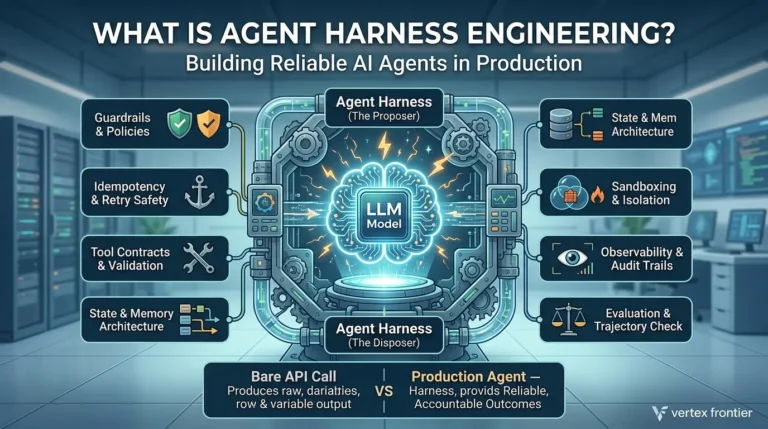
def chat(client, backend, model, messages, tools=None): # Fallback for clients that cannot handle whole tool-call chunks: # request a non-streaming reply when tools are present on Ollama. stream = not (tools and backend == "ollama") return client.chat.completions.create( model=model, messages=messages, tools=tools, stream=stream)The serving engine is only one layer of the production stack. The control layer around the model, meaning guardrails, idempotency, retry safety and evaluation, matters as much as the engine choice, and we treat it as its own discipline in our agent harness engineering guide.
“OpenAI-compatible” is a checklist, not a contract. Test layer 3 with your own client, model and endpoint before it reaches production.
Quantization Tradeoffs: GGUF Q2 to Q8 vs GPTQ, AWQ and FP8
Quantization is where you decide which ecosystem you live in. The formats are not interchangeable, and the choice follows the server.

Two families, two ecosystems
GGUF is the llama.cpp family’s single-file format. Docker’s Model Runner docs list its quantization levels from Q2_K to Q8_0, label Q4_K_M as the recommended balance of quality and memory, and call Q8_0 near-original. Ollama and LM Studio’s llama.cpp engine use GGUF models.
Safetensors-based quantization covers GPTQ, AWQ and FP8 checkpoints. vLLM’s documentation has separate quantization pages for AutoAWQ, GPTQModel, FP8 through LLM Compressor, bitsandbytes, AMD Quark and a quantized KV cache. Docker pairs the two worlds the same way: llama.cpp with GGUF, vLLM with safetensors.
Cross-support exists but is uneven. vLLM lists a GGUF page, and vllm-metal added GGUF support in v0.28.0. Check each engine’s page for current limits. A practical rule: if you plan to serve AWQ, GPTQ or FP8 checkpoints, plan on vLLM or SGLang. If your model library is GGUF, plan on the llama.cpp family.
Which quantization should I use for my GPU?
Short answer: Start with Q4_K_M on small cards, move up to Q5_K_M or Q8_0 when you have the VRAM, and look at FP8 or 4-bit AWQ and GPTQ through vLLM on datacenter GPUs. Sizes below come from bits per weight, so treat them as estimates.
- 6 to 8 GB VRAM: Q4_K_M GGUF, about 4.5 bits per weight. Roughly 4 GB of weights for a 7B model.
- 12 to 16 GB VRAM: Q5_K_M GGUF, about 5.5 bits. Roughly 5 GB for a 7B model.
- 24 GB or more: Q6_K or Q8_0 GGUF, about 6.5 to 8 bits. Roughly 6 to 7 GB for a 7B model.
- NVIDIA datacenter cards: FP8 or 4-bit AWQ and GPTQ checkpoints through vLLM. Confirm your GPU generation supports the format you pick.
- AMD Instinct: AMD’s post lists FP8 and FP4 work in vLLM’s ROCm backend. Check the quantization docs for your exact card.
The arithmetic is simple enough to automate. Weights are about parameters times bits per weight divided by eight, before the overhead that every runtime adds.
| Format | Bits per weight | Weights (7B) | Quality, per Docker | Served by |
|---|---|---|---|---|
| Q2_K | ~2.5 | ~2.2 GB | Reduced | llama.cpp family |
| Q3_K_M | ~3.5 | ~3.1 GB | Acceptable | llama.cpp family |
| Q4_K_M | ~4.5 | ~3.9 GB | Good (recommended) | llama.cpp family |
| Q5_K_M | ~5.5 | ~4.8 GB | Excellent | llama.cpp family |
| Q6_K | ~6.5 | ~5.7 GB | Excellent | llama.cpp family |
| Q8_0 | 8 | ~7.0 GB | Near-original | llama.cpp family |
| AWQ or GPTQ 4-bit | ~4 (nominal) | ~3.5 GB | Measure on your task | vLLM, SGLang |
| FP8 | 8 | ~7.0 GB | Measure on your task | vLLM, SGLang on supported GPUs |
| FP16 or BF16 | 16 | ~14 GB | Original | All |
Why perplexity hides the damage
This part is our interpretation, not a benchmark result. Perplexity averages quality across every predicted token, so small numerical errors wash out. A multi-step task is different. A math solution or a tool-calling chain needs many tokens right in a row, and errors compound. That is a plausible reason practitioners report low-bit quantization holding up in chat while slipping in code and agent loops. Measure on your own tasks.
Two habits save pain on shared servers:
- Ship pre-quantized weights. Quantizing at load time moves work into startup. Do it once, offline, and serve the result.
- Quantize the KV cache deliberately. Ollama’s FAQ documents
OLLAMA_KV_CACHE_TYPEwithf16as the default,q8_0at roughly half the memory with a very small loss, andq4_0at roughly a quarter with a loss that may show at larger contexts. It needs Flash Attention, applies to all models, and affects models with high grouped-query counts more. vLLM documents a quantized KV cache feature of its own. Either way, the advertised context length is an upper bound, not a guarantee, so test it with the methods in our long-context LLM benchmarks guide.
Pick the format your server speaks, start at Q4_K_M or a 4-bit checkpoint, and move up only where your own evaluation shows a loss.
LM Studio’s Repositioning: From Desktop App to Headless Server
If your mental model of LM Studio is “a nice window for downloading models,” it is out of date.

Three changes matter:
- Licensing. LM Studio became free for use at work on July 8, 2025. Its post says the earlier requirement to get a separate commercial license was removed.
- Headless mode. LM Studio 0.4.0, released in January 2026, introduced
llmster, a daemon for headless deployments on servers and cloud instances, started withlms daemon up. - Parallel requests. The same release added parallel inference with continuous batching, built on llama.cpp’s open-source implementation. The default is four parallel slots with a unified KV cache, and the notes say this works on the llama.cpp engine, with MLX coming later. It also added a stateful REST API at
POST /v1/chat.
Bash Code (illustrative):
# Start the headless daemon (no GUI needed), as shown in the 0.4.0 post lms daemon up # Then follow the 0.4.0 post and LM Studio docs to load a model and start the # local API server. Confirm commands and flags with: lms --helpThe post and the release notes describe the licensing change and the daemon, but they don’t settle every question. Read LM Studio’s current terms before you embed or redistribute it in a product. Its parallelism is slots on one loaded model, so if you need explicit control over sharding one large model across several GPUs or nodes, look at the parallel deployment modes vLLM documents.
Where does it fit? A shared workstation for a small team that likes a GUI, a Mac that benefits from its MLX engine for single-stream work, or a quick internal endpoint with model management built in. Past a few concurrent users with latency targets, test it against a paged engine on your own workload before you decide.
LM Studio is now a legitimate small-team server. Whether it meets a latency target is a question for your burst test, not the release notes.
The Wider 2026 Field: When the “Big Three” Framing Is Already Outdated
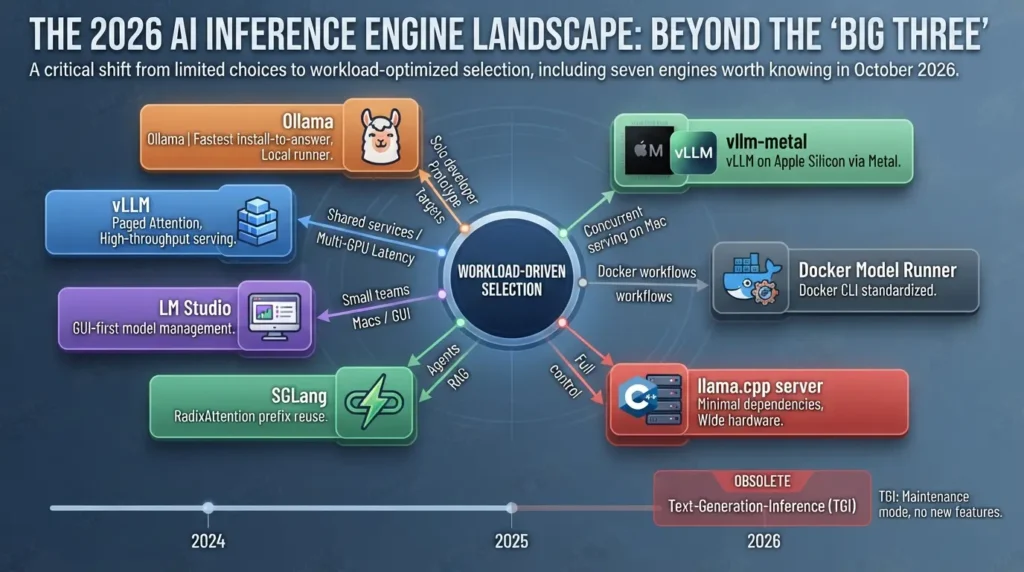
The “Ollama vs vLLM vs LM Studio” framing made sense in 2024. In October 2026 it leaves out engines you may need and includes one that has stopped moving.
Is TGI still worth using?
Short answer: Not for a new deployment. Hugging Face’s own docs say that text-generation-inference is in maintenance mode, with only minor fixes, documentation improvements and lightweight maintenance accepted, and they recommend vLLM, SGLang and local engines such as llama.cpp or MLX going forward.
You will still see TGI v3’s headline claim in older roundups. Hugging Face’s TGI v3 page reports that on prompts of 200,000-plus tokens, conversation replies take 27.5 seconds in vLLM and 2 seconds in TGI. It also says the benchmark reports the second run, with prefix caching on. That is a vendor benchmark of one scenario, against the vLLM of its release period, from a project that has since stopped adding features.
The 2026 shortlist
| Engine | What it is | Pick it when | Watch out for |
|---|---|---|---|
| Ollama | Local runner with a model library and slot-based concurrency | One user or a handful, fastest install-to-answer | Slot and queue ceiling, no tool_choice, context defaults |
| vLLM | Paged KV cache, continuous batching | Shared services, latency targets, multi-GPU | Startup cost, per-model flags |
| LM Studio | GUI plus headless daemon, llama.cpp and MLX engines | Small teams, Macs, GUI-first model management | Read the current terms; parallelism is slots on one model |
| SGLang | RadixAttention prefix reuse | Agents, RAG and chats with shared prefixes | Benchmark against current vLLM prefix caching |
| llama.cpp server | The open-source engine behind LM Studio’s llama.cpp runtime and Docker’s default backend | Minimal dependencies, full control, wide hardware | You assemble the operations yourself |
| Docker Model Runner | Docker CLI with llama.cpp, vLLM and Diffusers engines | Teams standardized on Docker workflows | vLLM engine: Linux x86_64 with NVIDIA CUDA, or WSL2 on Docker Desktop 4.54+ |
| TGI | Hugging Face’s serving toolkit | Keeping an existing deployment alive | Maintenance mode, no new features |
Two entries deserve a closer look.
Docker Model Runner is not “Ollama in Docker.” Docker’s docs describe three engines behind one CLI: llama.cpp as the default, plus vLLM and Diffusers. It pairs GGUF models with llama.cpp and safetensors models with vLLM, and the vLLM engine runs on Linux x86_64 with NVIDIA CUDA, or on Windows through WSL2 with Docker Desktop 4.54 or later. Docker lists AMD GPUs as unsupported for vLLM. For a team that already lives in Docker, one tool covering both worlds is the appeal.
vllm-metal closes a gap that lasted since vLLM’s launch. The September 22, 2026 announcement describes vLLM’s scheduler, paged KV cache and OpenAI-compatible server running on Apple Silicon, with MLX and Metal doing the execution, installed with Homebrew on macOS 15 or later. The benchmarks in that post come from the vLLM team on an M5 Pro with 64 GB, so treat them as vendor results. In the same post, requests that don’t fit the KV pool wait until pages free up. If you serve concurrent agents from a Mac, it is worth testing.
When one GPU is no longer enough, the questions change from “which engine” to “how do I shard this model across GPUs and nodes.” That is a separate subject, and we cover it in our distributed inference guide.
Ollama or LM Studio. Optimize for time to first answer.
LM Studio headless or Ollama with a pinned context size. Run the burst test first.
vLLM. Budget for startup and per-model flags.
SGLang or vLLM with prefix caching. Benchmark both on your prompts.
Docker Model Runner, with vLLM on Linux NVIDIA hosts.
vllm-metal or LM Studio. Test both under your agent load.
The honest 2026 question isn’t “which of three?” It is “what shape is my workload?” Then pick from seven, and drop TGI from new plans.
GPU Economics: Tokens per Second per Dollar
Tokens per second per dollar is the only number that survives a finance review.

Start with the idea that hardware cost is fixed and utilization is the variable. At saturation, the cost per token moves with the throughput ratio. Red Hat’s reported peaks of 793 and 41 tokens per second on the same A100 imply a ratio of roughly 19 at saturation. Your ratio will depend on your traffic, prompts and versions. The engine choice can change your cost per token before any hardware decision does.
What the hardware tiers are good for
Memory decides what fits. Memory bandwidth decides how fast one user gets answers. Batching decides how many users share that speed. Keep the three separate when you shop.
- Consumer cards give the best value for one user or a small team and for experiments with quantized models. Check each card’s VRAM on the vendor’s spec sheet, then run the weight and KV calculators above.
- Datacenter NVIDIA cards earn their price when many users share the card, or when a model needs the memory.
- AMD Instinct parts matter when you need large memory per card and the ROCm path described below.
We deliberately omit tokens-per-second tables and price lists for these cards. Published numbers vary with model, quantization, context length, batch size and date, and a table copied from someone else’s test would mislead you. Run the burst test from earlier on the card you are considering.
The AMD question: ROCm or Vulkan?
The backend follows the hardware, not the tool you like.
- ROCm is AMD’s compute stack. AMD announced on January 21, 2026 that ROCm is a first-class platform in the vLLM ecosystem, covering Instinct MI300 and MI350 GPUs, with official Docker images from vLLM v0.14.0 and a ROCm 7.0 wheel. It is a vendor claim, and the same post says AMD’s CI pass rate rose from 37% to 93% between November 2025 and January 2026, so read “first-class” as “recently matured.”
- Vulkan is the cross-vendor route for llama.cpp-based tools. Docker’s Model Runner docs list AMD and Vulkan GPU options for llama.cpp on Linux.
- Consumer Radeon cards sit in between. AMD’s post lists broader Radeon support as future work, so check AMD’s compatibility information for your card and release before you buy.
Engine choice moves cost per token first. Hardware choice follows memory needs. Pick the backend your GPU vendor actually supports.
Migration Path: The Ollama to vLLM Trigger Points
Don’t migrate at a headcount. Migrate at the first signal that your serving layer, not your model, is the bottleneck.
There is no universal user count. Set a P95 target for each use case first. A few seconds may suit interactive chat and far more may suit batch jobs. That target is a product decision, and this guide’s rule of thumb is simply to migrate when a burst test breaches it. Two teams with 10 users can land on opposite sides of the line, depending on model size, KV headroom and output length.

The migration trigger score
Count how many of these are true today:
- Burst P95 is over target. Your burst test fails your latency SLA.
- Throughput has flattened. Aggregate tokens per second stops rising while users rise.
- Agents need enforced tools. You depend on
tool_choiceforcing, which Ollama’s docs list as unsupported. - You need explicit multi-GPU control. Ollama’s FAQ says a model that doesn’t fit on one GPU is spread across the available GPUs. vLLM documents tensor, data, context and expert parallel deployment for cases where you want to control the layout.
- Prompts share prefixes. Agents or RAG send the same long system prompt thousands of times.
- You owe someone numbers. You need metrics and throughput targets, and vLLM’s docs include production metrics and Prometheus and Grafana guides.
One signal means investigate. Two or more means plan the migration. The calculator below turns signal 1 into a number.
With the defaults, 40 users on four slots with 8-second answers means ten waves and an 80-second wait for the unluckiest user. That is an illustration, but it is the same order of magnitude as the “over a minute” experience in the 40-user rollout above.
When you should not migrate
- You have fewer than about five users, and a missed deadline costs little.
- You are prototyping, evaluating models or running CI.
- Your hardware isn’t supported by the engine you would move to.
- You need the shortest possible path from install to answer.
How do I migrate from Ollama to vLLM?
Short answer: Map each Ollama model to a Hugging Face checkpoint, start vllm serve with explicit memory, context and tool settings, point your OpenAI-compatible client at port 8000, then re-run your evaluation under concurrent load while Ollama stays available as a fallback.
- Audit your models. Run
ollama listand map each tag to its Hugging Face equivalent. Check which quantization you were running, because GGUF tags and safetensors checkpoints are different artifacts. - Provision the GPU host. Size it with the weight and KV calculators above, not by weights alone.
- Start vLLM with explicit limits. Set context length, memory utilization and tool parsing yourself.
- Repoint the client. Change the base URL to port 8000 and the model name to the Hugging Face ID.
- Re-run your evals under load. Higher concurrency exposes failure modes a slot queue hid. Move traffic over in stages and keep the Ollama endpoint live until the numbers hold.
Bash Code (illustrative: verify flags against your vLLM version):
vllm serve meta-llama/Llama-3.1-8B-Instruct \ --max-model-len 16384 \ --gpu-memory-utilization 0.90 \ --max-num-seqs 64 \ --enable-auto-tool-choice \ --tool-call-parser llama3_json # vLLM's Llama 3.1 quickstart also passes a chat template from its repo: # --chat-template examples/tool_chat_template_llama3.1_json.jinja # The parser name depends on the model family. See the vLLM tool calling docs. # Sharding across GPUs uses a tensor parallel setting. See the parallelism docs.Config deltas: Ollama setting to vLLM equivalent
| Concept | Ollama | vLLM | Gotcha |
|---|---|---|---|
| Model residency | OLLAMA_KEEP_ALIVE (5 minutes by default) | No idle timer in what we reviewed. The model stays loaded while the process runs. | Scaling to zero means a cold start. |
| Parallel requests | OLLAMA_NUM_PARALLEL (default 1 in current docs) | --max-num-seqs | RunPod notes that lowering it trades throughput for boot time. Set it explicitly. |
| Context length | OLLAMA_CONTEXT_LENGTH or num_ctx | --max-model-len | Ollama’s docs disagree on its default (4,096 in the FAQ, VRAM-based on the context page). Check what each server applied. |
| Queueing | OLLAMA_MAX_QUEUE (512 by default), then a 503 | No direct equivalent documented in what we reviewed. | Add timeouts and load shedding at a gateway. |
| Several models | OLLAMA_MAX_LOADED_MODELS | One model per server process in the examples we reviewed. | Run several processes on different ports, or add a router. |
| Memory budget | Automatic | --gpu-memory-utilization | Leave headroom if other workloads share the GPU. |
| Multi-GPU | Spreads a model across GPUs when it doesn’t fit on one | Documented tensor, data, context and expert parallel deployment | Interconnect speed starts to matter. |
| Quantization | GGUF tag such as q4_K_M | Pre-quantized checkpoint, or the quantization options in its docs | Ship pre-quantized weights to keep startup short. |
| Tool calling | Model templates. No tool_choice. | --enable-auto-tool-choice --tool-call-parser | The docs call the auto flag mandatory. Pick the parser for your model family. |
| Endpoint and model name | :11434/v1, llama3.1:8b | :8000/v1, Hugging Face ID | Gated models need a Hugging Face token. |
Migrations fail in predictable places. Plan the rollback before you flip any traffic.
| Symptom | Likely cause | Check | Rollback |
|---|---|---|---|
| Tool calls fail or return plain text | Auto tool choice flags missing, or the wrong parser for the model family | Compare startup flags with the vLLM parser list. Run the tool_choice smoke test. | Route tool-using traffic back to Ollama. |
| Server fails to start or runs out of memory | Context length and memory utilization exceed the KV budget | Recompute with the KV calculator. Set both limits explicitly. | Keep serving from Ollama while you resize. |
| First request after deploy is slow | Startup work, or a first forced tool call compiling a grammar (vLLM’s docs mention several seconds) | Send one warm-up request per mode before routing traffic. | Hold traffic on the old pods until warm. |
| Slow boot returns after a config change | Compile cache goes stale when the model or serving flags change (RunPod) | Budget one warm-up boot after every flag or model change. | Restore the previous flags and cache path. |
| Answers differ from Ollama | Different weights, quantization, context length or chat template | Replay the same prompts at temperature 0 and log model revisions. | Keep Ollama as the reference during A/B comparison. |
| Model download is denied | Gated Hugging Face model without a token | Confirm access and token on the host. | Not applicable. Nothing changed for users yet. |
Migrating to vLLM gives you better throughput, and it also gives you more to watch: KV cache pressure, queue time and prefix-cache hit rates. HTTP 200 isn’t enough, so we cover production LLM observability in our MLflow observability guide.
Migrate on the first two signals, change the config deliberately, and keep the old server as a fallback until the evals pass under load.
Common Mistakes and How to Avoid Them
These are the errors that show up again and again in the sources above.

Leaving keep_alive at five minutes on a shared Ollama server
The first user after a quiet period pays a full model load. Set OLLAMA_KEEP_ALIVE=-1 and pre-load.
Raising parallelism without doing the memory math
Ollama’s FAQ says memory scales with parallel requests times context length. Run the calculator first.
Treating “OpenAI-compatible” as “agent-compatible.”
Ollama lists tool_choice as unsupported, and vLLM needs parser flags. Test your actual client.
Running agents on a small default context
Ollama’s docs recommend at least 64,000 tokens for agents and coding tools. Check ollama ps.
Benchmarking a single stream
Single-user speed looks fine on every server. Sweep concurrency and watch P95.
Quantizing at load time in production
It adds startup work. Ship pre-quantized weights.
Letting defaults decide your memory
Set context length and memory utilization yourself on vLLM.
Judging cold start from one run
RunPod’s unchanged baseline ranged from 273 to 834 seconds on one setup. Use medians of several boots.
Choosing TGI for a new project
Its maintainers now point to vLLM, SGLang and llama.cpp.
The Transformation Framework: Before vs After Migration
Here is the same hardware before and after, using Red Hat’s reported figures for one A100 and an 8B model.
- Peak throughput 41 tok/s
- P99 latency 673 ms at peak throughput
- Throughput stays flat as concurrency rises
- No tool_choice forcing
- Peak throughput 793 tok/s
- P99 latency 80 ms at peak throughput
- Throughput scales with concurrency
- tool_choice supported, with parser flags you now own
On those reported peaks, that is roughly 19 times the throughput and about 8 times lower P99 latency. The price was operational: a longer startup, model names that follow Hugging Face, and a set of flags you now own. Your results will depend on your model, prompts and versions.
Conclusion
Pick the engine by workload shape, not by reputation.
Start with Ollama or LM Studio for development and small teams. Add a burst test to your definition of done. When your P95 under load crosses your target, or two of the trigger signals appear, move to vLLM, and consider SGLang if your prompts share prefixes. Revisit the shortlist every quarter. TGI showed how quickly an engine name can age.
If you take one habit from this guide, make it this: measure your own knee before you trust anyone else’s user count, including ours.
How We Sourced and Scoped This Guide
We did not run these benchmarks ourselves. The table lists every source behind a number or a capability claim, what kind of evidence it is, and the version or date it covers. Documentation was checked on October 19, 2026.
| Source | Evidence type | Scope | Used for |
|---|---|---|---|
| Red Hat Developer benchmark | Vendor benchmark with documented setup | A100-40GB, Llama 3.1 8B, Ollama 0.9.2, vLLM 0.9.1, GuideLLM 0.2.1 | Concurrency results |
| RunPod cold-start post | Vendor test, small sample | Qwen3-32B-FP8, 2x H200, vLLM 0.27.0, 3 baseline and 2 optimized runs | Cold-start phases and fixes |
| AWS post on The New Stack | Vendor claim, sponsored content | p5.48xlarge GPU instances | Weight-load versus compile bottleneck |
| Ollama docs | Documented capability | Pages as of October 19, 2026 | Defaults, endpoints, tool_choice |
| vLLM docs | Documented capability | Latest developer preview, October 19, 2026 | Tool calling |
| LM Studio blog and release notes | Documented capability | July 2025 and version 0.4.0 | Licensing, headless mode, parallel requests |
| vllm-metal and AMD ROCm posts | Vendor claims | September 2026 and January 2026 | Apple Silicon and AMD support |
| Hugging Face TGI docs | Documented status, vendor benchmark | Maintenance-mode notice | TGI status |
| Towards AI post and GitHub issue #12557 | Hands-on anecdote, user report | April 2026, Ollama 0.12.3 | Failure patterns only |
| This guide’s calculators and frameworks | Editorial inference | Simplified models | Planning estimates, not predictions |
FAQs: Ollama vs vLLM vs LM Studio
Is Ollama good for production?
It depends on what production means. For one user, a CI job or a low-concurrency internal tool, it can work well. For a multi-user API with latency targets, Ollama’s slot and queue model becomes the limit quickly. In Red Hat’s 2025 A100 benchmark, vLLM stayed ahead at every tested concurrency level, even with Ollama tuned. Run the burst test with your own prompts to find where your ceiling sits.
Why is vLLM faster than Ollama under load?
vLLM pages the KV cache, so very little memory is wasted, and its scheduler adds and removes requests at every decode step. Ollama sizes memory per parallel slot and queues what does not fit. In Red Hat’s benchmark on one A100 with Ollama 0.9.2 and vLLM 0.9.1, vLLM peaked at 793 tokens per second against 41 for Ollama. Your numbers will differ by model, hardware and version.
Does Ollama support streaming tool calls and tool_choice?
Ollama has documented streaming with tool calling since May 2025, but tool calls arrive as complete objects inside chunks rather than as token-by-token fragments, which some clients do not expect. Its OpenAI-compatible and Anthropic-compatible endpoint docs both list tool_choice as unsupported. Test your client and model before relying on either behavior.
Can LM Studio run headless, and is it free for commercial use?
LM Studio 0.4.0, released in January 2026, introduced llmster, a daemon for running without the GUI. LM Studio announced on July 8, 2025 that it is free to use at work. Read its current terms before embedding or redistributing it in a product.
Does vLLM work on AMD GPUs or Apple Silicon?
AMD says ROCm became a first-class platform in the vLLM ecosystem in January 2026, covering Instinct MI300 and MI350 GPUs, and it lists broader Radeon support as future work. On Apple Silicon, vllm-metal brings vLLM’s scheduler and paged KV cache to Macs running macOS 15 or later, according to the vLLM team’s September 2026 announcement.
When should I switch from Ollama to vLLM?
Switch when your P95 latency under burst load exceeds your target, or when two or more of these hold: aggregate throughput stays flat as users grow, you need tool_choice forcing, you need explicit multi-GPU control, many requests share long prompt prefixes, or you must report throughput against an SLA. Do not switch on user count alone.
Is TGI still worth using?
Keep an existing deployment if it works, but do not start a new one on it. Hugging Face’s documentation says text-generation-inference is in maintenance mode and recommends vLLM, SGLang, llama.cpp or MLX going forward.
How do I measure whether my server is the bottleneck?
Replay realistic prompts at rising concurrency, such as 1, 2, 4, 8, 16 and 32 users, with fixed output length. Record time to first token, end-to-end P95 and aggregate tokens per second at each step. If aggregate throughput stops rising while P95 climbs, the serving layer is saturated. Write down versions, hardware and cache state with every run.

Was this article helpful?





[…] a single machine and you’re choosing between local serving engines instead, our comparison of Ollama vs vLLM vs LM Studiocovers where each one breaks under concurrency and tool […]
[…] long-context workload stays on a single box, the equivalent decision is which engine serves it, Ollama, vLLM, and LM Studio differ sharply in how they handle the KV cache growth that long-context prompts […]
[…] KV-cache footprint is also why the choice of local serving engine matters more than teams expect, Ollama, vLLM, and LM Studio allocate and reuse that cache in fundamentally different ways, and the wrong pick throttles the […]
[…] 'a local model' is the choice, the engine serving it (Ollama vs vLLM vs LM Studio) is itself a design decision the harness has to absorb, they expose […]