

Running AI locally is not automatically cheaper, more private, or more reliable. It is a deployment choice that can give an organization more control over data movement, latency, model availability, and operating conditions, while transferring hardware, security, maintenance, and evaluation work to the operator.
The right question is not “Is local AI better?” It is “Which constraint matters most for this workload, and what responsibility will the team accept in return?” A laptop experiment, an internal team service, and a customer-facing production system have very different requirements.
This guide compares the privacy, cost, reliability, and quality trade-offs using documented product information, first-party engineering reports, and a reader-run evaluation method. Where a number depends on hardware, model, version, workload, or date, that boundary is stated explicitly.
What you’ll walk away with
Click any topic to expand or collapse3 core reasons for local AI (and cost myths)
The three real reasons to run AI locally — and why “it’s cheaper” is usually the weakest of the three when factoring hardware lifecycles.
Hardware ROI & break-even calculator
A working break-even calculator so you can check your own workload numbers before committing budget to local hardware purchases.
EU AI Act compliance (August 2026 requirements)
What the EU AI Act actually requires starting August 2026, compliance scope, and who these regulations apply to globally.
Production scale case studies (LinkedIn, Roblox, Stripe)
Three documented case studies (LinkedIn, Roblox, Stripe) analyzing infrastructure metrics, failure modes, and production-scale trade-offs.
The “Local = Private” security fallacy
The most common architectural mistake teams make when assuming that “local deployment” automatically guarantees telemetry-free privacy.
Unified-memory hardware shift in 2026
Why a $4,000 unified-memory hardware setup fundamentally redefined what local AI inference capabilities look like in 2026.
Autonomous agents as the local AI killer app
Why the primary value driver for local execution isn’t conversational chat, but latency-sensitive, high-throughput autonomous agents.
Turn this article into action.
Get the complete 35-page Local AI Field Guide — break-even calculator, Ollama hardening checklist, Nginx + Docker configs, engine selection matrix, and a 7-day quickstart plan.
What Does "Running AI Locally" Actually Mean?
Running AI locally means executing a language model's calculations on hardware you own or control, your laptop, a desktop with a GPU, or a server in a rack you manage, instead of sending your prompt over the internet to a company's data center and waiting for a response.
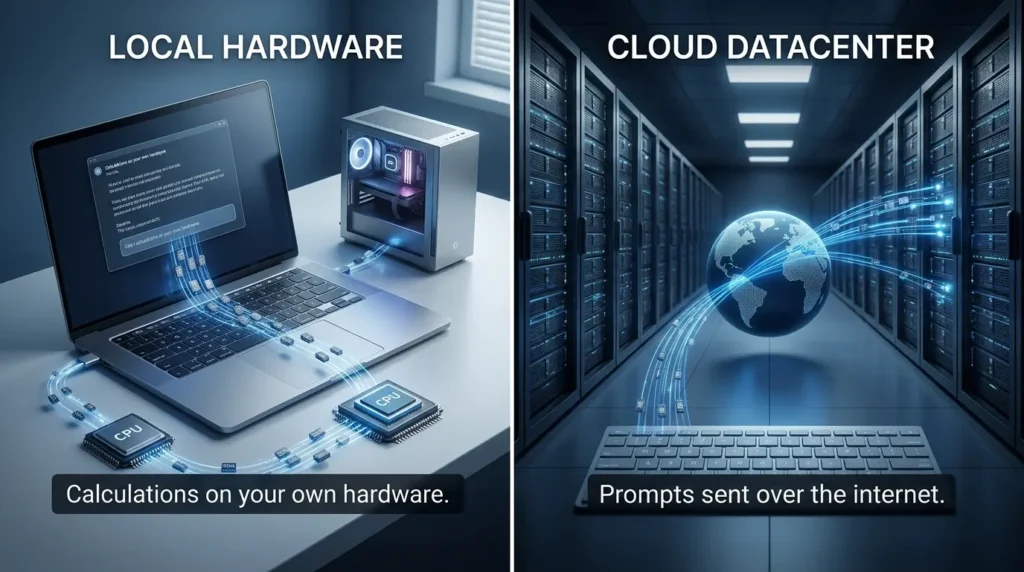
When the model, tokenizer, and inference process run on hardware you control, the application can avoid sending the inference request to a hosted model provider. That does not prove that every byte stays inside the device or network.
Model downloads, telemetry, logs, backups, retrieval connectors, plugins, remote tools, authentication services, updates, and cloud fallbacks can still create external data flows. Privacy therefore depends on the whole deployment configuration, not only on where the model weights are loaded.
The tradeoff is that you now own the operations job that used to belong to OpenAI, Anthropic, or Google. You're the one who patches the server, provisions the GPU, and answers for it when something breaks at 2 a.m. That job is not free, even when the software is.
Local does not mean data-free
A local model can remove the API request from your normal cloud-provider path, but it does not guarantee that no data leaves the device or network. Check the entire workflow: the application, inference server, model-download source, telemetry, logs, backups, retrieval system, remote tools, plugins, authentication provider, update mechanism, and any cloud fallback.
A practical privacy statement is therefore conditional: “This inference path can keep prompts on the controlled network when external integrations are disabled and the surrounding infrastructure is configured accordingly.”
LLM Security Verification Checklist
Verify security parameters and boundary safety for inference deployments.
| Status | Component | Question to verify |
|---|---|---|
| Prompt and response | Are they written to local logs, traces, caches, or crash reports? | |
| Model and tokenizer | Were they downloaded from a trusted source, and are updates verified? | |
| Retrieval and tools | Can the model call a remote database, browser, API, or messaging service? | |
| Network boundary | Is the inference port bound to localhost or a protected private interface? | |
| Backups and support | Can backups, diagnostics, or support workflows copy sensitive content elsewhere? | |
| Fallback behavior | Does the application silently switch to a cloud model when local inference fails? |
local AI trades a monthly bill for a one-time hardware cost and an ongoing operations responsibility. Whether that trade is worth it depends entirely on what you're optimizing for.
The Privacy Argument: More Complicated Than "My Data Never Leaves My Machine"
This is the argument people reach for first, and it's the strongest one, but it's also the one most people get wrong in a specific, predictable way. Before the numbers, it helps to actually see the difference in where your data physically travels:
Why privacy pressure on cloud AI is increasing, not decreasing
Two regulatory shifts changed the calculus for anyone handling regulated data in 2026.
Privacy and data-protection enforcement make the data-flow decision more consequential, but a cumulative-fines total must be tied to a named dataset and refresh date. Public trackers use different inclusion rules and currently report different totals. Use the applicable regulator guidance and your organization’s legal review for the specific processing activity instead of treating one headline number as a measure of local-AI necessity.
The European Commission states that new transparency obligations for certain AI systems take effect on August 2, 2026. The rules include informing people when they are interacting with an AI system and labelling certain AI-generated or manipulated content. The exact duty depends on the system, the provider or deployer’s role, the use case, and the applicable territorial scope. The Commission also states that companies can face fines of up to €15 million or 3% of global annual turnover for relevant violations .
Do not infer from this date that running an open-weight model locally creates a blanket exemption or a blanket compliance obligation. Review the AI Act classification and the system’s deployment context before making a legal claim.
For healthcare workloads, the relevant question is whether a service creates, receives, maintains, or transmits protected health information on behalf of a covered entity or business associate. HHS describes those circumstances as part of the business-associate boundary and requires the appropriate contractual safeguards, including a Business Associate Agreement where applicable.
OpenAI’s current API guidance states that a BAA is required before using its API with PHI and that requests are reviewed case by case, with service-specific exceptions. Local deployment may reduce one external data-transfer boundary, but it does not by itself establish HIPAA compliance. Confirm the exact vendor, service, data flow, safeguards, and legal obligations with qualified counsel and your compliance team.
Case study: what regulated industries are actually doing
Petronella Technology Group, which has run production private AI for defense, healthcare, legal, and financial clients since 2024, reports that a capable entry-level private LLM server costs $8,000 to $12,000, and that open-source models like Llama 3.3 70B and Qwen 2.5 72B now handle summarization, document analysis, and code review at a level competitive with commercial APIs for most business tasks.
That's the part people underestimate: the "we need local for compliance" decision used to come with a quality tax. You'd get privacy, but you'd be stuck with a noticeably worse model. That tax has mostly disappeared over the past two years.
AI Just Rewrote the Economics of Data Breaches: What the 2026 IBM Report Means for Your Defense
From compliance checkbox to brand asset
There's a second shift worth naming, because it changes who local AI is actually for. Compliance was always the defensive case for going local, you do it because a regulator or a client contract requires it. What I've noticed more of lately is boutique law firms, medical practices, and financial advisories turning the same architecture into an offensive one: a trust signal marketed directly to clients, in the same register as "organic" on a food label.
"Your data never touches the internet" is a sentence a client understands immediately, without needing to know what a KV cache is. For a firm competing on trust rather than price, that's not just a compliance line item, it's a positioning statement, and one genuinely available to any small firm willing to run a single box on-site, not just organizations with a dedicated infrastructure team.
local AI is starting to function as a marketing claim as much as a technical architecture, for client-facing firms, that may end up being the more durable reason to make the switch.
The uncomfortable truth: local isn't automatically secure
Here's the contrarian point I want to make clearly, because it's the single biggest misconception I run into: running a model locally does not mean your data is private by default. It means your data has the potential to stay private, if you configure the server correctly.
In May 2026, Cyera reported a critical unauthenticated memory-leak vulnerability in Ollama, tracked as CVE-2026-7482. NVD describes the issue as a heap out-of-bounds read in the GGUF model loader affecting Ollama versions before 0.17.1. NVD lists a CVSS v3.1 base score of 9.1 Critical and a CNA CVSS v4.0 score of 8.8 High. Cyera estimated that approximately 300,000 servers were vulnerable at the time of its research. Treat this as a dated research estimate, not a permanent count of public systems.
A separate SentinelLABS investigation reported 175,000 publicly exposed open-source AI hosts across 130 countries. More than 48% of the observed hosts advertised tool-calling capability, while a completion-plus-tools configuration appeared on 38% . Tool calling can increase the blast radius of an exposed system, but the practical impact depends on the tools, identities, network access, and permissions granted to the model.
127.0.0.1 (localhost only) by default. The moment someone sets OLLAMA_HOST=0.0.0.0 to reach it from another device — a completely normal thing to do when connecting a second machine or a phone — the API becomes reachable by anyone who finds the open port, with zero authentication required. This is not a bug. It's the default trust model of a tool built to run on one person's laptop, now frequently deployed on networked servers.The fix: lock Ollama behind Nginx before it ever touches your network
The safe order of operations is to patch first, keep Ollama bound to localhost or a protected private interface unless remote access is required, restrict network access with host and perimeter firewalls, add authentication and TLS at the access layer, review logs and tool permissions, and verify that the inference port is not directly exposed.
Ollama documents 127.0.0.1:11434 as the default bind address and OLLAMA_HOST as the setting used to change it . A reverse proxy can be one defense-in-depth layer; it is not proof that the vulnerability or the complete attack surface has been eliminated.
Step 1: generate a password file:
Bash:
mkdir -p ./nginx htpasswd -c ./nginx/.htpasswd your-username # you'll be prompted to set a password — store it in a password managerStep 2: write the Nginx reverse proxy config:
nginx/default.conf:
server { listen 443 ssl; server_name your-domain.example.com;
ssl_certificate     /etc/nginx/certs/fullchain.pem;
ssl_certificate_key /etc/nginx/certs/privkey.pem;

auth_basic           "Restricted - Ollama Inference Server";
auth_basic_user_file /etc/nginx/.htpasswd;

location / {
    proxy_pass         http://ollama:11434;
    proxy_set_header   Host $host;
    proxy_set_header   X-Real-IP $remote_addr;
    proxy_read_timeout 300s;
}

}
server { listen 80; server_name your-domain.example.com; return 301 https://$host$request_uri; }
Step 3: wire it together with Docker Compose:
docker-compose.yml:
services: ollama: image: ollama/ollama volumes: - ollama_data:/root/.ollama expose: - "11434" # Deliberately no "ports:" mapping here. # Ollama is never bound to the host network directly — # only Nginx below is allowed to reach it.
nginx: image: nginx:alpine depends_on: - ollama ports: - "443:443" - "80:80" volumes: - ./nginx/default.conf:/etc/nginx/conf.d/default.conf:ro - ./nginx/.htpasswd:/etc/nginx/.htpasswd:ro - ./certs:/etc/nginx/certs:ro
volumes: ollama_data: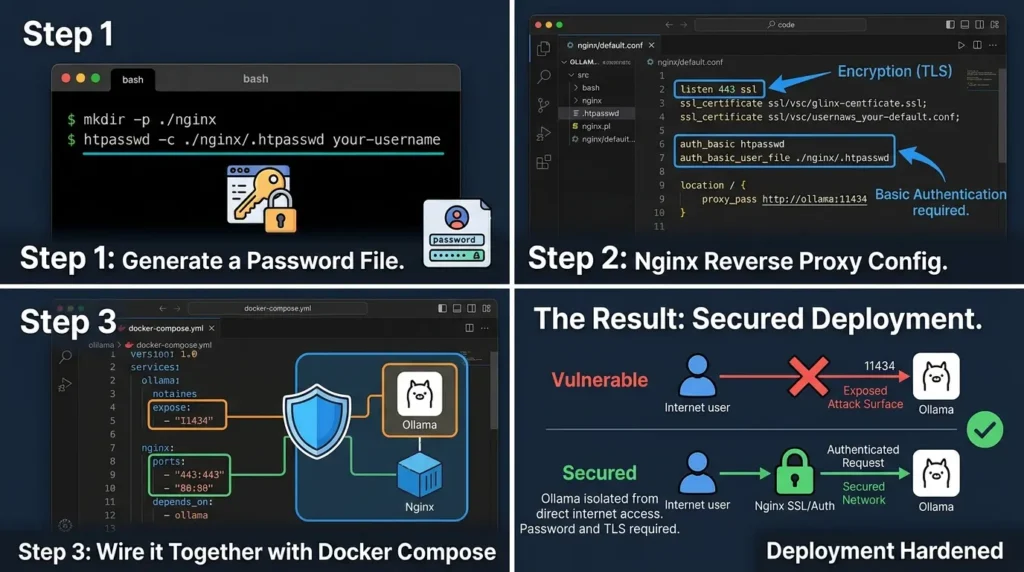
Run docker compose up -d, point a free TLS certificate at it (Let's Encrypt's certbot works fine here), and the server that was one misconfigured environment variable away from being one of those 300,000 exposed hosts is now demanding a password and an encrypted connection before it will proxy a single token. I'll walk through certificate automation and IP allowlisting in more depth in the dedicated Ollama hardening guide later in this series, but the setup above is enough to take a server off the exposed list today.
None of this means local AI is less private than cloud AI, it almost certainly still is, in aggregate. It means privacy is a property of your configuration, not a property of the word "local." If you're deploying local models anywhere beyond your own laptop, put them behind a reverse proxy with authentication, and never expose the inference port directly to the internet.
Hardening checklist before remote access
Before exposing a local inference service to another machine, verify each item in a staging environment:
- Upgrade the inference runtime to a version that contains the relevant security fix.
- Confirm the bind address and verify from another host that the inference port is not reachable directly.
- Restrict inbound traffic with host and network firewalls to the smallest required set of source networks.
- Put authentication at the access layer and use TLS when traffic crosses an untrusted network.
- Disable or isolate tools, shell access, filesystem writes, plugins, and remote connectors that the workload does not require.
- Review application, proxy, inference, and operating-system logs for prompts, credentials, and sensitive content before enabling centralized collection.
- Define retention and deletion rules for prompts, responses, model files, caches, and backups.
- Test unauthorized access, direct-port access, TLS failure, oversized requests, service restart, patching, and rollback before production use.
This checklist reduces common exposure paths; it is not a certification of security or compliance. The exact commands and configuration depend on the operating system, runtime version, network topology, proxy, identity provider, and tool permissions.
local AI gives you the legal and architectural foundation for compliance that cloud APIs often can't, but only if you treat the server like production infrastructure, not like a weekend project.
The Cost Argument: Where the Math Actually Works (and Where It Doesn't)
This is where I want to slow down, because the "local AI is cheaper" claim gets repeated constantly without anyone showing the arithmetic.
What cloud API pricing actually looks like in 2026
As checked on August 23, 2026, OpenAI lists GPT-4o at $2.50 per 1 million input tokens, $1.25 per 1 million cached input tokens, and $10.00 per 1 million output tokens . It lists GPT-4o mini at $0.15 per 1 million input tokens, $0.075 per 1 million cached input tokens, and $0.60 per 1 million output tokens. These are dated model-specific prices. Recheck the provider’s current pricing, model alias, token mix, caching, tools, and batch options before using them in a purchase decision.
The economics flip once you're running something with sustained volume: a coding agent making hundreds of calls a day, a document pipeline processing thousands of files, or a product with real user traffic. That's where the second number matters more than the first: the hardware.
The hardware side just got cheaper, and it's not the "$12,000 server" story anymore
For years, the standard rebuttal to "just run it locally" was hardware cost: multi-GPU servers running $8,000 and up, out of reach for anyone without an IT budget. That rebuttal is aging fast.
NVIDIA’s current DGX Spark product information documents 128GB of coherent unified system memory, up to 1 PFLOP of FP4 AI performance, and testing or inference with models up to 200 billion parameters. NVIDIA’s marketplace listing currently shows $4,699 for the listed configuration. A parameter-count statement is not a promise of full-precision execution, useful throughput, context length, or production suitability. Treat the price as a dated US listing and benchmark the exact model and quantization you intend to use.
That number matters more than the raw compute figure. VRAM, not GPU speed, has always been the real ceiling on local inference. A single RTX 3090 or 4090, with 24GB of VRAM, chokes on anything past roughly a 30-billion-parameter model without offloading to much slower system RAM. Unified memory architectures sidestep that ceiling by letting the CPU and GPU share one memory pool instead of splitting it, which is what makes 70B-class models runnable at full precision on a single desktop for the first time.
It isn't the cheapest way to run AI locally, a used RTX 3090 still wins on dollars-per-token for smaller models. What it changes is the ceiling. "Prosumer local AI" used to top out around 13–30B parameters. It now realistically tops out around 200B, for a one-time cost a solo developer or small firm can put on a credit card instead of a capital-expenditure request.
Bottom line: "you need a $12,000 server" is now the wrong objection for anything short of serving real production traffic, unified memory changed what a single desktop machine can hold, not just how fast it runs.
Compare total cost and measured service behavior
LLM Deployment Comparison
Compare operational factors between managed Hosted APIs and Local self-hosted inference.
| Factor | Hosted API | Local or Self-Hosted Inference |
|---|---|---|
| Upfront cost | Usually low; usage is billed over time. | Hardware, deployment, and setup cost are paid before use. |
| Variable cost | Depends on tokens, model, tools, caching, and provider pricing. | Depends on electricity, utilization, maintenance, and replacement cycle. |
| Data boundary | The request is sent to the provider under the provider’s terms and configuration. | The inference path can remain on a controlled network if external flows are disabled and infrastructure is configured correctly. |
| Latency | Depends on network, provider load, model, region, and queueing. | Depends on hardware, model, quantization, context, concurrency, and scheduling. |
| Availability | Provider operates the service and publishes its own limits. | Operator owns power, hardware, patching, capacity, monitoring, and recovery. |
| Model access | Limited to the provider’s available models and terms. | May support open-weight models that match the engine and hardware. |
A simple payback screen is:
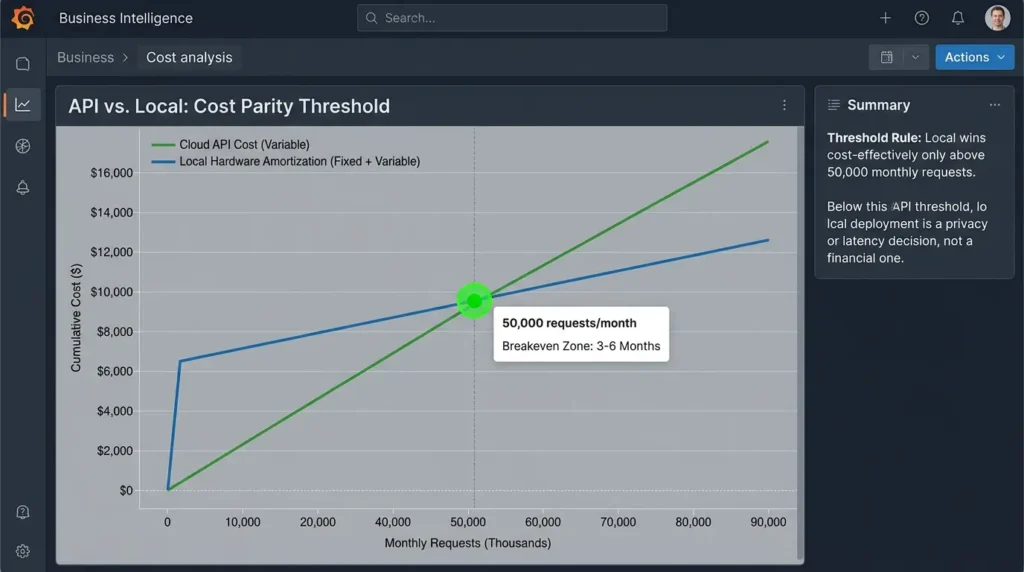
simple payback months = upfront hardware cost / (avoidable monthly cloud spend − incremental monthly local operating cost)
This is not a complete total-cost-of-ownership model. Add electricity, cooling, storage, networking, backups, support, maintenance time, security work, evaluation, licensing, facilities, and hardware replacement. Do not publish a universal request threshold: prompt length, output length, concurrency, model size, quantization, batching, utilization, and latency targets can change the result substantially.
Case study: what break-even looks like at real scale
The clearest documented example of local inference paying for itself is Stripe's 2025 migration to vLLM, which reportedly delivered a 73% reduction in inference cost while running 50 million daily API calls on roughly one-third of their previous GPU fleet. That's not a privacy story, it's pure throughput efficiency. The same GPUs, serving three times as many requests, because the inference engine stopped wasting memory on every request.
LinkedIn's engineering team documented a similar pattern at a different scale: after adopting vLLM to power more than 50 GenAI use cases — including their Hiring Assistant and AI Job Search products — across thousands of hosts, they reported roughly 10% throughput gains and GPU savings exceeding 60 units for certain workloads, while holding sub-600ms p95 latency across thousands of queries per second.
Both of these examples share a mechanism, and it's worth understanding because it's the single biggest lever in local AI economics: PagedAttention. Before vLLM introduced it, inference engines routinely wasted 60 to 80% of a GPU's memory reserving space for the worst-case length of every request, even short ones. PagedAttention borrows the concept of virtual memory paging from operating systems, breaking the cache into small reusable blocks instead, and the original UC Berkeley research showed it delivering up to 24x higher throughput than plain HuggingFace Transformers on identical hardware.
That's the real cost story. It's not "buy a GPU, save money." It's "the software running on that GPU determines whether you're using 20% of it or 95% of it," and the gap between those two numbers is the entire economic case for choosing the right inference engine, a topic this series covers in depth in the vLLM and Paged Attention deep dives.
local AI only beats cloud pricing past a real volume threshold, and even then, the software you run on the hardware matters as much as the hardware itself.
The line item the calculator above doesn't show you
The break-even calculator earlier only accounts for hardware and electricity. It leaves out the cost that developers who've actually run local infrastructure for a year keep bringing up in community threads on r/LocalLLaMA and Hacker News: engineering time.
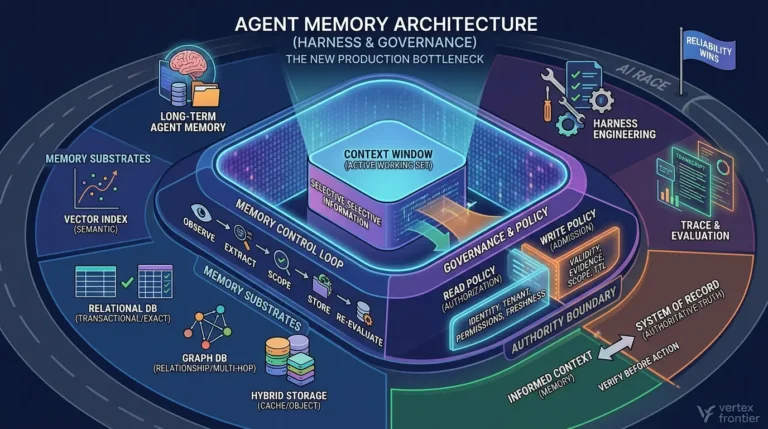
A cloud API absorbs a category of maintenance you never see. The provider handles model updates, patches security issues quietly, and manages what practitioners call "model rot", the slow drift in output quality and behavior as the systems underneath change. Running locally, that job moves to you.
You're the one updating the inference engine when a new Ollama or vLLM release ships, re-quantizing models as formats evolve, GGUF today, something else in eighteen months, and diagnosing "prompt drift," where a prompt that worked perfectly on one model version behaves differently the moment you swap it for another.
None of this shows up on an invoice, which is exactly why it's easy to underestimate. A rough rule worth carrying into your own math: for every dollar you save on API fees, budget real engineering hours against it. Even a modest local deployment easily consumes several hours a month in patching, post-update testing, and troubleshooting when a new model version changes behavior in ways the old prompts didn't anticipate. Price that time at your actual hourly cost, not zero, before calling the arithmetic settled.
Bottom line: local AI's cost advantage is real at scale, but it trades a line-item bill for a labor cost that almost nobody tracks, factor in maintenance hours before you declare the math closed.
The Local AI Field Guide (PDF)
Get the complete 35-page companion PDF — break-even calculator, Ollama hardening checklist, Nginx + Docker configs, engine selection matrix, and cheat sheet.
A practical evaluation protocol
Use the same model family or the closest documented alternative, the same prompt set, the same context lengths, and the same output limits. Measure at least 100 representative requests, including short prompts, long-context prompts, peak-concurrency requests, tool calls if they are part of the product, and failure or timeout cases.
Record model and engine versions, quantization, hardware, driver/runtime versions, batch or concurrency settings, warm-versus-cold state, tokens per second, time to first token, p50 and p95 latency, error rate, and output-quality scores.
A successful local run proves only that the tested combination worked under those conditions. It does not prove that another model, quantization level, hardware platform, user count, or future software release will behave the same way.
The Reliability Argument: Latency, Outages, and the Rate Limit You Didn't See Coming
Cost and privacy get most of the attention, but reliability is the argument that actually changes how a product feels to use.
Latency: the number nobody quotes correctly
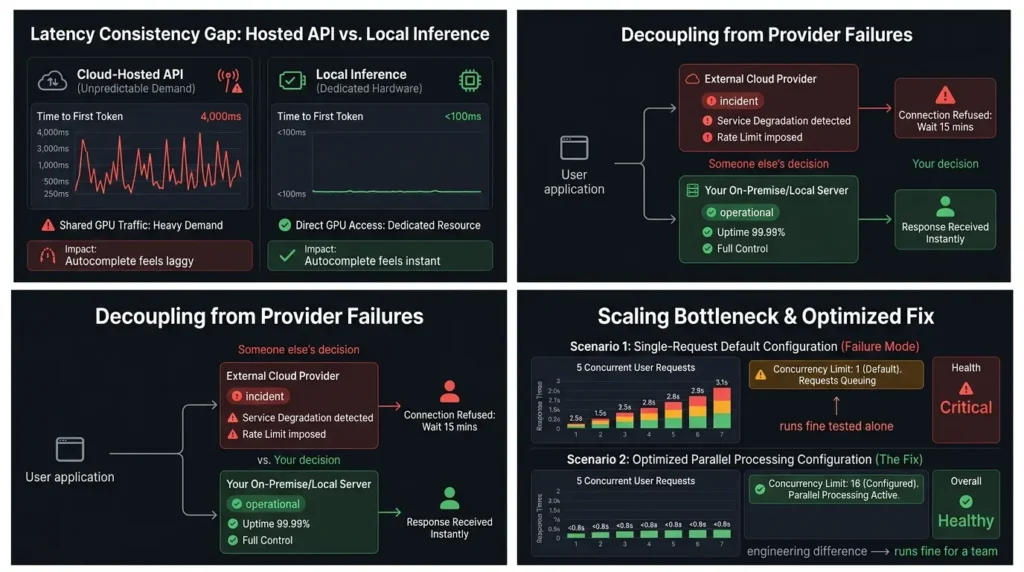
A hosted API call typically takes a few hundred milliseconds to return a first token under normal load — sometimes stretching to four full seconds when the provider is under heavy demand. A small model running locally on decent hardware answers in well under a tenth of a second, every single time, because there's no network round-trip and no other tenant's traffic competing for the same GPU.
For a chatbot, that gap is invisible, humans read at roughly five words a second, and both setups generate far faster than that. For autocomplete, voice interfaces, or anything where the response has to feel instant, that gap is the entire product experience. Roblox's engineering team reported that adopting vLLM to serve their AI Assistant, which processes more than a billion tokens per week, cut latency by roughly half compared to their prior setup, a difference that shows up directly in how responsive the feature feels to millions of concurrent users.
Outages and rate limits are someone else's decision
When a cloud provider has an incident, your application has an incident, whether or not you did anything wrong. When a provider changes its rate limits or quietly degrades quality to manage cost on their end, you often don't find out until your own users complain. None of that risk exists when the model is running on hardware you control, the tradeoff is that now you're the one who gets paged when it goes down.
Here's what checking a local server's status looks like in practice. Once you have an inference engine running behind an OpenAI-compatible endpoint, you can confirm it's alive with a single request:
Bash / cURL:
curl http://localhost:11434/api/generate -d '{ "model": "llama3.2", "prompt": "Say hello in one sentence.", "stream": false }'That request never touches the internet. There's no provider dashboard to check, no status page to refresh, no rate-limit header to parse. It either works because your machine is on, or it doesn't, and you already know which, because it's your machine.
One documented failure mode worth knowing about
Not every local setup scales the way people expect. AI infrastructure practitioners have documented cases where a mid-sized organization, one account involved a legal technology team supporting around 50 lawyers running internal document search, moved to a simple local setup expecting it to handle their whole team, only to see response times climb past two to three seconds once five or more people queried it at the same time.
The fix wasn't more hardware; it was switching to an inference engine built for concurrent requests and explicitly configuring parallel processing, instead of the single-request-at-a-time defaults many beginner-friendly tools ship with. It's a useful reminder that "runs fine when I test it alone" and "runs fine for a team" are two completely different engineering problems.
Bottom line: local AI removes your dependency on someone else's uptime and rate limits, but only if you deliberately architect for concurrency, the default setup that works for one person rarely survives contact with five.
The Real Killer App for Local AI Isn't Chat, It's Zero-Latency Agents
Everything covered so far treats local AI as a faster, more private version of the same thing you already do with ChatGPT: ask a question, get an answer. That undersells what's actually changed in 2026.
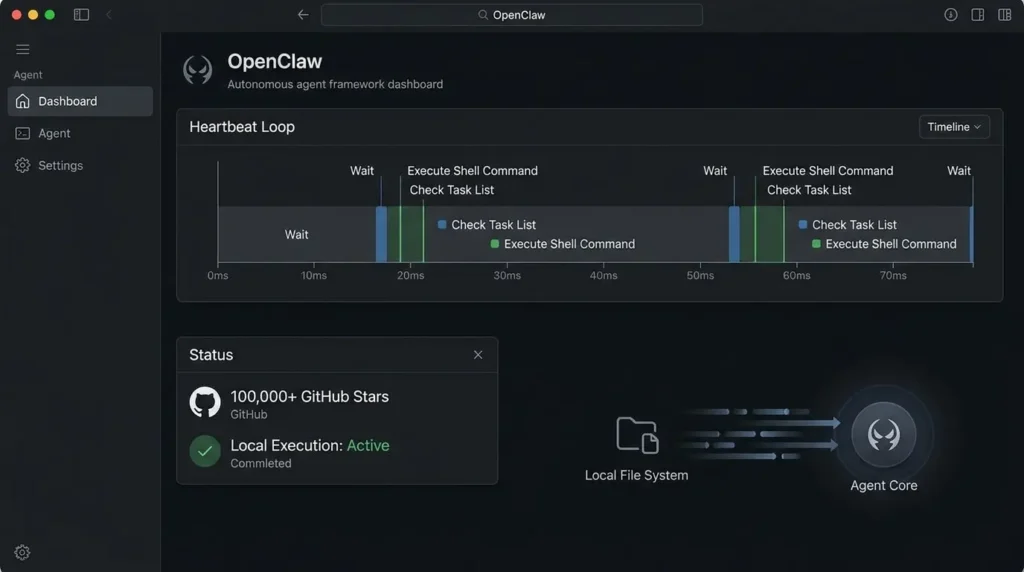
Local agents can be useful when they need low-latency access to files or applications, but local execution is not automatically the only viable architecture. A cloud model can operate through a controlled gateway, and a local model can still send data to remote tools, APIs, messaging services, or retrieval systems.
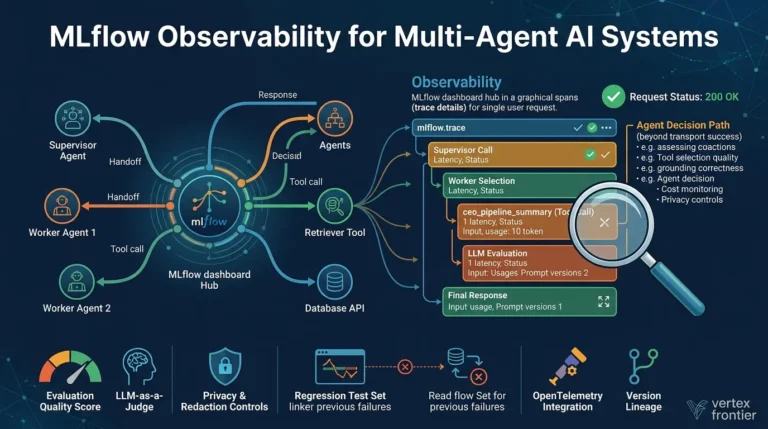
Once an agent's calls span local files and remote services like that, multi-agent observability with MLflow is what turns each tool, API, and retrieval step into a traceable span instead of an opaque external call.
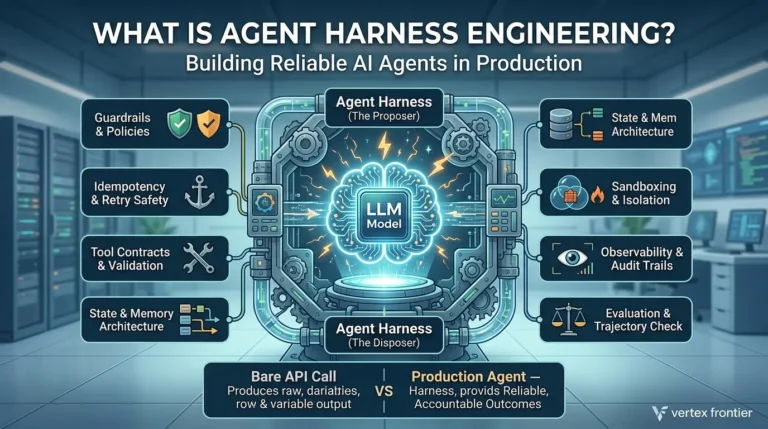
The key design question is permission. Start with read-only access, a dedicated operating-system identity, a workspace allowlist, network-egress restrictions, explicit tool schemas, human approval for writes or external messages, audit logs, resource limits, and a tested rollback path. Treat shell access, browser control, accessibility services, file writes, credentials, and messaging integrations as separate capabilities.
OpenClaw’s official repository describes a personal assistant intended to run on user devices . PokeClaw’s repository describes an Android on-device AI phone-automation path, but it also documents cloud LLM support . Neither project should be summarized as a universal “no cloud” architecture.
It's also the workload where the security posture covered earlier in this article stops being optional. An agent with shell access and file-system permissions is a fundamentally larger blast radius than a chatbot that only returns text, security researchers evaluating agent frameworks consistently flag unrestricted local execution as the primary risk surface, which is exactly why frameworks in this space are converging on sandboxed execution and human-approval gates for anything beyond read access.
For a practical look at how one agent framework handles tools, orchestration, MCP, human approval, deployment, and security, see Google Agent Development Kit (ADK).
Recent research reinforces this shift: fine-tuning an 8B open-weight model on recursive trajectories allows it to drive context-routing loops that approach frontier cloud performance on complex aggregation tasks. See our analysis on Recursive Language Models and small-model routing efficiency to see how local models can handle multi-step agent workloads without cloud API costs.
Bottom line: the strongest argument for local AI in 2026 might not be privacy or cost, it's that autonomous agents doing real work on your files and system are only fast and affordable enough to be practical when they never have to leave your machine.
Common Mistakes People Make When Going Local
I've made most of these myself, and I see them repeated constantly in community forums. Here's the honest list.
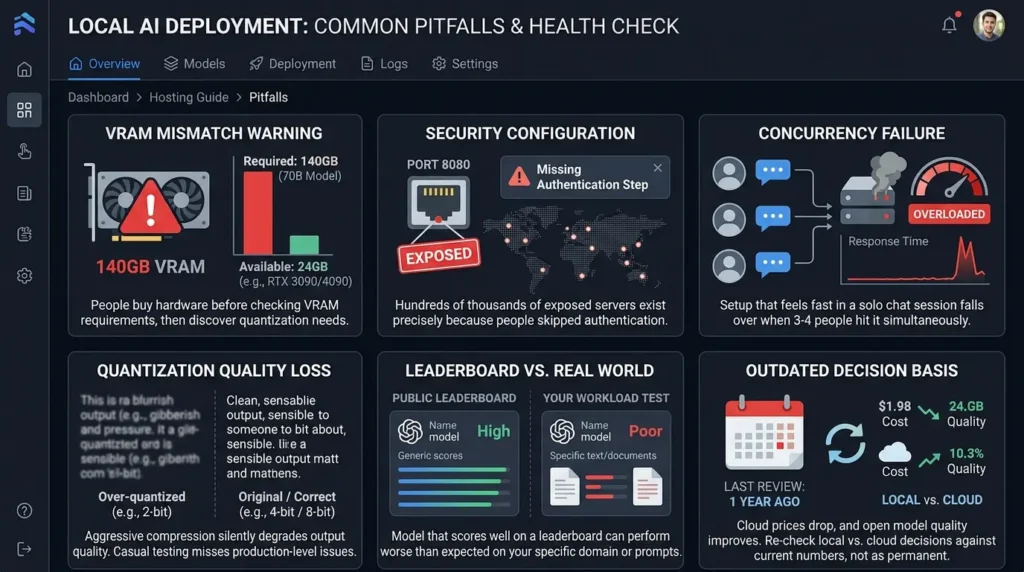
Buying hardware before checking VRAM requirements
A 70-billion-parameter model needs roughly 140GB of VRAM at full precision, far beyond what a single consumer GPU offers. People buy a card, then discover the model they wanted needs quantization or a completely different model size.
Assuming "local" means "secure" without configuring it that way
As covered above, hundreds of thousands of exposed servers exist precisely because people skipped the authentication step, not because the underlying idea was flawed.
Testing with one user and deploying for a team
A setup that feels fast in a solo chat session can fall over the moment three or four people hit it simultaneously, because the serving layer wasn't built for concurrent batching.
Ignoring quantization entirely, or over-quantizing without checking quality
Compressing a model too aggressively can silently degrade output quality in ways that are easy to miss during casual testing but show up in production.
Comparing raw benchmark numbers instead of testing on your actual workload
A model that scores well on a public leaderboard can still perform worse than expected on your specific documents, your specific prompts, or your specific domain.
Never revisiting the decision
Cloud pricing drops regularly, and open model quality improves every few months. A local-versus-cloud decision made a year ago is worth re-checking against current numbers, not treated as permanent.
Which Local Engine Should You Actually Use?
This article is the foundation for a series that goes deep on each tool, so I'll keep this section short and practical.
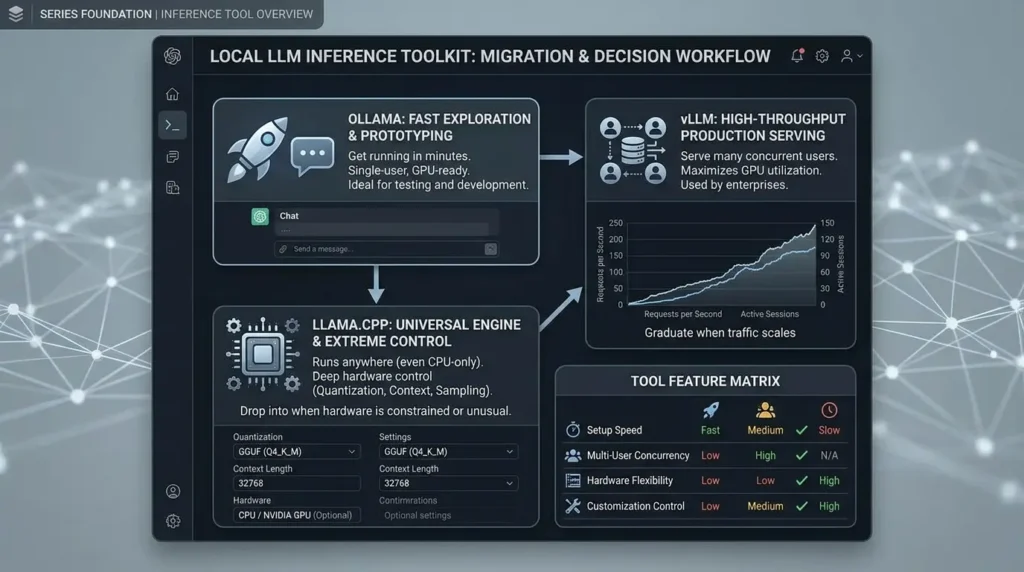
Choose the engine by workload
Local Inference Engines
Compare local LLM tools, fit scenarios, and implementation boundaries.
| Tool | Best fit | Boundary to verify |
|---|---|---|
| Ollama | Fast exploration and a simple local API | Defaults do not prove production authentication, concurrency, observability, or upgrade readiness |
| llama.cpp | Broad hardware support, quantization, CPU execution, and CPU+GPU hybrid inference | You assume more setup and tuning responsibility |
| vLLM | GPU-backed serving where concurrent requests, continuous batching, prefix caching, and throughput matter | Results still depend on hardware, model architecture, version, configuration, and workload |
The official llama.cpp project documents CPU, GPU, quantization, and CPU+GPU hybrid inference [15]. The official vLLM documentation describes an inference and serving library with PagedAttention and continuous batching [16]. These descriptions support capability comparisons; they do not prove that one engine is fastest or that it is used by most production deployments.
Why Your Local Model Feels "Dumber" Than ChatGPT - Even When the Benchmarks Say Otherwise
This is the complaint that shows up constantly in local AI communities, and it trips up almost everyone who makes the jump: you download a model that posts strong benchmark scores, run it locally, and it feels noticeably worse than GPT-4o or Claude at the same task.
A benchmark score measures a model under a defined test setup. A product experience also depends on the system prompt, prompt template, retrieval quality, tool definitions, output validation, routing, safety filters, context limits, quantization, sampling settings, and application logic. That is why a local model can feel different from a commercial chat product even when its public benchmark results look strong.
Do not assume that local models are automatically better or worse. Build a representative evaluation set from the tasks that matter to you, define what a correct answer means, compare the local configuration with the cloud baseline, and repeat the test after changing the model, quantization, prompt template, or serving engine. Publish numeric quality or latency results only with the model, version, hardware, dataset, metric, and test conditions.
A 70-billion-parameter model stored in FP16 needs approximately 140GB for the weights alone, before runtime overhead, activations, and KV cache. Quantization can reduce memory use, while CPU or unified-memory offload can change what fits, but it can also affect speed and output quality. Size the complete workload rather than treating parameter count as a direct VRAM guarantee.
Unified-memory systems can raise the amount of model data that a single machine can address. NVIDIA documents DGX Spark for testing or inference with models up to 200 billion parameters, but that figure does not guarantee full-precision execution, useful throughput, context length, or production concurrency.
Before vs. After: What Actually Changes
Before going local, a typical small team is paying a variable monthly bill that grows with usage, sending every prompt, including anything sensitive, to a third party, and quietly accepting whatever latency and uptime that provider delivers on a given day.
After going local, done properly, that same team has a fixed hardware cost, full control over where their data lives, and consistent latency they can actually plan around. What they've gained in control, they've traded for a new job: someone now owns the server.
The teams that make this transition well are the ones who go in knowing exactly which of the three arguments, privacy, cost, or reliability, applies to their specific situation, instead of assuming all three apply equally. They usually don't.
Three Frameworks Worth Keeping
The Volume Threshold Rule
Below a certain number of requests per month, cloud APIs win on cost every time, the fixed hardware cost simply can't amortize fast enough. Above that threshold, local wins, and the gap widens the longer you run it. The Petronella data points to roughly 50,000 queries a month as the zone where local reaches cost parity within three to six months; below that, treat local as a privacy or latency decision, not a cost one, because the math won't support it yet.
The Configuration-Is-The-Product Principle
With cloud AI, the vendor's security team is part of what you're paying for. With local AI, you become that security team the moment you expose a port. The Bleeding Llama incident didn't happen because Ollama is insecure software, it happened because "local" quietly became "networked" for 300,000 installations, and nobody treated that change as the security event it actually was. Every local deployment should be evaluated on its actual network exposure, not on the assumption that "local" is a synonym for "safe."
The Strategic Insurance Principle
Treat future model availability, licensing, pricing, and release cadence as variables rather than guarantees. DeepSeek’s official changelog documents V4-Pro and V4-Flash API releases in 2026, but an API release is not the same as a verified open-weight licensing statement. If a local deployment depends on a particular model, record the exact model identifier, license, checksum or source artifact, quantization, and redistribution terms. That evidence is more useful than speculation about why a future model may or may not be released.
Quick Recap
- Privacy is the strongest argument for local AI, but only holds if the server is actually configured securely, not just physically local.
- Cost only favors local AI past a real volume threshold; below it, cloud APIs win on price every time.
- Reliability means consistent latency and full control over uptime, but it also means you now own the operations job a cloud provider used to handle.
- The single biggest lever in local AI economics isn't the GPU, it's which inference engine you run on it.
- Unified-memory hardware moved the local hardware ceiling from ~30B to ~200B parameters at a fraction of last year's cost, but factor in real maintenance hours, not just the sticker price.
- A local model without a proper "harness", system prompt, few-shot examples, output constraints, will underperform its own benchmark score. And the most compelling use case for local AI in 2026 may not be chat at all, but autonomous agents that never have to leave your machine.
I'll be honest about where this series is headed: the next few articles get into the actual mechanics, what quantization does to a model, why the GGUF format became the standard, and how to get your first model running with Ollama in about five minutes. If any of the three arguments above matched your situation, that's the natural next stop.
Take the Field Guide with you
Download the complete 35-page companion PDF — every checklist, code block, and break-even formula from this article, formatted for quick reference.
Frequently Asked Questions
Is running AI locally cheaper than using a hosted API?
It depends on the workload. A hosted API may be cheaper at low or irregular usage because there is no idle hardware cost. Local inference may have a lower marginal cost at sustained utilization, but the comparison must include hardware, electricity, cooling, storage, maintenance, security work, evaluation, and operator time. Use a workload-specific payback model instead of a universal request threshold.
Do I need a powerful GPU to run AI models locally?
Not necessarily. Smaller or quantized models can run on a CPU, while a GPU or a unified-memory system can improve speed and allow larger models to fit. The practical requirement depends on the model, quantization, context length, target latency, and number of concurrent users.
Is local AI automatically more private than cloud AI?
Local inference can reduce the normal API data-transfer path, but it is not automatically private. Logs, telemetry, model downloads, backups, retrieval systems, plugins, remote tools, authentication services, updates, and cloud fallbacks can still send data outside the device or network. Privacy depends on the complete data flow and configuration.
Does the EU AI Act apply to a locally hosted open-weight model?
It can. The relevant obligations depend on the AI system, the provider or deployer role, the use case, and the applicable territorial scope, not only on whether the model is open-weight or hosted locally. The European Commission states that transparency obligations for certain AI systems take effect on August 2, 2026. Review the specific deployment with qualified legal and compliance professionals.
What is the difference between Ollama, llama.cpp, and vLLM?
Ollama is oriented toward simple local model use and a convenient local API. llama.cpp is a flexible inference project with CPU, GPU, quantization, and CPU-plus-GPU hybrid support. vLLM is an inference and serving library focused on throughput features such as PagedAttention, continuous batching, and prefix caching. The best choice still depends on the model, hardware, version, configuration, and workload.
Can a local model match the quality of a commercial model?
Sometimes, but there is no universal answer. Output quality depends on the model, version, quantization, prompt template, system instructions, retrieval, tools, sampling settings, context, and evaluation task. Compare a local configuration with the cloud baseline on a representative test set before making a quality claim.
Can one desktop system run a very large model locally?
Some unified-memory systems can address models that would not fit in a single consumer GPU. NVIDIA documents DGX Spark with 128GB of unified system memory and support for testing or inference with models up to 200 billion parameters. That parameter-count statement does not guarantee full-precision execution, useful throughput, context length, or production concurrency.
Are local AI agents safer because they run on my hardware?
No. Local execution can reduce network delay for file and application workflows, but an agent with shell, filesystem, browser, accessibility, credential, or messaging permissions can have a large blast radius. Use least privilege, read-only access where possible, network-egress controls, human approval for writes or external messages, audit logs, resource limits, and a tested rollback path.
📋 Article Timeline & History
Successfully updated on September 17, 2026 with the latest details.
This article was originally published on August 6, 2026.

Was this article helpful?



[…] if a small, fine-tuned model can approach flagship performance on the routing task, the case for running smaller models locally gets stronger for exactly the workloads where recursion is already the right […]
[…] boundary, but it does not create an automatic exemption or make the deployment compliant; the local AI deployment guide explains why privacy is a property of configuration rather than the word […]