
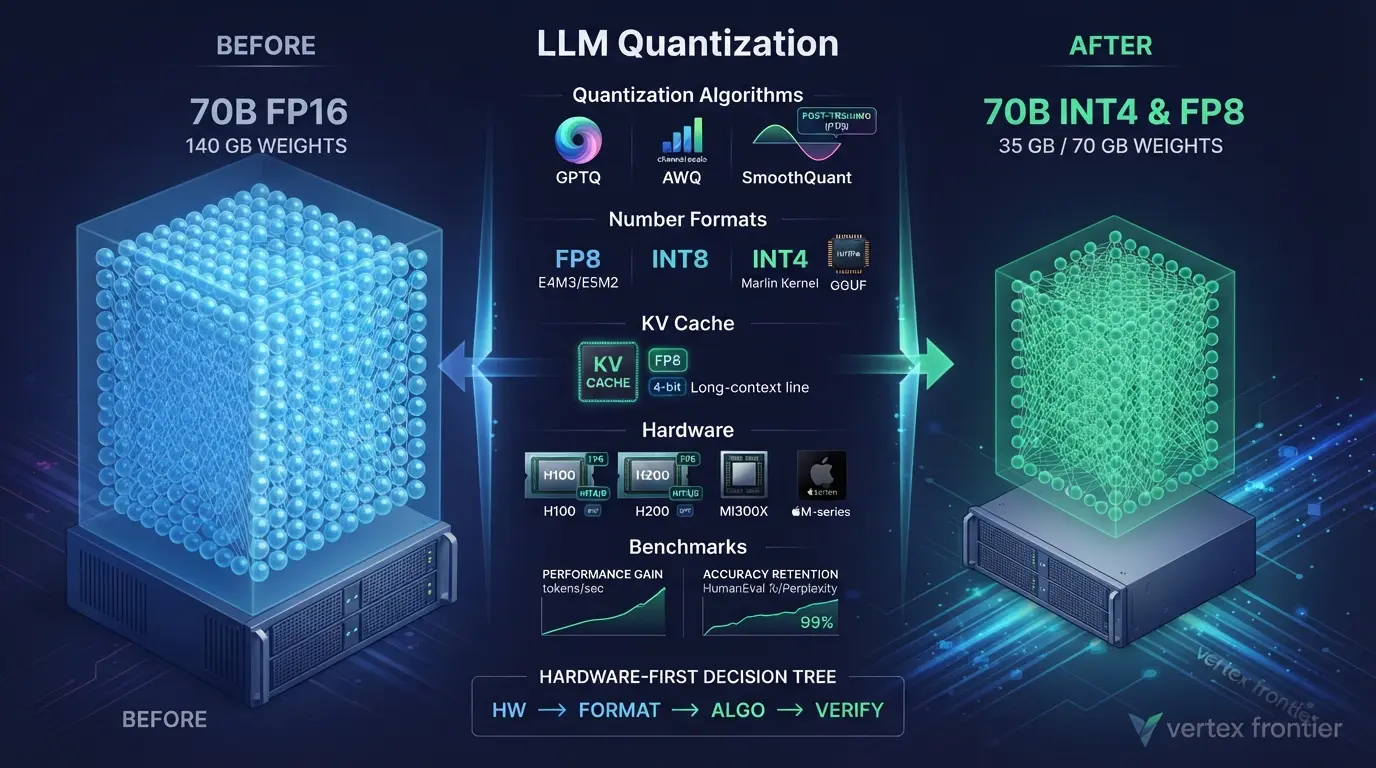

A 70-billion-parameter model stored in 16-bit precision needs about 140 GB for its weights alone. An H100 carries 80 GB, so the model does not fit on one card. Store the same weights in 4-bit and they shrink to roughly 35 GB.
That is the promise of LLM quantization: lower-precision numbers, less memory, often faster generation. It is also where the trouble starts. Quantization is not one switch. It is four decisions (what you shrink, which number format you use, which algorithm picks the rounding, and which GPU kernel runs the result), and a bad choice in one layer can erase the gains from the others.
Here is the proof. In a public vLLM benchmark on an H200, the same 4-bit AWQ weights generated 68 tokens per second on one code path and 741 on another. Nothing changed except the kernel.
This guide explains how quantization works, compares GPTQ, AWQ, SmoothQuant, bitsandbytes, GGUF, EXL2, FP8 and NVFP4, and shows where accuracy falls off a cliff. It also covers the KV cache, which most explainers skip, and ends with a hardware-first decision tree. Every number is tied to a primary source, and we flag the ones that come from vendors or forum threads.
Key takeaways
Click any topic to expand or collapse| Evidence type | Where you will see it | How much weight to give it |
|---|---|---|
| Peer-reviewed paper result | GPTQ, AWQ, SmoothQuant and QLoRA tables | Strong for the models and hardware tested. Many are older models, so verify on yours. |
| Vendor claim or release note | NVIDIA, Apple, Together AI, AMD | Real products under chosen conditions. Treat as upper bounds. |
| Cloud-provider benchmark | Jarvis Labs vLLM comparison | One model, one GPU, one run. Good for ratios, weak for absolute figures. |
| Community measurement | r/LocalLLaMA threads | Practitioner signal with small samples. Use it to form hypotheses, then test. |
| Derived arithmetic | Memory math | Exact for weights. Ignores KV cache and runtime overhead. |
Why LLM Quantization Matters in 2026
Suppose the model fits in memory. Is the job done? Not even close.
Two walls stand between you and a fast model. The first is capacity: the weights must fit. The second is bandwidth: to generate each token, the GPU streams the weights from memory again. The AWQ authors put numbers on that second wall. An RTX 4090 offers 165 TFLOPS of compute but only 1 TB/s of memory bandwidth, so any workload that does fewer than 165 operations per byte moved is memory-bound, and FP16 decoding sits near 1.

Together AI turns this into a rule of thumb: throughput is capped by batch size times memory bandwidth divided by model size. To go faster in the memory-bound regime, their engineers argue, the only realistic option is a smaller model. So quantization is a speed tool as much as a memory tool.
Two other things changed. Hardware now speaks low precision natively: the H100’s Transformer Engine runs FP8, and AMD lists 2.61 PFLOPs of peak FP8 on the MI300X. And the software side exploded. Hugging Face says Transformers integrates more than 20 quantization methods, and vLLM’s quantization docs list roughly a dozen entries of their own. The question is no longer “can I quantize?” It is “which of twenty options fits this GPU and this workload?”
Practitioners on r/LocalLLaMA summarize the trade-off bluntly: cheap, fast, good, pick two. That framing is crude, but it is a decent compass for everything below.
If your model is too big even after quantizing, the next move is sharding it across GPUs. Our guide to distributed inference walks through that, including the full derivation of the 140 GB, 70 GB and 35 GB figures that we only summarize here.
Quantization fights two bottlenecks at once, capacity and bandwidth. That is why it helps speed as well as memory.
What Is LLM Quantization?
LLM quantization is the process of storing a model’s numbers (weights, activations or the KV cache) at lower precision, such as 8-bit or 4-bit integers instead of 16-bit floats. It cuts memory and often speeds up inference, at the cost of a small, measurable loss in accuracy.
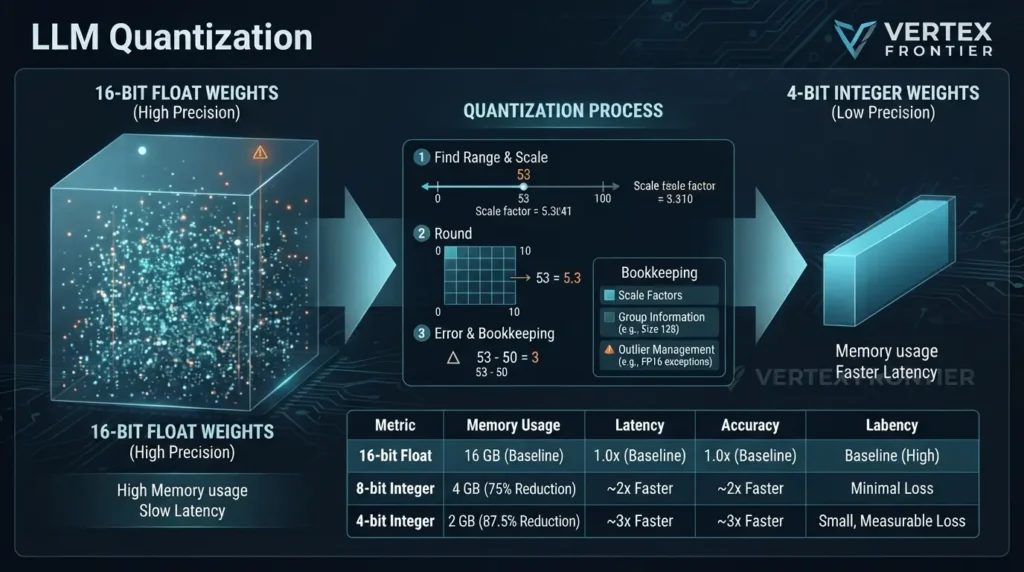
A model is a huge pile of learned numbers. Each parameter is a tiny dial set during training, and every dial must live somewhere in memory. More bits per dial means a finer setting and a bigger bill.
The core mechanism is simple enough to do by hand. Take a layer whose values range from 0 to 100 and squeeze it onto a grid of 0 to 10:
- Find the range of the values in the layer (0 to 100).
- Pick a smaller grid that fits in fewer bits (0 to 10).
- Scale each value onto the grid: 53 becomes 5.3.
- Round to the nearest grid point: 5.3 becomes 5.
- To use the weight later, map it back: 5 becomes 50. The gap between 53 and 50 is the quantization error.
The scale factor that makes the round trip possible has to be stored too. That detail matters later, because those stored scales are why real 4-bit models never reach a clean 4x reduction.
Real models break this toy example in two ways.
One scale per layer is too blunt. Weights in one layer vary a lot, so modern methods give each small group of weights its own scale. A group size of 128 is common. The GPTQ paper notes that group size 128 costs about 0.15 extra bits per weight and lands within 0.1 to 0.3 perplexity points of the uncompressed model.
Outliers wreck the grid. A few values are far larger than the rest. One giant value stretches the range, and every ordinary value then rounds into the same few buckets. The LLM.int8() paper found systematic outlier features that dominate predictive performance once models grow large. The damage is real: in the SmoothQuant paper, vanilla per-tensor W8A8 on OPT-175B collapsed LAMBADA accuracy from 74.7% to 0.0%.
Much of the research since 2022 is outlier management. LLM.int8() keeps the troublemakers in 16-bit. SmoothQuant moves the difficulty from activations to weights. AWQ protects about 1% of salient weights. QuaRot and SpinQuant rotate the numbers so the outliers disappear.
One more detail explains why you cannot just chop bits off. A floating-point number splits its bits into a sign, an exponent that sets the scale, and a mantissa that sets the detail. Drop the wrong bits and you change a number’s size, not just its detail. That is why even FP8 comes in two flavors, E4M3 and E5M2, which trade range against precision.
Quantization is rounding with bookkeeping. The bookkeeping (scales, groups, outlier handling) decides whether the result is usable.
Quantization Formats: FP16, BF16, FP8, INT8, INT4
Which format wins depends on what you are optimizing and what your hardware can run natively.
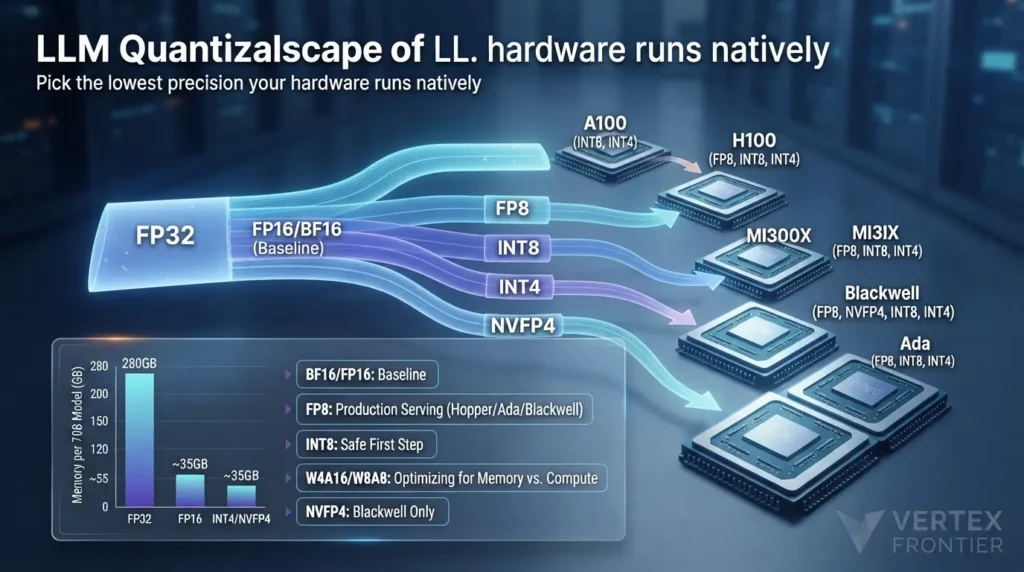
- BF16 and FP16 are the baseline. Hugging Face notes that models are usually loaded in bf16, at 2 bytes per parameter.
- FP8 halves memory again and runs natively on Hopper, Ada and Blackwell GPUs. NVIDIA’s Transformer Engine README lists FP8 on those architectures, and AMD’s MI300X supports it too. The A100 does not: NVIDIA’s A100 page tops out at INT8 and INT4 for low precision.
- INT8 is the safe first step. On OPT-175B, LLM.int8() and SmoothQuant held the average zero-shot score at 66.7% against 66.9% for FP16, per the SmoothQuant paper’s tables.
- INT4 is where most memory is saved and where method quality starts to matter. Weight-only 4-bit dominates local and memory-bound serving.
- NVFP4 is a 4-bit floating-point format that NVIDIA’s TensorRT-LLM documentation ties to Blackwell. It is not supported on H100 or A100.
| Format | Bits | Bytes per weight | 7B model | 70B model | Accuracy evidence | Hardware path | Best for |
|---|---|---|---|---|---|---|---|
| FP32 | 32 | 4 | 28 GB | 280 GB | Reference | Everywhere | Training, not serving |
| FP16 / BF16 | 16 | 2 | 14 GB | 140 GB | Baseline | All modern GPUs | Default serving precision |
| FP8 (E4M3 / E5M2) | 8 | 1 | 7 GB | 70 GB | FP8 paper reports 16-bit training quality up to 175B parameters. Inference quality is per checkpoint. | Ada, Hopper, Blackwell, MI300X | Production serving on newer GPUs |
| INT8 | 8 | 1 | 7 GB | 70 GB | OPT-175B average zero-shot 66.7% vs 66.9% FP16 (LLM.int8(), SmoothQuant) | A100 and most NVIDIA GPUs | Safe first step, large-batch W8A8 |
| INT4 (weight-only, g128) | 4 plus about 0.15 for scales | about 0.5 | about 3.5 GB | about 35 GB (+4%) | +1.8% to +2.7% perplexity on Llama-1 and 2 (AWQ paper) | Marlin kernels on Ampere and newer; GGUF on CPU, AMD, Apple | Memory-bound decoding, local use |
| NVFP4 | 4 | about 0.5 | about 3.5 GB | about 35 GB | Per checkpoint; mostly vendor-reported | Blackwell only | Blackwell serving |
You will often see precision in model names. “W4A16” means 4-bit weights with 16-bit activations. “W8A8” means 8-bit for both. Weight-only formats shrink memory and help memory-bound decoding. Weight-plus-activation formats can also speed up compute-bound work, such as long prompts and large batches.
Pick the lowest precision your hardware runs natively and your task tolerates. “Natively” is the key word.
The Memory Math: How Much You Actually Save
The formula behind every table in this article fits on one line. Weights dominate, so we start there.
Four worked examples show how it plays out:
- Llama 2 70B at 4-bit, group size 128: 70 × 0.5 = 35 GB, plus about 3.75% for scales (0.15 extra bits on 4), so roughly 36 GB. That fits one 48 GB card, or an 80 GB card with room left for the KV cache.
- Llama 3.1 405B at 2-bit: 405 × 0.25 is about 101 GB before overhead, which fits across two 80 GB GPUs. The QTIP release includes a prequantized 2-bit 405B model, and one of its authors describes running it pipelined on two GPUs.
- Falcon-180B at INT4: about 90 GB. NVIDIA reports running it on a single 141 GB H200 with INT4 AWQ, at up to about 800 tokens per second.
- A measured cross-check: the GPTQ-for-LLaMa README lists LLaMA-65B at 121.0 GB in FP16 and 32.3 GB in 4-bit with group size 128. That is about 3.7 times smaller, not 4.
That last gap is the point. The 4x figure is a ceiling. Scales, embeddings and layers kept at higher precision all eat into it.
Warning: “Fits” does not mean “runs well.” These numbers cover weights only. The KV cache, activations and runtime buffers come on top, as our distributed inference guide explains in fitting the model is the floor, not the finish line.
Memory scales linearly with bits per weight, minus the overhead of the scales. Budget 4% to 5% extra at 4-bit, then add the cache.
PTQ vs QAT: Two Different Times to Quantize
When you quantize matters as much as how.
Post-training quantization (PTQ) compresses a model that is already trained, usually in minutes to hours. Quantization-aware training (QAT) simulates low precision during training, so the model learns to absorb the rounding error. PTQ is cheaper and far more common. QAT tends to hold up better at very low bit-widths.

PTQ is fast because it does not train anything. The GPTQ paper reports quantizing OPT-175B in about four GPU hours. QAT costs more because the model must see training data, but it pays off at the extreme end. EfficientQAT produced a 2-bit Llama-2-70B, and LLM-QAT showed a data-free recipe that generates its own training samples from the model.
Real pipelines blend the two. Apple compresses its on-device model to a mixed 2-bit and 4-bit scheme and adds LoRA adapters to maintain model quality.
QLoRA is a third thing. It is not PTQ or QAT. It freezes a 4-bit base model and trains small adapters on top, and we return to it below.
| Aspect | Post-training quantization (PTQ) | Quantization-aware training (QAT) |
|---|---|---|
| When it runs | After training, on a finished checkpoint | During or after training, with low precision simulated in the loop |
| Compute cost | Low. GPTQ quantized OPT-175B in about 4 GPU hours | Higher. Needs training passes over data |
| Data needed | A small calibration set | Training data, or data the model generates (LLM-QAT) |
| Behavior at low bits | Strong at 8-bit, good at 4-bit, degrades faster near 3-bit | Better at aggressive levels. EfficientQAT produced a 2-bit Llama-2-70B |
| Typical tools | GPTQ, AWQ, SmoothQuant, GGUF k-quants | LLM-QAT, EfficientQAT, vendor toolkits |
| Start here when | Almost always | PTQ misses your accuracy target and you have training budget |
Rule of thumb: start with PTQ. Reach for QAT only when PTQ misses your accuracy target at the bit-width you need and you have the training budget.
PTQ is the default. QAT is the escalation path for aggressive bit-widths.
The Four-Layer Stack: Why “AWQ vs GGUF” Is the Wrong Question
Search results love “GPTQ vs AWQ vs GGUF.” The comparison is shaky, because those names live on different layers. Here is a model that untangles them. We call it the Four-Layer Stack.
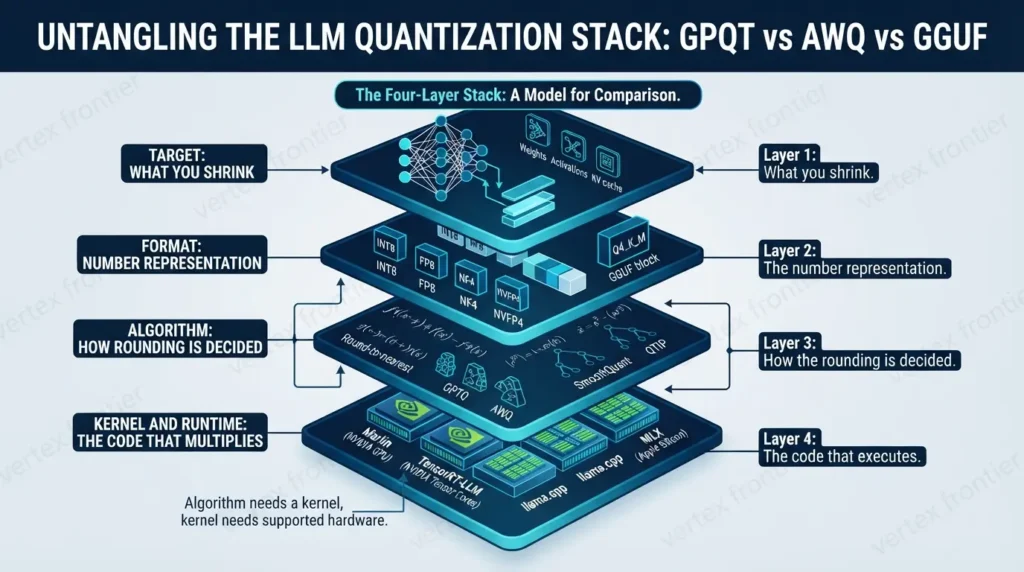
- Target: what you shrink. Weights, activations, or the KV cache.
- Format: the number representation. INT8, FP8, NF4, NVFP4, or a GGUF block type such as Q4_K_M.
- Algorithm: how the rounding is decided. Round-to-nearest, GPTQ, AWQ, SmoothQuant, QTIP.
- Kernel and runtime: the code that actually multiplies. Marlin, TensorRT-LLM, llama.cpp, MLX.
Each layer is a separate decision, and each can fail separately. Jarvis Labs’ own write-up makes the point: Marlin is not a quantization algorithm, only a kernel, and GGUF is a file format, not an algorithm. The llama.cpp project describes GGUF as the “GGML Universal File” format.
| Name | Layer | What it actually is |
|---|---|---|
| GPTQ | Algorithm | Hessian-based one-shot post-training quantization |
| AWQ | Algorithm | Activation-aware channel scaling, usually W4A16 |
| SmoothQuant | Algorithm | W8A8 with outlier smoothing |
| Marlin | Kernel | Fused 4-bit weight matrix-multiply kernel for NVIDIA GPUs |
| GGUF | Container and formats | llama.cpp’s file format, with block types such as Q4_K_M |
| bitsandbytes | Format and runtime | Load-time 8-bit and NF4 quantization, no calibration |
| EXL2 | Format and runtime | ExLlamaV2’s mixed-bit-width format, CUDA only |
| FP8, NVFP4 | Format | Numeric formats tied to specific Tensor Core generations |
| KV-cache quantization | Target | Applies to the attention cache, not to the weights |
Keep this stack in mind. Most production surprises come from changing one layer without noticing, and the symptom map in the mistakes section is organized around it.
Compare things on the same layer. An algorithm needs a kernel, and a kernel needs hardware that supports it.
The Main LLM Quantization Methods Compared
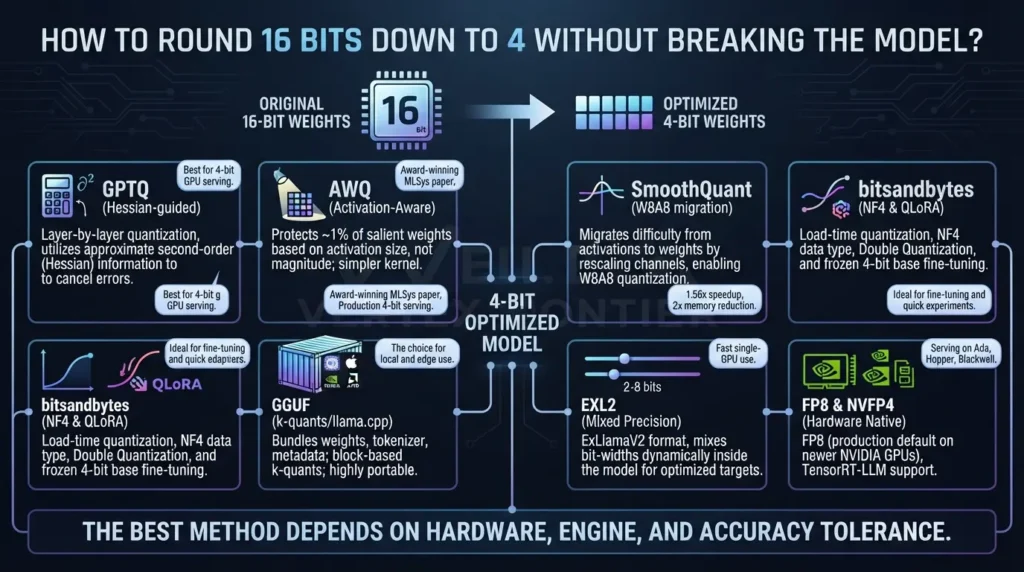
Every method below answers the same question differently: how do you round 16 bits down to 4 without breaking the model?
GPTQ
GPTQ quantizes a layer one column at a time and nudges the still-unquantized weights to cancel the error, using approximate second-order (Hessian) information. It was the first method to run a 175B model for generation on a single GPU. On OPT-175B, 4-bit GPTQ reached WikiText2 perplexity 8.37 against 8.34 in FP16.
Best for: 4-bit GPU serving.
Watch for: it needs calibration data, and the AWQ authors argue it can overfit that set.
Status: the AutoGPTQ README calls the project unmaintained and recommends GPTQModel.
AWQ
AWQ starts from an observation: not all weights matter equally. Protecting about 1% of them, chosen by activation size rather than weight size, removes most of the error. It does this by scaling channels, not by keeping mixed precision, so the kernel stays simple. The paper won the MLSys 2024 Best Paper award.
Best for: production 4-bit serving on NVIDIA GPUs.
Watch for: kernel choice (more on that below).
Status: the AutoAWQ README says it is deprecated and points to the vLLM project’s LLM Compressor. In vLLM, compatible AWQ checkpoints are converted to the Marlin kernel at load time unless you force plain AWQ.
SmoothQuant and the W8A8 family
Weight-only methods shrink memory but leave the matrix multiplies in 16-bit. To speed up compute-bound work you must quantize activations too, and that is where outliers hurt. SmoothQuant rescales channels so the difficulty migrates from activations to weights, with the same math output. The paper reports up to 1.56x speedup and 2x memory reduction.
Best for: large-batch, compute-bound serving.
Watch for: per-tensor W8A8 without smoothing, which collapsed OPT-175B in the paper’s tests.
bitsandbytes, NF4 and QLoRA
bitsandbytes quantizes at load time with no calibration step. It offers 8-bit LLM.int8() and 4-bit NF4, a data type that places its 16 levels where normally distributed weights cluster. QLoRA adds double quantization, which saves about 0.4 bits per parameter, and trains LoRA adapters on a frozen 4-bit base.
At roughly 4 bits per weight, the quality gap versus GPTQ is small. In the GPTQ-for-LLaMa comparison on LLaMA-7B, C4 perplexity was 5.30 for GPTQ-128g and 5.30 for NF4 with double quantization, against 5.22 for FP16.
Python (Transformers + bitsandbytes), illustrative:
import torch from transformers import AutoModelForCausalLM, BitsAndBytesConfig
bnb_config = BitsAndBytesConfig( load_in_4bit=True, bnb_4bit_quant_type="nf4", bnb_4bit_use_double_quant=True, bnb_4bit_compute_dtype=torch.bfloat16, )
model = AutoModelForCausalLM.from_pretrained( "your-org/your-model", # replace with a model you can access quantization_config=bnb_config, device_map="auto", )transformers and
bitsandbytes versions. Check the latest
Hugging Face documentation
before production deployment.Best for: fine-tuning and quick experiments.
Watch for: speed. In the vLLM benchmark below, bitsandbytes had the best perplexity of the 4-bit options but only 168 tokens per second.
GGUF and k-quants
GGUF is the file format of llama.cpp. It bundles weights, tokenizer and metadata, and it stores weights in block types such as Q4_K_M. K-quants use blocks and sub-blocks with their own scales. By Jarvis Labs’ arithmetic, a Q4_K block stores about 4.5 bits per weight once scales are counted. That overhead is why a “4-bit” GGUF file is bigger than the label suggests.
Because llama.cpp runs on CPUs, Apple Metal, NVIDIA and AMD GPUs, GGUF is the portable choice and the one behind Ollama and LM Studio.
Best for: local and edge use.
Watch for: serving GGUF through vLLM, which was slow in the benchmark below.
EXL2
EXL2 is ExLlamaV2’s format. It mixes bit-widths inside a model and can target any average between 2 and 8 bits. The README says a 2.55-bit Llama2 70B ran on one 24 GB GPU with “coherent and mostly stable output.” The qualifier matters. A user comparing 70B formats reported EXL2 at 2.4 bits as “broken” and 2.6 bits as “fail”.
The same thread claims EXL2 trades determinism for speed, which would make it a poor choice for model-to-model comparisons. We could not confirm that in the project’s documentation, so treat it as community-reported.
Status: ExLlamaV2 is archived, and development has moved to ExLlamaV3.
FP8 and NVFP4
FP8 is the production default on newer NVIDIA hardware. TensorRT-LLM supports FP8 on Hopper and NVFP4 on Blackwell. In vLLM’s compatibility table, FP8 W8A8 through LLM Compressor is listed for Ada, Hopper and AMD GPUs, but not for Ampere.
Best for: serving on Ada, Hopper, MI300X and Blackwell.
Watch for: per-checkpoint accuracy, because FP8 and NVFP4 quality depends on how the checkpoint was calibrated.
| Method | Layer | Bits | Calibration | Hardware | Best for | Status note |
|---|---|---|---|---|---|---|
| GPTQ | Algorithm | 3 to 4 | Yes | NVIDIA (fast with Marlin) | Quality 4-bit serving | AutoGPTQ unmaintained; GPTQModel recommended |
| AWQ | Algorithm | 4 (3 in paper) | Yes, small | NVIDIA Turing and newer; Intel; x86 CPU in vLLM | Production 4-bit | AutoAWQ deprecated; LLM Compressor |
| SmoothQuant | Algorithm | 8 (W8A8) | Yes | NVIDIA | Large-batch serving | In TensorRT-LLM and LLM Compressor |
| bitsandbytes | Format and runtime | 8, 4 (NF4) | No | NVIDIA; other backends per its README | Fine-tuning, quick tests | Active |
| GGUF | Container and formats | 2 to 8 | No | CPU, Apple, NVIDIA, AMD | Local and edge | Active (llama.cpp) |
| EXL2 | Format and runtime | 2 to 8, mixed | Yes | NVIDIA CUDA only | Fast single-GPU use | ExLlamaV2 archived; ExLlamaV3 |
| FP8 | Format | 8 | Optional | Ada, Hopper, Blackwell, MI300X | Production serving | Active |
| NVFP4 | Format | 4 | Yes | Blackwell only | Blackwell serving | Newer; check each checkpoint |
There is no single best method. There is a best method for your hardware, your engine, and your tolerance for accuracy loss.
KV-Cache Quantization: The Other Axis
You shrank the weights and the model still runs out of memory at long context. What happened?

The KV cache did. Every token in the context stores keys and values for every layer, and that cache grows with context length and batch size. Weights are a fixed cost. The cache is a variable one, and at long context it can dwarf the weights. In one worked example in our distributed inference guide, moving weights to FP8 saves 70 GB while moving the cache to FP8 saves about 268 GB.
So treat the cache as its own target in the Four-Layer Stack. It has its own formats, its own failure modes and its own cliff.
What the tooling offers. vLLM documents a quantized KV cache, and TensorRT-LLM exposes INT8 and FP8 KV-cache modes. Research methods such as QuaRot and SpinQuant go further and quantize weights, activations and cache to 4 bits.
What the evidence says. In May 2026, vLLM engineers compared BF16, FP8 and four TurboQuant KV-cache variantson Llama-3.3-70B-Instruct, two Qwen3-30B-A3B models and MiniMax-M2.7. Their verdict: FP8 is the best default, with about twice the KV-cache capacity and negligible accuracy loss. The 4-bit TurboQuant variant they call most practical trades that extra capacity for moderate accuracy, latency and throughput costs. The 3-bit variants lost enough accuracy that the authors call them poor candidates for production, and the damage concentrated at 128k to 256k tokens.
| Option | Bits stored (keys / values) | What vLLM found | Verdict |
|---|---|---|---|
| BF16 cache | 16 / 16 | Reference | Use when memory is not tight |
| FP8 (–kv-cache-dtype fp8) | 8 / 8 | About 2x cache capacity with negligible accuracy loss on validated paths | Best default |
| TurboQuant k8v4 | 8 / 4 | Safe for long-context retrieval on Llama-3.3-70B, with latency and throughput costs | Only if FP8 capacity is not enough |
| TurboQuant 4bit-nc | 4 / 4 | Most practical TurboQuant variant. Moderate accuracy, latency and throughput costs | Only under real memory pressure |
| TurboQuant k3v4-nc, 3bit-nc | 3 / 4 and 3 / 3 | Meaningful accuracy drops on reasoning and very long context. About 4 points on MATH500 | Poor candidates for production |
A cautionary tale. Even FP8 has failed before. In a separate April 2026 validation, the same project found that on Hopper GPUs the FP8 attention kernel lost precision when accumulating over long contexts. On a 128k needle-in-a-haystack task, accuracy fell from 91% in BF16 to 13% in FP8. A two-level accumulation fix brought it back to 89%. The lesson is practical: a cache setting that is safe in one version can fail in another, so pin versions and test at your longest real context.
vLLM’s own FP8 validation post lists four cases where BF16 may serve you better:
- Contexts shorter than about 7k tokens, where FP8 has a small constant overhead.
- Models with a head dimension of 256 when prefill latency matters. Time to first token rose about 1.6x at long context.
- Workloads where uncalibrated accuracy falls below 95%. Kimi-K2.5 with FlashMLA is the example, and calibration is the fix.
- Hybrid models with many small sliding-window layers. Skip those layers with
--kv-cache-dtype-skip-layers sliding_window.
What practitioners report. In an r/LocalLLaMA thread on KV quantization, one user suggested that Q4 quality loss is severe and that Q8 for keys with Q4 for values is a workable middle ground. The author of that thread saw a 35B model “fall apart” around 200k tokens even with a Q8 cache, and concluded that sub-100k was the practical window. That is one anecdote, not a benchmark, but it matches what you would expect from context rot: long contexts degrade on their own, and cache precision can make it worse. If you build agents that carry long histories, see our guide to agent memory architecture and the context window before you lower cache precision.
Decide cache precision separately from weight precision. Start at FP8, treat 4-bit as an experiment, and test at your longest real context.
Side-by-Side Benchmark: One Model, Seven Ways
Most comparisons run one method per model. Few run the same model through every method on the same GPU and harness. The most complete such comparison we could verify end to end is Jarvis Labs’ vLLM study. It uses Qwen2.5-32B-Instruct on an H200, Wikitext-2 perplexity, HumanEval Pass@1 (164 problems), and a ShareGPT load of 200 prompts at concurrency 10.
We would have preferred Llama-3-8B, but that comparison does not exist in one verifiable place. Read the ratios as the lesson, not the absolute numbers.
| Setup | Perplexity (lower is better) | HumanEval Pass@1 | Output tokens per second | Mean time to first token (ms) |
|---|---|---|---|---|
| Baseline FP16 | 6.56 | 56.1% | 461 | 57.7 |
| AWQ (plain, forced) | 6.84 | 51.8% | 68 | 277.8 |
| GPTQ (default kernel) | 6.90 | 46.3% | 277 | 107.1 |
| GPTQ + Marlin | 6.97 | 45.7% | 712 | 51.9 |
| AWQ + Marlin | 6.84 | 51.8% | 741 | 73.5 |
| GGUF Q4_K_M (in vLLM) | 6.74 | 51.8% | 93 | 958.0 |
| bitsandbytes (on the fly) | 6.67 | 51.8% | 168 | 135.3 |
What the table says, and what it does not:
- The kernel dominates. Same AWQ weights: 68 tokens per second on plain AWQ, 741 on Marlin. Same GPTQ weights: 277 versus 712. FP16 manages 461.
- “AWQ is slow” is a configuration artifact. vLLM normally converts compatible AWQ checkpoints to Marlin on its own. The benchmark forced plain AWQ with a flag, which bypassed that conversion. Commenters on the original Reddit thread questioned the setup, which is why we rely on the published commands instead of the thread.
- Quality gaps are small and noisy. Perplexity stays within about 6% of baseline across all methods. HumanEval has a standard error near 3.9 points, so 51.8% versus 56.1% is not clearly a real difference. GPTQ’s 46.3% and 45.7% are the only gaps worth worrying about, and even they come from one run.
- Best perplexity is not best product. bitsandbytes scored best on perplexity (6.67) but ran at 168 tokens per second.
- GGUF belongs in llama.cpp. Through vLLM it had a time to first token near one second. Jarvis Labs itself suggests using llama.cpp for GGUF.
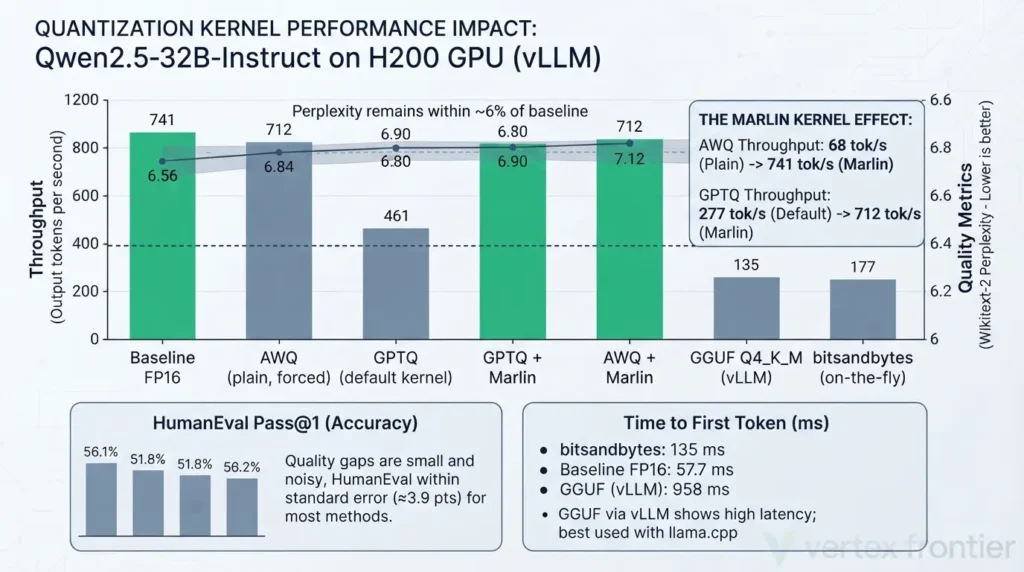
Caveats: one model, one GPU, one run, and a GPU cloud vendor ran the test. Use it to form hypotheses, then measure on your own stack.
You can check which path you are on. In vLLM, load an AWQ checkpoint without forcing a method and look for a log line saying the model is convertible to awq_marlin.
Shell (vLLM), illustrative:
# Let vLLM pick the kernel. Compatible AWQ checkpoints are converted to Marlin. vllm serve Qwen/Qwen2.5-32B-Instruct-AWQ
Forcing plain AWQ bypasses that conversion (the setup the benchmark measured as "AWQ").
vllm serve Qwen/Qwen2.5-32B-Instruct-AWQ --quantization awqvLLM versions.
Marlin conversion is skipped in batch-invariant mode.
Check the logs and the
official vLLM documentation
for your installed version.On the same weights, the serving kernel moved throughput by up to 10.9 times. Algorithm choice moved quality by a few points.
Accuracy Trade-offs: Where the Cliff Lives
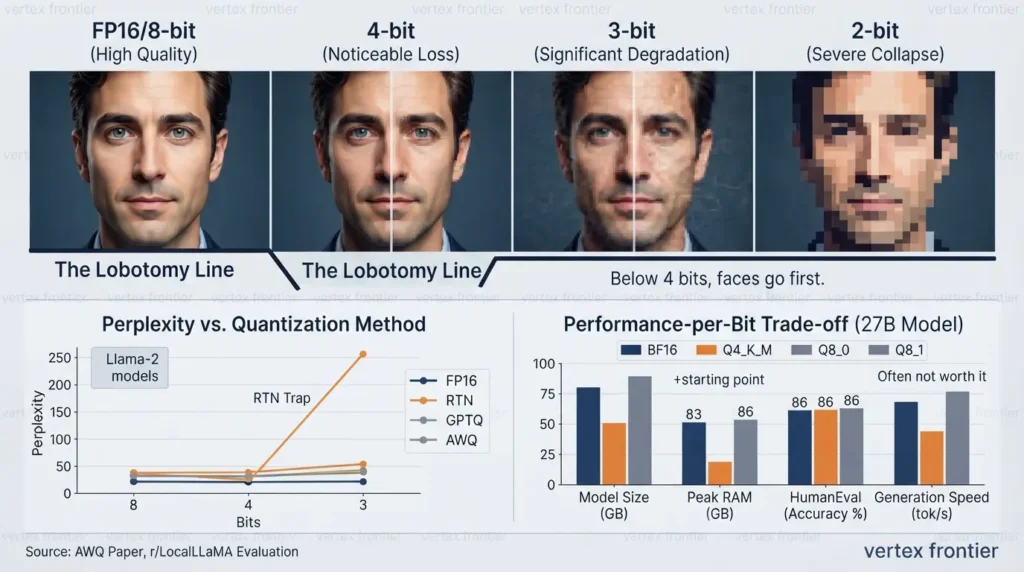
Quantization is like exporting a photo at lower quality. At 8 bits you cannot tell. At 4 bits you notice if you zoom in. Below that, the faces go first. The numbers show where.
The AWQ paper’s head-to-head table compares round-to-nearest (RTN), GPTQ and AWQ on the same hardware, calibration data and pipeline.
| Model | FP16 | INT4 RTN | INT4 GPTQ | INT4 AWQ | AWQ loss at 4-bit | INT3 RTN | INT3 GPTQ | INT3 AWQ | AWQ loss at 3-bit |
|---|---|---|---|---|---|---|---|---|---|
| Llama-2 7B | 5.47 | 5.73 | 5.69 | 5.60 | +2.4% | 6.66 | 6.43 | 6.24 | +14.1% |
| Llama-2 13B | 4.88 | 4.98 | 4.98 | 4.97 | +1.8% | 5.52 | 5.48 | 5.32 | +9.0% |
| Llama-2 70B | 3.32 | 3.46 | 3.42 | 3.41 | +2.7% | 3.98 | 3.88 | 3.74 | +12.7% |
At 4 bits with group size 128, the cost is about 2% to 3% in relative perplexity. At 3 bits it jumps to 9% to 14%. Method choice barely matters at 4 bits and matters more at 3. The SpQR authors add a warning for small models: 3 to 4 bits usually cause moderate to high accuracy loss, especially for models in the 1 to 10B range.
The round-to-nearest trap
Naive rounding fails badly below 4 bits. In the GPTQ paper, OPT-66B scored perplexity 9.34 in FP16 and 9.55 with 4-bit GPTQ, but 110 with 4-bit RTN. At 3 bits, RTN reached perplexity in the thousands on OPT-175B (about 7,300), while GPTQ stayed at 8.68. If a quantizer has no calibration step, do not push it below 4 bits.
The “lobotomy line”
Practitioners have a blunt name for the point where quality collapses. In an r/LocalLLaMA thread on when quantization turns into quality loss, one user described Q4_K_M to Q3_K_M as the “lobotomy line” for a 35B model, measured on a subset of lm-eval. Going from 8 bits to 4 was gradual. Below 4 it was a cliff. Another commenter warned that averages hide the long tail, which is where quantization bites.
A separate KL-divergence benchmark of a 27B model found Q6 to Q8 close to lossless and called anything below Q4 “for the desperate”. Treat the exact line as model-specific. The shape, a gentle slope and then a drop, shows up repeatedly.
Is Q8_0 worth it?
Often not. One community evaluation compared BF16, Q4_K_M and Q8_0 of the same 27B model.
| Metric | BF16 | Q4_K_M | Q8_0 |
|---|---|---|---|
| Model file | 53.8 GB | 16.8 GB | 28.6 GB |
| Peak RAM | 54 GB | 28 GB | 42 GB |
| Generation speed | 15.5 tok/s | 22.5 tok/s | 18.0 tok/s |
| HumanEval (164 problems) | 56.10% | 50.61% | 52.44% |
| HellaSwag (100 samples) | 90.00% | 86.00% | 83.00% |
| BFCL function calling (400 samples) | 63.25% | 63.00% | 63.00% |
Q8_0 gained about 1.8 HumanEval points over Q4_K_M, for roughly 50% more peak RAM and slower generation. That 1.8 points is three problems out of 164 (86 solved versus 83). With samples this small, it is within noise. Q4_K_M is the usual starting point, but one user reported that on a non-standard architecture, Q4_K_M was the wrong default. Check per model.
Perplexity is the wrong ruler for some jobs
Perplexity is an average. Quantization failures are long-tailed. A model can write a fluent paragraph and still emit JSON that is a brace short. A popular community thread argues that tool-call validity degrades before prose. The evidence is mixed: in the Q8_0 table above, the function-calling score barely moved between BF16 and Q4_K_M while code generation dropped. Both can be true, because a benchmark of happy-path calls can pass while subtle schema errors slip through. If you run agents, our guide to agent harness engineering covers the layer that wraps the model and its tool calls.
The practical answer is to measure your task, not a proxy. Build a private holdout test from real inputs, and remember that perplexity alone is not enough. Two more habits help:
- Compare distributions, not just scores. Community practice is moving toward mean KL divergence plus a “same top token” rate against the full-precision model, which reveals drift that perplexity averages away.
- Repeat your evals. A 2024 study found that five hosted LLMs, configured to be deterministic, still varied by up to 15% in accuracy across 10 runs. vLLM’s own KV-cache validation averages 5 to 10 repetitions per benchmark for the same reason.
| What you need to know | Test to run | What it catches | Evidence in this article |
|---|---|---|---|
| Did average language quality drop? | Perplexity on held-out text | Broad drift. Hides long-tail failures | AWQ and GPTQ perplexity tables |
| Did the output distribution drift? | Mean KL divergence and same-top-token rate against full precision | Drift that averages hide | Community KL-divergence benchmarks |
| Does it still solve my tasks? | Task benchmark on your own holdout set | Real capability loss. Needs enough samples | HumanEval has 164 problems, so about 3.9 points of standard error |
| Do tool calls and JSON still validate? | Schema-validity rate on real agent traces, or a function-calling benchmark | Structural errors that prose metrics miss | BFCL stayed flat while HumanEval fell in the Q8_0 table |
| Does long context still work at my length? | Needle or multi-needle retrieval at your real maximum length | Cache and long-context errors | vLLM FP8 study: 91% falling to 13% at 128k |
| Is the gap real? | 5 to 10 repeated runs, with the spread reported | Sampling noise | vLLM validation practice; hosted-LLM variance study |
| Is it fast enough? | Throughput, time to first token and inter-token latency at production concurrency | Kernel and runtime mistakes | 68 versus 741 tokens per second on the same weights |
The cliff for weight-only PTQ sits near 3 bits on dense models. The cliff on your task may arrive earlier, and only your own tests will show it.
When NOT to Quantize: Five Named Scenarios
Quantization is a trade, and sometimes the trade is bad. Here are five situations where we would hesitate:
- Memory is not your constraint. If the model fits in BF16 with headroom and speed is acceptable, you add risk for no gain.
- The model is small. SpQR notes that 1 to 10B models lose more at 3 to 4 bits than large ones do.
- You need to train the weights. Do not fine-tune quantized weights directly. Use QLoRA: a frozen NF4 base with trainable adapters.
- Long context plus 4-bit cache. Stacking aggressive KV quantization on a long prompt compounds errors. Stay at FP8 and test.
- You need reproducible comparisons. Fix seeds, repeat runs, and prefer formats whose behavior you can pin down. EXL2 is reportedly non-deterministic, so be careful when benchmarking with it.
Code and math deserve a second look too. The AWQ abstract singles out coding and math benchmarks as the hard domains. In the vLLM study, HumanEval fell from 56.1% to between 45.7% and 51.8% for the 4-bit options, and in the Q8_0 evaluation it dropped from 56.1% to 50.6% at Q4_K_M. These samples are small, but all point the same way.
If you do quantize a sensitive workload, start at 8-bit and step down only after task-level tests.
Quantize when memory or bandwidth hurts, not by reflex. Keep full precision as your fallback.
Real-World Case Studies
Theory is cheap. Here are five documented cases, four successes and one failure, each with the numbers that were published.

Apple Intelligence: about 3.5 bits per weight on a phone
Challenge: run a roughly 3B-parameter language model on an iPhone with tight memory, power and thermal limits.
Decision: Apple compressed the on-device model with low-bit palettization (a lookup-table form of quantization) in a mixed 2-bit and 4-bit scheme, then added LoRA adapters to maintain model quality.
Outcome: Apple reports an average of about 3.5 bits per weight, roughly 30 tokens per second of generation and 0.6 ms of time-to-first-token latency per prompt token on an iPhone 15 Pro, with accuracy it describes as matching the uncompressed model. These are Apple’s own figures, not an independent measurement.
Lesson: sub-4-bit is production-viable when you pair per-layer precision with hardware-aware design and a quality-recovery step.
Together AI QTIP: a 405B model in about 100 GB
Challenge: Llama 3.1 405B is about 810 GB in FP16, more than the 640 GB of memory in an eight-H100 node.
Decision: Together AI’s research post introduces QTIP, a weight-only post-training method built on trellis-coded quantization and incoherence processing, with prequantized models that include a 2-bit Llama 3.1 405B Instruct.
Outcome: the post says QTIP improves on QuIP# quality while being more than 3x faster than unquantized models. By our arithmetic the 2-bit 405B weights come to about 101 GB, and one of the authors describes running the model pipelined on two GPUs.
Lesson: below 4 bits is no longer a lab curiosity for the largest models, but it needs a specialized encoder and a matching decoder kernel.
NVIDIA TensorRT-LLM: INT4 AWQ on one H200
Challenge: serve very large models on hardware customers actually own.
Decision: NVIDIA built INT4 AWQ, SmoothQuant INT8 and FP8 into TensorRT-LLM. Its H200 post describes Falcon-180B on a single 141 GB H200 using INT4 AWQ with FP8 compute, where eight A100s were previously required, at up to about 800 tokens per second.
Outcome: the memory claim follows from the math (180B at 4 bits is about 90 GB). The post’s headline 6.7x figure is a different experiment: Llama 2 70B in FP8 on an H200 versus an A100, which NVIDIA credits to improved attention kernels, not to INT4.
Lesson: vendor posts are real data but they mix experiments. Separate what each number measures, then reproduce it on your workload.
QLoRA: fine-tuning a 65B model on one GPU
Challenge: fine-tuning a 65B model in 16-bit needs hundreds of gigabytes for weights, gradients and optimizer state.
Decision: the QLoRA authors froze the base in 4-bit NF4, added double quantization and paged optimizers, and trained small adapters in higher precision.
Outcome: a 65B model fine-tuned on a single 48 GB GPU, with the best model reaching 99.3% of ChatGPT’s score on the Vicuna benchmark after 24 hours of training.
Lesson: quantization is not only for inference. It is why many teams can fine-tune large models at all.
Failure story: the benchmark that measured the wrong kernel
Challenge: a GPU cloud published a seven-way vLLM comparison, and plain AWQ came out at 68 tokens per second, slower than FP16 at 461.
Decision: the run passed –quantization awq explicitly. vLLM would otherwise have routed the same checkpoint to its Marlin kernel.
Outcome: the “AWQ is slow” reading was a setup artifact. With Marlin, the same weights hit 741 tokens per second, 10.9 times faster.
Lesson: when a result contradicts the documented behavior of a method, check the kernel path before blaming the method.
Successful deployments pair a quantization scheme with a matching kernel and a recovery or evaluation step. The failure came from skipping that match.
The 2026 Production Stack
Which stack are teams actually running? The pattern in current documentation and community practice looks like this:
- Serving on Hopper, Ada or Blackwell: vLLM with FP8 W8A8 first, NVFP4 on Blackwell, and an FP8 KV cache. If you still need 4-bit, use AWQ through Marlin.
- Serving on Ampere: AWQ or GPTQ with Marlin kernels. FP8 compute is not native on A100. On Turing,vLLM’s table lists AWQ and GPTQ but not Marlin, so benchmark the speed before you commit.
- AMD Instinct: FP8 through LLM Compressor. In vLLM’s compatibility table, AWQ, GPTQ and Marlin are not listed for AMD GPUs.
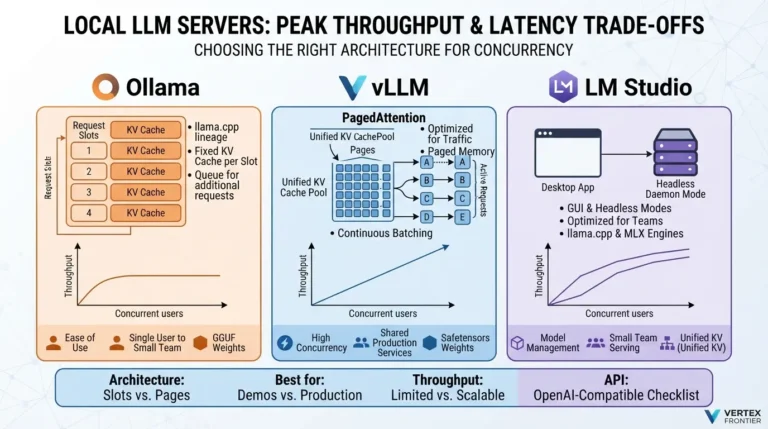
- Local and desktop: GGUF Q4_K_M through llama.cpp or Ollama.
- Apple Silicon: MLX. The mlx-lm project supports 4-bit quantization. Pin MLX versions: one community thread reported a grouping bug, since fixed, that slowed AWQ and GPTQ checkpoints by 7% to 14% in prefill.
- Fine-tuning: bitsandbytes NF4 with QLoRA.
- Edge: mixed 2-bit and 4-bit with recovery adapters, following Apple’s recipe.
| Format | Turing | Ampere | Ada | Hopper | AMD GPU | x86 CPU |
|---|---|---|---|---|---|---|
| AWQ | Yes | Yes | Yes | Yes | No | Yes |
| GPTQ | Yes | Yes | Yes | Yes | No | Yes |
| Marlin kernels | No | Yes | Yes | Yes | No | No |
| FP8 W8A8 (LLM Compressor) | No | No | Yes | Yes | Yes | No |
| bitsandbytes | Yes | Yes | Yes | Yes | No | No |
| GGUF | Yes | Yes | Yes | Yes | Yes | No |
A mnemonic from the community helps here: formats named after a runtime (GGUF, MLX) travel across hardware, while formats named after a numeric type (FP8, NVFP4, INT4-W4A16) tie you to specific chips. It is a heuristic, not a law, because engines can fall back. One commenter notes that FP8 checkpoints often still load on Ampere as storage, so you keep the memory saving but lose the speed.
The stack is converging on FP8 for new NVIDIA and AMD hardware, Marlin-backed 4-bit for older GPUs, and GGUF or MLX for local use.
Which Quantization Method Should I Use? A Hardware-First Decision Tree
Start from the hardware, because it decides which formats and kernels exist for you. Then work through these steps:
- Can the model fit in BF16 with headroom, and is accuracy critical? If yes, do not quantize the weights yet. Consider an FP8 KV cache.
- What hardware are you on?
- Apple Silicon: MLX 4-bit, or GGUF through llama.cpp or Ollama.
- CPU only: GGUF Q4_K_M.
- AMD Instinct: FP8 W8A8, with GGUF as a fallback.
- NVIDIA Ampere: AWQ or GPTQ with Marlin, or INT8 W8A8 for compute-bound batches.
- NVIDIA Turing: AWQ or GPTQ without Marlin. Benchmark the speed first.
- NVIDIA Ada or Hopper: FP8 W8A8 first, then AWQ with Marlin if you need 4-bit.
- NVIDIA Blackwell: NVFP4 or FP8.
- Are you fine-tuning? Use bitsandbytes NF4 with QLoRA.
- Is the job accuracy-sensitive (code, math, agents, structured output)? Start at 8-bit and step down only after task-level tests.
- Before shipping: confirm the kernel path in logs and run repeated evals.
Want a quick answer? Pick your setup below. It encodes the same logic as the tree.
Hardware first, then bits, then algorithm, then verify the kernel.
Common Mistakes (and How to Avoid Them)
Most quantization failures are not exotic. They repeat. Here are the ones with documented evidence, each tagged with its layer in the Four-Layer Stack.
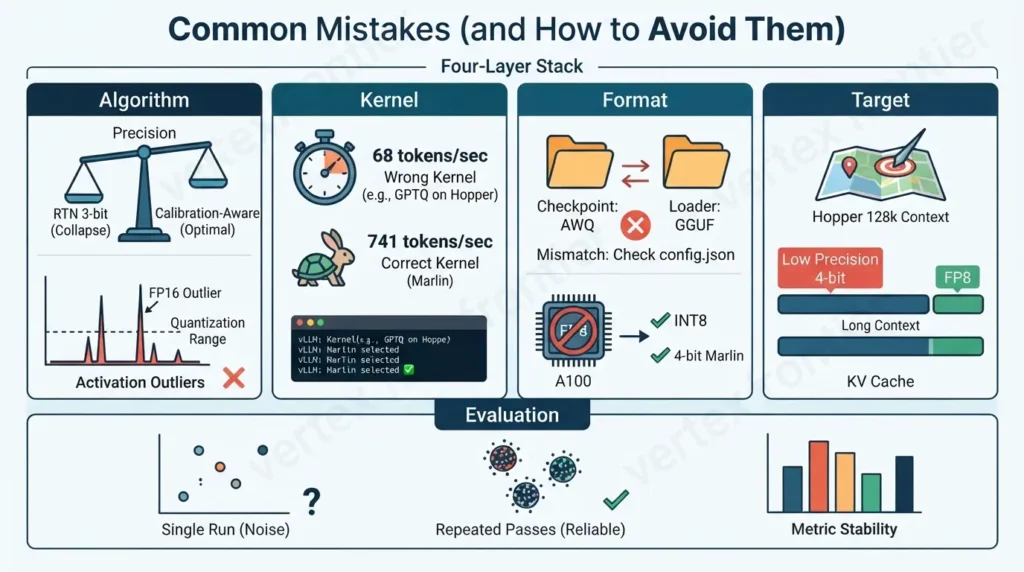
Rounding to nearest below 4 bits (Algorithm)
RTN took OPT-66B from perplexity 9.34 to 110 at 4 bits. Use a calibration-aware method.
Running the wrong kernel (Kernel)
Same weights, 68 versus 741 tokens per second. Let vLLM auto-select Marlin, and verify in the logs.
Ignoring activation outliers (Algorithm)
Per-tensor W8A8 collapsed OPT-175B. Use smoothing or a mixed-precision scheme.
Mismatched checkpoint and loader (Format)
Hugging Face stores a quant_method field in config.json for this reason. Some methods, such as AWQ and GGUF, can only be loaded from a pre-quantized checkpoint.
Wrong group size or calibration data (Algorithm)
Smaller groups cost more bits. Calibrating a coding model on encyclopedic text invites trouble, so use data that resembles production.
Hardware mismatch (Format)
EXL2 is CUDA-only, FP8 needs Ada or newer, NVFP4 needs Blackwell. Check the support matrix before downloading.
Treating the KV cache as free (Target)
A 4-bit cache can undo a careful weight choice at long context, and even FP8 once cut 128k needle accuracy from 91% to 13% on Hopper until a kernel fix landed. Pin versions and test at your longest context.
Trusting a single metric or run (Evaluation)
Use task tests, repeated passes and distribution-level comparisons.
Warning: do not ask a chatbot for your quantization recipe without checking it. In one r/LocalLLaMA thread, a user asked a large model how to quantize itself, and commenters found wrong size estimates and unsupported CUDA advice. Verify sizes, versions and tools against official docs.
| Symptom | Likely cause | Layer | Fix |
|---|---|---|---|
| Quantized model is slower than FP16 on vLLM | Plain AWQ or GPTQ kernel instead of Marlin | Kernel | Let vLLM auto-select Marlin, or request the Marlin method, and confirm in the logs |
| Garbage tokens or NaNs after loading | Checkpoint method does not match the loader config | Format | Check quant_method in config.json and use the matching loader |
| Model collapses at 3 bits | Round-to-nearest with no calibration | Algorithm | Use GPTQ, AWQ or another calibration-aware method, or stay at 4 bits |
| Fluent text but broken JSON or tool calls | Long-tail errors from weight or cache quantization | Target / Algorithm | Test structured output directly. Move up one precision level or keep the cache at FP8 |
| Quality falls apart at very long context | Low-precision KV cache on top of context rot | Target | Return the cache to FP8 or 16-bit and shorten the context |
| Long-context accuracy collapses after enabling an FP8 KV cache on Hopper | FP8 attention accumulation error in older kernel versions. vLLM measured 91% falling to 13% at 128k | Target / Kernel | Upgrade to a version with the fix, re-test at your longest context, or return the cache to BF16 |
| FP8 checkpoint gives no speedup on A100 | No native FP8 compute on Ampere | Format | Use INT8 or 4-bit with Marlin on this GPU |
| Benchmark scores change between runs | Sampling noise or a non-deterministic stack | Evaluation | Fix seeds, repeat runs and report spread |
| Out of memory at long context though weights fit | KV cache and batch size | Target | Quantize the cache, lower batch size or context, or add GPUs |
When something breaks, ask which layer changed. The fix is usually one layer away.
Before and After: What Changes When You Get It Right
Here is the same deployment before and after a careful 4-bit AWQ rollout. The rows use different models because no single source measured everything, so each row names its source.
| Dimension | Before (16-bit) | After (4-bit AWQ) | Source |
|---|---|---|---|
| Weight memory, 70B model | about 140 GB | about 36 GB (g128, about 4% overhead) | Memory math, GPTQ paper overhead |
| Hardware for the weights | Two 80 GB GPUs | One 48 GB or one 80 GB GPU, with KV headroom on 80 GB | Derived |
| Perplexity, Llama-2 70B | 3.32 | 3.41 (+2.7%) | AWQ paper, Table 4 |
| Throughput, Qwen2.5-32B on H200 | 461 tok/s | 741 tok/s with Marlin (1.6x). 68 tok/s on the wrong kernel path | Jarvis Labs |
| HumanEval Pass@1, same model | 56.1% | 51.8% (within about one standard error) | Jarvis Labs |
| Cost per million tokens | Depends on price and load | Depends on price, throughput and utilization. Use the calculator | Formula below |
Cost is the part everyone wants. The formula is plain arithmetic, but the inputs decide everything. At low utilization an idle GPU costs the same as a busy one.
The defaults are illustrative, not quotes. Replace them with your GPU price and a throughput you measured at your own concurrency.
Quantization can cut memory by about three quarters at a cost of a few percent in accuracy. Whether it cuts cost depends on kernel, load and utilization.
Pre-Deployment Checklist
Run through this before a quantized model reaches users. The boxes are interactive, so you can work down the list.
Emerging Trends: Sub-4-bit, NVFP4 and Rotations
Four directions are worth watching.
Sub-4-bit is becoming practical. QTIP's 2-bit 405B checkpoint and EfficientQAT's 2-bit Llama-2-70B show the frontier. The ExLlamaV2 authors' "mostly stable" wording at 2.55 bits is a useful reminder that very low bit-widths are not lossless.
NVFP4 arrives with Blackwell. It is Blackwell-only by NVIDIA's documentation, and vLLM and Red Hat's LLM Compressor team already publish NVFP4 checkpoints for several model families. Evaluate each checkpoint, because calibration data differs between publishers.
Rotation methods target full 4-bit pipelines. QuaRot reports 4-bit weights, activations and KV cache on Llama-2-70B with at most 0.47 WikiText perplexity loss, retaining 99% of zero-shot performance. SpinQuant narrows the 4-bit gap on Llama-2 7B to 2.9 points. It also warns that some random rotations are up to 13 points better than others, so quality is not guaranteed by the recipe alone.
Per-layer precision is the norm. Static "everything INT4" is giving way to dynamic schemes, as Apple's mixed 2-bit and 4-bit layers and the community's expert-versus-shared-layer recipes show.
Security Note: Quantization as an Attack Surface
Quantization changes behavior, and that is also a security question.
A NeurIPS 2024 paper, Exploiting LLM Quantization, shows that widely used quantization methods can be abused. An attacker can build a model that looks benign in full precision but behaves harmfully once quantized. The authors demonstrate this on popular zero-shot methods (LLM.int8(), NF4 and FP4), across coding-specific and general-purpose models and three real-world scenarios. They also study a Gaussian-noise defense, and they publish their code.
The attack matters most when you download full-precision weights from a source you cannot verify and quantize them locally. What to do about it:
- Treat quantization as a model change. Re-run your behavior and safety evaluations on the quantized artifact, not just on the original.
- Prefer publishers you can verify, and record checksums for every checkpoint.
- Fold quantization into your model change management and your model supply chain review, and keep the records you would need for EU AI Act compliance.
- If the model sits behind retrieval, pair this with the controls in our guide to enterprise RAG security architecture.
Conclusion
Quantization is the cheapest large lever you have on LLM cost, and also one of the easiest to misconfigure.
The decision rule is short. Pick the hardware first, because it fixes your options. Choose the highest precision that solves your memory or speed problem, then step down only when your own tests say it is safe. Verify the kernel path, decide on KV-cache precision separately, and treat any quantized checkpoint as a new model that needs its own evaluation.
Fitting the model is only the floor. If you are sizing a full deployment, continue with our guide to serving giant AI models, and if new guides like this one are useful, the VertexFrontier newsletter sends them as they publish.
Glossary
- Activation: the intermediate values a layer produces while the model runs, as opposed to the stored weights.
- Calibration data: a small sample of text used to measure activations or errors before quantizing.
- Group size: how many weights share one scale factor. Smaller groups are more accurate and cost more bits.
- Outlier: a rare, very large value that stretches the quantization range and hurts everything else.
- PTQ / QAT: post-training quantization versus quantization-aware training.
- W4A16, W8A8: bits for weights and activations. W4A16 means 4-bit weights and 16-bit activations.
- KV cache: stored attention keys and values for the tokens already processed. It grows with context length.
- Perplexity: how surprised a model is by held-out text. Lower is better, but it is an average.
- KL divergence: a measure of how far the quantized model's output distribution drifts from the full-precision one.
- Salient weights: the small share of weights, chosen by activation size, that AWQ protects.
- NF4: a 4-bit data type with levels placed for normally distributed weights, used by QLoRA.
- Marlin: a fused GPU kernel for 4-bit weight matrix multiplication on NVIDIA GPUs.
- GGUF: llama.cpp's file format for quantized models.
- FP8 (E4M3, E5M2): two 8-bit floating-point formats trading range against precision.
- NVFP4: NVIDIA's 4-bit floating-point format for Blackwell.
FAQs
Does quantization make a model dumber?
A little, and by an amount you can measure. On Llama-2 models, 4-bit AWQ with group size 128 raised WikiText2 perplexity by about 2% to 3%, while 3-bit raised it by roughly 9% to 14%. Eight-bit methods such as LLM.int8() and SmoothQuant stayed within about 0.2 points of FP16 on OPT-175B zero-shot. Averages hide long-tail failures, and community tests often show code generation moving first, so test your own task.
GPTQ vs AWQ: which is better?
At 4 bits they are close. On Llama-2 70B the AWQ paper reports perplexity 3.41 for AWQ and 3.42 for GPTQ against 3.32 for FP16. AWQ pulls ahead at 3 bits (3.74 versus 3.88). In vLLM the kernel matters more than the algorithm: Marlin lifted AWQ from 68 to 741 tokens per second and GPTQ from 277 to 712 in one benchmark. Choose the method with a well-maintained checkpoint for your model, then verify the kernel.
Should I use Q4_K_M or Q8_0?
Q4_K_M is the usual starting point. In one community evaluation of a 27B model, Q8_0 gained about 1.8 HumanEval points, which is three problems out of 164, while using about 50% more peak RAM and generating more slowly. Move up only if your own tests show a gap, and do not assume Q4_K_M suits every architecture.
Does quantization make inference faster?
Often, but not automatically. Decoding is memory-bandwidth-bound, so smaller weights help: GPTQ reported 3.25x on an A100 and 4.5x on an A6000 against FP16. But speed depends on the kernel. In one vLLM benchmark, 4-bit AWQ ran at 68 tokens per second without Marlin and 741 with it, while FP16 reached 461. Always load-test the exact stack.
Can I fine-tune a quantized model?
Not by training the quantized weights directly. QLoRA keeps the base model frozen in 4-bit NF4 and trains small LoRA adapters in higher precision, with gradients flowing through the frozen weights. The QLoRA paper fine-tuned a 65B model on a single 48 GB GPU.
Does vLLM support AWQ, GPTQ and GGUF?
vLLM lists AWQ, GPTQ, bitsandbytes, GGUF and FP8 through LLM Compressor, among others. Support varies by GPU: AWQ and GPTQ appear for Turing and newer, FP8 W8A8 for Ada, Hopper and AMD GPUs, and GGUF for both NVIDIA and AMD. GGUF was slow through vLLM in the benchmark above, so llama.cpp or Ollama is the better home for it.
Should I quantize a model myself or download a pre-quantized one?
Downloading saves time but moves trust to the publisher, who chose the calibration data and group size. Research has also shown that a full-precision model can be crafted to behave benignly until quantized with common methods such as LLM.int8(), NF4 and FP4. Prefer publishers you can verify, record checksums, and evaluate the quantized artifact. If you quantize yourself, calibrate on data that resembles production.
When should I not quantize a model?
Skip or delay it when memory is not your constraint, when the model is small (SpQR notes 1 to 10B models lose more at 3 to 4 bits), when you need to train the weights directly, when long-context behavior is critical and you would use a 4-bit KV cache, or when you need reproducible comparisons. For accuracy-sensitive work, start at 8-bit.

Was this article helpful?







[…] the two machines, where bandwidth is lower and latency higher. Meta also built an FP8 version, quantizing most feed-forward layers while keeping self-attention at higher […]
[…] sizing and prefix reuse are covered in Vertex Frontier’s distributed-inference guide. and KV-cache quantization — compressing that cache to FP8 or INT4 — is covered in our LLM quantization […]
[…] crossing that GPU boundary, the first lever is usually quantizing the model — cutting weight precision from FP16 to INT8 or INT4 can shrink the memory footprint 2–4x […]
[…] fine-tuning, adapter, quantization, retrieval, prompt, or tool changes; […]