
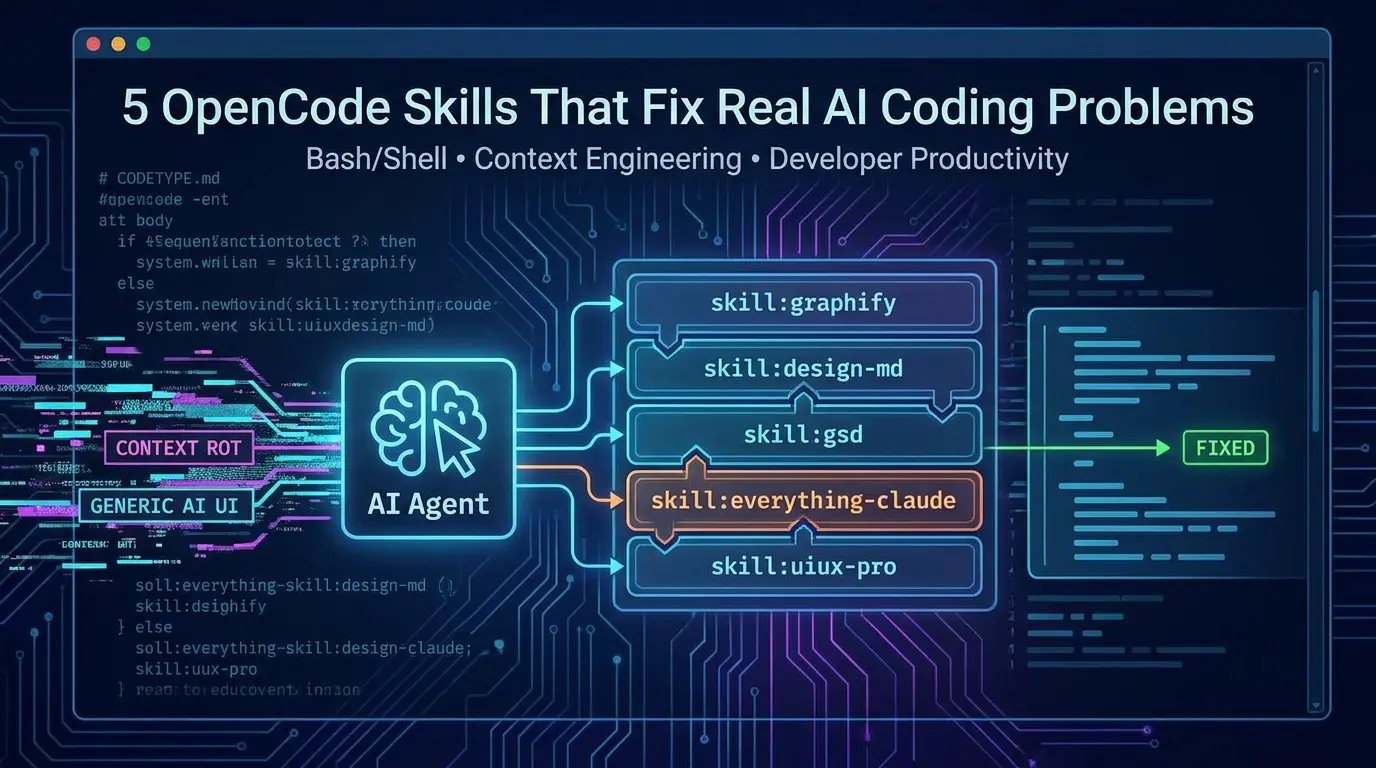

It’s 2 a.m. You’ve been deep in a flow state with your AI agent for three hours straight, and it’s been genuinely good, clean commits, sensible naming, no arguing. Then, out of nowhere, it forgets an architectural rule you set in the first ten minutes and starts writing code that feels like it belongs to a different project entirely.
That’s not a bad-model day. That’s context rot, and no context window, however large the marketing says it is, has fully solved it. For a full breakdown of why long context fails and how to measure your effective window, read our deep dive on context rot in LLMs.
Most people respond to that moment by switching models, chasing whichever provider claims the biggest context window this month, assuming more tokens means fewer of these 2 a.m. surprises.
That assumption is backwards, and there’s now hard research to prove it.
If you’ve spent any real time inside OpenCode, the open-source terminal coding agent that’s crossed 160,000 GitHub stars and 900 contributors, you already know the model is rarely the bottleneck. The bottleneck is everything around it: the instructions it can’t remember, the design decisions it re-litigates every session, and the plans that quietly rot as your context window fills up.
What you’ll get from this article: a working understanding of OpenCode’s skill system, five specific skills that solve five specific problems, the research behind why “just add more context” doesn’t actually fix agentic coding, and a decision framework for picking which skill to install first based on where your workflow actually hurts.
⚡ Quick takeaways
Click any topic to expand or collapseOpenCode SKILL.md discovery & compatibility
OpenCode discovers SKILL.md files from six documented project and global locations, including .opencode/skills, .claude/skills, and .agents/skills. This creates a useful compatibility path for skills written for other agents, but each skill still needs a runtime, dependency, permission, and behavior check before you assume it works unchanged.
The context window myth
The “bigger context window fixes everything” assumption is contradicted by controlled research from Chroma and Stanford.
Graphify token optimization
Graphify replaces raw file reads with a queryable graph, cutting token use dramatically on large repos.
Preventing visual drift with DESIGN.md
DESIGN.md solves a problem unique to multi-model setups: visual drift when you switch providers.
GSD vs. Everything Claude Code layering
GSD and Everything Claude Code target different layers: one structures project execution, while the other packages a broader harness of skills, agents, hooks, rules, and security tooling. They may overlap, so test them separately before combining them; installing both can increase configuration and context complexity.
Security update: GSD fork notice
GSD’s original maintainer abandoned the project in May 2026 — install the community-audited fork instead (details in the GSD section).
What Is a Skill in OpenCode?
A skill is a folder containing instructions, scripts, and reference material that OpenCode's agent pulls in only when a task actually calls for it. Instead of stuffing every possible instruction into your system prompt, OpenCode lists available skill names and short descriptions up front, then loads the full content through a native skill tool the moment it's relevant.
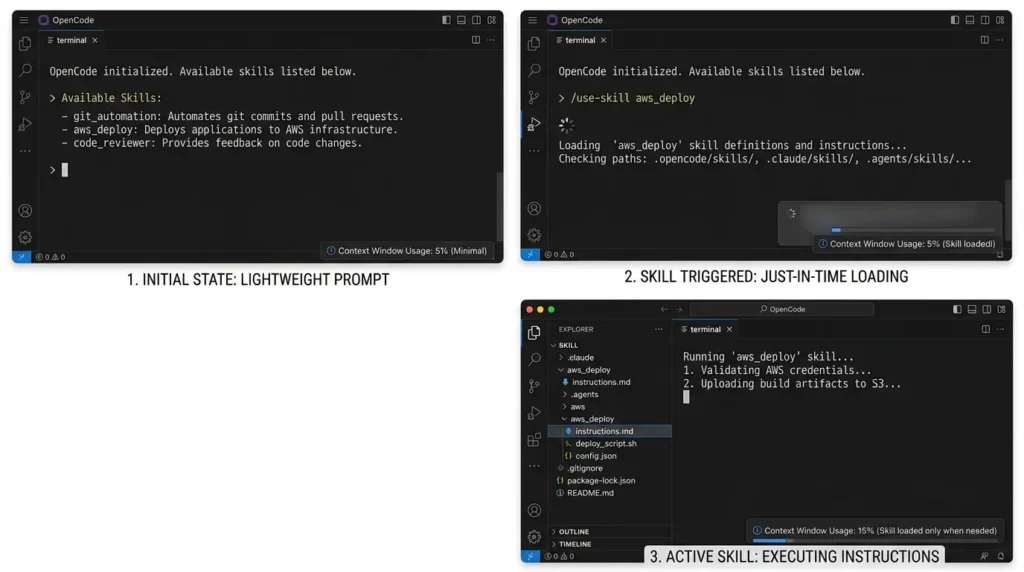
That distinction matters more than it sounds. Every extra paragraph sitting permanently in your context window is a paragraph the model has to weigh against everything else it's tracking. Skills keep that weight off until it's needed.
OpenCode's skill documentation, confirms it searches project-local and global paths across six locations, including .opencode/skills, .claude/skills, and .agents/skills, plus the home-directory equivalents of each. Practically, this means the fast-growing library of skills built for Claude Code drops into OpenCode with zero conversion work, which is exactly why the five tools below, several of them built primarily for Claude Code, work identically here.
Before You Install Any Skill: A Five-Minute Safety
Check Treat a skill as executable project configuration, not as harmless prompt text. Before installing it, inspect the repository owner, recent commits, release and package ownership, install script, hooks, shell commands, network access, file-write scope, and required secrets.
| Check | What to verify |
|---|---|
| Source | Use the canonical repository or package linked by the maintainer; avoid re-uploads and unknown mirrors. |
| Install script | Read the script before running it and note every file, directory, binary, and configuration file it writes. |
| Permissions | Check whether the skill can run shell commands, edit files, access credentials, or contact external services. |
| Dependencies | Pin or inspect package versions and review post-install scripts where applicable. |
| Rollback | Know how to uninstall the skill and restore the previous project configuration. |
| Test scope | Run it first in a disposable repository with no secrets or production credentials. |
Why "Just Use a Bigger Context Window" Doesn't Work
Here's the uncomfortable finding most vendors don't lead with.
In July 2025, Chroma Research published a study testing 18 frontier models, including GPT-4.1, Claude 4, and Gemini 2.5, on how reliably they use long input contexts. The result: every single model tested got measurably worse as input length grew, even on simple retrieval tasks, even well before the context window was full.
Researchers Kelly Hong, Anton Troynikov, and Jeff Huber named the phenomenon "context rot, and it directly undercuts the marketing pitch that a bigger window is a substitute for good context management.
An earlier Stanford study on retrieval-augmented generation found something just as telling: with roughly 4,000 tokens of retrieved documents, accuracy could swing from 70–75% down to 55–60% depending purely on where the relevant fact sat in the input, according to analysis referencing the original "Lost in the Middle" research. The information wasn't missing. The model just paid less attention to it.
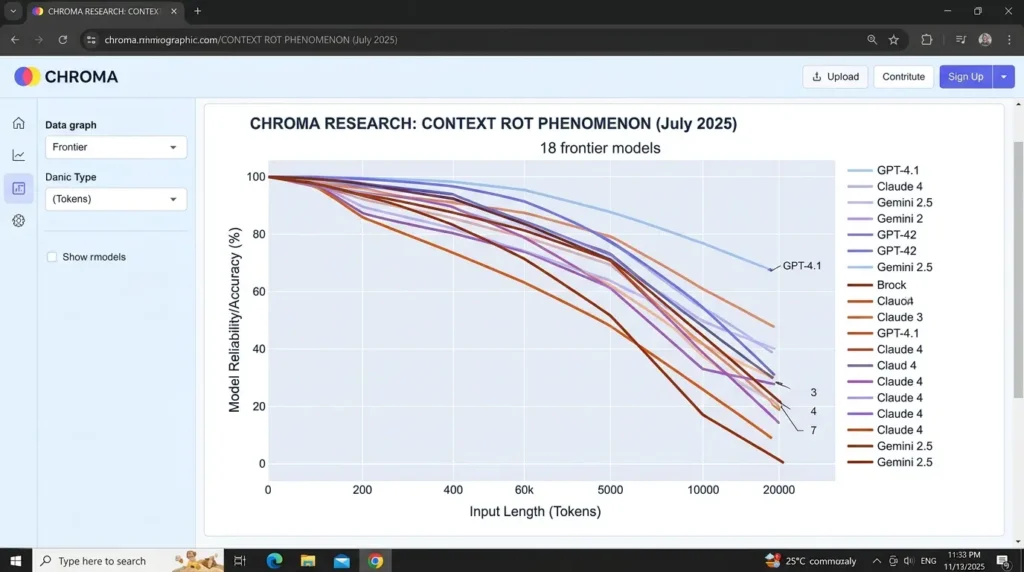
Here's the contrarian part most guides skip: if longer context reliably degrades output quality, then the standard advice, "switch to the model with the bigger window", treats the symptom while ignoring the disease. The actual fix isn't more tokens. It's less irrelevant context, delivered exactly when it's needed. That is precisely what a well-built skill does, and it's why this category of tooling has grown so fast around agents like OpenCode, Claude Code, and Codex.
In short: context rot means every unnecessary token in your prompt is actively working against you, not just sitting there neutrally.
Get the Free Cheat Sheet
+ Templates Pack
A printable companion to this article — 5 skills at a glance, the decision tree, 3 ready-to-copy templates (AGENTS.md, DESIGN.md, .gitignore), install commands, and a post-GSD security checklist.
- 5-skill comparison matrix + decision framework
- 3 production-ready templates you can paste today
- Security checklist after the GSD rug-pull incident
How to Evaluate a Skill Instead of Trusting Its Marketing
Use the same repository, model, task prompt, and success criteria before and after installation. Run at least five representative tasks: locating an unfamiliar symbol, changing a cross-file behavior, adding a feature with tests, recovering from a failing test, and reviewing a security-sensitive change.
Record task completion, test pass rate, number of manual corrections, elapsed time, input and output tokens where available, tool failures, and whether the agent touched files outside the requested scope. Repeat each task more than once before attributing an improvement to the skill. A skill that reduces tokens but increases debugging or review time is not automatically cheaper.
For multi-agent systems in production, this kind of per-step scoring is exactly what multi-agent observability with MLflow automates, turning ad-hoc skill evaluation into continuous, traceable evidence across every supervisor, worker, and tool-call span.
Skill #1: Graphify - A Memory Layer for Any Folder
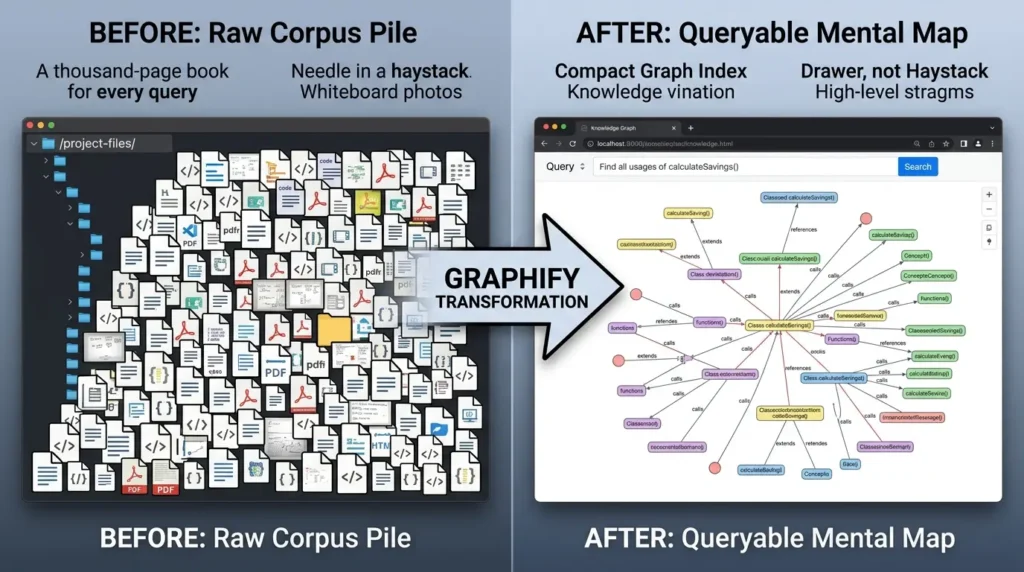
What it is: Graphify turns any folder, code, documentation, PDFs, screenshots, whiteboard photos, even video and audio recordings, into a queryable knowledge graph instead of a pile of files your agent has to re-read every session.
Think of it as a mental map for your project instead of the project itself. Rather than forcing your agent to re-read a thousand-page book every time you ask it a question, it consults a smart index, the difference between searching for a needle in a haystack and just knowing exactly which drawer the needle is in.
How It Actually Works
Graphify runs a three-pass pipeline, and understanding the passes is the key to understanding why it's cheap:
- AST extraction (free): Graphify's own documentation confirms it uses Tree-sitter to walk the abstract syntax tree of every supported language, pulling out classes, functions, imports, and call graphs. This step runs entirely locally, costs zero API tokens, and never sends your code anywhere.
- Local transcription (free): Audio and video files get transcribed on-device using faster-whisper, a local reimplementation of OpenAI's Whisper model, according to independent technical analysis of the tool. Nothing leaves your machine.
- Semantic extraction (paid, but small): Only docs, PDFs, and images get sent out to whichever model your agent is configured with, to extract concepts and relationships.
The output is a graph.json file, an interactive HTML viewer, and a markdown report ranking the most-connected nodes. Maintainers report roughly 71x reduction in tokens per query on mixed corpora once the graph is built, since follow-up questions read the compact graph instead of re-opening dozens of source files.
Cost Saved ($) = Tokens Saved × Price per 1K Tokens ÷ 1000
Installing Graphify
Shell:
uv tool install graphifyy
graphify install --platform opencode
After installation, verify where the skill was written, inspect the generated files, and run Graphify first in a disposable or non-sensitive repository. The official repository also documents project-scoped installation; use that when the skill should travel with one repository rather than apply globally.
Then in OpenCode's prompt, typing /graphify . builds the graph for the current directory. A watch mode rebuilds it automatically as you edit, and a clone command pulls a public GitHub repo straight into a graph without a manual clone step.
Where this matters most: monorepos, and any project where you keep dropping research papers or meeting notes into a raw notes folder. It's also disproportionately valuable if you're running OpenCode against a smaller-context model, where every token in the prompt costs relatively more.
Known Limitations
- The "free" pitch has an asterisk: AST extraction on pure code is genuinely local and free, but the moment your corpus includes docs, PDFs, or images, the semantic pass needs an actual configured backend, the project's own docs list Gemini, Claude, OpenAI, DeepSeek, or a local Ollama instance as valid options, and headless runs have, in some versions, refused to proceed on code-only corpora until a key was set even though no LLM call was actually needed, a friction point tracked as an open issue on the project's tracker.
- Cache invalidation gotcha: Because Graphify writes graph.json and its output folder directly into your workspace, forgetting to add those paths to .gitignore or .claudeignore can invalidate your coding agent's prompt cache on every rebuild, forcing a costlier full re-upload on the next turn.
- Agent-specific rollout is uneven: Some third-party agent runtimes install the skill only into .claude/skills by default, requiring a manual copy into .agents/skills if your setup expects that path, worth checking right after install rather than assuming it "just works" everywhere.
Graphify can create a useful local index for code, but mixed corpora require more careful privacy and cost decisions. Before running a semantic pass over documents or media, identify the configured backend, API key, retention behavior, and whether the content is allowed to leave the machine. Add generated output such as graphify-out/ to the appropriate ignore files only after confirming that the project does not need to version the graph artifacts.
Graphify doesn't shrink your codebase, it replaces repeated raw reads with one compact, queryable structure, which is where the real savings come from, but budget for the semantic-pass API cost on anything beyond pure code.
Skill #2: DESIGN.md - One File That Keeps Every Model On-Brand
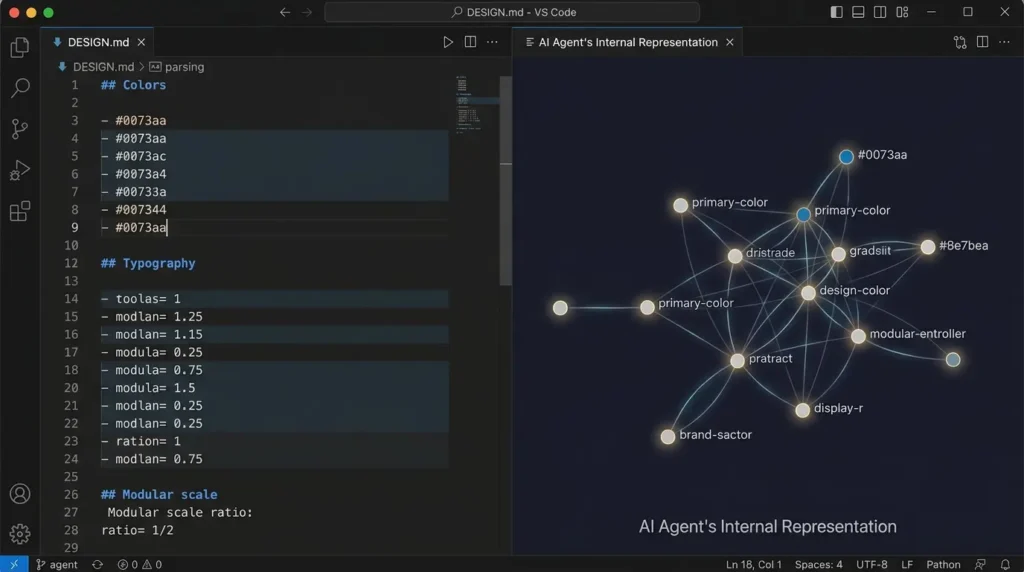
What it is: DESIGN.md is a plain-text specification of a design system, colors, typography scale, spacing rules, component states, dos and don'ts, written so an AI agent can read it the way it reads code, instead of trying to parse a Figma export or a JSON token file.
Where It Came From
The format was introduced by Google Stitch, Google's AI-driven UI generation tool, as a way to describe a brand's look in a format models actually parse well: markdown. The community project VoltAgent's awesome-design-md then did the tedious part, extracting real DESIGN.md files from dozens of popular sites including Stripe, Linear, Vercel, Notion, Apple, and Anthropic itself.
Case study: the fastest-growing "awesome" list of the year. When VoltAgent's repository appeared on GitHub in early 2026, independent tracking found it outpaced every comparable "awesome list" at the same age by a wide margin, reportedly crossing thousands of stars within its first two weeks and drawing a community fork within three days that extended the format for CJK typography, a gap the original spec hadn't addressed.
The lesson for anyone building on a new AI-agent convention: formats that solve a real, painful, and shared problem (in this case, inconsistent AI-generated UI) spread through organic forks faster than almost any other kind of open-source project, because every team hits the same wall independently.
Why This Specifically Matters for OpenCode
OpenCode is provider-agnostic, you can point it at Claude, GPT, Gemini, or a local model. That flexibility creates a real problem: each model has its own default aesthetic instincts. Ask three different models for a "modern settings page" with no guidance, and you'll get three visually unrelated results.
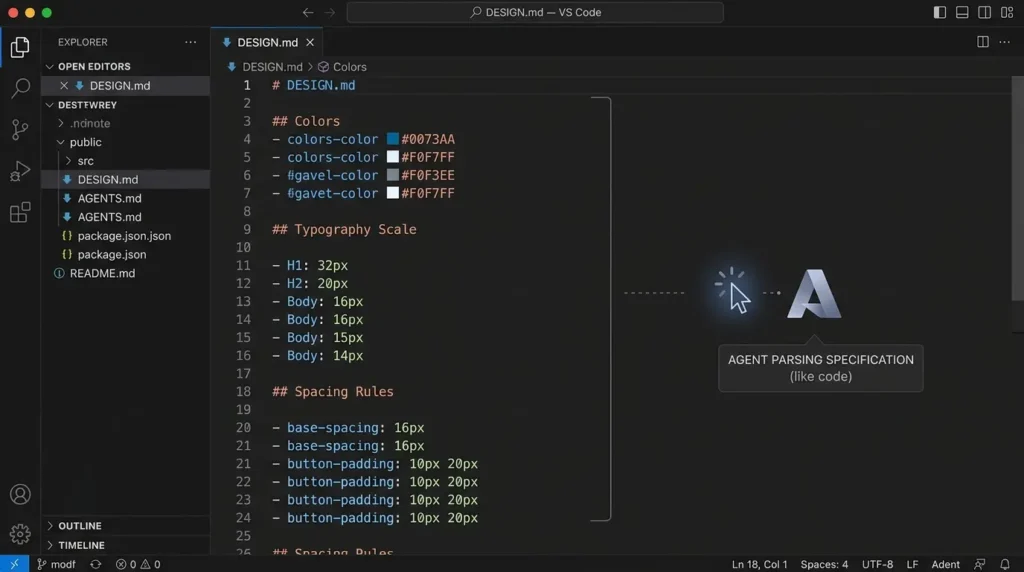
Drop a DESIGN.md into your project root, next to your AGENTS.md, and that gap closes. The agent has exact hex values, exact type scale, exact shadow depth to hit, regardless of which provider is answering the prompt.
| Without DESIGN.md | With DESIGN.md |
|---|---|
| Each model invents its own palette and spacing | Every model reads the same hex values and type scale |
| Switching providers means visual drift across the app | Output stays consistent regardless of which model answered |
| You re-explain "make it look premium" every session | The spec is pinned once, in the repo, permanently |
Tip: Start by copying the file for the design language closest to what you want (Linear's is a popular starting point for SaaS dashboards), then have OpenCode build a single test page before you commit to it project-wide. The repository also ships preview HTML files for each brand, so you can eyeball the palette and type scale before adopting it.
Known Limitations
- It's a starting point, not your brand: A copied DESIGN.md describes someone else's system. Ship it as-is past a first prototype and your product visually resembles the brand you borrowed from, the file still needs deliberate editing to become genuinely yours.
- No enforcement mechanism: DESIGN.md is a convention the model is expected to follow, not a constraint the system enforces. Nothing stops an agent from ignoring it under a long, noisy context, which is exactly why pairing it with disciplined context management (see GSD, below) rather than relying on the file alone tends to hold up better over long sessions.
- Maintenance debt: As your product evolves, the pinned file can quietly drift out of sync with your actual shipped UI unless someone owns keeping it updated, it's an artifact that needs a maintainer, not a "set once" fix.
DESIGN.md doesn't make any single model better at design, it makes every model agree on the same answer, as long as someone keeps the answer current.
Skill #3: Get Shit Done (GSD) - A Structural Fix for Context Rot
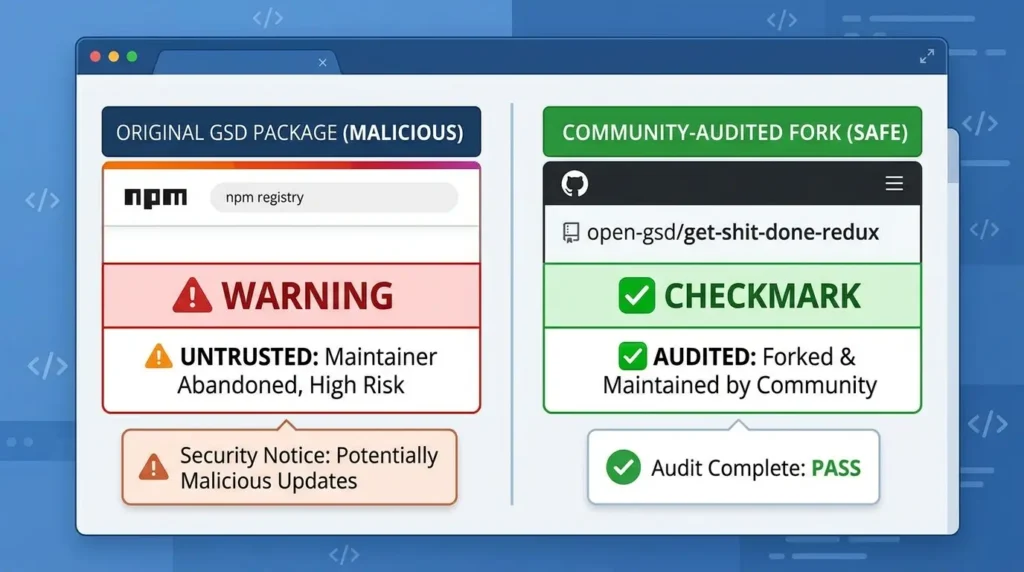
package-lock.json for the original package name and remove it.What it is: GSD is a spec-driven workflow system that organizes work into discussion, planning, execution, verification, and shipping stages. The exact command names and available integrations depend on the repository version and the target harness, so verify the current README before copying installation or invocation commands.
Think of it as the annoyingly brilliant project manager everyone has worked with once. It forces you to stop and plan before a single line of code gets written. It feels like overhead in the first ten minutes, and then it's the only reason your agent isn't wandering off into the weeds by hour three.
The Problem It's Actually Solving
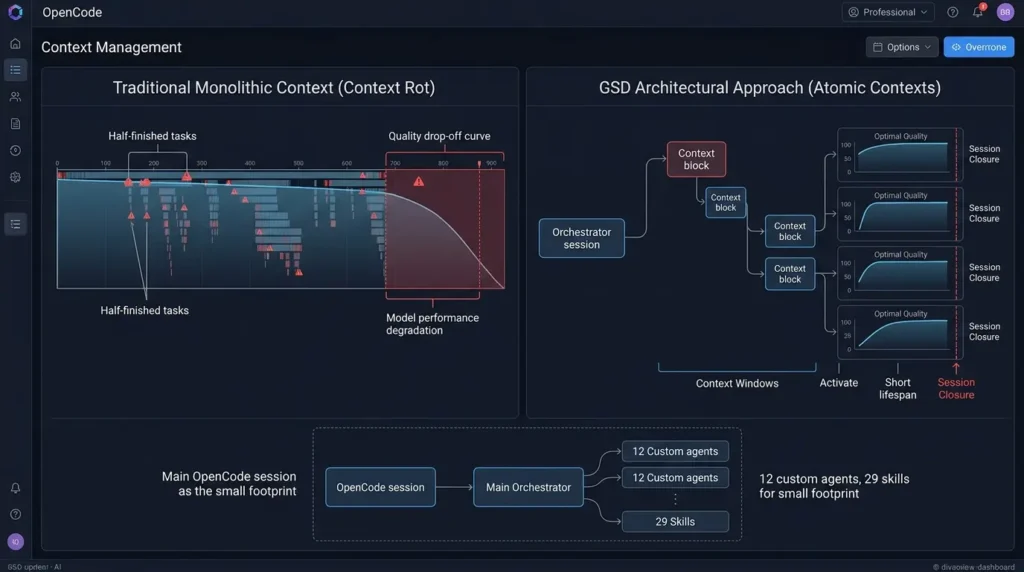
Independent coverage of the project describes the exact failure mode Chroma's research predicts: as a coding session's context window fills with old plans, half-finished tasks, and the model's own prior reasoning, output quality measurably drops, shorter responses, missed instructions, sloppier code. This is context rot showing up in a live coding session rather than in a benchmark.
GSD's fix is architectural, not prompt-based: instead of one long-running conversation, work gets split into small, atomic plans, and each plan executes in its own fresh context window.
Asks questions, spawns research agents, writes requirements + roadmap
Locks implementation decisions before any code is written
Creates atomic plans small enough for a fresh context each
Runs plans in parallel or sequential waves, atomic commit per task
Guided user-acceptance testing; failures go to a debug agent
Opens the pull request
The design detail worth calling out: each executor agent gets a disposable context window purely for implementation. Your main OpenCode session can stay well under half its context capacity even on a multi-day project, because the heavy lifting happens in windows that close when the task finishes.
Under the hood, this is built as a layer of skills, custom subagents, and hooks rather than a single monolithic prompt, one independent technical breakdown of the system counted around 29 skills and 12 custom agents behind the six user-facing commands, all standard agent-framework features rather than anything exotic.
Known Limitations
- It's genuinely token-heavy: Independent write-ups of real usage report an overhead ratio as steep as roughly 4 tokens spent on orchestration for every 1 token spent writing code, and multiple users describe burning through a standard subscription tier quickly enough that a higher-cost plan becomes close to mandatory for regular use.
- Vague input makes it worse, not better: Starting the workflow with a one-line idea instead of a detailed brief tends to trigger excessive follow-up questioning and unfocused research, the system rewards preparation, it doesn't compensate for the lack of it.
- It delays context rot; it doesn't fully eliminate it: At least one detailed field report found that within a single phase, output quality was closest to perfect on the first plan and visibly degraded by the third or fourth plan in that same phase, meaning the discipline of splitting work into fresh windows has to be applied consistently, not just once at the start of a project.
- It assumes you can write and evaluate a spec: Teams without someone comfortable defining requirements and judging AI output against them will find the learning curve steeper than the "one command install" framing suggests.
Security and maintenance check before installing GSD
Before installing GSD or any fork, verify the canonical repository, package name, maintainer activity, recent releases, publish permissions, open security issues, and install instructions. Prefer a repository and package whose current ownership and release path you can verify. Test the installation in a disposable project and pin or review the version rather than relying on an unqualified latest package.
Installing GSD (Community-Audited Fork)
Shell:
# Use the audited community fork, not the original package npx get-shit-done-redux@latest --opencode --local Always verify the exact package name against the fork's current README before running the install command, since package names on npm can shift during a migration like this one.
- Practical pairing: GSD works especially well with OpenCode's Plan Mode, which is read-only by design. Switch into Plan Mode, run the discuss phase there so the agent can't accidentally touch files while it's still working out the architecture, then switch back to Build Mode for execution.
- Common mistake: teams install GSD and immediately try to run /gsd execute on a vague, one-line idea. The system is built around the discuss phase locking in decisions before planning, skip that step and you've just added ceremony without the context-management benefit. Run discuss first, every time, even when the task feels obvious.
GSD doesn't make the model less forgetful, it stops asking one context window to remember everything in the first place.
Skill #4: Everything Claude Code - The Production Harness
What it is: Not a single skill but a full performance-optimization system, one repository shipping dozens of specialized subagents, well over a hundred skills, hooks, rules, MCP configurations, and command shims, built to standardize how an agent behaves across an entire team rather than one project at a time.
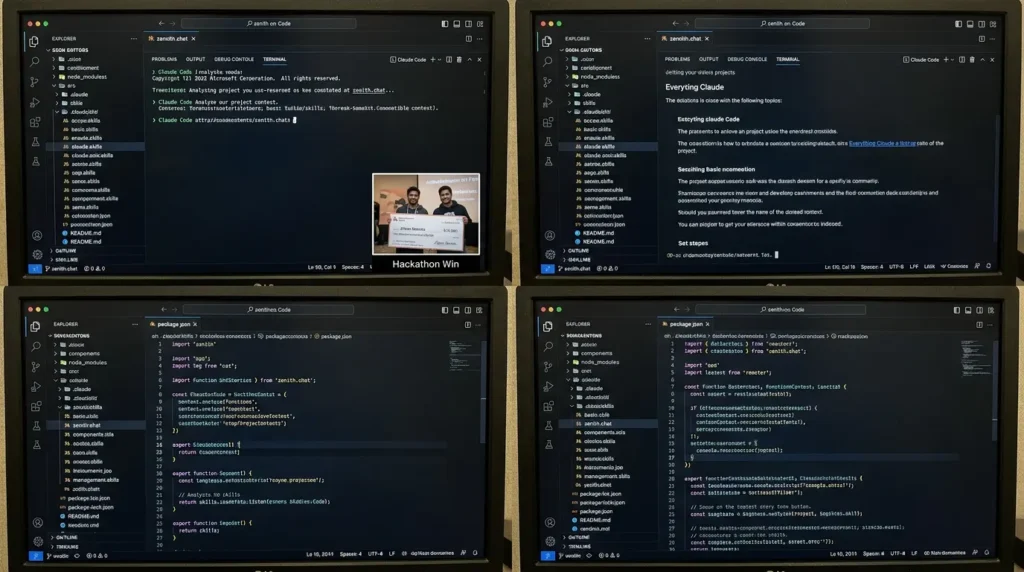
Case Study: From an 8-Hour Hackathon Build to a Production Harness
This is a genuinely documented case study, not a hypothetical.
The challenge: developer Affaan Mustafa needed a way to keep Claude Code reliable across long, high-stakes sessions without hand-tuning context management for every new project.
The action: at the Anthropic × Forum Ventures hackathon in New York, Mustafa and a teammate built an entire product, zenith.chat, in roughly eight hours using Claude Code, applying the configuration approach he'd been refining daily for months. The project won first place among more than 100 entrants and $15,000 in API credits. He then open-sourced the full underlying configuration under the MIT license as Everything Claude Code.
The outcome: independent tracking of the repository's growth shows it crossing 163,000 GitHub stars, 25,000+ forks, and 161 contributors, expanding from an initial ~28 agents and 119 skills to roughly 48 agents and 183 skills as of its most recent major release, alongside a desktop dashboard for browsing everything visually.
The lesson: the parts of the system that get the most sustained use aren't the flashiest ones. Coverage of the project highlights three components teams keep coming back to:
- A test-driven-development skill that enforces an 80% coverage gate before code is considered done.
- A build-error resolver that walks through dependency versions and config drift in a structured sequence instead of surfacing a raw stack trace.
- A security scanner, nicknamed Agent Shield in community writeups, that runs over a thousand checks against agent configurations to catch injection risks and leaked secrets before they ship.
Installing Everything Claude Code
For OpenCode, follow the current ECC repository instructions. The documented adapter path uses the verified repository and an OpenCode-specific build/install step; do not assume that an npm package name or a Claude Code installation automatically provides feature parity in OpenCode. Choose one installation method per harness and do not stack plugin, sync, and manual installs because duplicate skills and hooks can result.
Shell:
git clone https://github.com/affaan-m/ECC.git
cd ECC
npm install
npm run build:opencode
./install.sh --profile full --target opencode
Since OpenCode natively reads from .claude/skills, the entire harness works with no conversion step, a meaningful advantage over rebuilding an equivalent config from scratch per project.
Expert tip: the project's own documentation on token optimization is worth reading independent of whether you install anything. It recommends defaulting to a mid-tier model for routine tasks, capping maximum thinking tokens, ECC’s documentation discusses model selection, thinking-token limits, and earlier compaction as workflow controls.
These are configuration recommendations, not universal performance laws. Test them on your own tasks and compare quality, token use, latency, and rework before treating an earlier compaction threshold as a default.
Known Limitations
- It doesn't make the model smarter, only more disciplined: Independent hands-on reviews are direct about this: the agents and hooks catch process failures, a skipped test, a missing review, not reasoning failures. If the underlying model hallucinates an API that doesn't exist, extra agents won't catch that on their own.
- The learning curve is real and non-trivial. With well over a hundred skills and dozens of agents on offer, figuring out which 10-15 actually matter to your specific workflow takes deliberate time, and the documentation, while thorough, is large enough that skimming it isn't really an option.
- It's not a universal prerequisite. Worth noting for calibration: Claude Code's own creator at Anthropic has been described as running a comparatively vanilla configuration day to day, a reminder that this harness adds the most value at team scale and in production, not as a baseline every solo developer needs.
If you want one system that replaces five smaller bespoke configs with a single maintained harness, this is built for exactly that use case, at the cost of taking longer to fully absorb than a single-purpose skill, and it's a governance layer, not a substitute for model capability.
Skill #5: UIUX Pro Max - Design Taste as a Reasoning Engine, Not a Guess
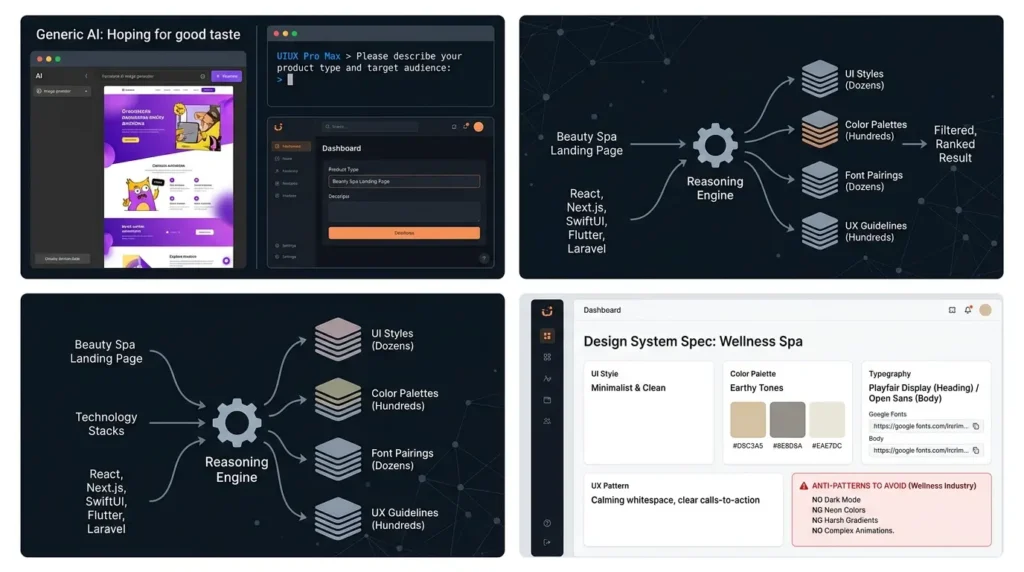
What it is: A skill that replaces "hope the model has good design taste today" with a rules-based reasoning engine mapping your product type to a specific, industry-appropriate design system.
How the Reasoning Actually Works
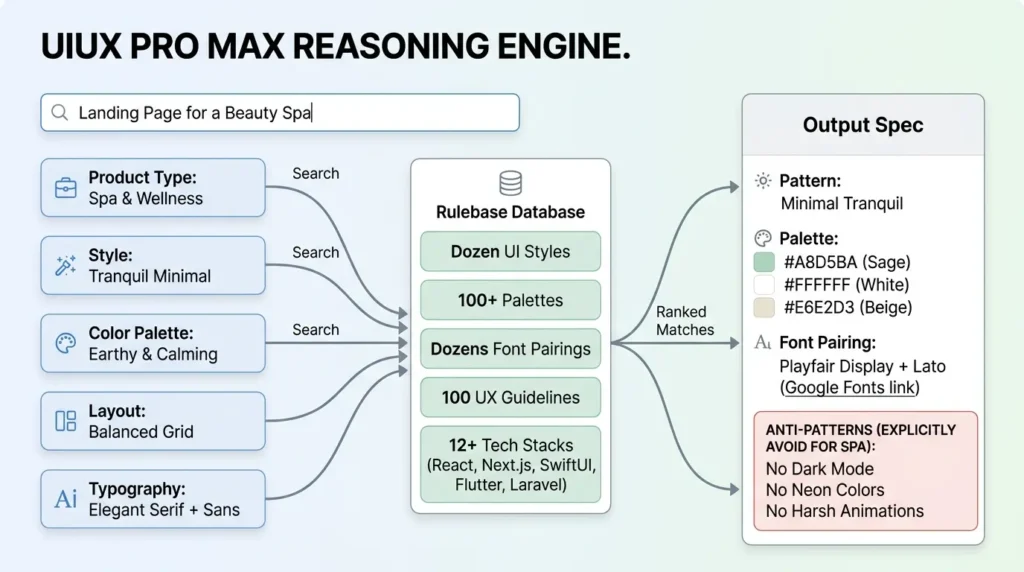
According to the project's own repository documentation, the engine holds a searchable database of dozens of UI styles, well over a hundred color palettes mapped one-to-one against product types, dozens of font pairings, and close to a hundred UX guidelines, spanning more than a dozen technology stacks from React and Next.js to SwiftUI, Flutter, and Laravel.
When you ask for a landing page for a specific vertical, the documentation uses a beauty spa as its own example, the engine runs several parallel searches across product type, style, color, layout pattern, and typography, ranks the matches, and returns a complete spec: pattern, palette with exact hex values, font pairing with a Google Fonts link, and the genuinely useful part, a list of anti-patterns to explicitly avoid for that industry.
That anti-pattern list is what separates this from a generic style guide. For a fintech app, the engine will flag AI-typical purple gradients and harsh animation as things to avoid. For a spa or wellness brand, it flags dark mode and neon as mismatches. Those are exactly the default instincts most models fall into unprompted, because they're statistically common in training data, not because they fit the brief.
Installing UIUX Pro Max
Shell:
npm install -g ui-ux-pro-max-cli
uipro init --ai opencode
Check the current CLI version before installing. The repository distinguishes the current ui-ux-pro-max-cli package from older uipro-cli releases, and platform adapters may not have identical feature parity. After installation, inspect the generated files and test the skill on a non-production interface first.
You can pass any agent name, including OpenCode, during setup. A master-plus-overrides pattern lets a single dashboard page deviate from the master design rules without re-explaining your entire system every time.
Known Limitations
- The full toolkit isn't entirely free: The open-source core covers the style database, reasoning engine, and design-system generation, but the project also sells a premium tier for extras like brand-identity and logo generation, worth checking the current feature split before assuming everything demonstrated in a walkthrough ships in the free install.
- A reasoning engine still needs a clear brief. Vague product descriptions return vague (if well-formatted) design systems. The quality of the anti-pattern filtering depends on giving it a real industry and audience, not just "make it look nice."
- Version-specific numbers move fast. The exact count of styles, palettes, and stacks has grown across releases, so treat any specific figure, including the ones in this article, as a snapshot rather than a permanent spec.
DESIGN.md vs. UIUX Pro Max: The Precise Difference
Because these two get confused constantly, here's the distinction stated as plainly as possible:
| Question | DESIGN.md | UIUX Pro Max |
|---|---|---|
| What problem does it solve? | Visual drift across different model providers | Not knowing what a good design system looks like for your industry |
| What does it actually contain? | One fixed, specific brand's exact tokens (hex codes, type scale, spacing) | A searchable database of many systems, ranked by fit to your brief |
| When do you reach for it? | After your brand identity is decided, to keep every model consistent with it | Before your brand identity exists, to help you decide what it should be |
| Does it flag anti-patterns? | No — it only specifies what to use, not what to avoid | Yes — explicitly, per industry (e.g. no dark mode for a spa brand) |
| Typical sequence | Step 2: pin the decided system | Step 1: decide what the system should be |
The anti-pattern list, not the style database, is the actual value of UIUX Pro Max, it's telling the model what a human designer would rule out immediately. DESIGN.md and UIUX Pro Max aren't competitors; used together, one decides the system and the other pins it.
The Skill-Fit Framework: Which One Should You Install First
Here's an original way to cut through five options fast, based on where your workflow actually hurts rather than which tool has the most GitHub stars.
| Workflow problem | First candidate | Verify before adopting |
|---|---|---|
| Repeated raw reads on a large repository or mixed research folder | Graphify | Run a before/after task and token comparison; review semantic-pass privacy and cost. |
| Long sessions become disorganized | GSD | Verify the current repository, package, commands, and orchestration overhead. |
| Visual output drifts between model providers | DESIGN.md | Confirm that the project has a real brand system and that the agent actually reads the file. |
| You do not yet know what design system fits the product | UIUX Pro Max | Review generated accessibility, responsive, typography, and anti-pattern guidance manually. |
| You want a governed team harness | Everything Claude Code | Check harness feature parity, install method, permissions, hooks, and duplicate-install risk. |
None of these are mutually exclusive. A common stack in practice: Graphify for repo comprehension, GSD for the execution workflow, and either DESIGN.md or UIUX Pro Max depending on whether your brand identity is already fixed.
A Practical Skill Evaluation Protocol
For each candidate, create a disposable branch and keep the model, repository, task prompt, and time budget constant. Run one baseline task without the skill and the same task with the skill. Score the result on task completion, tests passed, manual corrections, review findings, token usage, elapsed time, and file-scope discipline.
Use at least three task types: repository comprehension, a cross-file change with tests, and recovery from a failing test. Repeat the comparison before drawing a conclusion. A skill is useful when it improves the outcome you care about, not merely when it adds more files, commands, or context instructions.
Other Skills Worth Watching in 2026
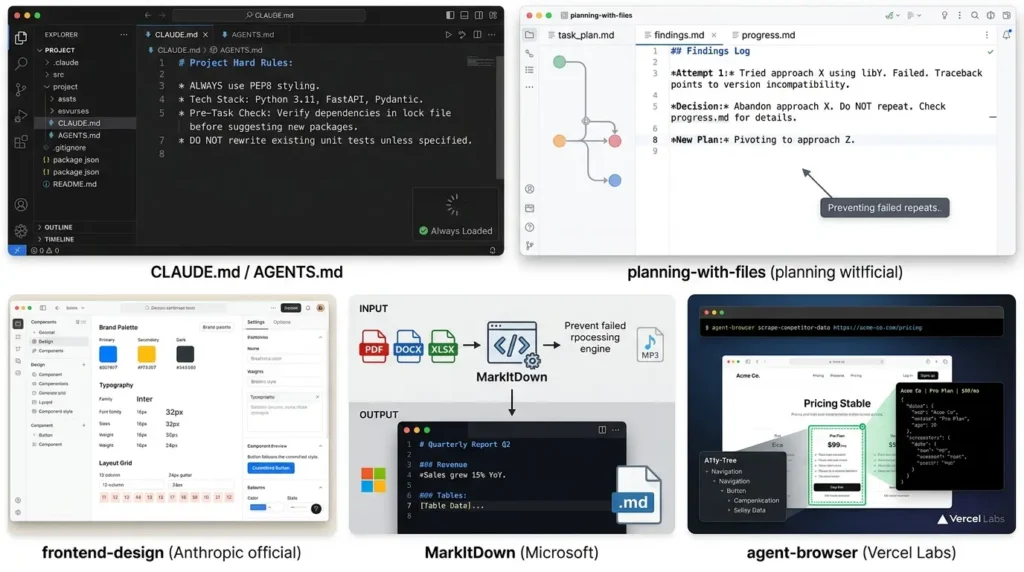
The five above are the deepest dive, but the same category of tooling is expanding fast. A few adjacent skills worth knowing about, verified against their own repositories rather than secondhand claims:
- CLAUDE.md / AGENTS.md as permanent memory: increasingly, teams define their tech stack, conventions, and hard rules in a project-level file read before the agent even starts a task, effectively a lightweight, always-loaded companion to the on-demand skills covered above.
- planning-with-files: a skill that maintains a living task_plan.md, findings.md, and progress.md on disk, specifically to prevent an agent from repeating a failing approach because it "forgot" it already tried it in an earlier part of a long session.
- frontend-design: Anthropic's own official skill, built to break agents out of the generic "purple gradient and Inter font" default look by forcing a committed design direction before any code gets written, useful alongside DESIGN.md or UIUX Pro Max rather than instead of them, since it addresses implementation-level styling choices those two don't cover on their own.
- MarkItDown: wraps Microsoft's open-source MarkItDown library as a skill, converting PDFs, Office documents, images, and audio into clean Markdown, handy for feeding non-code source material into a Graphify-style pipeline without burning multimodal tokens on every file.
- agent-browser: a CLI-driven browser automation skill from Vercel Labs that gives an agent structured, accessibility-tree-based control over a real browser, useful for research tasks like pulling competitor data into a table without hand-rolling Playwright scripts.
Common Mistakes When Adopting Agent Skills
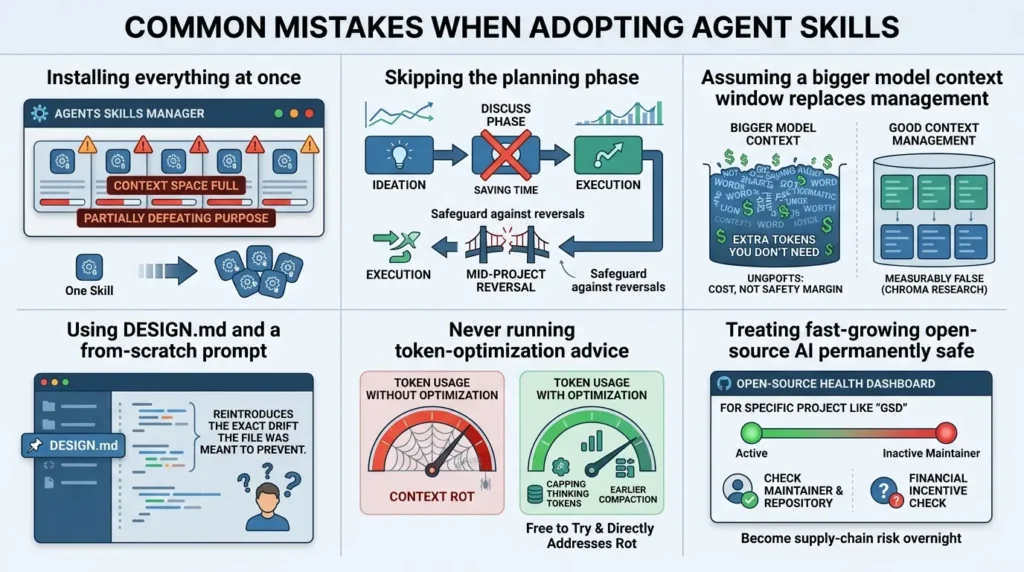
Installing everything at once
Five overlapping skills competing for the same context space partially defeats the purpose. Start with the one skill matching your current biggest pain point, confirm it's working, then add the next.
Skipping the planning phase to save time
With GSD specifically, jumping straight to execution without the discuss phase removes the exact safeguard that prevents mid-project architecture reversals.
Assuming a bigger model context window replaces good context management
Unnecessary context can increase cost and may make retrieval or instruction-following less reliable. Measure the trade-off for the model and task you use instead of assuming that every additional token is harmful or every shorter prompt is better.
Using DESIGN.md and a from-scratch style prompt in the same session
Conflicting instructions between a pinned file and an ad-hoc prompt reintroduce the exact drift the file was meant to prevent.
Never running the token-optimization advice that ships with these tools
Capping thinking tokens and triggering earlier compaction is free to try and directly addresses context rot.
Treating any fast-growing open-source AI tool as permanently safe once installed
Treat fast-moving open-source skills as dependencies that need periodic review. Check maintainer activity, release provenance, package ownership, install scripts, permissions, and security notices before updates. Popularity is not a substitute for a current supply-chain review.
Advanced Insight: Skills Are a Response to a Structural LLM Limitation, Not a Workaround
It's worth being precise about what's actually happening here, because it reframes how you should think about adopting any of these five tools.
Context rot isn't a bug that a future model update quietly fixes. Chroma's research frames it as an architectural property of how transformer attention works at scale, attention is computed pairwise across all tokens, so a 100,000-token input creates on the order of ten billion pairwise relationships to weigh, and the "lost in the middle" effect means the model systematically under-weighs facts that aren't near the start or end of that input. That's not a training deficiency; it's closer to a physical constraint of the mechanism itself.
Which means skill-based context management isn't a stopgap until models get better. It's a permanent, structural layer of any serious agentic workflow, the same way caching didn't disappear once databases got faster. The practical implication: betting your workflow entirely on next year's larger context window, instead of on disciplined context engineering today, is very likely to age poorly.
Where This Fits in the Bigger Picture
None of this is happening in a vacuum. GitHub's own Octoverse 2025 report found that roughly 80% of new developers adopt an AI coding assistant within their first week on the platform, and AI-related repositories have grown fast enough that they now make up a meaningful share of the fastest-growing projects on GitHub overall. Agent skills, MCP servers, and design-token conventions like DESIGN.md are the tooling layer catching up to that adoption curve, turning "the agent writes code" into "the agent writes code that matches your architecture, your brand, and your team's standards" without you re-explaining all three every session.
How to Stay Current on These Five Tools
Given how fast this space moves, and given what just happened with GSD's original maintainer, treat every install as something to periodically re-check, not a one-time decision. The most reliable signals, in order of how quickly they update:
- Watch the GitHub repo directly (not a third-party review site) for each tool, and enable release notifications rather than relying on star count alone as a health signal.
- Check the maintainer's own changelog or release notes before a major update, Graphify, GSD, Everything Claude Code, and UIUX Pro Max all publish these in-repo.
- Re-verify maintainer activity every three months, especially for smaller projects run by a single developer rather than an organization. This applies most strictly to any skill that has write or execute permissions on your machine. An inactive repo with a recent flurry of unrelated commits, a sudden rebrand, or a newly attached token or paid product is worth pausing on before your next update.
- Favor skills that have passed an independent security scan or carry a high number of community forks, both are practical signals that if something goes wrong, the userbase can catch it or route around it quickly, the way the GSD community did.
Bottom Line
The five projects have different licensing, hosting, package, and model-cost arrangements. Some core components are open source, while premium services, hosted dashboards, API calls, or optional backends may cost money. Check the current repository, package, and pricing pages before calling the full workflow free or estimating installation time.
Pick the one that matches your current biggest pain point using the framework above, install it, and confirm it's actually working before stacking on a second. All five are free, all install in a few minutes, and none of them require you to switch which model you're running.
If you found this useful, the natural next step is trying the one skill from the table above that matches your current workflow's weakest point this week.
Grab the 9-page cheat sheet
5 skills, 3 templates, install commands, and the security checklist — free PDF, no email required.
FAQ
What is an OpenCode skill, in one sentence?
An OpenCode skill is a directory containing a SKILL.md file with reusable instructions. OpenCode can discover skills from documented project and global locations and load them on demand through its native skill tool. A skill may also include scripts or reference files, so review its contents and permissions before installing it.
Do Claude Code skills work in OpenCode without changes?
Some Claude-compatible skills can be discovered through OpenCode’s supported .claude/skills path, but discovery compatibility is not the same as runtime compatibility. Check each skill’s hooks, commands, subagents, dependencies, permissions, and platform-specific assumptions before using it unchanged.
Is a bigger context window a substitute for these skills?
Not by itself. Chroma’s controlled long-context evaluation covered 18 language models and reported task- and model-dependent performance degradation as input length increased. The practical lesson is to manage context with focused instructions, retrieval, planning, and evaluation instead of assuming that a larger advertised window guarantees reliable coding-agent behavior.
Which skill should I install first?
Choose based on the workflow problem you can observe. Consider Graphify when repeated repository or document reads are the bottleneck; GSD when you need a staged execution workflow; DESIGN.md when an established brand system drifts between model providers; UIUX Pro Max when you need design-system recommendations; and Everything Claude Code when you need a broader agent harness. Run a small before-and-after test before adopting any option globally.
Does Graphify send my source code to an external server?
Graphify’s repository describes code parsing with Tree-sitter as a local step. Other inputs, such as documents, PDFs, images, audio, or video, may use a configured model or backend for semantic extraction. Check the selected backend and its configuration before processing sensitive material, and test the workflow in a repository with no secrets first.
Can I use DESIGN.md and UIUX Pro Max together?
Yes, they can be complementary. UIUX Pro Max can help generate or choose design-system recommendations, while DESIGN.md can record the approved tokens and rules for the project. The combination still requires human review, accessibility checks, maintenance, and a test page; neither tool guarantees that an agent will follow every rule.
Are all five of these skills free to use?
Not necessarily in the same sense. Some projects provide an open-source core, while optional hosted services, premium features, API calls, model usage, or commercial support may cost money. Check each project’s current license, package, plan, and pricing documentation before estimating the total cost.
Is it still safe to install GSD?
There is no blanket yes-or-no answer for every repository, package, or fork. Before installing GSD, verify the canonical repository, package name, recent release activity, maintainer ownership, install script, permissions, and security notices. Test it first in a disposable repository without credentials, and avoid relying on an unverified fork or an unqualified latest package.
📋 Article Timeline & History
Successfully updated on September 17, 2026 with the latest details.
This article was originally published on July 30, 2026.

Was this article helpful?
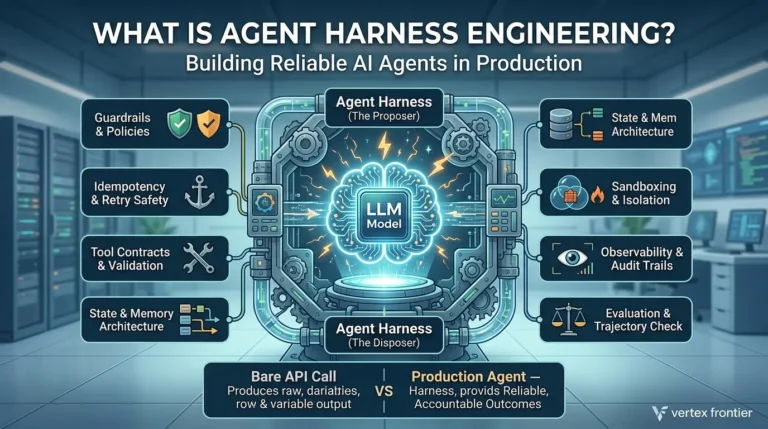
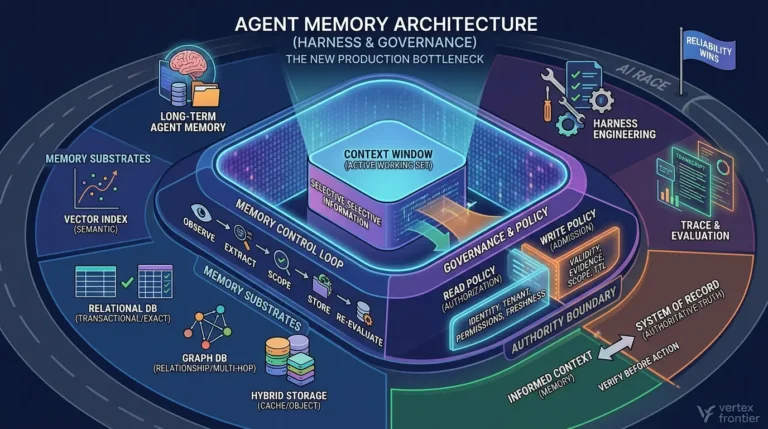
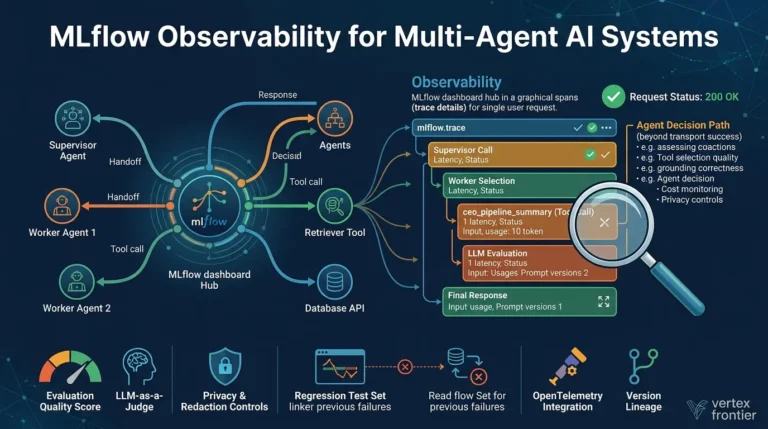





[…] For a hands-on treatment of skills, context rot, project planning, and agent-governance patterns, see Vertex Frontier’s guide to AI coding skills. […]