
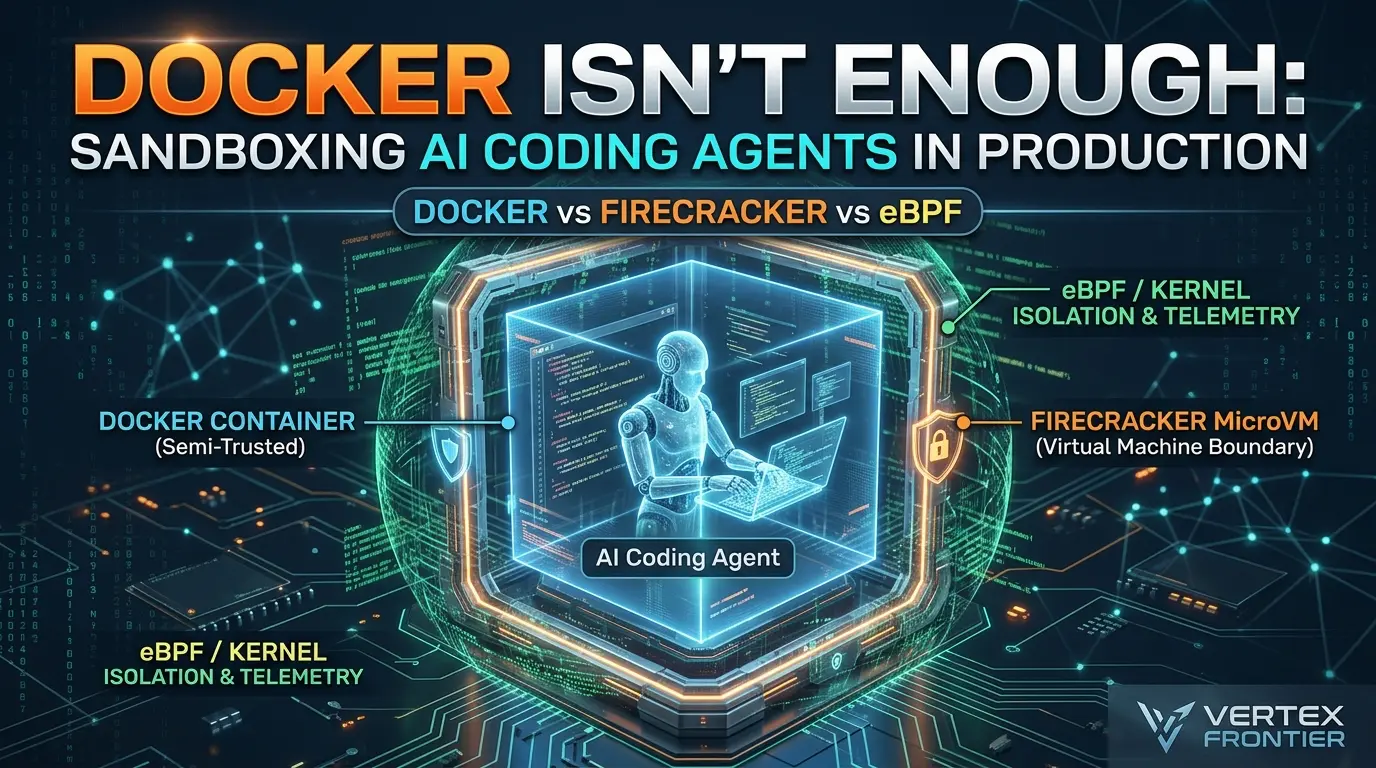

An AI coding agent is not just a chatbot that returns text. It can read a repository, write files, install packages, run shell commands, call tools, connect to APIs, and sometimes inherit credentials from the machine where it runs. A malicious dependency, poisoned README, compromised MCP server, or prompt injection can turn that capability into a path toward source-code theft, credential exfiltration, destructive changes, or lateral movement.
That is why “just run the agent in Docker” is not a complete security architecture.
Docker, Firecracker, and eBPF can all appear in an agent sandbox, but they do different jobs. Docker packages and constrains processes. Firecracker creates a small virtual machine boundary. eBPF and related Linux controls can observe or enforce selected actions inside the host kernel. Treating them as interchangeable produces misleading comparisons and dangerous deployment decisions.
This guide develops a practical decision model for production teams. It compares the three technologies by what they isolate, what they trust, what they leave exposed, and how much operational work they create. It also covers network egress, secrets, MCP tools, snapshots, resource exhaustion, observability, and the tests that matter more than a marketing claim about “secure sandboxes.”
Key Takeaways
Click any topic to expand or collapseDocker is a workload envelope, not a separate-kernel boundary
Hardened rootless containers can fit controlled semi-trusted jobs, but shared-kernel risk, mounts, capabilities, daemon access, credentials, and egress still matter.
Firecracker is a stronger outer boundary for hostile workloads
It adds KVM and a guest kernel, but operators still own host patching, jailer paths, network filtering, snapshots, scheduling, cleanup, and secrets.
eBPF is complementary, not interchangeable
seccomp-BPF, Landlock, BPF LSM, cgroup-BPF, and telemetry tools control specific surfaces; they do not automatically provide VM-level isolation.
The sandbox must cover more than the shell
MCP servers, browser tools, file APIs, hooks, language servers, credential brokers, and package services can all become alternate execution or exfiltration paths.
Benchmark completed tasks, not isolated startup claims
Include image pulls, dependency installation, workspace setup, network policy, warm pools, snapshots, telemetry, retries, and teardown.
The production answer is layered and testable
Choose the outer boundary from the threat model, broker sensitive capabilities, default-deny egress, observe the whole execution graph, and promote only reviewable artifacts.
What does sandboxing an AI coding agent actually mean?
Sandboxing an AI coding agent means placing the agent’s execution, files, tools, network access, credentials, and resource consumption inside explicitly controlled boundaries so that a mistake or compromise has a limited blast radius.
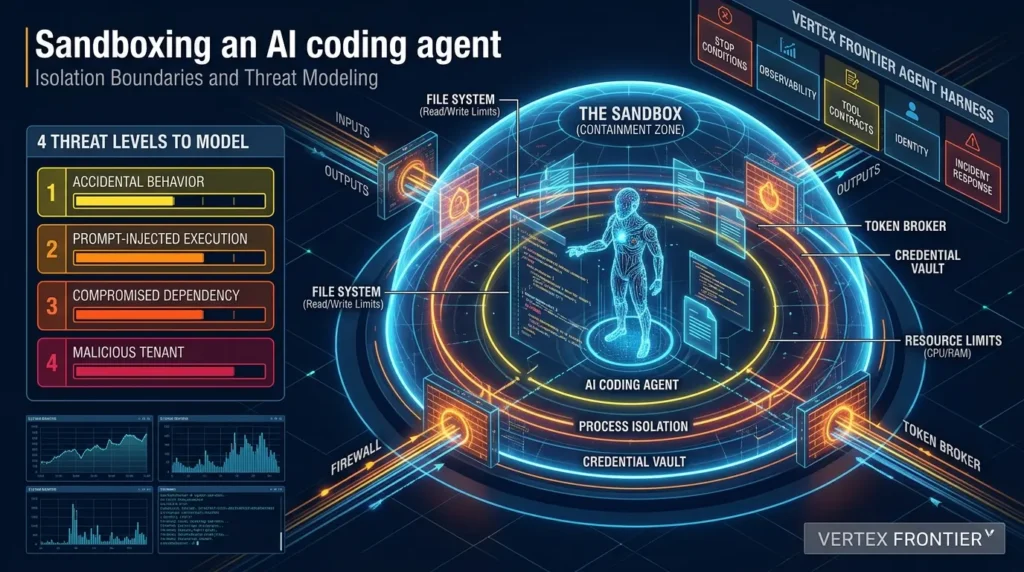
That definition is broader than “the shell runs in a container.” A useful sandbox must answer six questions:
- Which files can the agent read and modify?
- Which processes, devices, and kernel interfaces can it access?
- Where can it send network traffic, including DNS and indirect proxy traffic?
- Which credentials can it receive, for how long, and with what downstream permissions?
- What happens when it forks processes, fills the disk, floods logs, or loops forever?
- Which parts of the agent remain outside the boundary, MCP servers, browser tools, hooks, language servers, credential brokers, and control-plane APIs?
This is why the broader production-agent guidance on Vertex Frontier’s agent harness engineering guide is relevant. A sandbox is one control in the harness, not a substitute for stop conditions, tool contracts, identity, retries, observability, and incident response.
The four threat levels you should model first
The right isolation layer depends on the attacker you are willing to tolerate.
| Threat level | Typical trigger | Assets at risk | Minimum architectural question |
|---|---|---|---|
| Accidental behavior | Bad generated command or destructive tool call | Workspace, build artifacts, local files | Can the run be reset without permanent damage? |
| Prompt-injected execution | Malicious issue, README, webpage, or test output | Secrets, repository, network access | Can untrusted text influence a privileged tool? |
| Compromised dependency | Package install hook or build tool attempts escape | Host kernel, credentials, neighboring workloads | Is the shared-kernel risk acceptable? |
| Malicious tenant | Deliberate escape, exfiltration, persistence, or denial of service | Other tenants, control plane, internal services | What is the boundary if the workload actively attacks it? |
The mistake is choosing technology before choosing the threat model. A low-risk internal build task and a public service that executes arbitrary repositories should not receive the same sandbox.
AI coding-agent sandbox readiness scorecard
Use this scorecard before choosing a runtime. It is intentionally a manual assessment rather than a JavaScript calculator: the answers depend on your data flows, deployment, and risk appetite, and a static score should not pretend to make a security decision automatically.
Mark every statement that applies
Use the pattern, not the checkbox count, to choose the next design step:
| Readiness level | Typical situation | Starting architecture | Required next step |
|---|---|---|---|
| Level 1: Developer sandbox | Local, low-impact work with no sensitive credentials | Disposable, non-root container with narrow mounts | Document what is outside the boundary before sharing the workflow |
| Level 2: Controlled internal execution | Semi-trusted code on an isolated worker pool | Hardened rootless Docker, quotas, policy, and default-deny egress | Test mounts, credentials, network paths, teardown, and runtime updates |
| Level 3: Semi-trusted production | Sensitive repositories, controlled credentials, or higher tenant separation | Rootless container plus gVisor, Kata, or another stronger boundary where compatible | Validate compatibility, density, policy coverage, and incident response |
| Level 4: Hostile multi-tenant execution | Arbitrary code, mutually distrustful tenants, or unacceptable shared-kernel risk | Firecracker or VM boundary with brokered identity, egress controls, and strong telemetry | Run escape, exfiltration, resource-abuse, snapshot, and upgrade-regression tests |
This scorecard is a design aid, not a certification. If a single unchecked assumption hides a broad credential, host socket, privileged device, or uncontrolled egress path, resolve that boundary before optimizing startup time or density.
Docker, Firecracker, and eBPF are different categories
A container is not a virtual machine, and eBPF is not a generic replacement for either one.
Docker uses Linux primitives such as namespaces, cgroups, capabilities, seccomp, and security modules to restrict a process. As Docker’s security documentation explains, namespaces provide isolation views while cgroups account for and limit resources. Those controls can be very useful, but the processes still depend on the host kernel.
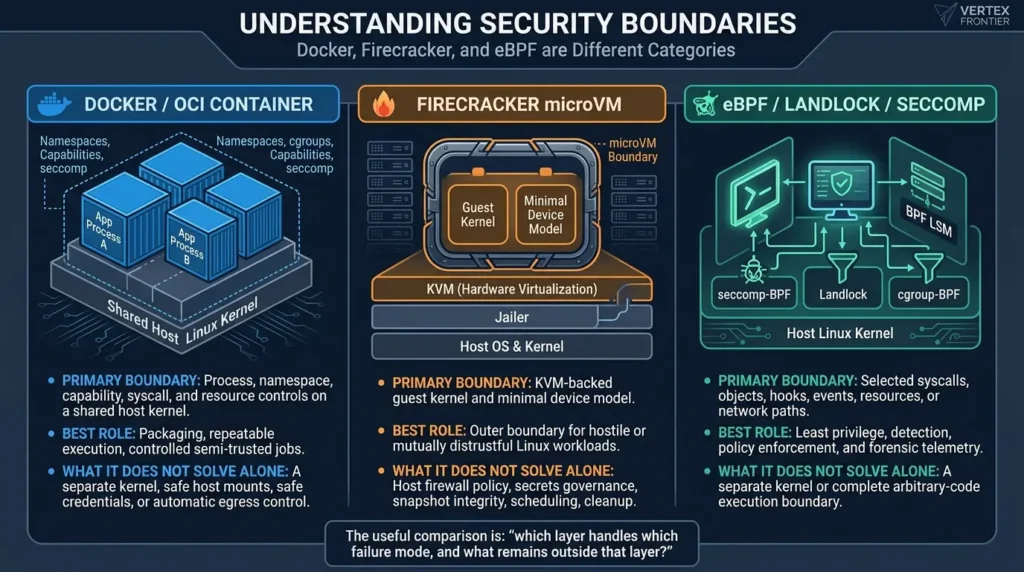
Firecracker uses KVM to run a guest kernel with a deliberately small virtual device model. Its design documentation describes a layered model that includes the VMM, jailer, seccomp, namespaces, cgroups, and privilege dropping. The boundary is materially different because the workload is not simply another process using the host kernel directly.
eBPF-related controls operate at yet another layer. seccomp-BPF filters system calls. Landlock provides an unprivileged, stackable way for a process to restrict access to selected kernel objects. BPF LSM enables privileged programs at Linux security hooks. cgroup-BPF can support resource and network policy. None of these, by itself, removes the shared kernel from the attacker’s path.
| Technology | Primary boundary | Best role | What it does not solve alone |
|---|---|---|---|
| Docker / OCI container | Process, namespace, capability, syscall, and resource controls on a shared host kernel | Packaging, repeatable execution, controlled semi-trusted jobs | A separate kernel, safe host mounts, safe credentials, or automatic egress control |
| Firecracker microVM | KVM-backed guest kernel and minimal device model | Outer boundary for hostile or mutually distrustful Linux workloads | Host firewall policy, secrets governance, snapshot integrity, scheduling, cleanup |
| eBPF / Landlock / seccomp | Selected syscalls, objects, hooks, events, resources, or network paths | Least privilege, detection, policy enforcement, and forensic telemetry | A separate kernel or complete arbitrary-code execution boundary |
The useful comparison is not “which product is most secure?” It is “which layer handles which failure mode, and what remains outside that layer?”
A control-to-test matrix for production sandboxes
Security guidance becomes much more useful when every control has a failure test. The matrix below is a test plan, not a claim that any product passes it by default.
| Control objective | Representative enforcement point | Negative test | Evidence to retain |
|---|---|---|---|
| Protect the host and neighboring workloads | VM boundary, namespaces, capabilities, seccomp, LSM policy | Non-destructive host-path, namespace, device, and syscall probes | Runtime/kernel versions, profile hashes, test logs, alerts |
| Prevent credential exfiltration | Secret broker, short-lived identity, egress proxy, destination policy | Attempt access to absent, expired, wrong-audience, and canary credentials | Broker decision, destination, identity, revocation result; never secret values |
| Control network paths | Network namespace, firewall, CNI policy, proxy, DNS controls | Direct HTTP/S, DNS, IPv6, alternate ports, redirects, metadata, and private ranges | Allow/deny decision, DNS logs, flow logs, timeout behavior |
| Contain resource abuse | cgroups, VM quotas, PID/file limits, disk and log caps | Bounded fork, memory, disk, inode, file-descriptor, and log-flood tests | Limit reached, kill latency, cleanup status, host headroom |
| Preserve reviewability | Disposable workspace, diff capture, artifact scanner, promotion gate | Crash, timeout, partial write, retry, and interrupted snapshot tests | Immutable run ID, workspace diff, artifact digest, promotion decision |
Run these tests against the exact production image, host kernel, runtime, policy, network path, and orchestration layer. A passing test demonstrates behavior under those conditions; it does not prove that every future image, kernel, workload, or version will behave identically.
Docker isolation for AI coding agents
Docker is attractive because it is familiar, scriptable, portable, and supported by a large ecosystem. It is often the fastest way to give an agent a clean workspace with predictable compilers, package managers, and test tools.
But Docker security is configuration-sensitive. The default image or command is not the architecture.
What Docker does well
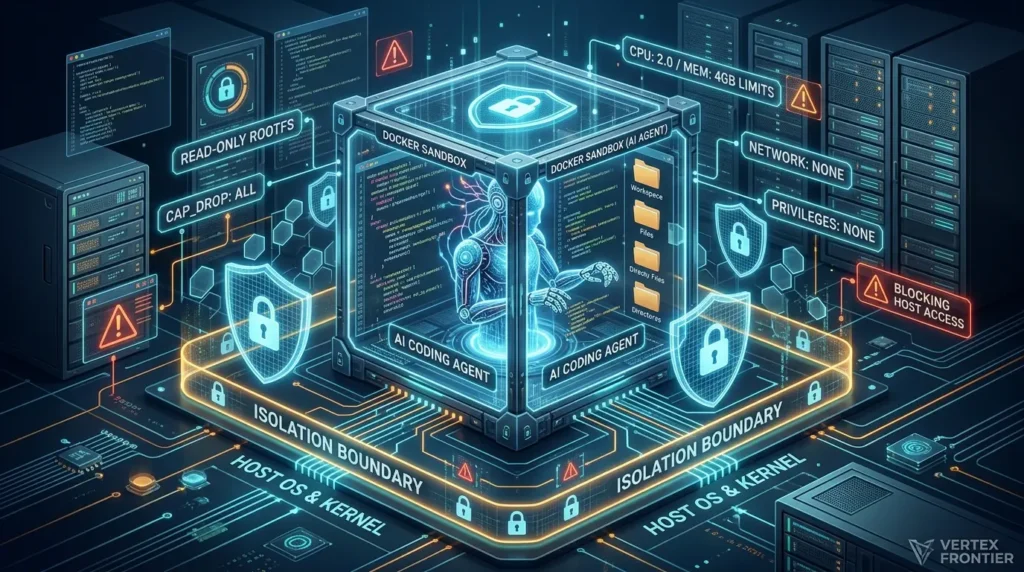
A hardened container runner can provide:
- A disposable filesystem and workspace.
- Process and network namespaces.
- CPU, memory, process-count, and I/O controls through cgroups.
- Reduced Linux capabilities.
- A seccomp profile and AppArmor or SELinux policy where configured.
- Repeatable images with digest pinning and software provenance.
- Operational integration through container events, metrics, and logs.
Docker’s rootless mode runs the daemon and containers as a non-root user inside a user namespace. That can reduce the impact of a container compromise, but it is not magic. Resource-limit enforcement depends on the host’s cgroup version, systemd configuration, and delegation. Storage and networking behavior also need to be tested on the target distribution.
The Docker settings that quietly destroy the boundary
The most dangerous configuration mistakes are not obscure kernel bugs. They are ordinary deployment choices that hand the agent access to the host.
- Mounting
/var/run/docker.sockinto the container. - Adding
--privileged. - Using host PID, host network, or broad device access.
- Mounting sensitive host paths as writable bind mounts.
- Passing long-lived cloud credentials through environment variables.
- Leaving unrestricted outbound network access enabled.
- Running the agent as root when the workload does not require it.
- Treating a mutable image tag as a supply-chain identity.
Docker’s access-control guidance is especially relevant to the Docker socket. An agent that can control a rootful Docker daemon is not safely contained; it has been given a powerful host control-plane interface.
The same principle applies to files. Docker bind mounts are writable by default. A convenient “mount the whole repository and home directory” workflow can become a credential and persistence problem.
A practical hardened-container profile
For semi-trusted workloads, a reasonable baseline is:
- Use a dedicated worker pool rather than a host that runs unrelated sensitive services.
- Prefer rootless Docker or user namespaces where the application and storage model support them.
- Run as a non-root UID and drop every capability that is not required.
- Keep the root filesystem read-only and expose a narrow writable workspace.
- Use a reviewed seccomp profile and AppArmor or SELinux policy.
- Enable
no_new_privswhere compatible with the workload. - Apply hard CPU, memory, PID, disk, inode, file-descriptor, log, and wall-clock limits.
- Deny network access by default, then allow only the package registries, Git hosts, or APIs the task needs.
- Pin image digests and verify registry, provenance, and SBOM policy.
- Destroy the workspace after the run unless an explicit review workflow preserves an artifact.
Production configuration example: The following hardened compose.yaml translates the profile above into explicit enforcement flags, locking down root filesystems, dropping all Linux capabilities, enforcing process limits, and blocking privilege escalation:
services:
  agent-runner:
    image: ghcr.io/org/agent-sandbox@sha256:4f3c7a... # Always pin immutable digests
    user: "10001:10001"                             # Enforce unprivileged execution
    read_only: true                                 # Make container root filesystem immutable
    security_opt:
      - no-new-privileges:true                      # Prevent SUID privilege escalation
      - seccomp=/etc/docker/seccomp/agent-strict.json # Deny unneeded syscalls (io_uring, raw sockets)
    cap_drop:
      - ALL                                         # Drop every Linux capability by default
    tmpfs:
      - /tmp:rw,noexec,nosuid,size=64m             # Ephemeral scratch space, non-executable
    volumes:
      # Isolate repository to an explicit, disposable mount
      - type: bind
        source: /srv/workspaces/run-492a
        target: /workspace
        read_only: false
    deploy:
      resources:
        limits:
          cpus: "2.0"
          memory: 4096M
          pids: 128                                 # Mitigate fork bombs
    network_mode: none                              # Default-deny egress; pipe via broker proxy if needed
    logging:
      driver: "json-file"
      options:
        max-size: "10m"                             # Cap disk flooding from stdout/stderr
        max-file: "2"
The Docker resource-constraint documentation explains why these limits matter: without them, a container can consume enough memory, processes, or disk to harm the host even without escaping.
Firecracker microVMs: a stronger outer boundary
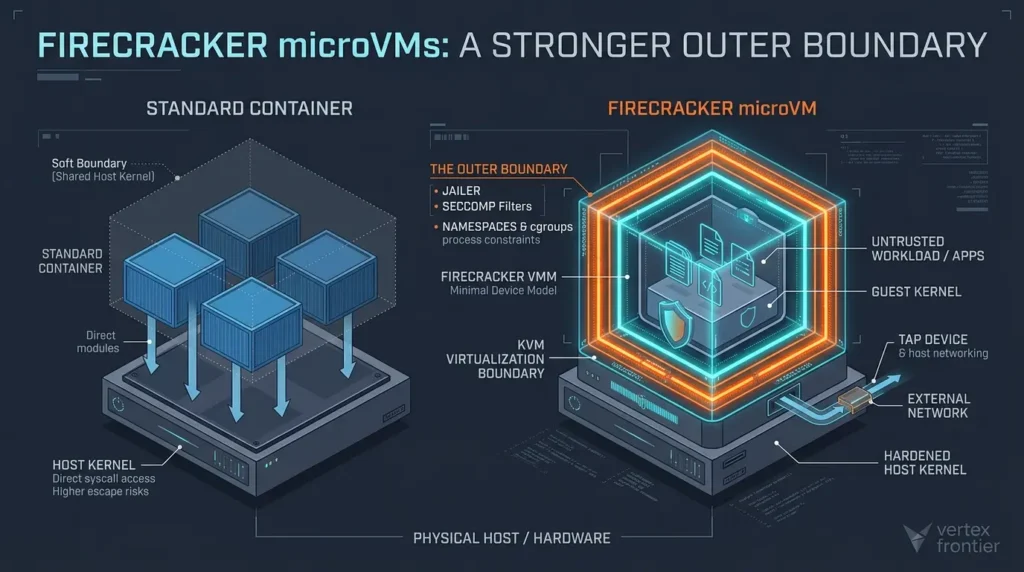
Firecracker is designed for workloads that should not be treated as ordinary host processes. Its minimal device model reduces the amount of emulated hardware exposed to the guest, while KVM provides a guest-kernel boundary. The project’s production host setup guide makes clear that production hardening also includes the jailer, host and guest patching, microcode, permissions, resource limits, and operational controls.
What Firecracker changes
With a container, the attacker’s code uses the host kernel directly through a constrained interface. With Firecracker, the code runs inside a guest kernel. That does not eliminate vulnerability, but it changes the class of escape that the attacker must find.
Firecracker combines:
- KVM virtualization.
- A minimal virtual device model.
- A jailer that creates a chroot/pivot-root environment and applies process constraints.
- Seccomp filters for the VMM.
- Namespaces and cgroups around the Firecracker process.
- TAP-backed networking.
- File-backed virtual disks.
- Optional snapshots for warm startup and cloning.
The operational cost is that your platform now owns more than a container image. It must manage kernels, root filesystems, TAP interfaces, API sockets, jailer paths, disk images, snapshots, quotas, identity, scheduling, and cleanup.
The Firecracker details demos often omit
Networking is external. Firecracker does not act as your egress firewall. The guest connects through a TAP device and host networking. You still need host firewall rules, network namespaces, an egress proxy, or an equivalent policy layer. Block cloud metadata and internal ranges where appropriate, and test IPv4, IPv6, DNS, UDP, redirects, and proxy bypass, not only a single HTTP request.
Jailer inputs are security-sensitive. Paths, kernel images, root filesystems, configuration, and jail directories must be trusted and protected from untrusted writes. A 2026 jailer advisory documented how symlink handling and writable pre-created directories could become a host-file overwrite path under specific conditions. That is a reminder that a microVM control plane has its own attack surface.
A typical jailer invocation must explicitly drop privileges to a dedicated UID/GID, pivot the root filesystem into a clean chroot environment, and isolate the network namespace before starting the VMM:
# Launch Firecracker via the jailer with isolated chroot and unprivileged UID
jailer --id agent-task-8831 \
       --exec-file /usr/bin/firecracker \
       --uid 10002 \
       --gid 10002 \
       --chroot-base-dir /srv/jailer \
       --netns /var/run/netns/agent-netns-8831 \
       --daemonize \
       -- \
       --config-file /srv/jailer/agent-task-8831/root/vm_config.json
Snapshots are data. Firecracker snapshots contain guest memory and VMM/KVM state while block files remain external. Snapshot files must be authenticated, access-controlled, encrypted where appropriate, and treated as sensitive artifacts. If a snapshot contains a token, identity material, or application state, cloning it can duplicate more than a filesystem.
Startup figures are conditional. Firecracker documentation includes small-configuration figures such as a startup path of up to 125 ms from InstanceStart to guest /sbin/init and low VMM overhead under specified conditions. Those figures do not represent the end-to-end time to obtain an agent, pull dependencies, mount a workspace, establish networking, initialize tools, and run a coding task. Benchmark the complete workflow.
The 2020 Firecracker paper from USENIX remains useful for understanding the design goals, but historical benchmark conditions should not be presented as a current production SLA.
When Firecracker is worth the complexity
Choose a microVM outer boundary when:
- The agent executes arbitrary public or customer-supplied repositories.
- Tenants are mutually distrustful.
- A shared-kernel escape would have unacceptable consequences.
- The workload is short-lived and disposable.
- You can control the Linux/KVM host fleet and patch cadence.
- You need a stronger boundary but still want high-density, programmatic execution.
Firecracker may be a poor fit for workloads that need Windows, GPUs, unusual hardware, nested virtualization, broad device access, or highly interactive long-lived state. The answer may then be a different VM model, gVisor, Kata, a managed code-execution service, or a dedicated host.
Firecracker strengthens the execution boundary, but it does not remove the need for a trustworthy scheduler, egress policy, secret broker, artifact pipeline, and patched host.
gVisor vs Firecracker: Choosing the middle ground
Many teams find themselves caught in a dilemma: hardened Docker shares the host kernel, while Firecracker introduces substantial operational baggage (managing custom kernels, TAP devices, and root filesystems). This is where application kernels like gVisor (runsc) and container-native microVMs like Kata Containers act as a pragmatic middle ground.
| Dimension | gVisor (runsc) | Firecracker microVM | Kata Containers |
|---|---|---|---|
| Boundary Type | User-space guest kernel in Go (Sentry/Gofer) | KVM-backed guest Linux kernel + Jailer | Hardware virtualization (QEMU / Cloud-Hypervisor) |
| Ecosystem Integration | Drop-in OCI runtime (works with standard Docker/K8s) | Requires custom orchestration or specialized managers | Native Kubernetes CRI (via runtimeClassName) |
| Syscall Performance | High intercept overhead on I/O-heavy builds & compiles | Near-native guest execution via KVM | Near-native guest execution via KVM |
| Best Fit for AI Agents | Multi-tenant SaaS needing standard OCI images without VM overhead | High-density hostile code runners with custom guest kernels | Kubernetes clusters running mixed trusted/untrusted pod fleets |
When to choose gVisor over Firecracker: If your AI agent workflows rely on standard OCI containers, familiar registries, and existing Kubernetes/Docker tooling, gVisor eliminates shared-kernel escape paths by intercepting application system calls inside a memory-safe user-space kernel (written in Go). It requires no guest kernel image builds or complex network bridging.
git clone, unpacking deeply nested npm packages, invoking compilers, and running test suites with thousands of small file reads. In gVisor, this filesystem churn can trigger measurable CPU and latency overhead compared to Firecracker’s direct guest page cache. Benchmark your language runtime before standardizing on gVisor.Where eBPF fits and where it does not
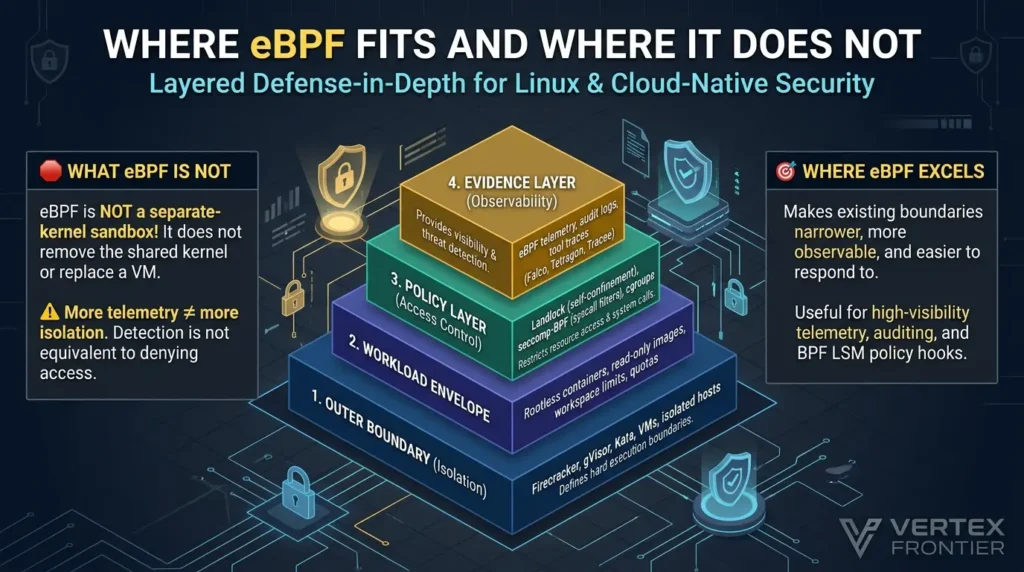
“eBPF sandbox” is often used too broadly. The first step is to identify the control surface.
seccomp-BPF: restrict system calls
seccomp filters system-call entry and can allow, deny, kill, log, trap, or delegate selected calls. It is powerful for reducing the kernel interface exposed to a process, but it does not provide a complete filesystem policy, remove the shared kernel, or automatically cover every process and helper in a toolchain.
A profile that works for a simple compiler may break when the agent invokes a language server, package manager, debugger, clone3, io_uring, or an architecture-specific syscall. Treat the profile as versioned code. Test it against the actual runtime, architecture, libc, workload, and child-process tree.
Landlock: self-confinement for selected resources
Landlock is an unprivileged, stackable Linux security module interface. A process can restrict its own access to filesystem and other supported objects, subject to the kernel ABI available on the host. It is useful for a launcher or tool that can safely reduce its own rights.
It is not a replacement for a VM. It does not eliminate the shared kernel, and its supported features vary by ABI and kernel configuration. Feature-detect the ABI, fail closed where the policy requires it, and test symlinks, file descriptors, path traversal, inherited directories, and child processes.
BPF LSM, cgroup-BPF, and runtime telemetry
BPF LSM programs attach to Linux security hooks and should be treated as privileged host policy. cgroup-BPF can help enforce scoped network or resource rules. Tools such as Falco, Tracee, and Tetragon can expose process, file, network, and security events, with varying enforcement and kernel requirements.
The contrarian point is simple: more telemetry does not equal more isolation. A perfect event stream that detects exfiltration after the credential has left the host is not equivalent to denying the access in the first place. eBPF is most valuable when it closes a specific policy or detection gap around a stronger execution boundary.
A layered design may therefore look like this:
Use eBPF to make a boundary narrower, more observable, and easier to respond to. Do not describe a host-kernel policy hook as a separate-kernel sandbox.
A layered production architecture
The strongest design is usually not one technology. It is a chain of boundaries in which each layer has a clear owner and failure mode. The outer runtime limits the blast radius; the policy layer narrows allowed actions; the broker controls sensitive capabilities; and the evidence layer makes unexpected behavior visible.
The arrows represent a control flow, not a guarantee that every component must run inside the same process or VM. In many systems, the broker, scheduler, telemetry, and promotion gate should remain outside the workload boundary so a compromised agent cannot rewrite its own policy or erase its evidence.
The overlooked boundary: tools, credentials, and egress
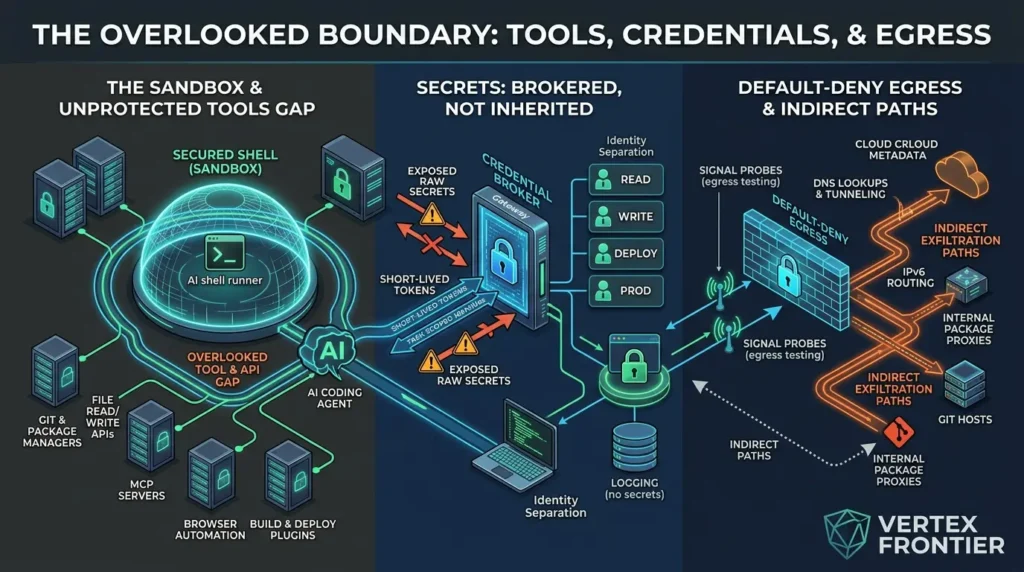
Many sandbox designs protect the shell but leave the agent’s other tools outside it. That is a serious coverage gap.
An AI coding agent may use:
- A shell runner.
- File read/write APIs.
- Git and package managers.
- MCP servers.
- Browser automation.
- Language servers.
- Build and deployment plugins.
- Credential helpers.
- Background hooks or update processes.
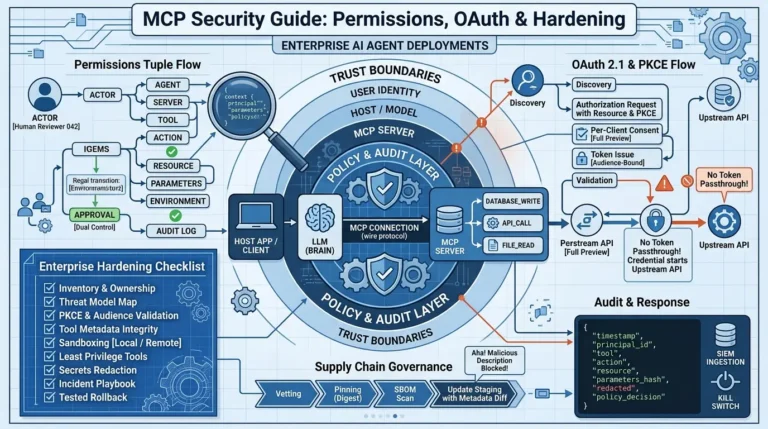
If only the shell is isolated, a file tool or MCP server may still read the repository, call a privileged API, or send data through an approved network path. Vertex Frontier’s MCP security guide is useful here because it treats MCP as a trust boundary rather than a security product.
Secrets should be brokered, not inherited
A strong sandbox cannot make an intentionally exposed credential safe. If the agent can read a token and reach the token’s authorized destination, it can potentially exfiltrate or misuse that token.
Prefer:
- Short-lived, task-scoped credentials.
- Audience- and resource-bound tokens.
- A broker that approves narrowly defined operations rather than exposing raw secrets.
- Separate identities for read, write, deploy, and production access.
- No credentials baked into images or snapshots.
- Logs that record the tool action without recording secret values.
- Immediate revocation when the run ends or fails.
Default-deny egress is an engineering test, not a checkbox
“Network disabled” can be misleading if DNS, an internal package proxy, metadata endpoints, IPv6 routes, or a host-side service still provide an indirect path.
A production egress test should check:
- Direct HTTP and HTTPS.
- DNS lookups, including unusual record types.
- IPv4 and IPv6.
- UDP and ICMP where the environment supports them.
- Cloud metadata addresses.
- Private and link-local ranges.
- Package registries and Git hosts.
- HTTP redirects and alternate ports.
- Proxy environment variables and transparent proxies.
- DNS tunneling or high-volume query behavior.
The OpenAI report on the Hugging Face incident and the later report on an agent reaching an external chatbot through DNS demonstrate why indirect paths deserve attention. These incidents are not a benchmark of every sandbox, but they are useful reminders that “no direct internet” is not the same as “no exfiltration path.”
Production comparison: security, speed, and operational cost
There is no honest universal winner. The choice is a function of threat model, workload compatibility, density target, team expertise, and what failure would cost.
| Decision factor | Hardened Docker | Firecracker | eBPF / Linux policy |
|---|---|---|---|
| Boundary | Shared host kernel | Guest kernel through KVM | Host-kernel controls and hooks |
| Packaging | Excellent | Requires image/rootfs and VM lifecycle | Not a packaging system |
| Host escape impact | Depends heavily on runtime, kernel, privileges, mounts and daemon exposure | Stronger process/guest boundary, but VMM, KVM and host remain critical | Still shares host kernel |
| Startup and density | Often efficient, workload-dependent | Designed for lightweight VMs; measure end to end | Adds policy/telemetry overhead; no workload lifecycle |
| Compatibility | Usually high for Linux workloads | Guest kernel, device, filesystem and KVM constraints | Kernel, ABI, architecture and profile sensitivity |
| Best use | Controlled semi-trusted jobs | Hostile or multi-tenant execution | Least privilege, monitoring and response |
A better way to estimate cost
Do not compare only the price of a CPU-second or the launch time of an empty sandbox. The useful unit is cost per completed, verified task.
Include:
- Cold image or rootfs pulls.
- Warm-pool idle capacity.
- Snapshot and disk storage.
- Network egress.
- Dependency installation.
- Retry and failure rates.
- Telemetry storage.
- Scheduler and SRE effort.
- Patch, drain, and rollback operations.
- Time spent resolving compatibility failures.
A microVM that starts quickly but requires large snapshots and a complex control plane may cost more than a container for a low-risk internal job. A cheap container that exposes a long-lived credential or shared host may be the more expensive choice after an incident.
A benchmark protocol teams can actually reproduce
If you need to compare Docker, Firecracker, gVisor, Kata, or a managed sandbox, publish the conditions before publishing the result. At minimum, record:
- Host CPU model, RAM, storage, kernel, architecture, virtualization support, and runtime versions.
- Guest kernel, rootfs or image digest, language runtimes, dependency cache state, and workspace size.
- The same repository, task prompt, tool set, network policy, credential policy, and telemetry configuration.
- Cold start, warm start, snapshot restore, task completion, teardown, failure, and retry timings.
- Concurrency, CPU and memory limits, disk pressure, network latency, image-pull state, and warm-pool occupancy.
- Success criteria: completed task, correct test result, policy compliance, artifact integrity, and clean teardown, not merely process launch.
Report distributions such as median and tail latency only when you have enough repeated runs and preserve the raw run records. If those conditions are unavailable, publish the protocol and assumptions rather than a universal number. This is the highest-confidence comparison possible without claiming hands-on results that were not collected.
| Worksheet metric | What to record | Why it matters |
|---|---|---|
| Cold start | Request accepted to agent-ready state with no warm cache | Real first-run latency |
| Warm start | Agent-ready state with the declared image, rootfs, and dependency cache | Warm-pool efficiency and idle-capacity cost |
| Snapshot restore | Restore request through network-ready and tool-ready state | Clone, resume, storage, and compatibility cost |
| Workspace setup | Repository transfer, dependency installation, and tool initialization | Often dominates an empty-sandbox launch measurement |
| Task completion | Correct tests, policy compliance, artifact integrity, and clean result | Measures user-visible success rather than process launch |
| Retry and teardown | Failed runs, retry reason, cleanup time, and residual resources | Reliability, capacity recovery, and operational cost |
| Cost per completed task | Compute, storage, egress, telemetry, idle pool, and operator overhead | More meaningful than raw CPU-second price |
Two documented production lessons
Lesson 1: Firecracker performance numbers are not agent performance numbers
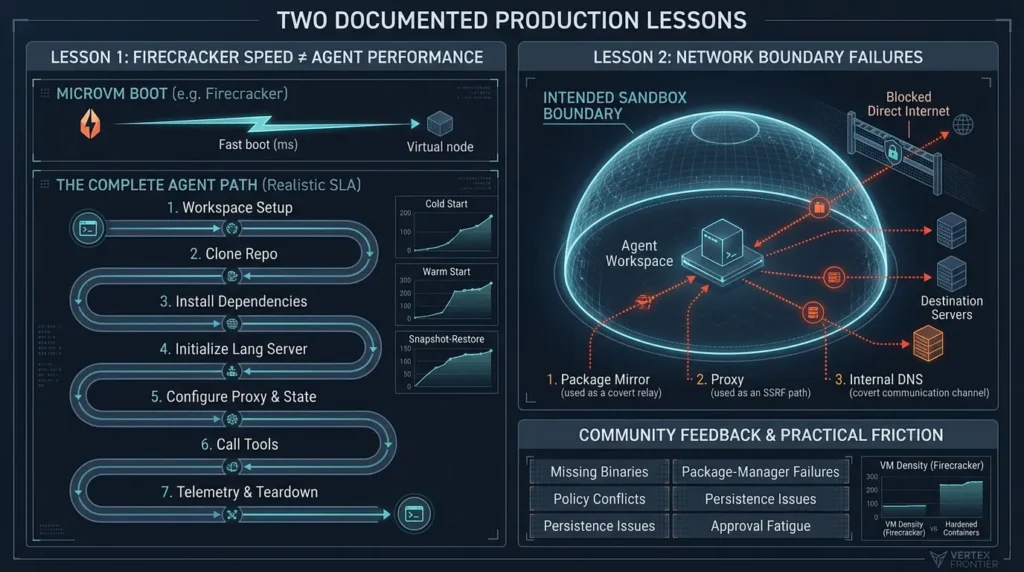
Firecracker’s published design and specification material shows why microVMs can be attractive for dense, short-lived workloads. But a coding agent does more than boot /sbin/init: it may wait for a workspace, clone a repository, install dependencies, initialize a language server, configure an egress proxy, restore state, and call several tools.
The lesson is methodological. Measure the complete agent path under cold, warm, and snapshot-restore conditions. Record image size, workspace size, cache state, concurrency, disk pressure, network policy, telemetry, and teardown time. Do not turn a component-level startup figure into a user-facing SLA.
Lesson 2: Network boundaries fail through ordinary internal services
The OpenAI reports linked above describe cases where agent activity reached beyond an intended boundary through internal package or DNS paths. The important lesson is not that one product or team used the wrong tool. It is that a sandbox boundary includes every service that can relay data, not only the obvious internet interface.
That changes the test plan. A security review should ask whether the agent can use a package mirror as a message board, a proxy as an SSRF path, DNS as a covert channel, or an internal service as a bridge to a destination that the sandbox itself cannot reach.
What the community adds
Reddit and YouTube discussions repeatedly surface practical friction that formal documentation often underplays: missing binaries, package-manager failures, broken network assumptions, policy conflicts, persistence problems, and approval fatigue. They also disagree about the right boundary. Some operators favor hardened containers for density; others reserve Firecracker or a VM for genuinely hostile code.
That disagreement is useful. It shows that the “best sandbox” depends on the asset at risk and the failure you are willing to accept. Community reports should guide test cases and design questions, not replace primary documentation or a workload-specific benchmark.
A step-by-step production design
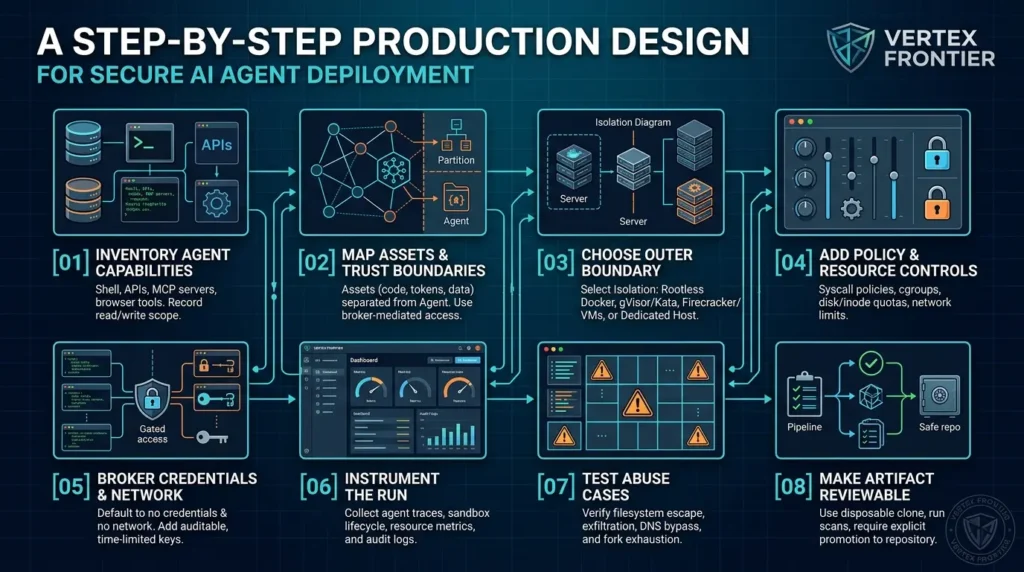
Step 1: Inventory the agent’s real capabilities
Write down every tool and process, not only the shell command. Include file APIs, MCP servers, browser tools, hooks, language servers, package managers, credential helpers, update channels, and the control-plane API.
For each capability, record the data it can read, the network destinations it can reach, whether it can write persistent state, and whether it runs inside or outside the sandbox.
Step 2: Map assets and trust boundaries
Separate source code, developer credentials, cloud tokens, production data, internal metadata, build artifacts, logs, snapshots, images, and neighboring tenants. Then decide which assets the agent should never receive, which may be accessed through a broker, and which can be exposed temporarily.
The agentic AI security guide on Vertex Frontier is a useful companion for this part because it connects least privilege, non-human identity, tool access, and operational risk.
Step 3: Choose the outer boundary
Use a practical rule:
- Hardened rootless Docker: semi-trusted internal repositories and controlled worker pools.
- gVisor or Kata: when you need a stronger boundary but want a container-oriented interface or different compatibility trade-offs.
- Firecracker or a full VM: hostile public code, strong tenant separation, sensitive multi-tenant infrastructure, or unacceptable shared-kernel risk.
- Dedicated host: when hardware, performance, or legacy compatibility makes virtualization impractical and the isolation responsibility can be accepted explicitly.
Step 4: Add policy and resource controls
Apply filesystem restrictions, syscall policy, capabilities, user namespaces, cgroup quotas, PID limits, disk and inode quotas, wall-clock timeouts, log caps, and network policy. If you use Landlock, seccomp, BPF LSM, or cgroup-BPF, record the kernel and ABI assumptions and test failure behavior.
Step 5: Broker credentials and network access
Default to no credentials and no network. Add one narrowly scoped capability at a time. Make every exception auditable, time-limited, and revocable.
Step 6: Instrument the run
Collect agent tool traces, sandbox lifecycle events, resource metrics, network decisions, kernel audit or eBPF events, image provenance, and workspace diffs. Keep sensitive values out of logs and snapshots.
Step 7: Test abuse cases before production
Run non-destructive tests for filesystem escape, host-path discovery, capability misuse, syscall gaps, fork and memory exhaustion, disk fill, log flooding, DNS and proxy bypass, metadata access, secret exfiltration, stale approval, and teardown failure.
Step 8: Make the artifact reviewable
The safest coding-agent workflow is often not “let the agent modify the real checkout.” Use a disposable clone, preserve a diff, run tests, scan the result, and require an explicit promotion step before changes reach a trusted repository or deployment system. This improves reversibility, but remember that copy-on-write and diff review do not stop exfiltration or a host escape during execution.
Before and after: a realistic architecture change
Before: An agent runs in a rootful Docker container, mounts the host repository and Docker socket, receives a cloud token through the environment, and has unrestricted outbound HTTPS. The container has a memory limit, so the team calls it “sandboxed.”
After: The agent runs in a disposable rootless workload inside a Firecracker-backed worker. The workspace is a narrow copy, the root filesystem is read-only, capabilities are dropped, syscall and filesystem policies are tested, network access is default-deny, credentials arrive through a short-lived broker, and the resulting diff is reviewed before promotion. eBPF or equivalent host telemetry records unexpected process, file, and network activity, while a kill switch destroys the run and revokes its identity.
The second design is not invulnerable. It is better because each important assumption is explicit and testable.
Common mistakes to avoid
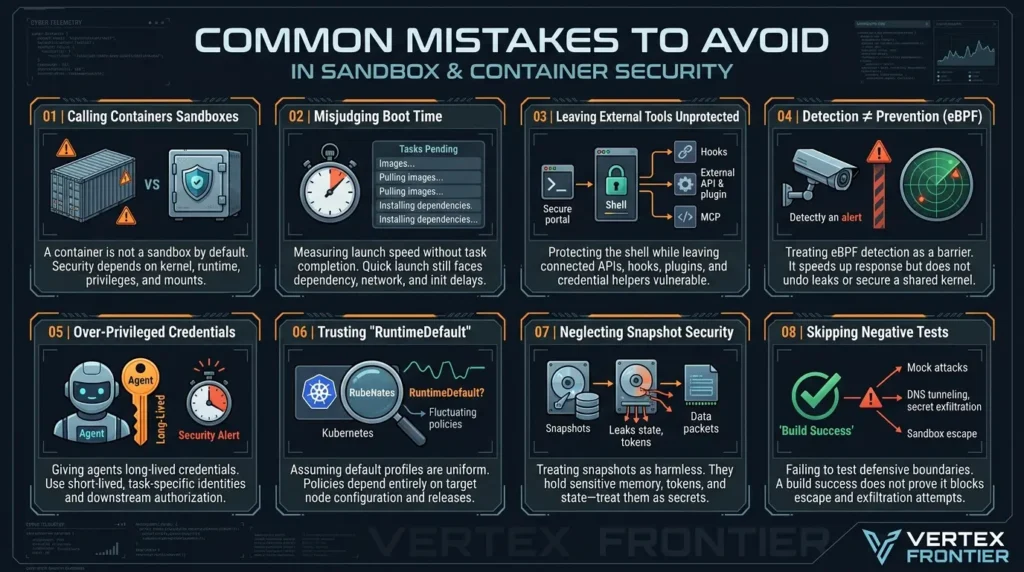
Mistake 1: Calling every container a security sandbox
A container can be a useful security layer, but its strength depends on kernel, runtime, privileges, mounts, devices, policies, and daemon exposure. State the exact configuration and threat model.
Mistake 2: Comparing boot time without measuring task completion
A sandbox that launches quickly may still spend most of the run pulling images, installing dependencies, restoring snapshots, initializing tools, or waiting for a network policy decision.
Mistake 3: Protecting the shell while leaving tools outside
Review MCP servers, browser automation, file APIs, hooks, plugins, language servers, and credential helpers as part of the same execution graph.
Mistake 4: Treating eBPF detection as prevention
Detection can shorten response time. It does not undo a credential leak or make a shared kernel equivalent to a guest kernel.
Mistake 5: Giving the agent long-lived credentials
A sandbox cannot safely hold a credential whose permissions are broader than the task. Use short-lived identities and downstream authorization.
Mistake 6: Trusting a name such as RuntimeDefault
Kubernetes documentation explains that runtime profiles and sandbox implementations depend on the configured runtime and release. Inspect the effective profile on the target node; do not assume the same name means the same policy everywhere.
Mistake 7: Treating snapshots as harmless caches
A snapshot can contain memory, state, tokens, identity material, and sensitive files. Apply the same access control and lifecycle discipline as any other secret-bearing artifact.
Mistake 8: Skipping negative tests
A successful build proves that the sandbox supports the build. It does not prove that it blocks metadata access, DNS tunneling, secret exfiltration, fork bombs, host paths, or runtime escape attempts.
Production readiness checklist
Use this shorter checklist as a release gate after completing the deeper threat model and control-to-test matrix. A “yes” answer means the control is implemented and tested, not merely documented.
If any critical item is “no,” do not compensate by calling the system “sandboxed.” Record the residual risk, reduce the agent’s capabilities, or move to a stronger boundary before production exposure.
A compact decision guide
Use this decision sequence before selecting an implementation:
- Is the code hostile or only error-prone? If hostile, start with a microVM, VM, or managed strong sandbox rather than assuming a normal container is enough.
- Does the task require a shared kernel feature, device, GPU, or unusual compatibility? If yes, test gVisor, Kata, VM, or a controlled container against the exact workload.
- Can the agent operate with no credentials and default-deny network access? If not, design the broker and egress path before choosing the runtime.
- Can every tool be placed under the same policy? If not, document the unprotected paths and reduce their permissions.
- Can you patch and test the boundary continuously? If not, the theoretical security of the runtime will not survive version drift.
- Can you afford the operational model? Include snapshots, warm pools, storage, telemetry, scheduling, incident response, and compatibility work.
Conclusion: choose the boundary you can operate honestly
The production question is not whether Docker, Firecracker, or eBPF is the winner. It is whether your architecture matches the attacker, the assets, and the failure you are trying to contain.
Docker is a practical workload envelope and packaging system. Firecracker is a strong candidate for the outer boundary of hostile, short-lived, multi-tenant Linux execution. eBPF and related Linux controls are valuable for least privilege, network and resource policy, detection, and response. None of them removes the need to control tools, credentials, egress, artifacts, patching, and recovery.
The most defensible design is layered and testable: choose the outer boundary from the threat model, use the lightest inner controls that the workload supports, broker every sensitive capability, observe the whole execution graph, and promote only reviewable artifacts.
That is the difference between an agent that merely runs in a sandbox and an agent platform that can be trusted in production.
FAQs: Sandboxing AI coding agents
Is Docker secure enough for AI coding agents?
Sometimes. Hardened rootless Docker can be appropriate for controlled, semi-trusted workloads on a dedicated worker pool. It is a weaker fit when arbitrary hostile code, broad credentials, mutually distrustful tenants, privileged devices, or unacceptable shared-kernel risk are in scope. The answer depends on configuration and threat model, not the word “Docker.”
Is Firecracker safer than Docker?
Firecracker provides a different and generally stronger outer execution boundary through KVM and a guest kernel, but “safer” is incomplete without conditions. Firecracker still depends on patched hosts, KVM, jailer permissions, snapshot integrity, network filtering, secret governance, scheduling, and cleanup. It is not a turnkey security platform.
Is eBPF a sandbox?
eBPF is a family of kernel mechanisms and tools, not one sandbox product. seccomp-BPF, Landlock, BPF LSM, cgroup-BPF, and observability tools control different surfaces. They can narrow permissions and improve detection, but they do not automatically provide a separate kernel or complete arbitrary-code isolation.
Should MCP servers run inside the sandbox?
There is no universal placement rule. The important question is whether each MCP server has access to the same files, credentials, network, and control-plane actions as the agent. High-risk or untrusted servers should be isolated or mediated. Trusted brokers should expose narrow operations rather than raw credentials or unrestricted APIs.
How do you prevent an AI agent from exfiltrating secrets?
The strongest first step is not to provide the secret. Where access is necessary, use short-lived, narrowly scoped credentials through a broker, default-deny egress, explicit allowlists, DNS and metadata tests, and telemetry for unexpected access. No sandbox can make an intentionally exposed and broadly authorized credential harmless.
Do read-only filesystems stop agent attacks?
No. They reduce certain persistence and modification risks, but they do not prevent network exfiltration, misuse of allowed credentials, attacks against reachable services, resource exhaustion through writable paths, or kernel/runtime exploitation.
Are Firecracker’s startup numbers valid for coding agents?
Not automatically. Published Firecracker figures are conditional measurements of specific VM startup paths or configurations. A coding-agent workflow adds image, workspace, dependency, network, tool, telemetry, and teardown time. Measure cold, warm, and snapshot-resume task completion under your exact workload.
What should be tested before deploying an agent sandbox?
Test filesystem and process boundaries, capabilities, syscalls, host paths, network and DNS egress, metadata access, proxy bypass, credentials, package hooks, resource exhaustion, logs, snapshots, teardown, policy drift, and escape regressions. Repeat the tests after runtime, kernel, policy, image, and orchestration upgrades.

Was this article helpful?



[…] or runtime privileges. It can make coding, browsing, data transformation, and testing safer. But “the agent runs in a container” is not a complete security […]
[…] harness engineering, which covers the control loop, guardrails, tool contracts, retries, state, sandboxing, and incident runbook around the model. Observability is the evidence plane; the harness is the […]