

In the first two weeks of June 2024, three announcements changed where Iceberg tables would live. Snowflake unveiled Polaris at its annual conference. On June 4, Databricks announced it had agreed to acquire Tabular, the company founded by Iceberg’s original creators. Eight days later, Databricks said it would open-source Unity Catalog.
The table format fight was over. The catalog fight had started.
Two years on, the picture is less tidy than the press releases suggested. Polaris is an Apache top-level project. Snowflake’s documentation tells new customers to use a different catalog. Dremio’s own editor’s note says Nessie’s development has slowed. And Snowflake can write to Unity-managed Iceberg tables on Azure.
This guide is for the engineer or architect who has to pick one of these and live with it. You get a clear model of what a catalog owns, the documented limits of each option, a sync-and-federation playbook, a write-path test protocol you can run yourself, and a decision tool. The article contains no benchmarks, because none were run. Where a claim comes from a vendor, it is attributed.
Why the catalog is the Iceberg decision that ages with you
Most Iceberg advice starts at the data files. Parquet layout, partition specs, compaction. That is the right place to start for performance. It is the wrong place to start for regret.
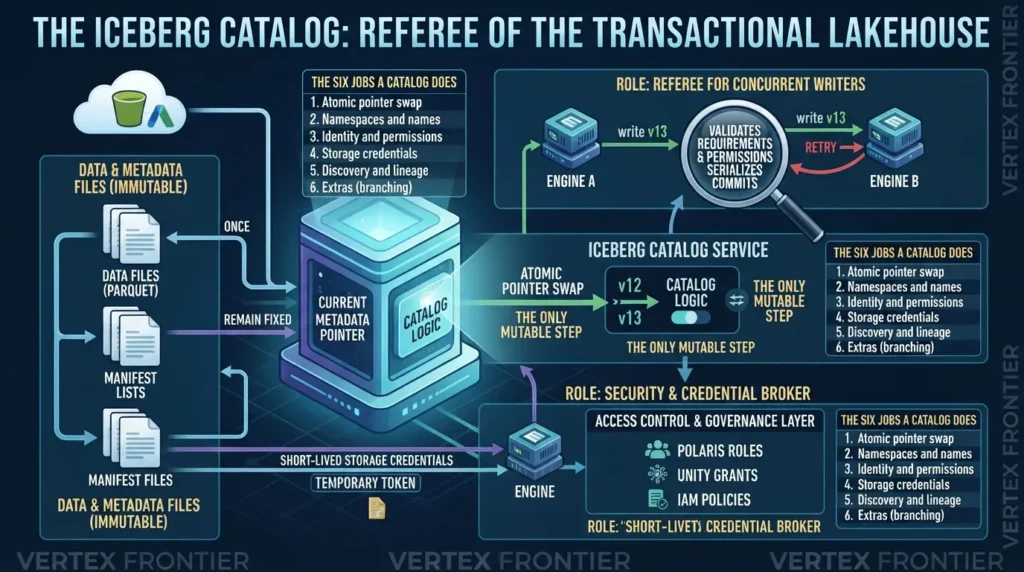
Here is the structural fact that explains the regret. Almost everything in an Iceberg table is immutable. Data files, manifests and metadata files are written once and never edited. Exactly one thing changes: the pointer to the current meta file. The Iceberg table spec leaves that pointer to the catalog.
What is an Iceberg catalog?
An Iceberg catalog is the service that maps a table name to the location of its current metadata file and updates that location atomically on every commit. Engines ask it where a table is, and ask it to swap the pointer when they write. Most catalogs also manage namespaces, access control and storage credentials.
The atomic swap, step by step
Every write in Iceberg ends the same way, whatever engine you use:
- The writer reads the table’s current metadata (call it v12).
- It writes new data files, new manifests and a new metadata file (v13).
- It asks the catalog to move the pointer from v12 to v13, only if v12 is still current.
- If the catalog agrees, the commit is done. If another writer got there first, the swap fails.
- The writer re-reads the new state and retries when its change does not conflict. Appends usually can retry. Rewrites must check that the files they replaced still exist.
Step 3 is the whole game. The catalog is the referee for concurrent writers. With the REST protocol, the client sends its requirements and updates and the server validates them and builds the new metadata, so the referee logic lives in one place instead of in every client.
The six jobs a catalog does
Pointer swaps get the attention. The rest of the job description is where catalogs diverge.
| Job | What it means in practice | Where catalogs differ |
|---|---|---|
| Atomic pointer swap | One winner per concurrent commit | Database transaction, HMS lock, or server-side validation |
| Namespaces and names | What a table is called and how deep names can go | Glue is a single level; Unity is three-part; REST allows multi-level |
| Identity and permissions | Who can read, write and create | IAM and Lake Formation, Unity grants, Polaris roles, or storage-level controls only |
| Storage credentials | How an engine gets short-lived access to files | Credential vending, remote signing, or static cloud keys |
| Discovery and lineage | Search, tags, ownership, audit trail | Varies by platform; strongest in managed governance layers |
| Extras | Branches, multi-table commits, federation | Nessie leads on branching; Polaris leads on federation |
The first job is standardized by Iceberg itself. The last five are where your future migration pain lives.
What breaks when you pick wrong
The failures are specific, and the primary documentation names most of them.
- Lock debris in Hive Metastore. Iceberg’s
HiveCataloguses HMS locks for commits by default, and its catalog properties document timeouts and a heartbeat that must stay below the metastore’s transaction timeout. A stuck lock blocks writers, as this Impala bug report on an orphaned lock shows. - Engine and catalog mismatch. Athena supports only Glue optimistic locking. AWS says modifying an Iceberg table from Athena under any other lock implementation can cause data loss and break transactions.
- Two catalogs, one table. The Iceberg register_table procedure documentation warns that registering the same metadata file in more than one catalog can lead to missing updates, data loss and table corruption.
- Namespace depth and API gaps. Glue’s Iceberg REST endpoint accepts only single-level namespaces in the REST path, and its limitations page says the spec’s view APIs are not supported and that tables with more than 20 MB of metadata are rejected.
- Permission models that do not travel. Snowflake’s catalog-linked database reference says Snowflake does not sync the remote catalog’s access control for users or roles. Your data files move for free. Your grants do not.
| Catalog type | How the pointer swap is protected | Documented failure mode | What to check before you commit |
|---|---|---|---|
| Hive Metastore (HiveCatalog) | HMS table lock, on by default (iceberg.engine.hive.lock-enabled=true) | Heartbeats expire if they outlast the HMS transaction timeout. Turning locks off without HIVE-26882 (and HIVE-28121 on MySQL or MariaDB), or with other HiveCatalogs still locking, risks corrupting the table. | HMS version, transaction timeout versus heartbeat interval, lock-age monitoring |
| AWS Glue | Glue optimistic locking, the default for Iceberg’s Glue catalog (Iceberg AWS docs) | Custom lock managers are unsupported by Athena. REST rejects tables whose metadata exceeds 20 MB. | No custom lock-impl; snapshot expiry and compaction keep metadata small |
| REST servers (Polaris, Unity, Nessie) | Server validates the commit’s requirements, then applies updates (REST protocol doc) | Optional features differ by server: multi-table commit, scan planning, views, and which storage-access mechanism is supplied. | Run the write-path test protocol later in this guide |
If you are still deciding on the table format itself, start with our comparison of Iceberg, Delta Lake and Hudi. For the layers underneath the catalog, Apache Iceberg Explained covers metadata files and snapshots. And no catalog rescues a bad layout, so read the partitioning guide before you blame the catalog for slow queries.
And if you are preparing for architecture or scenario interviews that test the full lake stack, storage, file format, table format, catalog, governance, and operations together, our Data Lake Interview Questions guide walks through 44 answers across those layers.
The catalog is the referee, the security perimeter and the credential broker. Choose it for those jobs, not for its feature list.
The REST catalog spec: the great unifier, and what it leaves out
Here is a quiet shift that makes this whole comparison different from the one you would have written in 2022. Four of the five options in this guide now expose the same HTTP interface. Polaris implements it natively. Glue offers an Iceberg REST endpoint. Unity serves it from an iceberg-rest path. Nessie supports it, though with a caveat we will get to. Only Hive Metastore stays on Thrift.

What is the Iceberg REST catalog spec?
The Iceberg REST catalog spec is an OpenAPI-defined HTTP contract that describes how any engine lists namespaces, loads tables and commits changes to a catalog server. Because every compliant server answers the same calls, an engine needs one REST client instead of a separate integration for each catalog.
The protocol documentation is short enough to read in an afternoon. The core is a handful of calls.
| Call | Purpose | Why you care |
|---|---|---|
GET /v1/config | Client asks the server how to behave | Servers can push defaults and advertise supported endpoints |
/namespaces | Create, list, drop namespaces | Where naming-depth differences surface |
/tables (load, create, register) | Resolve a name to current table state | Load responses can carry vended storage credentials |
POST .../tables/{table} | Commit requirements and updates | The atomic swap from the previous section |
POST .../transactions/commit | Commit several tables at once | Optional. Servers are not required to support it |
Why this reduces lock-in risk
Before REST, moving catalogs meant changing client libraries, jars and engine configuration on every cluster. Now the engine-side change is often a URI and a credential.
What the spec does not standardize
This is the part vendor blogs skip. REST makes catalogs interchangeable at the wire. It does not make them interchangeable in behavior.
| Not standardized | What the spec and docs actually say |
|---|---|
| Authorization model | Roles, grants and policies are each vendor’s own design. Nothing exports cleanly. |
| Storage access delegation | A client can send the X-Iceberg-Access-Delegation header. The OpenAPI text says the server may supply access through any or none of the requested mechanisms. |
| Optional endpoints | Scan planning, views and multi-table commit are defined, but servers advertise what they support through GET /v1/config, and clients only use what is advertised. |
| Catalog-wide branching | Not in the spec. Tables have branches and tags inside the table spec. Branching across a catalog is a Nessie feature. |
| Maintenance and audit | Compaction, snapshot expiry and logs are left to each platform. |
The delegation point is not theoretical. The OpenAPI definition gives servers that freedom, and a thread on the Polaris developer list shows contributors debating what a server should do when it cannot satisfy the request. Same spec, two reasonable readings, different behavior for your Spark job.
Here is what “supports REST” has hidden in each catalog’s own documentation.
| Catalog | REST posture | Documented gap or condition |
|---|---|---|
| AWS Glue | REST endpoint, requests signed with SigV4 | Single-level namespaces in the REST path; view APIs not supported; tables above 20 MB of metadata rejected (spec page, limitations) |
| Unity Catalog (Databricks) | /api/2.1/unity-catalog/iceberg-rest for read and write; a separate read-only endpoint also exists | Databricks’ external-access page labels the REST API Public Preview on Databricks Runtime 16.4 LTS and above, and says foreign Iceberg tables are not refreshed automatically. Check the current status for your release. |
| Project Nessie | REST endpoint where the branch is part of the URL | The Nessie REST guide calls Iceberg REST support experimental, and GCS and ADLS storage experimental. |
| Apache Polaris | Implements the REST spec as its core interface (Dremio’s summary) | No gap found in the sources checked. Test credential-delegation behavior against your engines. |
REST cut the cost of leaving a catalog’s wire protocol. It did not cut the cost of leaving its permissions, its branches, its optional features or its operational habits.
Nessie: the only catalog built around Git-like branching
What if your nightly dbt run could fail halfway and no analyst ever saw a half-built table?
That is the promise Project Nessie was designed around. It is a transactional catalog that versions the state of the catalog with commits, branches and tags, the way Git versions a code repository.
What is zero-copy branching in Nessie?
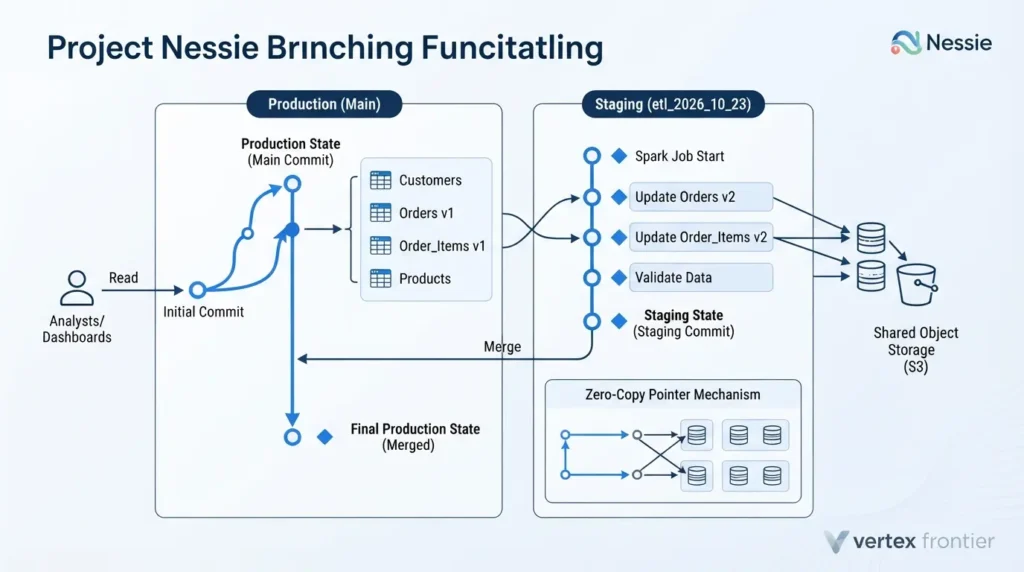
Zero-copy branching means creating a branch copies only pointers, not data. A Nessie branch records which metadata file each table points to at that moment. Writers on the branch add new files beside the old ones in shared storage. Merging moves the pointers, so nothing is rewritten.
Iceberg has table-level branches too, described in its branching documentation. The difference is scope.
| Question | Iceberg table branch | Nessie catalog branch |
|---|---|---|
| Scope | One table | Every table in the catalog |
| Publish 10 tables together? | Ten separate fast-forwards | One merge |
| Works on any catalog? | Yes, it is in the table spec | Only where Nessie runs |
| Best for | Audits, WAP on a single table | Staging a whole pipeline run |
How a zero-copy staging run works
- Create a branch off
main(for exampleetl_2026_10_23). - Point the dbt or Spark job at that branch instead of
main. - Run every transformation. Readers on main see nothing change.
- Validate on the branch: row counts, freshness, dbt tests, key uniqueness.
- Simulate the merge, then merge into
mainif checks pass. Drop the branch if they fail.
The merge is what makes this valuable. Ten tables arrive in the same instant, so a fact table never appears without its dimension. Nessie’s Spark SQL reference also documents a DRY keyword that simulates a merge to show whether it would succeed.
Bash (launch Spark with the Nessie catalog):
spark-sql \ --packages org.apache.iceberg:iceberg-spark-runtime-3.5_2.12:<iceberg-version>,org.projectnessie.nessie-integrations:nessie-spark-extensions-3.5_2.12:<nessie-version> \ --conf spark.sql.extensions=org.apache.iceberg.spark.extensions.IcebergSparkSessionExtensions,org.projectnessie.spark.extensions.NessieSparkSessionExtensions \ --conf spark.sql.catalog.nessie=org.apache.iceberg.spark.SparkCatalog \ --conf spark.sql.catalog.nessie.catalog-impl=org.apache.iceberg.nessie.NessieCatalog \ --conf spark.sql.catalog.nessie.uri=http://nessie:19120/api/v2 \ --conf spark.sql.catalog.nessie.ref=main \ --conf spark.sql.catalog.nessie.warehouse=s3://your-bucket/warehouseSpark SQL with Nessie extensions (stage, validate, publish):
-- Tables nessie.sales.orders and nessie.sales.order_items already exist on main -- 1. Branch off main CREATE BRANCH IF NOT EXISTS etl_2026_10_23 IN nessie FROM main; -- 2. Work on the branch USE REFERENCE etl_2026_10_23 IN nessie; INSERT INTO nessie.sales.orders SELECT * FROM nessie.staging.orders_delta; INSERT INTO nessie.sales.order_items SELECT * FROM nessie.staging.items_delta; -- 3. Validate before anyone sees it SELECT COUNT(*) AS bad_rows FROM nessie.sales.orders WHERE order_id IS NULL; -- 4a. Simulate the merge, then publish both tables in one step MERGE DRY BRANCH etl_2026_10_23 INTO main IN nessie; MERGE BRANCH etl_2026_10_23 INTO main IN nessie; -- 4b. Or discard everything -- DROP BRANCH etl_2026_10_23 IN nessie;Syntax follows Nessie’s Spark SQL reference. Nessie warns that the Spark SQL extensions version must match the Nessie version bundled with your Iceberg version. These statements were not executed for this article, so test them in a sandbox first.
Branches in REST mode
With Nessie’s Iceberg REST endpoint, the branch lives in the URL. The Nessie REST guide says to append the branch or tag name to the URI, for example http://nessie-host/iceberg/my_branch, and notes that setting the prefix property does not work for PyIceberg. In principle, any engine that lets you set the REST URI can target a branch. Whether a given managed service lets you do that is something to test, not assume.
Nessie’s compatibility boundary
| Component | Version in Nessie’s README (0.109.0 row) | Where the ecosystem is |
|---|---|---|
| Apache Iceberg | 1.5.0 | Iceberg’s release notes list 1.12.0 as the newest release |
| Spark | 3.3.x, 3.4.x, 3.5.x | Check your Spark version against this list |
| Flink | 1.16.x to 1.18.x | Check your Flink version against this list |
| Trino | 419 | Check your Trino version against this list |
| Presto | 0.277 to 0.281 | Check your Presto version against this list |
Sources: the compatibility table in the Nessie README and the Iceberg release notes, both read on October 23, 2026. The README table describes the integration the Nessie project tests. The REST endpoint may work with newer clients, but that is not what the table promises.
When branching is a superpower
- Multi-table pipelines. Orders and order items, or a star schema, must change together.
- Pre-production validation on production-sized data. No copy, no second warehouse.
- Reproducible training sets. Tag the catalog state used for a model run, and rebuild it later.
- Fast rollback. Nessie’s SQL reference documents an
ASSIGNcommand that moves a branch to another commit.
When it is not
- You need current engine versions. See the compatibility boundary above.
- You want a vendor to call. Nessie is not an Apache project. Dremio’s own editor’s note, added to its Nessie REST post in September 2026, says development has slowed considerably and that Nessie remains the clearest implementation of catalog-level branching. Dremio’s managed catalog is built on Polaris, and Dremio’s site now carries a banner saying it is part of SAP.
- You plan to lean on its REST endpoint for production writes. The project labels that support experimental. Plan an exit path.
Case study: Wells Fargo’s catalog as a control plane
A conference session description from Wells Fargo engineer Vineel Arekapudi outlines an unusual use of Nessie. The problem: keep non-production environments realistic without hand-copying tables. The approach, as described: replicate object storage, and periodically synchronize Nessie’s metadata store between environments, with production holding the authoritative metadata. The lesson is that a versioned catalog can act as an environment-promotion tool, not only a staging tool.
Evidence here is limited. The source is a talk abstract and publishes no throughput or cost numbers. Note also that this pattern replicates storage as well as metadata, so it is not the same as pointing two catalogs at one set of files. Treat it as a design pattern, not a benchmark.
Nessie is a superpower for atomic, multi-table staging and a risk for teams that need current engine versions or a vendor behind the product.
Apache Polaris: what it is now, and where it fits Snowflake-centric stacks
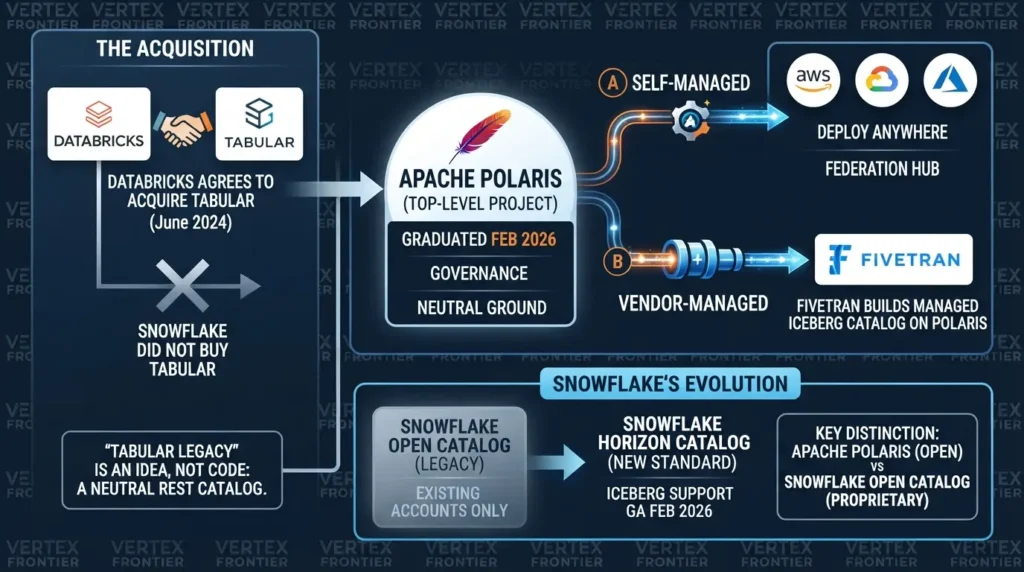
Before anything else, a correction that trips up a lot of articles. Polaris is not Tabular’s code, and Snowflake did not buy Tabular. Databricks agreed to buy it. Snowflake initiated Polaris, and Dremio says it co-created the project with Snowflake before both donated it to Apache.
What Polaris is today
Polaris is an Apache top-level project. The Apache Incubator’s status page records entry on August 9, 2024 and graduation on February 15, 2026, and the project announced it on its own blog on February 19. Per Dremio’s account of the incubation, the project shipped six releases from 0.9.0 through 1.3.0, drew roughly 100 contributors and merged about 2,800 pull requests. Those figures come from a vendor with a stake in the project, so treat them as indicative.
What graduation buys you is governance you can read. Decisions happen on a public mailing list, under Apache rules, with several companies in the room. For a catalog that will hold your permission model, that matters more than any single feature.
Functionally, Polaris is an Iceberg REST server with a role-based access model. Engines connect with service principals, and principal roles map to catalog roles and privileges. Snowflake’s documentation for Open Catalog walks through that structure. Polaris can also map tables from other catalogs into itself, which the project’s January 2026 post on legacy and heterogeneous data lakes describes.
Where Snowflake fits, and where it has moved on
Here is the twist for Snowflake-centric teams. Snowflake’s Open Catalog overview now tells new customers to use Horizon Catalog, and says customers who have never created an Open Catalog account cannot sign up for a first one. Open Catalog remains documented for existing accounts.
Horizon moved the other way. Snowflake’s 2026 release notes list external query engine support for Iceberg tables with Horizon Catalog as generally available on February 6, 2026. They list write support through an external engine as a preview on March 16 and generally available on May 26.
Write scope for tables managed by Open Catalog is described differently on two Snowflake pages. The overview says Snowflake can read and write tables in the catalog. The page on using Open Catalog tables in Snowflake lists a consideration that Snowflake can query but not write to tables managed by Open Catalog, and says Snowflake-managed tables synced out to Open Catalog are read-only there. The wording may refer to the sync scenario, but the pages do not say so. If you depend on this path, test writes before you design around it.
So what is Polaris for, if you run Snowflake? Three things.
- Neutral ground. You want a catalog no single data platform owns.
- Self-hosting or other clouds. You run it yourself, or a vendor runs it for you.
- A federation hub. One place to expose tables from several catalogs to many engines.
| Way to run Polaris | Who operates it | Best for | Watch out for |
|---|---|---|---|
| Self-hosted Apache Polaris | You | Neutrality, multi-cloud, cost control | You own upgrades, HA and backups |
| Snowflake Open Catalog | Snowflake | Existing accounts | No first-time sign-ups; new customers are pointed to Horizon |
| Dremio Open Catalog | Dremio | Teams already on Dremio | Roadmap tied to Dremio, now part of SAP |
| Fivetran managed catalog | Fivetran | Landing SaaS data as Iceberg | Scope is shaped around ingestion |
Case study: Fivetran builds on Polaris instead of writing a catalog
The problem: Fivetran needed a managed Iceberg catalog so customers could land SaaS data in open tables. Writing a catalog server from scratch is a long road with a sharp edge: it must be correct on commits.
The decision: Fivetran built its Iceberg REST catalog on Apache Polaris, and said so after graduation.
The outcome: It shipped a managed catalog on a base that other vendors, including Dremio, also use. Neither company published latency or cost numbers, so the measurable result is adoption, not performance.
The lesson: A neutral Apache base lets vendors compete above the catalog instead of rewriting it. For you, that means the Polaris you self-host and the Polaris a vendor hosts speak the same dialect.
Polaris is the strongest neutral option and a sound self-hosting choice. For Snowflake-first shops, Horizon is now the default and Polaris is the escape hatch.
Unity Catalog and Databricks: first-class Iceberg, and the 2026 Azure milestone
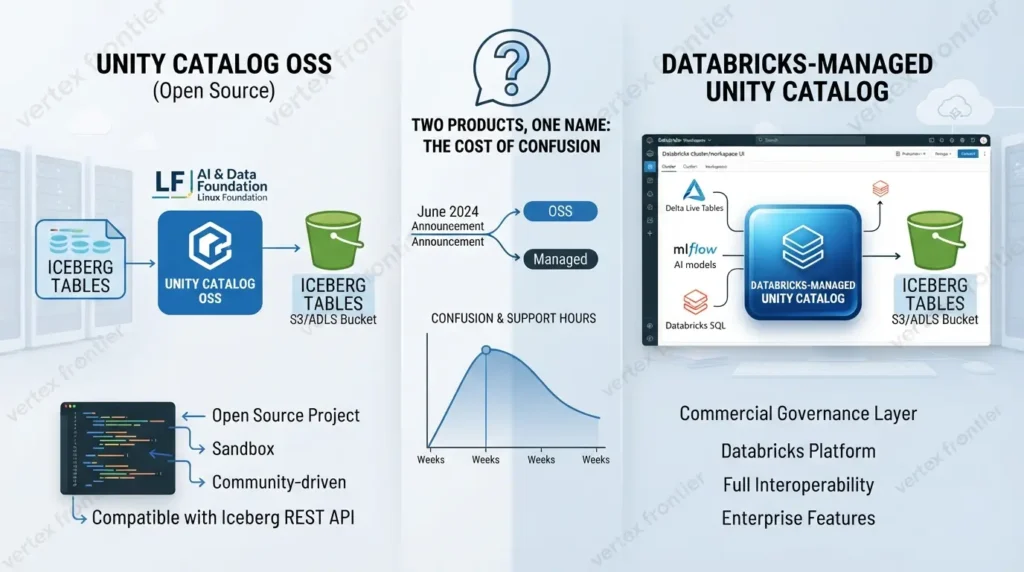
Two products share this name, and the confusion costs people weeks.
Unity Catalog OSS is the open-source project. Databricks announced it on June 12, 2024 and said the code would be posted the next day. The project README describes it as a sandbox project with the LF AI & Data Foundation, part of the Linux Foundation, and says it is compatible with the Iceberg REST catalog API.
Databricks-managed Unity Catalog is the commercial governance layer inside the Databricks platform. Most of the Iceberg interoperability news in 2026 is about this one.
How Iceberg works in Unity
Unity exposes Iceberg to outside engines through REST, and there are two paths worth knowing. Databricks’ external-access documentation describes the iceberg-rest API for reading and writing, and a separate read-only endpoint. The same page labeled the REST API Public Preview on Databricks Runtime 16.4 LTS and above when I read it, so check the current status for your release. It also says foreign Iceberg tables are not refreshed automatically when read through this API.
Pick the wrong path and the symptom is a confusing permissions error on the first INSERT. If an engine needs to write, point it at iceberg-rest.
The 2026 milestone: Snowflake writes to Unity-managed tables on Azure
Snowflake’s April 6, 2026 release note announced general availability of Iceberg write support for Databricks Unity Catalog on Azure. As that note’s text reads, write support for Unity-managed tables had previously been limited to workspaces with AWS-backed storage. The Azure path depends on ADLS Gen2 external volumes, which Snowflake released in preview on March 20 and in general availability on June 12. A separate release note covers CTAS against Unity Catalog with external volumes, generally available on March 31.
Setting it up on the Snowflake side takes three objects: an external volume for the storage account, a catalog integration, and a catalog-linked database.
Snowflake SQL (connect to Unity and write):
-- 0. Create the ADLS Gen2 external volume first (see Snowflake's external volume guide) -- 1. Integration pointing at Unity's read/write Iceberg endpoint CREATE OR REPLACE CATALOG INTEGRATION unity_rest_int CATALOG_SOURCE = ICEBERG_REST TABLE_FORMAT = ICEBERG CATALOG_NAMESPACE = 'default' REST_CONFIG = ( CATALOG_URI = 'https://<workspace-host>/api/2.1/unity-catalog/iceberg-rest' CATALOG_NAME = '<unity_catalog_name>' ACCESS_DELEGATION_MODE = EXTERNAL_VOLUME_CREDENTIALS ) REST_AUTHENTICATION = ( TYPE = OAUTH OAUTH_TOKEN_URI = 'https://<workspace-host>/oidc/v1/token' OAUTH_CLIENT_ID = '<service-principal-id>' OAUTH_CLIENT_SECRET = '<secret>' OAUTH_ALLOWED_SCOPES = ('all-apis', 'sql') ) ENABLED = TRUE; -- 2. Link a database; ALLOWED_WRITE_OPERATIONS decides read-only vs writable CREATE DATABASE unity_linked_db LINKED_CATALOG = ( CATALOG = 'unity_rest_int', ALLOWED_WRITE_OPERATIONS = ALL ) EXTERNAL_VOLUME = '<your_adls_external_volume>'; -- 3. Write. Unity validates and commits; Snowflake is a writer, not the owner. INSERT INTO unity_linked_db."sales"."orders" (order_id, amount) VALUES (1001, 49.90);Syntax follows Snowflake’s REST catalog integration reference, its Unity setup guide and the catalog-linked database reference. The Unity guide also documents VENDED_CREDENTIALS as an alternative delegation mode. Identifier quoting rules depend on the remote catalog’s case sensitivity: Snowflake stopped requiring double quotes for catalog-linked database DDL on April 30, 2026, but check the identifier rules for the commands you run. These statements were not executed for this article.
Who holds write authority here
Unity does. Snowflake sends a commit through Unity’s REST endpoint, Unity checks permissions and conflicts, and Unity moves the pointer. Snowflake never becomes a second catalog of record. That is the pattern to copy: many writing engines, one catalog that owns the pointer.
Unity is the right authority if Databricks is your primary platform, and it now accepts writes from Snowflake on Azure as well as AWS-backed storage. Keep one catalog of record and let engines come to it.
Cross-catalog sync and federation: one storage, many catalogs, one writer
Your bucket does not care how many catalogs point at it. Your tables do.
This is the pattern taking shape in 2026. Data stays in one object store. Each platform wants its own front door, so catalogs multiply: Glue for AWS-native engines, Unity for Databricks, Polaris or Horizon for Snowflake and neutral engines. The tables in the middle stay the same. The risk is that two catalogs both think they own the pointer.

What is catalog federation?
Catalog federation means one catalog can see and query tables that another catalog owns, without copying the data or taking over authority. The owning catalog keeps the pointer and the write path. The visiting catalog reads through it, or mirrors the pointer for read-only access.
There are four ways this is done today, and they carry different risks.
| Pattern | How it works | Who writes | Main risk |
|---|---|---|---|
| Linked catalog (preferred) | The engine reads through the owner’s REST endpoint. Snowflake’s catalog-linked database discovers tables on a SYNC_INTERVAL_SECONDS schedule and can be made read-only with ALLOWED_WRITE_OPERATIONS = NONE. | Remote catalog stays the authority | Name mapping, sync lag, and roles that do not sync |
| Registered pointer copy (avoid) | A second catalog registers the same metadata file with register_table | Should be nobody | Iceberg’s docs warn this can lose updates and corrupt the table. The copy also goes stale after every source commit. |
| Facade or external catalog | Polaris maps tables from another catalog into its own namespace | Depends on the mode; check the project docs | Assuming write-through works |
| One-time migration | The migrator moves registrations. Its migrate operation deletes the source entry after success; register leaves the table in both catalogs. | New catalog after cutover | Commits in flight during the move; choosing register by accident |
The trend in vendor tooling points the same way. Snowflake’s release notes list a preview on August 18, 2026 for accessing externally managed Iceberg tables through Horizon Catalog, which is a facade pattern, not a copy.
The one rule: exactly one writable catalog per table
Two primary sources say it plainly. The Iceberg Spark procedures documentation says register_table should only be used when the table is no longer registered elsewhere, or when you are moving it between catalogs. The Iceberg catalog migrator, now maintained in the Polaris tools repository, repeats the warning, recommends its delete-after-migrate mode, and advises against running while commits are in flight. The project’s migration guide covers the supported path.
The reason is mechanical. Each catalog holds its own pointer. If two catalogs both accept a commit from different writers, the table forks, and files from one branch of history are invisible to the other.
A five-step authority playbook
- Assign one writer catalog per table, usually by domain. Finance tables write through Unity; ingestion tables write through Polaris.
- Expose, do not copy. Prefer a linked catalog or facade over a registered copy whenever the consuming engine supports it.
- Make consumers read-only in practice. Use the engine-side switch where one exists (such as
ALLOWED_WRITE_OPERATIONS = NONE) and remove write privileges for every principal in the consuming catalog. - Detect drift. Compare the current metadata location in each catalog on a schedule and alert on mismatch that outlasts your sync window.
- Write the failover runbook before you need it. Promotion means freezing the source, moving the registration with the migrator’s
migrateoperation, and only then flipping writers.
Snowflake SQL (a read-only link to a catalog you do not own):
CREATE DATABASE glue_readonly_db LINKED_CATALOG = ( CATALOG = 'glue_rest_int', ALLOWED_WRITE_OPERATIONS = NONE, SYNC_INTERVAL_SECONDS = 60 ) EXTERNAL_VOLUME = '<your_s3_external_volume>';Assumes a REST catalog integration named glue_rest_int already exists. Parameter names follow the catalog-linked database reference. Not executed for this article.
Python (PyIceberg: drift check, and a guarded move):
from pyiceberg.catalog import load_catalog # Region and credentials come from your AWS environment glue = load_catalog("glue", **{"type": "glue"}) polaris = load_catalog( "polaris", **{ "type": "rest", "uri": "https://<polaris-host>/api/catalog", "warehouse": "analytics", "credential": "<client_id>:<client_secret>", "scope": "PRINCIPAL_ROLE:ALL", }, ) ident = "sales.orders" def check_drift(a, b, ident): """Read-only. Run on a schedule; alert if drift outlasts the sync window.""" ma, mb = a.load_table(ident).metadata_location, b.load_table(ident).metadata_location if ma != mb: print(f"DRIFT on {ident}: {ma} vs {mb}") def move_table(src, dst, ident): """Run ONLY with writers paused. Registers in dst, then removes the src entry.""" location = src.load_table(ident).metadata_location dst.register_table(ident, location) src.drop_table(ident) # drop_table removes the catalog entry; purge_table would delete data check_drift(glue, polaris, ident)Illustrative, not production code: error handling, retries and table-existence checks are omitted. register_table, load_catalog and the REST properties come from the PyIceberg documentation. Prefer the migrator for real moves, because it has dry-run and delete-after-migrate behavior built in.
Case study: Snowflake steps back from syncing out to Open Catalog
The problem: Snowflake let customers sync Snowflake-managed Iceberg tables out to Open Catalog so other engines could read them. That created a second pointer for tables Snowflake was still writing, and the synced copy is read-only.
The decision: Snowflake’s sync documentation now recommends querying Snowflake-managed Iceberg tables from third-party engines through Horizon Catalog instead of syncing them, and says syncing is no longer recommended.
The outcome: No metrics were published. What changed is the guidance: expose through the owner’s endpoint, not through a copy.
The lesson: When a vendor retires a sync pattern in favor of a direct endpoint, that tells you which pattern held up. Evidence here is limited to a documentation change, so treat it as a strong hint, not a measured result.
one storage layer and many catalogs is workable if exactly one catalog is allowed to move each pointer, and every other view is a link, not a copy.
Hive Metastore and Glue: why legacy persists, and the way off
Hive Metastore is the most unfashionable thing in your stack, and probably the most widely supported. Spark, Trino, Presto, Flink, Impala and Hive all speak it. After a decade, thousands of tables are registered in it, and half your jobs have never heard of REST.
That is why it persists. Not inertia. Compatibility.

Does Iceberg work well on HMS?
Yes, with conditions. HMS itself does not understand table-format commits. Iceberg’s HiveCatalog makes the pointer swap safe by taking a metastore lock, and the catalog properties page documents the settings. Locking is on by default (iceberg.engine.hive.lock-enabled=true). The heartbeat that keeps a lock alive must be shorter than the metastore’s transaction timeout.
Turning locks off is possible but guarded. The same page says it requires Hive fixes HIVE-26882 (and HIVE-28121 on MySQL or MariaDB), and that every other HiveCatalog writing to the table must run Iceberg 1.3 or newer with locks also disabled. Otherwise you risk corrupting the table.
The weak spot is operations. Locks can be orphaned, and a stuck lock blocks every writer on that table, as the Impala bug report shows. Teams that run HMS well monitor lock age and keep the backing database healthy.
Glue: the managed HMS
AWS Glue Data Catalog is, in practice, the managed Hive-compatible metastore for AWS. Iceberg’s Glue catalog uses Glue’s optimistic locking by default, and Glue adds a REST endpoint with AWS Signature Version 4 authentication. Athena depends on Glue, as noted earlier.
Its limits are knowable. Namespaces are single-level in the REST path. View APIs are not supported through the REST endpoint. Tables with more than 20 MB of metadata are rejected, so snapshot expiry and compaction are not optional chores. Branching is not a catalog feature. Permissions come from IAM and Lake Formation, which is powerful and AWS-specific. For many AWS-only teams, those are acceptable trades for zero servers to run.
Case study: Airbnb’s move from Hive-style tables to Iceberg
The challenge: Airbnb’s warehouse upgrade write-up describes a Hive-based ingestion framework handling more than 35 billion Kafka event messages and over a thousand tables per day.
The decision: Rebuild that ingestion on Iceberg as part of a wider upgrade to Spark 3.
The outcome: Airbnb’s engineers reported more than 50 percent savings in compute resources and about a 40 percent cut in job elapsed time, as summarized by Qlik. The figures come from a secondary summary, so check Airbnb’s post before quoting them.
The lesson: The gains came from the table format and the engine upgrade together. A catalog swap alone would not have produced them, so budget the migration as a table-layer project with a catalog change inside it.
The migration path off HMS
Four methods cover almost every case. The Iceberg Hive migration guide and the Spark procedures reference define them.
| Method | Rewrites data? | Best for | Documented conditions |
|---|---|---|---|
snapshot | No | Dry run on a test table | Shares files with the source. Deleting from the Hive table removes files the snapshot needs, and expiring snapshots on the Iceberg copy is not allowed. |
migrate | No | In-place conversion of a quiet table | Writers must be paused. Fails on bucketed tables and unsupported partition formats. Keeps the original as a backup table by default. |
add_files | No | Importing specific partitions or files when the first two do not fit | The docs say not to use it when migrate or snapshot is possible. It does not validate schema, and added files become Iceberg-managed, so later maintenance can physically delete them. |
CTAS | Yes | Fixing partition layout during the move | Cost and time scale with table size |
Spark SQL (Iceberg migration procedures):
-- Dry run: new Iceberg table over the same data files CALL spark_catalog.system.snapshot('analytics.orders_hive', 'analytics.orders_iceberg_test'); -- In place: convert the Hive table (pause writers first; a backup table is kept by default) CALL spark_catalog.system.migrate('analytics.orders_hive'); -- Last resort: import existing files into an Iceberg table you already created CALL spark_catalog.system.add_files( table => 'analytics.orders', source_table => 'analytics.orders_hive_archive' );A successful procedure call does not prove a correct migration. Before you retire the backup, check these:
- Row counts per partition match between the backup and the Iceberg table.
- Schema diff is empty, including nullability and nested types.
- Five representative queries return identical results on both tables.
- Writers and readers all use the new table name or catalog, with none still pointing at the backup.
- Rollback is rehearsed. You know how to rename the backup back before you delete anything.
List tables, owners, writers, sizes. Flag bucketed tables, which
migrate cannot handle.Stand up a REST catalog (Polaris, Unity or Glue’s endpoint). New tables land there.
Convert pilot tables with
snapshot. Run old and new in parallel.Pause writers, run
migrate, repoint writers, run the checks above.Drop backups after a hold period. Revoke old write access.
HMS persists because it is compatible, Glue is the low-effort upgrade on AWS, and the safest exit is a REST catalog for new tables followed by table-by-table conversion with checks.
The decision matrix: managed vs self-hosted, branching and engine ecosystem
Skip the feature checklist. Three questions decide almost every case, and they are worth asking in this order.
- Who must write to these tables? The writer set decides which catalogs are even candidates.
- Who owns identity and permissions? Whichever platform already holds your roles will win unless you pay to move them.
- Can your team operate it at 3 a.m.? A catalog outage stops every writer at once.
| Option | Run model | Catalog-wide branching | Iceberg REST | Governance | Choose when | Avoid when |
|---|---|---|---|---|---|---|
| AWS Glue | Managed by AWS | No | Yes (SigV4, single-level namespaces, no view APIs, 20 MB metadata cap) | IAM, Lake Formation | AWS-centric, Athena in the mix, no appetite for servers | You need multi-level naming, REST views or multi-cloud neutrality |
| Hive Metastore | Self-hosted | No | Not natively (Thrift) | Not assessed in this guide | Large legacy estate, engines that only speak HMS | Greenfield, or you need catalog-level access control |
| Unity Catalog | Databricks-managed, or OSS self-hosted | No | Yes (iceberg-rest for read and write; Public Preview when documented) | Unity grants, lineage, tags | Databricks is the primary platform | You want a vendor-neutral authority |
| Apache Polaris | Self-hosted or vendor-managed | No | Yes, native | Role-based, credential vending | Neutral multi-engine hub, platform team on staff | You need a single vendor on the phone |
| Snowflake Horizon | Snowflake-managed | No | Yes, for external engines (reads GA Feb 6, 2026; writes GA May 26, 2026) | Snowflake roles and policies | Snowflake is the system of record | Snowflake is a minority consumer |
| Project Nessie | Self-hosted | Yes | Experimental | Not assessed in this guide | Atomic multi-table staging is a hard requirement | You need current engine versions or vendor support |
On Google Cloud, Snowflake lists a BigLake metastore catalog integration as generally available since June 2, 2026, and our guide to Apache Iceberg with BigQuery covers how BigQuery reads and writes Iceberg tables.
Compatibility boundaries that decide real projects
Matrices of features hide the combinations that fail. These are the ones the documentation names, as read on October 23, 2026.
| Combination | Documented condition | What it means for you |
|---|---|---|
| Athena with other lock managers | Athena supports only Glue optimistic locking for Iceberg. | Do not configure a custom lock implementation on tables Athena touches. |
| Athena with Iceberg v3 tables | The Athena page I read says it operates on Iceberg v2 tables. Snowflake lists v3 support as GA on May 7, 2026 and v3 table upgrades as GA on October 16, 2026. | Editorial inference: do not upgrade a shared table to v3 until every reader you run supports it. Check Athena’s current docs first. |
| Nessie with current engines | The README pins Iceberg 1.5.0 and Trino 419, while Iceberg’s latest is 1.12.0. | Test your exact versions before adopting. |
| Snowflake writing to Unity on Azure | GA since April 6, 2026, and it relies on ADLS Gen2 external volumes (GA June 12, 2026). | Plan the external volume and its Azure permissions before the catalog integration. |
| Snowflake Open Catalog for a new account | First-time sign-ups are not available; new customers are pointed to Horizon. | For Snowflake-first stacks, evaluate Horizon, or run Polaris yourself. |
| Glue REST with views or very large metadata | View APIs unsupported; metadata above 20 MB rejected. | Keep snapshot expiry running and do not plan on REST view workflows. |
| Unity REST for external writers | Labeled Public Preview on the Databricks page I read; foreign Iceberg tables do not refresh automatically. | Confirm GA status for your runtime and test refresh behavior. |
A write-path test protocol you can run in a day
Do not choose from documentation alone. This protocol turns “supports REST” into evidence. It is a protocol, not a set of results: nothing here was run for this article.
| # | Test | Pass criteria |
|---|---|---|
| 1 | Create and load. Create a namespace and table from engine A. Load it from engine B. | Schema and partition spec are identical in both engines. |
| 2 | Append and read back. Append from every writer engine. Read from every reader engine. | Row counts and a checksum column match everywhere. |
| 3 | Concurrent appends. Two writers append at the same moment. | Both commits land, or one retries cleanly. No lost rows. |
| 4 | Conflicting commits. Run an overwrite or delete while another writer appends. | The conflicting commit fails with a retryable error. Nothing is silently overwritten. |
| 5 | Schema change under load. Add a column from engine A while engine B writes. | B succeeds against the new schema or fails loudly. |
| 6 | Credential expiry. Run a write longer than the credential lifetime, or force a refresh. | The job finishes, or fails with a clear auth error and no partial table state. |
| 7 | Permission boundary. A read-only principal tries to write, create and drop. | Every attempt is denied at the catalog or the storage layer. |
| 8 | Restore. Rebuild the catalog’s backing store or re-register tables in a scratch catalog. | Tables are readable. You have written down how long it took. |
Run the decision tool
Answer four questions. The tool scores the options above and tells you what to verify before you commit. It is a conversation starter for your team, not a verdict.
Four common setups and where they land
Why the boring choice often wins
Here is the argument in three points.
- Outages are asymmetric. A fancy feature you never use costs nothing. A catalog outage that you cannot diagnose stops every writer you have.
- Governance is the stickiest layer. The catalog that already holds your roles has a head start that no feature list overcomes.
- REST lowered the price of staying boring. Glue already offers a REST endpoint, and a later move to a REST catalog is a table-by-table job.
Ask who writes, who owns permissions and who gets paged. The answers usually pick the catalog for you.
Write the decision down: a catalog decision record
The decision ages, so record why you made it. This template takes ten minutes to fill in and saves a week of archaeology later.
Markdown (catalog decision record template):
# Catalog decision record: <data domain> Date: <yyyy-mm-dd> Owner: <team> Review by: <date, 6 months out> ## Authority - Writer catalog for each table domain: - Read-only consumers, and how read-only is enforced: ## Engines - Engine, version, role (writer or reader): ## Identity and permissions - Where roles and grants live: - How we would export them: ## Evidence - Write-path test protocol results (link): - Known gaps we accepted, and why: ## Exit - Steps and tool to move to another catalog: - Freeze window needed: - What we would have to rebuild (grants, principals, audit):Common mistakes and how to avoid them

Choosing by feature list
Fix: score options against your writers, your permission model and your on-call reality.
Equating “speaks REST” with “is interchangeable.”
Fix: run the write-path protocol, not a read demo.
Registering one table in two writable catalogs, including as a “mirror.”
Fix: one writer catalog per table, with consumers linked and made read-only by setting and by permission.
Confusing Polaris with Snowflake Open Catalog, or Unity OSS with Databricks Unity Catalog
Fix: read the documentation for the product you actually run.
Adopting Nessie without testing the engine matrix
Fix: pin versions in a sandbox first and confirm every writer can reach a branch.
Migrating HMS in place while writers are active, or reaching for add_files when migrate or snapshot fits
Fix: pause writers, snapshot first, keep the backup through a hold period.
Disabling HMS locks without the prerequisites
Fix: confirm the Hive fixes and inventory every committing client first.
Upgrading a shared table to Iceberg v3 before every reader supports it
Fix: list your readers and check each one’s documented format support.
Ignoring the exit cost of grants
Fix: export and document roles and privileges now, while it is cheap.
Conclusion
A catalog is not a feature you add to Iceberg. It is the referee, the security perimeter and the credential broker for every table you will ever write. That is why this decision ages with you.
The good news is that the 2024 land grab produced something useful. REST made catalogs easier to leave on the wire. Polaris gave the ecosystem a neutral Apache home. Unity learned to accept writes from a rival. The bad news is that governance, optional features and operations still differ, so the exit cost is lower, not zero.
Pick the authority first. Let engines come to it. Test the write path before you trust the brochure. And when in doubt, choose the one your team can already run.
If you are mapping the layers beneath this decision, Apache Iceberg Explained is the best next read.
FAQ
What is the best Iceberg catalog?
There is no universal winner. Choose by who writes, who owns permissions and who operates it. Glue fits AWS-centric teams, Unity fits Databricks-first teams, Horizon fits Snowflake-first teams, and Polaris fits neutral multi-engine setups.
Is Nessie still maintained?
The code is open source under Apache 2.0 and still deployable, but it is not an Apache project. Dremio's September 2026 editor's note says development has slowed considerably, and the README's compatibility table still lists Iceberg 1.5.0. Verify engine compatibility before you adopt it.
Is Apache Polaris the same as Snowflake Open Catalog?
No. Polaris is the Apache top-level project you can run anywhere. Open Catalog is Snowflake's hosted service, and Snowflake's documentation says new customers should use Horizon Catalog and that first-time Open Catalog sign-ups are not available.
Can Snowflake write to Unity Catalog Iceberg tables?
Yes. Snowflake's release notes list general availability of write support for Unity Catalog on Azure as of April 6, 2026, and say write support had previously been limited to workspaces with AWS-backed storage. The Azure path uses ADLS Gen2 external volumes.
Can two catalogs manage the same Iceberg table?
Only one should be writable. Iceberg's documentation warns that registering the same metadata file in more than one catalog can lose updates, lose data and corrupt the table. Give every other catalog a linked or read-only view instead.
Do I need to leave Hive Metastore?
Not immediately. Iceberg commits on HMS through locks that are on by default. Keep them on unless you have confirmed the required Hive fixes and every committing client, monitor lock age, and move tables to a REST catalog when scale, locks or governance needs justify it.
Does AWS Glue support the Iceberg REST catalog?
Yes. Glue exposes an Iceberg REST endpoint that uses AWS Signature Version 4. AWS documents single-level namespaces in the REST path, no support for the spec's view APIs, and a 20 MB limit on table metadata.
Does the REST spec eliminate catalog lock-in?
No. It standardizes the wire protocol. Permissions, optional endpoints, credential behavior and operations remain vendor-specific, so exit costs shrink but do not vanish.
📋 Article Timeline & History
Successfully updated on November 3, 2026 with the latest details.
This article was originally published on October 30, 2026.

Was this article helpful?


[…] For a deeper breakdown of how Nessie, Polaris, Unity Catalog, Glue, and HiveMetastore compare on branching, REST support, and exit cost, see our fullIceberg catalogs comparison. […]
[…] client, and deployment configuration. If you are choosing which catalog implementation to run, our comparison of Nessie,Polaris, Unity Catalog, and Hive Metastore walks through the practical […]
[…] remote-catalog alternatives differ more than their names suggest, our Nessievs Polaris vs Unity vs Hive Metastore comparison explains what each one locks […]
[…] To see how table formats depend on their catalogs in practice, read our ApacheIceberg catalogs comparison. […]