
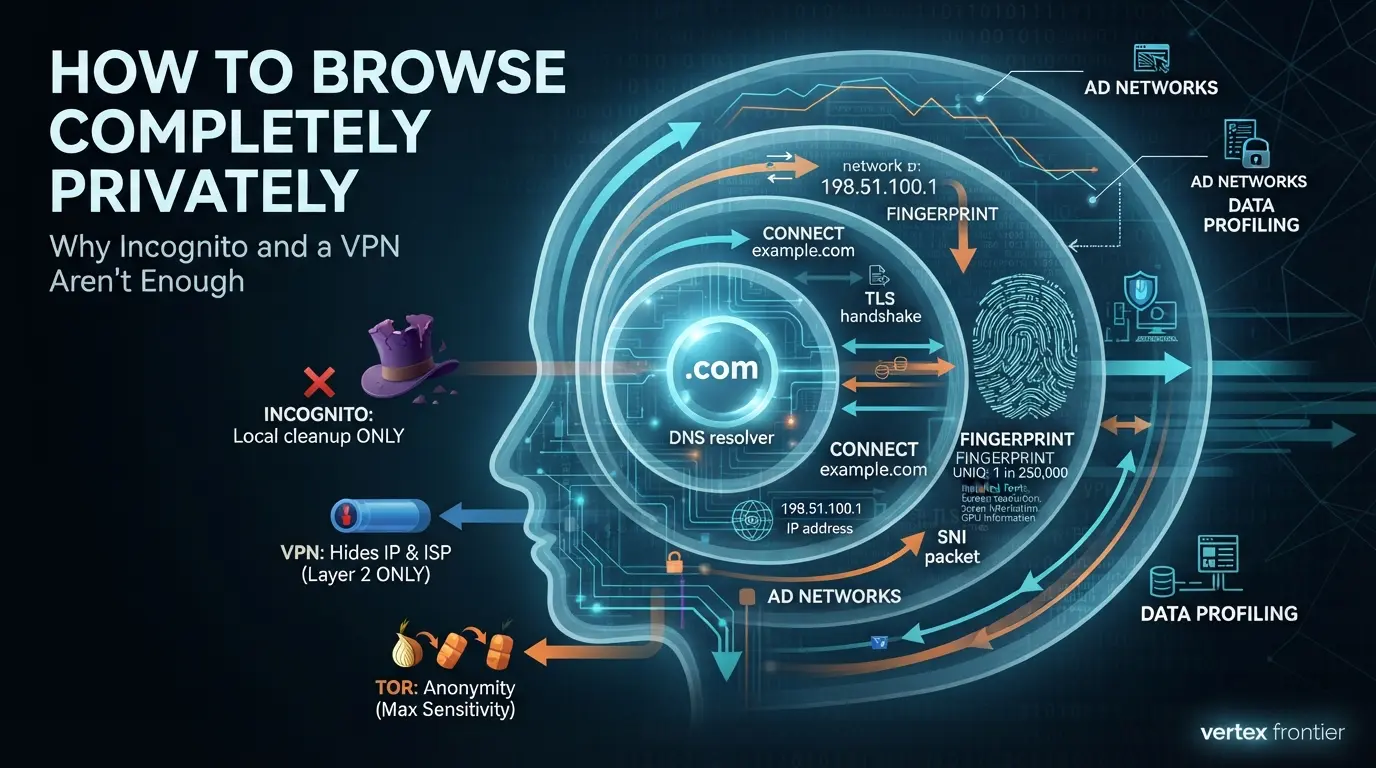

When Google settled the Incognito tracking lawsuit in April 2024, it agreed to destroy billions of browsing records collected from people who believed the purple hat made them invisible. Reuters reported the settlement was valued at more than $5 billion, and Google paid no damages. The company just deleted the evidence of a habit it had been quietly recording since 2016.
That case file is the reason this guide exists. The tools most people trust for privacy were never designed to provide it. Incognito mode was built to erase your history from your own laptop, not to hide you from the websites you visit, the network you sit on, or the trackers embedded in nearly every page you load. A VPN alone fixes one leak and opens another.
And the trackers themselves have moved on: third-party cookies are only one entry in a surveillance toolbox that now includes encrypted-traffic analysis, GPU-level fingerprinting, and behavioral profiling assembled by data brokers the FTC has repeatedly caught trading your clicks.
This guide does something most “private browsing” articles never attempt: it dissects exactly how tracking works at every layer of the connection, then rebuilds your setup layer by layer. By the end, you will know what leaks, who can see it, which tool plugs which hole, and how to match a privacy stack to your actual threat level, without buying anything you don’t need.
Key Takeaways
Click any topic to expand or collapseHow Can I Browse Completely Privately? The Quick Answer
You browse as privately as possible by defending five layers at once: encrypt your DNS with DoH, route your traffic through a VPN or Tor, use a fingerprint-resistant browser, keep your identities separated, and change the habits that link those identities together.

Incognito mode contributes almost nothing to this, it only clears local data when you close the window. Practiced consistently, this layered stack can make you statistically indistinguishable inside a crowd, though never literally invisible; the honest goal is managed privacy, not magic anonymity.
What “Private Browsing” Actually Means, and What It Was Never Built to Do
Private browsing is a browser mode that discards local session data, history, cookies, cache, form entries, when you close the window. It changes nothing about how your traffic travels, who can observe it on the network, or what the websites you visit can record about the visit itself.

Think of it as cleaning your hotel room rather than traveling under a false name. The room looks untouched afterward. Every camera, every corridor, every check-in record still knows exactly who you are and where you went.
That’s why the industry’s own words matter here. Chrome’s Incognito mode, Firefox’s private windows, Safari’s private tabs, and Edge’s InPrivate windows all share the same honest scope: they delete local traces. None of them encrypt traffic, none of them change your IP, and none of them block fingerprinting.
Chrome’s own support page now discloses this in plain language: while Incognito keeps your activity private on your device, it doesn’t make you invisible, websites you visit and organizations that manage your network may be able to observe your activity in Incognito.
- Challenge: Millions of users believed Incognito mode hid their activity from Google itself — including Google Analytics on sites they visited in private windows.
- Action: A class action filed in 2020 argued Google secretly tracked “private” browsing. After a judge refused to dismiss it, Google settled in April 2024 rather than face trial.
- Outcome: Google agreed to destroy billions of records reflecting Incognito browsing and to disclose data collection in the mode, per Reuters. The class received no cash — but the records died.
- Lesson: The mode was doing local cleanup all along. If a multi-trillion-dollar company’s lawyers fought for years over that gap in understanding, treat every privacy feature as a question, not an answer.
The bigger picture is uncomfortable: browsing data has become a commodity with real market price. When IBM’s Cost of a Data Breach study prices the average breach in the millions, it’s measuring stolen records; but the legal Avast/Jumpshot business model showed browsing histories alone were valuable enough to sell wholesale. Your clickstream isn’t just trivia, it’s inventory.
Private browsing mode is housekeeping for your own device. Everything that happens between your browser and a website, the part that actually gets recorded, stays wide open until you address the five layers below.
The Anatomy of Web Tracking: Five Layers That Expose You
Here’s the question that separates people who feel private from people who are private: when you load one web page, who gets to learn something about you, and through what channel?
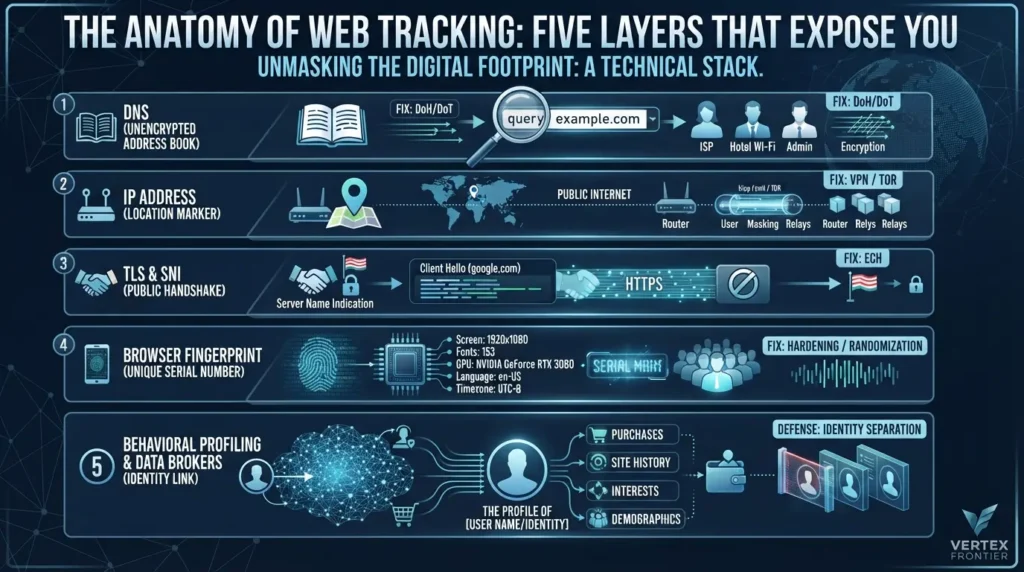
The answer is not one channel. It’s five, stacked on top of each other, each invisible to the last. A VPN fixes layer two and leaves layers one, three, four, and five untouched. Incognito mode touches none of them. To see why so many “private” setups fail, walk up the stack.
| Layer | What It Reveals | Who Sees It | Defense |
|---|---|---|---|
| 1. DNS | Every domain you visit, including ones inside “private” tabs | Your ISP, network admin, DNS resolver | DNS over HTTPS/TLS (DoH/DoT) |
| 2. IP address | Your network and approximate location | Websites, trackers, ISPs | VPN tunnel or Tor network |
| 3. TLS & SNI | Which sites you connect to, even on encrypted HTTPS | ISP, middleboxes, censors | Encrypted Client Hello (ECH) |
| 4. Browser fingerprint | Device, screen, fonts, GPU — a serial number you can’t delete | Any script on any page | Hardened/randomized browser |
| 5. Behavior & brokers | Habits, interests, identity links across sites and apps | Ad networks, data brokers, platforms | Identity separation + compartmentalization |
Layer 1: DNS: The Address Book You Broadcast in Plaintext
Before your browser can load anything, it asks a DNS resolver to translate “example.com” into an IP address. By default, that question travels as unencrypted plaintext. Anyone between you and the resolver, your ISP, the hotel’s router, your employer’s firewall, reads it like a postcard.
This is why “private browsing” mode feels so broken to informed users. You can delete every cookie, and your DNS query for a medical site, a dating platform, or a competitor’s portal still lands in your ISP’s logs with a timestamp.
The fix is DNS encryption. DNS over HTTPS (DoH) and DNS over TLS (DoT) wrap the lookup inside an encrypted connection. Mozilla began rolling out DoH by default to Firefox users in the United States in February 2020 and extended the default to Canada in mid-2021, a quiet change that moved hundreds of millions of lookups out of ISP visibility.
But DoH has a catch worth understanding: it encrypts the question in transit while concentrating trust in whoever answers it. Your default DoH provider, often Cloudflare or Google, still sees every domain you visit. Choosing a resolver with a real no-logging policy matters as much as flipping the switch.
DNS is the cheapest tracking channel in the stack, and the easiest to close. Encrypt it, then pick the operator deliberately.
Layer 2: Your IP Address: The Return Address on Every Envelope
Once the lookup succeeds, your device connects to a web server. That connection carries your public IP address, which reveals your network and, in most cases, your city. Websites log it; analytics platforms aggregate it; abuse filters use it to flag traffic.
Hiding this layer means putting a middleman between your device and the web. A VPN server replaces your IP with its own. The Tor network goes further, bouncing traffic through three volunteer relays so no single point knows both who you are and where you’re headed. The network defense section below compares both in depth, including the failures you’ll want to avoid.
One under-discussed leak here: WebRTC. This browser feature, used for video calls, can expose your local IP addresses to web pages, and on some VPN configurations, your public IP, because parts of the call setup can take a shortcut outside the tunnel. It’s the reason “WebRTC leak test” is one of the most-searched privacy checks, and why a serious VPN app ships with built-in WebRTC protection.
Your IP is a persistent location marker on every connection you make. A VPN or Tor handles it, a proxy or incognito tab does not.
Layer 3: TLS and SNI — The Handshake That Says Hello in Public
HTTPS encrypts your page content. What it did not historically encrypt is the greeting. During the TLS handshake, your browser sends the server name indication (SNI), the hostname you’re visiting, unencrypted. Your ISP may not see the page you read, but it sees every domain you connect to, in order, with timing.
The industry patched this with Encrypted Client Hello (ECH). ECH encrypts that greeting inside the handshake, closing a privacy gap that existed for roughly two decades of the modern web. Firefox has enabled ECH by default since version 119, and according to the Center for Democracy & Technology, by the end of 2024 ECH was active by default across millions of websites served by Cloudflare.
The deployment also produced one of the most instructive privacy events of 2024: in November, Russia’s telecom watchdog began blocking Cloudflare-hosted sites that used ECH, precisely because the encrypted greeting removed a surveillance point. Privacy technology rarely gets a clearer demonstration of its effect: the moment one side stops being able to observe, it pushes back.
Even “fully encrypted” HTTPS leaks your destinations through SNI. ECH closes that leak where deployed; a VPN or Tor makes the conversation unreadable to your local network anyway.
Layer 4: Browser Fingerprinting: The Serial Number You Didn’t Know You Were Showing
Browser fingerprinting is a tracking technique that identifies you by the unique combination of your device’s characteristics, screen size, installed fonts, graphics hardware, browser settings, language, timezone, rather than by cookies. There is nothing to delete, because nothing is stored on your device. The fingerprint is assembled on the server side from what your browser is, not from what it keeps.
How unique is a fingerprint in practice? EFF’s Cover Your Tracks test typically reports a browser as unique among the hundreds of thousands of fingerprints tested in the past 45 days, the exact count changes with every visit, which is itself the point. The research lineage is older and starker: EFF’s foundational 2010 study found 94.2% of browsers with Flash or Java enabled were unique in a sample of hundreds of thousands.
Modern defenses changed the math, a large 2018 analysis by Gómez-Boix and colleagues measured only 33.6% of fingerprints as fully unique, versus over 80% in earlier studies, but “two-thirds match someone else” is small comfort when the characteristics that don’t match are the ones you added yourself.
That last point deserves the math. Each identifying characteristic contributes bits of entropy, information that narrows down who you are. The total entropy of your fingerprint tells you how large the crowd you blend into is:
Where H is your total entropy in bits, and b1…bn are the bits contributed by each identifying characteristic. At 10 bits, one person in 1,024 matches you. At 18 bits, one in 262,144 — effectively unique.
Notice what the formula implies, because it’s the contrarian core of this whole section: blocking more things can make you more identifiable. Disabling JavaScript, installing a niche user-agent spoofer, or adding five privacy extensions each carves a rare characteristic into your fingerprint. You don’t disappear from the dataset, you move to a crowd of one. Real defenses work by blending (making you look like thousands of identical users) or randomizing (adding noise that changes per session), not by hiding.
Your fingerprint is the most durable identifier in the stack. It survives cookie deletion, VPNs, and incognito windows alike, and it rewards blending, not hiding.
Layer 5: Behavioral Profiling and the Data-Broker Economy
Even with all four technical layers defended, one channel remains: your behavior. The pages you linger on, the order you browse in, the hours you’re active, the account you eventually log into. This layer links the anonymous you to the real you.
The industry evidence is unambiguous. Princeton’s Web Transparency & Accountability Project ran what its authors describe as the largest measurement of online tracking conducted to date, a crawl of the top one million websites that catalogued more than 81,000 third parties across the web, and a follow-up Princeton study exposed session-replay scripts silently recording users’ scrolls, clicks, and keystrokes across hundreds of top sites for operators and their third parties.
Then there’s the commercial pipeline. Consider the sequence:
- Challenge: Avast’s free antivirus — on hundreds of millions of machines — generated browsing telemetry nobody thought twice about.
- Action: From 2014 to January 2020, its subsidiary Jumpshot packaged that browsing data and sold it, via “de-identified” feeds, to major companies — a trade exposed by PCMag’s and Motherboard’s joint investigation.
- Outcome: The FTC banned Avast from selling browsing data for advertising and fined it $16.5 million in February 2024, noting the data was never meaningfully anonymized.
- Lesson: Tools you install for protection can be the leak. Every intermediary in your stack — antivirus, VPN, resolver, browser maker — is a trust decision, not a purchase.
Regulators are now pricing behavioral data directly. In October 2024, the Irish Data Protection Commission fined LinkedIn €310 million for building behavioral ads on personal data without a valid legal basis, one of a wave of enforcement actions reshaping what platforms may do with profiles.
The last layer isn’t technical, it’s logistical. Data brokers and ad networks correlate what the first four layers leak with what your accounts reveal. Identity separation is the only real defense here, and it’s a habit, not a download.
Threat Modeling: Private From Whom?
“Completely private” sounds absolute, but privacy always means private from someone specific. A stack that defeats your ISP does nothing against your employer’s endpoint agent. A setup that blinds advertisers still tells a cafe’s router where you’ve been. Professionals define the adversary first, then choose the tools, the reverse order is how people waste money and stay visible anyway.
| Adversary | What They Can See | What Beats Them |
|---|---|---|
| Advertisers & data brokers | Fingerprints, behavioral patterns, broker-sold histories | Hardened browser + tracker blocking + identity separation |
| Your ISP | Domains (DNS/SNI), traffic volumes, timing | VPN or Tor + encrypted DNS |
| Local network (cafe wifi, hotel) | Everything a network admin sees, plus interception attempts | VPN tunnel — non-negotiable on untrusted wifi |
| Employer / school | Company devices: nearly everything; your own device on their network: traffic patterns | Your own hardware + cellular data; respect workplace policy |
| State-level actors | Legal access to providers, traffic analysis, censorship infrastructure | Tor with bridges + compartmentalized devices + operational discipline |
Read that table as a menu, not a checklist. Most readers honestly face the first three rows. Trying to counter state-level adversaries with consumer tools, or fighting advertisers with Tails, means buying capability in the wrong direction. Your threat model is the answer to “how private is completely private, for me?”
Name your adversary before you buy anything. Every tool in the rest of this guide exists to beat one or more rows of that table.
Defense Pillar 1: The Network: VPN vs Tor vs Proxies
Network defense is where most people start, and where most people start wrong, because the market is full of tools that sound equivalent and aren’t.
A VPN (virtual private network) creates an encrypted tunnel from your device to a server run by the VPN provider, replacing your visible IP address with the server’s and shielding your traffic from the local network and your ISP.

The encryption is real and modern providers use audited protocols like WireGuard and OpenVPN, our guide to end-to-end encryption explains the underlying mechanics if you want the cryptography. The catch is architectural: the tunnel ends at the provider.
From that server outward, your traffic looks like anyone else’s on that server, but the operator knows it’s yours. A VPN shifts trust from your ISP (which knows your identity but not your destinations) to the VPN company (which sees your destinations and must be trusted not to log them).
Tor goes further: it routes traffic through three volunteer relays with layered encryption, so the entry relay knows who you are but not what you visit, the exit relay knows what you visit but not who you are, and no single component learns both.
Tor’s metrics typically report millions of daily users worldwide, concentrated in countries where observing citizens matters most. The cost is speed, some site compatibility, and a harder operational learning curve, Tor Browser also deliberately makes its users look alike, shrinking the number of distinguishable fingerprints, precisely to defeat fingerprinting.
And proxies? A proxy forwards your web traffic through an intermediate server without a full encryption protocol, it hides your IP from websites but exposes, rather than protects, everything in transit. Many “free VPN” browser features are proxies wearing a trench coat. If the product is free and doesn’t explain how it encrypts, that’s your answer.
| Criterion | VPN | Tor | Proxy |
|---|---|---|---|
| Encryption of traffic | Yes — full-tunnel protocols | Yes — layered per relay | No (traffic visible) |
| Hides IP from sites | Yes | Yes | Yes |
| Hides activity from ISP | Yes — sees “you use a VPN” | Yes — sees “you use Tor” | No |
| Fingerprint protection | None | Strong (browser unifies the crowd) | None |
| Who gains your trust | VPN operator | No single relay (distributed) | Proxy operator |
| Speed / usability | Fast, everyday-friendly | Slower, site friction | Fast but unsafe |
| Best for | Daily privacy from ISP/network | Anonymity for sensitive sessions | Almost nothing |
Two operational details decide whether a VPN actually delivers the privacy row of that table:
First, a kill switch: if the tunnel drops, your device must block all traffic until it’s restored, otherwise a single disconnect silently publishes your real IP.
Second, leak testing: the tunnel must be verified, not assumed. Here is the full check, and it takes five minutes:
How to verify your network stack for leaks
- Connect the VPN and note your real IP first. Visit an IP-checking service before the tunnel is up, then again after: the second result should show the VPN server’s location, never yours.
- Run a DNS leak test. If the resolver shown belongs to your ISP or your home country’s provider, your lookups are escaping the tunnel, enable DoH inside the browser or force DNS through the tunnel in the VPN app.
- Run a WebRTC leak test. If your real IP appears in the WebRTC section, disable WebRTC or enable your VPN’s built-in WebRTC protection.
- Repeat after every change. App updates, OS upgrades, and network switches can silently break a previously clean setup.
- Challenge: In October 2019, NordVPN disclosed that an attacker had remote access to one of its rented servers in Finland — the breach dated to March 2018, via a third-party datacenter’s poor configuration.
- Outcome: NordVPN stated no user credentials or traffic logs were compromised and has since moved to colocated RAM-only infrastructure — but the industry’s trust model took the hit, not just one company.
- Lesson: The moment your VPN server was rented from someone else’s datacenter, your privacy depended on a vendor you never chose. When you evaluate a VPN, audit its infrastructure story, jurisdiction, and independent audits — not just its marketing.
The contrast completes the lesson. In April 2023, Swedish police served Mullvad VPN’s Gothenburg office with a search warrant, and left with nothing, because the company’s minimal-data architecture had nothing to hand over. Same product category, opposite outcomes: what protected users wasn’t a slogan, it was how little data existed to breach, sell, or seize.
That comparison exposes the question most privacy setups never ask: every defense above works the same way, it doesn’t eliminate trust, it moves it. The table below is the map of where your trust goes, what each component can see, hold onto, and hand over. Professionals read it the way an auditor reads a ledger.
| Component | What It Can See | What It Can Log & Retain | Who Else Can Reach the Data | How to Shrink the Exposure |
|---|---|---|---|---|
| Your browser | Everything on every page, plus your fingerprint | History, cache, cookies, saved passwords — per your settings | Its developer, every extension you install, every script the page loads | Minimal extensions, hardened browser, no sensitive logins in shared profiles |
| Your DoH resolver | Every domain you look up (encrypted in transit, visible to the operator) | Whatever its logging policy says | The resolver operator; legal process | An audited no-logs resolver — and notice who owns it |
| Your VPN operator | Your IP, destinations, traffic timing and volume | Policy-dependent; must be verified, not assumed | The provider, its datacenter landlords, legal process | Audited no-logs, RAM-only infrastructure, kill switch, jurisdiction you can reason about |
| Tor entry relay | Your IP and the fact you use Tor | Varies by relay operator | The relay operator — but Tor’s design splits knowledge across three relays | Bridges if the fact of using Tor is itself sensitive |
| Tor exit relay | The destination and that the traffic came from Tor | Varies by relay operator | The exit operator, the destination site | HTTPS on top; onion services for sensitive destinations |
| Websites & their trackers | Your fingerprint, IP, everything you type and click | As long as they want, per their policy | Ad networks, data brokers, legal process | Blending or randomizing browser; identity separation |
Read that ledger honestly and one thing becomes clear: no row in it is proof of safety. A no-logs policy is a promise until an audit or a court tests it; an audit is a snapshot in time, not a permanent guarantee; and legal process can compel disclosure of whatever exists. The ledger shows where your trust lives, that residual risk is exactly why “am I completely private?” deserves a threat model as an answer, not a tool purchase.
A reputable VPN with a kill switch is the right daily tool for beating ISP and network observation; Tor is the right tool when who you are must not be learnable at all; a proxy is the wrong tool for both.
Defense Pillar 2: The Browser: Hardened Configuration and the Extension Paradox
With the network path secured, the browser becomes your identity’s front door, and this is where the most counterintuitive lesson in privacy lives.
The paradox: privacy extensions can make you easier to track, not harder. Every plugin, every customization, every “helpful” modification shifts your browser further from the crowd it would otherwise blend into. A stock Firefox install looks like millions of other installs.
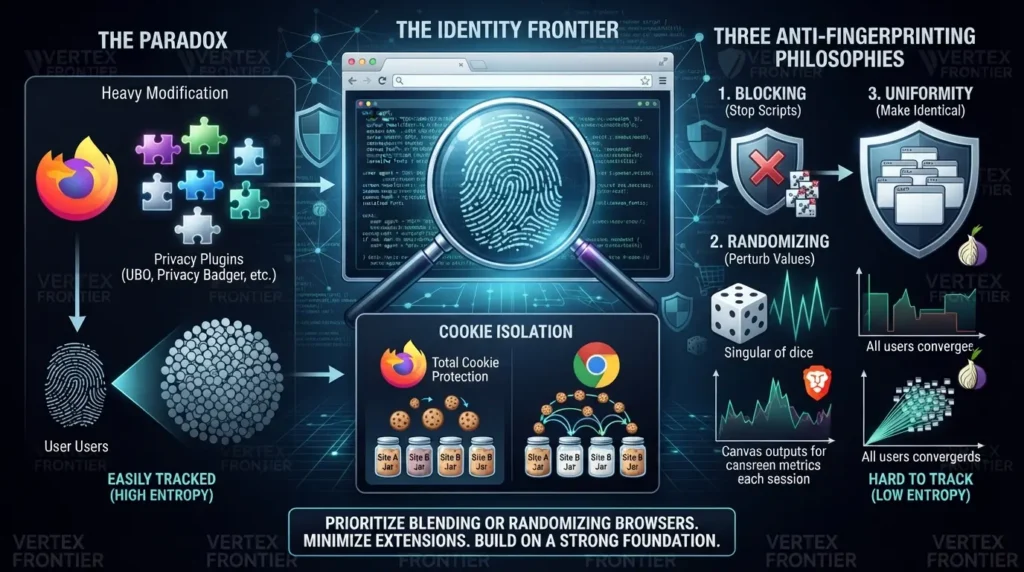
Firefox plus seven carefully chosen privacy add-ons looks like roughly nobody, and “nobody” is trivially re-identifiable on every site you visit. This is the entropy math from the previous section applied to your own toolbox, and it’s why professional privacy stacks emphasize fewer modifications, done at the right level, rather than a pile of add-ons.
The browser market has largely settled into three anti-fingerprinting philosophies, and understanding them matters more than any brand name:
- Blocking: Stop the scripts that probe your browser (tracker blocklists). Powerful against known trackers, blind to first-party probing and new domains.
- Randomizing: Perturb fingerprint values (canvas output, screen metrics) each session so trackers collect noise instead of truth. Brave is the most prominent user of this approach.
- Uniformity: Make every user look identical, so the fingerprint itself carries no information. Tor Browser and Mullvad Browser deliberately shrink or flatten rare characteristics, trusting the crowd.
Cookie isolation matured too. Firefox rolled out Total Cookie Protection by default to all desktop users worldwide in June 2022, confining every tracker’s cookies to a per-site “jar” so they can’t stitch your journey across sites. Chrome, notably, walked the other road: Google confirmed in April 2025 that it will keep supporting third-party cookies rather than deprecate them, abandoning the standalone deprecation prompt it had promised users for four years.
That April 2025 decision has a direct consequence for anyone building a private setup on Chrome: the burden of cross-site tracking defense shifts onto extensions, and Chrome’s extension platform has meanwhile constrained its strongest tooling. Full uBlock Origin no longer works in current Chrome after the Manifest V2 removal; the reduced uBlock Origin Lite is the MV3-era replacement. If you’re serious about private browsing in 2026, building it inside Chrome means accepting both of those trade-offs deliberately.
Tip: We’ve compared how Brave, Firefox, LibreWolf, Mullvad, and Tor Browser each implement these defenses, with a decision framework and the mistakes that undo each setup, in our privacy browsers comparison guide. Use that to pick the tool; use this guide to build the rest of the stack around it.
Mobile deserves one honest paragraph, because “private browsing on iPhone” and its Android twin are among the most-searched privacy queries. Mobile Safari and Chrome private tabs have the same limits as desktop incognito, and iOS funnels every browser through the same WebKit engine, which limits how much a “private browser” app can genuinely differ.
The EU’s Digital Markets Act technically opened the door to alternative browser engines on iOS 17.4, but Apple’s technical restrictions have so far kept vendors from shipping one in practice, so the practical ceiling holds worldwide. On Android, Firefox-family browsers can ship real isolation. For a phone that treats privacy as a system property rather than an app feature, our comparison of privacy-focused operating systems covers GrapheneOS and its trade-offs in depth.
Choose a browser engineered for blending or randomizing, keep extensions minimal, and don’t build your privacy foundation on a browser whose owner just recommitted to third-party cookies.
Defense Pillar 3: OS, Identity, and Behavior: The Layer Downloads Can’t Fix
You can encrypt every byte and still be betrayed by a login. The moment a private session touches your Google, Facebook, or Amazon account, the anonymous browsing window and the documented person merge into one profile, instantly, retroactively, across every site those platforms can see. This third pillar addresses exactly this: identity bleed.

The technical ceiling here is set by your operating system. Standard Windows or macOS was never designed for anonymity; browsers are guests on systems that leak through dozens of channels. That’s why high-assurance setups run Tails (a live system that leaves no trace and routes everything through Tor) or isolate work in Qubes with Whonix compartments, and why a hardened Android option exists for mobile. We compare those systems, their real-world trade-offs, and who genuinely needs them in the privacy-focused OS comparison.
For the 95% of readers whose threat model stops well short of state surveillance, the identity layer is behavioral, not technical, and it’s buildable in half an hour:
How to build a private browsing stack in 30 minutes:
- Pick a fingerprint-resistant browser (5 minutes). Choose one designed for blending, from the comparison linked above, rather than your daily browser with add-ons. Keep it only for private sessions.
- Secure the network path (5 minutes). Install a reputable VPN with a kill switch, or use Tor for maximum-sensitive sessions. Run a DNS leak test and a WebRTC leak test immediately; if your ISP’s resolver appears, reconfigure.
- Create identity containers (10 minutes). Separate browser profiles or containers for: personal, work, shopping, and anonymous. Never sign into your main accounts inside the anonymous container. This single habit prevents the #1 de-anonymization event.
- Change the defaults that report you (5 minutes). Switch to a private search engine (we compared the leading candidates in our private search engines guide), DuckDuckGo alone processes around 100 million searches daily, so you lose nothing in quality, and migrate email to a provider that doesn’t monetize metadata; our Proton vs Tuta vs Mailfence comparison ranks the realistic options.
- Close the behavioral loop (5 minutes). Strip metadata from photos before uploading, opt out of ad personalization on your OS and in Google/Microsoft accounts, and compartmentalize sensitive messaging, our private messaging apps comparison covers the end-to-end encrypted choices.
Notice the pattern: four of those five steps cost nothing, and none of them require technical skill beyond installing an app. The scarce resource is discipline, not money.
Anonymity dies by login, not by leak. Containers, private defaults, and metadata hygiene defend the identity layer that no VPN can reach.
The Decision Matrix: Match Your Threat Level to Your Stack
Everything above compresses into one decision table. Find yourself in the first column; build only what that row requires. Buying past your threat model wastes money and adds fragility; buying under it is how people stay exposed while feeling protected.
| Reader Profile | Primary Threat | Recommended Stack |
|---|---|---|
| The everyday private user | Advertisers, brokers, ISP visibility | Hardened browser + DoH + reputable VPN + profile separation |
| The remote professional | Employer monitoring, account correlation | Own device + VPN + strict work/personal containers (within company policy) |
| The journalist / researcher | Source protection, targeted profiling | Tor Browser for sensitive work + dedicated device or Tails + compartmentalized identities |
| The at-risk activist | State surveillance, censorship | Tor + bridges + hardened OS (Tails/GrapheneOS) + disciplined operational security |
One stack per threat level. Your row is the honest answer to “how completely can I browse privately?”, and it’s a range you can climb, not a wall you can’t.
The Mistakes That Quietly De-Anonymize You
Ask anyone who works in operational security what breaks privacy, and the answer is never the crypto. It’s the habits. These are the errors that appear again and again in real-world failures, each one common, each one cheap to fix.
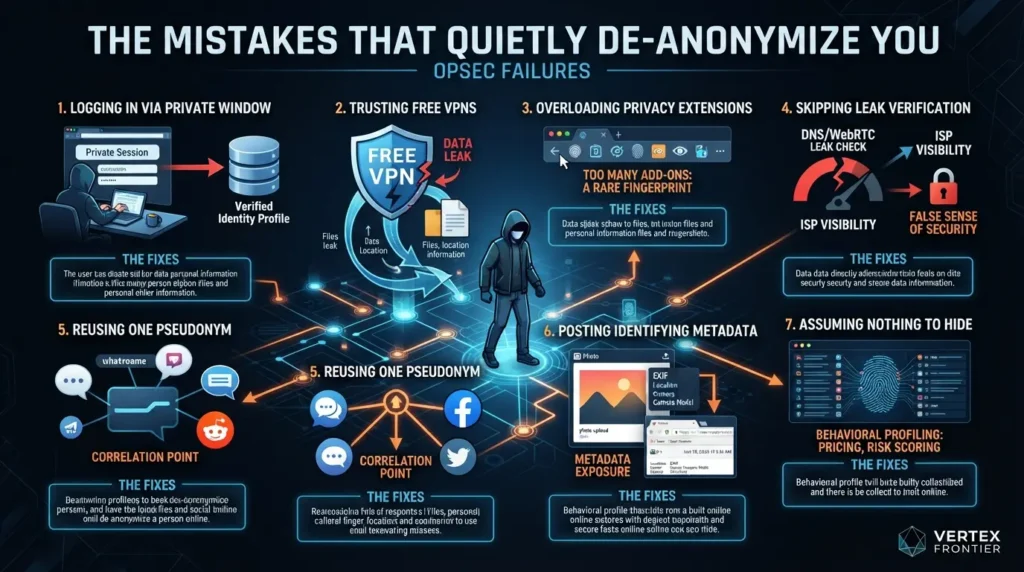
1. Signing into a personal account inside a private window
This fuses your “anonymous” session to your verified identity in the platform’s graph, and one merge is permanent.
Fix: containers exist precisely so logins never wander.
2. Trusting free VPNs with the data you wanted to hide
The incentive structure is the tell: you’re not the customer, you’re the inventory, Avast proved the model scales. The habit is widespread; Security.org’s annual survey of 1,008 U.S. users found 43% of VPN users relied on free services in 2026, up from 28% the year before.
Fix: if you need a VPN, pay the modest subscription fee and treat the fee as the privacy product.
3. Decorating your browser with privacy extensions
As shown in layer four, each add-on is another rare characteristic in your fingerprint.
Fix: one well-designed defense mechanism at the browser level beats six overlapping add-ons.
4. Skipping leak verification after setup
A misconfigured VPN that leaks DNS gives you ISP visibility plus a false sense of security, worse than no VPN, because you stop being careful.
Fix: a five-minute DNS and WebRTC leak test after every stack change.
5. Reusing one pseudonym everywhere
A unique username across three forums is a fingerprint for your whole persona; behavioral analysts correlate activity patterns the way fingerprinters correlate GPU output.
Fix: one persona, one context, no bridges.
6. Posting identifying metadata with content
Photo EXIF data, document properties, screenshots with visible tabs and notifications.
Fix: strip metadata at upload time and crop screenshots like a professional.
7. Assuming “nothing to hide” means nothing to lose
Behavioral profiles drive pricing, insurance risk scoring, and content filtering, decisions made about you, without you. The people who learned this lesson in expensive ways were not doing anything wrong; they were simply visible.
- Chrome with third-party cookies enabled and default settings
- “Incognito” used for anything sensitive
- ISP reading every domain in plaintext
- Same account logged in everywhere, on every device
- Free VPN (or none) with unverified leaks
- One identity, one fingerprint, zero separation
- Hardened, blending browser for private sessions
- DoH enabled; DNS and WebRTC leak-tested
- Reputable paid VPN with kill switch (or Tor for sensitive work)
- Identity containers that never touch each other
- Private search + private email defaults
- Metadata stripped; habits compartmentalized
Every de-anonymization above is a behavior, not a bug. The cheapest privacy upgrade available to you is deleting two habits this week.
Legal and Practical Boundaries of Privacy Tools
Privacy tools are legal in the United States, the United Kingdom, the European Union, and most democracies, and regulators increasingly expect their use under privacy law. GDPR gives individuals rights over their personal data, including the right to object to processing and profiling, and enforcement is real: the €310 million LinkedIn decision cited earlier came from exactly that framework. Using a VPN or Tor to exercise those rights is not a gray area; it’s compliance.
The legal picture sharpens at the edges, and two live debates show how. In the UK, the Online Safety Act’s age-verification rules took effect on July 25, 2025, and Wired reported the resulting VPN surge, with downloads spiking as users routed around verification, evidence that privacy tooling and access regulation are now colliding in policy, not just in theory.
In the EU, the “Chat Control” proposal (the Child Sexual Abuse Regulation) would have mandated scanning of private communications; EFF reported in December 2025 that the Council’s agreed position removed the forced scanning of encrypted messages; in July 2026, EU lawmakers extended the temporary scanning exemption until April 2028 while negotiations over the permanent rules continue. The direction matters for anyone betting on encryption staying untouched by default.
Use privacy tools lawfully and their legality stays simple: circumventing paywalls, violating workplace policy on company machines, or committing crimes through anonymity tools all convert a legal tool into evidence. Anonymity protects process, not crimes, and courts can and do order providers to hand over what they hold.
Note: This section is general information, not legal advice. Laws differ by jurisdiction and change quickly; check your local rules, and your employer’s policies, before building anything on top of them.
Privacy tooling is mainstream, lawful, and increasingly reinforced by regulation, but “private” and “above the law” are different products, and only one of them exists.
The Honest Conclusion: Privacy Is a Spectrum You Manage
“Completely private” is the wrong target, and chasing it with a single purchase is how the privacy industry wins and the user loses. The evidence in this guide points somewhere more useful: privacy is a spectrum, and every layer you close moves you measurably along it.
Encrypt DNS and your ISP stops reading your destinations. Add a VPN and the network stops seeing either. Harden the browser and the fingerprint stops speaking. Separate identities and the brokers stop connecting the dots.
None of it makes you invisible. All of it makes you expensive to track, and expensiveness is what actually changes outcomes, because mass surveillance is a business of cheap averages, not individual effort.
Here is the entire guide compressed into ten checks:
- Incognito mode is local cleanup, never treat it as privacy.
- Encrypt DNS (DoH) and verify it with a leak test.
- Use a reputable paid VPN with a kill switch, or Tor for sensitive sessions.
- Choose a browser built for blending or randomizing, not Chrome with cookies enabled.
- Keep extensions minimal; every add-on is entropy.
- Contain identities: separate profiles that never share logins.
- Switch defaults: private search, private email, OS-level tracking off.
- Strip metadata from everything you publish.
- Test after every change: DNS leak, WebRTC leak, fingerprint check.
- Match the stack to your adversary, don’t build Tails-level security for ad-blocking problems.
If this guide changed how you think about the layers, the natural next step is choosing the right privacy browser for your threat row, and if you manage your own infrastructure rather than trusting someone else’s, our guide to privacy-focused operating systems shows what the ceiling looks like.
Frequently Asked Questions

Was this article helpful?







[…] is the exact gap we covered in our guide to how to browse completely privately: the browser is one pillar, and the DNS, IP, TLS, and behavioral layers each need their own […]
[…] put search into that full-path context in our guide on how to browse completely privately, which covers the DNS, IP, fingerprinting, and behavioral layers a search engine cannot protect on […]
[…] browser and network path make up most of that remaining data flow, which is why our guide on how to browse completely privately treats the operating system as one layer among […]
[…] Messaging is also just one container in your overall privacy stack. For the browsing layer, see our guide on how to browse completely privately. […]
[…] Local AI protects the prompt trail, but your web browsing leaves a separate trail entirely, see our guide on browsing completely privately. […]
[…] The same logic applies to web browsing, where DNS, IP, and TLS metadata reveal which sites you visit even under HTTPS, see our guide on the five layers that expose your browsing. […]