
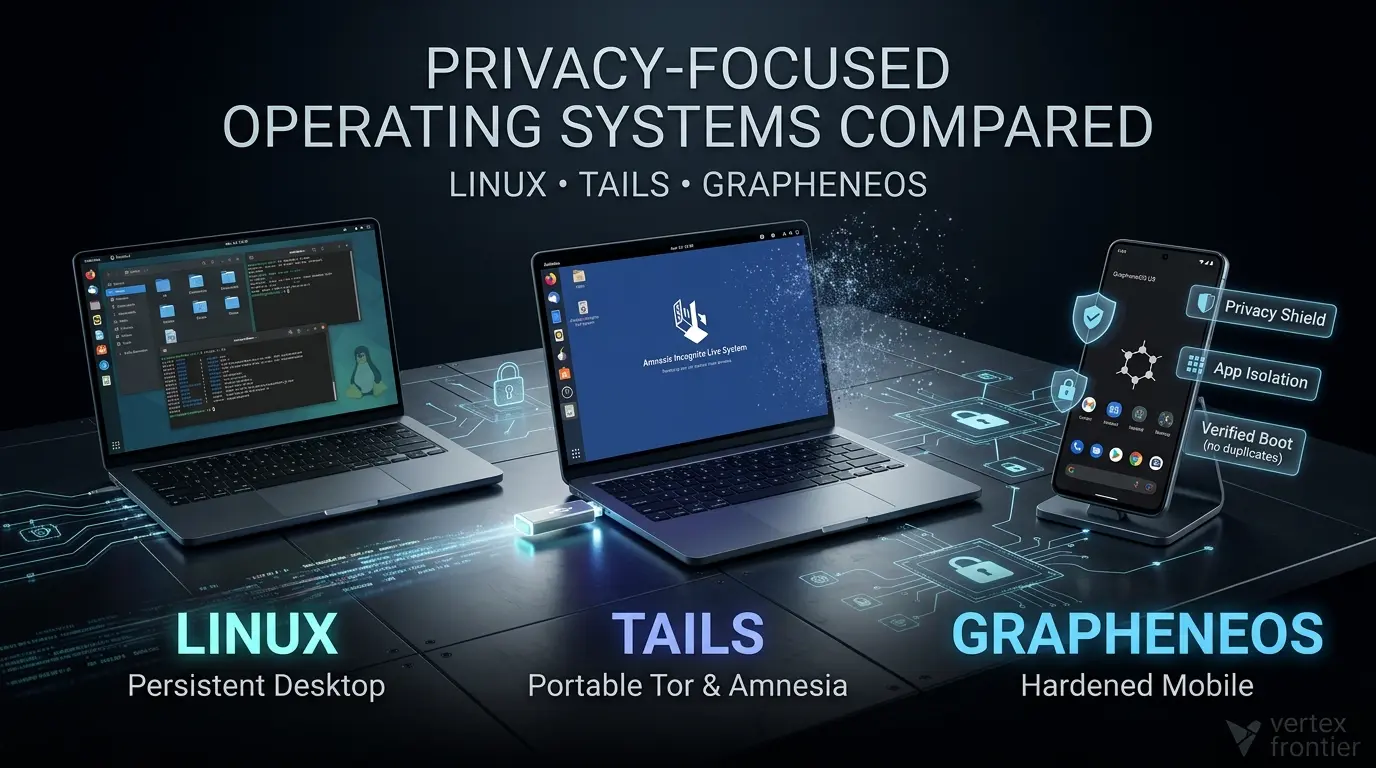

Linux, Tails, and GrapheneOS are not three versions of the same idea. They protect different boundaries on different kinds of hardware.
- Mainstream Linux is the flexible choice for a persistent desktop. It gives you control over software, accounts, packages, and local data, but its privacy and security depend heavily on the distribution, release, package sources, desktop stack, firmware, and your configuration.
- Tails is a portable, Tor-centered live operating system. It is designed to reduce local traces and route internet applications through Tor, but it does not guarantee anonymity and it is deliberately less convenient than a normal desktop.
- GrapheneOS is a hardened mobile operating system for supported Google Pixel devices. Its strengths are verified boot, hardware-backed security, app isolation, granular permissions, and a reduced dependence on privileged Google services, not anonymous mobile networking.
The most useful question is not “Which is the most private?” It is:
Which system protects the asset I care about, against the adversary I actually face, without creating operational mistakes I cannot manage?
Key takeaways
Click any topic to expand or collapsePrivacy, Security & Confidentiality
Privacy, security, anonymity, and local confidentiality are separate goals.
Linux Privacy Posture
Linux is a family of configurations, not one privacy posture.
Tails OS Workflow
Tails is strongest for a temporary Tor-and-amnesia workflow, not as a universal desktop replacement.
GrapheneOS Security Boundary
GrapheneOS is strongest as a hardened mobile boundary, not as an anonymity system.
Operational Discipline
For sensitive work, operational discipline can matter more than the operating system logo.
Privacy is not the same as security or anonymity
Many operating-system comparisons fail before the first feature table. They use “privacy” as a catch-all word for several different goals.
Privacy asks who can collect, infer, or retain information about you. Security asks who can compromise your device, applications, or data. Anonymity asks whether an activity can be linked to your real identity. Local confidentiality asks whether somebody with access to the device can read what is stored on it.
Those goals overlap, but they are not interchangeable.
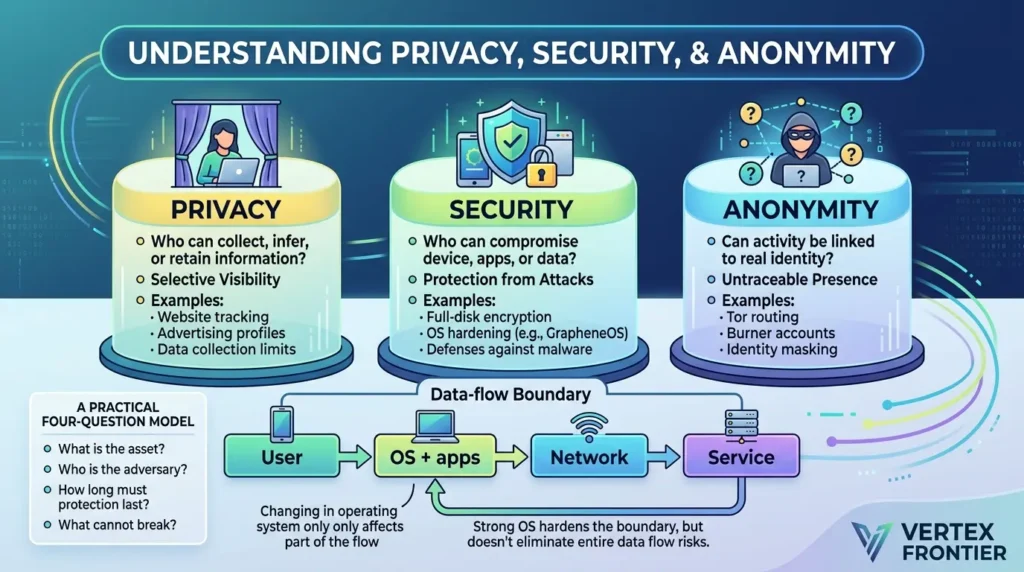
A Linux laptop with full-disk encryption may protect files while the laptop is powered off. It does not automatically hide browser activity from websites or a network provider. Tails can route traffic through Tor, but logging into a real-name account can still identify you. GrapheneOS can reduce app privileges and harden the phone against exploitation, but it does not stop a cellular carrier from seeing cellular metadata.
The data-flow boundary matters more than the OS label
An operating system controls only part of the path between a person and a service. The rest of the path includes firmware, the local network, the ISP or carrier, the browser or app, the destination service, backups, and the user's identity choices.
Linux mainly changes the OS + apps box and gives you more control over it. Tails also changes the network path and local persistence. GrapheneOS strengthens the mobile OS and application boundary, while the carrier and destination service remain separate trust domains. This is why changing operating systems can reduce risk without eliminating the entire data flow.
This distinction also explains why “open source” is not a complete security argument. Source availability improves inspectability and supports independent review. It does not prove that every component was reviewed, every dependency is safe, every update is timely, or every default is appropriate for your threat model.
A practical four-question model
Before choosing a privacy-focused operating system, answer four questions:
- What is the asset? Files, identity, browsing destinations, contacts, credentials, or device integrity?
- Who is the adversary? Advertisers, a local network observer, a malicious app, a thief, an employer, a targeted investigator, or compromised hardware?
- How long must the protection last? One session, daily use, a multi-year phone lifecycle, or recovery after theft?
- What cannot break? Banking, NFC payments, notifications, proprietary desktop software, GPU support, cellular service, or enterprise management?
The trust chain: your operating system starts before it boots
An operating system cannot repair a compromised foundation. The relevant security boundary begins before the login screen:
| Layer | What can go wrong | What the OS can and cannot do |
|---|---|---|
| Hardware | Physical keyloggers, altered components, unsupported devices. | No OS can reliably neutralize every hostile hardware change. |
| Firmware and boot chain | Compromised BIOS/UEFI, bootloader, firmware, or recovery path. | Verified boot and hardware-backed checks can raise the bar, but coverage depends on platform and configuration. |
| Image and installation media | Modified download, infected installer, or damaged USB media. | Use the project’s current verification process and a trusted installation environment. |
| OS and applications | Unpatched vulnerabilities, malicious packages, excessive permissions, or unsafe files. | Sandboxing, updates, access controls, and app provenance help, but do not remove operator risk. |
| Network and services | Metadata, account linkage, service logs, carrier visibility, or traffic correlation. | Tails changes the network path; Linux and GrapheneOS do not automatically make ordinary traffic anonymous. |
The Tails warnings explicitly state that installing from a compromised computer and running on compromised firmware or hardware remain risks. GrapheneOS takes a different approach: its features documentation describes enhanced verified boot and hardware-based security, but those properties are tied to supported Pixel hardware and its firmware lifecycle. Linux can use platform features such as Secure Boot or hardware-backed encryption, but the exact protection depends on the named distribution, device, and configuration.
Trust-chain takeaway: verifying the operating-system image is valuable, but it is only one link in the chain. A trustworthy download cannot compensate for a hostile bootloader, unsupported hardware, an untrusted application, or an identity-linked service.
Linux: the privacy choice that depends on your choices
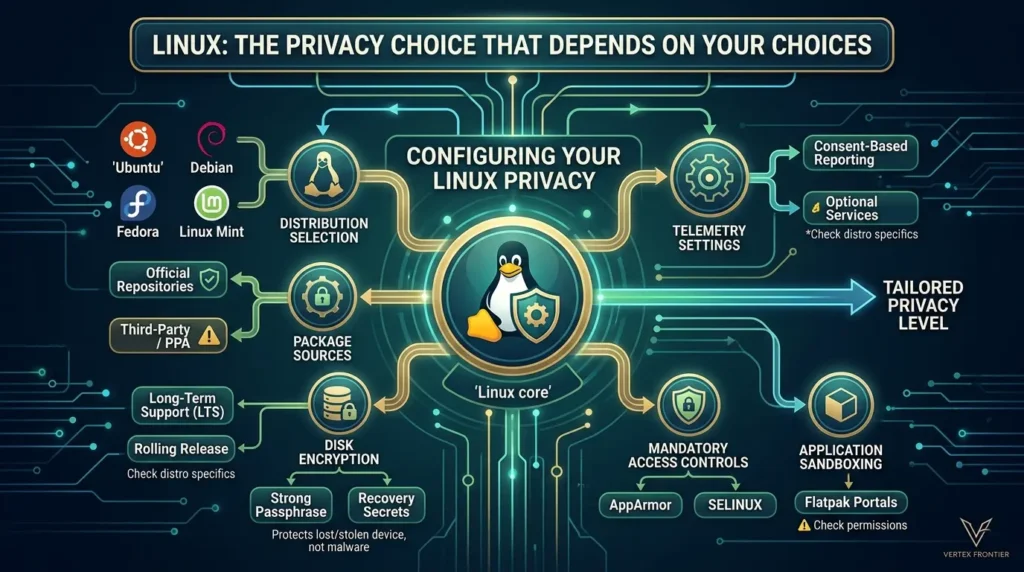
Linux is often recommended as a private operating system because it gives users more control than many vendor-managed desktop platforms. You can choose the distribution, package sources, desktop environment, update model, accounts, disk layout, and network tools.
That control is real. It is also the source of the complexity.
Ubuntu, Debian, Fedora, Linux Mint, and immutable or atomic variants do not have identical defaults or security models. Even within one distribution, privacy changes when you install a browser with its own account ecosystem, add third-party repositories, enable cloud synchronization, use proprietary drivers, or grant a Flatpak broad filesystem access.
What Linux can do well
A carefully maintained Linux installation can provide:
- Persistent local control over files and accounts.
- Strong package provenance when you stay close to official repositories.
- Passphrase-based disk encryption, depending on installer, release, and hardware.
- Mandatory access controls such as AppArmor or SELinux, where configured and supported.
- Application sandboxing through technologies such as Flatpak portals, with important permission caveats.
- A wide range of update and support models, from long-term releases to faster-moving distributions.
The important phrase is can provide. Linux is not one product with one set of guarantees.
Does Linux have telemetry?
The safe answer is distribution-specific: some Linux distributions document optional or consent-based reporting mechanisms, and the surrounding software stack can create additional data flows.
For example, Canonical’s systems information notice describes information that may be collected by Ubuntu services. Ubuntu has also described changes to desktop system information reporting in its Ubuntu Insights discussion. Debian’s privacy documentation discusses optional services such as popularity-contest reporting.
That does not mean “Linux is spying on you.” It means the blanket claim “Linux has no telemetry” is too broad to publish responsibly. You need to audit the named distribution, installed services, browser, package manager, crash reporting, extensions, cloud accounts, and third-party applications.
Encryption protects the disk, not the entire life of the data
Disk encryption is one of Linux’s most useful privacy controls, especially for a stolen or lost laptop. It protects data at rest when the device is powered off or locked, assuming the recovery secret is strong and the encryption covers the intended storage.
It does not protect an unlocked session from malware. It does not erase backups, browser activity already sent to a service, screenshots, firmware compromise, weak recovery procedures, or credentials typed into a malicious application.
This is a recurring mistake in privacy discussions: treating encryption as a synonym for anonymity. It is not.
Application isolation is not automatic
Flatpak’s documentation explains the sandbox and portal model, while its permission documentation shows why “sandboxed” does not mean “unable to access anything.” Depending on the application and its permissions, access may include networking, files, devices, display servers, D-Bus services, or broader host resources.
Native packages, AppImages, Snap packages, Flatpaks, and applications launched through a desktop display server should not be treated as interchangeable security boundaries. Your desktop environment, compositor, permission grants, and application design matter.
Linux takeaway: Linux is the best fit when you want a controllable, persistent desktop and are willing to maintain the system as a security project—not when you want a magic privacy switch.
Tails: a Tor-and-amnesia workflow, not a normal desktop
Tails, the Amnesic Incognito Live System, starts from a different premise. Instead of turning your everyday installation into a hardened environment, it gives you a portable live session designed around Tor and reduced local persistence.
Tails is useful when the workflow itself is the security boundary: boot from trusted media, perform a limited task, avoid identity-linking mistakes, shut down, and leave fewer local traces than a persistent operating system normally would.
What makes Tails different?
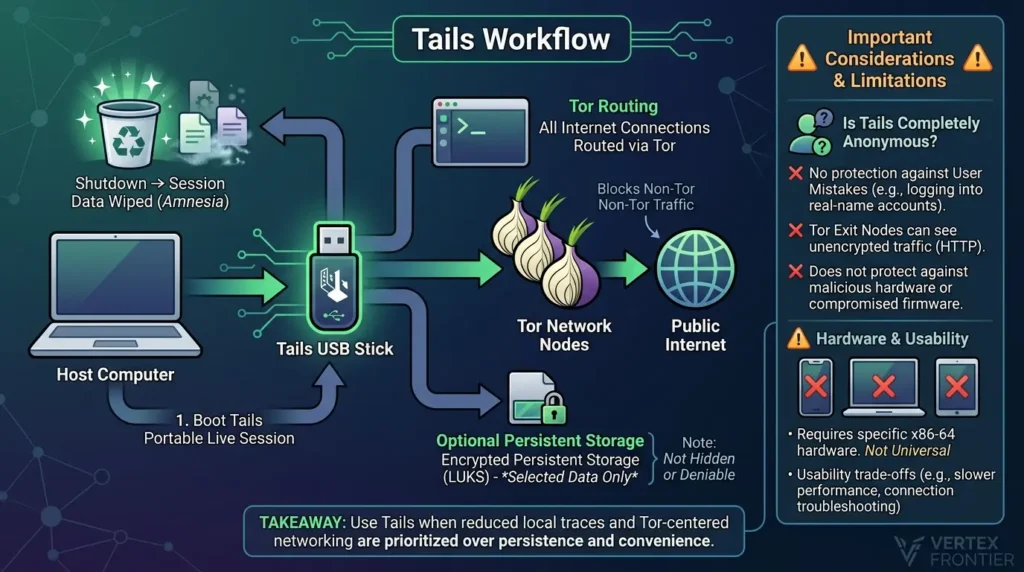
According to the Tails feature documentation, the system is designed to run from removable media, route internet connections through Tor, and reduce persistence by default. Tails also provides optional encrypted Persistent Storage for selected data and settings.
Its central strengths are therefore architectural:
- Amnesia: unsaved session data is intended to disappear at shutdown.
- Tor routing: internet access is blocked until Tor connects, with documented exceptions and application-specific limitations.
- Portability: the same live environment can be used across compatible computers.
- Reduced local persistence: the system is not designed as a conventional installed desktop.
Is Tails completely anonymous?
No. The official Tails warnings and Tor warnings are unusually important because they describe what the project does not promise.
Tails cannot prevent every form of Tor detection, traffic correlation, identity disclosure, unsafe-file exposure, malicious hardware, compromised firmware, or compromise of the computer used to create or boot the media. A Tor exit node can see traffic that is not protected by HTTPS. A user can identify themselves by logging into a real-name account, reusing a username, uploading a revealing document, or repeating distinctive behavior.
Tails can reduce some exposure. It cannot correct a broken operational identity model.
Tails and the “no network leaks” shorthand
Tails blocks ordinary internet access until Tor connects, and its documentation explains restrictions on non-Tor applications. But absolute wording is dangerous. Automatic clock synchronization is a documented non-Tor exception, and third-party applications still need to work within the supported network model. UDP, ICMP, and IPv6 limitations also affect what applications can do.
The accurate description is Tor-centered network enforcement with documented exceptions and compatibility limits, not “every packet is magically anonymous.”
Persistent Storage: useful, encrypted, and not hidden
Tails Persistent Storage uses encrypted storage based on LUKS/dm-crypt, according to the official documentation. It lets users preserve selected files, settings, and features between sessions.
That convenience changes the threat model. Persistent Storage is not designed to be hidden or deniable. Only selected data persists, and disabling a feature is not identical to deleting all of the data it previously stored. A person who can access the media may know that encrypted persistent data exists, even if they cannot read it without the passphrase.
Hardware and usability are part of security
Tails is not a universal emergency operating system for every device. Its requirements documentation describes 64-bit x86-64 requirements and hardware limitations. Apple Silicon Macs, smartphones, tablets, ARM/PowerPC devices, and some graphics configurations are not interchangeable with a supported PC and USB workflow.
The usability cost is not cosmetic. A failed boot, broken Wi-Fi driver, captive portal, Tor bridge problem, or lost unsaved work can push a user toward unsafe shortcuts. An operating system that is theoretically appropriate but operationally frustrating may produce less privacy in practice.
A hands-on LWN test of Tails is useful here because it shows the kind of trade-off that official feature lists cannot: the system can be usable, but it is slower and more constrained than a normal installed desktop.
Tails takeaway: Use Tails when reduced local traces and Tor-centered networking matter more than persistence, convenience, and broad hardware compatibility.
GrapheneOS: a hardened mobile boundary
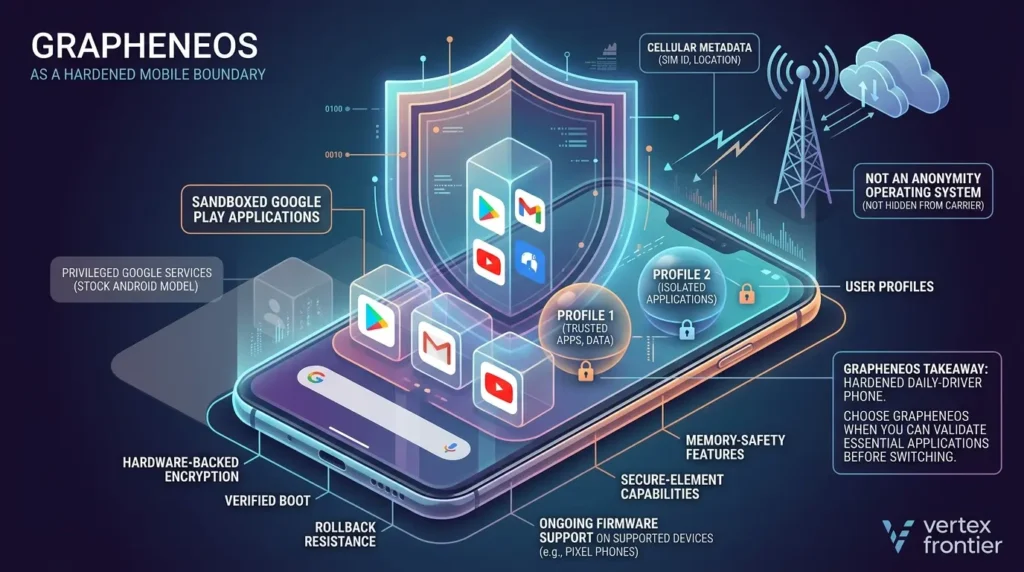
GrapheneOS is a privacy and security-focused mobile operating system based on Android Open Source Project code. It is not a Linux desktop distribution and not a Tor anonymity environment. Its security model is built around a supported mobile device, especially the hardware and firmware features available on Google Pixel phones.
The right comparison is not “GrapheneOS versus Tails as two privacy apps.” It is “What kind of mobile security boundary do I want, and how much compatibility friction can I accept?”
Why the hardware matters
GrapheneOS’s features documentation connects its security model to hardware-backed encryption, verified boot, rollback resistance, secure-element capabilities, memory-safety features on supported devices, and ongoing firmware support.
That creates a critical constraint: official support is device-specific. You cannot assume that any Android phone can deliver the same security properties. Bootloader unlocking may also depend on the device variant and carrier. Before purchase or installation, check the current supported-device and release information rather than relying on an old review.
Sandboxed Google Play is not the same as privileged Google services
One of GrapheneOS’s most misunderstood features is its support for the official Google Play components as ordinary sandboxed applications. The GrapheneOS usage documentation explains the model: users can install Google Play without granting it the privileged position it has on many stock Android installations.
That can improve compatibility, but it does not make every app work identically. Banking applications, wallets, DRM, enterprise-management tools, RCS, Android Auto, notifications, and integrity checks can depend on the exact app version, country, device, profile, and configuration.
A compatibility report or Reddit thread is a lead for testing, not a guarantee for your phone.
Profiles improve separation, but separation has a cost
User profiles can separate apps, data, and permissions. That is useful when you want to keep high-trust and low-trust applications apart, or separate identities on one phone.
The cost is operational. Notifications may not behave as expected across profiles. Switching profiles takes time. Some apps assume a single-user workflow. Data sharing and backups need deliberate planning. A feature that strengthens compartmentalization can still fail if the user bypasses it every day because it is inconvenient.
GrapheneOS does not make cellular life anonymous
GrapheneOS can reduce default Google integration and strengthen the phone’s application boundary. It does not hide the existence of the phone from the carrier. SIM and cellular metadata remain relevant. Calls and SMS are not automatically transformed into end-to-end encrypted communications merely because the operating system changed.
This is why GrapheneOS should be described as a hardened mobile security and privacy platform, not an anonymity operating system.
GrapheneOS takeaway: Choose GrapheneOS when you want a hardened daily-driver phone on supported Pixel hardware and can validate your essential applications before switching.
The maintenance burden: privacy is a process, not an installation
The first boot is often the easiest part. The harder question is whether the privacy model remains intact after updates, new applications, broken peripherals, forgotten recovery secrets, and ordinary time pressure.
| System | Recurring work | Typical failure pressure |
|---|---|---|
| Linux | Updates, repositories, browser permissions, firmware, backups, encryption recovery, and application isolation. | A user adds a convenient third-party package or grants broad access without reviewing the new trust boundary. |
| Tails | Trusted media, image updates, USB health, bridge troubleshooting, metadata handling, and Persistent Storage discipline. | A failed boot, captive portal, or missing file encourages the user to mix identities or return to an unsafe workflow. |
| GrapheneOS | Supported-device checks, OS updates, profile design, app testing, permissions, and recovery planning. | A banking, payment, messaging, notification, or work app behaves differently after migration or configuration changes. |
This is not an argument that one system is “harder” in every sense. It is a reminder that security is partly an operational practice. The best theoretical boundary may become the weaker practical choice if the user cannot maintain it, understand its failure modes, or recover without disabling protections.
Compare the recurring work, not only the installation screen. A system that fits your routine is more likely to remain correctly configured.
The comparison matrix: what each system actually protects
The table below compares design boundaries rather than marketing labels.
| Decision axis | Mainstream Linux | Tails | GrapheneOS |
|---|---|---|---|
| Product class | Persistent desktop; posture varies by distro and configuration. | Portable live desktop built around Tor and reduced persistence. | Android-compatible mobile OS for supported Pixel devices. |
| Best primary use | Controlled everyday computing. | Short, privacy-sensitive Tor sessions. | Hardened mobile daily use. |
| Network anonymity | Not inherent; requires separate tools and careful identity handling. | Tor-centered, but vulnerable to correlation and identity mistakes. | Not an anonymity system; cellular and account metadata remain. |
| Local persistence | Persistent by design. | Unsaved session data is intended to disappear at shutdown. | Persistent encrypted mobile storage and optional profiles. |
| Hardware dependency | Broad, but firmware, GPU, Wi-Fi, and Secure Boot vary. | USB-boot-compatible x86-64 hardware with notable limits. | Strongly tied to supported Pixel hardware and firmware. |
| Main residual risk | Misconfiguration, packages, browser identity, firmware, and unlocked-session compromise. | Tor correlation, identity linkage, unsafe files, compromised hardware, and persistence mistakes. | Carrier metadata, app compatibility, account linkage, and unsupported devices. |
The hybrid privacy strategy: you do not have to choose one OS
The three systems can complement one another when they are assigned different jobs. A privacy-conscious workflow might use Linux for daily desktop work, Tails for a limited Tor-centered session, and GrapheneOS for mobile communication and application isolation.
That does not create automatic anonymity. It creates separate boundaries that still need separate identities, accounts, files, backups, and operating rules. The more environments you introduce, the more opportunities you create for accidental cross-linking.
| Workflow | Possible fit | Separation rule |
|---|---|---|
| Daily desktop work | Linux | Use named accounts and packages deliberately; do not assume the distribution hides browser identity. |
| Temporary Tor-centered task | Tails | Avoid mixing purposes, real-name logins, revealing files, and shared Persistent Storage without a reason. |
| Mobile daily driver | GrapheneOS | Use profiles and permissions intentionally; test critical apps and remember that carrier metadata remains. |
Compartmentalization is useful only when the boundaries are understandable and consistently maintained. Three systems can mean three times the recovery and identity-management work.
A threat-model chooser instead of a “best OS” ranking
Use this decision guide when the use case is more concrete than the keyword “privacy.”
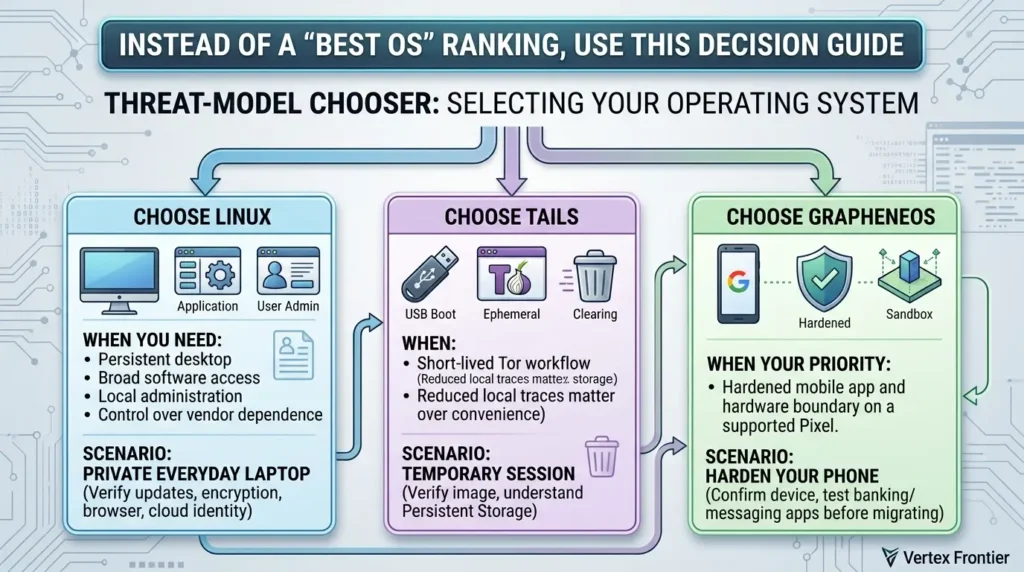
Scenario 1: You want a private everyday laptop
Start with Linux, but choose a named distribution and release. Enable encryption where appropriate, use supported updates, keep recovery secrets safe, reduce unnecessary services, review application permissions, and understand how your browser and cloud accounts identify you.
Do not assume that installing Linux removes tracking. A browser account, social login, advertising script, or third-party application can still create an identifiable activity trail.
Scenario 2: You need a temporary session with fewer local traces
Tails is the more direct fit. Verify the downloaded image and media, use supported hardware, understand what Persistent Storage does, and avoid mixing the session with identity-linked accounts. If the task requires normal desktop persistence, specialized drivers, or broad application compatibility, Tails may be the wrong tool.
Scenario 3: You want to harden your phone
GrapheneOS is the candidate to evaluate, not automatically the answer to install. Confirm that your exact Pixel model is supported, that the device can be unlocked and relocked correctly, and that your banking, messaging, wallet, work, and authentication apps function under your intended profile and Google Play setup.
Keep the old phone until the new environment has passed a real validation period. A successful operating-system installation is not the same thing as a successful migration.
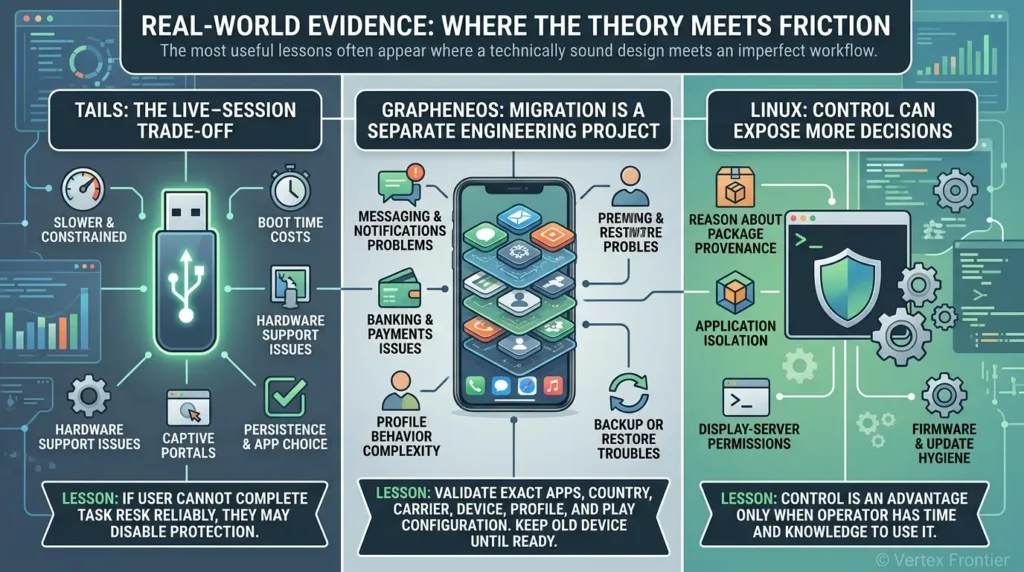
Real-world evidence: where the theory meets friction
The most useful lessons often appear where a technically sound design meets an imperfect workflow.
Tails: the live-session trade-off
In the LWN hands-on report, Tails was described as usable but slower and more constrained than a normal installed system. The practical lesson is not that Tails “fails.” It is that a privacy design can impose costs in boot time, hardware support, captive portals, persistence, and application choice.
Lesson: if the user cannot complete the task reliably, they may disable the very protections they selected.
GrapheneOS: migration is a separate engineering project
Reddit reports collected during the research included successful daily-driver experiences as well as problems involving messaging, notifications, banking, payments, profile behavior, and backup or restore. These are individual community reports, not prevalence measurements. They still reveal an important planning mistake: users often test installation but not the entire dependency chain around the phone.
Lesson: validate the exact apps, country, carrier, device, profile, and Play configuration. Keep the old device until contacts, authentication, messaging, payments, and recovery all work.
Linux: control can expose more decisions
Linux discussions repeatedly separated privacy and control from security architecture. Users may appreciate a local account, fewer vendor defaults, and freedom to remove services, while still needing to reason about package provenance, application isolation, display-server permissions, firmware, and update hygiene.
Lesson: control is an advantage only when the operator has the time and knowledge to use it.
Common mistakes that weaken a privacy setup
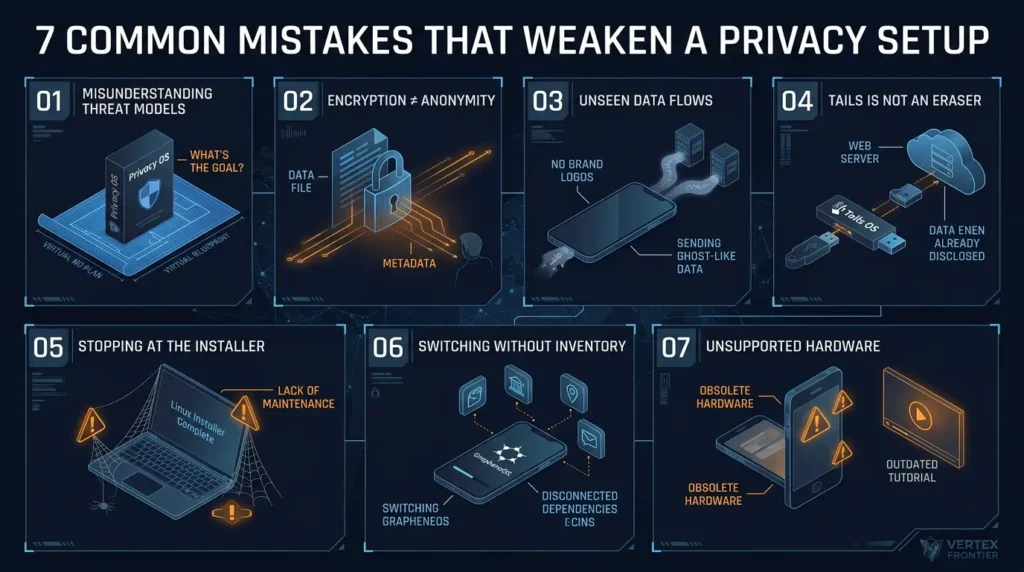
Mistake 1: Treating a product label as a threat model
“Privacy OS” does not tell you whether the goal is anonymous browsing, theft resistance, app isolation, reduced vendor telemetry, or secure mobile computing. Write the adversary and asset down first.
Mistake 2: Confusing encryption with anonymity
Encryption protects content under specific conditions. It does not erase metadata, prevent account correlation, or hide the fact that a service was contacted.
Mistake 3: Believing that no Google account means no Google-related data flows
GrapheneOS reduces privileged default integration, but installed applications can still communicate with their own services. The relevant question is not whether a logo appears in the setup screen. It is which application has which permission, which network access, and which account relationship.
Mistake 4: Assuming Tails erases everything
Tails can reduce local traces after a clean shutdown. It cannot erase information already disclosed to a website, a contact, an account, a network observer, a malicious document, or compromised hardware.
Mistake 5: Installing Linux and stopping at the installer
A secure desktop is maintained over time. Review updates, repositories, browser extensions, sandbox permissions, backups, recovery keys, firmware, and the applications that handle sensitive files.
Mistake 6: Migrating to GrapheneOS without an app inventory
List every critical dependency before switching: banking, payments, work profiles, password managers, 2FA, messaging, maps, navigation, medical apps, cameras, printers, and smart-home controls. Test them on the exact phone rather than trusting a generic compatibility list.
Mistake 7: Using unsupported hardware because a tutorial is popular
Release pages, support windows, bootloader behavior, and device variants change. Use current official documentation. An old tutorial can describe a device that no longer receives the security support you need.
When each operating system is the wrong choice
A trustworthy comparison should explain when a product is a poor fit. “Privacy-focused” does not mean “appropriate for every privacy problem.”
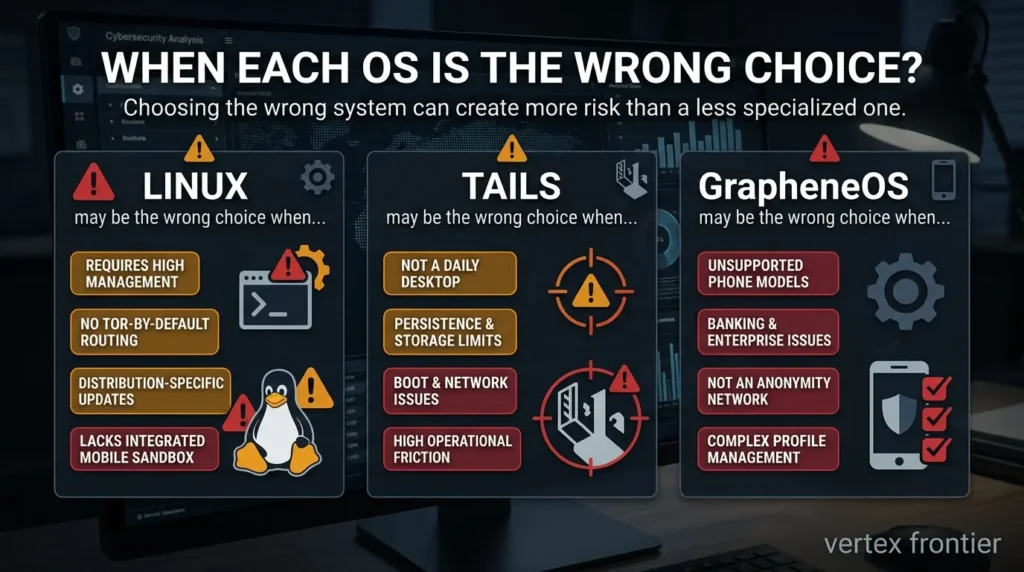
Linux may be the wrong choice when
- You need Tor routing and reduced local persistence as the default workflow.
- You do not want to manage distribution-specific updates, repositories, permissions, and recovery planning.
- You need a tightly integrated mobile application sandbox rather than a desktop stack assembled from separate controls.
Linux can still be a good platform, but those requirements point toward a different boundary or a more specialized design.
Tails may be the wrong choice when
- You need a normal daily desktop with extensive persistent software and hardware support.
- Your computer cannot reliably boot supported removable media or connect to the network through the Tails workflow.
- You need to preserve large amounts of data or depend on applications that do not fit the live-session model.
- The operational friction would make you reuse identities, disable protections, or abandon the workflow.
The Tails requirements and official warnings should be checked before treating a tutorial or review as a compatibility guarantee.
GrapheneOS may be the wrong choice when
- Your phone model or carrier variant is not currently supported.
- Banking, payment, enterprise, DRM, messaging, or notification requirements have not been tested on the exact device and configuration.
- You need a guaranteed anonymity network rather than a hardened mobile application and hardware boundary.
- You do not want to manage profiles, permissions, recovery, and app-specific compatibility decisions.
GrapheneOS’s current usage documentation is more useful than a generic “works with Android apps” claim because it describes where sandboxed Google Play, profiles, Android Auto, banking, and RCS have additional conditions.
Wrong-choice takeaway: rejecting a poor fit is part of good security advice. A system that cannot support the required workflow may produce more risk than a less specialized system that the user can operate correctly.
A safer adoption workflow
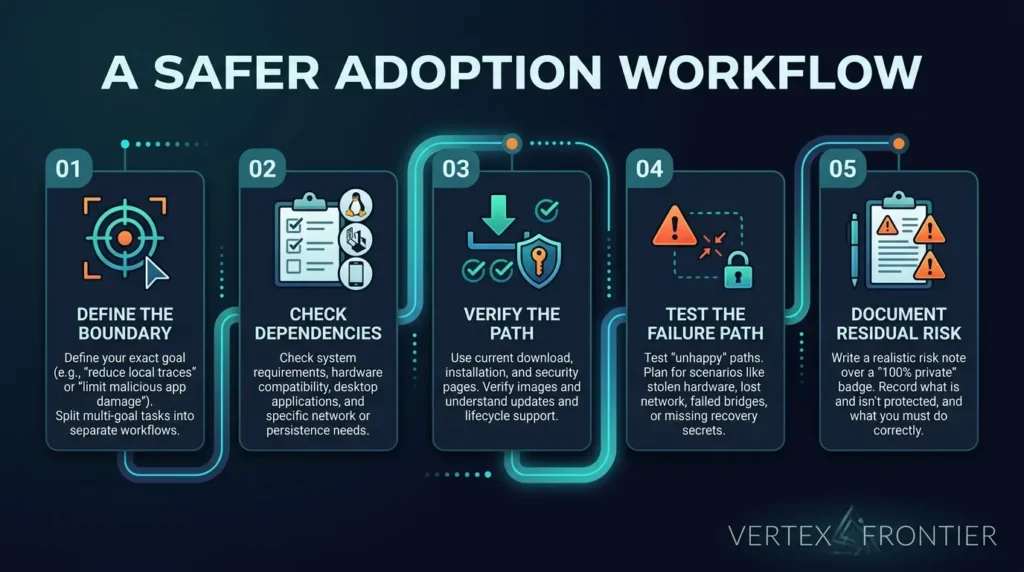
Step 1: Define the boundary
Write one sentence such as: “I want to reduce local traces during a temporary session,” or “I want to reduce the damage a malicious mobile app can cause.” If the sentence contains five different goals, split it into separate workflows.
Step 2: Check the dependency list
For Linux, check your hardware and desktop applications. For Tails, check USB boot, network access, bridges, file workflow, and persistence needs. For GrapheneOS, check the Pixel model, bootloader, lifecycle, app compatibility, profiles, and cellular requirements.
Step 3: Verify the supply and update path
Use the project’s current download, installation, release, and security pages. Verify images or media where the project provides a verification method. Understand how updates arrive and what happens when support ends.
Step 4: Test the failure path
Do not test only the happy path. Ask what happens if:
- the laptop is stolen while powered off;
- the phone loses network access;
- a Tails bridge fails;
- a banking app rejects the configuration;
- a profile notification does not arrive;
- a recovery secret is unavailable;
- a third-party package is abandoned;
- a sensitive file is opened in the wrong application.
Step 5: Document residual risk
A short risk note is more useful than a “100% private” badge. Record what the system protects, what it does not protect, and what you must do correctly every time.
A practical validation protocol before you switch
This article does not claim to have run a universal benchmark across three incomparable platforms. A better standard is a repeatable, scenario-based check of the exact device and workflow you plan to use.
Run the same five checks for the candidate you are considering
- Support check: Record the distribution and release, Tails version and hardware requirements, or GrapheneOS device model, release, and firmware support window.
- Asset check: Write down the files, accounts, credentials, contacts, and network destinations that must remain protected.
- Dependency check: Test the applications and peripherals you cannot lose. For GrapheneOS, include banking, payments, notifications, authentication, messaging, and work apps. For Tails, include USB boot, Wi-Fi, bridges, file handling, and the need for persistence. For Linux, include package sources, browsers, GPU, printers, and recovery tools.
- Failure check: Repeat the workflow with a failed network connection, unavailable recovery secret, rejected application, missing notification, or damaged boot medium. Record whether you can recover without weakening the security model.
- Residual-risk check: List what the system still exposes to the carrier, ISP, websites, app providers, local observers, backups, or a person with physical access.
What should you choose?
| Your priority | Best starting point | Do not forget |
|---|---|---|
| Persistent desktop control | Linux | Distro-specific telemetry, packages, isolation, firmware, and updates. |
| Reduced local traces and Tor workflow | Tails | Identity mistakes, Tor correlation, hardware limits, and Persistent Storage visibility. |
| Hardened mobile security | GrapheneOS on a supported Pixel | App compatibility, carrier metadata, profile friction, and support lifecycle. |
| Guaranteed anonymity | None by itself | Identity separation, metadata, endpoint security, and operational discipline. |
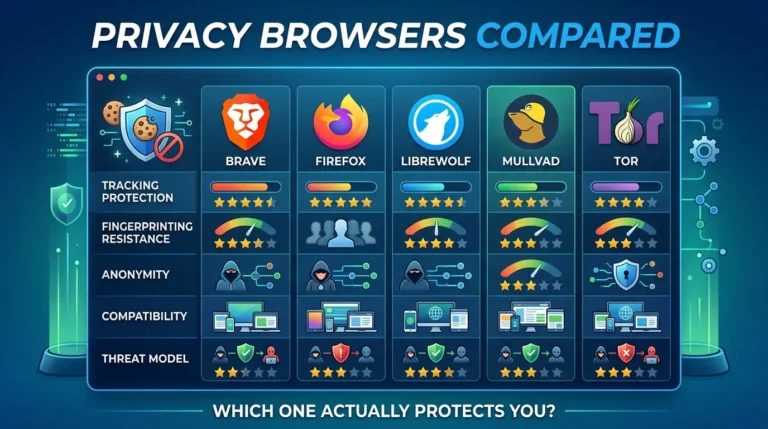
For a broader view of the privacy stack, Vertex Frontier’s Privacy Browsers Compared guide is a useful companion because browser behavior, fingerprinting, extensions, and account logins can undo part of an operating system’s privacy benefit.
The same principle applies to security architecture beyond the endpoint. Readers deploying automation or AI systems can also apply the trust-boundary thinking used in MCP Security in Production: identify the actor, permission, boundary, and failure mode instead of relying on a reassuring label.
Final verdict
There is no single winner among Linux, Tails, and GrapheneOS because there is no single problem being solved.
Choose Linux when you want a persistent, controllable desktop and are prepared to maintain the system. Choose Tails when a temporary Tor-centered workflow and reduced local traces are worth the loss of convenience. Choose GrapheneOS when you want a hardened mobile boundary on supported Pixel hardware and can test your application dependencies.
The premium answer is not a ranking. It is a boundary map:
- Linux gives you control.
- Tails gives you a portable Tor-and-amnesia workflow.
- GrapheneOS gives you a hardened mobile platform.
Your privacy outcome will depend on the rest of the system too: browser behavior, accounts, communications, backups, firmware, application permissions, network metadata, and the decisions you make when the workflow becomes inconvenient.
That is the uncomfortable part of privacy engineering, and the reason a threat-model-first choice is more useful than a “most private OS” badge.
Frequently asked questions
Is Linux the most private operating system?
Is Tails completely anonymous?
Can Tails be installed on a phone?
Is GrapheneOS safer than stock Android?
Does GrapheneOS work with banking apps and Google Play?
Does full-disk encryption make a computer anonymous?
Which is better for anonymity: Tails or GrapheneOS?
📋 Article Timeline & History
Successfully updated on October 13, 2026 with the latest details.
This article was originally published on October 5, 2026.

Was this article helpful?




[…] worth asking whether the OS underneath minimizes telemetry and enforces isolation by default – our privacy-focused operating systems comparison covers the main […]
[…] on. Hardening the operating system beneath Docker is a privacy decision in its own right, and our Linux, Tails, and GrapheneOS comparison walks through the trade-offs before you […]