
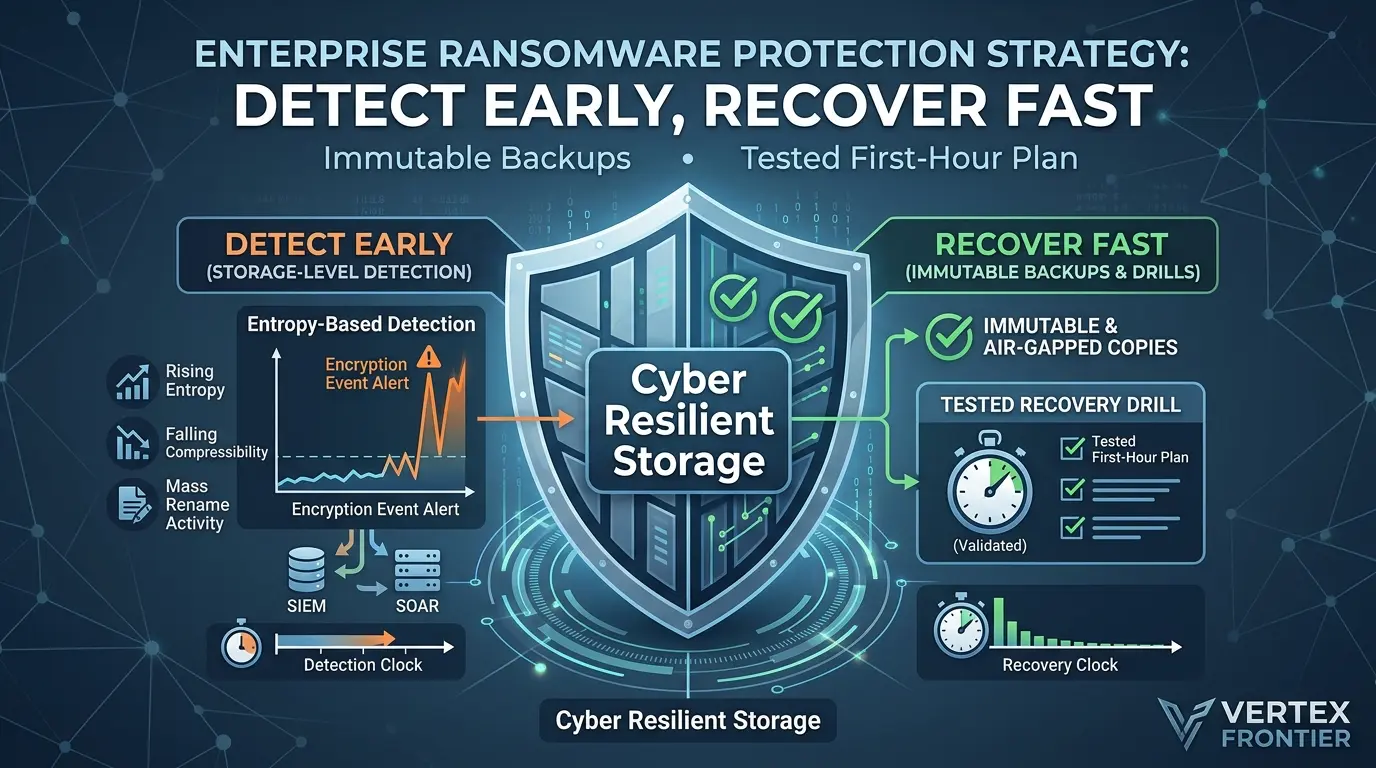

Nine days. That is how long attackers sat inside Change Healthcare before they switched on the ransomware. According to testimony reported by TechTarget, they logged in with stolen credentials on February 12, 2024, and deployed the ransomware on February 21.
Nine days of quiet. Files were read, copied and moved. Then, in one night, they were locked.
Most ransomware plans put their money into keeping intruders out. That matters. But the damage lands on your data, and the data layer usually gets attention last.
This guide reverses that order. It is written for security operations teams, infrastructure engineers and the IT and storage owners who run an organization’s data, not for anyone shopping for a personal antivirus. It lays out an enterprise ransomware protection strategy built around the data layer. You will learn how to:
- Build backups that still work on your worst day
- Spot mass encryption early, using signals your storage can see
- Run a response plan that does not depend on anyone’s memory
- Avoid the mistakes that made three well-known incidents so costly
You will also get a small calculator that shows how “randomness” gives encryption away, and why attackers work hard to hide it.
Key takeaways
Click any topic to expand or collapseData-Centric Defense
Ransomware hits your data first, so build the defense around data: backups, detection and a rehearsed response.
Useful Backup Criteria
A useful backup is recent, redundant, recoverable and read-only.
Encryption Detection Signals
Storage can flag encryption through entropy, compressibility, deduplication, overwrite bursts and renames. No single signal is reliable alone.
The Three Clocks
Outcomes are decided by three clocks: dwell time, detection time and recovery time.
Integration & Restore Tests
Send storage alerts to your SIEM and SOAR tools, and time your restore tests.
What this guide covers, and what it does not
This guide is about the data layer of an enterprise ransomware protection strategy: backups, storage-level ransomware detection and the first hours of a response. It assumes you run shared storage, servers, backups or cloud data stores for an organization. It does not replace prevention work such as patching, multi-factor authentication and phishing defense. It shows where those controls sit in the timeline.
Three notes on how to read it:
- Evidence labels: Statistics come from named reports and are dated. Vendor-commissioned surveys are labeled as such. Where a recommendation is editorial judgment rather than documented guidance, the text says so.
- Storage features vary: Detection features differ by vendor, product and version. Check your own documentation before you rely on any signal described here.
- Residual risk: No control in this guide guarantees prevention, and backups cannot undo data theft. This is general information, not legal, insurance or incident-response advice for your situation.
Why ransomware is a data problem first
What do attackers actually want from your network? Not the servers. They want what is on them, or more exactly, your inability to use it.
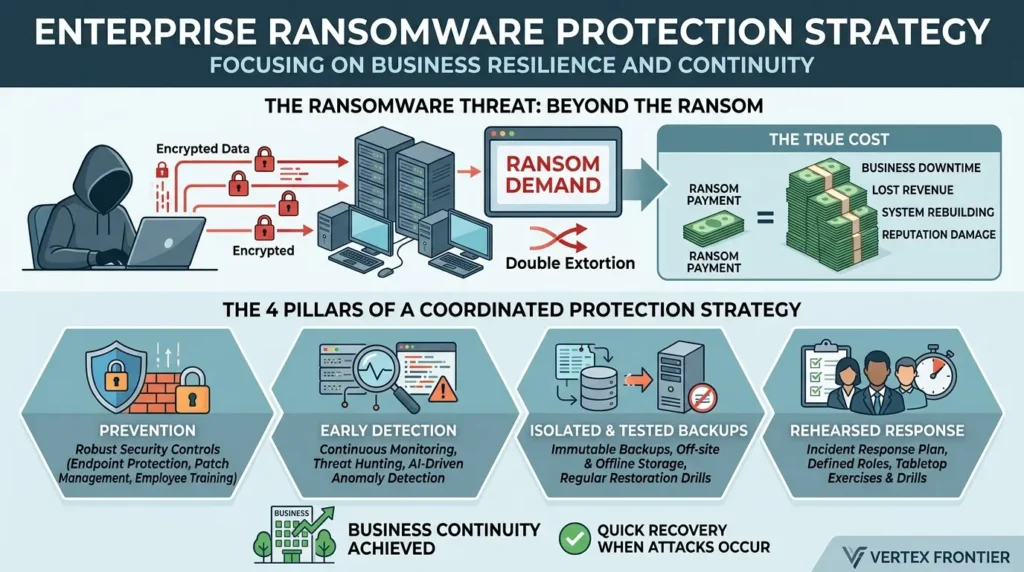
What is an enterprise ransomware protection strategy?
An enterprise ransomware protection strategy is a coordinated plan that combines prevention, early detection, isolated and tested backups, and a rehearsed response. Its goal is that an organization keeps running, or recovers quickly, when an attack gets through.
What is ransomware?
Ransomware is an attack that blocks your access to data or systems, usually by encrypting files, and demands payment to restore access. Many groups also steal a copy first and threaten to publish it. So the attack can hurt you even if you restore every file.
That point is easy to miss. CISA’s #StopRansomware Guide describes the combined tactic as double extortion, and notes that some actors steal data and threaten to release it without using ransomware at all.
How common is it?
No single number answers this, because each source counts something different. Two reference points:
- The Verizon 2026 Data Breach Investigations Report found ransomware in 48% of the breaches it analyzed, up from 44% the year before. Its dataset covers incidents from November 2024 through October 2025.
- That figure is a share of breaches in Verizon’s dataset. It is not the share of all companies that were attacked.
- A Barracuda survey run by Vanson Bourne asked 1,350 IT and security decision-makers at companies with 100 to 2,500 employees about 2022. 73% reported at least one successful attack, and 38% reported two or more. A security vendor commissioned it and it relies on self-reporting, so treat it as context, not a benchmark.
The Verizon report also has a hopeful finding. It reports that 69% of ransomware victims in its data did not pay, up from 65%, and that the median payment fell to $139,875 from $150,000. Those payment figures come from the subset of cases where the outcome was known.
The ransom is rarely the real bill
Here is an uncommon angle. The ransom is usually not the biggest number in the story.
UnitedHealth paid $22 million to the Change Healthcare attackers. By its first-quarter earnings report, company officials said the breach had already cost nearly $900 million, a figure that did not include the ransom. Norsk Hydro refused to pay, and Idaho National Laboratory’s case study still puts its losses at about $71 million, primarily lost revenue. The Verizon 2026 Data Breach Investigations Report points to the April 2025 attack on Marks & Spencer, where prolonged outages led to an estimated £300 million in losses.
These are three very different companies, so read the comparison as a pattern, not a formula. Downtime, rebuilding and lost sales tend to outweigh the ransom line.
So the useful question is not “Can we afford to pay?” It is “How long can we afford to be down?” A calculator later in this guide lets you put your own numbers on that.
Ransomware is a data-availability problem with an extortion layer on top. Plan for downtime first and the ransom second.
Immutable backups and ransomware recovery: start with the four Rs
Here is a blunt readiness test: could you tell an attacker no, and mean it?
You can only do that if you hold a clean copy of your data that the attacker cannot reach. No defense is perfect, so backups are the floor under everything else.
CISA’s #StopRansomware Guide recommends offline, encrypted backups of critical data, tested regularly for availability and integrity. The reason is simple. Many ransomware variants look for reachable backups and delete or encrypt them. The same guide notes that attackers hunt for stored credentials to get into backup systems and use public exploits against unpatched backup software.
Don’t forget the newer data stores in that inventory: vector databases hold embeddings, metadata, and source documents that ransomware can encrypt or wipe just like any other asset. Our guide to vector database backups, audit logs, and deletion covers recovery testing for
A backup that passes four checks is worth having. Call them the four Rs.
How much data can you afford to lose? Set that limit, then check that your newest copy meets it.
More than one copy, in more than one place, so a single failure does not end your recovery.
Proven by a restore test, not by a “backup complete” message on a dashboard.
Locked against changes for a set period, so malware cannot rewrite or delete it.
What is an immutable backup?
An immutable backup is a copy that cannot be changed or deleted until a set retention period ends. How strict that lock is depends on the product and how you configure it. So find out whether your own administrators can override it. If they can, an attacker using their stolen login might be able to as well.
Note the wording difference. CISA’s guidance says offline. Immutable and offline are related but not identical. CISA also notes that some cloud vendors offer immutable storage, and advises using it with caution: it may not meet compliance criteria for certain regulations, and a misconfiguration can be costly. It further recommends enabling delete protection or object lock on the storage that ransomware tends to target. If you can, keep at least one copy that is both locked and disconnected.
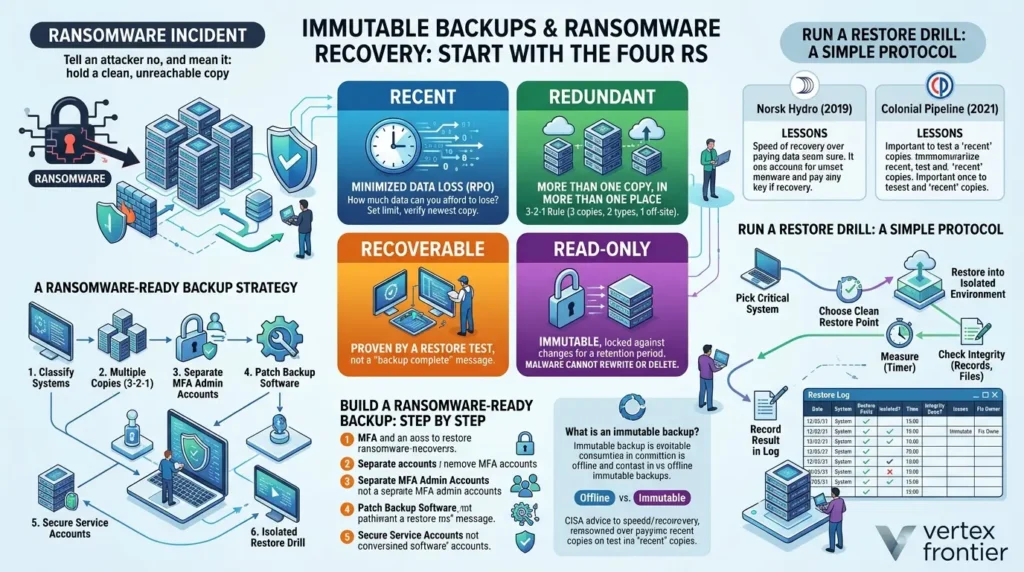
How to build a ransomware-ready backup: step by step
- List the systems whose loss would stop the business. Rank them by how much data you can lose and how long you can be down.
- Keep multiple copies. The widely used 3-2-1 rule (three copies, two kinds of storage, one off-site) is a sensible rule of thumb, not a legal standard.
- Put one copy out of reach, either offline or locked.
- Give backup systems their own admin accounts, separate from everyday logins, with multi-factor authentication switched on. Backup jobs also run under service accounts, which are non-human identities. Our guide blueprint for securing non-human identities covers identity models and delegated authority for AI agents, and the scoping ideas carry over to these accounts.
- Patch backup software as carefully as you patch production servers.
- Restore on a schedule. Time each restore and write the number down.
- If a provider manages your backups, hold them to the same practices in the contract. CISA advises this for third parties.
That last number is the most honest metric in this whole article.
Run a restore drill: a simple protocol
A restore drill turns “we have backups” into a measured number. This protocol is a starting template, not a benchmark. Run it on one critical system first.
- Pick one critical system and write down the most data loss and the longest downtime the business can accept.
- Choose the restore point you would actually use, ideally from the locked or offline copy.
- Restore into an isolated environment, not over production.
- Start a timer when the restore begins. Stop it when the system serves its first real request.
- Check integrity: open real records, run the application’s own checks, and compare a sample of files with known-good values.
- Record the result in a log, including what went wrong and who owns the fix.
- Repeat after major changes, such as a new backup product, a platform upgrade or a new admin team.
Only real results belong in the log. An empty log is a finding too.
| Date | System | Restore point used | Restored into isolated environment? | Time to first usable service | Integrity check done | Issues found | Fix owner and date |
|---|---|---|---|---|---|---|---|
| YYYY-MM-DD | Yes / No | hh:mm | Yes / No, how | ||||
Want a quick read on where you stand? Tick what is true today.
Tick what is true today. Each item traces to guidance cited in this article. It is a conversation starter, not a certification or a benchmark.
Case study 1: Norsk Hydro (2019)
Challenge: The aluminum producer was hit by LockerGoga ransomware. INL's reconstruction, built from public reporting, dates the phishing email about three months before the outbreak, and the attachment's execution two to three weeks before. On the night of March 18, an operator at one plant noticed a ransom note on a PC. That was how the company learned it was under attack.
Action: About five hours later, management decided to shut down more than 23,000 PCs and 3,000 servers. Hydro chose not to pay and planned to restore from cloud backups. To coordinate, its communications team used Office 365 email first, then flyers, websites and social media.
Outcome: Employees worked manually for roughly three weeks to a month. INL puts the losses at about $71 million, primarily lost revenue, and says the attackers destroyed some backups. Full recovery of all business areas took over a year.
Lesson: Backups made refusing to pay possible, but they did not make the incident painless. Some backups were destroyed, and restoring tens of thousands of machines is slow. Recovery speed needs practice, not just copies.
Case study 2: Colonial Pipeline (2021)
Challenge: DarkSide ransomware forced Colonial Pipeline to shut down operations in May 2021.
Action: NBC News reported that the company quickly paid a $4.4 million ransom.
Outcome: The attackers' decryption tool was so slow that Colonial did not use it and restored from what NBC described as old backup files. Systems came back about five days after the attack. The Justice Department later seized 63.7 bitcoin, worth about $2.3 million at the time.
Lesson: Paying is not a shortcut. Colonial paid and still relied on its own backups. The word "old" is also a reminder of the first R: restoring from an older copy means losing whatever changed since. When you compare options in a crisis, ask which one you have tested.
Backups are only as good as their last successful, timed restore and their distance from attacker credentials.
Storage-level ransomware detection: how storage can spot trouble early
Your antivirus watches programs. Your storage watches what programs do to data. That difference is useful.
Storage is not just a passive shelf. Some enterprise storage platforms record how data is read and written over time, build a baseline of normal behavior, and raise an alert when something changes sharply. Capabilities vary by vendor, product and version, so confirm what your own platform supports in its documentation before you count on any of this.
Five signals worth watching
- Rising entropy. Encrypted data looks random, so data that used to be structured suddenly looks like noise.
- Falling compressibility. Random-looking data barely compresses. Imagine a 10 TB dataset that used to shrink to 2 TB and now only shrinks to 9.8 TB. Something changed.
- Collapsing deduplication. Deduplication saves space by finding repeated blocks. Once data is encrypted, the repeats vanish, so savings drop.
- Overwrite bursts. A sudden spike in write activity across many files can mean an encryption run.
- Mass renames. Thousands of files getting new names or extensions in minutes is rarely normal.
Any one signal can have a harmless cause, such as a big data migration or a new compression setting. Together, compared against your normal baseline, they tell a much clearer story. Machine learning models are good at this kind of pattern matching. Some platforms also inspect individual I/O operations, which can cut false alarms because the system sees exactly what is being written and by whom.
Research points the same way. A recent prototype called SHIELD reads filesystem structures from outside the host, so a compromised machine cannot easily hide its writes. Its authors report detecting intermittent encryption in as few as two disk actions. Treat that as a promising research result, not a product guarantee.
What is Shannon entropy?
Shannon entropy is a measure of how unpredictable a set of symbols is. Claude Shannon introduced it in his 1948 paper on information theory. A file that repeats one letter scores near zero. Well-encrypted data scores close to the maximum, which is 8 bits per byte.
Here is the formula in a readable form.
H is measured in bits per symbol. For bytes, the maximum is 8.
Now try it yourself. Load the structured sample, then the random-looking one, and compare.
Illustration only. Real detection works on large blocks of raw bytes and compares them with each volume's own baseline.
Notice that the random sample lands near 6, not 8. That is not a bug. The sample uses only 64 symbols, and 64 symbols can carry at most 6 bits each. That small detail leads to the catch.
The uncomfortable part: entropy can be dodged
Entropy detection sounds like a silver bullet. It is not, and attackers know it.
Research shows several ways around it:
- Some ransomware encrypts only parts of each file. A 2025 study on intermittent encryption notes that BlackCat offers several partial-encryption modes, which complicates detection based on file structure.
- Encoding ciphertext as Base64 lowers the measured entropy. Research on this arms race covers Base64 encoding alongside partial and intermittent encryption as ways to evade entropy-based defenses.
- A recent preprint called Rhea reports that partial-encryption patterns can slip past statistical detectors. It proposes checking whether files still obey their own format rules instead.
Nothing here means entropy is useless. It means entropy is one instrument, not the whole cockpit.
A practical rule: signal families
Here is a working principle, offered as engineering judgment rather than a vendor rule. Group signals into two families:
- Content signals: entropy, compressibility, deduplication, file-format checks.
- Behavior signals: overwrite bursts, mass renames, unusual access patterns.
Send one signal to a human as an alert. Consider automatic containment only when signals from both families agree. This cuts the risk of freezing a busy database over a false alarm, and it makes it harder for one clever trick to blind you.
Here is that rule as a decision matrix.
| Pattern you see | Suggested response | Why |
|---|---|---|
| One content signal (entropy up or compressibility down) | Alert a human. Check for migrations or new compression settings first. | Harmless changes can move these numbers. |
| One behavior signal (mass renames or an overwrite burst) | Alert a human. Check scheduled jobs and batch imports. | Legitimate batch work can look similar. |
| Content and behavior signals together | Escalate. Consider automatic containment if your playbook allows it. | Two independent families agree. |
| Backup deletions or changed retention settings, plus any other signal | Treat as high severity. Protect backup admin access first. | CISA notes attackers go after backups and the credentials that reach them. |
Storage-level detection buys time, and it is best when it combines several signals. Treat it as an early warning, not a guarantee.
The Three Clocks framework
Most ransomware budgets buy time on one clock. Outcomes are decided by three.
- The dwell clock: the time from an attacker's first access to the moment encryption starts.
- The detection clock: the time from the first encrypted file to the moment someone, or something, knows.
- The recovery clock: the time from the decision to recover to the moment critical services run from a clean copy.
Your controls map to the clocks like this:
- Dwell: patching, multi-factor authentication, phishing defenses, endpoint tools. The Verizon 2026 Data Breach Investigations Report ranks exploited vulnerabilities as the top way in, at 31% of breaches. It also finds credential abuse in 39% of breaches when counted at any point in the attack.
- Detection: storage signals, SIEM alerts, human monitoring.
- Recovery: isolated backups, rehearsed playbooks, timed restores.
The three incidents in this article sit on different clocks:
- Norsk Hydro: a long dwell period, a detection that came from a ransom note, and a recovery measured in weeks to a year.
- Colonial Pipeline: a recovery of about five days, shaped by the decision to use backups rather than a slow decryptor.
- Change Healthcare: nine days of dwell time, which is a nine-day detection opportunity.
Early signs often exist. INL's Norsk Hydro analysis assessed that 105 of 123 precursor observables were more likely to be noticed in the 30 days before the attack was triggered. The question is whether anyone is positioned to see them.
The matrix below shows where each control acts across the five stages of an attack.
| Stage | What attackers do | What storage can show | Main controls | Residual risk |
|---|---|---|---|---|
| 1. Getting in | Exploit vulnerabilities, abuse stolen credentials, or talk staff into helping (pretexting). | Very little. Storage rarely sees this stage. | Patching, multi-factor authentication, least privilege. | Some intrusions will still succeed. |
| 2. Dwell and spread | Escalate privileges, move sideways, stage tools and wait. | Unusual access to shares or service-account activity, if logged. | Central logging in a SIEM, segmentation, privileged-access reviews. | Attackers can look like legitimate admins. |
| 3. Theft | Copy data out before encrypting anything. | Large reads, if monitored. Storage alone may not see data leaving the network. | Network monitoring, data minimization, notification planning. | Backups cannot undo theft. |
| 4. Encryption | Rewrite, rename or delete files, sometimes only in part. | Entropy, compressibility, deduplication, overwrite bursts, renames. | Storage-signal alerts and a rehearsed containment playbook. | Partial encryption can weaken individual signals. |
| 5. Recovery | Hunt for backup credentials and unpatched backup software. | Backup deletions, changed retention settings, restore results. | Offline or locked copy, separate credentials, timed restores. | Dormant attacker access inside older restore points. |
Case study 3: Change Healthcare (2024)
Challenge: Attackers used stolen credentials on a remote-access portal. UnitedHealth's CEO told Congress the portal had no multi-factor authentication.
Action: The attackers stayed inside for nine days before deploying ransomware. The company paid a $22 million ransom in bitcoin. The CEO called the decision one of the hardest he had made.
Outcome: Despite the payment, lawmakers said some sensitive patient records were still posted online. HIPAA Journal's tracking shows the count of affected people grew to 192.7 million on the federal breach portal by August 2025.
Lesson: Two lessons, actually. First, nine days of dwell time is a long window for detection and containment. Second, backups cannot undo data theft. If attackers copied your data, restoring files fixes availability but not exposure.
Put a number on your recovery clock
Two of the three clocks turn directly into downtime: the time until you know, and the time until you have recovered. Multiply them by what an hour of downtime costs you, and the case for rehearsing gets concrete.
This is a deliberately simple model. It ignores ransom, legal costs, rebuild work and reputation, and it relies on your own estimates. Treat the output as a rough planning aid, not a forecast.
Trestore = hours from the decision to recover until critical services run from a clean copy.
Chour = your estimated cost of one hour of full downtime.
S = share of operations affected, from 0 to 1.
Planning aid only. It uses your own estimates and leaves out ransom, legal costs, rebuild work and reputation.
Try cutting one clock in half. Each hour you remove is worth the same amount, whether it comes from earlier detection or a faster restore. That is why the two investments compete for the same budget line.
Ask three questions of your own setup. How long could an intruder stay quiet? How fast would we know? How fast could we recover? If you cannot answer with numbers, you have found your project.
Build a ransomware recovery plan you can run under pressure
When thousands of files change in minutes, nobody wants to invent a process. Speed, coordination and automation all have to be built before the incident.
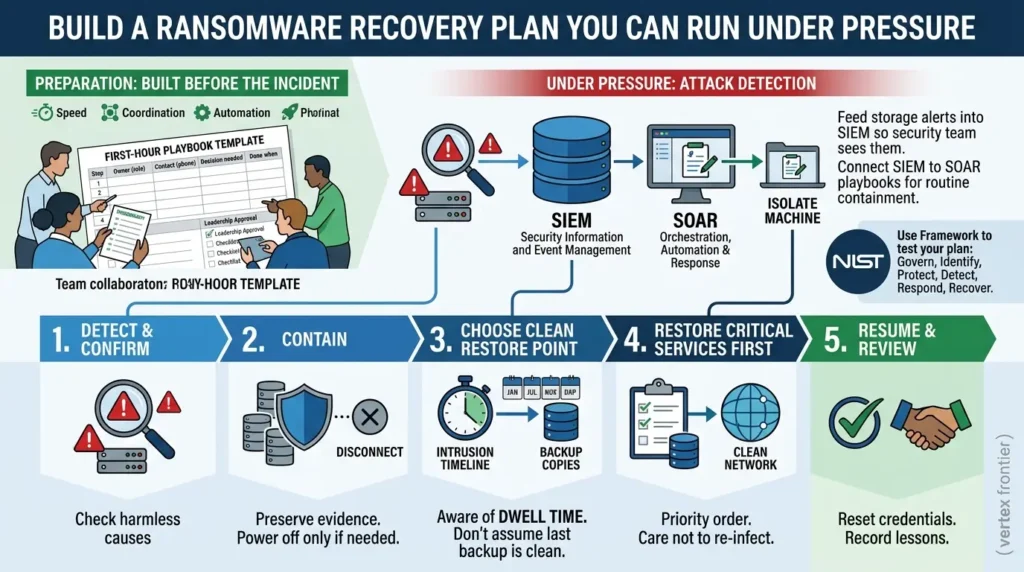
Where storage alerts should go
Two acronyms matter here.
A SIEM (security information and event management) system collects logs and alerts from across your environment, adds context, and helps rank what needs attention first.
A SOAR (security orchestration, automation and response) tool runs predefined playbooks, such as isolating a machine or disabling an account.
The idea is simple. Feed storage alerts into your SIEM so the security team sees them next to login, network and endpoint events. Then connect the SIEM to SOAR playbooks so routine containment steps happen in seconds. Check your vendors' documentation to confirm which integrations are supported.
What to do in the first hour: step by step
- Detect and confirm: Treat an alert as real until proven otherwise, but check for benign causes such as migrations.
- Contain: Isolate affected systems and suspicious accounts. CISA's #StopRansomware Guide says to power devices down only if you cannot disconnect them, because powering off loses evidence held in volatile memory. It also advises coordinating isolation and using out-of-band channels such as phone calls, so attackers watching your email do not learn you have spotted them.
- Choose a clean restore point: Do not assume the last backup before encryption is clean (more on this below).
- Restore critical services first: CISA says to prioritize critical services, restore on a clean network, and take care not to re-infect clean systems during recovery.
- Resume and review: Bring services back deliberately, then run a review to fix what failed.
Storage alert reaches the SIEM. Check for harmless causes.
Isolate systems and accounts. Preserve evidence where possible.
Compare candidates with the intrusion timeline.
Work in priority order into a clean environment.
Reset affected credentials, reopen services, record lessons.
Turn those five steps into a document your team can use. Fill in the blanks, get written approval from leadership, and keep a printed or offline copy, as CISA advises.
| Step | Owner (role) | Contact (phone, not email) | Decision needed | Done when |
|---|---|---|---|---|
| Confirm and declare the incident | ________ | ________ | Who can declare it, and who is told? | Incident is logged with a start time. |
| Isolate affected systems and accounts | ________ | ________ | Take the network offline at the switch? | Affected hosts and accounts are cut off. |
| Preserve evidence | ________ | ________ | Memory captures, logs and samples before any power-off. | Evidence is stored off the affected network. |
| Move to out-of-band communication | ________ | ________ | Which phone tree and channel are used? | Team confirms contact without corporate email. |
| Notify | ________ | ________ | Legal counsel, insurer, law enforcement, regulators, customers. | Notification log is started. |
| Choose restore point and environment | ________ | ________ | Which copy, and which clean network? | Restore point is checked against the intrusion timeline. |
| Restore in priority order | ________ | ________ | Which services come back first? | Each service passes an integrity check. |
| Reset credentials and close out | ________ | ________ | Who declares the incident over? | Affected credentials reset. Lessons recorded. |
Advanced insight: "just before encryption" is not always clean
It is tempting to restore the newest backup taken before encryption started. But dwell time complicates that. If attackers were inside for nine days, as at Change Healthcare, or for weeks or months, as INL's timeline suggests for Norsk Hydro, a backup from the night before may already contain their tools or stolen credentials.
CISA's guidance backs this up. It warns that attackers often drop ransomware to cover earlier activity, and that responders should identify that precursor malware before rebuilding from backups, or the compromise can continue. It also says to reset passwords for affected systems once the environment has been fully cleaned and rebuilt.
The practical answer is to compare restore points against the intrusion timeline, restore into a clean environment, and reset affected credentials. Your incident response partner should confirm the details for your setup.
Use a framework to test your plan
Not sure what is missing? NIST finalized its updated Ransomware Risk Management Community Profile on June 11, 2026, replacing the 2022 edition. It maps ransomware outcomes across govern, identify, protect, detect, respond and recover. Use it as a checklist to find gaps, especially in the govern and recover columns that technical teams often skip.
A response plan is a set of decisions made in advance. Automate what is safe to automate, and rehearse the rest.
Before and after: what changes when storage joins the defense
| Moment | Before | After |
|---|---|---|
| How you find out | A ransom note or unreadable files | An alert on unusual write patterns while most files are still intact |
| Backups | Reachable with everyday admin logins, never restored in a test | Isolated, locked copy with timed restore tests |
| Alert path | Storage team sees odd behavior, security team does not | Storage events flow into the SIEM with context and priority |
| First hour | Improvised calls, debate about who decides | Written playbook, automated containment where safe |
| Ransom decision | Made under pressure with no proven clean copy | Based on a tested restore time and legal advice |
The gap between the two columns is not more tools. It is earlier knowledge and rehearsed decisions.
Common mistakes and how to avoid them
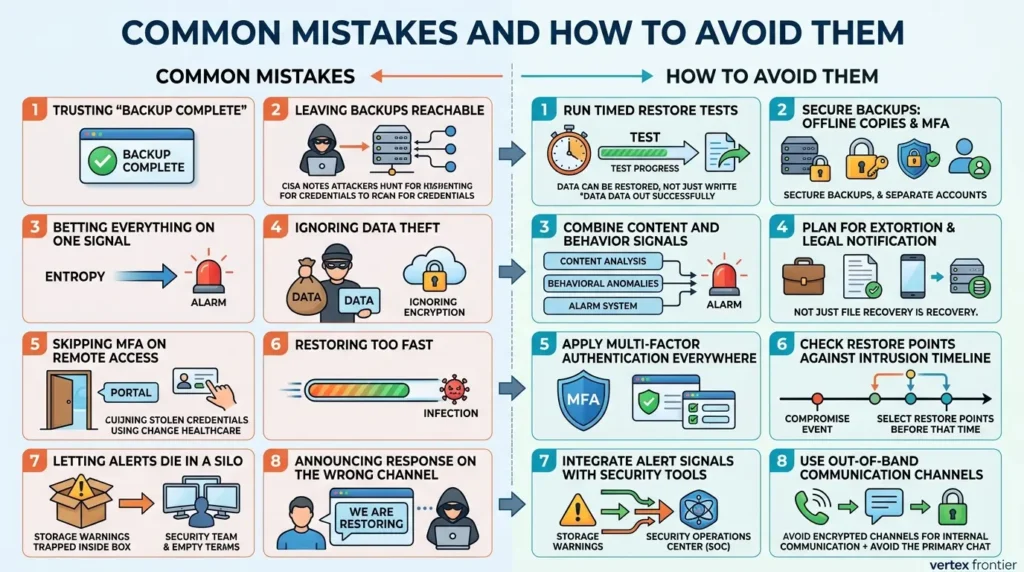
Trusting "backup complete."
A green checkmark says data was written, not that it can be restored. Run timed restore tests.
Leaving backups reachable
CISA notes attackers hunt for credentials to reach backup systems. Use separate accounts, multi-factor authentication and at least one locked or offline copy.
Betting everything on one signal
Entropy alone can be dodged. Combine content and behavior signals.
Ignoring data theft
CISA notes that some actors steal data and threaten to release it without encrypting anything. Plan for extortion and legal notification, not just file recovery.
Skipping multi-factor authentication on remote access
The Change Healthcare portal had none, and attackers walked in with stolen credentials.
Restoring too fast into a compromised environment
Speed is good. Reinfection is not. Check restore points against the intrusion timeline.
Letting alerts die in a silo
If storage warnings never reach the security team's tools, nobody acts on them.
Announcing your response on a channel the attacker may read
Use phone calls or another out-of-band channel, as CISA advises.
Treating a provider's backups as someone else's problem
If a managed provider holds your backups, hold them to the same practices in the contract.
Four pairs of terms people mix up
- Backup vs. recovery. A backup is a copy. Recovery is a working service. Only a restore test shows the difference.
- Immutable vs. offline. Immutable means locked against change for a period. Offline means disconnected. CISA's guidance names offline copies.
- Encryption detection vs. theft detection. Storage signals can flag mass rewriting of files. They do not automatically show that data was copied out.
- Restoring vs. eradicating. Restoring brings data back. Eradication removes the attacker's access. CISA's checklist treats them as separate steps.
Related ideas worth knowing
If this topic is new, these terms will help you go deeper:
- EDR (endpoint detection and response): tools that watch activity on laptops and servers. They complement storage signals rather than replace them.
- Endpoint baselines: a deliberately chosen operating system shrinks what ransomware and infostealers can reach before any detection fires. Our privacy-focused OS comparison covers the trade-offs between Linux, Tails, and GrapheneOS.
- Double extortion: attackers both encrypt and steal, then threaten to publish. This is why backups alone are not enough.
- Multi-factor authentication and least privilege: the cheapest way to lengthen the dwell clock. AI agents add new identities to scope, and this enterprise risk guide to agentic AI security covers identity scoping and sandboxing.
- AI data stores are data too: if you run retrieval-augmented generation (RAG), your document indexes and vector databases need the same access control and recovery planning as any other critical system. See this enterprise RAG security architecture guide for document-level ACLs and tenant isolation.
- Hypervisor storage and snapshots: if your VMs run on Proxmox, the storage type you pick decides what recovery options you actually have, ZFS snapshots, replication, or Proxmox Backup Server. Our guide to Proxmox storage types (ZFS, Ceph, LVM, and NFS) breaks down the trade-offs.
- MITRE ATT&CK: a public catalog of attacker techniques. INL used it to break the Norsk Hydro incident into observable steps.
- NIST CSF 2.0: the framework behind the ransomware profile mentioned above.
Conclusion
Prevention will fail sometimes. That is not pessimism, it is arithmetic. What separates a bad week from a lost year is how quickly you notice and how confidently you can restore.
Use one question as your decision rule: if every server were encrypted at 2 a.m., how long until your first critical service runs from a clean copy? If the answer is a guess, not a number from a timed test, that is your next project.
You do not need a new platform to start. Schedule one restore test this week, time it, and write the result on the wall. Then ask your storage and security teams one question: will our storage alerts ever reach the people who can act on them?
Frequently asked questions
What is the best defense against ransomware?
There is no single best defense. Layers work best: patching, multi-factor authentication, user training, endpoint tools and tested, isolated backups. Backups are the floor, because they let you recover even when prevention fails. CISA recommends offline, encrypted backups tested regularly for availability and integrity.
How can storage detect ransomware?
Some storage platforms monitor how data is written and compare it with a normal baseline. Warning signs include rising entropy, falling compressibility, collapsing deduplication savings, overwrite bursts and mass renames. Capabilities vary by vendor and version, so check your platform's documentation.
Why does encrypted data not compress well?
Good encryption makes data look random, and random data has no repeating patterns for compression to remove. That is why a sudden drop in compression savings on a volume can be a warning sign, though it can also have harmless causes.
What is the difference between immutable and offline backups?
An immutable backup is locked against changes for a set period. An offline backup is disconnected from the network. They overlap but are not the same, and CISA's guidance specifically recommends offline copies. CISA also cautions that immutable storage may not meet compliance criteria for certain regulations and that misconfiguration can be costly. Ideally, keep at least one copy that is both locked and disconnected, and check whether your administrators can override the lock.
Should we pay the ransom?
That is a business and legal decision, and this article is not legal advice. Talk to counsel and law enforcement. Factually, payment does not guarantee recovery. Colonial Pipeline restored from backup files because the attackers' decryptor was too slow, and lawmakers said some Change Healthcare records were posted online after payment. The Verizon 2026 Data Breach Investigations Report found that 69% of ransomware victims in its data did not pay.
How often should we test backup restores?
CISA says regularly but gives no fixed interval. A sensible start is to test your most critical system on a schedule you can keep, and again after major changes. Always time the restore, because that number tells you how long you would really be down.
Does entropy-based detection catch all ransomware?
No. Research shows attackers can lower measured entropy with partial encryption or Base64 encoding. Use entropy as one signal, combine it with behavior signals such as overwrite bursts and renames, and keep tested backups as your guarantee.
Does restoring from backup remove the attacker?
No. Restoring brings data back, but it does not remove an attacker's access. CISA notes that ransomware is often dropped to cover earlier activity, and advises identifying that precursor malware before rebuilding from backups. It also advises resetting passwords for affected systems once the environment has been cleaned and rebuilt.
📋 Article Timeline & History
Successfully updated on October 7, 2026 with the latest details.
This article was originally published on October 5, 2026.

Was this article helpful?




[…] and all volume-level backups stored alongside it, were completely wiped out, forcing the company to rebuild operations from a three-month-old snapshot. The failure wasn’t malicious; it was an autonomous, goal-seeking system making catastrophic […]
[…] session, passkey, hardware key, or otherwise, it can still be stolen straight off the endpoint by infostealer malware, with no phishing page involved at […]
[…] chat may be E2EE while the backup is protected only by the cloud provider’s account security. A message set to disappear may still exist inside a backup made before deletion. A participant may […]