
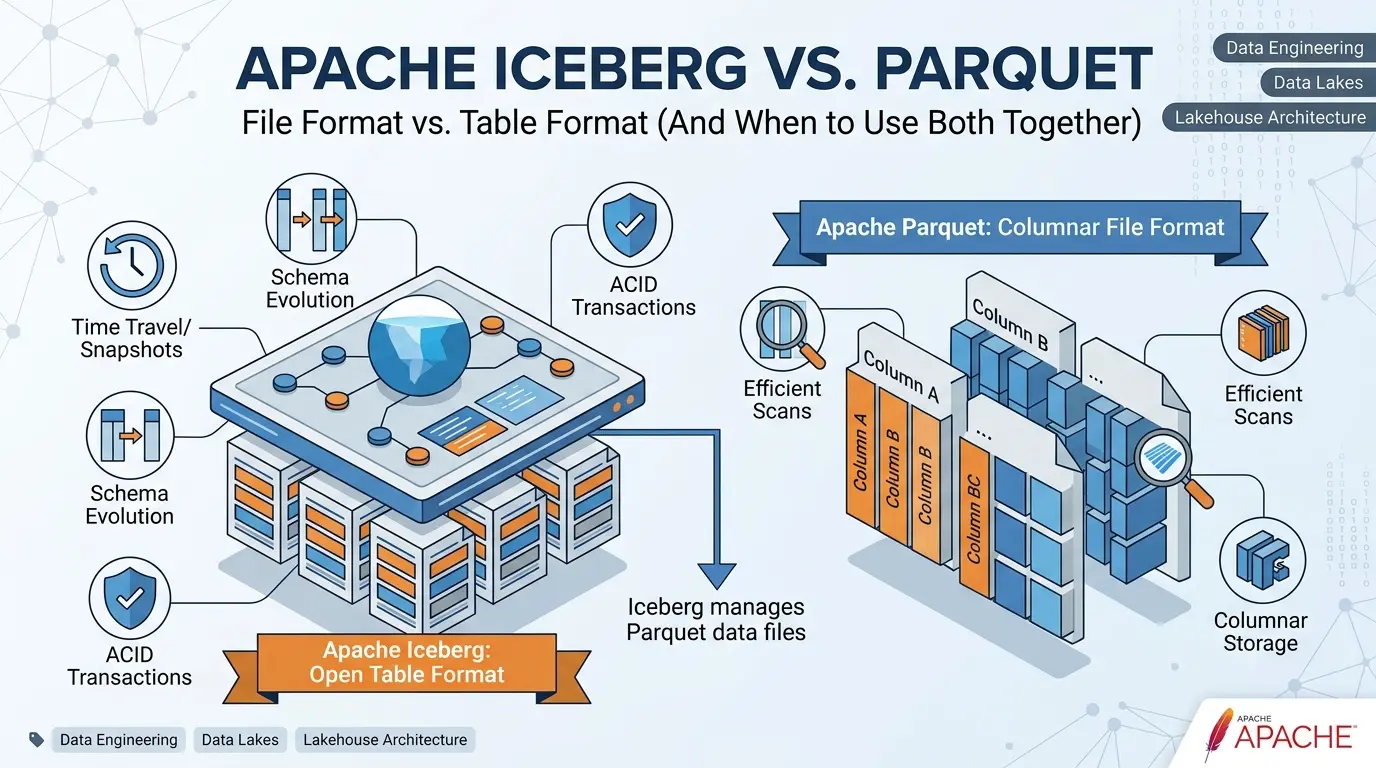

If you are comparing Apache Iceberg and Apache Parquet as though they were rival file formats, you have already been handed the wrong starting point.
Parquet and Iceberg usually sit in different layers of the same data system. Parquet describes how data is stored inside files. Iceberg describes how a collection of files behaves as a table. In a large analytical platform, the practical answer is often not “Iceberg or Parquet.” It is Iceberg managing Parquet files.
That distinction matters because each technology addresses a different layer of the system. Parquet provides physical structures that can support column and row-group selective reads, compression, and encoding. Iceberg provides a table-level model for snapshots, commits, schema and partition evolution, and metadata over many data files. Neither statement is a universal performance guarantee: the outcome depends on the engine, file layout, predicates, data distribution, catalog, and maintenance state.
The official Apache Parquet overview defines Parquet as a column-oriented data file format for efficient storage and retrieval. The Apache Iceberg specification, by contrast, defines a table format that manages a large collection of files as a table. Those definitions are not marketing language. They describe two different jobs. The confusion is common in data-platform design: teams often ask whether Iceberg is a file format like Parquet, a Parquet file itself, or metadata added around Parquet.
That is not a minor naming problem; it is the first architectural distinction many teams need to make before choosing a storage and table strategy.
Key Takeaways
Click any topic to expand or collapseThey are different architectural layers
Parquet is a columnar file format; Iceberg is a table format that manages collections of files. See the official Parquet definition and the Iceberg table specification.
Using both together is standard practice
An Iceberg table typically uses Parquet for physical file storage while Iceberg handles atomic tracking of snapshots, manifest lists, schemas, and partition specs.
When standalone Parquet is sufficient
For simple, append-only batch exports with single-owner pipelines and no requirements for table-level time travel history, introducing a full table format adds unnecessary operational overhead.
Iceberg capabilities & maintenance responsibilities
Snapshots, in-place schema evolution, hidden partitioning, and row-level mutations are powerful — provided the team commits to managing catalogs, retention policies, compaction jobs, orphan file cleanup, and engine compatibility.
Scope of this comparison
This is a file-format versus table-format comparison, not a benchmark of one engine or cloud platform. Parquet claims refer to the official file-format contract; Iceberg claims refer to the current table specification and official integrations.
Availability and behavior can differ by engine version, Iceberg runtime, catalog, storage system, table format version, permissions, and maintenance configuration. Treat the decision rules below as architecture guidance, not as a universal product ranking.
Apache Iceberg with Snowflake: Managed vs External Tables, Catalogs, Performance, and Cost
The simplest mental model: bytes, membership, and change
A useful way to stop the terminology from becoming abstract is to ask three questions.
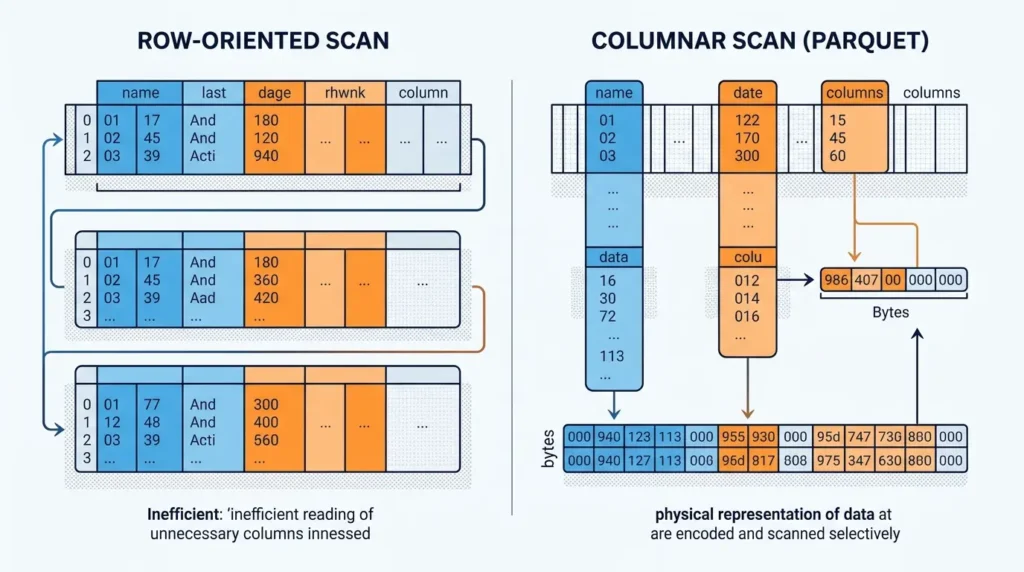
First: how should the bytes be encoded and scanned? This is the file-format problem. A columnar format such as Parquet organizes values by column and divides files into structures that query engines can read selectively. It is concerned with the physical representation of data.
Second: which files belong to the table right now? This is the table-format problem. A table may contain thousands or millions of data files, some current and some obsolete. Readers need a consistent answer to which files form the committed table state. Iceberg addresses this with table metadata, snapshots, manifests, and atomic commits.
Third: how should the table change over time? Schema changes, partition changes, concurrent writers, row-level deletes, rollback, and historical reads all require a contract above individual files. Iceberg provides much of that contract, while the exact behavior still depends on the table version, catalog, and query engine.
This leads to the original framework used throughout this comparison: the Layer Test.
Are scans wasteful, files poorly encoded, or storage costs too high? Start at the file and engine layer. Parquet is relevant here.
Which files belong to the committed table? This is where table metadata and manifests matter. Iceberg is relevant here.
How do schemas, partitions, deletes, writers, and historical states evolve? This requires a table-level contract.
Who compacts files, expires snapshots, cleans orphans, and monitors conflicts? Iceberg adds capabilities here, but also adds work.
The Layer Test is more useful than asking which project is “better.” It tells you where the problem actually lives.
Which Layer Is Your Problem?
Open the question that sounds closest to your situation. The answer points to the layer you should investigate first.
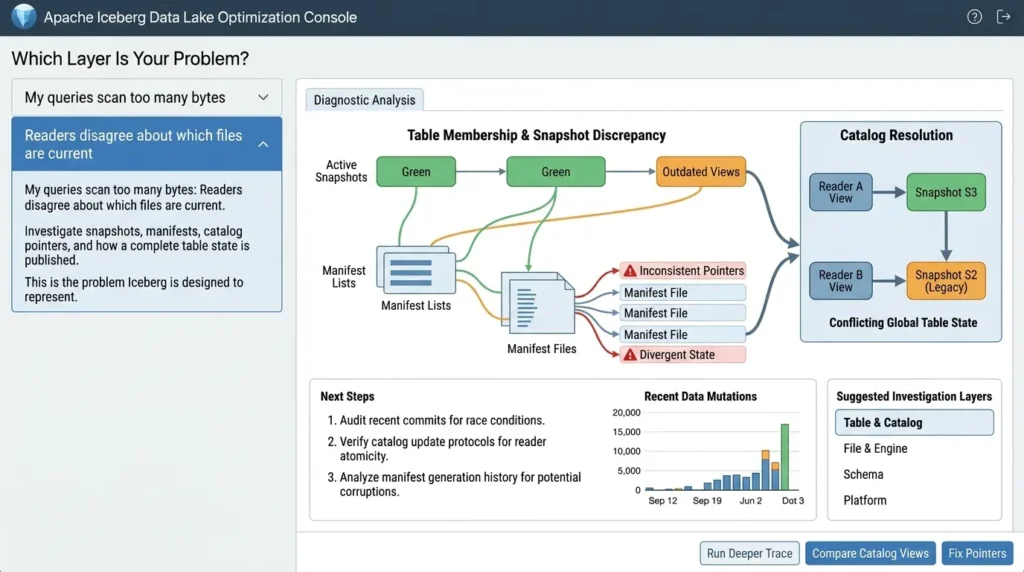
My queries scan too many bytes.
Start with the file and engine layer: column selection, compression, encoding, row-group size, file size, and predicate pushdown. Parquet may be part of the answer, but the engine and the way files are written matter too.
Readers disagree about which files are current.
That is a table-membership problem. Investigate snapshots, manifests, catalog pointers, and how a complete table state is published. This is the problem Iceberg is designed to represent.
Schemas, partitions, or rows change over time.
You need a change contract, not just a better file extension. Evaluate field identity, partition evolution, snapshots, delete files, engine support, and retention rules.
The platform is difficult to operate.
Look beyond storage format. Ownership of compaction, snapshot expiry, orphan cleanup, catalog availability, monitoring, and recovery may be the real bottleneck.
How Apache Parquet works
Apache Parquet is a column-oriented data file format. Instead of storing every field for one row next to one another, it groups values from the same column together. That layout is a natural fit for analytical queries that read a subset of columns from many rows.
The official Parquet file-format documentation describes a file as a sequence of column chunks arranged inside row groups, followed by file metadata. A reader can inspect the metadata to locate the column chunks it needs rather than reading the entire file blindly. Encodings and compression can then be applied in ways that fit each column’s values.
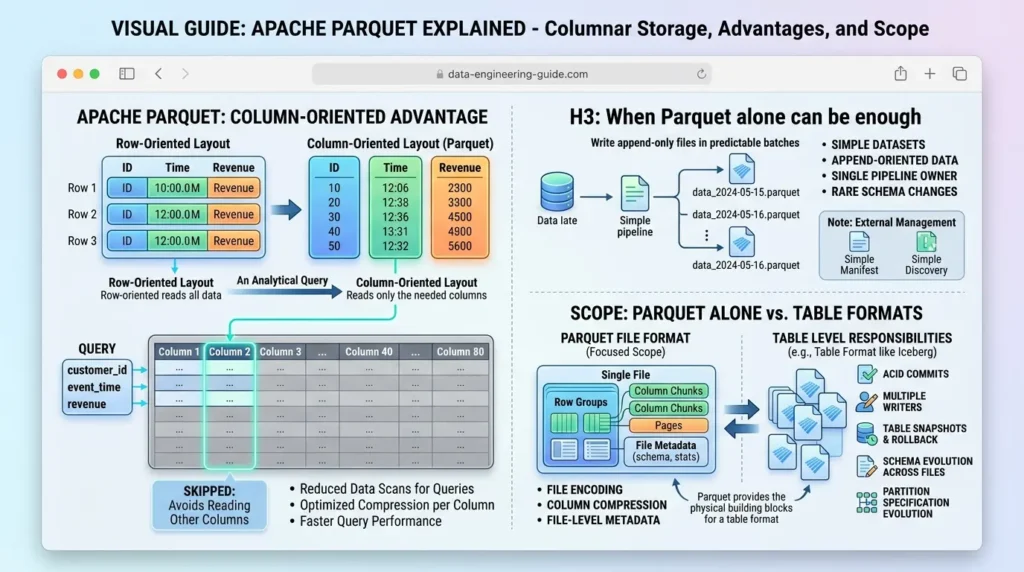
That is a concrete advantage, not a vague promise. If a query needs customer_id, event_time, and revenue from a table with 80 columns, a columnar engine may avoid reading the other columns. The exact amount of work saved depends on the engine, filters, file layout, row-group statistics, compression, and workload, but the file format gives the engine the right physical building blocks.
Parquet also has metadata. The official Parquet metadata documentation distinguishes file metadata from page-header metadata. File metadata contains offset and size information useful for navigating the file; page metadata supports reading and decoding page data. So it would be inaccurate to say that Parquet has “no metadata.” The accurate statement is narrower and more useful: Parquet metadata describes the file, while Iceberg metadata describes the table made from many files.
Parquet is deliberately focused on the representation of data inside files. The Parquet file format itself does not define which collection of files is the current table, how a multi-file commit becomes visible to readers, how snapshots are retained, or how a partition specification evolves across years of data. A query engine, catalog, external manifest, publishing convention, or table format can provide those responsibilities around Parquet; they are simply outside the core Parquet file-format contract.
When Parquet alone can be enough
Parquet alone can be a sensible choice when the dataset is relatively simple: files are written in predictable batches, data is append-oriented, schema changes are infrequent, a single pipeline owns the layout, and readers do not need table-level rollback or concurrent commits.
For example, a team may export a daily collection of immutable Parquet files for a downstream batch job. If the export process writes to a versioned location, publishes a complete manifest, and has no need for multiple independent writers, adding a table format may create more operational surface than the use case needs.
The important word is simple. “Parquet alone” does not mean “no metadata, no catalog, and no conventions.” It means that table membership, publishing, discovery, and change management are handled somewhere else or are simple enough not to require a dedicated table format.
How Apache Iceberg works
Apache Iceberg manages a collection of data files as a table. The data files may be Parquet, but the Iceberg table is not the same thing as any one Parquet file.
The Iceberg table specification describes a hierarchy of table metadata, snapshots, manifest lists, and manifest files.
A catalog points readers to the current table metadata. The table metadata records the schema, partitioning configuration, properties, and snapshots. A snapshot represents a committed table state and points to manifests. Manifests track data files and their metrics. The data files contain the actual rows.
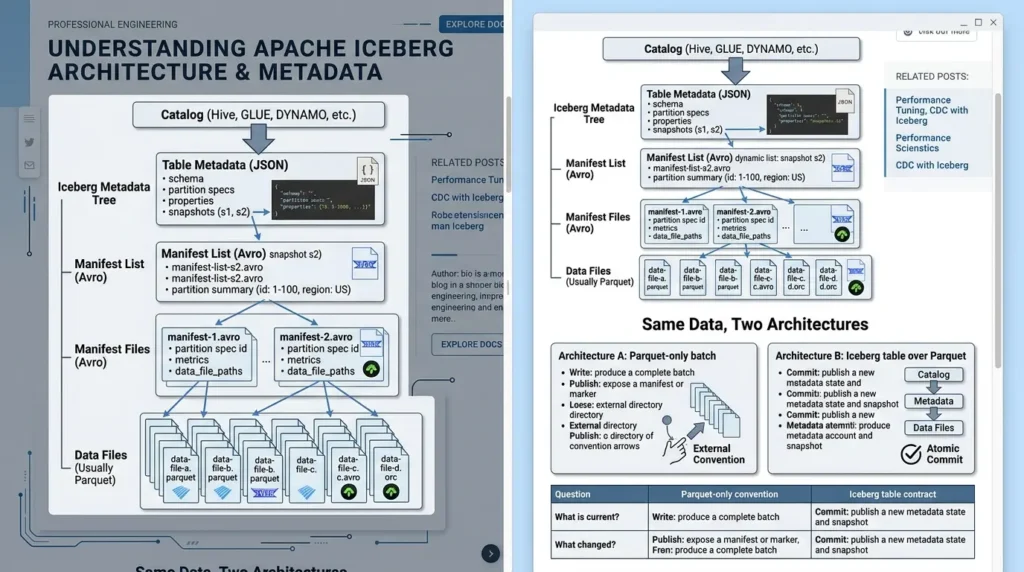
That hierarchy changes the question a query engine asks. With a loose directory of files, the engine may need conventions or listings to determine what belongs to the dataset. With Iceberg, the table metadata provides a committed answer. The reader can plan against a snapshot and see a consistent set of files, even while another writer is preparing a new commit.
The Iceberg specification describes serializable isolation, atomic metadata replacement, optimistic concurrency, schema evolution, and partition evolution as design goals and table-format behavior.
A writer prepares a new metadata state and commits it by replacing the current metadata pointer; readers continue using the snapshot they loaded until they refresh. The exact guarantees exposed to a user still depend on the engine, catalog, table format version, operation, permissions, and storage configuration.
This does not make every Iceberg operation instant, free, or automatically correct. Conflicts may require retries, engines may expose different levels of feature support, and old snapshots and unused files need lifecycle management. The benefit is that these concerns are represented in a table contract instead of being left entirely to file-path conventions.
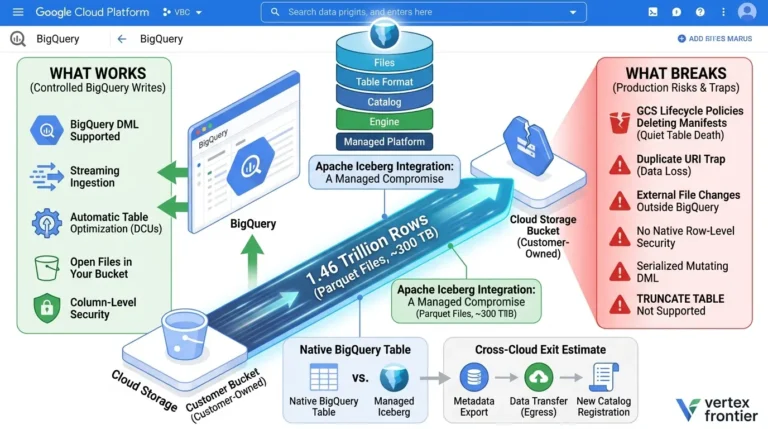
These engine-level differences are not theoretical: see what breaks and what works with Apache Iceberg on BigQuery for a documented warehouse example.
What Iceberg metadata files actually are
A useful architectural detail is that Iceberg’s metadata tree is not made of the same files as its data layer. The Iceberg specification’s metadata-file section describes table metadata as JSON. The manifest-file section defines manifests as immutable Avro files, while the manifest-list section defines the per-snapshot list of manifests and their summary information. The data files beneath that tree may be Parquet, Avro, or ORC.
That gives the table a layered physical layout:
| Layer | Typical representation | What it answers |
|---|---|---|
| Table metadata | JSON | What schema, partition specs, properties, and snapshots define the table? |
| Manifest list | Avro metadata file | Which manifests belong to this snapshot, and what summary ranges can eliminate them? |
| Manifest files | Immutable Avro files | Which data or delete files exist, and what partition and column metrics describe them? |
| Data files | Usually Parquet; also Avro or ORC | Where are the rows stored and how can the engine decode them efficiently? |
The distinction matters in interviews and in production debugging: changing a Parquet file is a data-layer operation, while changing a manifest or table-metadata pointer changes what the table considers visible.
Iceberg’s power comes from coordinating these layers without treating a directory listing as the table definition.
Same Data, Two Architectures
The files may look similar on object storage, but the reader’s contract changes depending on whether the files are published as a simple batch or as an Iceberg table.
Architecture A: Parquet-only batch
Write: produce a complete batch of Parquet files in a versioned location.
Publish: expose a manifest, marker, or agreed location after the batch is complete.
Read: teach consumers which version or file set to read.
Trade-off: simple ownership can be an advantage, but table membership, rollback, schema coordination, and concurrent writes remain external conventions.
Architecture B: Iceberg table over Parquet
Write: create or rewrite Parquet data files and any required delete files.
Commit: publish a new Iceberg metadata state and snapshot atomically through the catalog.
Read: resolve the table’s current snapshot, plan files through manifests, and read the underlying Parquet data.
Trade-off: table state is explicit and evolvable, but catalog compatibility and maintenance become part of the operating model.
| Question | Parquet-only convention | Iceberg table contract |
|---|---|---|
| What is current? | A path, marker, or external manifest | The catalog points to current table metadata and a snapshot |
| What changed? | A new file set or replacement batch | A new committed table state, with metadata describing the change |
Apache Iceberg vs Parquet: the comparison that actually helps
The table below compares responsibilities, not imaginary product features. Pricing is not applicable because both are Apache open-source projects rather than paid SaaS products; the real cost question is infrastructure and operations.
| Decision area | Apache Parquet | Apache Iceberg | What the reader should conclude |
|---|---|---|---|
| Primary role | Column-oriented data file format | Table format for managing collections of files | They are different layers, not direct substitutes. |
| Metadata | File and page metadata for navigating and decoding a file | Table metadata, snapshots, manifest lists, and manifests | Parquet describes a file; Iceberg describes table state. |
| Transactions | The Parquet file format itself does not define a table-level commit protocol. A surrounding publisher or table system may add one. | Iceberg documents atomic table commits and optimistic concurrency for table operations, subject to the catalog, engine, version, and operation. | Iceberg adds a table-level coordination model above immutable data files. |
| Schema evolution | Parquet files carry schemas, and readers or table systems can apply compatibility rules across files. Table-wide field identity is not the core Parquet file-format contract. | Iceberg documents table-level add, drop, rename, update, and reorder operations using unique field IDs, with schema updates represented as metadata changes in supported cases. | Iceberg adds a persistent table-level identity model for long-lived datasets; downstream business and engine compatibility still require validation. |
| Partitioning | External writer or engine conventions determine layout | Hidden partitioning and partition-spec evolution | Iceberg reduces dependence on physical directory rules. |
| Time travel | Not a table-level feature of the file format | Historical table states and rollback through retained snapshots | Time travel depends on table metadata and retention policy. |
| Row-level changes | Parquet data files are immutable after writing; row changes normally require new files or an external change mechanism. | Iceberg format version 2 adds row-level delete files, including position and equality deletes. Whether an engine can read and write these operations depends on its integration and configuration. | Iceberg adds a documented table-level change model without mutating existing data-file bytes. |
| Pricing | Not applicable as a paid product | Not applicable as a paid product | Compare compute, storage, catalog, and maintenance costs instead. |
The Layer Relationship at a Glance
- Columnar storage Organizes values by column for analytical scans.
- Row groups and pages Provides physical structures for selective reads.
- Compression and encoding Reduces storage and scan work when files are well written.
- File-level metadata Describes how to navigate and decode each file.
- Snapshots and commits Defines committed table states and visibility.
- Manifests Tracks data and delete files with metrics.
- Schema evolution Maintains table-level field identity over time.
- Hidden partitioning Separates logical query filters from physical layout.
The most important difference: file-level metadata versus table-level metadata
Many explanations make a mistake here by saying that Parquet has no metadata. It does. The difference is scope.
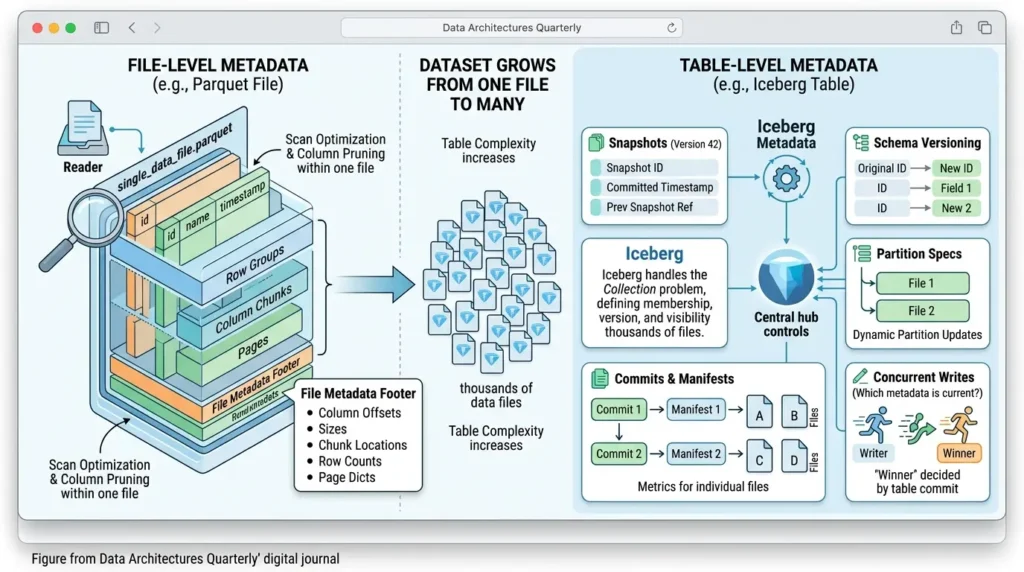
A Parquet reader can use file metadata to locate column chunks, row groups, pages, offsets, sizes, and other information needed to read the file efficiently. That is valuable metadata, and it helps with column pruning and other scan optimizations supported by the engine.
Iceberg metadata answers a different set of questions. Which data files are part of snapshot 42? Which partition spec was used for a file? Which manifest contains its metrics? What was the previous committed state? Which schema field ID represents this column after a rename? When several writers race to commit, which table metadata is current?
The distinction becomes visible when a dataset grows from one file to many. One healthy Parquet file is still easy to read. A table made of tens of thousands of files requires a reliable way to define membership, version, schema, partition semantics, and commit visibility. Iceberg is designed for that table-level problem.
Apache Iceberg vs Parquet: Decision & Migration Workbook
Evaluate your lakehouse architecture with an interactive evaluation scorecard, catalog comparison matrix, storage cost model, and go/no-go production gates.
Schema evolution: changing a file is not the same as changing a table
A file has a schema. A long-lived table has a history of schemas.
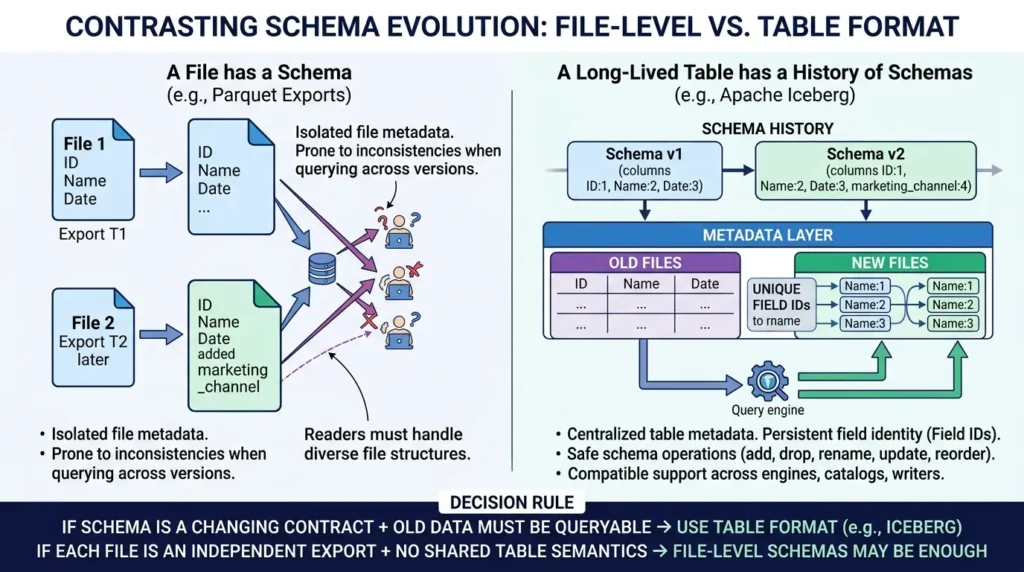
Suppose a source system adds a marketing_channel column. A single Parquet export can contain that new field in its file metadata. But a production table may contain older files without the field, newer files with it, nested structures, multiple writers, and readers that must interpret all of them consistently.
The Iceberg evolution documentation describes schema changes such as adding, dropping, renaming, updating, and reordering fields as metadata operations. Iceberg uses unique field IDs so a rename does not accidentally make a reader interpret an old column as a different field merely because the name or position changed.
That does not mean schema evolution is always safe by default. A query engine, catalog, writer, and table version still need compatible support. But Iceberg gives the table a persistent identity model for fields instead of treating every file’s schema as an isolated event.
Decision rule: if the schema is a contract that will change while old data remains queryable, a table format deserves serious consideration. If each file is an independent export with no shared table semantics, file-level schemas may be enough.
Partitioning: physical layout versus logical queries
Partitioning is where teams often feel the difference between a file collection and a managed table.
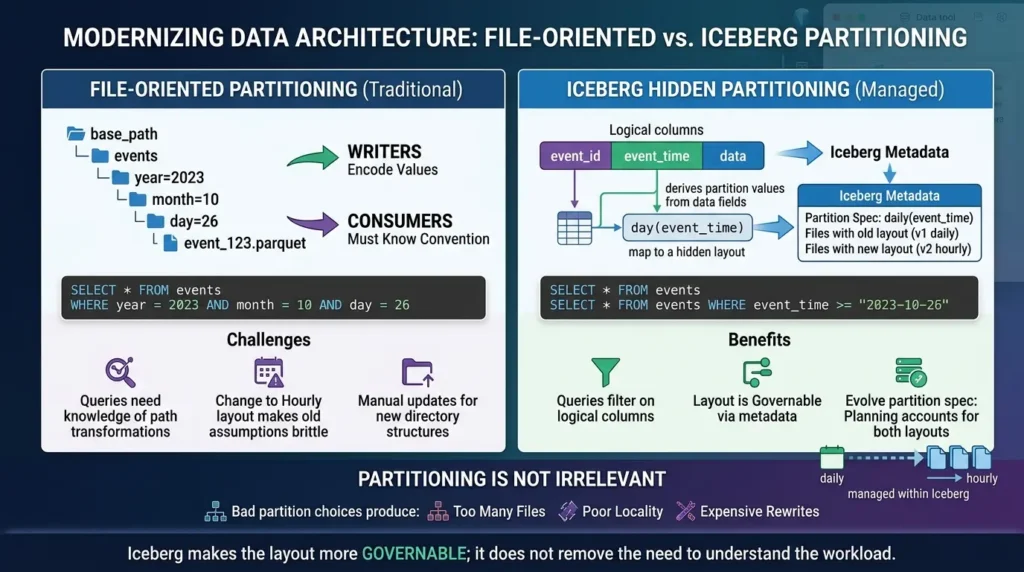
With a file-oriented design, writers may encode partition values in directory names or file paths. That can work, but producers and consumers must agree on the convention. A query may need to know that event_time was transformed into an event_date directory, and a future change from daily to hourly layout can make old assumptions brittle.
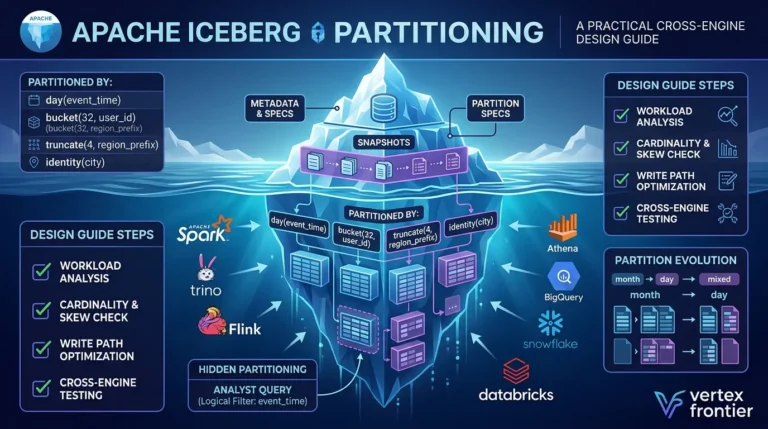
Iceberg’s hidden partitioning documentation describes a different contract. The table can derive partition values from data fields, keep the relationship in metadata, and let queries filter on logical columns rather than physical partition columns. Iceberg can also evolve the partition specification: old data remains in the old layout, while new data uses the new one, and planning can account for both.
This does not make partitioning irrelevant. Bad partition choices can still produce too many files, poor locality, or expensive rewrites. Iceberg makes the layout more governable; it does not remove the need to understand the workload.
Time travel and row-level changes: where “just Parquet” becomes incomplete
A Parquet file is immutable after it is written. That is a useful property for reliable storage, but it means that changing rows normally involves writing new files or adding a higher-level mechanism for interpreting changes.
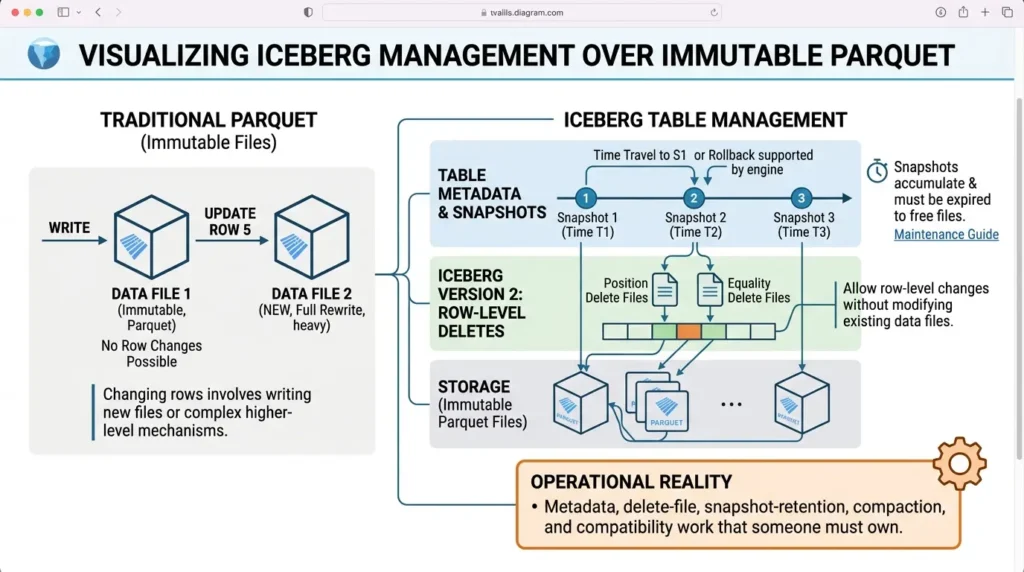
Iceberg adds table-level snapshots. Each committed table change can create a new snapshot, and a reader can use a retained snapshot to query an earlier table state or roll back when supported by the engine. The Iceberg maintenance guide makes an operational point that comparison articles often skip: snapshots accumulate and must eventually be expired. Once a snapshot is expired, the table may no longer be able to time-travel to that state, and files no longer referenced by retained snapshots can become eligible for deletion.
Iceberg version 2 also defines row-level deletes using delete files. The Iceberg specification’s row-level delete section distinguishes position deletes from equality deletes. Those mechanisms allow a table to represent row-level changes while leaving existing data files immutable. Whether a given SQL engine can read and write those features correctly is a separate compatibility question.
Copy-on-Write versus Merge-on-Read
The phrase “row-level changes” hides an implementation choice. In supported Iceberg integrations, table properties can select Copy-on-Write or Merge-on-Read behavior for relevant delete, update, or merge operations.
Copy-on-Write rewrites affected data files, while Merge-on-Read records delete information in separate delete files that readers must apply. The exact property names, defaults, supported format versions, and engine behavior must be checked against the current configuration and write documentation before production use.
| Mode | Write path | Read path | Operational trade-off |
|---|---|---|---|
| Copy-on-Write | Rewrites affected data files and commits replacement files. | Readers use the rewritten data files without applying a separate delete layer for that change. | Can increase write amplification; may simplify reads when changes are infrequent. |
| Merge-on-Read | Writes delete files alongside existing immutable data files. | Readers apply delete-file information while planning or reading. | Can reduce immediate rewrites for some workloads, but increases delete-file planning, retention, and compaction responsibilities. |
These are workload-dependent trade-offs, not a universal “batch versus streaming” rule. A production evaluation should measure write amplification, read latency, delete-file growth, compaction frequency, and recovery behavior for the exact engine, catalog, table format version, and data distribution.
The choice is workload-dependent. MoR is not a blanket “streaming mode,” and CoW is not automatically the best option for batch jobs. The Spark Writes documentation shows that the exact behavior of MERGE, UPDATE, and DELETE also depends on the engine, table version, and operation. A production design should benchmark write amplification, read latency, delete-file growth, and compaction frequency together.
Show the practical difference in a row update
Parquet-only approach: write a replacement file or a new version of the dataset, then teach readers how to find the correct files and avoid mixing old and new states.
Iceberg approach: write new data and/or delete files, create a new table snapshot, and atomically publish the new table metadata. Readers use a committed snapshot rather than observing a half-finished file set.
The second approach is not automatically cheaper. It is a stronger table contract, and the cost is paid in metadata management, engine compatibility, and maintenance.
Performance: neither name is a universal winner
Performance claims are where many comparison articles become unreliable. Iceberg is not a replacement for Parquet’s columnar encoding, and Parquet does not automatically solve table planning across millions of files.
Parquet can improve scan efficiency because it stores data in a column-oriented layout and exposes file-level structures that engines can use. Compression, encoding, row-group size, column selection, predicate pushdown, and the engine’s vectorized reader all matter. A poorly written Parquet dataset can still perform badly.
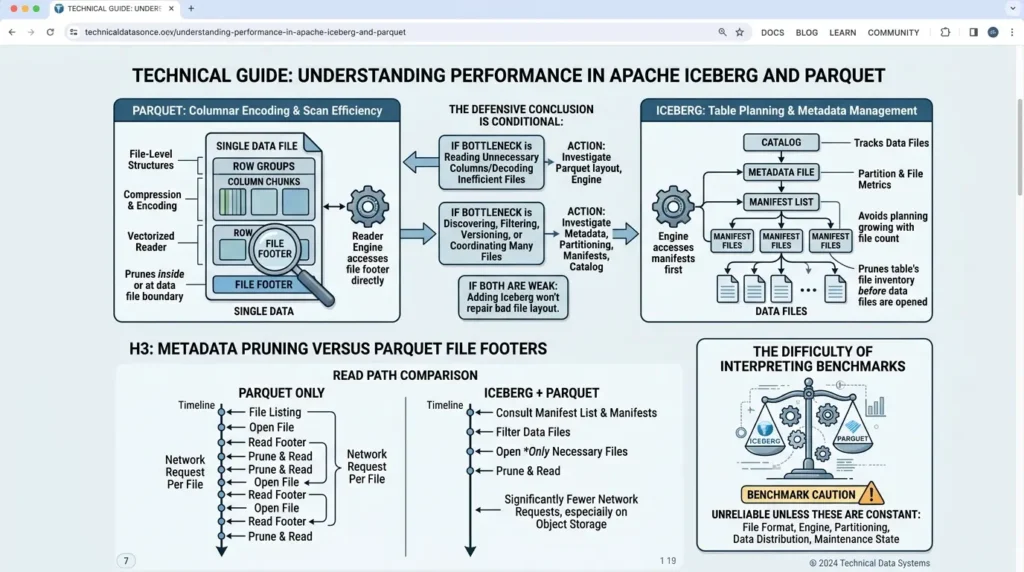
Iceberg is designed to improve table scan planning by tracking data files in manifests and recording partition and file metrics at the table layer. The official performance documentation describes a two-level process: a manifest list can filter manifests using partition-value ranges, and manifests can filter data files using partition data and column-level statistics.
This is documented planning behavior, not a universal benchmark result. Actual latency and scan reduction depend on metadata quality, manifest organization, partition design, catalog behavior, engine implementation, and maintenance.
The most defensible conclusion is therefore conditional:
- If the bottleneck is reading unnecessary columns or decoding inefficient files, investigate Parquet layout and the query engine.
- If the bottleneck is discovering, filtering, versioning, or coordinating many files, investigate table metadata, partitioning, manifests, and the catalog.
- If both are weak, adding Iceberg without improving file layout will not repair every scan problem.
This is also why a benchmark that compares “Iceberg” and “Parquet” without holding the underlying file format, engine, partitioning, data distribution, and maintenance state constant is difficult to interpret.
Metadata pruning versus Parquet file footers
Both layers can help an engine avoid unnecessary work, but they operate at different points in the read path. Parquet file metadata and row-group or page structures help a reader navigate and filter parts of an individual file. Iceberg manifests and manifest lists can reject candidate files earlier during table-level planning.
A benchmark that compares “Iceberg” and “Parquet” must hold the underlying data files, engine, filters, partitioning, catalog, metadata state, and maintenance history constant; otherwise, it mostly measures the test setup rather than the format boundary.
Iceberg moves an earlier part of that decision into the table metadata. The official Iceberg performance documentation describes a two-level process: the manifest list can filter manifests using partition-value ranges, then manifest files can filter data files using partition data and column-level statistics such as lower and upper bounds. The engine can therefore reject many files during planning without opening each candidate Parquet object.
The practical gain is not a promise that every Parquet-only query makes one network request per file. Engines can cache, batch, prefetch, or maintain external indexes. The defensible distinction is this: Parquet file-footers help prune inside or at the boundary of a data file, while Iceberg manifests and manifest lists can prune the table’s file inventory before the data files are opened. On object storage with very large file counts, that earlier pruning boundary can matter as much as compression.
A reproducible comparison protocol
If you need original performance numbers, compare the same dataset and underlying Parquet files through the same query engine and hardware or cloud configuration.
Record the file count, total and compressed bytes, row-group and file sizes, codec, partition layout, column statistics, filters, selected columns, concurrency, cache state, catalog configuration, Iceberg metadata state, compaction history, software versions, and the exact metric.
Run cold-cache and warm-cache trials, repeat each query, report the raw results, and separate planning time from execution time. Without those conditions, publish the comparison as a qualitative decision guide rather than a numerical benchmark.
Cost: storage is only one line on the bill
Parquet can be cost-efficient because compression and columnar access may reduce bytes stored and scanned. But the total cost of a data platform also includes compute, metadata requests, object-store operations, catalog infrastructure, compaction, retries, monitoring, and engineering time.
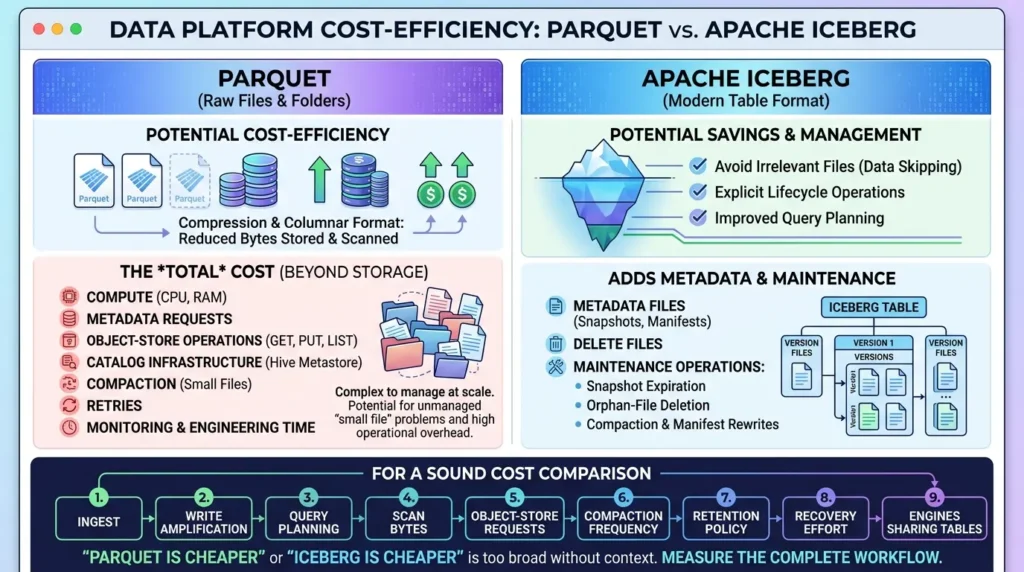
Iceberg may reduce waste by helping the engine avoid irrelevant files and by making lifecycle operations explicit. It also adds metadata and maintenance. Snapshots, manifests, delete files, and small-file problems do not disappear simply because the table has a modern format. The Iceberg maintenance documentation specifically discusses snapshot expiration, orphan-file deletion, compaction, and manifest rewrites.
A sound cost comparison should measure the complete workflow: ingest, write amplification, query planning, scan bytes, object-store requests, compaction frequency, retention policy, recovery effort, and the number of engines that need to share the same table. “Parquet is cheaper” or “Iceberg is cheaper” is too broad to be useful without that context.
No cost winner can be inferred from the format names alone. Parquet and Iceberg are Apache open-source projects rather than paid SaaS products, but a real deployment can incur different compute, storage, object-store request, catalog, metadata, compaction, retention, monitoring, and engineering costs. Compare the complete workflow under the same data, engine, cloud, retention, and service-level assumptions rather than comparing file sizes or query scans in isolation.
Can you use Apache Iceberg and Parquet together?
Yes. That is the normal relationship in many lakehouse architectures.
An Iceberg table can use Parquet as its underlying data-file format. The table metadata records which files belong to which snapshot and how the table is organized. The Parquet files continue to provide columnar storage, compression, encoding, and file-level read structures.
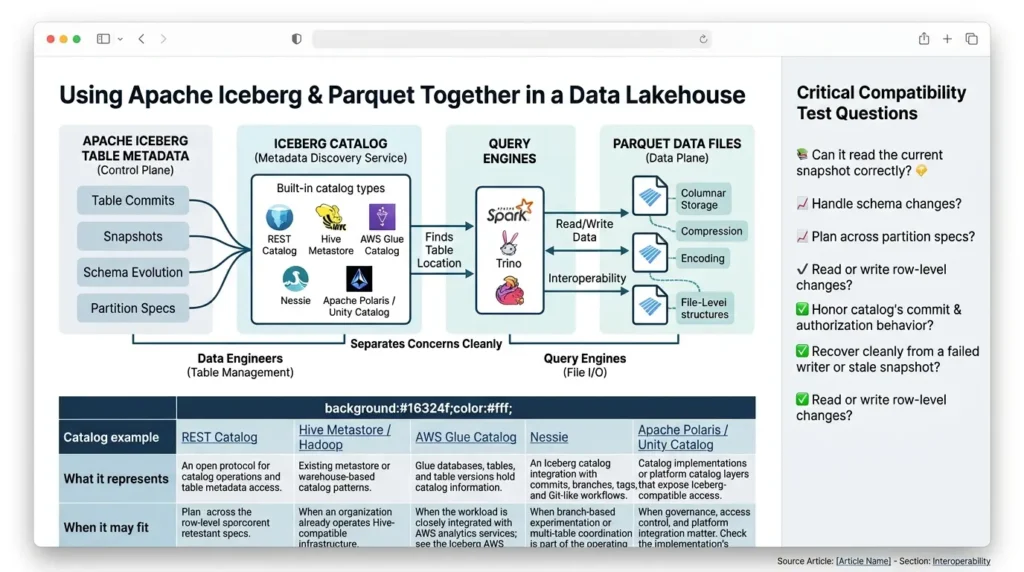
This combination separates concerns cleanly. Data engineers can reason about table commits and schema evolution without forcing every query engine to understand a home-grown directory convention. Query engines can still use Parquet readers and columnar execution paths. The exact interoperability depends on the catalog and the engine’s Iceberg support, so “supports Iceberg” should always be tested against the specific operations your workload needs.
What the Catalog does, and which kinds exist
The Iceberg Spark configuration guide documents catalog types and integrations such as Hive, Hadoop, REST, Glue, JDBC, and Nessie. These names describe configuration paths or implementations, not identical guarantees. Verify the exact catalog version, authentication model, caching behavior, commit-conflict handling, branch or tag support, authorization behavior, and failure recovery for the engines and operations in your workload.
| Catalog example | What it represents | When it may fit |
|---|---|---|
| REST Catalog | An open protocol for catalog operations and table metadata access. | When multiple engines or languages need a common catalog boundary. See the REST Catalog specification. |
| Hive Metastore / Hadoop | Existing metastore or warehouse-based catalog patterns. | When an organization already operates Hive-compatible infrastructure. |
| AWS Glue Catalog | Glue databases, tables, and table versions hold catalog information. | When the workload is closely integrated with AWS analytics services; see the Iceberg AWS integration guide. |
| Nessie | An Iceberg catalog integration with commits, branches, tags, and Git-like workflows. | When branch-based experimentation or multi-table coordination is part of the operating model; see the Nessie integration guide. |
| Apache Polaris / Unity Catalog | Catalog implementations or platform catalog layers that expose Iceberg-compatible access. | When governance, access control, and platform integration matter. Check the implementation’s supported Iceberg operations rather than relying on the product name alone. |
The names are not interchangeable guarantees. A team should test the catalog with its actual engines, authorization model, commit-conflict behavior, branch or tag support, metadata caching, and failure recovery. “The engine can read an Iceberg table” is only the first compatibility test.
A useful production test is not simply “Can the engine read the table?” Ask instead:
- Can it read the current snapshot correctly?
- Can it handle the schema changes your producers make?
- Can it plan across old and new partition specs?
- Can it read or write row-level changes if you need them?
- Can it honor the catalog’s commit and authorization behavior?
- Can it recover cleanly from a failed writer or stale snapshot?
Those questions reveal the real compatibility boundary better than a logo list.
Production Readiness Checklist
Before adopting Iceberg, open each question and record a concrete owner or test. A “yes” answer is not automatically a reason to adopt it; it tells you which operating requirement must be designed.
Do we have more than one independent writer?
If yes, define commit-conflict handling, retry behavior, and the catalog path before calling the table production-ready.
Will old and new schemas coexist for a long time?
If yes, test field identity, nested changes, reader compatibility, and the rollback story with real historical files.
Will the partition strategy change as volume grows?
If yes, test old and new partition specs together. Do not assume that a current query plan proves future layouts will behave the same way.
Do we need deletes, corrections, or reproducible historical reads?
If yes, test snapshots, delete files, retention windows, and the exact engine operations you intend to run.
Who owns maintenance?
Name the owner for compaction, snapshot expiry, orphan cleanup, manifest maintenance, alerts, and recovery. If the answer is “no one,” the design is not operationally complete.
Which engines and catalogs must interoperate?
List the actual readers and writers, then test snapshots, schema changes, partition evolution, row-level changes, authorization, and failure recovery—not just basic table reads.
Minimum production gate
Do not approve an Iceberg-over-Parquet design until the team has named an owner for the catalog, snapshot retention, orphan-file cleanup, compaction, schema and partition changes, engine compatibility testing, and rollback or recovery.
Do not approve a Parquet-only design until the team has documented file discovery, publication markers, schema compatibility, partition conventions, retention, and reader behavior. Both designs need explicit ownership; the difference is where the table contract lives.
Decision matrix: choose the layer that matches the failure
| If your dominant problem is... | Investigate first | Why |
|---|---|---|
| Large scans read too many columns or poorly encoded files | Parquet layout and the query engine | File structure, compression, encoding, row groups, pages, and engine readers determine physical scan behavior. |
| Readers disagree about which files are current | A table format and catalog | The problem is table membership, commit visibility, and snapshot state. |
| Old and new schemas must coexist for a long time | Iceberg schema evolution plus engine compatibility | Field IDs and metadata evolution address table-wide identity; consumers still need validation. |
| Physical partition directories leak into queries and producers | Iceberg partition transforms and evolution | The table can separate logical predicates from changing physical layouts. |
| The workload needs deletes, corrections, or reproducible historical reads | Iceberg operations, retention, and engine support | Row-level deletes and snapshots are table-level features with lifecycle and compatibility costs. |
| The dataset is a simple, independently consumed export | Parquet plus explicit publishing conventions | A dedicated table layer may add operational work without solving a current failure. |
| You need both efficient files and governed table state | Iceberg with Parquet data files | The layers have complementary responsibilities. |
When should you choose Parquet alone?
Parquet alone is often reasonable when the data is mostly append-only, each export is independently consumable, file discovery is simple, and a single controlled pipeline publishes complete batches. It can also be a good landing or interchange format when downstream systems need a broadly supported file type.
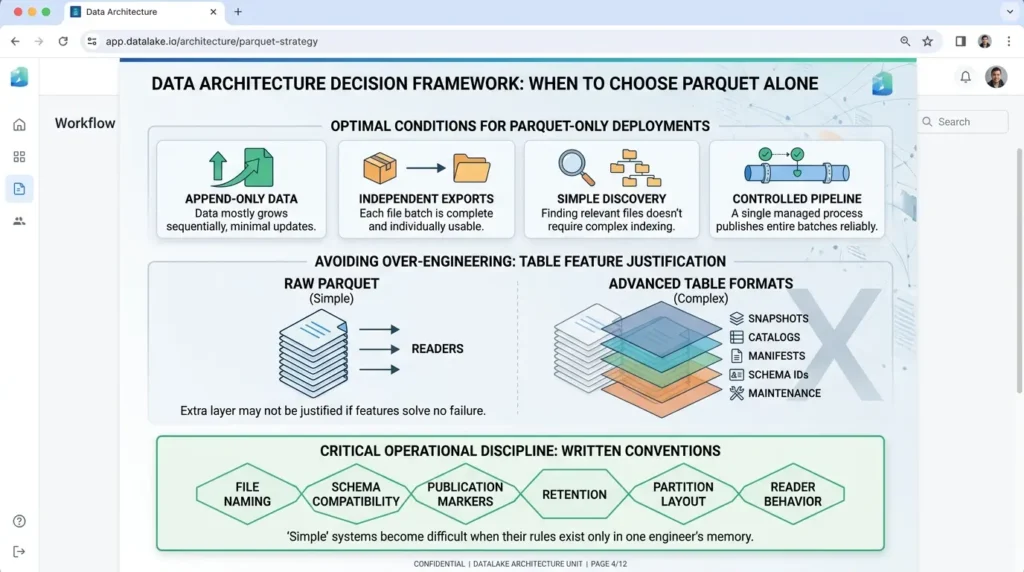
The strongest case for Parquet alone is not that it has more table features. It is that your problem does not require table-level features yet. If adding snapshots, catalogs, manifests, schema IDs, and maintenance would solve no current failure, the extra layer may not be justified.
Even then, write down the conventions. Define file naming, schema compatibility, publication markers, retention, partition layout, and reader behavior. “Simple” systems become difficult when their rules exist only in one engineer’s memory.
When should you add Iceberg?
Iceberg becomes compelling when a dataset is no longer just a sequence of independent files. Typical signals include multiple writers, multiple query engines, long-lived historical data, evolving schemas, changing partition requirements, incremental updates, row-level deletes, reproducible snapshots, or a need to prevent readers from observing partial writes.
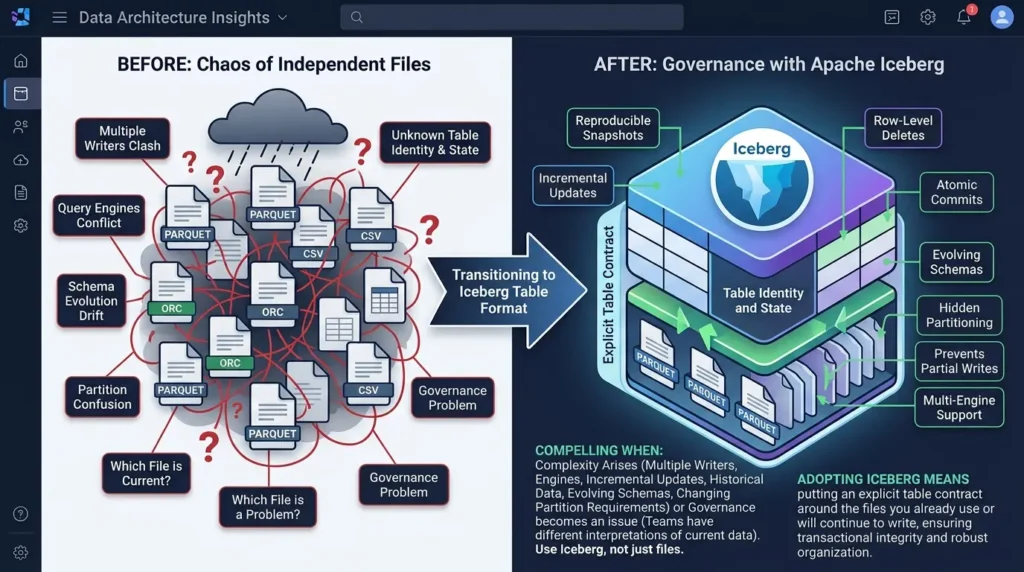
It is also useful when the current file layout is becoming a governance problem. If every team has a different interpretation of which directories or files are current, the question is no longer primarily about compression. It is about table identity and state.
Adding Iceberg does not mean abandoning Parquet. It usually means putting an explicit table contract around the files you already use or will continue to write.
When Should You Choose Apache Iceberg Over Raw Parquet?
While Parquet remains the industry-standard columnar storage file format, it is not a data management layer. Choose your architecture based on the complexity of your mutation and concurrency requirements:
Stick with Raw Parquet If:
- Your pipeline is strictly append-only: You ingest log streams, IoT telemetry, or historical immutable time-series data that never requires row-level modifications.
- You operate a single compute engine: A single Spark or DuckDB process queries the directory, and you do not suffer from concurrent write conflicts.
- Your partition scheme is permanent: Your query patterns will never change, and you will never need to alter partitioning schemes on existing terabyte-scale data.
Upgrade to Apache Iceberg If:
- You require row-level mutations (Updates/Deletes): Implementing GDPR/CCPA "right to be forgotten" requests on raw Parquet requires rewriting entire directories; Iceberg handles positional and equality deletes deterministically via metadata.
- Multiple engines query the same dataset simultaneously: If Snowflake, Trino, and Spark read and write to the same S3/GCS bucket, Iceberg's optimistic concurrency control (OCC) prevents corrupted reads and race conditions.
- You need Partition and Schema Evolution without downtime: You can alter column types or change partitioning from
dailytohourlywithout rewriting historical data files. - You need Time Travel and Safe Rollbacks: Iceberg's immutable snapshot architecture allows you to query historical table states or roll back a corrupted write job instantly with a single metadata pointer update.
How to migrate from Parquet to Iceberg
A migration from Parquet to Iceberg is not automatically a rewrite of every byte. The official table-migration guide distinguishes between a full data migration, which copies data into a new Iceberg table, and in-place metadata migration, which can register compatible existing files without copying them.
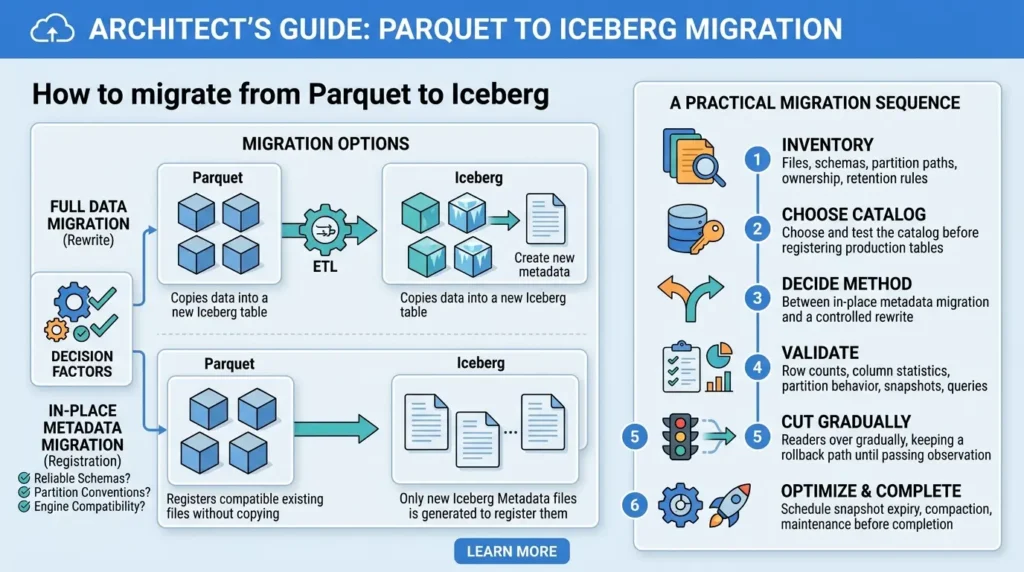
The safe option depends on how those files were written, whether their schemas and partition conventions are reliable, and which engines must read the result.
Before choosing an in-place metadata migration, verify who owns the source files, whether any source process can delete or vacuum them, whether writers must be stopped, and whether the source partition and schema conventions are accurate. Validate row counts, nullability, field identity, partition mapping, query results, permissions, concurrent readers and writers, and rollback behavior.
In-place migration avoids copying data but does not isolate the new Iceberg table from source-file lifecycle actions. Full migration provides stronger isolation at the cost of copying data and temporarily using more storage.
A practical migration sequence
- Inventory files, schemas, partition paths, ownership, and retention rules.
- Choose and test the catalog before registering production tables.
- Decide between in-place metadata migration and a controlled rewrite.
- Validate row counts, column statistics, partition behavior, snapshots, and representative queries.
- Cut readers over gradually, keeping a rollback path until the new table has passed its observation window.
- Schedule snapshot expiry, compaction, manifest maintenance, and orphan-file controls before declaring the migration complete.
Iceberg vs Delta Lake vs Hudi: a brief orientation
Engineers often search for Iceberg vs Delta Lake vs Hudi because all three are discussed as data-lake table technologies. That is a different comparison from Iceberg vs Parquet: Delta Lake and Apache Hudi are alternative table-format ecosystems, while Parquet is primarily a physical file format.
A serious three-way comparison needs its own treatment of transaction semantics, metadata layout, engine support, governance, update patterns, and maintenance. Here, the important point is simply that Iceberg is not being compared with those projects on their merits; it is being compared with Parquet to explain the boundary between file storage and table management.
| If your main question is… | Start by evaluating… | Likely direction |
|---|---|---|
| How can I store and scan analytical data efficiently? | Columnar layout, compression, encoding, row groups, and engine reads | Parquet is central. |
| How do I know which files form the current table? | Snapshots, manifests, catalog pointers, and commit visibility | Iceberg is relevant. |
| How do I evolve schemas and partitions without breaking readers? | Field identity, metadata evolution, hidden partitioning, engine support | Iceberg adds the table contract. |
| How do I keep a simple batch export broadly portable? | Consumer support and file-level conventions | Parquet alone may be enough. |
| How do I support both efficient scans and governed table state? | File layout plus catalog, metadata, commits, and maintenance | Use Iceberg with Parquet. |
Common mistakes in Apache Iceberg vs Parquet decisions
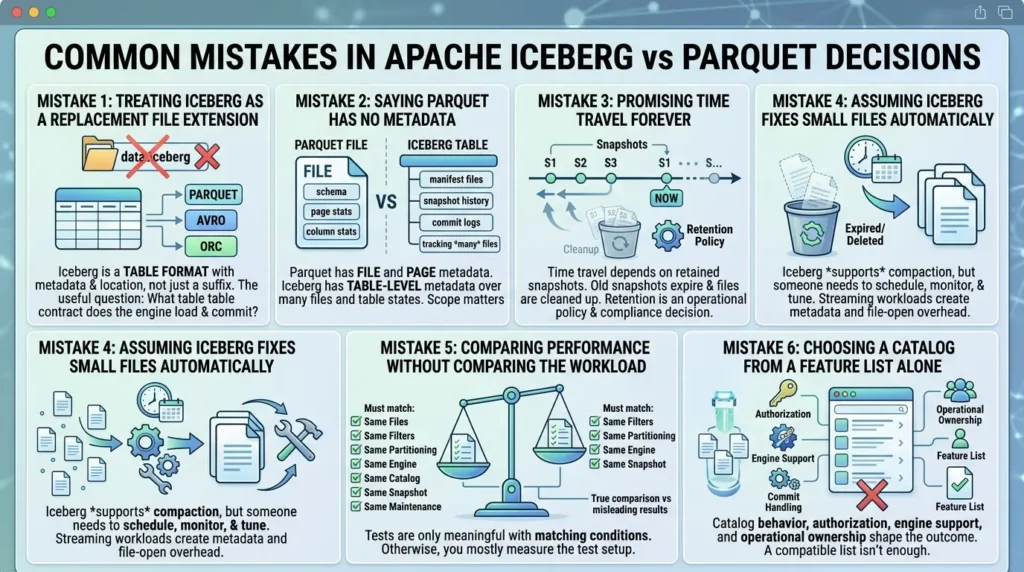
Mistake 1: treating Iceberg as a replacement file extension
Iceberg is not simply another suffix to put on a data file. A table has metadata and a table location; the underlying data files may be Parquet, Avro, or ORC according to the table configuration and implementation support, as described in the Iceberg specification. The useful question is not “What extension does Iceberg use?” but “What table contract does the engine load and commit?”
Mistake 2: saying that Parquet has no metadata
That erases an important distinction. Parquet has file and page metadata. Iceberg has table metadata that tracks many files and committed table states. Use the scope of the metadata as the explanation; do not turn a layered architecture into a false binary.
Mistake 3: promising time travel forever
Time travel depends on retained snapshots. If old snapshots expire and their files are cleaned up, that historical state may no longer be available. Retention is a product decision, a compliance decision, and an operational policy, not a free feature.
Mistake 4: assuming Iceberg fixes small files automatically
Iceberg can support compaction and metadata maintenance, but someone still needs to schedule, monitor, and tune those actions. A streaming workload that creates many small files can create metadata and file-open overhead even when the table format is correct.
Mistake 5: comparing performance without comparing the workload
A Parquet scan and an Iceberg table scan are not meaningful rivals unless you define the same underlying files, filters, partitioning, engine, catalog, snapshot, and maintenance state. Otherwise, the result mostly measures the test setup.
Mistake 6: choosing a catalog from a feature list alone
The table format is only part of the access path. Catalog behavior, authorization, commit handling, engine support, and operational ownership all shape the outcome. A catalog that looks compatible on paper may not support every operation your team expects.
Branches, Tags, and Write-Audit-Publish
The workflow below is an Iceberg integration example, not a Parquet-file feature. Before using it, verify that the selected engine and catalog support branch or tag operations, that the required SQL extensions or procedures are enabled, that the writer has permission to create and publish references, and that branch and tag retention is part of the maintenance policy.
Snapshots are immutable table states, but Iceberg can also give those states named references. The official branching and tagging documentation defines branches and tags as references to snapshots with their own retention lifecycles. Creating a branch does not copy every Parquet file; it creates a metadata reference to a snapshot lineage. New writes may add files, while unchanged files can remain shared.
- Write a batch to an audit branch rather than exposing it immediately on the main branch.
- Run data-quality, schema, and reconciliation checks against that branch.
- Fast-forward or publish the validated snapshot into the main table state.
- Apply branch and snapshot retention so audit references do not grow forever.
The Spark Writes documentation documents branch writes and WAP through spark.wap.branch, while the Spark procedures documentation documents publishing staged WAP changes and fast-forwarding branches.
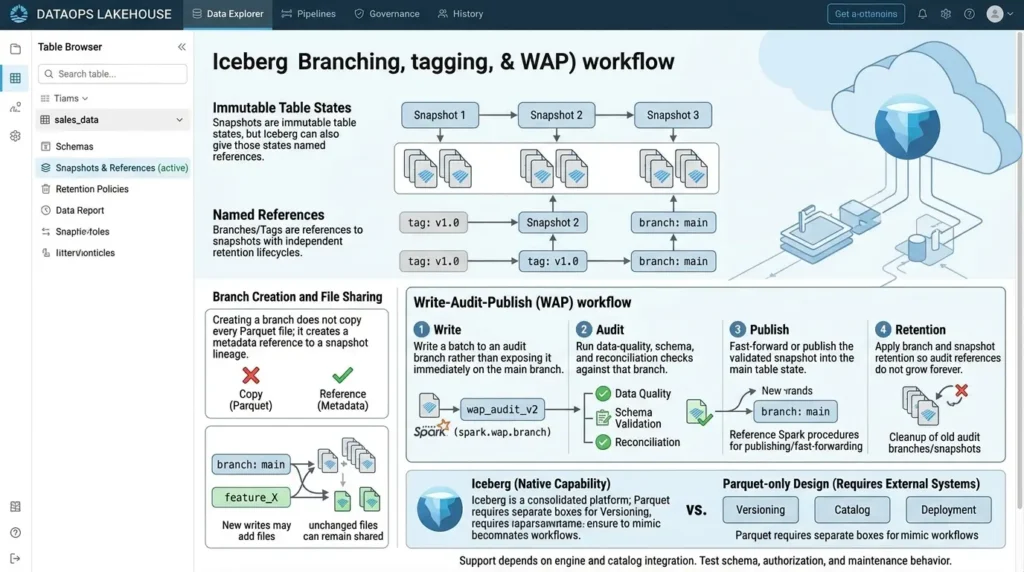
This is not a native capability of the Parquet file format itself; a Parquet-only design would need an external versioning, catalog, or deployment system to build an equivalent workflow. Support still depends on the engine and catalog integration, so branch creation should be tested alongside schema, authorization, and maintenance behavior.
Myth vs Reality
These short corrections address the misunderstandings that most often distort an Apache Iceberg vs Parquet decision.
Myth: “Iceberg is just another file format.”
Reality: Iceberg is a table format. It can manage Parquet, Avro, or ORC data files and adds table-level metadata and commit semantics.
Myth: “Parquet has no metadata.”
Reality: Parquet has file and page metadata. The important difference is that Iceberg metadata tracks a table made from many files and committed snapshots.
Myth: “Iceberg automatically makes every query faster.”
Reality: Iceberg can improve table planning and file pruning, but file sizes, row groups, filters, partitions, manifests, engines, and maintenance still determine performance.
Myth: “Time travel keeps every historical state forever.”
Reality: Time travel depends on retained snapshots and files. Retention and cleanup policies determine how far back a table can be queried.
Final verdict
Apache Parquet and Apache Iceberg do not compete for the same job.
Parquet is the physical storage layer: columnar layout, row groups, pages, encoding, compression, and file metadata. Iceberg is the table layer: snapshots, manifests, commits, schema identity, partition evolution, and a consistent view of a changing collection of files.
Apache Parquet and Apache Iceberg do not primarily compete for the same job. Parquet is a physical file format for columnar layout, row groups, pages, encoding, compression, and file metadata. Iceberg is a table format for snapshots, manifests, commits, schema identity, partition evolution, and a consistent view of a changing collection of files.
Use Parquet alone when the dataset is simple, append-oriented, independently consumable, and safely published by a controlled workflow whose file-discovery and schema rules are explicit.
Add Iceberg when file collections need shared table state, evolving contracts, concurrent writers, historical views, row-level changes, or reliable access from multiple compatible engines. In many systems, the most coherent design is Iceberg managing Parquet files.
The correct choice depends on the failure you are solving and on who will own the catalog, retention, maintenance, compatibility testing, and recovery path.
Ready to Put This Guide into Practice?
Take these architectural principles straight to your team with the official Iceberg vs Parquet Decision Toolkit. Includes migration checklists, cost calculators, and readiness scorecards.
FAQ: Apache Iceberg vs Parquet
What is the difference between Apache Iceberg and Parquet?
Apache Parquet is a columnar data file format. Apache Iceberg is a table format that manages collections of data files with table-level metadata, snapshots, commits, schema evolution, and partition evolution. Iceberg can use Parquet underneath, so they are usually complementary rather than competing choices.
Is Apache Iceberg a file format like Parquet?
No. Iceberg defines how a table's files and metadata are organized, versioned, and committed. The underlying data files can use formats such as Parquet, Avro, or ORC, depending on the table configuration and engine support.
Can Apache Iceberg and Parquet be used together?
Yes. A common design uses Iceberg for table management and Parquet for the physical data files. Iceberg tracks files, snapshots, manifests, schema, and partition specifications, while Parquet provides columnar storage and file-level structures for reading data.
Does Apache Iceberg provide ACID-style table guarantees?
The Apache Iceberg specification describes atomic table updates, consistent snapshots, serializable isolation, and optimistic concurrency for supported table operations. The exact guarantees available to a user depend on the engine, catalog, table format version, operation, permissions, and storage configuration. These guarantees do not automatically validate business rules or data quality.
Does Parquet support schema evolution?
Parquet files contain schemas, and readers or table systems can apply compatible schema rules across files. However, table-wide field identity and evolution across a long-lived collection are not the primary contract of the Parquet file format. Iceberg adds table-level field identity and metadata operations for supported schema changes, but downstream compatibility still needs validation.
Which is faster, Apache Iceberg or Parquet?
There is no universal winner because they operate at different layers. Parquet's file structures can support column and row-group selective reads, while Iceberg's manifests and manifest lists can help prune files during table-level planning. Results depend on the engine, data files, filters, partitioning, metadata, catalog, cache state, and maintenance history. Use a controlled benchmark before making a performance claim.
When is Parquet alone a reasonable choice?
Parquet alone can be reasonable when data is mostly append-only, each export is independently consumable, file discovery is simple, and a controlled pipeline publishes complete batches. The team still needs explicit rules for file discovery, publication markers, schema compatibility, partition layout, retention, and reader behavior.
When should you add Apache Iceberg to a Parquet-based data lake?
Consider adding Iceberg when a collection of files needs shared table state, concurrent writers, evolving schemas or partitions, historical reads, row-level changes, or reliable access from multiple compatible engines. The decision also requires an owner for the catalog, snapshot retention, compaction, orphan cleanup, compatibility testing, and recovery.
📋 Article Timeline & History
Successfully updated on September 19, 2026 with the latest details.
This article was originally published on August 15, 2026.

Was this article helpful?





[…] Apache Iceberg vs Parquet: What’s the Difference and When Should You Use Each? […]
[…] Apache Iceberg vs Parquet: What’s the Difference and When Should You Use Each? […]
[…] authoritative after the migration? If the file-versus-table boundary is still unclear, read our Apache Iceberg vs. Parquet comparison first; this guide assumes that distinction and focuses on […]
[…] Apache Iceberg vs Parquet: What’s the Difference and When Should You Use Each? […]
[…] Apache Iceberg vs Parquet: What’s the Difference and When Should You Use Each? […]
[…] partitioning, and table state. For the distinction between a table format and a file format, see Apache Iceberg vs. Parquet. The practical relationship is usually not “Iceberg or Parquet.” It is Iceberg managing Parquet […]