
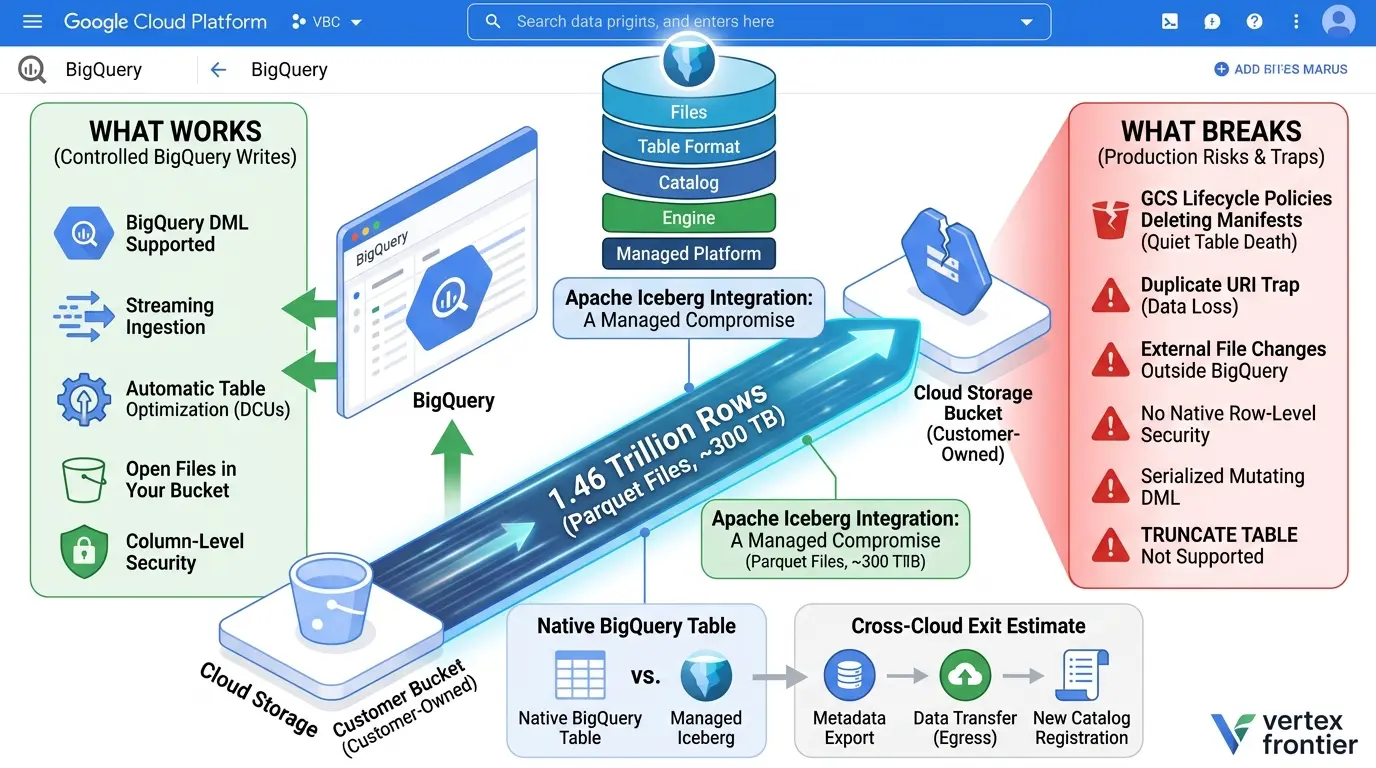

A data engineering team moved 1.46 trillion rows, about 300 TB, 338 Redshift tables, and 5.1 million files from AWS to BigQuery inside a four-hour cutover window. The numbers are impressive. The more useful part of the story is what happened before the cutover.
For roughly two months, the team had to work out which parts of Apache Iceberg on Google Cloud behaved as expected, which parts were narrower than the documentation suggested, and which assumptions could turn into an expensive operational problem later.
That distinction matters because “Iceberg on BigQuery” is not one thing. It can mean a BigQuery-managed Iceberg table, an Iceberg external table that points to metadata in Cloud Storage, or a table in Google’s managed Iceberg REST Catalog. The table format may be the same, but the catalog, writer, metadata path, security model, maintenance, and recovery options are not.
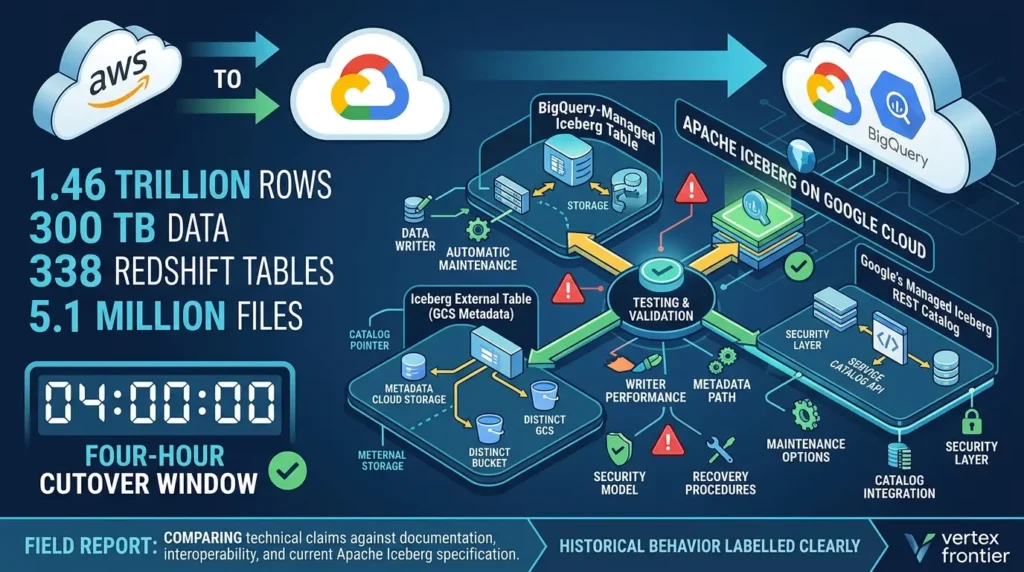
This guide examines a large migration as a field report and checks the important technical claims against Google Cloud’s current Apache Iceberg managed-table documentation, Google’s interoperability announcements, Apache Iceberg’s specification, and current integration documentation. Because the product has changed quickly, historical behavior is labeled clearly rather than presented as current.
What you will get from this guide
Click any topic to expand or collapseCapability Map
A current capability map for BigQuery-managed Iceberg, external Iceberg tables, and the Google-managed Iceberg REST Catalog.
Failure Modes & Production Warnings
The failure modes that deserve a production warning, including the duplicate-URI data-loss trap.
Migration & Readiness Framework
A practical migration and readiness framework for deciding whether Iceberg fits your workload.
Cost & Interoperability Model
A cost and interoperability model that does not confuse open storage with free or automatically portable analytics.
Practical Assets & SQL Patterns
Verified SQL patterns, responsive comparison tables, internal links, and a searchable FAQ for engineers making a real platform decision.
The short answer
Apache Iceberg on BigQuery is a strong fit when you want BigQuery’s managed execution and storage management while keeping table data in an open format in customer-owned Cloud Storage. It is less attractive when your workload depends on unrestricted table cloning, frequent concurrent mutations, native row-level policies, arbitrary external file writers, or a recovery model based only on BigQuery time travel.
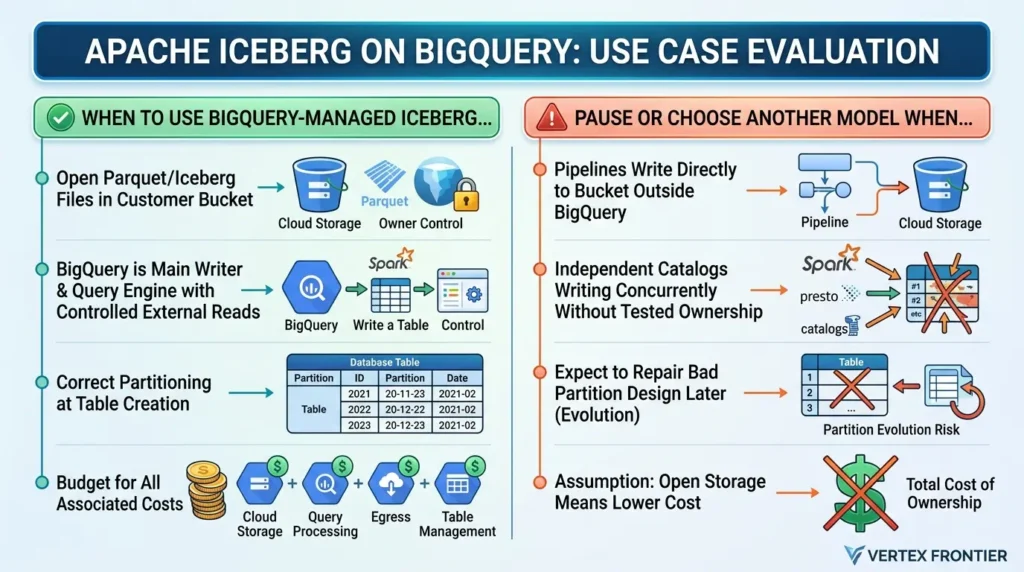
The contrarian point is simple: the biggest Iceberg risk on BigQuery is not that the table is open. It is that the table is open at the file layer while BigQuery still owns critical table state and garbage collection. Portability is real, but it is conditional on catalog ownership, metadata publication, URI discipline, engine compatibility, and bucket permissions.
| Use BigQuery-managed Iceberg when… | Pause or choose another model when… |
|---|---|
| You need open Parquet/Iceberg files in a bucket you control. | Your pipelines must write files directly to the bucket outside BigQuery. |
| BigQuery is the main writer and query engine, with controlled external reads. | Several engines must write to the same table through independent catalogs without a tested ownership model. |
| You can choose the partition column and URI correctly at table creation. | You expect to repair a bad partition design later with partition evolution. |
| You will budget for Cloud Storage, query processing, egress, and automatic table-management costs. | The business case assumes open storage automatically means lower total cost. |
What Apache Iceberg actually adds
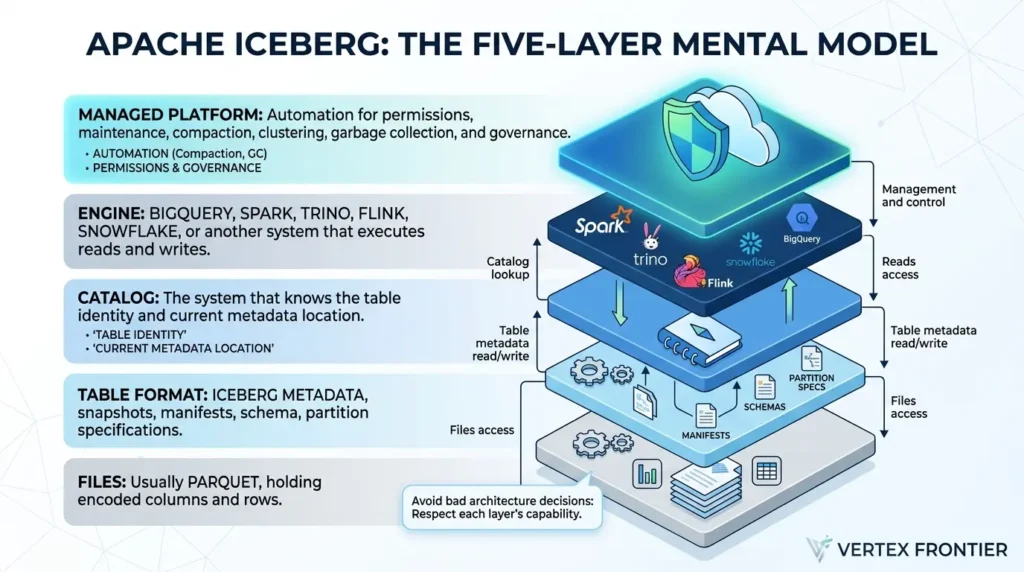
Apache Iceberg is an open table format, not a database, object store, or query engine. It adds a table-level contract around data files: snapshots, metadata, manifests, schemas, partition specifications, and commits. Engines such as Spark, Trino, Flink, Snowflake, and BigQuery can use that contract when the exact catalog and integration support the required operations.
If you need the general architecture first, Vertex Frontier’s Apache Iceberg guide explains snapshots, field identity, hidden partitioning, and table state. For the distinction between a table format and a file format, see Apache Iceberg vs. Parquet. The practical relationship is usually not “Iceberg or Parquet.” It is Iceberg managing Parquet files.
A useful mental model is to separate five layers:
- Files: usually Parquet, holding encoded columns and rows.
- Table format: Iceberg metadata, snapshots, manifests, schema, and partition information.
- Catalog: the system that knows the table identity and current metadata location.
- Engine: BigQuery, Spark, Trino, Flink, or another system that executes reads and writes.
- Managed platform: automation for permissions, maintenance, compaction, clustering, garbage collection, and governance.
Many bad architecture decisions come from treating a capability in one layer as if it belonged to all five.
The four models people keep mixing together
The phrase “BigQuery Iceberg” hides important differences. Before comparing features, identify which model you are evaluating.
| Model | Who owns live table state? | Typical write path | Main trade-off |
|---|---|---|---|
| Native BigQuery table | BigQuery | BigQuery DML, load jobs, Storage Write API | Less open storage portability |
| BigQuery-managed Iceberg | BigQuery metadata system; data files in your bucket | BigQuery DML, Storage Write API, supported connectors | Open files, but strict bucket and URI ownership rules |
| Iceberg external table | External Iceberg catalog/metadata file | Usually external engine; BigQuery access is read-only | Metadata URI must be kept current; limited management |
| Google-managed Iceberg REST Catalog | Google-managed catalog service | BigQuery and Iceberg-compatible engines, subject to availability | Separate preview/GA boundaries and catalog semantics |
Google’s current external-table documentation describes external Iceberg tables as read-only and says they are no longer recommended for most use cases when supported remote-catalog alternatives are available. That does not make them useless. They remain relevant when the data is managed elsewhere and BigQuery needs controlled access without taking ownership of the table lifecycle.
How Iceberg compares to Delta Lake and Hudi on BigQuery
Iceberg is not the only open table format with a BigQuery integration, and on BigQuery the comparison is not symmetric. The three formats are not offered on equal footing, and the differences are large enough to change an architecture decision.
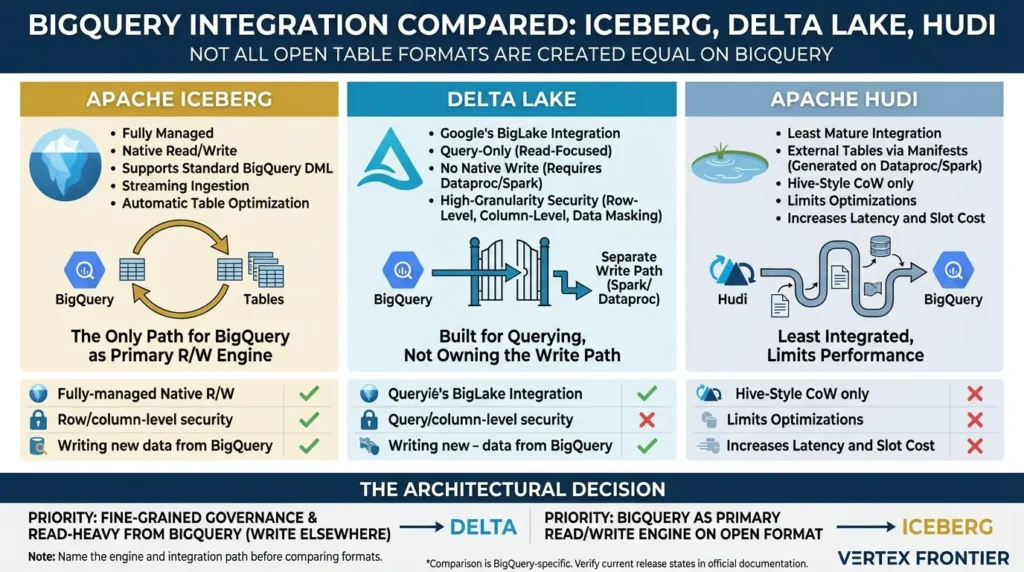
Delta Lake support on BigQuery is read-focused, not a managed-table replacement. Google's BigLake integration for Delta Lake lets BigQuery query Delta tables stored in Cloud Storage or Amazon S3, with automatic schema-change detection. The documented Delta Lake table path actually supports more granular access control than Iceberg managed tables, including row-level and column-level security and dynamic data masking.
The trade-off is ownership: Delta Lake tables on BigQuery are query-only. There is no fully managed, write-natively-from-BigQuery equivalent to an Iceberg managed table; writing back to Delta Lake requires a separate engine such as Dataproc or Spark, because the integration is built for querying, not for owning the write path.
Apache Hudi support on BigQuery is the least mature of the three. Rather than a native BigLake integration, Hudi tables reach BigQuery through external tables built from manifest files generated by the open-source Hudi–BigQuery connector running on Dataproc or Spark. That integration only works for Hive-style partitioned Copy-on-Write Hudi tables, and the implementation precludes some query-processing optimizations, which increases both query latency and BigQuery slot cost compared to a native table.
Iceberg is the only one of the three with a true fully managed path on BigQuery. Iceberg managed tables support standard BigQuery DML, streaming ingestion, and automatic table optimization directly against Iceberg-formatted files. That is also why the limitations list in this guide is as long as it is: a query-only integration has a much smaller surface area to break than a fully managed one that has to replicate everything a native BigQuery table does.
| Capability | Apache Iceberg | Delta Lake | Apache Hudi |
|---|---|---|---|
| Fully-managed, native read/write in BigQuery | Yes (managed tables) | No — query-only | No — query-only |
| Row/column-level security | Row-level not supported; column-level via policy tags | Supported | Depends on BigLake upgrade |
| Writing new data from BigQuery | Standard DML supported | Requires Dataproc/Spark | Requires Dataproc/Spark connector |
| Integration path | Native BigLake managed tables | Native BigLake external tables | External tables via manifest files |
Comparison is BigQuery-specific. Delta Lake and Hudi support broader native read/write capability on their home platforms. Verify current release states in Google's documentation before committing to a design.
What this means practically: if the priority is fine-grained governance on data you mostly query from BigQuery and write from elsewhere, Delta Lake's BigLake integration is arguably the more mature choice today. If the priority is running BigQuery as the primary read/write engine against an open format, the entire point of the migration this guide follows, Iceberg managed tables are currently the only path that offers that, rough edges included.
The comparison above is BigQuery-specific: both Delta Lake and Hudi support broader native read/write capability on their home platforms. For the full format-level comparison, architecture, ecosystem maturity, and engine support beyond BigQuery, see Apache Iceberg vs. Delta Lake vs. Hudi.
Name the engine and the integration path before comparing formats. "Iceberg vs Delta Lake" on BigQuery is a different decision from the same question on Databricks or a self-managed lakehouse.
Decision matrix: which model fits the workload?
The table format alone does not choose the architecture. The decision turns on who writes, who owns metadata, how current external readers must be, and which security controls the workload needs. Use this matrix as a first-pass screen, then validate the shortlisted path in a proof of concept.
| Decision criterion | Native BigQuery | Managed Iceberg | External Iceberg | REST Catalog path |
|---|---|---|---|---|
| Primary writer | BigQuery | BigQuery-managed workflow | External engine/catalog | Depends on catalog and supported engine path |
| Open files in your bucket | No physical Iceberg portability | Yes, with URI discipline | Yes, externally managed | Depends on storage/catalog arrangement |
| BigQuery writes | Broad native surface | Supported managed path with limitations | Read-only documented path | Release/model dependent |
| Metadata freshness | BigQuery table state | Export/refresh boundary for external readers | Manual metadata/catalog responsibility | Catalog service and engine compatibility |
| Best fit | BigQuery-first workloads without file portability requirements | BigQuery-first workloads that need open storage | Data managed elsewhere with controlled BigQuery reads | Multi-engine catalog design after availability validation |
Decision rule: if the primary business requirement is open storage and BigQuery is the controlled writer, start with managed Iceberg. If the primary requirement is broad external write access, evaluate a catalog-centered design instead of assuming a managed table is a shared folder.
What changed since the migration talk?
The migration account is valuable because it records a real implementation, not because every observation remains current. Google’s current documentation now lists table partitioning among the supported features for Iceberg managed tables. Google’s 2026 interoperability announcement also describes read/write interoperability for Google-managed Iceberg REST Catalog tables, with availability depending on the model and release state.
Do not repeat “partitioning is unavailable” as a present-tense statement. The accurate lesson is more useful: partitioning became available, but the initial choice still matters because partition evolution may remain restricted and supported partition column types are limited.
Every limitation in this article belongs to a specific table model and date. A limitation in a conference talk may be historical. A feature in a product announcement may be preview-only. Check the current Google documentation before using a statement in a production design.
The limitations that can change your design
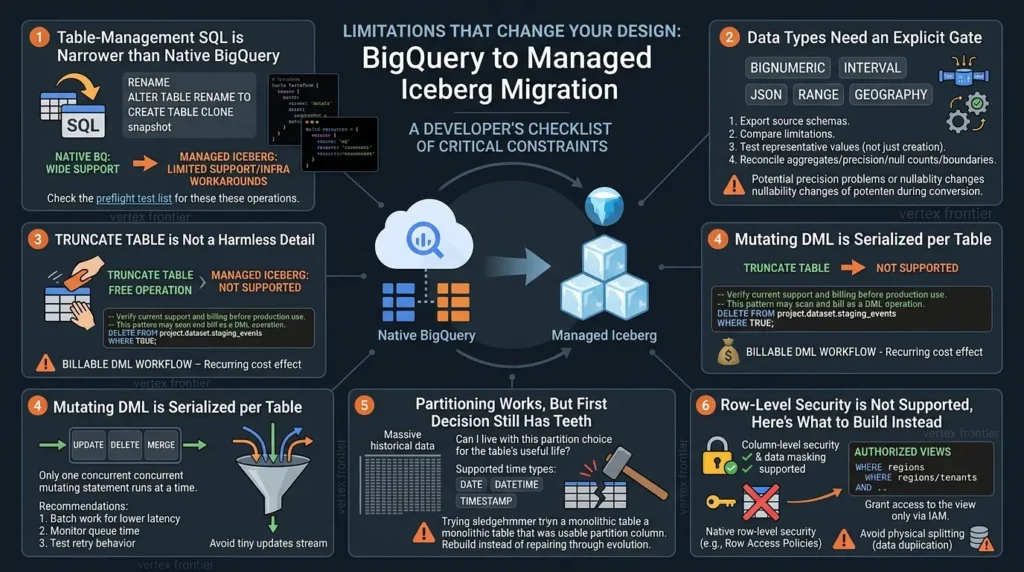
Table-management SQL is narrower than native BigQuery
Google’s managed Iceberg documentation confirms that some table-identity operations available on native BigQuery tables are not supported for Iceberg managed tables. Rename operations are one documented example. The broader migration lesson is: do not assume that a SQL translation from Redshift or native BigQuery preserves table lifecycle behavior.
A quick backup created with CREATE TABLE CLONE, a test copy, or a snapshot operation may need to become an infrastructure step instead. A Terraform-based replacement can be a reasonable engineering pattern, but it is a team-level workaround rather than a universal Google replacement.
Treat these operations as a preflight test list:
- Rename and
ALTER TABLE RENAME TO. - Copy, clone, and snapshot patterns.
- Table recreation with identical storage options.
- Default column expressions.
- Materialized-view or feature-specific dependencies.
- DML patterns that assume multiple concurrent mutating statements.
Data types need an explicit gate
Types such as BIGNUMERIC, INTERVAL, JSON, RANGE, and GEOGRAPHY require an explicit migration plan. Confirm the current Google Cloud schema limitations before moving these columns because managed-service support can change.
The deeper migration lesson is not simply “these five types fail.” A source-to-target conversion can also change precision, nullability, field meaning, or downstream behavior. One Redshift-to-BigQuery migration exposed precision problems during conversion. That is a field experience, not proof that every conversion follows the same path.
Use a type gate before moving data:
- Export source schemas and classify every column by type, precision, scale, nullability, and business meaning.
- Compare each type with the current BigQuery-managed Iceberg schema rules.
- Test representative values, not only table creation.
- Reconcile aggregates, maximum precision, null counts, and boundary dates.
- Route incompatible read-only datasets to an external-table design only after checking its own limitations.
TRUNCATE TABLE is not a harmless detail
TRUNCATE TABLE is not supported for the managed Iceberg table path. Depending on the workflow, use a documented table-recreation pattern or DELETE ... WHERE TRUE, after verifying the current syntax and modeling the billing impact.
The operational impact appears in staging pipelines. A pipeline that truncates a table for free on native BigQuery can become a billed DML workflow if converted directly to DELETE. That is a small code change with a recurring cost effect.
GoogleSQL pattern — illustrative replacement:
-- Verify current support and billing before production use.
-- This pattern may scan and bill as a DML operation.
DELETE FROM `project.dataset.staging_events`
WHERE TRUE;
Do not copy a DDL example from an older blog post and assume its WITH CONNECTION, storage_uri, file_format, and table_format options are still correct. GoogleSQL syntax and required permissions should be checked against the current documentation.
Mutating DML is serialized per table
If only one concurrent mutating DML statement runs per table and additional UPDATE, DELETE, or MERGE operations queue, pipeline design changes immediately. Confirm this behavior for the exact table model and current release before relying on it.
A stream of tiny updates is worse than a small number of larger, controlled mutations. Batch work when business latency allows it, monitor queue time, and test retry behavior. This is a BigQuery-managed implementation constraint, not a universal statement about every Iceberg catalog or engine.
Partitioning works, but the first decision still has teeth
Google’s current managed-table documentation lists table partitioning for Iceberg managed tables, and the supported time-based types are documented as DATE, DATETIME, and TIMESTAMP. The remaining design question is not “Can I partition?” It is “Can I live with this partition choice for the table’s useful life?”
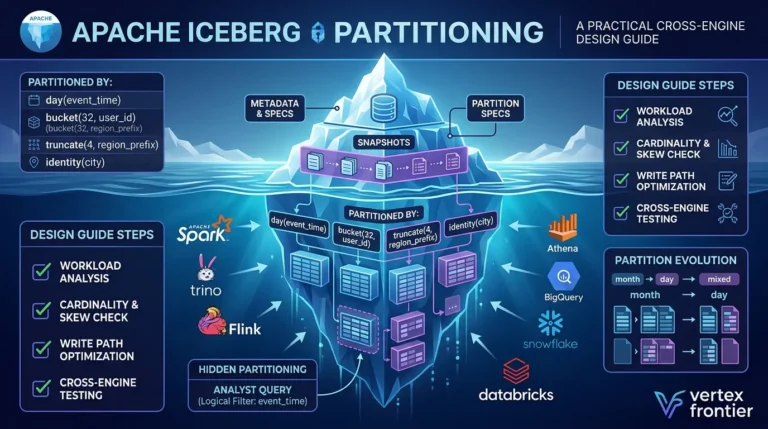
The migration-era warning remains valuable when framed correctly: a large historical table designed without a usable partition column may have to be rebuilt rather than repaired through partition evolution. Choose the column from actual query predicates, retention rules, and data arrival behavior, not from the column that looks most familiar in the schema. For a structured framework that walks through predicate contracts, write contracts, physical contracts, and compatibility contracts before you commit to a spec, see Apache Iceberg Partitioning: A Practical Design Guide.
Row-level security is not supported, here's what to build instead
Be precise about what is actually missing, because it is easy to overstate. Iceberg managed tables do support column-level security and data masking through BigQuery policy tags. What is not supported is row-level security, the native mechanism for filtering which rows a given user or group can see within the same table.
The gap does not leave a team without an option; it means the option is not a native row-level access policy. The standard, well-documented BigQuery pattern predates Iceberg entirely and applies cleanly on top of a managed Iceberg table: authorized views.
Create a view with a WHERE clause that encodes the row-level restriction, filtering by region, tenant, department, or whatever the boundary is, and grant read access to that view through IAM, without granting any access to the underlying Iceberg table. Different user groups get different authorized views over the same physical table, each pre-filtered to their allowed rows, and none of them can query the base table directly.
This works because authorized views are a query-time SQL construct, entirely independent of how the underlying table stores its data. Nothing about Iceberg's storage format blocks it.
The alternative some teams reach for physically splitting data into separate buckets or datasets per tenant, solves the same access problem at the cost of duplicating storage and pipeline logic per segment. That is a heavier and more error-prone pattern than one table with several authorized views layered on top. Reserve the separate-bucket approach for cases with genuinely different compliance or data-residency requirements per segment, not as a default substitute for row-level security.
Treat "no row-level security" as "no native row-level security." The authorized-views pattern delivers most of the same outcome with far less operational overhead than physically partitioning storage by access boundary. If native row-level policies are a hard requirement, factor that into the format comparison above, Delta Lake's BigQuery integration supports row-level security today, at the cost of a query-only write path.
The three dangerous bucket mistakes
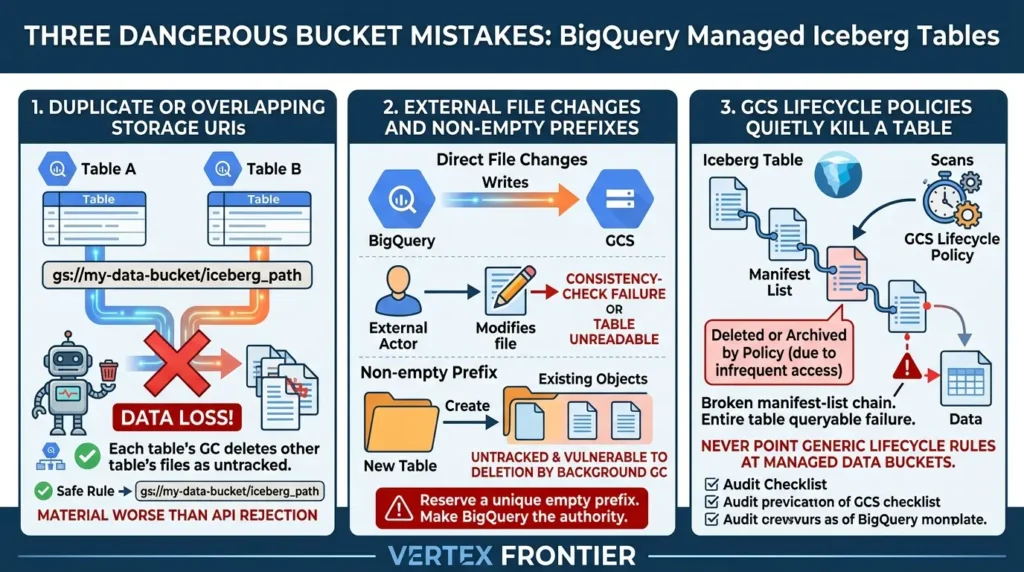
1. Duplicate or overlapping storage URIs
The duplicate-URI behavior deserves special attention. Google’s current documentation says that creating two Iceberg managed tables on the same or overlapping Cloud Storage URIs can cause data loss. Each table’s background garbage-collection process can treat the other table’s files as untracked and delete them.
That is materially worse than an API rejection. A blocked operation fails loudly. Independent cleanup processes can fail quietly and leave a table broken later.
The safe rule is strict:
One physical BigQuery-managed Iceberg table must have one unique Cloud Storage URI. Do not use the same path for a second table, project, environment, or alias.
If two projects need the same logical dataset, use a BigQuery view or an approved catalog/access pattern. Do not create a second physical table on the same path.
2. External file changes and non-empty prefixes
Google also warns against adding, replacing, or modifying managed-table files directly in Cloud Storage. New files may be treated as untracked. Replaced data files can cause consistency-check failure and leave the table unreadable, with recovery requiring support.
Creating a new managed table in a non-empty prefix carries a related risk: existing objects may not be tracked by BigQuery and can be considered untracked by background cleanup.
Do not treat the Cloud Storage prefix as an ordinary shared data folder. Reserve a unique empty prefix, restrict direct write/delete permissions, and make BigQuery the authority for managed-table mutations. A successful file upload is not proof that the table can safely use the file.
3. GCS lifecycle policies can quietly kill a table
Cost-conscious storage lifecycle rules are standard practice on large buckets, and that is exactly what makes this trap easy to walk into. The migration team's client ran an aggressive lifecycle policy, understandable at multi-petabyte scale, including Autoclass, which automatically moves objects to colder, cheaper storage tiers when they go unread and back to Standard when they are accessed again.
The problem: an Iceberg table is not one file. It is thousands of interdependent Parquet and metadata files, and the newest manifest or metadata file for a given table snapshot is often one of the least-frequently-accessed objects in the bucket by raw access count, exactly the kind of object a generic lifecycle rule is designed to move or, in a misconfigured policy, delete.
Losing that one file does not shrink the table. It makes the entire table unqueryable, because Iceberg's manifest-list structure means a broken link anywhere in the chain breaks the read path for the whole table.
Google's documentation confirms the same failure mode for any file removed outside BigQuery's own tracking: files added or modified outside of BigQuery are not tracked by BigQuery, untracked files are deleted by background garbage-collection processes, and modifying or replacing a data file directly causes the table to fail a consistency check and become unreadable, with no self-serve recovery path. A lifecycle rule that archives or deletes a manifest file produces the same outcome as an accidental deletion: a broken table and a support-assisted recovery.
Never point a generic, bucket-wide lifecycle policy at a bucket hosting Iceberg managed-table data. Google's configuration guidance for these buckets goes further than "be careful": restrict write and delete permissions for most users and tools at the bucket level, and keep the default Cloud Storage soft-delete policy active as a safety net — precisely because external tools and blanket lifecycle rules are the most common way these tables get silently corrupted.
Audit every lifecycle rule, Autoclass setting, and retention policy against Iceberg's file structure before pointing it at a bucket that hosts managed Iceberg tables. "Cost-optimized by default" and "Iceberg-safe" are not the same configuration.
Time travel is not the same as disaster recovery
BigQuery supports historical access for managed Iceberg tables, but a historical query feature is not automatically a disaster-recovery system. A production design must answer a question many guides skip: what happens when the table object itself is deleted, the bucket becomes inaccessible, or a file is changed outside BigQuery?
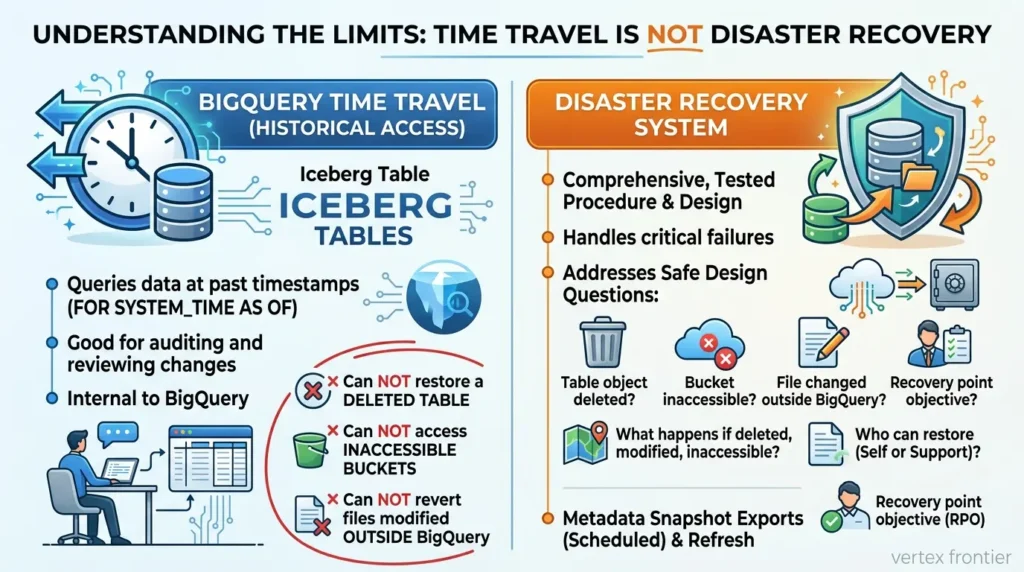
The current Google docs must be read carefully here because they distinguish table deletion, garbage collection, external modification, and support-assisted recovery. Do not summarize the entire situation as “time travel restores everything” or “a dropped table is always unrecoverable.” The safe design is to define recovery separately:
- What can be queried through normal time travel?
- What happens if the table object is deleted?
- What metadata snapshot is exported and where?
- Which data files remain available for that snapshot?
- Who can restore access, and who must contact support?
- What is the recovery point objective for external readers?
Google documents metadata export for Iceberg V2 snapshots and automatic refresh behavior. A scheduled export can help external engines read a known snapshot, but it is not a substitute for a tested backup and recovery procedure.
External engines see a published state, not a promise
BigQuery-managed Iceberg stores authoritative table state inside BigQuery while exporting Iceberg-compatible metadata for external access. That architecture is what makes the managed experience possible, but it also creates a publication boundary.
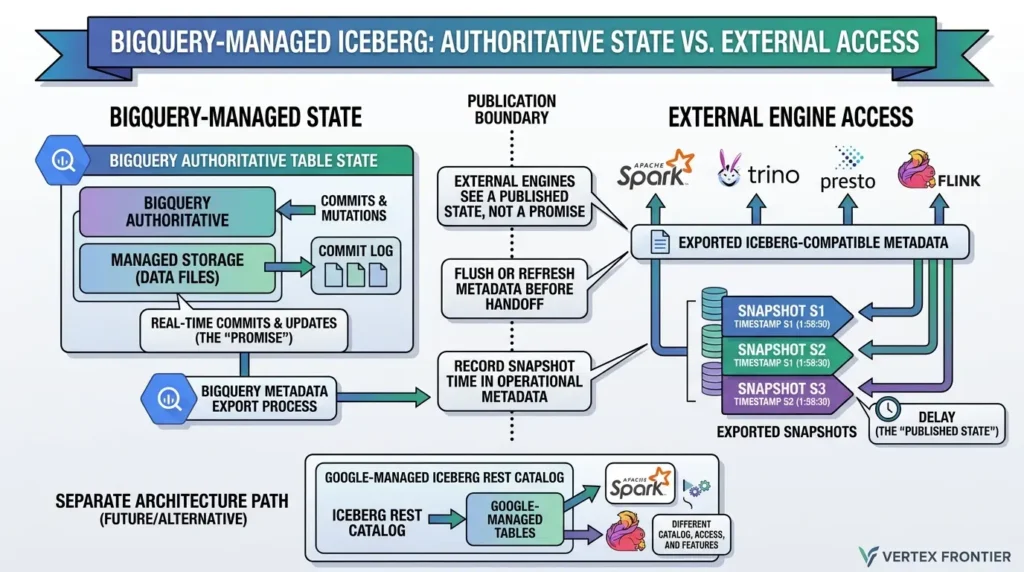
If Spark or Trino reads an exported snapshot, it is reading the state represented by that snapshot. It is not automatically reading every mutation at the exact moment BigQuery commits it. Flush or refresh metadata before a cross-engine handoff, and record the snapshot or export time in the pipeline’s operational metadata.
Google’s 2026 announcement also describes read/write interoperability for Google-managed Iceberg REST Catalog tables. Treat that as a separate architecture path. A REST Catalog table and a BigQuery-managed table may both use Iceberg, but catalog ownership, engine access, and feature availability can differ.
What held up under load
The migration team reported that Cloud Storage did not become the bottleneck during its large cutover, with 10,000 BigQuery slots allocated to the project. That is useful field evidence, not an independent benchmark. It tells us the architecture worked for that team, scale, region, file layout, and cutover design. It does not prove that every GCS-backed Iceberg workload will behave the same way.
The more durable success is architectural: storage and compute can be separated. Data can stay in a bucket controlled by the organization while BigQuery provides execution, and other engines can access compatible snapshots when the metadata path is designed correctly.
That is the real value proposition. It is not “Iceberg makes BigQuery faster.” It is “the storage and table contract can remain more portable without forcing the team to operate every maintenance task itself.”
Automatic maintenance is useful, but not free
Google documents automatic compaction, clustering, garbage collection, and metadata optimization for managed Iceberg tables. That removes the need to run the same manual OPTIMIZE or VACUUM routines common in self-managed deployments.
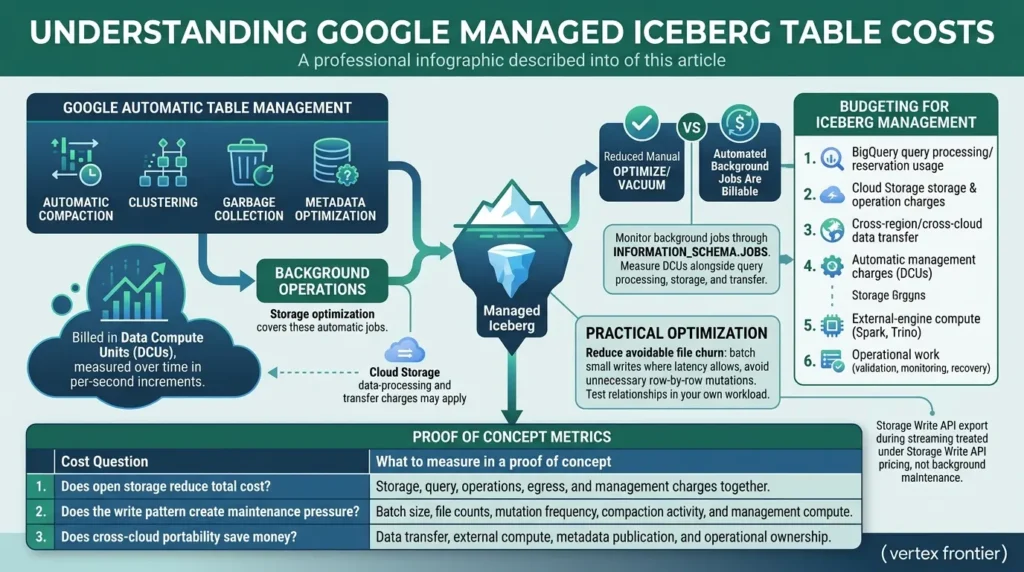
The trade-off is that automatic table management is still billable work. Google’s current pricing documentation breaks Iceberg managed-table costs into three broad areas: Cloud Storage, storage optimization, and queries/jobs. Storage optimization covers automatic compaction, clustering, garbage collection, and BigQuery metadata generation or refresh.
The compute used for those background operations is billed in Data Compute Units (DCUs), measured over time in per-second increments. Google also says that Cloud Storage data-processing and transfer charges may apply, while there are no BigQuery-specific storage fees for the data stored in Cloud Storage.
That detail changes the cost conversation. A managed Iceberg table does not simply move the storage line item from BigQuery to GCS and make maintenance disappear. It moves part of the maintenance responsibility into an automated service with its own usage signal. Monitor background jobs and usage through INFORMATION_SCHEMA.JOBS, then measure DCUs alongside query processing, storage, transfer, and Cloud Storage operations.
Storage Write API export operations during streaming are treated separately under Storage Write API pricing rather than as background maintenance. See Google’s Iceberg managed-table pricing documentation and the BigQuery pricing documentation before publishing a budget.
The practical optimization is not to disable compaction. It is to reduce avoidable file churn: batch small writes where latency allows, avoid unnecessary row-by-row mutations, and test the relationship between write patterns, background jobs, file counts, query scans, and DCUs in your own workload.
Budget for at least these categories:
- BigQuery query processing or reservation usage.
- Cloud Storage storage and operation charges.
- Cross-region or cross-cloud data transfer.
- Automatic compaction, clustering, garbage collection, and metadata-management charges.
- External-engine compute if Spark, Trino, or another engine participates.
- Operational work for validation, monitoring, catalog coordination, and recovery.
| Cost question | What to measure in a proof of concept |
|---|---|
| Does open storage reduce total cost? | Storage, query, operations, egress, and management charges together—not storage alone. |
| Does the write pattern create maintenance pressure? | Batch size, file counts, mutation frequency, compaction activity, and management compute. |
| Does cross-cloud portability save money? | Data transfer, external compute, metadata publication, and operational ownership. |
A safer migration playbook
A four-hour cutover can be a successful outcome, but it is not a migration method. A repeatable method looks more like this.
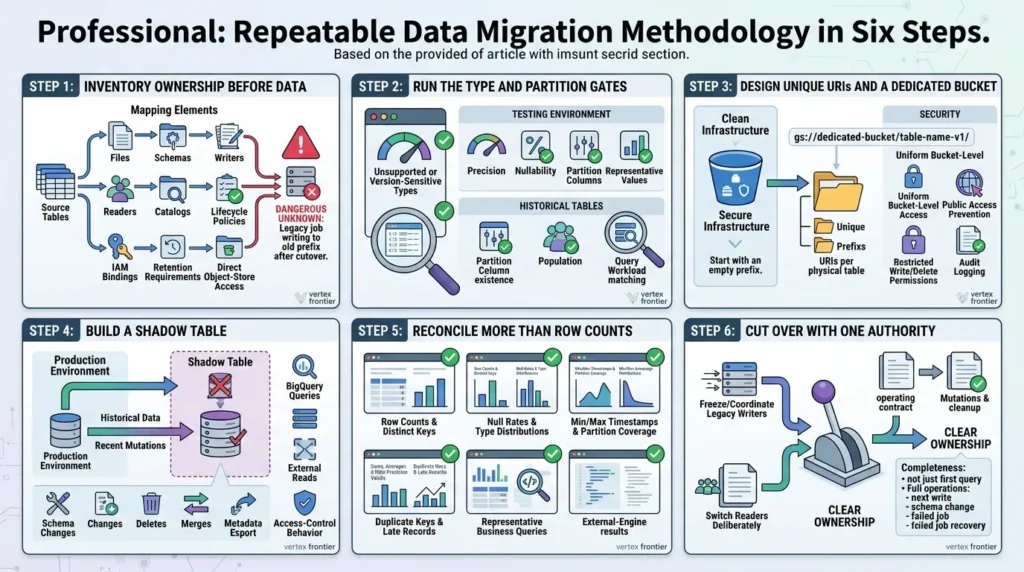
Step 1: Inventory ownership before data
List source tables, files, schemas, writers, readers, catalogs, lifecycle policies, IAM bindings, retention requirements, and direct object-store access. The most dangerous unknown is often not the data type. It is the legacy job that still writes to the old prefix after cutover.
Step 2: Run the type and partition gates
Test unsupported or version-sensitive types, precision, nullability, partition columns, and representative values. For historical tables, test whether the intended partition column exists, is populated, and matches the real query workload.
Step 3: Design unique URIs and a dedicated bucket
Use a dedicated bucket or clearly isolated prefixes, unique URI per physical table, uniform bucket-level access, public access prevention, restricted write/delete permissions, audit logging, and the documented Cloud Storage configuration. Start with an empty prefix.
Step 4: Build a shadow table
Do not make the first production table your compatibility test. Load representative history and recent mutations into a shadow environment. Test BigQuery queries, external reads, schema changes, deletes, merges, metadata export, and access-control behavior.
Step 5: Reconcile more than row counts
Compare:
- Row counts and distinct business keys.
- Null rates and type distributions.
- Min/max timestamps and partition coverage.
- Sums, averages, and high-precision numeric values.
- Duplicate keys and late-arriving records.
- Representative business queries.
- External-engine results after metadata refresh.
Step 6: Cut over with one authority
Freeze or coordinate legacy writers, switch readers deliberately, and document which system owns mutations and cleanup. A migration is not complete when the first query succeeds. It is complete when the operating contract is clear for the next write, schema change, failed job, and recovery event.
For a deeper migration framework, link readers to How to Migrate from Parquet to Apache Iceberg Without Breaking Your Data Lake.
Reusable migration preflight template
Copy this checklist into the migration ticket or design review. A checked box means the team has evidence attached, not that somebody verbally agreed the item is probably fine.
| Gate | Evidence to attach | Owner | Status |
|---|---|---|---|
| Table model and catalog selected | Architecture diagram and current product documentation link | Platform owner | □ |
| Schema/type gate passed | Column mapping, precision tests, null-rate comparison | Data owner | □ |
| Partition and URI design passed | Query-predicate analysis, unique empty prefix, bucket plan | Platform owner | □ |
| External-read test passed | Snapshot/export time, engine version, query reconciliation | Analytics owner | □ |
| Cost baseline captured | Queries, storage, transfer, Cloud Storage, DCUs, external compute | FinOps owner | □ |
| Recovery test passed | Metadata export, retention, access restoration, RPO/RTO result | SRE/operations | □ |
Do not approve a production cutover because the first query returned rows. Approve it when the evidence column is complete and the team can explain what happens after a failed write, a stale metadata snapshot, an accidental table drop, and a bucket-permission change.
Before and after: the operating model changes
| Before migration | After a safe managed-Iceberg design |
|---|---|
| Several jobs treat a bucket prefix as a shared folder. | BigQuery owns mutations; the prefix has one table identity and restricted direct access. |
| Backups are improvised with table copies or clones. | Backup, metadata export, retention, and recovery are explicit and tested. |
| Partition choices follow inherited folder conventions. | Partitioning follows query predicates, retention, and a known evolution boundary. |
| Cross-engine access is assumed because files are open. | Catalog, metadata freshness, engine versions, and write ownership are tested. |
Common mistakes that create expensive surprises
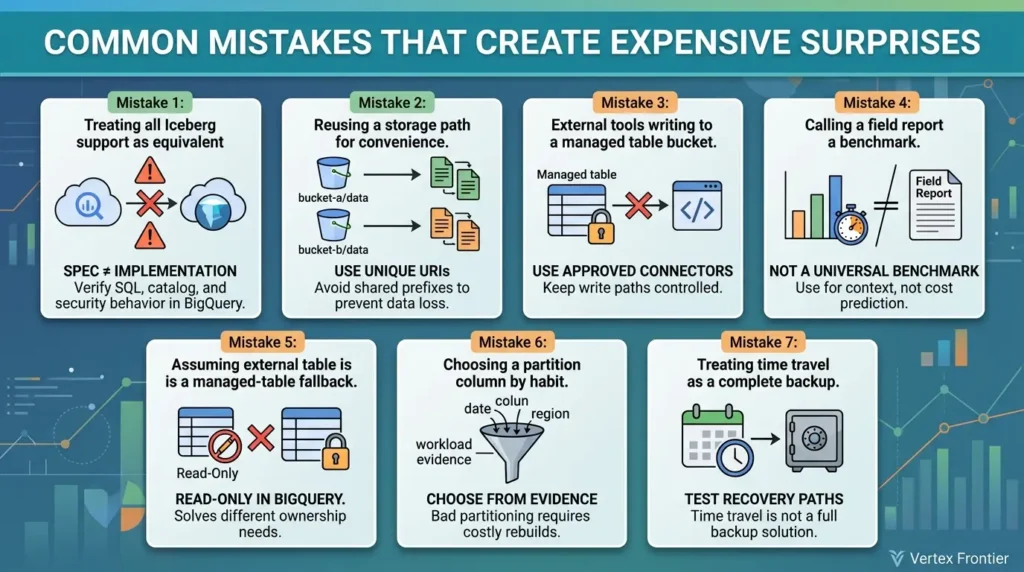
Mistake 1: Treating all Iceberg support as equivalent
A feature in Apache Iceberg’s specification does not guarantee the same SQL, catalog, security, or maintenance behavior in BigQuery. Name the engine, catalog, table model, and version.
Mistake 2: Reusing a storage path for convenience
Shared prefixes feel efficient until independent garbage-collection processes decide that files are untracked. Use unique URIs.
Mistake 3: Letting external tools write to a managed table bucket
Open format does not mean “any writer is safe.” Use approved connectors and controlled write paths.
Mistake 4: Calling a field report a benchmark
The 1.46-trillion-row migration is useful because it provides context and lessons. It is not a universal throughput or cost benchmark.
Mistake 5: Assuming an external table is a managed-table fallback
External tables are read-only in the documented BigQuery path and require current metadata references. They solve a different ownership problem.
Mistake 6: Choosing a partition column by habit
Partitioning is now supported in the managed-table path, but changing a bad choice later may still require a rebuild. Choose from workload evidence.
Mistake 7: Treating time travel as a complete backup
Historical reads, metadata export, object retention, table deletion, and support-assisted recovery are different controls. Test the recovery path.
Documented case studies: what the broader Iceberg ecosystem shows
The BigQuery migration is one field report. Three other public engineering accounts help put its lessons in context. They do not prove that every Iceberg deployment will deliver the same result; they show the kinds of trade-offs teams encountered in different engines and operating models.
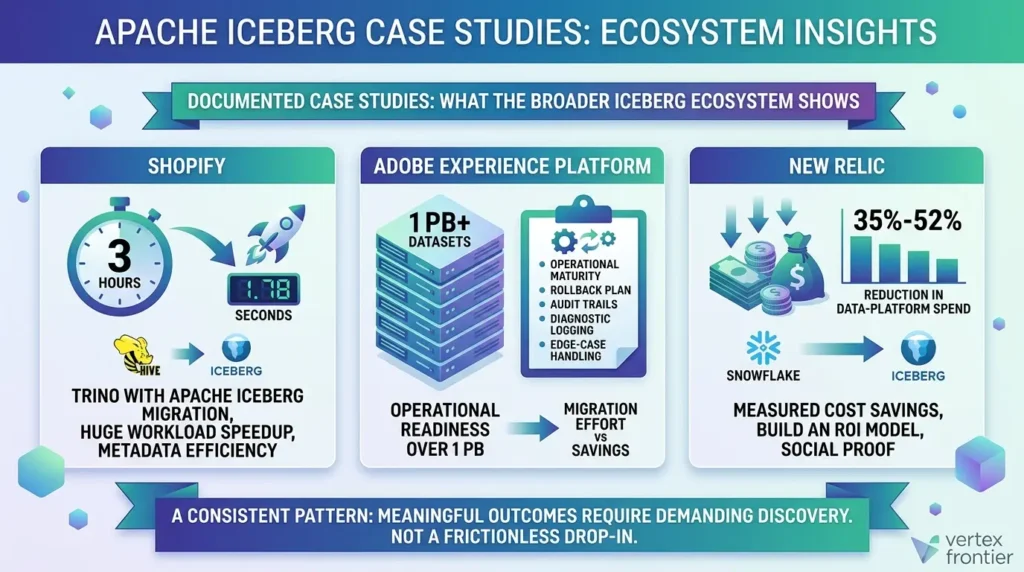
Shopify: a three-hour workload reduced to 1.78 seconds
Shopify migrated petabytes of data from a growing collection of Hive tables and used Trino with Apache Iceberg as part of the transition. In Starburst’s account of Shopify’s migration, one workload fell from roughly three hours to 1.78 seconds. A separate Trino Summit recap reports large reductions in planning time, cumulative user memory, and query execution time.
The useful lesson is not “Iceberg makes queries 6,000 times faster.” The result belongs to a specific workload, query engine, file layout, metadata state, and migration design. Shopify’s account also describes finding connector bugs and working with the Trino community to fix them. Some migration pain was therefore integration maturity, not a permanent property of Iceberg itself.
Adobe Experience Platform: more than 1 PB requires a recovery plan
Adobe documented the migration of more than one petabyte of datasets to Iceberg in its Experience Platform engineering account. The most transferable lesson is operational: rollback, audit trails, diagnostic logging, and edge-case handling must be designed before the migration starts. Adobe also frames the decision in total-cost terms: expected savings must outweigh both migration effort and the ongoing cost of operating the format.
That maps directly to BigQuery-managed Iceberg. Open storage is a strategic benefit, but it does not remove the need for ownership, validation, maintenance, and recovery controls.
New Relic: a measured 35%–52% reduction in data-platform spend
New Relic moved more than 1,000 batch and streaming datasets from Snowflake to Iceberg-based infrastructure. In New Relic’s engineering account, the company reports a 35%–52% reduction in annual data-platform spend without disrupting product delivery.
That is useful social proof, but it is not a promise for a BigQuery migration. The result depends on New Relic’s starting architecture, workload mix, pricing model, storage design, and operating choices. Use it as a reason to build an ROI model, not as a default savings percentage.
Taken together, these examples show a consistent pattern: Iceberg can deliver meaningful performance, portability, or cost outcomes, but the teams that report success also describe a demanding discovery period. None of these migrations was a frictionless drop-in replacement.
BigQuery editions and the exit path
Using Iceberg managed tables does not, by itself, force a move from on-demand BigQuery pricing to a slot reservation. Google documents query pricing under on-demand and capacity-based models separately from Cloud Storage-backed table storage. The relevant caveat is feature-specific: an advanced capability you use alongside the table can have its own edition or reservation requirements, so check the current feature matrix for the complete workload.
A practical exit plan has three steps:
- Publish the current Iceberg metadata for each table to Cloud Storage.
- Copy data and metadata files together to the destination storage environment.
- Register a new catalog against the copied Iceberg tables and validate reads before decommissioning the source.
The plan still incurs network transfer, validation compute, storage operations, and a safe parallel-run period. Open format reduces the need for reformatting; it does not eliminate migration work.
Cross-cloud exit cost: estimate the part you can actually measure
One practical benefit of an open table format is that an exit path can be designed around metadata publication, file transfer, and a new catalog rather than a full proprietary export-and-reload. The network transfer is not free, however. A simple first estimate is:
Estimated cost ($) = Data volume (GB) × Egress rate ($/GB)
Enter the current rate for your provider, source region, destination, and volume tier. This estimate excludes validation compute, parallel-run time, storage operations, and reprocessing.
This is an estimate, not a provider quote.
The calculator deliberately has no baked-in rate. Egress pricing varies by provider, source and destination, region, committed-use terms, and volume tier. The formula estimates network transfer only; it does not include compute needed to validate tables, a parallel-run period, or the operational work of registering a new catalog.
Go, hold, or no-go framework
Choose Go when BigQuery is the controlled primary writer, the organization needs open files, URI and bucket ownership are enforceable, partitioning is known, the type gate passes, external readers can consume the published state, and the cost model includes maintenance and transfer.
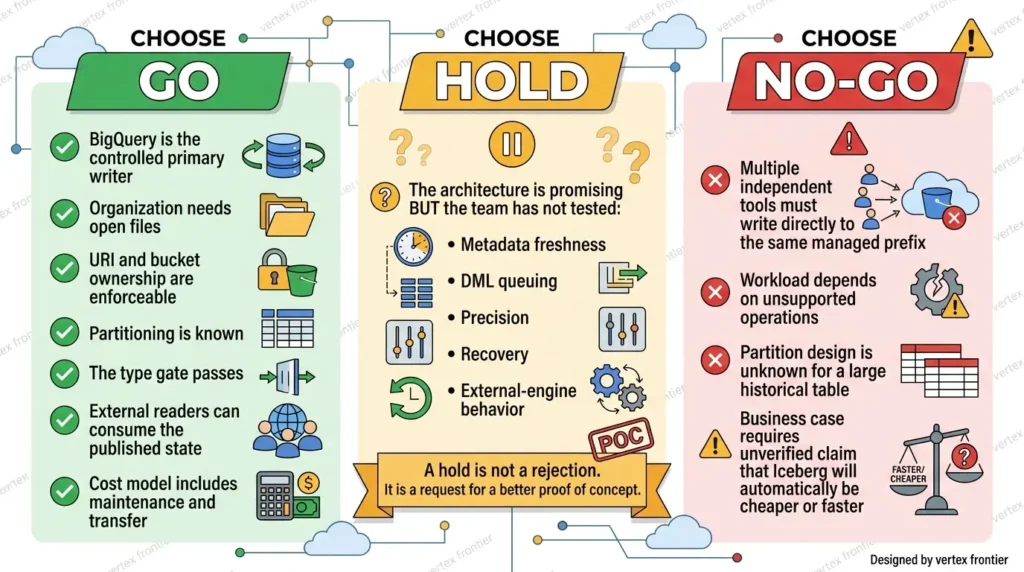
Choose Hold when the architecture is promising but the team has not tested metadata freshness, DML queuing, precision, recovery, or external-engine behavior. A hold is not a rejection. It is a request for a better proof of concept.
Choose No-Go when multiple independent tools must write directly to the same managed prefix, the workload depends on unsupported operations, the partition design is unknown for a large historical table, or the business case requires an unverified claim that Iceberg will automatically be cheaper or faster.
For the broader format decision, link to Apache Iceberg vs. Delta Lake vs. Hudi. For cross-cloud catalog and ownership trade-offs, see Apache Iceberg with Snowflake.
Final verdict
Apache Iceberg on BigQuery is not a reckless choice, and it is not a free portability switch. It is a managed compromise: BigQuery takes responsibility for important table operations and maintenance while your organization keeps the underlying data in an open format and a bucket it controls.
That compromise works when the team treats the bucket, URI, catalog, metadata export, partition design, and recovery path as one system. It fails when “open files” is interpreted as permission for every tool to write wherever it wants.
The production decision should therefore be simple to state, even if it takes work to validate:
Use BigQuery-managed Iceberg when open storage solves a real multi-engine or exit-path problem, and only after you can prove ownership, compatibility, cost, and recovery. If portability is merely a slogan, a native BigQuery table may be the more honest architecture.
FAQ: Apache Iceberg on BigQuery
What is Apache Iceberg on BigQuery?
It is a way to use the Apache Iceberg table format with BigQuery while storing managed-table data as open-format files in customer-owned Cloud Storage. The exact behavior depends on whether you use a BigQuery-managed table, an external Iceberg table, or a Google-managed Iceberg REST Catalog.
Is BigQuery-managed Iceberg the same as an Iceberg external table?
No. A managed table is maintained by BigQuery and supports a broader managed workflow. An external Iceberg table is read-only from BigQuery’s documented path and depends on an external metadata file or catalog staying current. Compare the exact table model before choosing a design.
Can two BigQuery Iceberg tables use the same Cloud Storage URI?
They should not. Google’s current documentation warns that the same or overlapping URIs can cause data loss because independent garbage-collection processes may treat the other table’s files as untracked. Use one unique URI per physical managed table.
Does Iceberg support partitioning in BigQuery?
Current Google documentation lists table partitioning for Iceberg managed tables. The remaining design constraints, including supported partition-column types and whether partition evolution is available, must be checked in the current documentation for the exact table model.
Can Spark or Trino read a BigQuery-managed Iceberg table immediately?
External readers generally depend on a published or refreshed Iceberg metadata snapshot, not only on the fact that BigQuery committed a mutation. Confirm the catalog model, export/refresh path, engine version, permissions, and snapshot time before treating interoperability as live.
Is Apache Iceberg cheaper than native BigQuery?
Not automatically. Compare query processing, Cloud Storage, operations, data transfer, external-engine compute, and automatic table-management charges. The answer depends on workload, region, write pattern, file layout, and how many engines operate the data.
Does BigQuery Iceberg time travel replace backups?
No. Time travel is a historical-query capability, while backup and disaster recovery require a tested plan for table deletion, metadata snapshots, bucket access, object retention, permissions, and recovery ownership.
When should a team choose native BigQuery instead?
Choose native BigQuery when portability of physical table files is not a priority and the workload benefits more from the broader native table-management surface, simpler ownership, or fewer cross-engine and bucket-governance constraints.
📋 Article Timeline & History
Successfully updated on September 27, 2026 with the latest details.
This article was originally published on September 19, 2026.

Was this article helpful?



[…] For a concrete example of how one engine changes this picture, see our field guide on Apache Iceberg on BigQuery: what breaks, what works, and what actually matters. […]
[…] same ownership questions apply on Google’s warehouse: our Apache Iceberg on BigQuery field guide shows how BigQuery splits catalog, storage, and compute responsibilities for Iceberg […]
[…] engine-level differences are not theoretical: see what breaks and what works with Apache Iceberg on BigQuery for a documented warehouse […]
[…] For a deeper worked example of how a table format behaves inside one warehouse, read our Apache Iceberg on BigQuery guide. […]
[…] When the sink itself is a lakehouse table rather than a message queue, the same published-state questions apply, see what breaks and what works with Apache Iceberg on BigQuery. […]