

In 2023, attackers forged sign-in tokens and read email at roughly 25 organizations, including government agencies. They never broke the encryption. They used a real Microsoft signing key. Microsoft’s investigation named a 2021 crash dump as the most probable source of that key, then noted in a March 2024 update that it had not found a crash dump containing it. The exact route is still unconfirmed.
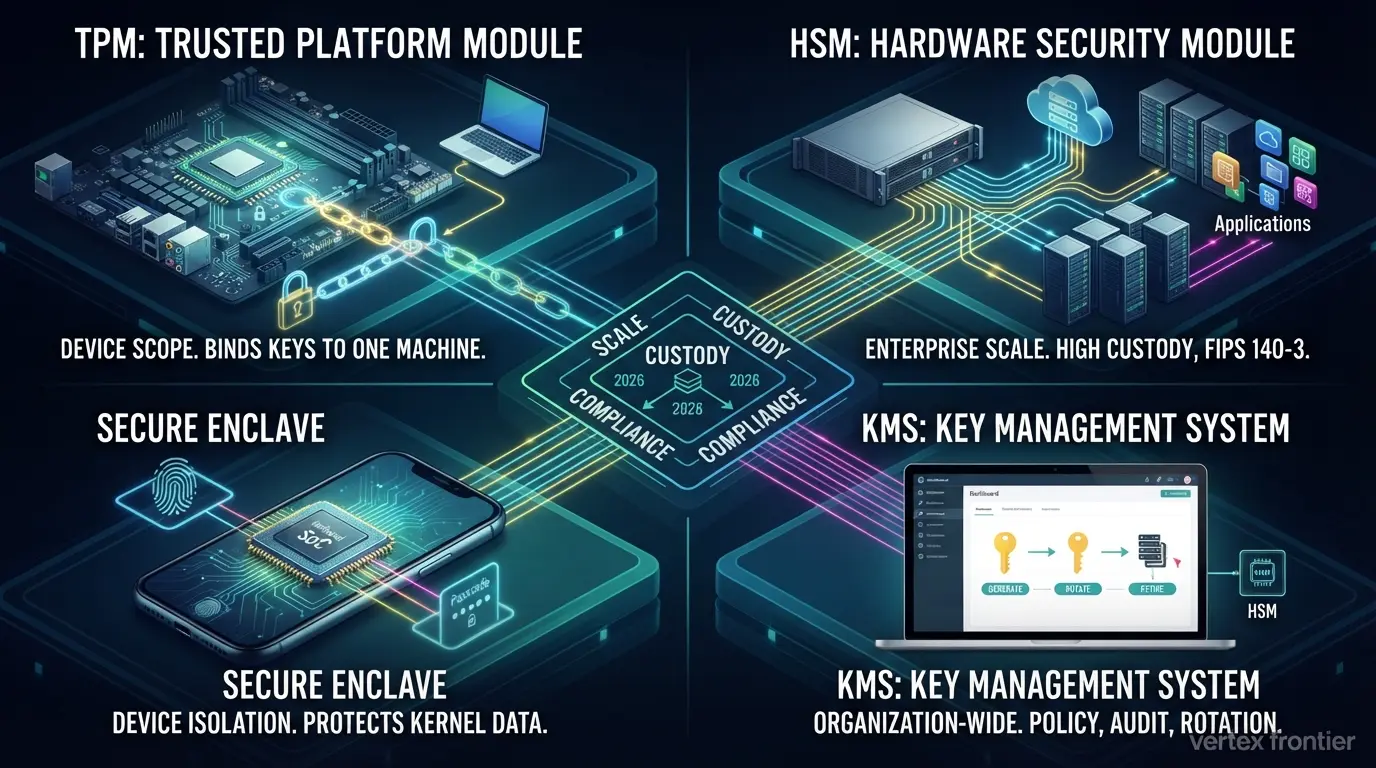
That incident is the best reason to understand TPMs, HSMs, key management systems and secure enclaves. Each one answers the same question: where do your encryption keys live, and who or what can touch them?
Most explainers define the four technologies one at a time. You finish reading with four glossary entries and no way to choose between them. This guide gives you the map instead.
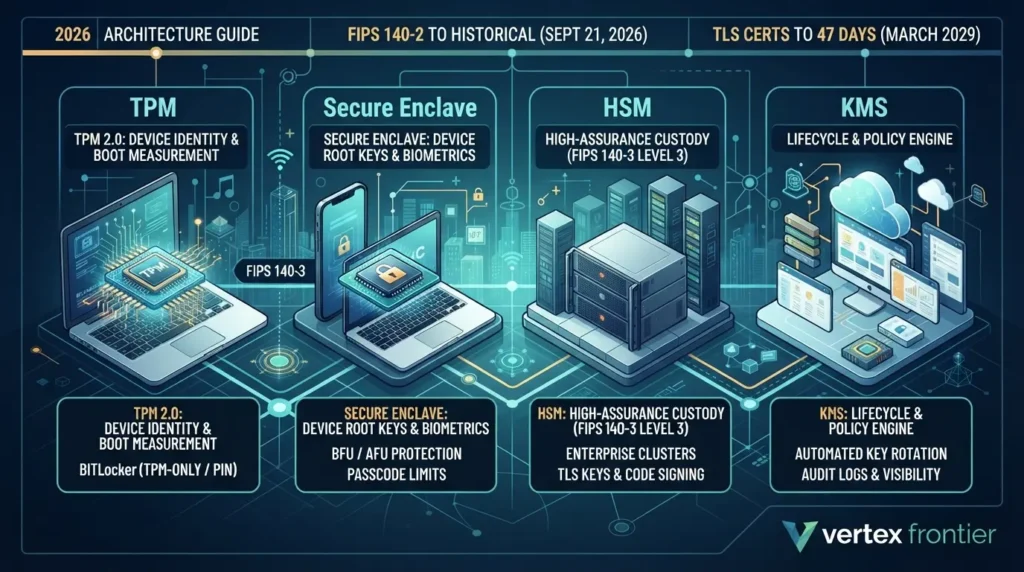
You will learn what each one does, where each one has failed in public, and a simple three-factor model (scale, custody, compliance) for picking the right layer. It also covers what changed in 2026, when FIPS 140-2 certificates reached the end of their Active window at NIST.
A quick housekeeping note. TPM here means the security chip, not the tire-pressure sensor. HSM means the hardware security module, not the Highway Safety Manual. Search results mix them up all the time.
Key Takeaways
Click any topic to expand or collapseThree of these hold keys, one manages them
A TPM protects keys for one computer, an HSM protects keys for many systems, a secure enclave protects keys inside one device, and a KMS runs the key lifecycle on top.
Hardware raises the cost of an attack. It does not end attacks
ROCA, TPM-FAIL, bitpixie and AMD’s 2026 TPM flaws all affected hardware-backed keys.
Handling failures drive many of the biggest documented key losses
Storm-0558, SolarWinds, Uber and RSA were about where keys were kept, who could reach them and what they could sign, not about broken math.
Choose by scale, custody and compliance
One device, one tenant or many, and which FIPS level your auditor expects.
2026 raised the stakes
FIPS 140-2 certificates moved toward NIST’s Historical list after September 21, 2026, and TLS certificates are heading to 47 days by March 2029. Manual key handling will not scale.
Escrow your recovery keys and test the restore
A lost key is lost data.
Why Encryption Keys, Not Data, Are the Real Target
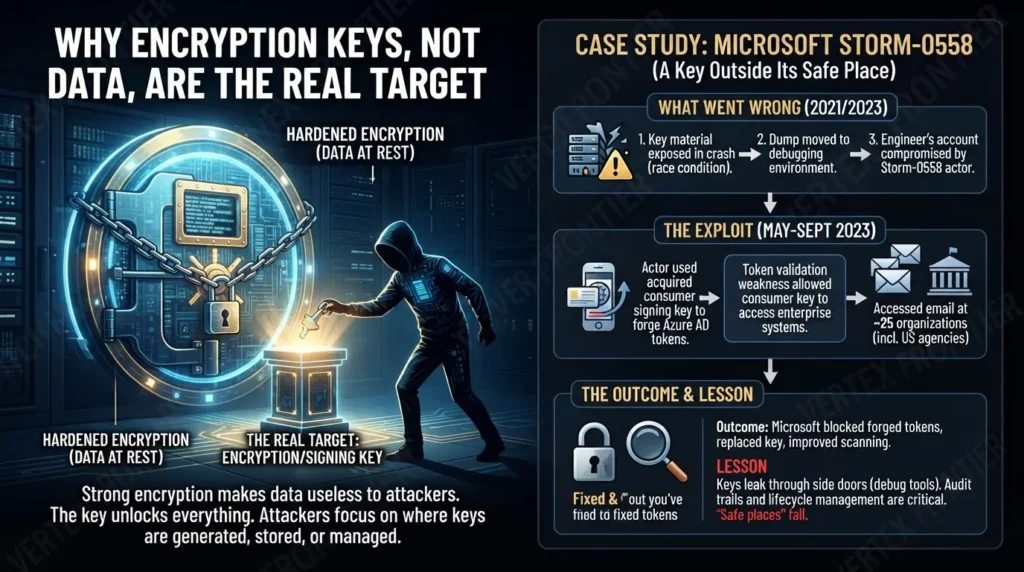
Strong encryption makes data hard to read. It also makes the key the only thing worth stealing.
That is why attackers rarely attack the cipher. They go after the place where the key is generated, stored, copied, backed up, or debugged. The cost of getting it wrong is not abstract: IBM’s 2026 Cost of a Data Breach research reports a record global average of USD 4.99 million per breach, up 12% from 2025, and coverage of the report puts the US average at USD 11.5 million. Our own breakdown of IBM’s 2026 breach-cost findings shows where that money goes.
Case study: Microsoft Storm-0558, a signing key outside its safe place
Challenge:
Beginning May 15, 2023, a China-based actor that Microsoft tracks as Storm-0558 forged authentication tokens and read email at approximately 25 organizations, including government agencies, according to Microsoft’s first public account. Microsoft’s technical analysis says the actor used an acquired, inactive consumer-account signing key to forge the tokens.
What went wrong:
Two things lined up. First, a token-validation weakness let a consumer-account key be accepted for enterprise tokens. Second, the key was out of its isolated signing environment. Microsoft’s investigation results say a 2021 crash of the consumer signing system produced a crash dump that, because of a race condition, contained the key.
The dump moved to a debugging environment on the corporate network, and the actor later compromised an engineer’s account with access to that environment. Microsoft added that log retention policies left it without logs showing the key being taken, though it called this the most probable route. In a March 2024 update, Microsoft said it had not found a crash dump containing the impacted key material.
Outcome:
Microsoft blocked tokens signed with the acquired key, replaced the key, and published its investigation. It also reported fixing the race condition and improving credential scanning.
Lesson:
Even a vendor with deep telemetry could not prove from its logs how a signing key left its safe place. That is the point. Keys leak through side doors such as debug tools and validation shortcuts, and when key access is not logged and retained, you cannot close the case. Key security is about the whole lifecycle, including audit trails, not just the storage box.
The pattern repeats. SolarWinds, Uber and RSA each show key and signing handling failing far more often than the cryptography itself, and we will walk through them in the sections where they fit best.
Encrypt the data, then spend your real effort on where the keys live and how they move.
What Is a Trusted Platform Module (TPM)?
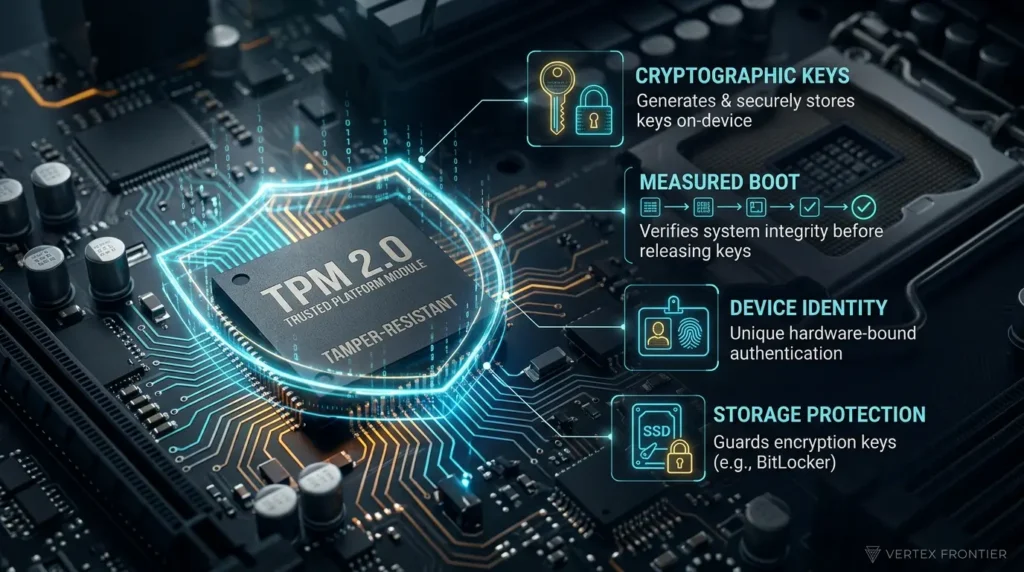
A Trusted Platform Module (TPM) is a tamper-resistant security chip, or firmware component, built into a computer. It generates, stores and protects cryptographic keys for that one device, and it records boot measurements so keys are released only when the system starts in a trusted state.
Microsoft describes a TPM as a secure crypto-processor with multiple physical mechanisms that make it tamper-resistant. Note the word “resistant.” It does not say “proof,” and the rest of this article will show why that difference matters.
TPM 2.0 is also a formal standard. The Trusted Computing Group publishes it as the TPM 2.0 Library specification (version 185 as of March 2026), and it is adopted internationally as ISO/IEC 11889. Windows 11 requires TPM 2.0 as a minimum system requirement.
What a TPM actually does
Four jobs matter in practice:
- Generate randomness and keys: The TPM has its own random number generator and key generation.
- Keep keys inside: Keys created in the TPM can be marked non-exportable, so software can ask the chip to use a key without ever seeing it.
- Prove device identity: Microsoft notes that each TPM carries a unique RSA key burned in at manufacture for device authentication.
- Record how the machine booted: During startup, firmware and OS components are measured into TPM registers (PCRs). This measured boot lets a system release a key only if the expected software chain actually ran.
You will often read that keys are “burned into” the TPM. That blends two things. The identity key is burned in at manufacture. Most other keys are generated inside the chip and simply never leave it.
TPM, BitLocker and the “password protected” claim
Here is a correction to a very common simplification. The TPM does not encrypt your disk. The storage encryption engine does the bulk work. The TPM protects the key material and releases it only when the boot measurements match. That is why a drive pulled out of a laptop does not unlock on another machine.
The same logic explains the claim that a TPM is “password protected, so it can’t be brute-forced.” Keys inside the TPM are guarded by authorization values, and Microsoft’s TPM fundamentals page describes dictionary-attack logic that is designed to stop brute-force guessing. That is rate limiting. Microsoft also documents that the lockout can be reset with the TPM owner password, and that a locked TPM 2.0 leaves lockout mode after the system has been on for 10 minutes. Rate limiting makes guessing slow. It does not make guessing mathematically impossible.
The hardware-bound idea also powers modern sign-in. If you are rolling out device-bound passkeys in Entra ID, the TPM is the thing making that key hard to copy to another machine.
How strongly the TPM protects a BitLocker drive depends on the setup. Practitioners think of it as a ladder:
Keys saved to Entra ID or AD DS, and someone has actually done a recovery drill.
Microsoft’s KB5025885 boot-manager hardening and a disabled network stack reduce the bitpixie-style downgrade path. Plan the rollout carefully.
The drive will not unlock without something the user knows. An insider who knows the PIN is a different threat.
Stops offline disk theft. Does not stop every physical attack on a running or rebooting machine.
Case study: bitpixie, when TPM-only BitLocker fell to a physical attacker
Challenge:
CVE-2023-21563, nicknamed bitpixie, is a flaw in how the Windows Boot Manager handles a network-boot (PXE) soft reboot: the BitLocker volume key is not wiped from memory. According to the public proof-of-concept repository, it was found by a researcher known as Rairii, and exploitation needs BitLocker without pre-boot authentication plus the ability to boot over the network.
What happened:
In 2025, researcher Thomas Lambertz demonstrated a software-only attack at the 38C3 conference, and Compass Security published working proofs of concept. SySS’s write-up covers the root cause. The PoC author reports testing on a fresh, fully patched Windows 11 install, and notes that on some systems the attack may still work with PXE disabled if an external network card is attached.
Outcome:
Microsoft’s mitigation is KB5025885, released in May 2023, which replaces the 2011 boot-manager signing certificate to block downgrade to vulnerable boot managers, as summarized in Korben’s overview. Researchers agree the stronger defense is pre-boot authentication.
Lesson:
The cipher was fine. The configuration was the weak point. A PIN protects against a thief who does not know it, not against an insider who does, so match the setup to your threat. Practitioners also report that sleep states can reduce the value of a PIN, which makes shutdown and hibernate policy part of the design. Treat that last point as field experience, not a measured statistic.
Discrete TPM vs firmware TPM (fTPM)
A discrete TPM is a separate chip. A firmware TPM runs inside the main processor’s firmware environment. That saves cost and board space, but the isolation boundary is thinner. A thinner boundary is a trade-off, not a rule: the record below includes discrete chips too.
- 2019, TPM-FAIL: Researchers from WPI, UC San Diego and the University of Lübeck found timing leakage in Intel’s firmware TPM (CVE-2019-11090) and in an STMicroelectronics TPM chip (CVE-2019-16863) that is certified at Common Criteria EAL 4+. They recovered ECDSA keys, and a local attacker needed roughly 4 to 20 minutes against the Intel fTPM. See the research paper and The Register’s coverage.
- 2023, reference-code flaws: Quarkslab found two buffer-overflow flaws (CVE-2023-1017 and CVE-2023-1018) in the TCG TPM 2.0 reference library. CERT/CC’s note lists which vendors are affected, and Sophos explains that the bugs can be triggered by sending crafted commands from user-mode applications to a TPM built on the affected code.
- August 2026, AMD: AMD disclosed two high-severity TPM flaws (CVE-2026-6726 and CVE-2026-6727, CVSS 8.5 and 8.3) affecting many Ryzen processors. Guru3D’s report notes both need local privileged access and that fixed firmware began reaching board makers in May 2026. Overclock3D covered the confirmation as well.
A vulnerability in TPM firmware does not automatically mean your BitLocker keys leaked. It does mean the chip is software too, and software has bugs. If you run a fleet on firmware TPMs, apply BIOS and firmware updates, and confirm recovery keys are escrowed before you update, since firmware changes can trigger recovery prompts.
When the chip itself is the weak point: ROCA
Challenge:
The Infineon RSA library used in some TPM firmware mishandled RSA key generation, which made it easier for attackers to defeat protections built on those keys (CVE-2017-15361, known as ROCA). The NVD entry lists affected examples including BitLocker with TPM 1.2, YubiKey 4 PGP key generation, and Chrome OS cached user data encryption.
What happened:
The flaw sat in the key generator, so the fix meant firmware updates and regenerating keys that had been created with the weak library. CERT/CC tracked it as VU#307015.
Lesson:
Between ROCA and TPM-FAIL, a certified TPM chip and a widely used key-generation library both failed. In our reading, certification tests a process and a defined set of properties; it cannot prove that every mathematical property of a key generator is sound. “Certified hardware” lowers risk. It does not remove it.
A contrarian point worth keeping: most security guides call hardware the strong layer and people the weak one. The documented record says something more useful. Hardware makes attacks cost more and leave more evidence. Many of the biggest real-world losses, though, came from how keys were handled around the hardware. Spend on both.
A TPM binds keys to one machine and its boot state. It is excellent at that job, and it is only as strong as its configuration and firmware.
What Is a Hardware Security Module (HSM)?
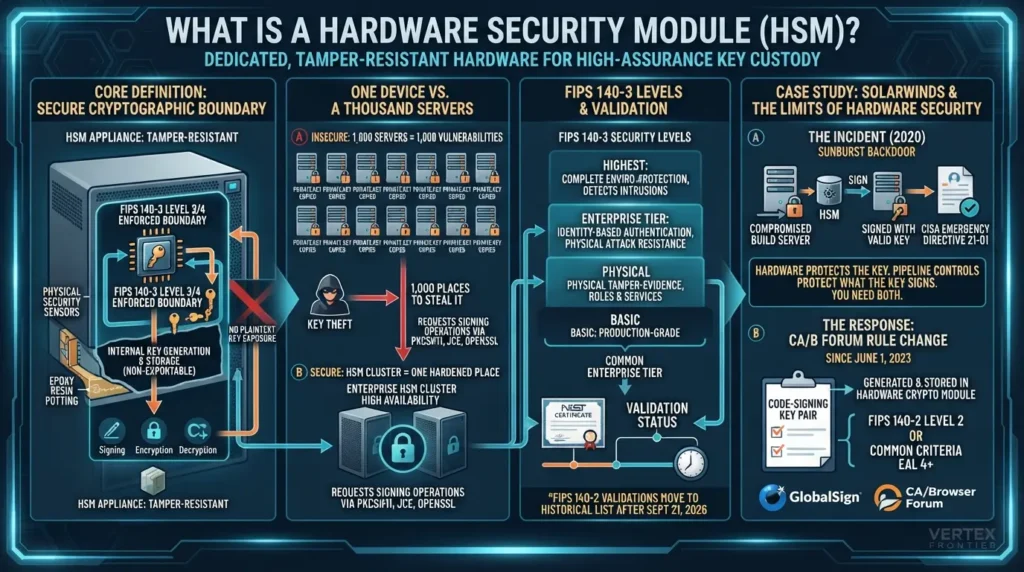
A Hardware Security Module (HSM) is a dedicated, tamper-resistant device that generates, stores and uses cryptographic keys for many servers or applications. It performs signing and encryption inside its own boundary, so private keys are not exposed in plaintext to the systems that depend on them.
Wikipedia’s HSM entry and vendor documentation agree on this core definition. Enterprise HSMs are usually deployed as clusters for availability.
One device vs a thousand servers
A TPM serves one computer. A data center has hundreds or thousands of machines that all need keys: web servers with TLS certificates, databases, signing services, certificate authorities.
Picture 1,000 web servers. Giving each one its own copy of a private key creates 1,000 places to steal it. Putting the key in an HSM and letting servers request signing operations creates one hardened place. Applications commonly reach HSMs through standard interfaces such as PKCS#11, and AWS CloudHSM is one example of a service that supports PKCS#11, JCE and OpenSSL integrations.
One detail often gets lost: form factor has moved on. HSMs started as plug-in PCIe cards. Today many are network appliances or cloud services, and cryptographic acceleration is built into or alongside them. You do not need a separate accelerator card to have an HSM.
FIPS 140-3 levels, clustering and what “tamper-resistant” buys you
HSMs are usually sold against a FIPS 140-3 security level from 1 to 4. Level 3 is the common enterprise tier. Higher levels add things like identity-based access control and stronger physical and environmental attack protection. Enterprise HSMs are usually deployed as clusters for availability.
Be precise about what that buys you. HSMs are designed so keys are generated and used inside the boundary and are non-exportable. That is a design goal with strong evidence behind it. It is not a promise that no flaw will ever surface, as TPM-FAIL showed for a Common Criteria EAL 4+ certified chip.
Validation status also expires. NIST’s FIPS 140-3 transition page says FIPS 140-2 modules stay active until September 21, 2026, when those validations move to the Historical list. Even then, CMVP says it supports purchase and use of those modules for existing systems. For anything new, ask vendors for a FIPS 140-3 certificate number and check its status in NIST’s database.
Case study: SolarWinds, and why signing keys need more than a signature
Challenge
Orion updates released between March and June 2020 contained the SUNBURST backdoor and were signed with valid digital signatures, according to GovInfoSecurity’s report on CISA’s emergency directive. SolarWinds said fewer than 18,000 of its customers may have installed an affected version, as The Hacker News reported from SolarWinds’ disclosure.
Outcome:
CISA ordered federal agencies still running vulnerable Orion versions to update. The incident also became the clearest example of why a valid signature proves very little if the signing environment is untrustworthy.
Lesson, with an honest limit:
A signature proves who signed something, not that the build was clean. In our analysis, an HSM stops key theft but does not stop a compromised build server from asking the HSM to sign something bad. Hardware protects the key. Pipeline controls protect what the key is allowed to sign. You need both.
Related rule change:
Separately from SolarWinds, the CA/Browser Forum tightened code-signing key protection. Since June 1, 2023, the key pair for code-signing certificates must be generated and stored in a hardware crypto module that meets FIPS 140-2 Level 2 or Common Criteria EAL 4+, and the rule applies as certificates are issued or renewed.
GlobalSign’s support notice summarizes it, and the rule text sits in the CA/Browser Forum’s code-signing baseline requirements. Check the current version of that document, because the standards it names have been moving from FIPS 140-2 toward 140-3.
What an HSM costs
HSM pricing is easy to misread, so use these shapes and check the live price pages before you budget:
- AWS CloudHSM charges per HSM instance per hour (pricing). AWS KMS charges per key plus per API call (pricing).
- Azure charges Managed HSM per HSM-hour plus transactions, and Key Vault Premium per HSM-protected key and operation (pricing).
- Google Cloud HSM charges per key version plus per operation (pricing).
- On-premises appliances from vendors such as Thales, Entrust, Utimaco and Futurex usually have no public list prices. Expect to request a quote, and include support, clustering and certification in the comparison.
An HSM is the right answer when many systems need high-assurance key custody. It is not “a stronger TPM.” It is a different scope.
Key Management Systems: The Layer People Skip
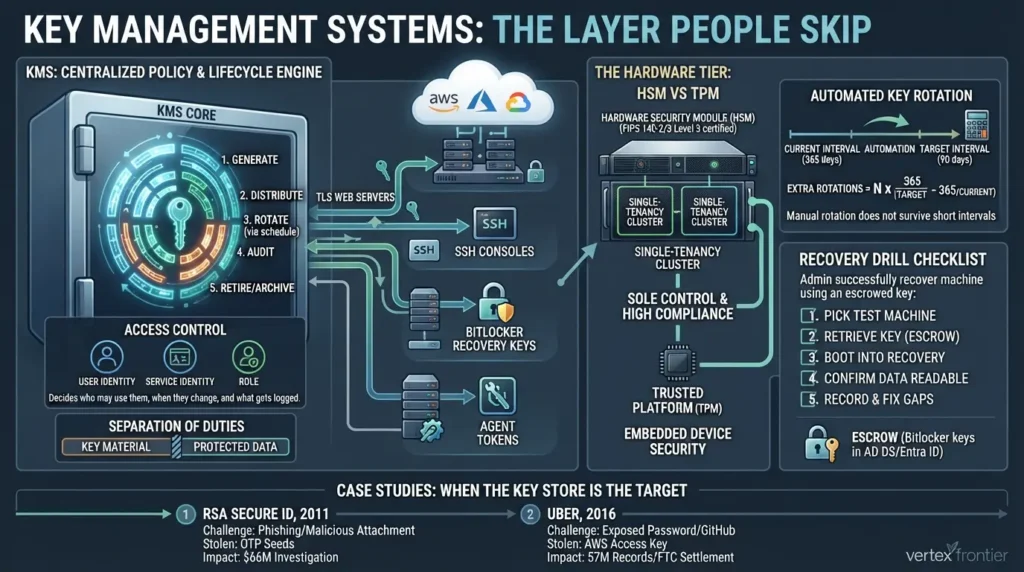
A key management system (KMS) is the software or service that creates, distributes, rotates, audits and retires cryptographic keys across an organization. It can run on premises or in the cloud, and the keys it manages can be protected in software or inside an HSM.
This is where most TPM-vs-HSM articles go quiet, yet “HSM vs KMS” and “cloud HSM vs KMS” are among the most searched comparisons in this space. The mental model that helps: a TPM, an HSM and a secure enclave are places where keys live. A KMS is the system that decides who may use them, when they change, and what gets logged.
A good KMS also keeps keys separate from the data they protect. Microsoft’s Storm-0558 investigation describes that separation failing: key material outside its isolated signing environment.
What a KMS actually does
NIST SP 800-57 Part 1 Rev. 5 is the canonical key-management reference. It covers the key lifecycle from generation through active use to deactivation, compromise handling and destruction, and it defines crypto-periods, the time limit during which a key should be used.
In practice a KMS gives you:
- One inventory: TLS keys for web servers, SSH keys for consoles, BitLocker recovery keys, certificates for users and services, all in one place.
- Access by identity: Keys are tied to specific users, services or roles, not shared in a chat thread.
- Scheduled rotation: Keys change on a calendar instead of when someone remembers.
- Logs and reports: Which keys are active, which are idle, which certificates expire next, and who used what.
That last point is about to become critical. When certificate lifetimes shrink toward 47 days, expiry dashboards stop being nice-to-have. Machines now hold more credentials than people do, which is why managing non-human identities and key management are really the same operational problem.
Cloud KMS vs dedicated HSM: which service for which job
The big clouds each split key protection into a managed software tier and a hardware tier. The names differ, but the decision is the same: how much do you need to control, and how much will an auditor demand?
| Criterion | AWS KMS | AWS CloudHSM | Azure Managed HSM / Key Vault Premium | Google Cloud HSM (in Cloud KMS) |
|---|---|---|---|---|
| Tenancy | Multi-tenant managed service | Single-tenant, cluster-based | Managed HSM: single-tenant. Key Vault Premium: multi-tenant | Multi-tenant by default; check Google’s docs for single-tenant options |
| Validation (as documented) | Depends on key store; check AWS compliance docs | hsm2m.medium: FIPS 140-3 Level 3 (older hsm1.medium: FIPS 140-2 Level 3) | FIPS 140-3 Level 3 firmware (Microsoft announcement, June 2025) | FIPS 140-2 Level 3 in Google’s docs (last updated Oct 2025) |
| Pricing shape | Per key + per API call | Per HSM instance per hour | Per HSM-hour + transactions (Managed HSM) | Per key version + per operation |
| Best fit | Everyday data encryption with low admin effort | Sole control and strict compliance | Azure workloads needing hardware-protected keys | Hardware protection through the same Cloud KMS API |
The details behind that table:
- AWS describes CloudHSM as single-tenant and cluster-based. AWS KMS itself is multi-tenant, and KMS can use a CloudHSM-backed custom key store, so you can keep KMS ergonomics with dedicated hardware underneath. Independent summaries report that the current hsm2m.medium type is FIPS 140-3 Level 3 and the older hsm1.medium certificate is now on NIST’s Historical list, so confirm the instance type you deploy.
- Microsoft says the HSM firmware behind Azure Managed HSM and Key Vault Premium was upgraded to a FIPS 140-3 Level 3 validated version in all Azure public regions (announced June 3, 2025). Managed HSM is a single-tenant service, while Key Vault Premium is multi-tenant.
- Google’s Cloud HSM architecture page says Cloud HSM is the hardware-backed backend inside Cloud KMS and describes FIPS 140-2 Level 3 hardware. The page we reviewed was last updated in October 2025. Because FIPS 140-2 validations moved toward the Historical list in September 2026, ask Google for its current FIPS 140-3 status if your procurement needs it.
A practical rule: start with a cloud KMS. Move to single-tenant HSM only when a regulation, a contract or a threat model demands sole custody. If you are also storing agent tokens and automation secrets, the same decision applies; our guide on hardening agent toolchains and tokens shows where those secrets tend to leak. And if the thing you are protecting is a data store, encryption at rest for vector stores is a typical KMS consumer.
Encryption key rotation without breaking production
Rotation sounds simple: change keys on a schedule. In real systems it breaks things when old keys are still referenced, when configs drift between environments, or when nobody tested the rollback. Practitioner threads on production outages from mismatched keys point to the same lesson, though that is directional field evidence, not a measured rate.
Use this sequence for any key class:
- Generate the new key in the right place (KMS or HSM), not on a laptop.
- Store it with access limited to the service that needs it.
- Schedule rotation with an interval that matches your crypto-period and compliance rules.
- Test the rotation in a staging environment, including decrypting old data with the retired key.
- Verify escrow. Confirm recovery keys are saved and that someone has restored from them.
Step 5 is the one teams skip, so here is a test protocol you can run in under an hour. It is a checklist, not a benchmark:
- Pick a test machine that holds no production data.
- Have someone other than its usual user retrieve the recovery key from your escrow location.
- Boot into recovery, enter the key, and confirm the data is readable.
- Record how long it took and who needed which permission.
- Fix every gap you found, then schedule the drill again.
Escrow deserves its own sentence. Microsoft documents saving BitLocker recovery keys to Microsoft Entra ID or AD DS so helpdesk staff can retrieve them. Rotation also touches backup design: attackers who go after backups usually go after keys next, which is why ransomware resilience strategies should cover key recovery as well as data recovery. The OWASP Key Management Cheat Sheet adds practical rules such as never hardcoding keys and separating keys by purpose.
Shorter intervals mean more rotations, and more rotations mean more work if the process is manual. This formula sizes that workload:
The calculator makes one argument for you: manual rotation does not survive short intervals. Automate it in your KMS, then spend the saved hours on testing.
Case study: when the key store is the target (RSA 2011 and Uber 2016)
Key management systems concentrate value, so they concentrate risk. Two documented incidents show both sides.
1 . RSA SecurID, 2011
Challenge: a phishing email with a malicious Excel attachment gave attackers a foothold in RSA's network in March 2011.
What happened: they took information related to SecurID two-factor authentication. RSA's early statements were vague, and The Register noted speculation that the stolen data included the seeds behind the one-time passwords. Attackers later used stolen SecurID information against defense contractors, Dark Reading reported.
Outcome: EMC said it spent about USD 66 million in the second quarter of 2011 on investigation, hardening, replacement tokens and customer monitoring.
Lesson: the system that holds your key material deserves threat modeling equal to what it protects.
2 . Uber, 2016
Challenge: intruders used passwords exposed in other breaches to reach an engineer's GitHub account.
What happened: they found an AWS access key in a private repository and used it to reach Uber's Amazon S3 data, per the FTC's analysis of the revised consent order.
Outcome: the breach affected 57 million users and drivers, including about 600,000 driver's license numbers, and Uber admitted it failed to report it to the FTC, as SecurityWeek reported. Uber also settled with all 50 states and Washington, DC for USD 148 million.
Lesson: "key management" includes secrets hygiene. A key in a repository is a key in the open.
A KMS is only as safe as the access around it. Treat key access like production database access, because it is.
What Is a Secure Enclave?
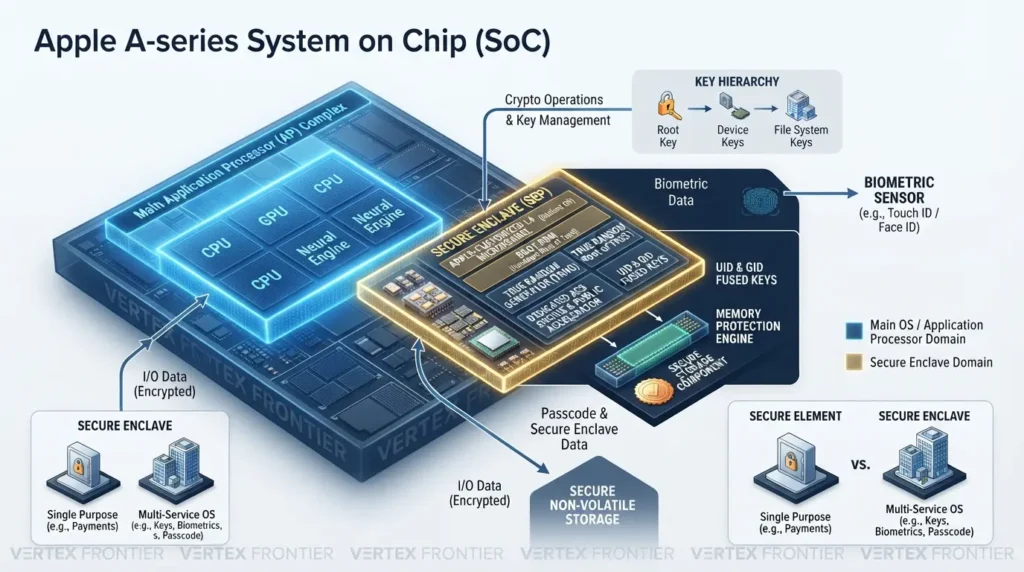
A secure enclave, in Apple's sense, is a dedicated security processor built into a device's chip. It runs its own isolated operating system, holds the root of the device's key hierarchy, and is designed to protect sensitive data even if the main processor's kernel is compromised.
Apple's Platform Security guide describes it as a secure subsystem integrated into the system on a chip and isolated from the main processor. It ships in iPhone 5s and later, recent iPads, Apple-silicon Macs, Intel Macs with the T2 chip, Apple Watch, Apple TV, Vision Pro and HomePod.
Inside Apple's Secure Enclave
Here is what the hardware actually contains, according to the same Apple documentation:
- Boot ROM: The hardware root of trust for the enclave's own operating system.
- An Apple-customized L4 microkernel: The enclave runs its own OS at a reduced clock speed. It does not supervise your main operating system; it runs alongside it and serves specific jobs such as biometrics and key handling.
- True random number generator: Built from multiple ring oscillators and post-processed with CTR_DRBG.
- UID and GID root keys: The UID is unique to each device, fused at manufacturing, and Apple says it is not available to Apple or its suppliers. The GID is shared across a group of chips.
- Memory Protection Engine: It encrypts and authenticates the enclave's memory with AES XEX and CMAC plus an anti-replay integrity tree. The enclave sees normal memory, while an outside observer sees only encrypted and authenticated data.
- Dedicated AES engine and public key accelerator: Hardware keys are never visible even to the enclave's own software.
- Secure Storage Component: Paired secure storage with its own ROM, random number generator and tamper detection. Counter lockboxes enforce a passcode attempt limit. Apple gives 10 attempts on iPhone as an example, after which the passcode-protected data is erased. The exact limit and behavior depend on the device and its settings.
Bulk file encryption uses a separate AES-256 engine in the path between flash storage and RAM. The enclave hands over wrapped keys, so the main operating system never sees unwrapped file keys.
Two corrections to the usual summary are worth making. The enclave does not "monitor all processes on your system." And "keys that cannot be changed" is really "keys fused at manufacturing, unique per device and never readable by software."
BFU and AFU: what practitioners see when phones fight back
If you only remember one practical idea about secure enclaves, make it this one. A phone is in a different security state before and after its first unlock.
- Before first unlock (BFU): After a restart, the enclave has not yet released the keys to the operating system.
- After first unlock (AFU): Once the user has unlocked it, more keys are available while the phone stays on.
Digital forensics practitioners describe BFU extraction as extremely difficult for exactly this reason. Everyday users report the same logic from the other side: a fully powered-off or freshly rebooted phone is safer than one that has been unlocked since boot. These are practitioner reports, not lab statistics, but they match Apple's own design description. Passcode strength still matters, because the attempt limit only helps if the passcode is hard to guess.
To place this in the bigger picture, our guide on how end-to-end encryption actually protects data explains what device-level protection covers and what it leaves to other layers. Data stored on a service's servers is a separate trust domain from the keys inside your device.
Beyond Apple: Titan M2, Knox Vault and Pluton
Apple is not alone. Google's Pixel phones use the Titan M2 security chip. Samsung's Galaxy line uses Knox Vault. Microsoft's Pluton is a security processor built into some Windows PC processors. Each makes its own design choices, so avoid performance claims you cannot source. The shared idea is the same: keep the most sensitive keys in a small, isolated, hard-to-attack piece of silicon.
| Technology | Found in | Form | Worth knowing |
|---|---|---|---|
| Apple Secure Enclave | iPhone, iPad, Apple-silicon Macs, Apple Watch and more | Dedicated security processor inside the main chip | Own boot ROM and OS; UID key fused at manufacturing |
| Google Titan M2 | Pixel phones | Dedicated security chip | Android's closest counterpart to a separate security processor |
| Samsung Knox Vault | Galaxy devices | Isolated secure hardware for keys and sensitive data | Part of Samsung's wider Knox platform |
| Microsoft Pluton | Some Windows PCs | Security processor built into the CPU | Sits inside the processor rather than on a separate board chip |
| Discrete TPM 2.0 | PC motherboards and laptops | Separate chip (or firmware TPM) | Open standard: ISO/IEC 11889, published by the TCG |
None of these is beyond attack. The 2016 Black Hat talk Demystifying the Secure Enclave Processor reverse-engineered Apple's design and evaluated its attack surface, and Eclectic Light's history of the Secure Enclave traces how it evolved. Separate research shows why a dedicated processor matters.
GoFetch, presented at USENIX Security 2024, used a side channel in Apple M-series CPUs to extract keys from cryptographic software running on the main processor. It targeted the CPU's data memory-dependent prefetcher, not the Secure Enclave, and mitigations have to be built into the cryptographic software. The pattern matches the TPM story: isolation helps, and every chip and firmware layer can still have bugs.
Secure element vs secure enclave
These two names sound almost identical and get swapped constantly, so here is the difference.
A secure element is a small, self-contained, tamper-resistant chip with its own firmware and memory. It stores a few high-value secrets and runs tiny, locked-down programs. You find it in payment cards, SIM cards, passports and the contactless-payment hardware inside phones. Its job is narrow: prove identity or authorize a payment without exposing the secret.
A secure enclave is a security processor integrated into the device's main chip. It does more than hold secrets. It runs its own operating system, manages the device's key hierarchy, enforces passcode attempt limits and serves services such as biometrics.
A simple way to remember it: a secure element is a tiny locked safe for a few secrets, and a secure enclave is a small locked office with its own staff. Many phones carry both, each doing its own job. Neither one is the same thing as the "enclaves" used in confidential computing on server CPUs.
A secure enclave protects device keys and attempts limits better than anything software can do on its own. Its value depends on your passcode and on how recently the device was unlocked.
TPM vs HSM vs Secure Enclave vs KMS: The Real Differences
Here is the comparison most search results never give you in one place.
| TPM | HSM | KMS | Secure Enclave | |
|---|---|---|---|---|
| What it is | Chip or firmware component in one computer | Tamper-resistant appliance or cloud service | Management software or service, optionally HSM-backed | Dedicated security processor inside a device chip |
| Scope | One device | Many servers and applications | Whole organization or cloud account | One device |
| Key custody | Generated inside, sealed to boot state | Generated and used inside, non-exportable by design | Policy, access and lifecycle control | Root keys fused at manufacturing, never readable |
| Typical workloads | BitLocker, Windows Hello, device identity | TLS keys, code signing, certificate authorities | Rotation, audit logs, data-at-rest encryption | Passcode and biometric key hierarchy |
| Strongest at | Binding keys to this machine and its boot | High-assurance custody at scale, FIPS 140-3 Level 3 common | Lifecycle and visibility across many keys | Protecting device data even if the main OS kernel is compromised |
| Typical failure mode | TPM-only setups; firmware bugs (ROCA, TPM-FAIL, AMD 2026) | Signing misuse by a compromised pipeline; access mistakes | Weak access policy, secrets sprawl, untested rotation | Implementation bugs; weak passcode; AFU state |
Read the table by columns and one pattern jumps out. TPM, HSM and secure enclave are places keys live. The KMS is the layer that governs them. In real deployments you combine them: a laptop's TPM protects its disk key, an HSM protects the signing key, a KMS rotates and audits both, and phones rely on their enclave.
And here is the uncommon angle. "Which is more secure, a TPM or an HSM?" is the wrong question, and it is the question most competing pages answer badly. They are built for different scopes. The better question is: which failure can you not afford, and which layer closes that gap?
What each layer protects against, and what it does not
The matrix below is our own analysis, not vendor documentation. It maps common threats to each layer so you can see residual risk. Use it as a starting point for your own threat model, not as a certification.
| Threat | TPM | HSM | KMS | Secure Enclave |
|---|---|---|---|---|
| Lost or stolen powered-off device | Helps. Key is sealed to boot state; a PIN adds protection. | Not its job | Not its job | Helps. Attempt limits; strongest before first unlock. |
| Physical attacker booting another environment | Depends. TPM-only setups have been bypassed (bitpixie). | Not its job | Not its job | Designed to resist. Research attacks exist. |
| Malware or admin on a running host | Partly. Keys cannot be copied out, but malware may still request operations. | Partly. Same idea: key stays inside, a compromised app can still ask it to sign. | Depends on access policy and logging. | Partly. Keys stay inside, allowed operations can still be triggered. |
| Stolen backup or database dump | Not its job | Helps if data keys are wrapped by the HSM and stored separately. | Helps when keys stay separate from data. | Not its job |
| Insider or leaked credentials with key access | Not its job | Depends on access controls and audit. | Depends on IAM policy and logs (Uber: key in a repo). | Not its job |
| Firmware bug or side channel | Possible. ROCA, TPM-FAIL, AMD 2026. | Possible. Patch and track vendor advisories. | Inherits the risk of whatever holds the keys. | Possible. Researchers have probed the design. |
Five claims you will hear, and what the documentation says
| Claim | What the evidence says |
|---|---|
| "A TPM cannot be brute-forced." | Microsoft documents dictionary-attack logic that rate-limits guessing, and a lockout that an owner password can reset. That is mitigation, not impossibility. |
| "The TPM encrypts your disk." | Microsoft describes TPM measurements as evidence that a TPM-based key is used only when the correct software booted. The TPM guards the key; it is not the disk encryption itself. |
| "Certified hardware means safe." | TPM-FAIL affected a TPM chip certified at Common Criteria EAL 4+, and ROCA affected a widely deployed key-generation library. |
| "The secure enclave monitors your whole system." | Apple and independent researchers describe it as a separate processor with its own operating system that performs specific secure services for the rest of the chip. |
| "An HSM is just a stronger TPM." | They differ in scope. A TPM binds keys to one device and its boot state. An HSM holds keys for many systems and is often chosen for compliance and custody. |
Don't rank these technologies. Match each key to the layer built for its job.
Which One Do You Actually Need? The Scale × Custody × Compliance Framework
This is the decision model used in this article. It is an original framework, not an industry standard, but each factor maps to something documented above.
One device: TPM or secure enclave.
Many servers: HSM-backed KMS.
Shared cloud is fine: cloud KMS.
Sole control needed: single-tenant HSM.
FIPS 140-3 Level 3 is a common enterprise bar. Code-signing keys must be in hardware.
Follow these steps in order:
- Inventory your keys: List where every key lives today: laptops, servers, repos, backups, phones, cloud accounts.
- Classify each key: Is it device-bound, a server TLS key, a signing key, or a data-encryption key?
- Pick the scale layer: Device-bound keys go to a TPM or secure enclave. Shared server and signing keys go to an HSM-backed service.
- Pick the custody level: Use cloud KMS by default. Move to single-tenant HSM only if you need sole control.
- Check the compliance bar: Match the FIPS level, and remember that code-signing keys must be in hardware.
- Add the lifecycle: Set rotation, access logging and a tested recovery path.
A few examples:
- A 50-laptop company on Windows 11: TPM + PIN with BitLocker, recovery keys escrowed to Entra ID.
- A SaaS company encrypting customer data in AWS: AWS KMS first, CloudHSM custom key store if a contract demands dedicated hardware.
- A software vendor shipping signed installers: HSM-held signing key, plus controls on what the build pipeline may sign.
- A mobile-first team protecting phones: rely on the platform's secure enclave, enforce strong passcodes and enable erase-on-failure.
Start with a key inventory
Step 1 of the framework is where most teams stall, because "list every key" sounds vague. Use a simple table. Each row names the key, classifies it, says where it lives today, and proposes a layer. The rows below are illustrative, so replace them with your own.
| Key | Class | Where it lives today | Suggested layer | Lifecycle note |
|---|---|---|---|---|
| Laptop disk key | Device-bound | OS drive, TPM-only protector | TPM + pre-boot PIN | Recovery key escrowed and restore tested |
| Web server TLS private key | Server | A file copied to each server | HSM-backed KMS | Automate renewal as certificate lifetimes shrink |
| Installer signing key | Signing | Build server disk | HSM or certified hardware token | Limit what the pipeline may sign |
| Cloud storage access key | Service secret | Private code repository | Managed secrets store, never hardcoded | Rotate it and scan repositories |
| Customer data key | Data | Application config file | Cloud KMS (HSM tier if required) | Test rotation in staging first |
Try the framework on one key
Pick the facts about a single key and the tool below suggests a starting layer. It encodes the framework in this article, so treat the result as a starting point for discussion, not compliance advice.
Ten questions to ask any HSM or cloud KMS vendor
Marketing pages blur the differences this article draws. These questions turn them into answers you can compare:
- Which FIPS 140-3 certificate covers the exact module and firmware version I will run, and what is its status in NIST's database?
- Is the HSM single-tenant or shared, and who can administer it?
- Can keys be exported, backed up or cloned, and under which controls?
- What does the log record about key use, how long is it retained, and can I export it? Storm-0558 showed why log retention decides whether you can reconstruct an incident.
- How is rotation automated, and what breaks when an old key is retired?
- What is the post-quantum roadmap, and how are firmware upgrades validated?
- How is availability handled across clusters or regions if one device fails?
- Which interfaces are supported, such as PKCS#11, JCE, OpenSSL or cloud APIs, and how hard is it to migrate out later?
- For code signing: does the service meet my certificate authority's current hardware rules?
- What does the full cost include: instances or hours, operations, support, validation and data transfer?
Write the answers down next to your key inventory. Gaps in the answers are information too.
Start with the key, not the product. The right layer falls out of scale, custody and compliance.
What 2026 Changed (and What Is Coming)
Three shifts make this a timely topic, and none of them appears in older comparison pages.
FIPS 140-2 reached the end of its Active window
NIST's FIPS 140-3 transition page says FIPS 140-2 modules stay active until September 21, 2026, when those validations move to the Historical list, and that CMVP still supports the purchase and use of those modules for existing systems.
NIST began accepting FIPS 140-3 submissions on September 22, 2020, and stopped accepting new FIPS 140-2 submissions on April 1, 2022. Our reading: FIPS 140-3 is the safer target for anything new, and a Historical certificate is not a reason to rip out working systems.
Certificate lifetimes are collapsing
The CA/Browser Forum approved Ballot SC-081v3 on April 11, 2025. Maximum TLS certificate validity drops from 398 days to 200 days on March 15, 2026, 100 days on March 15, 2027, and 47 days on March 15, 2029. Encryption Consulting's walkthrough lays out the phases and the shrinking domain-validation reuse window. At 47 days, no team can renew by hand across a large estate.
Post-quantum is a live migration
NIST finalized its first post-quantum standards, FIPS 203, 204 and 205, in August 2024, and national guidance sets migration timelines that run into the 2030s. Validation is starting to follow: a September 2026 analysis counts at least five active FIPS 140-3 certificates that list post-quantum algorithms as approved services. The practical lesson is crypto agility: if your keys are scattered, you cannot swap algorithms quickly.
Automate certificates and rotation now, and ask every vendor for its FIPS 140-3 and PQC roadmap.
Common Mistakes (and What to Do Instead)
These six come straight from the documented cases and practitioner reports above.
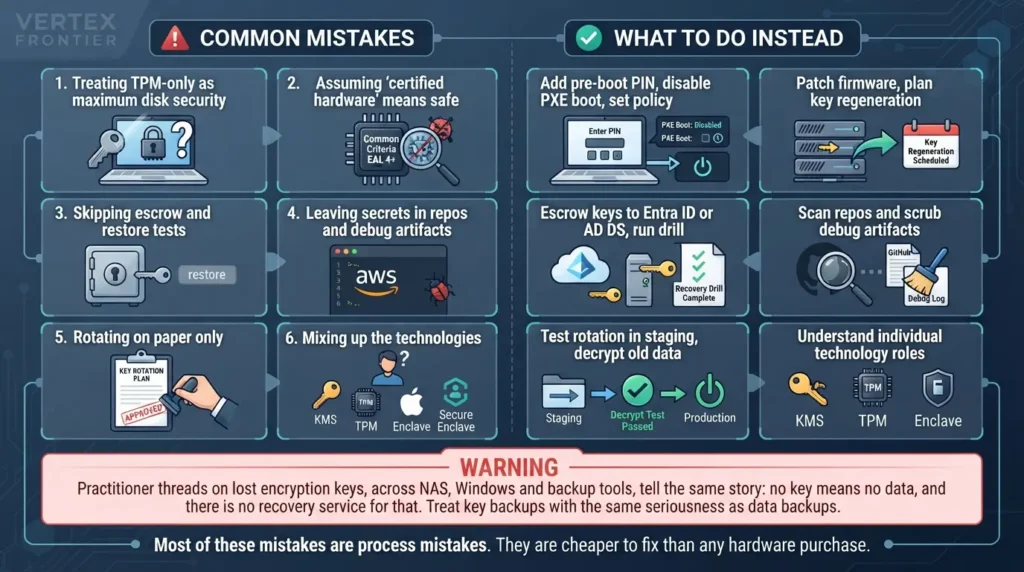
Treating TPM-only as maximum disk security
Add a pre-boot PIN for high-risk laptops, disable PXE boot, and set sleep and hibernate policy on purpose.
Assuming "certified hardware" means safe
TPM-FAIL hit a Common Criteria EAL 4+ certified TPM chip, and ROCA affected a widely used key-generation library. Patch firmware and plan key regeneration.
Skipping escrow and restore tests
Escrow recovery keys to Entra ID or AD DS, then run a recovery drill.
Leaving secrets in repos and debug artifacts
Uber's breach began with an AWS key in a private repository, and Microsoft's Storm-0558 analysis centered on key material reaching a debugging environment. Scan repositories and scrub debug artifacts.
Rotating on paper only
Test rotation in staging, including decrypting old data, before it hits production.
Mixing up the technologies
Don't compare a KMS to a chip, and don't mistake Apple's enclave for confidential-computing enclaves.
Most of these mistakes are process mistakes. They are cheaper to fix than any hardware purchase.
Before and After: Applying the Framework
The after state is not more expensive hardware everywhere. It is the same hardware, placed deliberately, with a process around it.
Conclusion
Keys are the asset. TPMs, HSMs, secure enclaves and key management systems are four layers for protecting them, and no single layer covers every job.
Hardware raises the price of an attack. It does not delete the risk, which is why the biggest losses in this article came from handling failures around perfectly good technology. A simple rule: choose the layer by scale, custody and compliance, then spend equal effort on rotation, escrow and access control.
If you are extending this to AI workloads, where agents and automation hold more credentials than any human team, our guide to enterprise security risk management for agentic AI is a natural next read.
FAQ
Is TPM required for Windows 11, and why?
Yes. Microsoft lists TPM 2.0 as a minimum system requirement for Windows 11. Windows uses the TPM to protect keys for features such as BitLocker and device attestation, and to record boot measurements. Check Microsoft's current Windows 11 specifications for edition details and exceptions.
Is TPM the same as Secure Boot?
No. Secure Boot checks the signatures of boot software before it runs. A TPM records measurements of what actually started and can release keys only if those measurements match what you expect. They complement each other but do different jobs.
TPM vs HSM vs secure enclave: what is the difference in one line each?
A TPM protects keys for one computer and its boot state. An HSM protects keys for many servers inside a tamper-resistant boundary. A secure enclave is a dedicated security processor guarding keys inside one device. A KMS manages the lifecycle of keys across all of them.
HSM vs KMS: when do I need which?
Use a KMS to manage keys, access and rotation. Add an HSM underneath when a regulation, contract or threat model requires hardware custody. Many cloud KMS products can do both, for example AWS KMS with a CloudHSM-backed custom key store.
Can a TPM be cracked?
A TPM can be attacked, and some have been. ROCA (CVE-2017-15361) involved weak RSA key generation in an Infineon library used in TPM firmware. TPM-FAIL (2019) used timing side channels against an Intel firmware TPM and an STMicroelectronics TPM chip. AMD disclosed two high-severity TPM flaws in August 2026 that need local privileged access. TPM-only BitLocker has also been bypassed with physical access when pre-boot authentication is not configured. Patch firmware, add a pre-boot PIN for high-risk laptops, and treat the TPM as a strong layer rather than a guarantee.
What does the secure enclave protect on an iPhone?
It guards the root of the device's key hierarchy, enforces passcode attempt limits, and handles biometric and key operations in a separate processor with its own operating system. Apple designed it to keep sensitive data protected even if the main processor's kernel is compromised. Protection is strongest right after a restart, before the first unlock, and it still depends on a strong passcode.
If I lose my encryption key, is my data gone?
Usually, yes. If the only copy of a key is lost, encrypted data typically cannot be recovered. Microsoft documents saving BitLocker recovery keys to Microsoft Entra ID or AD DS. Whatever method you use, store key backups separately from the data and test a restore before you need it.
Do I need an HSM for code signing in 2026?
Yes, or an equivalent certified hardware module. Since June 1, 2023, the CA/Browser Forum's code-signing requirements call for private keys to be generated and stored in a hardware crypto module that meets FIPS 140-2 Level 2 or Common Criteria EAL 4+, and the rule applies as certificates are issued or renewed. Check your certificate authority for its current requirements, because the standards named in the rule are moving toward FIPS 140-3.
Did FIPS 140-2 modules stop being valid on September 21, 2026?
No. NIST says FIPS 140-2 validations move to the Historical list on September 21, 2026, and that CMVP still supports the purchase and use of those modules for existing systems. New systems should favor modules validated under FIPS 140-3. Check a module's certificate status in NIST's CMVP database before you buy or audit.

Was this article helpful?




[…] treats cryptographic keys as an operational asset across their entire lifecycle, ( the choice of where those keys physically live (TPM, HSM, secure enclave, or KMS) is what determines who can actually touch them) generation, use, backup, recovery, and destruction, […]
[…] Customer-managed encryption keys can improve key ownership and revocation control. They can also change recovery assumptions. […]
[…] Pixel hardware and its firmware lifecycle. Linux can use platform features such as Secure Boot or hardware-backed encryption, but the exact protection depends on the named distribution, device, and […]
[…] produces its own WebAuthn credential, bound to the TPM on a specific Windows device, and it's functionally a passkey for that machine. But it's a separate authentication method inside […]
[…] a passkey isn’t a normal sign-in. It’s a credential-provisioning operation that touches Microsoft Graph and, less visibly, a separate authentication-method registration […]