
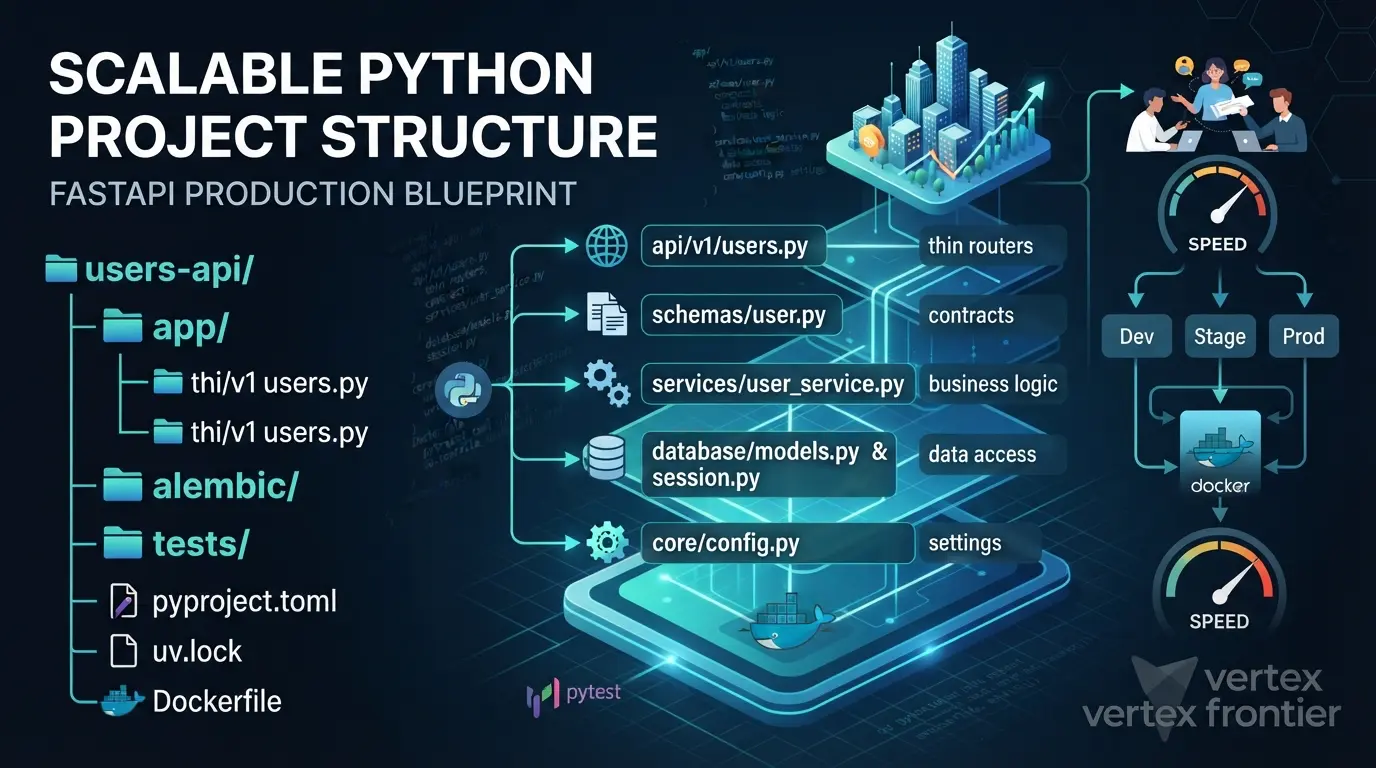

Most Python projects don’t die because someone picked the wrong library. They die around the 20,000th line, when nobody can say where the next feature belongs.
A route has grown a SQL query. A test needs a database file that exists on one laptop only. Production reads a password from a variable nobody documented. Each shortcut made sense on the day. Together they turn every change into archaeology.
A scalable Python project structure stops that drift. It gives each kind of code one obvious home, so the 500th endpoint looks like the 5th.
This guide builds a layered FastAPI project from five parts (API, services, database, core, tests) plus the tooling around them: uv, Docker, pytest, and Pydantic Settings. You get the reasoning behind each layer, working code, a decision flow, a readiness calculator, and the mistakes that quietly break the pattern. Along the way we look at what Netflix, Uber, Instagram, and Stripe show about structure at scale.
New to APIs? Start with what an API is and how it works. Prefer to build along? The tested REST API tutorial with FastAPI covers the same ground step by step. This article is the companion that explains why the project is shaped this way.
Key takeaways
Click any topic to expand or collapseFour scalabilities
Size, team, environments, and speed. A structure has to hold up on all four.
Thin routers
Routes translate HTTP. Services hold the rules. The database layer holds storage details.
One config object
Typed, read from environment variables, imported everywhere.
Test without infrastructure
In-memory SQLite plus app.dependency_overrides keeps tests fast and isolated.
Start with built-in tools
FastAPI Depends before any DI container. def routes before async def.
Same image everywhere
The Dockerfile you run locally is the one you deploy.
What “Scalable” Actually Means: The Four Scalabilities
“Scalable” gets used for servers, databases, and teams in the same breath. For a project structure, it means four separate things.
Definition: A scalable Python project structure is a folder and tooling layout where growth in code, people, environments, or tests adds files in predictable places instead of forcing rewrites.
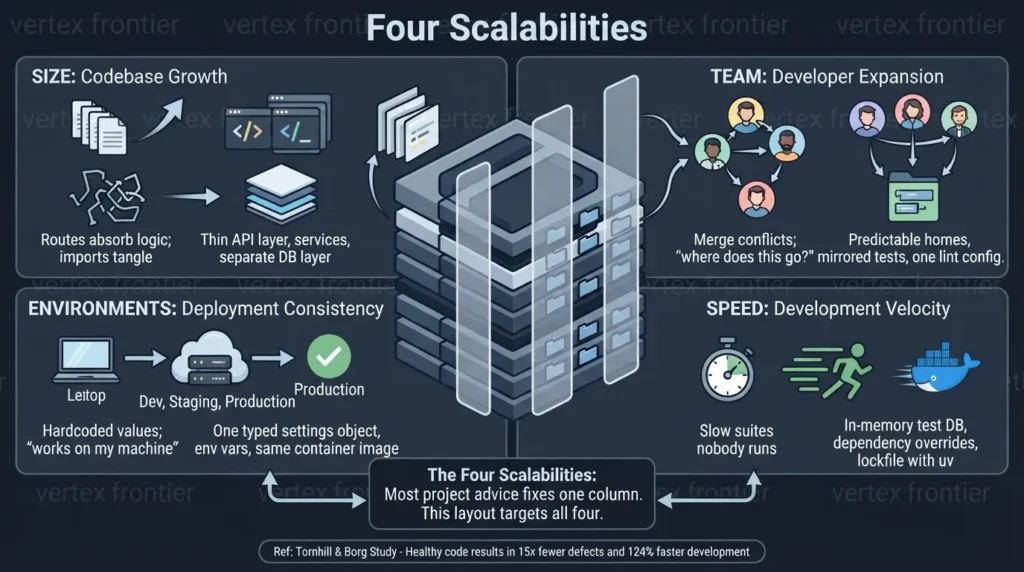
Think of it as the Four Scalabilities framework:
- Size: The codebase grows. You shouldn’t need a big refactor each time it does.
- Team: More developers join. Boundaries are clear, and everyone knows where features go.
- Environments: Dev, staging, and production differ. Switching between them should be boring, in a good way.
- Speed: Tests run fast, local setup takes minutes, and Docker is there when you need it.
| Dimension | What grows | What breaks without structure | Structural defense |
|---|---|---|---|
| Size | Lines of code, endpoints | Routes absorb logic; imports tangle | Thin API layer, services, separate database layer |
| Team | Contributors | Merge conflicts; “where does this go?” | Predictable homes, mirrored tests, one lint config |
| Environments | Dev, staging, production | Hardcoded values; “works on my machine” | One typed settings object, env vars, same container image |
| Speed | Test count, setup time, CI minutes | Slow suites nobody runs | In-memory test DB, dependency overrides, lockfile with uv |
Why does this matter in money and time? A peer-reviewed study of 39 proprietary codebases by Adam Tornhill and Markus Borg found that low-quality code contained 15 times more defects than high-quality code. Resolving issues in it took, on average, 124% more development time. The study measures code health, not folder layout, so treat the link as indirect. Layers are one way to keep files small and focused enough to stay healthy.
Most advice fixes one of the four scalabilities. The layout below is designed to cover all of them.
The Blueprint: A Folder Structure That Answers “Where Does This Go?”
A good tree answers one question in under five seconds. Here is the whole project at a glance.
PROJECT TREE:
users-api/ ├── app/ │ ├── main.py # create the app, register routers │ ├── api/ │ │ ├── dependencies.py # wiring: session -> service │ │ └── v1/ │ │ └── users.py # HTTP only: routes, status codes │ ├── schemas/ │ │ └── user.py # Pydantic request/response contracts │ ├── services/ │ │ └── user_service.py # business logic, one class per resource │ ├── database/ │ │ ├── models.py # SQLAlchemy Base + ORM models │ │ └── session.py # engine, session factory, get_db │ └── core/ │ ├── config.py # typed settings (Pydantic Settings) │ └── logging.py # one logging setup for the whole app ├── alembic/ │ ├── env.py # points Alembic at Base.metadata │ └── versions/ # one migration script per schema change ├── tests/ │ ├── conftest.py # in-memory DB + dependency override │ └── api/ │ └── v1/ │ └── test_users.py # mirrors app/api/v1/users.py ├── alembic.ini # migration tool config ├── pyproject.toml # dependencies, pytest config ├── uv.lock # exact, reproducible versions ├── .python-version # pinned Python version ├── .env # local secrets (git-ignored) ├── .env.example # committed template, no secrets ├── Dockerfile ├── docker-compose.yml └── README.mdThree choices in this tree matter more than the rest.
- Balanced depth: Organized enough to find things, shallow enough to avoid a maze of folders.
- Tests live outside app/: Production code stays lean, and test code never ships by accident.
- Tests mirror the app: app/api/v1/users.py is tested by tests/api/v1/test_users.py. Finding a test takes seconds.
The table below shows what each folder owns, and just as important, what it must never hold.
| Folder | Owns | Must never contain |
|---|---|---|
api/ | HTTP: routes, status codes, dependency wiring | SQL, business rules |
schemas/ | Pydantic request and response contracts | Database access |
services/ | Business logic and workflows, one class per resource | HTTP types such as HTTPException |
database/ | Engine, sessions, ORM models | Business rules |
core/ | Cross-cutting concerns: settings, logging | Feature-specific code |
tests/ | A mirror of app/ | Anything the app imports at runtime |
Definition: Cross-cutting concerns are capabilities every layer needs, such as configuration, logging, security, and observability. They live in core/ so no single feature owns them.
A quick naming note. The Pydantic request and response classes live in schemas/, not models/. Many projects use “models” for both Pydantic classes and ORM classes, and the collision confuses newcomers. Two names, two jobs.
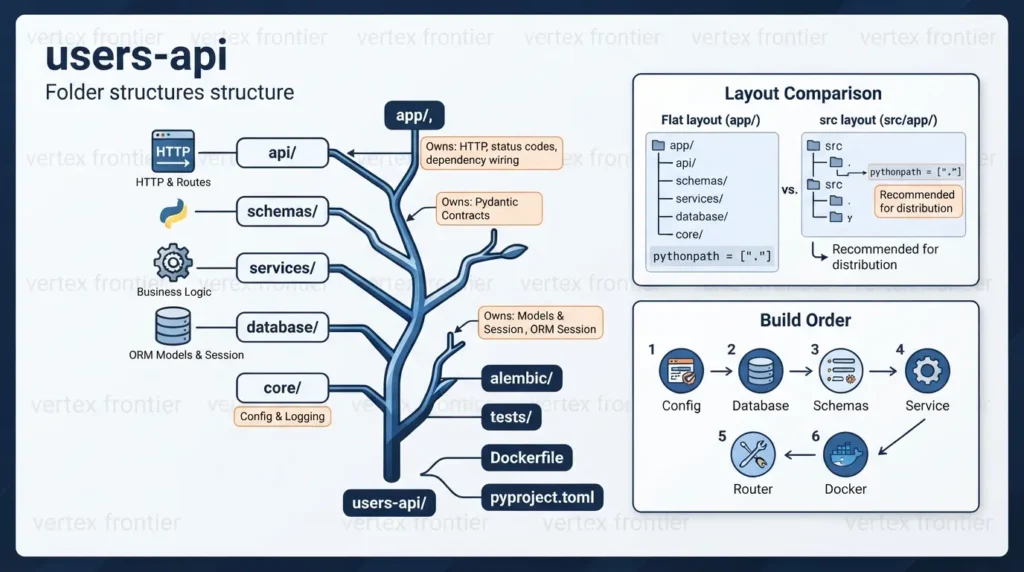
Should You Use app/ or src/?
The Python Packaging Authority recommends the src layout for projects meant to be distributed as packages. Its main benefit: code under src/ can’t be imported by accident from the working directory. That accident is a classic reason tests pass locally and fail after installation.
For an internal service that never goes to PyPI, a top-level app/ package is fine. Set pythonpath for pytest (shown later) and keep the package name unambiguous. If you might publish or share the code, start with src/.
Here is the difference side by side. Only one folder moves.
users-api/ ├── app/ │ ├── main.py │ └── ... ├── tests/ ├── pyproject.toml └── Dockerfile- Package sits at the repo root, next to
tests/ - Python can import it straight from the working directory, installed or not
- Fine for an internal service that is never published
- Needs
pythonpath = ["."]for pytest
users-api/ ├── src/ │ └── app/ │ ├── main.py │ └── ... ├── tests/ ├── pyproject.toml └── Dockerfile- Package sits one level down, under
src/ - Imports only work once the package is installed or
srcis on the path - Recommended by PyPA for packages you distribute
- Needs
pythonpath = ["src"]or an installable project
Switching is mostly mechanical: move app/ into src/, point pytest’s pythonpath at src, and change the Dockerfile’s COPY app ./app line to copy src. If you want the package installed into the environment, as the PyPA guidance assumes, the project also needs a build backend declared in pyproject.toml. The imports in your code (from app…) stay the same either way.
Layer-First or Feature-First?
This tree groups code by layer. Netflix’s Dispatch project groups by subject instead: its contributor docs describe putting a subject’s models, views, and services in one folder. Both approaches are legitimate.
Layer-first is quicker to learn and suits a service with a handful of resources. When one layer folder holds a dozen unrelated resources, regroup by feature (users/, billing/), each with its own router, service, and schemas. The rules inside each feature stay the same. The rules travel even when the folders change.
How to Build It: 7 Steps in Dependency Order
Build in this order, because each step only needs the ones before it:
- Config and logging in core/, so everything else can import them.
- Database models and session in database/.
- Schemas in schemas/, the contracts at the edge.
- Service in services/, holding the business logic.
- Router and dependency wiring in api/.
- Tests that mirror the app, with an in-memory database.
- Dockerfile and Compose so local runs match the cloud.
Every file has one job and one home. That is what makes the tree predictable for a new teammate.
The API Layer: Thin Routers, No Business Logic
What should a route handler actually do? Less than you think.
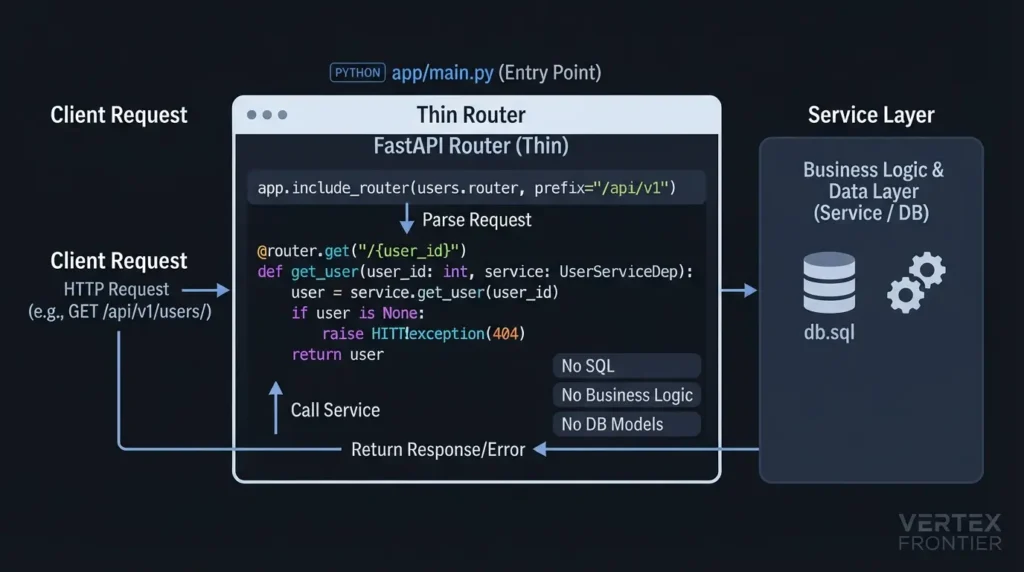
Definition: A thin router does HTTP and nothing else: it parses the request, calls a service, and returns a response. No business rules, no SQL.
Here is the entry point. It creates the app, sets up logging, and registers one router under a versioned prefix. FastAPI’s bigger applications guide documents the same include_router pattern.
PYTHON · app/main.py:
from contextlib import asynccontextmanager from fastapi import FastAPI from app.api.v1 import users from app.core.config import settings from app.core.logging import setup_logging from app.database.models import Base from app.database.session import engine setup_logging(settings.log_level) @asynccontextmanager async def lifespan(app: FastAPI): # Dev convenience. In production, manage schema changes with Alembic. Base.metadata.create_all(engine) yield app = FastAPI(title=settings.app_name, debug=settings.debug, lifespan=lifespan) app.include_router(users.router, prefix="/api/v1")The users router follows. Notice what’s missing: no database import, no query, no rule about who may be a user.
PYTHON · app/api/v1/users.py:
from fastapi import APIRouter, HTTPException, status from app.api.dependencies import UserServiceDep from app.schemas.user import UserCreate, UserRead router = APIRouter(prefix="/users", tags=["users"]) @router.get("", response_model=list[UserRead]) def list_users(service: UserServiceDep): return service.list_users() @router.post("", response_model=UserRead, status_code=status.HTTP_201_CREATED) def create_user(payload: UserCreate, service: UserServiceDep): return service.create_user(payload) @router.get("/{user_id}", response_model=UserRead) def get_user(user_id: int, service: UserServiceDep): user = service.get_user(user_id) if user is None: raise HTTPException(status_code=404, detail="User not found") return userThe service returns None when a user doesn’t exist. The router turns that into a 404. This split keeps HTTP concepts out of the service, which is why you can test the service without a web server.
The remaining routes (update and delete) have the same shape: call the service, translate the result.
Why Version the API in the Folder Path
The api/v1/ folder looks like ceremony until the day you need a breaking change. Then v2/ sits beside v1/, both run in one app, and clients migrate on their own schedule.
Stripe is the best-documented example of treating an API as a contract. Its engineering post on versioning explains a two-level system:
- The problem: businesses build payment flows on the API, so a breaking change can break their revenue.
- The action: Stripe keeps a major version in the path (like /v1/charges) and also uses rolling versions named by release date. Each account is pinned to the version of its first request, and a header can override it per request.
- The outcome: changes ship without forcing every integration to move at once. The post publishes no adoption numbers, so treat it as design evidence, not a benchmark. It also says the team works to avoid needing new versions by getting designs right the first time.
- The lesson: the path version is the coarse contract. Keep it rare and cheap. Don’t copy date-based versioning for a small internal API, but do keep the folder boundary.
A thin router plus a versioned folder makes both change and growth cheap.
Schemas: The Validation Boundary
Schemas are the contract at the edge of your app. They state what a client must send and what it gets back. Invalid input is rejected here, before any business code runs.
PYTHON · app/schemas/user.py:
from pydantic import BaseModel, ConfigDict, Field class UserCreate(BaseModel): name: str = Field(min_length=1, max_length=100) class UserUpdate(BaseModel): name: str = Field(min_length=1, max_length=100) class UserRead(BaseModel): model_config = ConfigDict(from_attributes=True) id: int name: strCreating a user needs a name. Reading one returns an ID and a name. These are different shapes, so they get different classes. When you later add an email field, the validation rules live in one obvious place.
The Services Layer: Where Business Logic Lives
If the router is the front desk, the service is the back office. It receives a database session, applies the rules, and talks to storage.
PYTHON · app/services/user_service.py:
import logging from sqlalchemy import select from sqlalchemy.orm import Session from app.database.models import User from app.schemas.user import UserCreate, UserUpdate logger = logging.getLogger(__name__) class UserService: def __init__(self, db: Session) -> None: self.db = db def list_users(self) -> list[User]: return list(self.db.scalars(select(User).order_by(User.id))) def get_user(self, user_id: int) -> User | None: return self.db.get(User, user_id) def create_user(self, data: UserCreate) -> User: user = User(name=data.name) self.db.add(user) self.db.commit() self.db.refresh(user) logger.info("Created user id=%s", user.id) return user def update_user(self, user_id: int, data: UserUpdate) -> User | None: user = self.get_user(user_id) if user is None: return None user.name = data.name self.db.commit() self.db.refresh(user) return user def delete_user(self, user_id: int) -> bool: user = self.get_user(user_id) if user is None: return False self.db.delete(user) self.db.commit() return TrueThis is the layer that changes most as the product grows. Validation of domain rules, logging, and orchestration all land here. When you swap the database or call an external API instead, you edit the service and the database layer. The routes don’t change, because they only know the service.
Service is the architectural name. If you prefer the pattern vocabulary, call it a repository. In larger systems the two often coexist: a service applies rules, and a repository runs queries. Start with one class per resource and split only when a file gets hard to read.
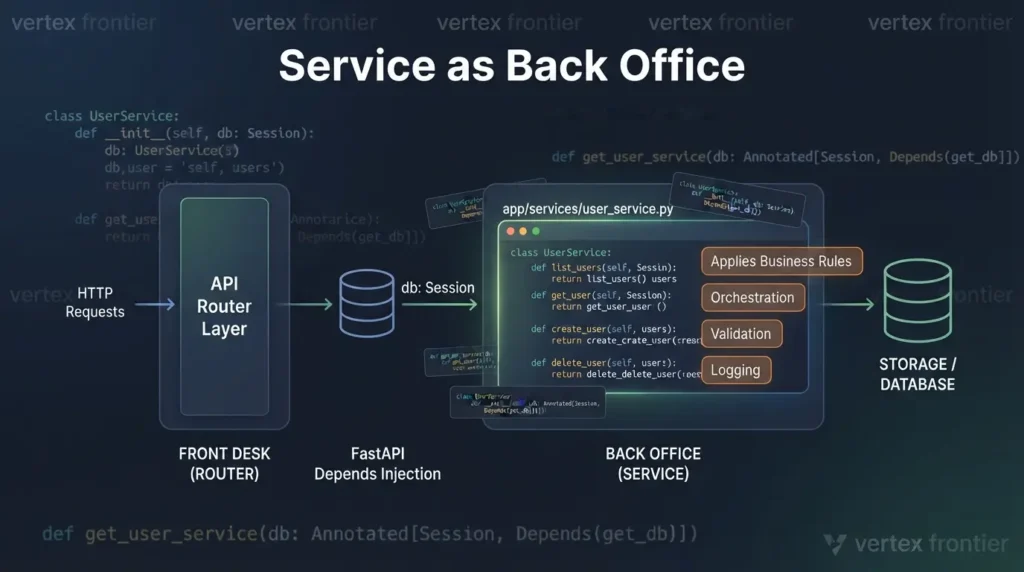
Dependency Injection: Use What FastAPI Already Gives You
The session reaches the service, and the service reaches the route, through FastAPI’s Depends system. Here is the wiring.
PYTHON · app/api/dependencies.py:
from typing import Annotated from fastapi import Depends from sqlalchemy.orm import Session from app.database.session import get_db from app.services.user_service import UserService def get_user_service(db: Annotated[Session, Depends(get_db)]) -> UserService: return UserService(db) UserServiceDep = Annotated[UserService, Depends(get_user_service)]Dependencies can declare their own dependencies, so the chain (session, then service, then route) builds itself per request.
Should you adopt a dedicated DI container such as inject? Weigh the trade:
- Pros: wiring in one central place, easy swapping of implementations, clear lifetime scopes.
- Cons: more boilerplate, an extra mental model for junior developers, and real weight for a small or medium service.
A practical rule of thumb (a judgment call, not a framework rule): start with built-in Depends. Introduce a container only when the wiring itself becomes a maintenance problem. Until then, simple wins.
The Database Layer: Sessions, Models, and Who Closes What
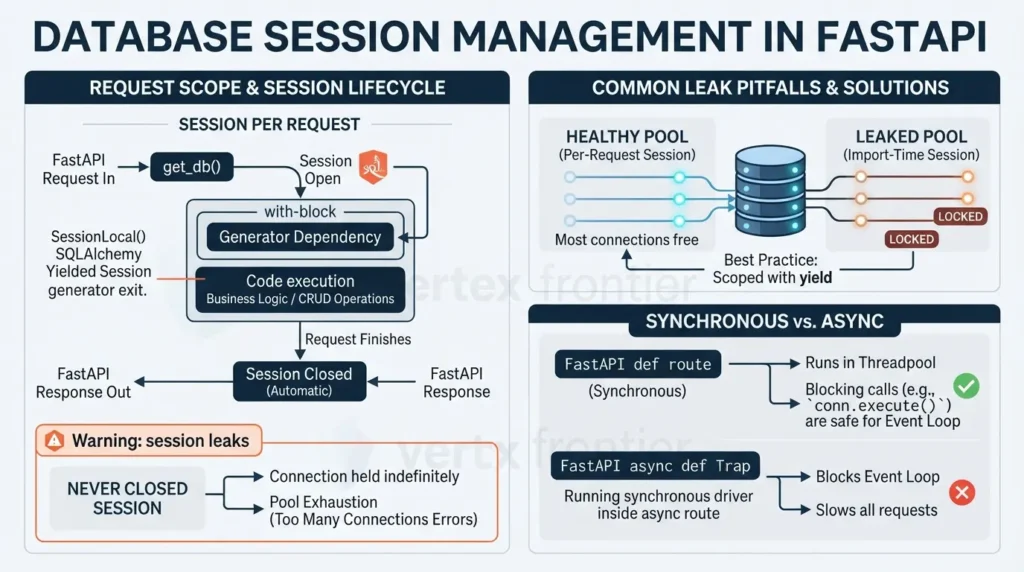
Where does a database session live, and who is responsible for closing it? Most production incidents in this area come from not having an answer.
The database layer holds the ORM models and the session factory. For a deeper look at ORMs versus query builders versus raw SQL, see our guide to what an ORM is.
PYTHON · app/database/models.py:
from sqlalchemy import String from sqlalchemy.orm import DeclarativeBase, Mapped, mapped_column class Base(DeclarativeBase): pass class User(Base): __tablename__ = "users" id: Mapped[int] = mapped_column(primary_key=True) name: Mapped[str] = mapped_column(String(100))PYTHON · app/database/session.py:
from collections.abc import Generator from sqlalchemy import create_engine from sqlalchemy.orm import Session, sessionmaker from app.core.config import settings connect_args = {"check_same_thread": False} if settings.database_url.startswith("sqlite") else {} engine = create_engine(settings.database_url, connect_args=connect_args) SessionLocal = sessionmaker(bind=engine, autoflush=False, expire_on_commit=False) def get_db() -> Generator[Session, None, None]: # One session per request. The with-block closes it when the request ends. with SessionLocal() as session: yield sessionThe get_db function is a generator dependency. FastAPI opens the session, injects it, and runs the code after yield when the request finishes. The yield dependencies guide explains the lifecycle. SQLAlchemy’s session basics describe why a session should be short-lived and scoped to one unit of work.
The check_same_thread flag is only for SQLite, which otherwise refuses connections shared across FastAPI’s worker threads.
yield dependency.Two more notes. First, create_all in the lifespan hook is a convenience for development. Real projects manage schema changes with a migration tool such as Alembic. That’s why the project tree includes an alembic/ folder and an alembic.ini file: each schema change becomes a reviewed, versioned script in alembic/versions/ instead of a surprise at startup.
Second, this layout uses plain def routes and a synchronous SQLAlchemy session on purpose.
The async def Trap
Here is a mildly contrarian point: async def is not a performance button. FastAPI’s concurrency guide explains that defpath operations run in a threadpool, so blocking calls don’t freeze the app. Put a blocking call (a synchronous driver, requests, time.sleep) inside an async def route and you block the event loop for every other request.
The rule: be async end to end, or not at all. For a typical CRUD service on a relational database, synchronous routes are simpler, easier to debug, and often fast enough. Move to async when you can make every I/O call in the path async.
One session per request, closed automatically, and no async def unless every call inside it is async.
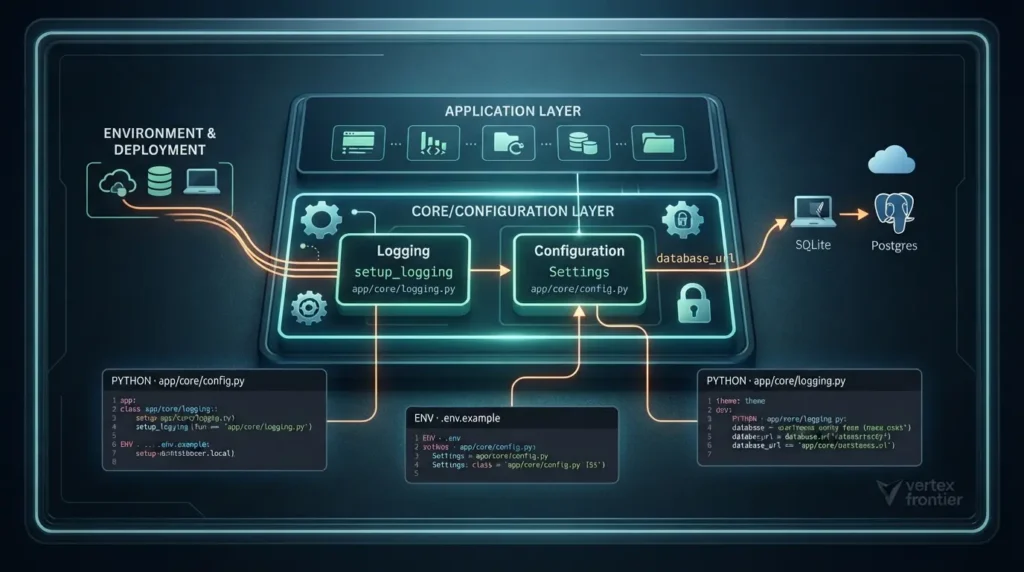
The Core Layer: Configuration and Logging
Configuration is the most underrated architectural decision in a project. Get it wrong and deployment becomes a research project. Get it right and switching environments is dull.
The Twelve-Factor App methodology lays out the rules: store config in the environment, keep it strictly separate from code, and treat databases and queues as attached resources addressed by configuration. Pydantic Settings is a direct way to follow that advice in Python.
PYTHON · app/core/config.py:
from pydantic_settings import BaseSettings, SettingsConfigDict class Settings(BaseSettings): model_config = SettingsConfigDict(env_file=".env", extra="ignore") # Low-risk defaults can live in code. app_name: str = "Users API" debug: bool = False log_level: str = "INFO" # Environment-specific values come from env vars or .env. db_path: str = "./app.db" @property def database_url(self) -> str: # Swap this for a Postgres URL when you deploy. Nothing else changes. return f"sqlite:///{self.db_path}" settings = Settings()The Pydantic Settings documentation describes how it reads environment variables, loads a .env file, and validates types. Real environment variables take priority over values in .env. That gives you the behavior you want: a .env file on a laptop, real variables in the cloud container.
Two habits keep this safe:
- Never commit .env. Commit a template instead, so teammates know which variables exist.
- Keep harmless defaults in code. The app name doesn’t need to be an environment variable. Secrets and environment-specific values do.
ENV · .env.example (commit this, never commit .env):
APP_NAME=Users API DEBUG=false LOG_LEVEL=INFO DB_PATH=./app.dbThe database_url property shows the payoff. Today it builds a SQLite URL. When you deploy, you change that one property, and no route, service, or test needs an edit.
Logging follows the same philosophy: one setup, used everywhere.
PYTHON · app/core/logging.py:
import logging import sys def setup_logging(level: str = "INFO") -> None: logging.basicConfig( level=level.upper(), format="%(asctime)s | %(levelname)-8s | %(name)s | %(message)s", stream=sys.stdout, force=True, )Call setup_logging once from main.py. In every other module, use logging.getLogger(__name__), as the service does. The standard library’s logging HOWTO explains why per-module loggers matter. Later, if you need better observability, switch the formatter to structured JSON in this single file.
If config and logging live in core/, every other layer stays free of environment details.
Where Does New Code Go? A Decision Flow
Rules only help if people apply them under deadline pressure. This flow compresses the layout into five questions.
api/v1/schemas/services/database/core/Testing Without Touching Production Data
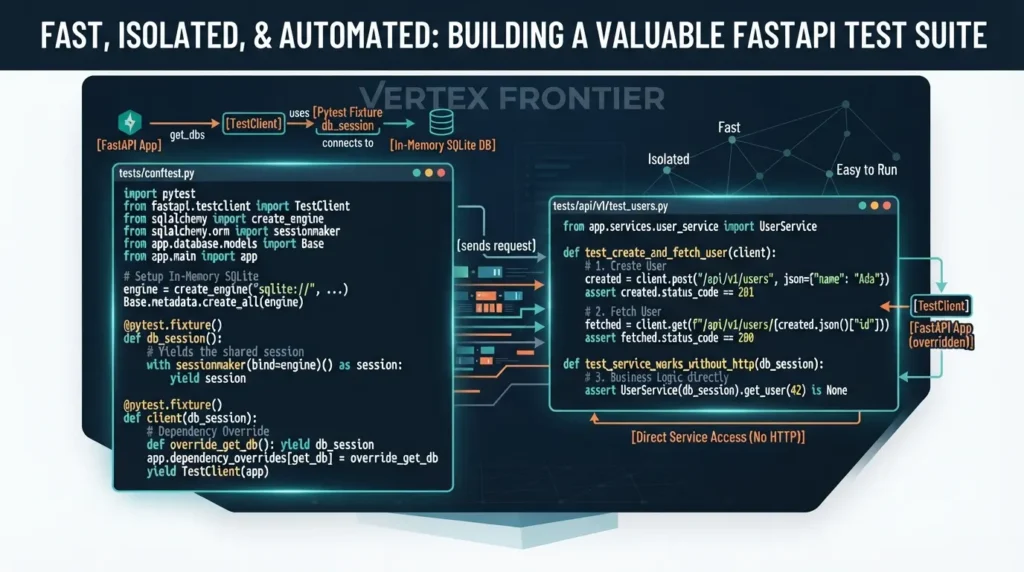
A test suite is only valuable if people run it. So it must be fast, isolated, and easy to find.
The setup has three parts: an in-memory SQLite database, a test client, and a dependency override that swaps the real session for the test one. FastAPI documents the pieces in its testing guide and its page on overriding dependencies in tests. Pytest fixtures handle the lifecycle, as the pytest fixtures explanation describes.
PYTHON · tests/conftest.py:
import pytest from fastapi.testclient import TestClient from sqlalchemy import create_engine from sqlalchemy.orm import sessionmaker from sqlalchemy.pool import StaticPool from app.database.models import Base from app.database.session import get_db from app.main import app @pytest.fixture() def db_session(): # In-memory SQLite. StaticPool keeps one connection, so every # session in the test sees the same in-memory database. engine = create_engine( "sqlite://", connect_args={"check_same_thread": False}, poolclass=StaticPool, ) Base.metadata.create_all(engine) with sessionmaker(bind=engine)() as session: yield session engine.dispose() @pytest.fixture() def client(db_session): def override_get_db(): yield db_session app.dependency_overrides[get_db] = override_get_db # No "with" block: the lifespan hook never runs, so the # real database file is never created during tests. yield TestClient(app) app.dependency_overrides.clear()Two details deserve attention. StaticPool forces one shared connection, which an in-memory SQLite database needs. And the TestClient is created without a with block, so the lifespan hook never runs and no real database file appears during tests.
Now the tests themselves.
PYTHON · tests/api/v1/test_users.py:
from app.services.user_service import UserService def test_create_and_fetch_user(client): created = client.post("/api/v1/users", json={"name": "Ada"}) assert created.status_code == 201 user_id = created.json()["id"] fetched = client.get(f"/api/v1/users/{user_id}") assert fetched.status_code == 200 assert fetched.json() == {"id": user_id, "name": "Ada"} def test_missing_user_returns_404(client): assert client.get("/api/v1/users/999").status_code == 404 def test_empty_name_is_rejected(client): assert client.post("/api/v1/users", json={"name": ""}).status_code == 422 def test_service_works_without_http(db_session): # Business logic tested directly. No client, no routes. assert UserService(db_session).get_user(42) is NoneStart with happy paths such as creating and fetching a user. Then add edge cases: validation errors and 404s. The last test shows another benefit of the service layer. It checks business logic directly, with no HTTP at all.
You can override at two levels. Overriding get_db, as above, swaps the infrastructure but keeps your real service. Overriding get_user_service swaps the service itself, handy when you want a fake for a route test.
Keep These Test Rules
- Mock external services in unit tests. Run a separate, smaller integration suite for them.
- Run a Postgres integration job in CI if production uses Postgres. SQLite is a fast stand-in, not an identical twin.
- Keep imports identical to the app’s, using the pythonpath setting shown below.
For a build-along version of these patterns, the tested REST API tutorial walks through more cases.
Tests that need no network, no real database, and no setup command are tests people run.
Tooling: uv, Docker, and One Config File
Tooling decides how painful the first day is for a new developer, and how reliable the last step is before deployment.
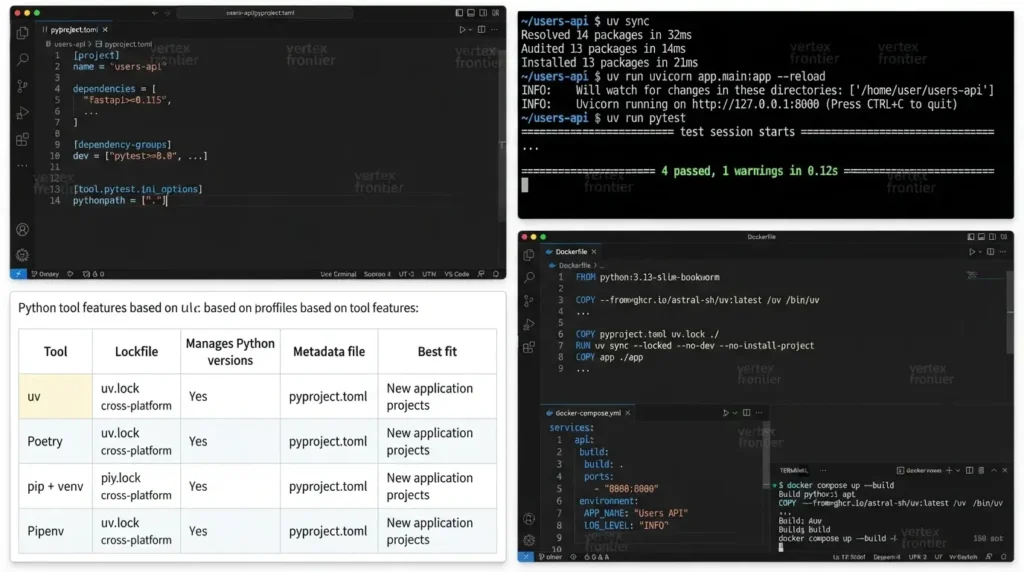
pyproject.toml and the Import Path
One file holds the dependencies and the pytest settings. The important line is pythonpath = [“.”]. It tells pytest where the code root is, so a test can write from app.schemas.user import UserCreate exactly as the app does. Same imports in both places means fewer surprises.
TOML · pyproject.toml:
project] name = "users-api" version = "0.1.0" description = "A layered FastAPI service" readme = "README.md" requires-python = ">=3.13" dependencies = [ "fastapi>=0.115", "uvicorn[standard]>=0.30", "sqlalchemy>=2.0", "pydantic-settings>=2.0", ] [dependency-groups] dev = ["pytest>=8.0", "httpx>=0.27"] [tool.pytest.ini_options] pythonpath = ["."] testpaths = ["tests"]Why uv
uv is a Python package and project manager from Astral, written in Rust. Astral says it is 10 to 100 times faster than pip. That figure is vendor-reported, and the gain is largest on cold installs, such as a fresh CI runner. With a warm cache, the difference shrinks.
Speed isn’t the only reason to use it. uv also manages Python versions, creates the virtual environment, and writes uv.lock, a lockfile that makes installs reproducible. That helps all four scalabilities at once: new developers start faster, CI is quicker, and production gets the same versions you tested.
SHELL · daily commands:
uv sync # create .venv from uv.lock uv run uvicorn app.main:app --reload # run the API locally uv run pytest # run the tests docker compose up --build # run the same app in a container| Tool | Lockfile | Manages Python versions | Metadata file | Best fit |
|---|---|---|---|---|
| uv | uv.lock, cross-platform | Yes: can install and pin Python | pyproject.toml | New application projects; one tool for environments, installs, and locking |
| Poetry | poetry.lock | No: uses the Python you already have | pyproject.toml | Libraries published to PyPI; teams already standardized on it |
| pip + venv | None built in for the classic workflow; teams add pip-tools or pinned requirements files | No | requirements.txt | Quick scripts and maximum compatibility |
| Pipenv | Pipfile.lock | Limited: relies on tools like pyenv | Pipfile | Existing Pipenv projects |
For an application, uv is the practical default. For a library you’ll publish, Poetry remains a defensible choice with a long track record, and uv can also publish.
The Dockerfile
The Dockerfile follows the pattern in uv’s own Docker integration guide: copy in the uv binary, install dependencies from the lockfile, then copy the app. Copying dependency files first means Docker reuses that layer until the lockfile changes, which speeds up rebuilds.
DOCKERFILE · Dockerfile:
FROM python:3.13-slim-bookworm # Pin an exact uv version in production builds. COPY --from=ghcr.io/astral-sh/uv:latest /uv /bin/uv WORKDIR /app ENV UV_COMPILE_BYTECODE=1 \ UV_LINK_MODE=copy \ PATH="/app/.venv/bin:$PATH" # Dependencies first: this layer is cached until the lockfile changes. COPY pyproject.toml uv.lock ./ RUN uv sync --locked --no-dev --no-install-project COPY app ./app # Migrations ship with the image so they can run at deploy time. COPY alembic.ini ./ COPY alembic ./alembic RUN useradd --create-home appuser && chown -R appuser /app USER appuser EXPOSE 8000 CMD ["uvicorn", "app.main:app", "--host", "0.0.0.0", "--port", "8000"]Three choices to note. –locked fails the build if uv.lock no longer matches pyproject.toml, so drift gets caught early. –no-dev leaves test tools out of the image. And the app runs as a non-root user.
A slim base image like python:3.13-slim-bookworm is smaller than the full image and enough for a pure-Python app. If you later need compilers, add them deliberately rather than by default.
Docker Compose: Local Should Mirror Cloud
YAML · docker-compose.yml:
services: api: build: . ports: - "8000:8000" environment: APP_NAME: "Users API" LOG_LEVEL: "INFO" # In the cloud, the platform injects these same variables.Compose builds from the same Dockerfile you deploy. Environment variables are set the way a cloud platform sets them. So docker compose up gives you something close to the cloud environment, and “it worked on my machine” loses most of its force.
SQLite inside a container is ephemeral, so in the cloud you’d point the settings at a managed database. That’s one property in config.py.
Containers also matter when AI coding agents run code inside your project. Our guide on sandboxing AI coding agents with Docker, Firecracker, and eBPF covers that angle.
One lockfile, one Dockerfile, one set of commands. Fewer differences between machines means fewer surprises.
Before and After: From Fat Router to Layered Structure
Showing the final tree hides the most useful lesson. What does the “before” look like, and how do you get from there to here?
- Database path hardcoded in the route
- Validation written by hand, as a plain dict
- Connection opened and never closed
printinstead of logging- Testing needs a real database file
@router.post("/users") def create_user(payload: dict): conn = sqlite3.connect("app.db") if not payload.get("name"): raise HTTPException(400, "name required") cur = conn.execute( "INSERT INTO users (name) VALUES (?)", (payload["name"],), ) conn.commit() print("created user", cur.lastrowid) return {"id": cur.lastrowid, "name": payload["name"]}- Route only translates HTTP
- Pydantic validates the body
- Session scoped per request, closed automatically
- Settings come from one typed object
- Test with an in-memory database
@router.post("", response_model=UserRead, status_code=201) def create_user(payload: UserCreate, service: UserServiceDep): return service.create_user(payload)
validation -> schemas/user.py
SQL + rules -> services/user_service.py
connection -> database/session.py
db path -> core/config.py
The left card works. That’s the trap: it works until the second endpoint, the first bug in production, or the first test.
How to Refactor a Fat Router in 5 Steps
- Move settings out: Replace hardcoded paths and passwords with a Settings class in core/.
- Extract the session: Create get_db with yield so connections are scoped and closed.
- Define schemas: Replace plain dicts with Pydantic classes. Validation moves to the boundary.
- Create a service: Move the SQL and rules into a class that receives the session.
- Slim the route: It should now only accept the payload, call the service, and return the result.
Run your tests after each step. Because behavior doesn’t change, the same test should pass throughout.
The structure isn’t a rewrite. It is a series of small moves, each of which you can verify.
Common Mistakes That Break This Structure
These are patterns that recur in real FastAPI projects. Each has a simple fix.
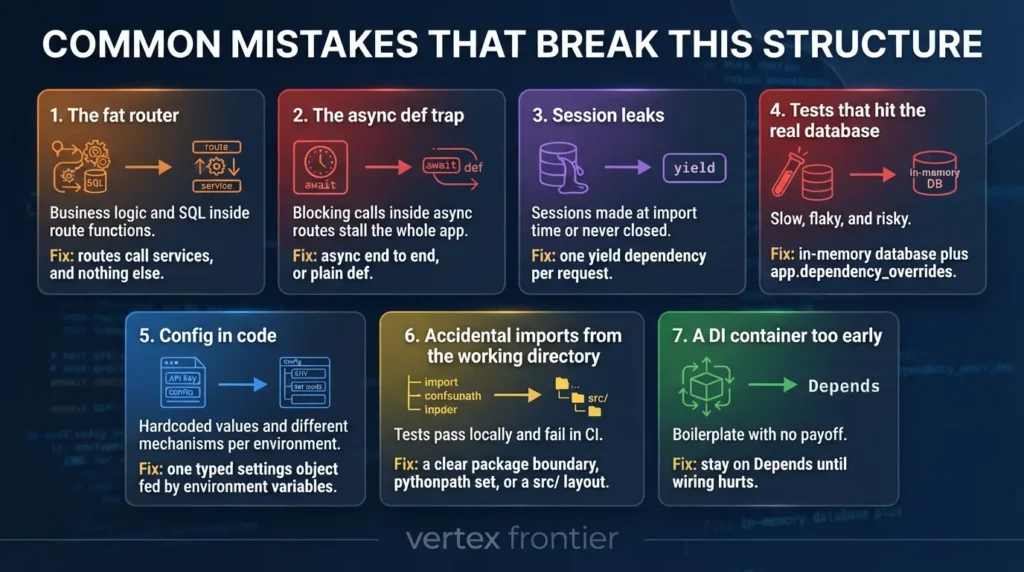
The fat router
Business logic and SQL inside route functions.
The fix: routes call services, and nothing else.
The async def trap
Blocking calls inside async routes stall the whole app.
The fix: async end to end, or plain def.
Session leaks
Sessions made at import time or never closed.
The fix: one yield dependency per request.
Tests that hit the real database
Slow, flaky, and risky.
The fix: in-memory database plus app.dependency_overrides.
Config in code
Hardcoded values and different mechanisms per environment.
The fix: one typed settings object fed by environment variables.
Accidental imports from the working directory
Tests pass locally and fail in CI.
The fix: a clear package boundary, pythonpath set, or a src/ layout.
A DI container too early
Boilerplate with no payoff.
The fix: stay on Depends until wiring hurts.
select, commit, and os.environ. Every hit is a layer boundary that leaked.Real-World Evidence: What Netflix, Uber, and Instagram Show
Theory is cheap. These documented cases show the same principles under real load. Stripe’s versioning case appears earlier, in the API section.
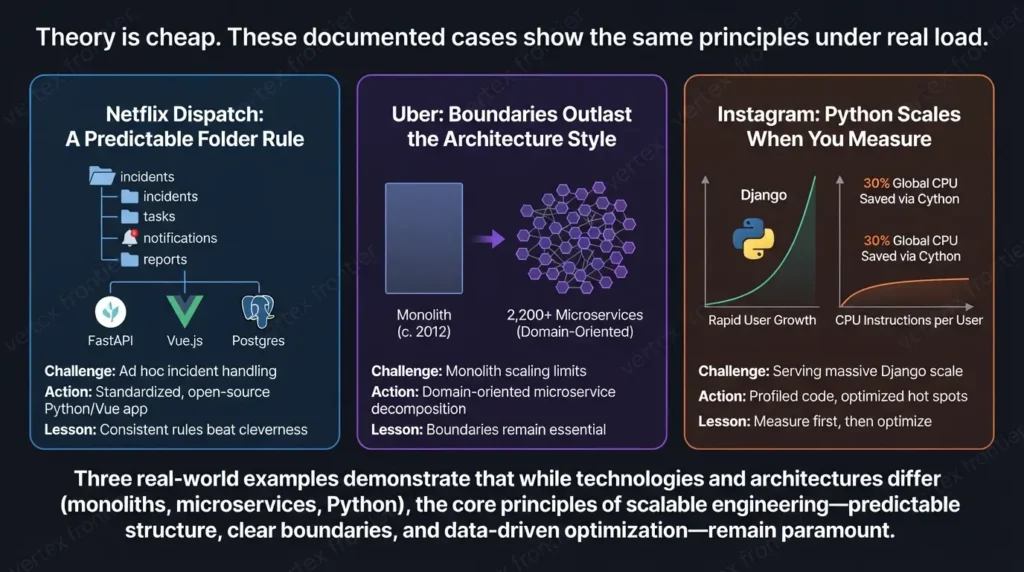
Netflix Dispatch: A Predictable Folder Rule
- Challenge: In its launch announcement, as reported by DevClass, Netflix said incident handling was often ad hoc and manual. It wanted a standard way to create resources, bring in people, send notifications, and track tasks during an incident.
- Action: Netflix built and open-sourced Dispatch in 2020. InfoQ’s report says it uses Python with FastAPI, a Vue.js UI, and Postgres. Its contributor docs describe a simple backend folder structure that mirrors the frontend, grouped by subject. Pull requests must also pass tests and style checks.
- Outcome: Dispatch was released as open source and is available for other organizations. No published numbers tie the folder structure to measurable results, so this is evidence of a deliberate pattern, not a proven speedup.
- Lesson: A simple, consistent rule that people can predict beats a clever one. Whether you group by layer or by subject matters less than applying the rule everywhere.
Uber: Boundaries Outlast the Architecture Style
- Challenge: Uber’s engineers wrote that, around 2012 to 2013, the company ran primarily two monolithic services and hit the operational problems that microservices solve.
- Action: Uber broke the original code base into many services. Its tech stack post describes replacing older Python code as it split things up.
- Outcome: The company grew to around 2,200 critical microservices. A later post on Domain-Oriented Microservice Architecture says Uber then spent about two years trying to reduce that complexity, by organizing related services into domains with rules about which layers may depend on which.
- Lesson: Splitting a system doesn’t remove the need for boundaries. It raises the price of not having them. Layers inside a single app are a cheaper place to learn that.
Instagram: Python Scales When You Measure
- Challenge: Instagram needed to serve rapid user growth. Its engineering team described running what it called the world’s largest deployment of Django, written entirely in Python.
- Action: The team made an efficiency program a priority. In its engineering post, it explains choosing a metric (CPU instructions per active user at peak minute) and profiling Django to find regressions.
- Outcome: Over six months, the post says, Instagram maintained user growth without adding capacity to its Django tiers. A separate PyCon 2017 talk abstract describes saving roughly 30% of global CPU by rewriting a handful of critical-path modules in Cython.
- Lesson: Language is rarely the real ceiling. Teams that scale Python measure first, then fix hot spots. A layered structure helps because it tells you where a hot spot lives.
The Contrarian Take: A Well-Structured Monolith Beats Sloppy Microservices
For years, “split into microservices” was the default answer to scale. Uber’s path above shows the cost: thousands of services, and then a multi-year effort to tame them.
A reasonable reading of that evidence, which is analysis and not a universal law: architecture quality matters more than architecture style. A single app with clean layers is easier to run than a distributed system, and it scales further than most teams will ever need.
It also keeps the exit open. If you do split someday, the layers map across. The API layer becomes a service boundary. The services layer becomes the new service’s business logic. The database layer becomes its private data store. The split turns operational (deployment, monitoring) rather than architectural.
One caution: that mapping only works if your tables aren’t joined across domains. Splitting data is the hard part, and folders alone won’t solve it.
Draw good boundaries first. Whether they become network calls is a later, separate decision.
Check Your Own Project: The Structure Readiness Calculator
Want a quick, honest read on where your project stands? Score yourself against the Four Scalabilities. The checks below cover each dimension.
| Dimension | Check 1 | Check 2 | Check 3 | Check 4 |
|---|---|---|---|---|
| Size (S) | Routes contain no SQL or business rules | Schemas are separate from ORM models | One folder per layer, with clear names | Schema changes go through migrations |
| Team (T) | A new endpoint has one obvious home | Tests mirror the app folders | One formatter and linter config, enforced in CI | README explains how to run and test |
| Environments (E) | All config flows through one typed settings object | .env is git-ignored, .env.example is committed | Same Dockerfile locally and in the cloud | Dependencies pinned in a lockfile |
| Speed (F) | Tests need no network and no real database | You run the full suite before every commit | A new developer starts the app with one command | CI installs from the lockfile with caching |
The formula averages your passed checks across the four dimensions.
E = Environment checks passed (0–4) | F = Speed checks passed (0–4)
This is a self-assessment heuristic, not an industry benchmark. Use it to find your weakest dimension and fix that first. A score of 100% doesn’t mean perfect. It means you’ve covered the basics.
Where This Structure Goes Next
A solid base opens several directions.
- LLM agents and AI services. The same layers apply when the “business logic” is an agent loop. Typed state, retries, evaluation, and observability slot into the service and core layers. See our guide to building a production-grade agent harness in Python and the overview of agent harness engineering.
- Data work. If the service wraps analytics, library choice matters. Our Python data libraries comparison helps, and why pandas gets slow covers common fixes.
- Operations. Add Alembic migrations, CI that runs uv sync –locked, structured JSON logs, and a deployment script triggered from a specific branch.
- Team tooling. Shared editor settings and a scripts/ folder for migrations, exports, and reports.
More articles on this theme live in our programming section.
The Structure in 8 Rules
- Routes translate HTTP. Nothing more.
- Business logic lives in services.
- Storage details live in the database layer.
- Schemas guard the boundary.
- Config is one typed object fed by environment variables.
- Tests live outside the app and mirror its folders.
- Tests use an in-memory database and dependency overrides.
- The container you run locally is the one you deploy.
Five Quick Wins for This Week
- Move one hardcoded value into a Settings class.
- Replace one module-level session with a yield dependency.
- Extract the SQL from your busiest route into a service.
- Add one test that uses app.dependency_overrides.
- Commit a .env.example and add .env to .gitignore.
Conclusion: Start Small, Keep the Boundaries
You don’t need all of this on day one. Start with one router, one service, one session dependency, one settings object, and one test with an override. Add folders when a file starts to hurt, not before.
What matters is that the boundaries exist early, because they’re cheap now and expensive later. Routes do HTTP. Services hold the rules. The database layer holds storage. Core holds what everyone shares. Tests mirror it all.
If you want the hands-on version, follow the tested REST API tutorial. If your next project involves agents, continue with the production agent harness guide.
FAQs : Scalable python project structure
What is the best FastAPI project structure for production?
Should I use the src layout or a flat layout?
app/ package works, provided you set pythonpath for pytest.Do I need a dependency injection framework?
Depends supports nested dependencies and test overrides. Consider a container only when the wiring itself becomes hard to maintain, such as dozens of cross-cutting dependencies.How do I test a FastAPI app without hitting the real database?
app.dependency_overrides. FastAPI documents the pattern in its guide to testing with overrides. Add a small Postgres integration job in CI if production uses Postgres.Should I use async def for every FastAPI route?
async def only when every I/O call inside is async. Blocking calls in an async route stall the event loop. Plain def routes run in a threadpool, which is safe. FastAPI’s concurrency guide explains the difference.uv, Poetry, or pip: which should I choose?
Will this structure survive growing from one developer to ten, or to microservices?

Was this article helpful?
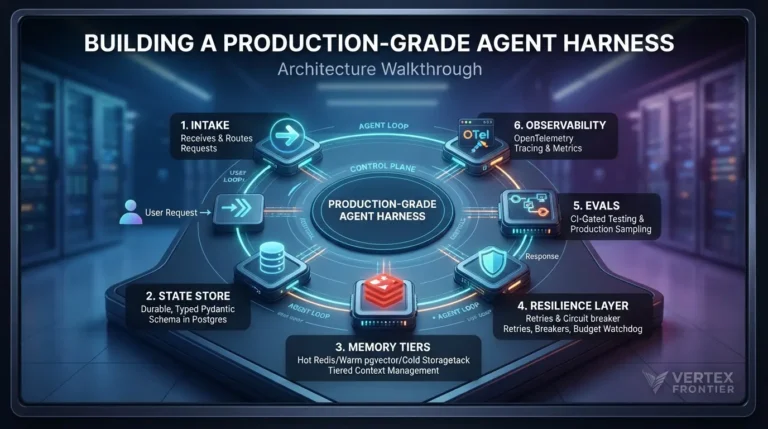




[…] called agent.py. The same one-home-per-file discipline keeps API services sane at scale, our Python project structure guide applies it to FastAPI routers, services, and […]
[…] predictable layout is one of the few defenses that works here, our guide on how to keep a growing Python codebase organized shows the folder rules that make code predictable for both humans and […]